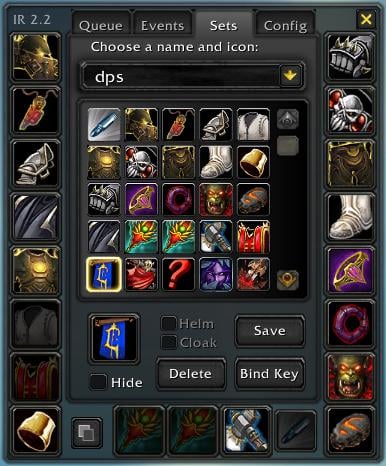
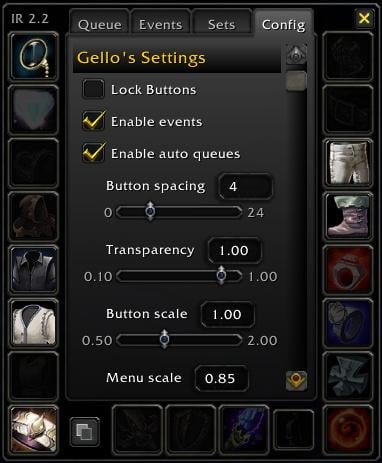
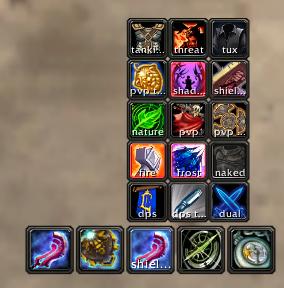
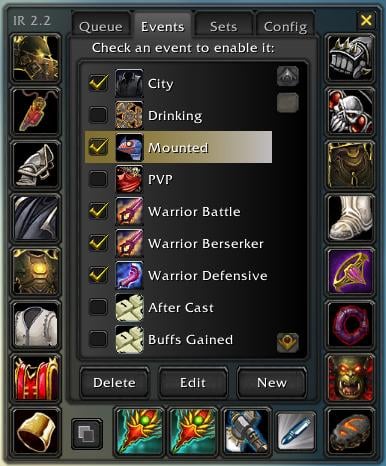
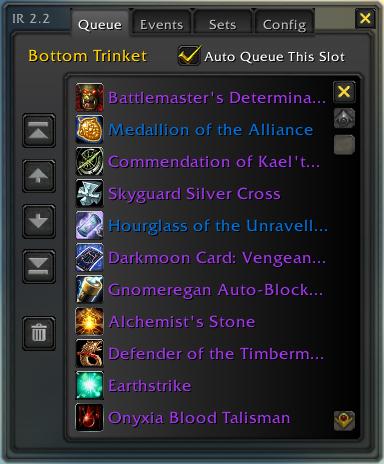
This is a mod to make swapping equipment easier through popout slot menus, equip slot buttons, gear sets and automated swaps.
__ New in 2.25 __
* Fix for Titan's Grip and dual spec
* Fix for Shaman's dual wield
* Updated .toc for 3.1
__ Quick Start Guide __
Minimap button:
* Right-click the minimap button to open options or create sets
* Left-click the minimap button to choose a set
* Shift-click the minimap button to unequip the last set equipped
* Alt-click the minimap button to toggle events on/off
Dockable buttons:
* Alt+click slots on the character sheet to create/remove buttons
* Alt+click yourself in the character sheet to create/remove a set button
* Alt+click the created buttons to toggle their auto-queue status
* Shift+drag buttons to break them apart if they're docked to each other
* Drag the menu's border around to dock it to a different side of buttons
* Right-click the menu's border to rotate the menu
* Size, alpha, spacing, etc are in options
Creating/equipping sets:
* You create sets in the Sets tab after right-clicking the minimap button
* Select slots for the set, choose a name and icon and click Save
* Once a set is saved, there are several ways to equip it:
1. Left-click the minimap button and choose the set
2. Mouseover a set button you've created (Alt+click yourself in character sheet)
3. Use a key binding you define in the set ("Bind Key" button)
4. In macros with /itemrack equip setname
5. In events or scripts that use EquipSet("setname")
Popout menus:
* Click an item or set in a menu to equip it
* Shift+click a set in a menu to unequip it
* Alt+click an item in a menu to hide/unhide it
* Hold Alt as you mouseover a slot to show all hidden items
While at a bank:
* Items/sets in the bank have a blue border.
* Selecting an item or set that's in the bank will pull it from the bank to your bags.
* Selecting an item or set that's not in the bank will attempt to put it all into the bank.
__ Slash Commands __
/itemrack : list the most common slash commands
/itemrack opt : summon the options GUI
/itemrack equip setname : equips a set
/itemrack reset : resets buttons
/itemrack reset everything : wipes all settings, sets and events
/itemrack lock/unlock : locks and unlocks the buttons
/itemrack toggle set name[, second set name] : equips/unequips "set name" (or swaps between two sets if a second set given)
__ Macro Functions __
EquipSet("setname") -- equips "setname"
UnequipSet("setname") -- unequips "setname"
ToggleSet("setname") -- toggles (equips then unequips) "setname"
IsSetEquipped("setname") -- returns true if "setname" is equipped
In the unlikely event that another mod (or default UI in the future) uses these function names, you can use their long version ItemRack.EquipSet(), ItemRack.UnequipSet(), etc. This mod only commandeers the shortened names if they appear to be unused.
__ Events __
2.2 (re)introduces events. These are scripts to automatically equip and unequip gear as things happen in game.
To use an event:
1. In the 'Sets' tab, create or make sure you have a set you'd like to equip when the event happens.
2. In the 'Events' tab, click the red ? icon beside the event you want to use.
3. Choose the set for this event.
4. Ensure the event has a check beside it.
As events are enabled, a separate process watches for those events and equips (and unequips if chosen) as they happen.
If you want to create or edit an event, there are four types of events:
Buff: These events equip gear as you gain buffs. ie, Evocation, Drinking and being on a mount.
Stance: These events equip gear when you change stances or forms. ie, Battle Stance, Moonkin Form, Shadowform
Zone: These events equip gear when you're in one of a list of zones. ie, the PVP event includes all arena and BG maps.
Script: For those with lua knowledge, you can create your own event based on a game event. A couple examples are in the default events.
When dealing with events, it's good to keep some things in mind:
* You'll get the most predictable behavior by having sets that don't overlap. If you're a warrior with a Tanking, DPS and PVP set, consider not including weapons in those sets. If you decide to make an event to swap in a 2H when you go into Berserker Stance and a 1h+shield when you go into Defensive Stance, you won't step on the toes of events that swap in PVP gear in a BG/arena or a tuxedo in a city.
* A gold gear icon on the minimap button (and on the sets button if you've created one) means that events are enabled. If you decide you want to temporarily shut down all events, Alt+click the minimap button or the sets button. (You can disable events in options also)
* For non-English users, you might want to edit the events that have English text within them. I try to keep it locale-independant when possible (ie, warrior and most druid stances use the numbers instead of names), but you'll never enter "Stormwind City" on a deDE client for the city event.
* Script Events do not have a "set" defined to them like other events do. They need to EquipSet("setname") explicitly. Its set button will always be the macro keys icon.
* Advanced users of 1.9x may notice the lack of a delay option in scripted events. I've decided to pull this down into the scripting system to streamline the event process. For now, you can use ItemRack.CreateTimer and ItemRack.StartTimer defined in ItemRack.lua.
__ Future plans __
* Move back to an associated set icon for script events
* Possible option of flags for less "persistent" events (only equip if specific state changes)
* Tighter integration/use of EquipItemByName for unique slots
* Moving options to the default UI's new option panels
* Dynamically reordering gear swaps to handle unique-equipped gems in different sets
* Supporting the existing ItemRackFu and TitanFu plugins if possible
* Native ButtonFacade support
* Possibly adding a Combat Log event type
* A set button to sit to the left of weapon slot since the character model isn't an intuitive "button"
* Moving slot key bindings back to default key binding interface
Originally posted by avngr I've altered my copy of ItemRack to use its existing queuing system for weapon slots as well, like it does for armor, so it will at least swap safely when combat ends.
In ItemRack.lua, at line 75 in mine, I changed ItemRack.SlotInfo = { ...array stuff... } to:
This just removes the "swappable=1" from the weapon(s), ranged, and ammo slots, so they are treated just like armor slots in the EquipSet function in ItemRackEquip.lua.
So, it still won't swap in combat, but it shouldn't cause weapon lockup when accidentally used in combat either.
I've altered my copy of ItemRack to use its existing queuing system for weapon slots as well, like it does for armor, so it will at least swap safely when combat ends.
In ItemRack.lua, at line 75 in mine, I changed ItemRack.SlotInfo = { ...array stuff... } to:
This just removes the "swappable=1" from the weapon(s), ranged, and ammo slots, so they are treated just like armor slots in the EquipSet function in ItemRackEquip.lua.
So, it still won't swap in combat, but it shouldn't cause weapon lockup when accidentally used in combat either.
swapping gear by using in-game equipment manager with
As there are too many errors on itemrack due to no more updates, i use the official ingame manager with no choice. But i want to play some notice sound when i swapping between the gears just like with itemrack, so i make a macro like this:
Since patch 3.3, I'm getting more error messages in the game saying "an interface action failed because of an AddOn". It looks like Itemrack is one of the culprits. From yesterdays taint.log:
1/25 20:06:13.062 Execution tainted by ItemRack while reading ItemRackButton20 - getglobal()
1/25 20:06:13.062 Interface\AddOns\ItemRack\ItemRack.lua:1690 ReflectAlpha()
1/25 20:06:13.062 Interface\AddOns\ItemRack\ItemRack.lua:367 InitCore()
1/25 20:06:13.062 Interface\AddOns\ItemRack\ItemRack.lua:182 func()
1/25 20:06:13.062 Interface\AddOns\ItemRack\ItemRack.lua:749 OnUpdate()
1/25 20:06:13.062 ItemRackFrame:OnUpdate()
1/25 20:06:13.062 An action was blocked in combat because of taint from ItemRack - SaveBindings()
1/25 20:06:13.062 Interface\AddOns\ItemRack\ItemRack.lua:1780 SetSetBindings()
1/25 20:06:13.062 Interface\AddOns\ItemRack\ItemRack.lua:368 InitCore()
1/25 20:06:13.062 Interface\AddOns\ItemRack\ItemRack.lua:182 func()
1/25 20:06:13.062 Interface\AddOns\ItemRack\ItemRack.lua:749 OnUpdate()
1/25 20:06:13.062 ItemRackFrame:OnUpdate()
1/25 20:06:13.062 An action was blocked in combat because of taint from ItemRack - ItemRackButton0:SetAttribute()
1/25 20:06:13.062 Interface\AddOns\ItemRack\ItemRackButtons.lua:34 InitButtons()
1/25 20:06:13.062 Interface\AddOns\ItemRack\ItemRack.lua:183 func()
1/25 20:06:13.062 Interface\AddOns\ItemRack\ItemRack.lua:749 OnUpdate()
1/25 20:06:13.062 ItemRackFrame:OnUpdate()
Originally posted by Zreb Wish someone would revive this mod =\
I hate not being able to switch weapons in combat. Blizzard's UI sucks.
yep, it's a pain in the arse if you get attacked while fishing. unfortunately it seems a deliberate act on blizzards part rather than ItemRack being outdated. apparently the rogue weapon swapping issue they said "isn't a major concern" was enough of a concern to screw over everyone else after all
Since 3.3 is anyone else having the issue when u mouse over someone else's gear occasionally the tooltip disapears and it only says "Chest" "Gloves" etc.... I know Itemrack in the past caused this but not sure whats doing it now if its Itemrack or not, also is there anything as good as this mod updated for 3.3? I have tried Outfitter, tried the Blizz interface but hate em... have used Itemrack for as long as I can remember and it is by far a much superior mod and love it, WTB an update! /beg
One more quick question, in past versions of Itemrack you could dock a button (Simular to the minimap button) anywhere on ur screen that when u mouse over it had a dropdown of all ur sets can u still do this with current version cause I couldnt get that to work either
Originally posted by Dridzt No idea.. so probably not.
As the description says it is a patch of v2.25 as uploaded by Gello here
with the exact changes noted, nothing more, nothing less.
romracer posted it on 4-27-2009 in these comments, its on the second page (for the moment at least). Perhaps it is something you could integrate into your patch?



