Download
(684 Kb)
Download
Updated: 03-09-13 09:34 PM
Pictures
File Info
Compatibility:
Thunder Isle (5.2)
Landfall (5.1)
Updated:03-09-13 09:34 PM
Created:unknown
Downloads:175,098
Favorites:1,136
MD5:
Pawn  Popular! (More than 5000 hits)
Version: 1.8.4
by: VgerAN [More]
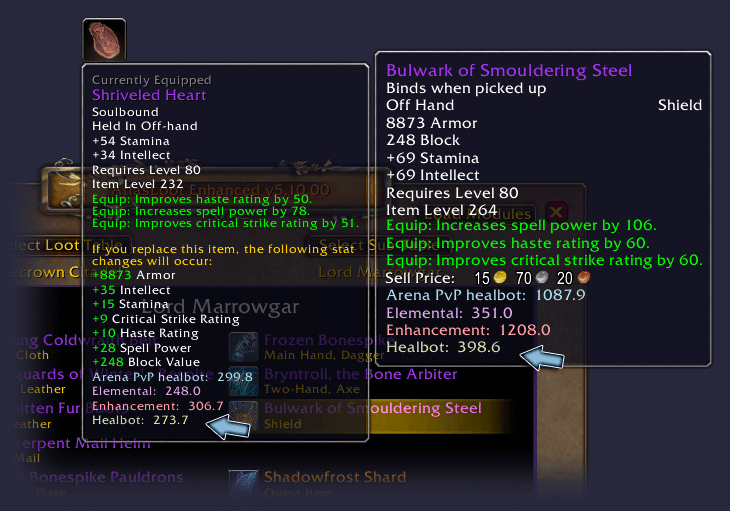
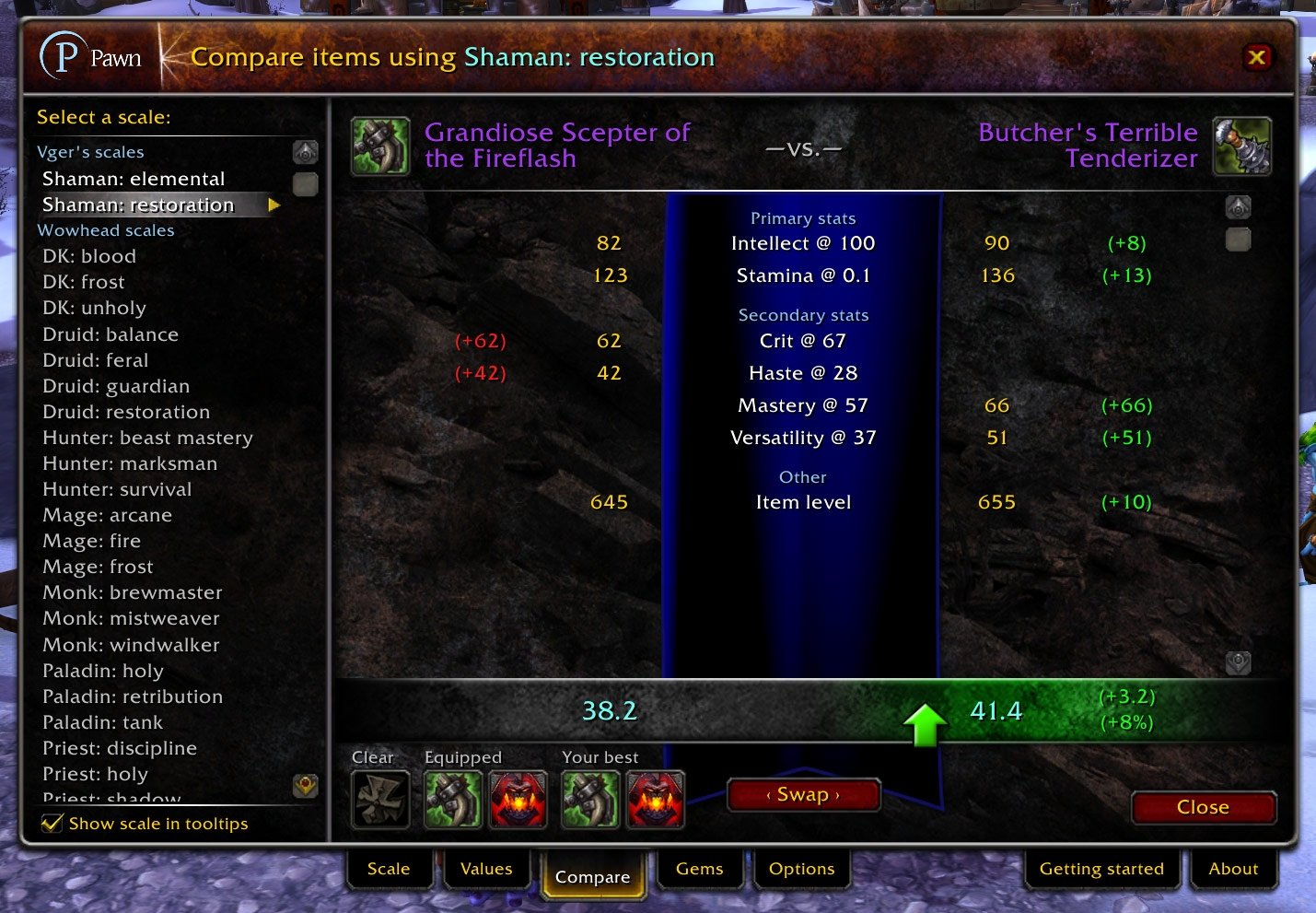
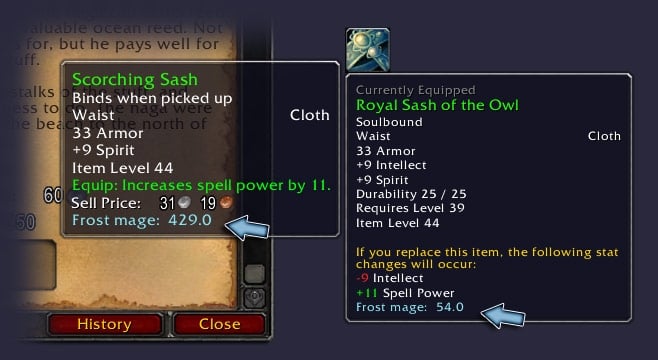
Pawn calculates scores for items to help you easily find upgrades for your gear. It's completely customizable, and applicable to any class and situation: for example, it can help you decide whether to equip the ring with a higher item level but one stat you don't want (say, strength for shamans), or the ring with the lower item level but all good stats. It's that level of customization that makes it very different from more general mods like GearScore and more specialized mods like TankPoints.

Pawn can be used by new players right off the bat without needing to change any options, or by advanced players who plan out their gear upgrades, build Excel spreadsheets, install Rawr, and read Elitist Jerks.

Language support

Pawn works with English, French, German, Portuguese, Russian, and Simplified Chinese, and includes an untested translation into Traditional Chinese. Unlike most addons, it's NOT possible to use the English version on a language that it doesn't support. (If you're interested in helping translate Pawn into other languages, let me know!)

Staying in touch

For fastest assistance with Pawn, leave a comment here or check the official thread at Curse. You can also become a fan of Vger on Facebook and get updates of new versions and stuff like that. You can also leave questions or comments there if you don't have an account on this site.

Getting started

Pawn will automatically set itself up to work with your characters, but there's a lot that you can do to customize it. See the readme file included with Pawn for more information on getting the most out of Pawn.
Version 1.8.4

Priests will no longer incorrectly see bows, crossbows, and guns as potential upgrades when using the built-in Wowhead scales.

Version 1.8.3

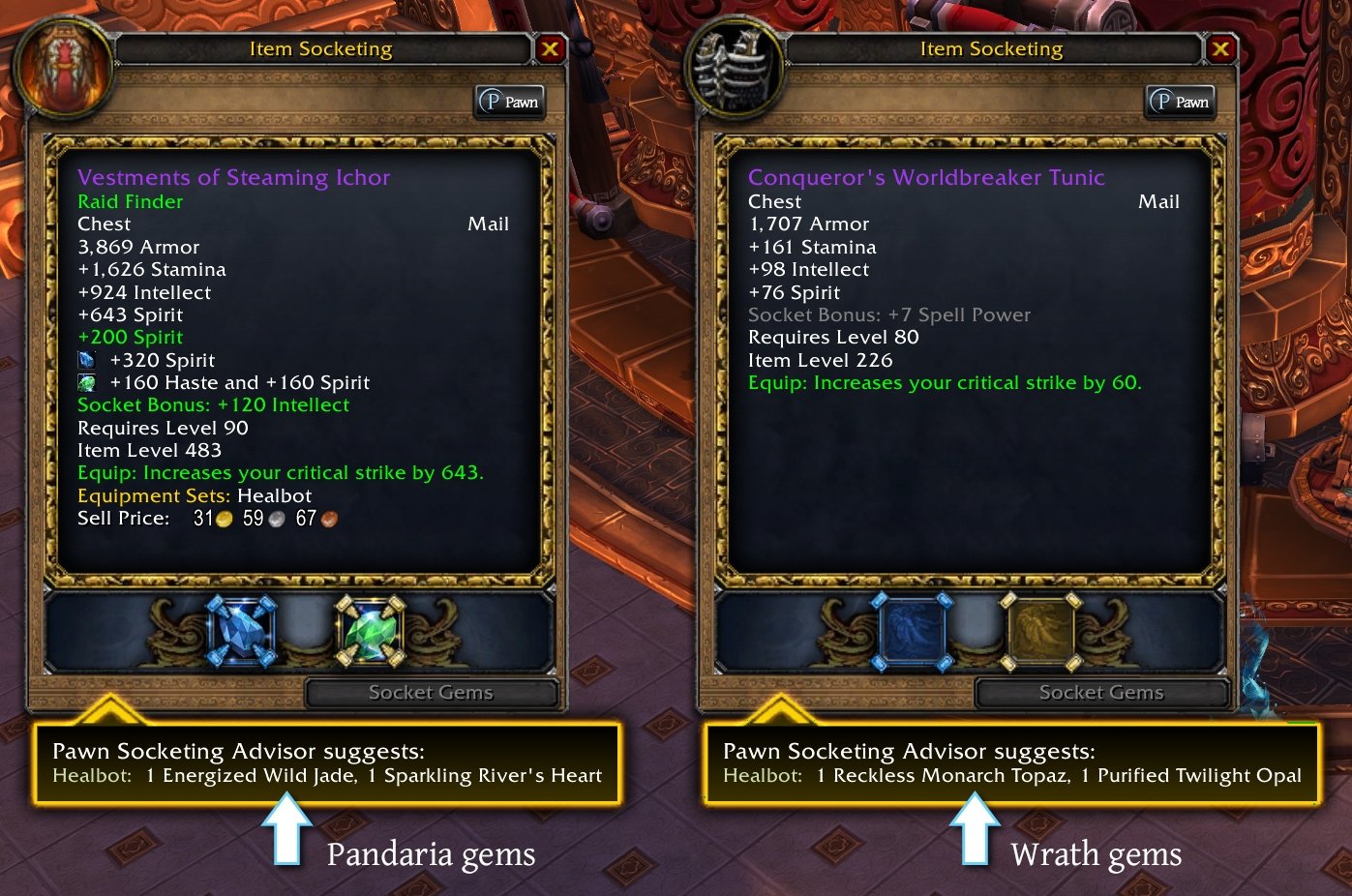
Sha-touched items from Heart of Fear and Terrace of Eternal Spring (all difficulties) will now always be valued (for base value) as if you've completed Wrathion's Chapter II questline and can add a prismatic socket to the item.
Added a Brailian Portuguese translation. Thanks maxmag!
Includes minor updates to the other translations.
Fixed a couple minor display issues on the Compare tab when one item had sockets and the other did not.
Thunderforged and Heroic Thunderforged items on the English PTR will no longer show (?) on their tooltips.

Version 1.8.2

Fixed a bug in average item level calculations when inspecting hunters. (Their ranged weapons were only getting counted for half the appropriate level.)
The Reforging Advisor will now also show up when you right-click an item while talking to an arcane reforger.

Version 1.8.1

This version of Pawn now includes French support, thanks to translation volunteers othor and Snuff, and an untested Traditional Chinese translation based on work by BNSSNB.
Reduced Pawn's memory usage by about 35% (at least on my PC) by optimizing the way translations are loaded. Pawn's memory usage should return to about where it was back when it was for a single language only.
Corrected a calculation problem where the Ghost Iron Dragonling trinket was undervalued because Pawn suggested Cataclysm cogwheels for it instead of Mists of Pandaria cogwheels. (Thanks durandal42!)
Fixed a minor problem that could occur when using the Compare tab if you used Pawn in the past (or on another computer), then stopped using it, then sold some of your best items, and then started using it again.

Version 1.8

This version of Pawn now works for German and Russian in addition to English. Big thanks to the translation volunteers Sandmahn and mgotovtsev! It also has an untested Simplified Chinese translation based on work by bigbamboo.
This version also contains a large number of changes to prepare for German, Russian, and more languages in the future.
Some now-unnecessary information that was being stored in Pawn's SavedVariables file will now be removed when logging out.
Reorganized the Options tab to make it a bit cleaner. Options for changing the digits of displayed precision for values and for controlling the visibility of (?) icons on tooltips were removed.
Changed a bunch of bits of text throughout Pawn.
Worked around a problem that occurred with Pawn annotations showing up on AtlasLoot items twice. (To show Pawn annotations on AtlasLoot items, click Options in AtlasLoot and then check Use GameTooltip.)
Added support for the Pyrium Weapon Chain and Living Steel Weapon Chain.
Crystals of Fear will now no longer improperly show (?) on their tooltips.
Archived Files (1)
File Name
Version
Size
Author
Date
1.8.3
683kB
VgerAN
02-08-13 12:34 PM


Post A Reply Comment Options
Old 06-30-10, 12:36 AM  
VgerAN
An Aku'mai Servant
 
VgerAN's Avatar
AddOn Author - Click to view AddOns

Forum posts: 36
File comments: 210
Uploads: 7
Sorry, I'm not seeing it on my computers. Maybe it interacts poorly with some other mod that you use that I don't, like GearScore or something? I'll see if I can find anything else out.

Pawn uses a chunk of CPU time right at startup (which I do intend on whittling down pretty soon), but it's consistently at zero for me on idle. The process of scanning tooltips for stats is pretty expensive, but it should only be happening when you're actually hovering over items and clicking item links. It's possible that some other mod is causing this to happen way more than it should be, which would make Pawn's CPU usage jump way up.
VgerAN is offline Report comment to moderator  
Reply With Quote
Old 06-29-10, 08:24 AM  
Nihlo
A Murloc Raider

Forum posts: 5
File comments: 125
Uploads: 0
Originally posted by VgerAN
Huge CPU usage when? Pawn is pretty kind to the CPU most of the time. The main exception is when you have a bunch of item tooltips open at once (Armory causes this to happen a lot), and in that situation the game is refreshing those tooltips on every video frame or something crazy (and buggy) like that. Pawn has to work hard to keep up.

In what situations are you seeing high CPU usage?
all the time, not just by opening tooltips. Just take a cpu-meter addon like OptionHouse and have a look at the cpu-usage of Pawn. It doesn't have peaks like eg Healbot while raiding, it's just constantly higher than you think it should be. Talking about CPU and not RAM...RAM is also high but that doesn't matter.
Nihlo is offline Report comment to moderator  
Reply With Quote
Old 06-07-10, 02:32 PM  
VgerAN
An Aku'mai Servant
 
VgerAN's Avatar
AddOn Author - Click to view AddOns

Forum posts: 36
File comments: 210
Uploads: 7
Originally posted by Nihlo
the huge cpu-usage is really a problem
Huge CPU usage when? Pawn is pretty kind to the CPU most of the time. The main exception is when you have a bunch of item tooltips open at once (Armory causes this to happen a lot), and in that situation the game is refreshing those tooltips on every video frame or something crazy (and buggy) like that. Pawn has to work hard to keep up.

In what situations are you seeing high CPU usage?
VgerAN is offline Report comment to moderator  
Reply With Quote
Old 06-06-10, 11:36 PM  
Manaman
An Aku'mai Servant
AddOn Author - Click to view AddOns

Forum posts: 39
File comments: 161
Uploads: 1
Originally posted by VgerAN
Pawn takes into account hit cap if your scale takes into account hit cap, which is to say... no, not really. The expectation is that your scale is a reflection of how much you care about various stats. As you approach hit or defense or haste or whatever caps, those stats become less useful, so you decrease the value in your scale to compensate. If you use something like Rawr to generate your scales, that's taken into account for you pretty well.

I realize that hit caps are a special situation, but I don't feel that they're AS special as people make them out to be. The idea is that a Pawn value is a reflection of how good an item is for you at this stage in your "career," not how good an item is for you based on what you are wearing right this second. If you're above hit cap, an item with a ton of hit on it is not useful, but as soon as you swap out one other item and fall beneath hit cap, suddenly that hit-heavy item is quite useful. It's the same item. I don't like the idea of it having a different value now just because you swapped an item five seconds ago.
All I do for my DPS scales, is setup one scale with hit valued, and then copy the scale and remove the value for hit. Name one "Capped" and one "Hit" or something to that effect. My goal in most of my upgrades are to upgrade both values together.
Manaman is offline Report comment to moderator  
Reply With Quote
Old 06-06-10, 10:31 PM  
Nihlo
A Murloc Raider

Forum posts: 5
File comments: 125
Uploads: 0
the huge cpu-usage is really a problem, mem-usage is also high but that doesn't matter for most peoples. And...an enchant-tab would still be nice in my eyes^^
Nihlo is offline Report comment to moderator  
Reply With Quote
Old 05-10-10, 02:54 PM  
Avitus
A Kobold Labourer
AddOn Author - Click to view AddOns

Forum posts: 0
File comments: 33
Uploads: 3
Thanks for the explanation, that would be a perfect option for the next version *nudge hint*

Originally posted by VgerAN

Deleting the Wowhead scales reduces the size of the cache somewhat because Pawn currently calculates values for all of those scales even when they're not visible. The cache will hold "n" items, and for each item, it will hold the item's stats, and then base and current values for all of your scales, including hidden ones. (The obvious performance improvement here is to no longer calculate anything for hidden scales...)
Last edited by Avitus : 05-10-10 at 02:54 PM.
Avitus is offline Report comment to moderator  
Reply With Quote
Old 05-10-10, 01:32 PM  
VgerAN
An Aku'mai Servant
 
VgerAN's Avatar
AddOn Author - Click to view AddOns

Forum posts: 36
File comments: 210
Uploads: 7
Pawn only does calculations when you hover over items or click item links. This could be during combat if, for example, you're in your twentieth heroic Gundrak run for the month and you're AFK-healing while browsing through ICC loot tables, but in general, no. It only reads items when it has to.

Deleting the Wowhead scales reduces the size of the cache somewhat because Pawn currently calculates values for all of those scales even when they're not visible. The cache will hold "n" items, and for each item, it will hold the item's stats, and then base and current values for all of your scales, including hidden ones. (The obvious performance improvement here is to no longer calculate anything for hidden scales...)
VgerAN is offline Report comment to moderator  
Reply With Quote
Old 05-09-10, 10:23 PM  
Avitus
A Kobold Labourer
AddOn Author - Click to view AddOns

Forum posts: 0
File comments: 33
Uploads: 3
Originally posted by VgerAN
You could delete the Wowhead.lua file; that might cut it down a bit. (I tested this at one point; Pawn should still work fine if that file is missing.) Pawn uses memory for two things, primarily: holding your scales, and caching data so that it doesn't have to recalculate things as often. Removing the Wowhead scales will reduce the memory used by both of those things. Without the cache, though, Pawn would take up more of your processor's time, which is way, way worse than taking up a tenth of a percent of your computer's memory.
I'm a bit confused by this. How is the cache tied to the Wowhead scales?

Personally all I use Pawn for is to input my own scales and have the value printed out when I hover over an item, to know how it roughly compares in a void compared to what I'm wearing at the moment. The wowhead scales are useless to me as I don't use them.

Does deleting the Wowhead.lua file still force pawn to use more processor time, even if you're using your own scales? Why is that the case? Is the cache function tied to the Wowhead.lua file somehow?

If so, would it be possible to make Wowhead scales Load on Demand? Making a simple calculation mod use 2-3 MB memory for data you don't use doesn't make any sense.


A final question: Does Pawn do any calculation during combat/if there are no items selected? If it doesn't then I guess that added processor time should be irrelevant.

Thanks for the mod
Avitus is offline Report comment to moderator  
Reply With Quote
Old 03-29-10, 05:55 PM  
VgerAN
An Aku'mai Servant
 
VgerAN's Avatar
AddOn Author - Click to view AddOns

Forum posts: 36
File comments: 210
Uploads: 7
Pawn takes into account hit cap if your scale takes into account hit cap, which is to say... no, not really. The expectation is that your scale is a reflection of how much you care about various stats. As you approach hit or defense or haste or whatever caps, those stats become less useful, so you decrease the value in your scale to compensate. If you use something like Rawr to generate your scales, that's taken into account for you pretty well.

I realize that hit caps are a special situation, but I don't feel that they're AS special as people make them out to be. The idea is that a Pawn value is a reflection of how good an item is for you at this stage in your "career," not how good an item is for you based on what you are wearing right this second. If you're above hit cap, an item with a ton of hit on it is not useful, but as soon as you swap out one other item and fall beneath hit cap, suddenly that hit-heavy item is quite useful. It's the same item. I don't like the idea of it having a different value now just because you swapped an item five seconds ago.
VgerAN is offline Report comment to moderator  
Reply With Quote
Old 03-29-10, 01:39 PM  
willgk
An Aku'mai Servant
AddOn Author - Click to view AddOns

Forum posts: 37
File comments: 154
Uploads: 3
Does pawn take into account hit caps? Like if you have hit cap will pawn say hey ok, that makes sense he's at hit cap, therefore this items hit value shouldn't be shared in the equation for how good the item is, or if this item has hit and it's previous item has hit, how much hit is lost or gained, will it put him over cap, if it does dont count the amount of hit over cap he will get in the value.
willgk is offline Report comment to moderator  
Reply With Quote
Old 03-20-10, 02:06 PM  
VgerAN
An Aku'mai Servant
 
VgerAN's Avatar
AddOn Author - Click to view AddOns

Forum posts: 36
File comments: 210
Uploads: 7
I'm actually not sure; Pawn just doesn't have any values for them because Wowhead doesn't. I'd imagine that fury needs hit more than arms but otherwise has similar stat requirements, but that's a guess; my warrior is only 29.
VgerAN is offline Report comment to moderator  
Reply With Quote
Old 03-19-10, 05:09 PM  
deadca7
A Defias Bandit
 
deadca7's Avatar
AddOn Author - Click to view AddOns

Forum posts: 3
File comments: 20
Uploads: 5
First of all, THANK you for this addon!
And then comes a little question, does furry and arms warriors share the same ratings? Since there are only Furry and Tank in Pawn/wowhead ?
deadca7 is offline Report comment to moderator  
Reply With Quote
Old 03-16-10, 11:12 PM  
VgerAN
An Aku'mai Servant
 
VgerAN's Avatar
AddOn Author - Click to view AddOns

Forum posts: 36
File comments: 210
Uploads: 7
You just want to get rid of the icon that appears to the left of the tooltip? Uncheck "Show inventory icons" on Pawn's Options tab.
VgerAN is offline Report comment to moderator  
Reply With Quote
Old 03-16-10, 03:14 PM  
willgk
An Aku'mai Servant
AddOn Author - Click to view AddOns

Forum posts: 37
File comments: 154
Uploads: 3
Vger,

Let me start off by saying sweet addon. I do have one complaint. You highjack the tooltip in such a way that you force add the ItemRef ICON back to the tooltip even when people have commented that out of their respective addons that do it. And since your code is rather complex and extensive I can't figure out how to uninject that addon . Can you please help out?
willgk is offline Report comment to moderator  
Reply With Quote
Old 03-05-10, 06:22 PM  
digitalwingx
A Kobold Labourer

Forum posts: 0
File comments: 3
Uploads: 0
Re: Re: Features

Great thanks.
digitalwingx is offline Report comment to moderator  
Reply With Quote
Post A Reply


Category Jump:

Support AddOn Development!

You have just downloaded by the author . If you like this AddOn why not consider supporting the author? This author has set up a donation account. Donations ensure that authors can continue to develop useful tools for everyone.



