
Category: Death Knight
Addon Information
Works with 3.3
Download Latest Version.
To add favorites please register for a free account. If you already have one you need to login. How do I install this? (FAQ)
Cralor's Portal Bug Reports Feature Requests
Author:
Version:
2.6.1
Date:
12-08-2009 07:54 PM
Size:
260.49 Kb
Downloads:
20,073
Favorites:
102
MD5:
Pictures
Click to enlarge
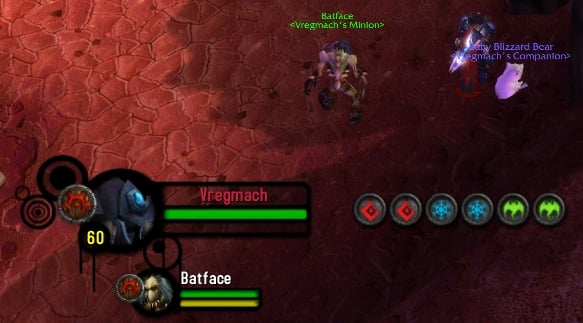
Default Layout
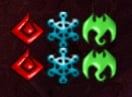
Horizontal Layout with Beta Runes
Click to enlarge
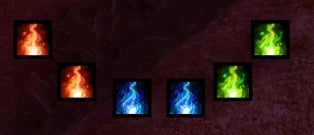
Down Curved Layout with Runica Art
Vertical Layout with Orb Runes
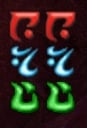
Vertical Block Layout with DKI Runes
RuneMover   Popular! (More than 5000 hits)
Description

RuneMover adds more features and functionality to the default rune frame while still using the Blizzard code.
The goal of RuneMover is to be simple yet rich. I hope RuneMover provides you with the features you are looking for while maintaining a simple, unobtrusive, and painless feel.

RuneMover does the following:

* Allows you to scale the size of the runes
* Allows you to change the transparency in and out of combat
* Allows you to unlock and lock the runes so that you can move them around
* Has 5 unique layouts including: Vertical, Curved Up, Curved Down, Vertical Block, and Horizontal Block
* Has 7 unique art choices including: Beta Runes, DKI Runes, and Letter Runes, Japanese Runes, Orb Runes, Runica Runes, Beta-Enhanced Runes

Notes

* Options can be accessed by typing /rm or /runemover
* OmniCC only currently works with the Runica and Default themes. Support for other art choices is possible in the future.
* If OmniCC does not function on the Runica or Default runes, try adjusting the 'Size Threshold' value in the OmniCC options menu.

If you are using Pitbull:
Config. > Modules > Hide Blizzard frames > UNCHECK "Rune bar"
Config. > Modules > Runes > UNCHECK "Enable"

If you are using Shadowed UF:
/suf > General > Hide Blizzard Frames > UNCHECK "Hide Rune bar"
/suf > Units > Player > Bars > UNCHECK "Enable Rune bar"
/console reloadui

Credits

Thank you to these people who gave me knowledge and insight to keep me going on the right track:
_Chloe, slakah, zeksie, KarlKFI, Akryn, arnath2, kollektiv
  Change Log - RuneMover
2.6.1
----------
Include Portfolio... d'oh!

2.6
----------
AddonLoader support - delayed
ToC reflected to show support for Patch 3.3
Fixed Death and Loading Screen bugs where the runes would reset

2.5.2
----------
Oops.
Lowered Rune Strata and increased font layer (so that you could see the X when unlocking the runes)

2.5.1
----------
Attempt fix at small bug on the default skin

2.5
----------
Pretty sure I fixed the Death Rune problem!
ToC bumped for Patch 3.2

2.4
----------
Fixed dreadful Unholy/Frost rune bug. What a pain!
Added 2 new layouts: Vertical Block and Curved Down
Added 4 new art choices: Japanese, Runica, Orb, and Beta-Enhanced

2.3
----------
Added art dropdown and new art choices
Fixed Vehicle bug
Updated Portfolio version
Fixed SetPoint issue

2.2
----------
New changes!!!
Now using Portfolio for options - options frame cleaned up
Cleaned up a lot of the code
Added 2 new layouts

2.1
----------
Fixed vehicle messing up the runes
Runes will now hide when you enter a vehicle and come back to personal settings when you exit

2.0
----------
Complete rewrite of the code. More like 2 times over! :P
Fixed and added Saved Variables
Added customizable transparency, scaling, and unlocking
Credits: slakah, _chloe, zeksie, and akryn

1.2
----------
Fixed folder issue.

1.1
----------
Added vertical/horizontal orientation options.
  Archived Versions - RuneMover
File Name
Version
Size
Author
Date
2.6
229kB
Cralor
12-07-2009 05:39 PM
2.5.2
260kB
Cralor
08-24-2009 06:03 PM
2.5
260kB
Cralor
08-23-2009 08:10 PM
2.4
260kB
Cralor
07-23-2009 03:22 PM
2.3
48kB
Cralor
07-08-2009 02:38 PM
2.3
17kB
Cralor
07-08-2009 02:36 PM
2.2
34kB
Cralor
05-29-2009 11:33 PM
2.2
33kB
Cralor
05-29-2009 09:56 PM
2.1
3kB
Cralor
05-25-2009 08:52 PM
2.0
3kB
Cralor
05-24-2009 11:22 PM
1.2
1kB
Cralor
08-11-2008 11:50 AM
  Comments - RuneMover
Post A Reply Comment Options
Old 02-08-2010, 12:05 AM  
Nikaj
A Kobold Labourer

Forum posts: 0
File comments: 1
Uploads: 0
I'm not sure if this has been addressed already, if is has i apologize...but I use xPerl unitframes and that seems to be interfering with RM. I tried turning off runes in xPerl, but still all I see of RM is the white X to move the runes. The runes themselves don't appear on the screen.

I really love both addons, is there a way to fix this? D:

Last edited by Nikaj : 02-08-2010 at 12:07 AM.
Nikaj is offline Report comment to moderator   Edit/Delete Message Reply With Quote
Old 12-26-2009, 07:30 PM  
Cralor
Mmm... cookies!!!
 
Cralor's Avatar
Premium Member
Interface Author - Click to view interfaces

Forum posts: 593
File comments: 245
Uploads: 6
Rename your WTF and Interface folders to:

Interface_Temp
WTF_Temp

And then log in to WoW. Then log back out.

Now, download and place RuneMover into the Interface\AddOns folder. Log back into WoW again. Let me know if there are still issues with RuneMover at that point. Once you are done, just delete the Interface and WTF folders and then rename Interface_Temp and WTF_Temp back to the original names.

I had another friend run it on his laptop and it has been working fine. It seems to me like a conflicting addon.
__________________

Last edited by Cralor : 12-26-2009 at 07:30 PM.
Cralor is offline Report comment to moderator   Edit/Delete Message Reply With Quote
Old 12-26-2009, 12:35 PM  
vikkyne
A Defias Bandit

Forum posts: 2
File comments: 24
Uploads: 0
Just don't get it. I d/l a clean version of Runemover, eliminated all the non 'Orb' image folders, and completely purged computer's cache of all files, then did a complete shutdown & restart.

Oddly enough, the Orb runes were randomly replaced by the smaller, older rune images as if I had not done a thing.

Just don't get it.
vikkyne is offline Report comment to moderator   Edit/Delete Message Reply With Quote
Old 12-24-2009, 11:16 AM  
vikkyne
A Defias Bandit

Forum posts: 2
File comments: 24
Uploads: 0
I keep forgetting to get a list of my addons. Only way I know how is do a copy/paste when an error occurs. Is there a common way other than that (aside from typing them out)?


AddOns:
Swatter, v5.7.4568 (KillerKoala)
Align, v
Altoholic, v3.3.001
AtlasLoot, vv5.09.00
AtlasLootFu, vv5.09.00
AtlasLootReverse, v1.7
AucAdvanced, v5.7.4568 (KillerKoala)
AucFilterBasic, v5.7.4568 (KillerKoala)
AucFilterOutlier, v5.7.4568.2531
AucMatchUndercut, v5.7.4568.2531
AucStatClassic, v5.7.4568 (KillerKoala)
AucStatHistogram, v5.7.4568 (KillerKoala)
AucStatiLevel, v5.7.4568 (KillerKoala)
AucStatPurchased, v5.7.4568 (KillerKoala)
AucStatSales, v5.7.4568.2842
AucStatSimple, v5.7.4568 (KillerKoala)
AucStatStdDev, v5.7.4568 (KillerKoala)
AucStatWOWEcon, v5.7.4568.2530
AucUtilAHWindowControl, v5.7.4568.3311
AucUtilAppraiser, v5.7.4568.2530
AucUtilAskPrice, v5.7.4568.3175
AucUtilAutoMagic, v5.7.4568.3142
AucUtilCompactUI, v5.7.4568.2530
AucUtilEasyBuyout, v5.7.4568.3583
AucUtilGlypher, v5.7.4568.2545
AucUtilItemSuggest, v5.7.4568.3108
AucUtilPriceLevel, v5.7.4568.2545
AucUtilScanButton, v5.7.4568.2530
AucUtilScanFinish, v5.7.4568.2530
AucUtilScanProgress, v5.7.4568.2530
AucUtilSearchUI, v5.7.4568.3655
AucUtilSimpleAuction, v5.7.4568.4553
AucUtilVendMarkup, v5.7.4568.2530
AutoDecline, v1.5.30000
Babylonian, v5.1.DEV.130
BadBoy, v3.4.9.7
BadBoyCCleaner, v2.2.1
BadBoyLevels, v2.1.5
Bartender4, v4.4.2
BeanCounter, v5.7.4568 (KillerKoala)
Carbonite, v3.31
CarboniteTransfer, v1.01
Configator, v5.1.DEV.130
DataStore, v3.3.001
DataStoreAchievements, v3.3.001
DataStoreAuctions, v3.3.001
DataStoreCharacters, v3.3.001
DataStoreContainers, v3.3.001
DataStoreCrafts, v3.3.001
DataStoreCurrencies, v3.3.001
DataStoreInventory, v3.3.001
DataStoreMails, v3.3.001
DataStorePets, v3.3.001
DataStoreQuests, v3.3.001
DataStoreReputations, v3.3.001
DataStoreSkills, v3.3.001
DataStoreSpells, v3.3.001
DataStoreStats, v3.3.001
DataStoreTalents, v3.3.001
DebugLib, v5.1.DEV.130
DMS, v1.2
FishermansFriend, v
Gatherer, v3.1.14
HoWT, v
Informant, v5.7.4568 (KillerKoala)
LightHeaded, v301
LightHeadedDataD, v301
LightHeadedDataNPC, v301
LootFilter, v3.9
MinimapButtonFrame, v3.0.9
MinimapButtonFrameSkinPack, v3.0
Omen, v3.0.9
Portfolio, v1.22
Quartz, v1.0
QuartzBuff, v1.0
QuartzFlight, v1.0
QuartzFocus, v1.0
QuartzGCD, v1.0
QuartzInterrupt, v1.0
QuartzLatency, v1.0
QuartzMirror, v1.0
QuartzPet, v1.0
QuartzPlayer, v1.0
QuartzRange, v1.0
QuartzSwing, v1.0
QuartzTarget, v1.0
QuartzTimer, v1.0
QuartzTradeskill, v1.0
Recount, v
Routes, vv1.2.8a
RuneMover, v2.6
SexyMap, v
SharedMedia, v3.0.1-177
SharedMediaAdditionalFonts, v1.0
SlideBar, v5.7.4568 (KillerKoala)
Stubby, v5.7.4568 (KillerKoala)
Tabardomatic, v2.0.9
TankPoints, v
Titan, v4.3.2.30300 - Revision 339
TitanBag, v4.3.2.30300
TitanCarbonite, vv3.3
TitanClock, v4.3.2.30300
TitanCoords, v4.3.2.30300
TitanGatherer, v3.3.1
TitanGoldTracker, v4.3.2.30300
TitanLootType, v4.3.2.30300
TitanMinimapControls, v3.3.1
TitanPerformance, v4.3.2.30300
TitanProfessions, v3.3
TitanQuests, v2.14.30300
TitanRecount, v3.3
TitanRegen, v4.3.2.30300
TitanRepair, v4.3.2.30300
TitanVolume, v4.3.2.30300
TitanXP, v4.3.2.30300
TomTom, v236
TomTomFu2, v1
TourGuide, v3.2.0.55
TourGuideRecorder, v3.0.1.3
WIM, v3.2.1
WoWProTourGuideAlliance, v0.6.5
WoWEquip, vBeta 1.1
XLoot, v0.91
XLootMonitor, v0.71
BlizRuntimeLib_enUS v3.3.0.30300 <us>

Last edited by vikkyne : 12-24-2009 at 12:09 PM.
vikkyne is offline Report comment to moderator   Edit/Delete Message Reply With Quote
Old 12-18-2009, 05:52 PM  
Cralor
Mmm... cookies!!!
 
Cralor's Avatar
Premium Member
Interface Author - Click to view interfaces

Forum posts: 593
File comments: 245
Uploads: 6
Any update on this? I'd love to see why this is occurring

Thanks!
__________________
Cralor is offline Report comment to moderator   Edit/Delete Message Reply With Quote
Old 12-12-2009, 10:13 PM  
Cralor
Mmm... cookies!!!
 
Cralor's Avatar
Premium Member
Interface Author - Click to view interfaces

Forum posts: 593
File comments: 245
Uploads: 6
Is there an addon that might be conflicting? Possibly post your mod list?
__________________
Cralor is offline Report comment to moderator   Edit/Delete Message Reply With Quote
Old 12-12-2009, 07:28 PM  
vikkyne
A Defias Bandit

Forum posts: 2
File comments: 24
Uploads: 0
I'd say a majority of swings fires off an old-style rune image. Not always, but usually.
vikkyne is offline Report comment to moderator   Edit/Delete Message Reply With Quote
Old 12-11-2009, 10:58 PM  
Cralor
Mmm... cookies!!!
 
Cralor's Avatar
Premium Member
Interface Author - Click to view interfaces

Forum posts: 593
File comments: 245
Uploads: 6
Ok. Does this happen every time you go in combat with a mob?

I am in no doubt that there is an issue here, but I really need to get a hold of the bug myself so that I can figure out what is wrong easier :P

I'll try removing it fully and downloading the one on this page to see if there is some weird issue with the 2.

Hmm...
__________________
Cralor is offline Report comment to moderator   Edit/Delete Message Reply With Quote
Old 12-11-2009, 08:10 PM  
vikkyne
A Defias Bandit

Forum posts: 2
File comments: 24
Uploads: 0
Well, I tried different rune types (Orb - and I love that!), but still same result. Going to eliminate my Savedvariables data and see what happens.

EDIT: deleted Runemover SavedVariables files and still occuring. Really no clue now.

Last edited by vikkyne : 12-11-2009 at 08:19 PM.
vikkyne is offline Report comment to moderator   Edit/Delete Message Reply With Quote
Old 12-11-2009, 04:15 PM  
Cralor
Mmm... cookies!!!
 
Cralor's Avatar
Premium Member
Interface Author - Click to view interfaces

Forum posts: 593
File comments: 245
Uploads: 6
Why don't I experience this? Does this occur every fight for you guys?

Here's my little test video to show how it works for me. I deleted my SavedVariables to just make sure and still nothing.

http://www.xfire.com/video/1b280c/

Thanks for feedback thus far!
__________________
Cralor is offline Report comment to moderator   Edit/Delete Message Reply With Quote
Old 12-11-2009, 12:53 PM  
Opaque
A Deviate Faerie Dragon
 
Opaque's Avatar

Forum posts: 16
File comments: 71
Uploads: 0
Funny, I just came here to post about the same problem!


Hopefully you sort it out! GREAT MOD!!!
__________________
Opaque is offline Report comment to moderator   Edit/Delete Message Reply With Quote
Old 12-10-2009, 09:26 PM  
vikkyne
A Defias Bandit

Forum posts: 2
File comments: 24
Uploads: 0
vikkyne is offline Report comment to moderator   Edit/Delete Message Reply With Quote
Old 12-10-2009, 05:03 PM  
Cralor
Mmm... cookies!!!
 
Cralor's Avatar
Premium Member
Interface Author - Click to view interfaces

Forum posts: 593
File comments: 245
Uploads: 6
Ok that is what I have been using too. Can you provide a screenshot? I'd like to get to the bottom of this!

Thanks for your help!
__________________
Cralor is offline Report comment to moderator   Edit/Delete Message Reply With Quote
Old 12-09-2009, 11:51 PM  
vikkyne
A Defias Bandit

Forum posts: 2
File comments: 24
Uploads: 0
I am using the Horizontal layout.
vikkyne is offline Report comment to moderator   Edit/Delete Message Reply With Quote
Old 12-09-2009, 09:18 PM  
Cralor
Mmm... cookies!!!
 
Cralor's Avatar
Premium Member
Interface Author - Click to view interfaces

Forum posts: 593
File comments: 245
Uploads: 6
oUF and oUF_Neav

The black and art around it is from : http://www.wowinterface.com/download...orUI.html#info

I am still unsure which parts do it but I know for sure you will need the kgPanels for the circle art around it. I believe the other folders in the 'Interface' folder do the black part of the frame.

Hope this helps.
__________________

Last edited by Cralor : 12-09-2009 at 09:23 PM.
Cralor is offline Report comment to moderator   Edit/Delete Message Reply With Quote
Post A Reply


Category Jump:


The Network:
EQInterface | EQ2Interface | LoTROInterface | MMOInterface | War.MMOUI | WoWInterface | VGInterface | Allakhazam | Thottbot | Wowhead | Zam


©2009 MMOUI / ZAM Network
vBulletin - Copyright ©2000 - 2010, Jelsoft Enterprises Ltd.



