

Category: Action Bar Mods
Addon Information
Works with 3.2
Download Latest Version.
To add favorites please register for a free account. If you already have one you need to login. How do I install this? (FAQ)
Author:
Version:
1.12
Date:
09-06-2009 03:54 AM
Size:
45.58 Kb
Downloads:
26,450
Favorites:
138
MD5:
Pictures
Click to enlarge
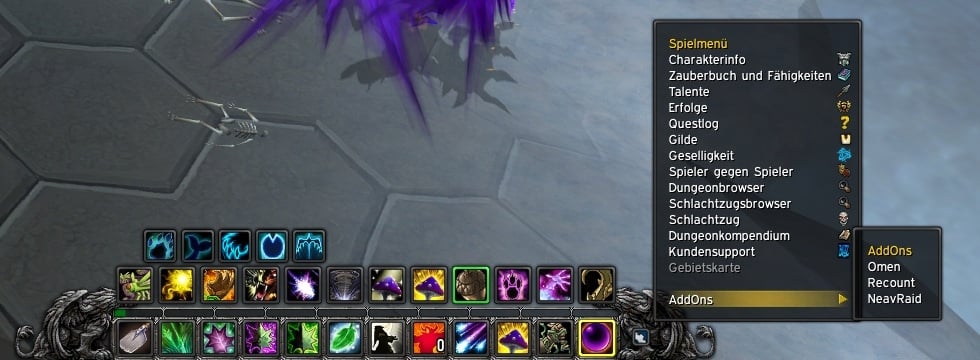
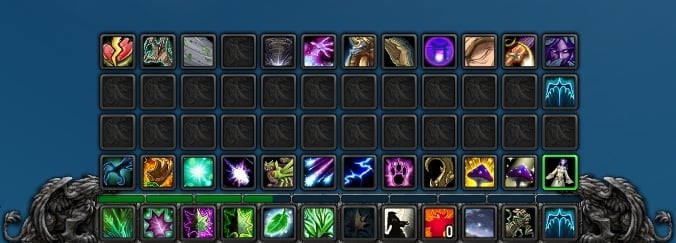
The bar
nMainbar   Popular! (More than 5000 hits)


Features
- Smaller Mainbar
- Skin the buttons
- Out of range coloring
- You can change the font or the fontsize of the macronames, hotkey, count or still hide them
- The gryphons are hideable
... and many more.


How can I move the Pet-, Stance- or Possessbar?
It's very simple!
ShiftKey + AltKey + Leftclick on the first button of the Pet-, Stance- or Possessbar to move the them.


And whats about the new totemmanger?
ControlKey + Leftclick on one of the 4 totembuttons and move them.

How can I change some settings?
Open the nMainbarConfig.lua with a texteditor of your choise.
You will require someknowledge withing LUA editing to configure this addon,
but the config is so simple that everyone can do this.


(!) THERE ARE NO INGAME CONFIGURATION (!)

Extra Stuff
If you want other gryphonarts check out SquidMod and SquidModGraficUpdate

Attention
Disable RedRange (or similar addons) if you use it, or it can occure
some problems. nMainbar has its own out of range coloring.
  Change Log - nMainbar
v. 1.12

- fixed a bug with the scaling of the totemmanager

v. 1.11

- fix a bug with the totemmanger (hopefully^^)

v. 1.1

- .toc bump
- support for the new totem manager

v. 1.01

- fix a little typo
- forgot a line
- .zip file instead of a .rar file


v. 1.0

- new config file
- fix the bug with the resets of the stancebar (hopfefully)
- remove the " show on modifier pressed " feature (i dont know but i think it will return in the future)
- new mouseover system (!)
- seperate some function in new .lua files
- changeable alpha of the bars

There are so much changes that i have set nMainbar back to version 1
  Optional Files - nMainbar
Sorry, there are currently no optional files available.
  Archived Versions - nMainbar
File Name
Version
Size
Author
Date
1.1
46kB
Neal
08-06-2009 05:08 PM
1.1
42kB
Neal
08-06-2009 04:36 PM
1.01
45kB
Neal
07-12-2009 12:00 PM
1
41kB
Neal
07-08-2009 06:38 PM
  Comments - nMainbar
Post A Reply Comment Options
Old Yesterday, 12:42 AM  
Leitwolf
A Kobold Labourer

Forum posts: 1
File comments: 4
Uploads: 0
Hi Neal, erstmal danke für dieses Wunderbare Barmod, aus meiner Sicht fast ideal.

Ich wüsste allerdings ganz gerne wissen, ob ich neben den Greifen auch die bartextur der Hauptbar (Action Bar 1) ausblenden kann, denn mir würde das ganze komplett ohne zerschnetzelte graue Textur super passen, leider habe ich dazu nichts in den Options gefunden.

Falls es nicht geht, wäre es nen großen Akt diese Option mit einzubauen bzw. gibt es nen simples anderes Addon das genau das und NUR das tut als Alternative ?

Schonmal danke für die Antwort und die Mühe

Last edited by Leitwolf : 11-22-2009 at 02:58 AM.
Leitwolf is offline Report comment to moderator   Edit/Delete Message Reply With Quote
Old 10-08-2009, 07:19 PM  
shinchih2001
A Kobold Labourer

Forum posts: 0
File comments: 97
Uploads: 0
extrabar

maybe you will think my command is stupid

1.would you mind to consider this additional bar
let the page2 or more bar appear??
http://www.wowinterface.com/download...-ExtraBar.html

2.would you mind to add opption to hide vehicle artwork

Last edited by shinchih2001 : 10-29-2009 at 03:29 PM.
shinchih2001 is offline Report comment to moderator   Edit/Delete Message Reply With Quote
Old 10-05-2009, 11:06 AM  
buja
A Kobold Labourer

Forum posts: 0
File comments: 1
Uploads: 0
Red face ingame interface

ehem ....

ich weis nicht wie es den andern geht, aber ich find das addon an sich ganz knorke *g*

mein problem ist leider nur das ich echt das untalentierteste wesen auf dieser welt bin, was das progging (<-- sagt man das so? ) angeht.

ich glaub es wäre sehr gut wenn man das addon ingame konfigurieren könnte, würde sehhhhr viel zeit und nerven sparen
buja is offline Report comment to moderator   Edit/Delete Message Reply With Quote
Old 09-19-2009, 09:15 PM  
Toran
A Wyrmkin Dreamwalker

Forum posts: 59
File comments: 217
Uploads: 0
As I mentioned, the only bar that doesn't show the keybind is the vehicle bar. All others do. I have the settings as you provided already.

Quote:
Originally posted by Atane
change

showKeybinds = false,

to
showKeybinds = true,

Last edited by Toran : 09-19-2009 at 09:15 PM.
Toran is offline Report comment to moderator   Edit/Delete Message Reply With Quote
Old 09-18-2009, 12:12 PM  
Piwafwi
A Murloc Raider
 
Piwafwi's Avatar

Forum posts: 4
File comments: 56
Uploads: 0
Getting rid of the exp/rep bar

Not sure if it's been asked as of yet. Liking you whole UI, Neal, and I'm tweaking it to fit my tastes.

Quick question tho: How can I disable or get rid of the experience/rep bar from nMainbar so it doesn't show? Both my toons are lvl 80 and I don't really care about rep/exp on them, so any assist will be greatly appreciated!

Keep up the good work!

edit: LOL, nvrmnd. I had a rep tracking enabled...disabled and all is well.../facepalm.
__________________

Last edited by Piwafwi : 09-18-2009 at 12:16 PM.
Piwafwi is offline Report comment to moderator   Edit/Delete Message Reply With Quote
Old 09-13-2009, 01:03 PM  
Atane
A Deviate Faerie Dragon
Interface Author - Click to view interfaces

Forum posts: 12
File comments: 38
Uploads: 5
Quote:
Originally posted by Toran
Can someone confirm this addon *shows* keybinding numbers while in vehicle? I cannot see my keybinds for that bar only.
change

showKeybinds = false,

to
showKeybinds = true,
Atane is offline Report comment to moderator   Edit/Delete Message Reply With Quote
Old 09-12-2009, 03:17 PM  
Toran
A Wyrmkin Dreamwalker

Forum posts: 59
File comments: 217
Uploads: 0
Can someone confirm this addon *shows* keybinding numbers while in vehicle? I cannot see my keybinds for that bar only.

Last edited by Toran : 09-12-2009 at 03:17 PM.
Toran is offline Report comment to moderator   Edit/Delete Message Reply With Quote
Old 09-07-2009, 04:54 PM  
Neal
A Kobold Labourer
Interface Author - Click to view interfaces

Forum posts: 0
File comments: 147
Uploads: 13
Sicherlicht nicht
Neal is offline Report comment to moderator   Edit/Delete Message Reply With Quote
Old 09-07-2009, 03:24 PM  
blizzart
A Defias Bandit
 
blizzart's Avatar

Forum posts: 2
File comments: 7
Uploads: 0
sieht doch schon anderst aus.
vorher stand dort nämlich *How can i move the totembar!

thx
blizzart is offline Report comment to moderator   Edit/Delete Message Reply With Quote
Old 09-07-2009, 11:09 AM  
Neal
A Kobold Labourer
Interface Author - Click to view interfaces

Forum posts: 0
File comments: 147
Uploads: 13
http://www.wowinterface.com/download...nbar.html#info

" How can I move the Pet-, Stance- or Possessbar? "
Neal is offline Report comment to moderator   Edit/Delete Message Reply With Quote
Old 09-06-2009, 03:11 PM  
blizzart
A Defias Bandit
 
blizzart's Avatar

Forum posts: 2
File comments: 7
Uploads: 0
Quote:
Originally posted by Neal
Lies doch mal bitte die AddOn beschreibung -_-
ja... sehr gute beschreibung...
hilft mir leider nich weiter wo ich die daten der stancebar zum verschieben finde!
blizzart is offline Report comment to moderator   Edit/Delete Message Reply With Quote
Old 09-06-2009, 02:34 PM  
Neal
A Kobold Labourer
Interface Author - Click to view interfaces

Forum posts: 0
File comments: 147
Uploads: 13
Quote:
Originally posted by blizzart
hi neal,
erstmal danke für das addon, istr genau so wie ich es will

Allerdings habe ich mit meinem warri das problem dass die stancebar mitten im bild hängt.
Ich denke mal dass ich es per lua überarbeiten muss, allerdings finde ich die zeile nicht in der ich es umschreiben muss :<
Könntest eventuell mal sagen wo ich genau in den lua's die zeile finde?

Ach und noch ne frage, kann ich luas bearbeiten während ich ingame bin und werden die änderungen dann übernommen mit einem interface reload ?

Mfg
Lies doch mal bitte die AddOn beschreibung -_-
Neal is offline Report comment to moderator   Edit/Delete Message Reply With Quote
Old 09-06-2009, 02:09 PM  
blizzart
A Defias Bandit
 
blizzart's Avatar

Forum posts: 2
File comments: 7
Uploads: 0
hi neal,
erstmal danke für das addon, istr genau so wie ich es will

Allerdings habe ich mit meinem warri das problem dass die stancebar mitten im bild hängt.
Ich denke mal dass ich es per lua überarbeiten muss, allerdings finde ich die zeile nicht in der ich es umschreiben muss :<
Könntest eventuell mal sagen wo ich genau in den lua's die zeile finde?

Ach und noch ne frage, kann ich luas bearbeiten während ich ingame bin und werden die änderungen dann übernommen mit einem interface reload ?

Mfg
blizzart is offline Report comment to moderator   Edit/Delete Message Reply With Quote
Old 09-06-2009, 03:50 AM  
Neal
A Kobold Labourer
Interface Author - Click to view interfaces

Forum posts: 0
File comments: 147
Uploads: 13
Quote:
Originally posted by shinchih2001
http://cid-072b071cf9bff3c8.skydrive...%7C_122115.jpg

when i change size:mainbar=0.6,totembar=1.25
i got this situation,what's wrong??
L.O.L. Damn Blizzard. Thx for the info.
Neal is offline Report comment to moderator   Edit/Delete Message Reply With Quote
Old 09-06-2009, 12:36 AM  
shinchih2001
A Kobold Labourer

Forum posts: 0
File comments: 97
Uploads: 0
http://cid-072b071cf9bff3c8.skydrive...%7C_122115.jpg

when i change size:mainbar=0.6,totembar=1.25
i got this situation,what's wrong??
shinchih2001 is offline Report comment to moderator   Edit/Delete Message Reply With Quote
Post A Reply


Category Jump:


The Network:
EQInterface | EQ2Interface | LoTROInterface | MMOInterface | War.MMOUI | WoWInterface | VGInterface | Allakhazam | Thottbot | Wowhead | Zam


©2009 MMOUI / ZAM Network
vBulletin - Copyright ©2000 - 2009, Jelsoft Enterprises Ltd.



