
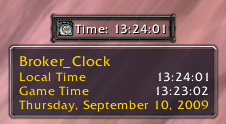
Fortress is a display addon for LDB data feeds. It shows each plugin as a block, which is freely movable and can stick to other blocks. Blocks can be unstuck by holding the ctrl-key while dragging them.
Commands:
Use /fortress or /ft to open the configuration (also accessible via Main Menu -> Interface -> Addons -> Fortress).
Configuration:
The configuration has two parts: The master settings and the individual plugin settings. At first each option is controlled by the master settings and therefore it has the same effect for each plugin. Once you change something individually for one plugin, this setting is no longer controlled by the master mode (for this plugin).
You can select the mode for each option at the "Select master" tab in each plugin's config screen.
Other versions:
The latest beta version can be get here.
Change Log - Fortress
1.1
- Implemented profile support
- Added support for LibSharedMedia-3.0 (and many block config options)
- Plugin list is now sorted
- Added "Show Linked" setting: Show all linked blocks, when you mouseover one
- Some more minor changes I've already forgotten
1.05
- Toc update
- Fixed a bug with the 'hide tooltip in combat' setting
- Added 'Disable tooltip' setting
- Updated locales: enUS, deDE and koKR (by Sayclub)
1.041 (WotLK change only)
- Fixed an error in the slash command handler for WotLK
1.04
- Fixed a bug, where plugins with a tooltip were not hiding properly.
- Added "Fixed Width" setting
- Added "Hide Border" setting
1.03
- New locales: zhCN (by cwd) and koKR (by sayclub)
1.02
- Fixed a bug, where the label color was not applied (by ag).
- Fixed a bug, where new blocks weren't cascaded.
- Fixed a bug, where block scaling wasn't applied.
1.01
- New locales: ruRU (by StingerSoft), frFR (by pettigrow) and deDE
1. The ability to adjust icon sizes.
2. The ability to adjust border size/thickness.
3. The ability to create blank buttons (for spacing/layout purposes).
4. The ability to change the alignment (left/right/center) of the data on the button. Currently, items with icons are left aligned, and text only is centered.
5. It would be awesome if some of the textures could be made available as borders instead - for example, the Elite and Rare dragon logos.
Ive just noticed that I cannot RE-Enable add ons once they are disabled. The Settings tab is disabled. The Select master tab is still enabled, but without Settings, there is no way to turn a plug in back on.
Originally posted by Tebasile Is there any way to adjust the tooltip font size?
Not at the moment. The display addon does not always have full control over the tooltip, so it would be impossible to implement for all plugins. But maybe I'll add more tooltip options in a later version.
Quote:
Originally posted by FarseerLolotea Fortress is misbehaving. It's not letting me disable individual add-ons.
I cannot reproduce this bug. Is there any error message or something like that?
Originally posted by Borlox This is working as intended. I changed this because many brokers open a config window when they're clicked without hiding the tooltip. I'll add a switch to disable this feature.
Not sure about that myself, IMHO it is really down to each broker addon author to ensure that a click on the button closes the tooltip if the click then opens another window that would be covered by the tooltip. Or perhaps that just me being awkward, but then perhaps not. Anyways, thanks in advance for adding a switch to disable the feature, that will be great.
Originally posted by Frayol Not sure if this is counted as a bug or not, but with version 1.1 whenever I click on block to change a setting the tooltip vanishes. It never used to do this and I reverted to 1.05 in order to test and the problem and with the older version it went away. If this is not intended behaviour, please let me know and I will add a bug report for it if you require.
Just to add that I am not using anything other than native LDB addons as the last non-native one I did use was OutfitterFu which is no longer required thanks to support for LDB being added.
This is working as intended. I changed this because many brokers open a config window when they're clicked without hiding the tooltip. I'll add a switch to disable this feature.
Not sure if this is counted as a bug or not, but with version 1.1 whenever I click on block to change a setting the tooltip vanishes. It never used to do this and I reverted to 1.05 in order to test and the problem and with the older version it went away. If this is not intended behaviour, please let me know and I will add a bug report for it if you require.
Just to add that I am not using anything other than native LDB addons as the last non-native one I did use was OutfitterFu which is no longer required thanks to support for LDB being added.
Originally posted by saanlem For some reason no profiles are saved. I have tried to copy from onr toon to another, pull the name, but the block stays blank.
Originally posted by Darkspell Just installed this. So far I love it but... getting this error:
[2008/09/22 11:41:08-527-x6]: Fortress-1.0\Options.lua:489: attempt to call global 'InterfaceOptionsFrame_OpenToFrame' (a nil value)
Interface\FrameXML\ChatFrame.lua:3189: in function `ChatEdit_ParseText':
Interface\FrameXML\ChatFrame.lua:2909: in function `ChatEdit_SendText':
Interface\FrameXML\ChatFrame.lua:2930: in function `ChatEdit_OnEnterPressed':
<string>:"*:OnEnterPressed":1: in function <[string "*:OnEnterPressed"]:1>
Thanks for reporting, fixed in version 1.041.
Note: This is a WotLK change, only Beta/PTR players need this update.
Just installed this. So far I love it but... getting this error:
[2008/09/22 11:41:08-527-x6]: Fortress-1.0\Options.lua:489: attempt to call global 'InterfaceOptionsFrame_OpenToFrame' (a nil value)
Interface\FrameXML\ChatFrame.lua:3189: in function `ChatEdit_ParseText':
Interface\FrameXML\ChatFrame.lua:2909: in function `ChatEdit_SendText':
Interface\FrameXML\ChatFrame.lua:2930: in function `ChatEdit_OnEnterPressed':
<string>:"*:OnEnterPressed":1: in function <[string "*:OnEnterPressed"]:1>


