

Category: Data Broker
Addon Information
Works with 3.1
Download Latest Version.
To add favorites please register for a free account. If you already have one you need to login. How do I install this? (FAQ)
Author:
Version:
r67
Date:
04-19-2009 04:50 PM
Size:
155.75 Kb
Downloads:
6,954
Favorites:
211
MD5:
Pictures
Click to enlarge
FuBar-like layout
Simple "button bin" layout
Click to enlarge
Various label display options
Click to enlarge
Three bins arranged to simulate a left/middle/right FuBar display
ButtonBin   Popular! (More than 5000 hits)
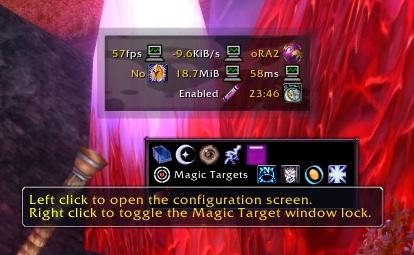
ButtonBin is a display addon for LibDataBroker objects. The initial design goal was to make a very compact display for LDB launchers, ignoring the labels. It has since evolved to become more of a full featured display addon, allowing both the compact button-only view as well as displaying labels with icons. Combined with FuBar2Broker, ButtonBin can fully replace FuBar as a displayer. With the new default configuration a left, right and center top bar layout is used, allowing for an easier transition.

Changes in r67:
  • Bumped .toc to 30100

Changes in r66:
  • Fixed a config UI issue. Moved 'Reset Bin Layout' to the main 'Bins' pane.
  • Fixed a small issue with profile copying.

Changes in r64:
  • Added option to disable tooltips on a per-bin and per-data block level.
  • Fixed problems with copying profiles. As a side effect, there is now a separate button to load the initial default bin layout that you can use after resetting a profile.

Changes in r62:
  • Fix formatting of label + value display.

Changes in r60:
  • Fixed a couple of bugs introduced in r59.

Changes in r59:
  • Fixed default layout to use a sane 3 bin setup emulating left/right/center FuBar geometry.
  • Added ability to move Blizzard frames out of the way to make room for the bins.
  • Added ability to assign a bin to a data block in the data block configuration.

Changes in r58:
  • Fixed issue with centered bins if the bin icon was shown (oops).
  • Added option to set use a custom icon texture and name for the bin icon display.

Feature List:
  • Customizable size (scale, button size and number of buttons per row)
  • If an object doesn't have a native tooltip, BB makes one using the text.
  • Ability to collapse all buttons into one (state now saved)
  • Enable/disable individual data objects for display.
  • Ability to toggle horizontal and vertical growth direction (toggle x/y axis)
  • Configurable horizontal and vertical button padding.
  • Drop and Drag support to order the buttons.
  • Support for multiple bars (currently hard coded at up to five bars)
  • Background and border texture/color configuration
  • Auto-hide options: Hide in combat, hide out of combat, and show on mouse over only.
  • Ability to show labels (always or on mouse over only)
  • Can set the (max) width of the bins in pixels.
  • Per-block label and icon visibility configuration.
  • Global / bin level font size and style configuration.

Planned features:
  • Ability to disable tooltips on a per-bin and/or per-block basis.
  • Button skinning support.
  • More complete configuration to control the display.
  • Whatever else comes up...
  Change Log - ButtonBin
r67:
  • Bumped .toc to 30100

r66:
  • Fixed a config UI issue. Moved 'Reset Bin Layout' to the main 'Bins' pane.
  • Fixed a small issue with profile copying.

r64:
  • Added option to disable tooltips on a per-bin and per-data block level.
  • Fixed problems with copying profiles. As a side effect, there is now a separate button to load the initial default bin layout that you can use after resetting a profile.

r62:
  • Fix formatting of label + value display.

r60:
  • Fixed a couple of bugs introduced in r59.

r59:
  • Fixed default layout to use a sane 3 bin setup emulating left/right/center FuBar geometry.
  • Added ability to move Blizzard frames out of the way to make room for the bins.
  • Added ability to assign a bin to a data block in the data block configuration.

r58:
  • Fixed issue with centered bins if the bin icon was shown (oops).
  • Added option to set use a custom icon texture and name for the bin icon display.

r57:
  • Added an option to center align the contents in a bin.
  • Added support for iconR, iconB, iconG, iconCoords/texcoords to enable fancy icon displays such as the TomTom crazy arrow feed.

r55:
  • Fixed bug when adding a new bin and immediately unlocking.
  • Fixed issue where a newly enabled data block didn't show up correctly.
  • Removed the ability to enable data blocks when there was no bins.
  • Changed default size and position to be center of the screen without a fixed width.

r53:
  • Added customizable tooltip scale. Only works on tooltips opened by ButtonBin however.
  • Some general code clean up and fixes.
  • Allow block level override for text display even on bars with all text disabled.
  • Rewrote text updating algorithm so it's no longer broken (fixes issues with StatBlock_Durability among others).
  • Added ability to toggle labels, text and values individually (per bin and per block)
  • Added configurable label, text, value and unit colors (on a bin level)
  • Fixed bug where a bin was initially the wrong size if it had mouseover visibility.
  • Fixed visibility issues when unlocking bins/buttons for mouseover bins.

r46:
  • Fixed bug when creating a new profile.
  • Fixed issues related to mouse over visibility and collapsing the bin.
  • Fixed issue with bin sizing when using label over mouse option.
  • Fixed an optimization bug that prevented the bin to be properly resized if the label length of a data block changed greatly.

r43
  • Per-data block configuration (label and icon visibility only)
  • Additional bin visibility option (mouse over while not in combat).
  • Ability to add and delete bins.
  • Fixes when copying and resetting a profile.
  • Ability to toggle icon visibility on a per-bin basis.
  • Fixed issue which made it impossible to set scale to 1.0 (doh!)
r35
  • Fixes for 3.0.
  • Fixed issues with profile copying.
  • Fixed an incorrect label (left vs right for icon location)
  • Some performance optimizations.
  • New versioning scheme, thus the lower number!
81491
  • Fixed issue with the green "moving box" unsticking from the bin if it's resized while movement is unlocked.
  • Fixed nil error when resizing / configuring a completely empty bin.
80757
  • Added option to set the pixel width of the bin.
  • Added toggle to decide whether or not to clamp a bin to the screen.
80714
  • Added font and font size bar level configuration.
  Optional Files - ButtonBin
Sorry, there are currently no optional files available.
  Archived Versions - ButtonBin
File Name
Version
Size
Author
Date
r66
155kB
neotron
04-05-2009 09:38 PM
r62
153kB
neotron
04-04-2009 11:15 PM
r60
145kB
neotron
01-31-2009 04:05 AM
r58
138kB
neotron
01-03-2009 02:45 PM
r57
137kB
neotron
12-21-2008 03:44 PM
  Comments - ButtonBin
Post A Reply
Author Comments Comment Options
Old 06-17-2009, 06:07 PM  
pexcer
A Kobold Labourer

Forum posts: 0
File comments: 14
Uploads: 0
If I click an ability in the spell book I get a dialogue box telling me button bin was blocked from an action only available to blizzard UI with two buttons to either ignore or disable addons.

This doesn't happen if I click on a profession that opens another window but only if I click on picklock, or disenchant or other "spell" out of the spellbook. I can use them from action bars, just not out of the spellbook.
pexcer is offline Report comment to moderator   Edit/Delete Message Reply With Quote
Old 06-06-2009, 09:24 AM  
Aesop
A Murloc Raider

Forum posts: 9
File comments: 9
Uploads: 0
I'm looking for the strata settings

Hi there, great mod. I love the ability so show some frames in combat and not otherwise.

I can't seem to locate any strata settings and im wondering if they're here and I missed 'em or not implemented yet?

Keep up the great work

Last edited by Aesop : 06-06-2009 at 09:25 AM.
Aesop is offline Report comment to moderator   Edit/Delete Message Reply With Quote
Old 04-19-2009, 06:24 PM  
SkunkWerks
A Deviate Faerie Dragon
 
SkunkWerks's Avatar
Interface Author - Click to view interfaces

Forum posts: 11
File comments: 179
Uploads: 2
I've been having a problem (I've yet to have an opportunity to test it with this latest version) where the menu sub-column where the datafeed entries and bar entries normally would be when selecting those options from the main menu column are suddenly empty.

Nothing I can identify seems to cause it. And though it will come back after a bit of mucking about and menu switching, I can't identify exactly what action seems to fix it either.

About the only thing that seems to be a sure-fire fix for it is a UI reload.

To add to the inconsistency of this occurrence, sometimes one, the other, or both will disappear- with no real indication as to what will happen and why.

I'm curious if this has been brought up before and/or addressed.
SkunkWerks is offline Report comment to moderator   Edit/Delete Message Reply With Quote
Old 04-05-2009, 01:50 PM  
neotron
A Kobold Labourer
 
neotron's Avatar
Interface Author - Click to view interfaces

Forum posts: 0
File comments: 68
Uploads: 8
Quote:
Originally posted by khariv
Bumping this as it is still a problem in the latest build. There does not seem to be any way to get the tooltips to turn off and stay off.
The option to disable tooltips is currently only used for the button bin icon tooltip (i.e the actual tooltip for the button bin "bin icons"). I'll look into adding this as a general option, probably with bin and datablock overrides.

Edit: I added this in r64. You can configure tooltip visibility on a per-datablock or per-bin basis.

Last edited by neotron : 04-05-2009 at 04:15 PM.
neotron is offline Report comment to moderator   Edit/Delete Message Reply With Quote
Old 04-04-2009, 11:40 PM  
khariv
A Defias Bandit

Forum posts: 2
File comments: 32
Uploads: 0
Quote:
Originally posted by khariv
The option for "Hide Tooltips" doesnt seem to do anything. I have tried setting it at the global level as well as on the individual data buttons. Both settings result in the tooltips still being shown.
Bumping this as it is still a problem in the latest build. There does not seem to be any way to get the tooltips to turn off and stay off.
khariv is offline Report comment to moderator   Edit/Delete Message Reply With Quote
Old 02-20-2009, 03:50 PM  
Palladia
A Kobold Labourer

Forum posts: 0
File comments: 11
Uploads: 0
That worked! Thanks very much.
Palladia is offline Report comment to moderator   Edit/Delete Message Reply With Quote
Old 02-20-2009, 02:59 PM  
neotron
A Kobold Labourer
 
neotron's Avatar
Interface Author - Click to view interfaces

Forum posts: 0
File comments: 68
Uploads: 8
Quote:
Originally posted by Palladia
Those work, thanks (though Location text is a bit more verbose than I need).

Is there any way to control the order of buttons. I can't drag them and I can't find an ordered list for each bin.
You can unlock the buttons (to allow them to be dragged) by holding Alt and left clicking on any of the bin icons.
neotron is offline Report comment to moderator   Edit/Delete Message Reply With Quote
Old 02-20-2009, 12:15 PM  
Palladia
A Kobold Labourer

Forum posts: 0
File comments: 11
Uploads: 0
Those work, thanks (though Location text is a bit more verbose than I need).

Is there any way to control the order of buttons. I can't drag them and I can't find an ordered list for each bin.

Last edited by Palladia : 02-20-2009 at 12:20 PM.
Palladia is offline Report comment to moderator   Edit/Delete Message Reply With Quote
Old 02-20-2009, 03:47 AM  
neotron
A Kobold Labourer
 
neotron's Avatar
Interface Author - Click to view interfaces

Forum posts: 0
File comments: 68
Uploads: 8
I suspect that is due to them using FuBar as the "autoloader" or similar so they simply don't get loaded. Not sure if F2B has an option to handle those.

In either case you can use this:

http://wow.curse.com/downloads/wow-a...ker_clock.aspx


Not sure if this is what you're looking for:

http://wow.curse.com/downloads/wow-a..._location.aspx
neotron is offline Report comment to moderator   Edit/Delete Message Reply With Quote
Old 02-19-2009, 07:42 PM  
Palladia
A Kobold Labourer

Forum posts: 0
File comments: 11
Uploads: 0
I'm trying this because FuBar isn't working properly for me.

It looks nice, but I miss being able to show the location on the left and the clock on the right. Apparently, even though I have Fubar2Broker, those modules aren't showing up.

Is there somewhere I can find modules for location and clock that will work with ButtonBar?
Palladia is offline Report comment to moderator   Edit/Delete Message Reply With Quote
Old 02-03-2009, 02:32 PM  
neotron
A Kobold Labourer
 
neotron's Avatar
Interface Author - Click to view interfaces

Forum posts: 0
File comments: 68
Uploads: 8
Re: Feature Request

Quote:
Originally posted by Myster
Feature Request:
Can you add the ability to set the strata level of each bin?

Bug Report:
I still seem to be having issues with customization settings (background colors,etc) to each bin applying across game sessions.

They seem to not be saving or initializing, because I can go into the options and make one change and then all previous settings seem to apply then.
Strata and/or frame level: Yep I can do that.
As for the settings - bizarre. You're saying you can make changes, many changes, and things work. Relog or reload the UI and you're back to the previous settings but as soon as you make any change, all settings are applied? It's possible I broke something with the recent changes - I'll definitely check it out.
neotron is offline Report comment to moderator   Edit/Delete Message Reply With Quote
Old 02-03-2009, 02:06 PM  
Myster
A Kobold Labourer
Interface Author - Click to view interfaces

Forum posts: 0
File comments: 50
Uploads: 2
Feature Request

Feature Request:
Can you add the ability to set the strata level of each bin?

Bug Report:
I still seem to be having issues with customization settings (background colors,etc) to each bin applying across game sessions.

They seem to not be saving or initializing, because I can go into the options and make one change and then all previous settings seem to apply then.

Last edited by Myster : 02-03-2009 at 02:08 PM.
Myster is offline Report comment to moderator   Edit/Delete Message Reply With Quote
Old 01-31-2009, 10:24 AM  
twobits
An Aku'mai Servant
Interface Author - Click to view interfaces

Forum posts: 38
File comments: 13
Uploads: 1
Some nice changes, thanks.
twobits is offline Report comment to moderator   Edit/Delete Message Reply With Quote
Old 01-31-2009, 03:34 AM  
neotron
A Kobold Labourer
 
neotron's Avatar
Interface Author - Click to view interfaces

Forum posts: 0
File comments: 68
Uploads: 8
Quote:
Originally posted by zoktar
i fixed it somehow dotn remember how. althogh now when i "miss" a move, it does as u say return 2 where it was.
With the latest version you can configure the bin for a block via the data block configuration. However this doesn't allow you to reorganize the order, only move bins. Might be a nice feature anyway.
neotron is offline Report comment to moderator   Edit/Delete Message Reply With Quote
Old 01-12-2009, 12:06 PM  
zoktar
A Murloc Raider

Forum posts: 8
File comments: 102
Uploads: 0
Quote:
Originally posted by neotron
If you "miss" a move it should return to the bin it was originally in (i.e there shouldn't have been a change). If it still doesn't work you can try to go into the datablock configuration and enable/disable the specific plugin and/or reload the UI.
i fixed it somehow dotn remember how. althogh now when i "miss" a move, it does as u say return 2 where it was.
zoktar is online now Report comment to moderator   Edit/Delete Message Reply With Quote
Post A Reply


Category Jump:

Support AddOn Development!

You have just downloaded by the author . If you like this AddOn why not consider supporting the author? This author has set up a donation account. Donations ensure that authors can continue to develop useful tools for everyone.




The Network:
EQInterface | EQ2Interface | LoTROInterface | MMOInterface | War.MMOUI | WoWInterface | VGInterface | Allakhazam | Thottbot | Wowhead | Zam


©2009 MMOUI / ZAM Network
vBulletin - Copyright ©2000 - 2009, Jelsoft Enterprises Ltd.

