Category: Action Bar Mods
Addon Information
Works with 3.1
Download Latest Version.
To add favorites please register for a free account. If you already have one you need to login. How do I install this? (FAQ)
Maul's Portal Bug Reports Feature Requests
Author:
Version:
30100.2.6
Date:
05-05-2009 11:03 AM
Size:
390.95 Kb
Downloads:
319,769
Favorites:
866
MD5:
Pictures
Click to enlarge
Main Menu
Click to enlarge
Storage
Click to enlarge
Profiles
Click to enlarge
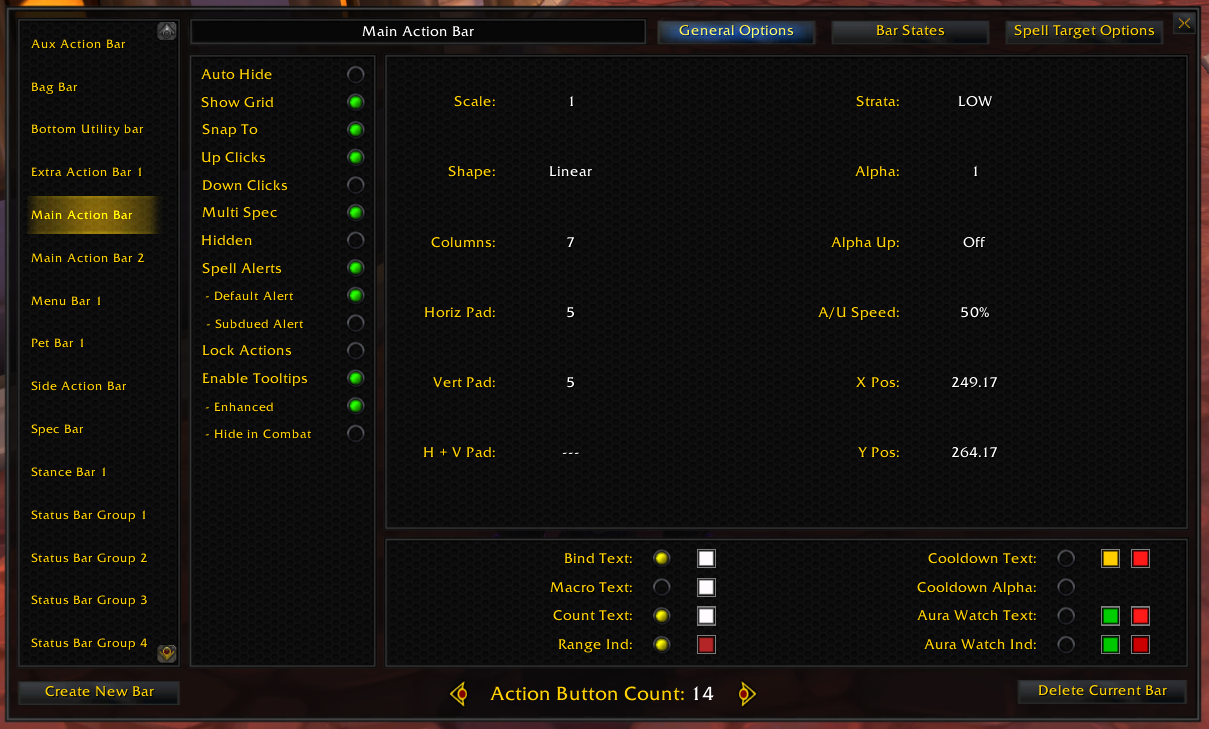
Bar Editor
Click to enlarge
Button Editor
Macaroon!   Popular! (More than 5000 hits)
Macaroon!
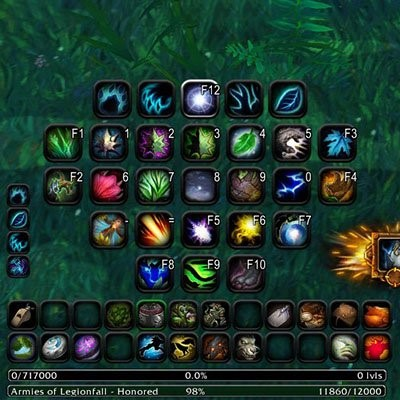
A macro-based action bar addon. It can stand on its own or supplement any other action bar addon or even the default Blizzard UI.

Buy Maul a Coke!

"Feel the power of the macro side..."
A WoW 3.x Wrath of the Lich King addon.

Visit this thread for more information on Macaroon!
Official Thread

Visit the Macaroon! FAQ page on WoWInterface
FAQ

Report bugs here - Bugs

Request features here - Feature Requests

Be sure to check out Macaroon Xtras, a supplemental addon for Macaroon.
Gives you all the extra bar addon goodies if you so desire (bags, menubar, castbar, xpbar, etc)


Features -
  • An unlimited number of macros, create as many bars/buttons as you want/need per character!
  • Are you a keybinder extreme? Use the button storage area for all your macros/keybinds! No buttons on screen needed!
  • Are you a clicker extrodanaire? As many buttons on the screen you want where you want, when you want!
  • Macros the size of Texas! Up to 1024 characters in length!
  • Maul's unique mouseover key-binding system - where the mouseover binding system was born!
  • Many other of the favorite desired bar addon features and then some!
  • Button Facade support!
  • Every button in Macaroon is a macro button by default and in many ways they behave like normal action buttons. Buttons can also be set to be "action" or "pet" buttons.
Commands -
  • Type /macaroon or /mac alone to display a list of available commands, which are:
menu: Toggle the main menu
storage: Open the button storage area
create: Create a blank bar
delete: Delete the currently selected bar
config: Toggle configuration mode for all bars
add: Adds buttons to the currently selected bar (add or add #)
remove: Removes buttons from the currently selected bar (remove or remove #)
edit: Toggle edit mode for all buttons
bind: Toggle binding mode for all buttons
scale: Scale a bar to the desired size.
snapto: Toggle SnapTo for current bar
autohide: Toggle AutoHide for current bar
shape: Change current bar's shape
name: Change current bar's name
strata: Change current bar's frame strata
alpha: Change current bar's alpha (transparency)
alphaup: Set current bar's conditions to 'alpha up'
arcstart: Set current bar's starting arc location (in degrees)
arclen: Set current bar's arc length (in degrees)
columns: Set the number of columns for the current bar
padh: Set current bar's horizontal padding
padv: Set current bar's vertical padding
padhv: Adjust both horizontal and vertical padding of the current bar incrementally
showgrid: Toggle the current bar's showgrid flag
x: Change current bar's horizontal axis position
y: Change current bar's vertical axis position
state: Toggle states for the current bar (/mac state <state>). Type /mac statelist for vaild states
statelist: Print a list of valid states
load: Load a profile
lock: Lock buttons
Just remember: "With great flexibility comes great configuration..." - Maul
Trinity/Trinity Bars Note:
Macaroon, a World of Warcraft® user interface addon.
Copyright© 2009 Connor H. Chenoweth, aka Maul


  Change Log - Macaroon!
30100.2.6 -
Minor fixes, but I was updating the other addons so why not the primary one

30100.2.5 -
Dual spec w/profiles fix.

30100.2.4 -
-Profiles loading fix.

30100.2.3 -
-Button Facade fix.

30100.2.2 -
-If you choose to use the default UI vehicle bar, Macaroon will now set the bindings on those buttons as priority override.
-Control Bar and Possess/Vehicle are now mutually exclusive states. If you check Control Bar, it will erase the any Possess/Vehicle states set on that bar.

The Control Bar is a pure [bonusbar:5] state, so it will show anytime [bonusbar:5] is true. The Possess and Vehicle states attempt to determine if the [bonusbar:5] state is a possession or a vehicle, but at this time it is not guaranteed. The only purpose to the Possess and Vehicle states are to show the special buttons that control those states. However, a user may create these buttons on their own for any macro button using the following syntax-

#macaroon-vehicleup
#macaroon-vehicledown
#macaroon-vehicleleave
#macaroon-possessaction
#macaroon-possesscancel

Placing these # commands in a macro will cause the macro to be re-written with the appropriate commands as well as display the special icons and tooltips associated with those buttons.

Some very small changes to loading.


30100.2.1 -
-Tooltip issue should be fixed.
-Dual spec loading when using profiles should load "cleaner"
-Added a new state "Control Bar", this state should respond to all possess/vehicle states. The intent of the possess/vehicle states are purely to provide the extra buttons for those states. As you add buttons to the possess/vehicle bars Macaroon will create the appropriate macros.
-Other small fixes to things no one probably notices.

30100.2 -
Loading sequence is figured out and should be good for all users.
Dual specs should work as expected.

30100.1.13 -
Save as .12, but reloads work

30100.1.12 -
Same as .11, but without the spec bug.

30100.1.11 - removed - spec bug
Better loading sequence, may solve the problem of logging back in after a disconnect while in combat.
I think I finally cracked the possess/vehicle bar issues, let me know.
Other small changes and fixes.

30100.1.10 -
When entering combat, the slight delay should no longer happen.
Re-worked some of the dual-spec code to be friendlier...not all yet.
Some performance tweaks that are aimed at the loading sequence.

30100.1.9 - removed

30100.1.8 - removed

30100.1.7 -
Binding fix for the default UI if left active.

30100.1.6 -
Hopefully the final autowrite fix
Fixed a bug that would cause the new Blizz vehicle bar option to not initialize properly.
Changes to some core functions to accommodate Macaroon Extensions future changes.
Other small things I can't remember.

30100.1.5 -
More fixes on autowrite macros.
Added a new option in the main menu to enable the blizzard vehicle bar.
Fixed the issue of bars near the left/right edges of the screen not staying on the edge.

30100.1.4 -
- Didn't go to sleep tonight, so I got another update out earlier than I anticipated
- Shadowdance is now a workable stance for rogues. You must re-create your stance bars for them to remap correctly (uncheck then recheck the "Stance" option)
- Fixed the buff/debuff highlighting issue where it would show any buff/debuff cast by any other player
- I think I have the hidden binding issue fixed. Let me know if not.
- Added a new feature to deignate if a binding is a priority binding or not. While in binding mode, right-click the bind frame to toggle this. What this means is that if at any moment you have two buttons on the screen showing that happen to have the same bindings, you can deisgnate which one has priority.
- Re-worked the editing modes. You can now enter bind/button edit modes without exiting bar edit mode. You can however still enter bind/button edit modes on their own. While in bar config mode, when you exit it turns off all modes. This is to make configuring different states a bit easier.

30100.1.3 -
Bars "squished" to the bottom should be fixed.
Specs are no longer reloaded upon zoning
An error when loading a profile has been fixed.
Other small fixes.

30100.1.2 -
Worked on most reported issues, report again if issues persist. Thanks!

30100.1.1 -
A couple changes for dual spec functionality

30100.1 -
Release version for patch 3.1

3.1.Preview.8 -
Some compatibility changes to let Macaroon Extensions work properly.
Integrated MacaroonFu into Macaroon itself. No longer need a separate addon. Working on a LDB version.

3.1.Preview.7 -
Performance fixes.
Anchor code re-vamped (works on PTR only atm)
Added logo.

3.1.Preview.6 -
Found the small piece of offending code causing the performance issues

3.1.Preview.5 -
Forgot to disable a new feature that is in its early stages from .4 >.<

3.1.Preview.4 -
Did a performance pass through of the button code, hopefully addresses current performance issue reports.

3.1.Preview.3 -
Redid the data loading sequence to use a new event.
Hopefully got the pet/possess/vehicle conditionals fine-tuned.
Finished off the storage button area as was the original design/intent.
Added two new button types to the possess bar, they are similar to the two buttons that put on the default UI when you possess a creature.
Fixed some reported issues (scrollframes, etc)
Other things that I can't remember right now :P

3.1.Preview.2 -
Adjusted pet/possess/vehicle conditionals.
Re-ordered how when some elements are created/loaded.
Small bug fixes.

30100.patch.preview -
A preview of some of the changes made to Macaroon for patch 3.1. Make sure you backup your Saved Variables and current version before installing.

30000.30 -
3.0.9 Update - Updated for maul by a friend. Any interested in becoming involved in keeping the project updated please email trinityui@live.com.

30000.30 -
3.0.8 Update - Updated for maul by a friend.

30000.28.1 -
- Minimap icon fix.
- Showgrid issue fixed.

30000.28 -
- Charges on macro buttons re-enabled. Item equip addons should no longer cause game pauses because of Macaroon.
- Button anchors are in!
- Button scaling and button offsets are in!
- Added a neat feature for /castrandom and /userandom macros that will update to the current spell/mount/vanity pet you have out. Seems to work well. Also, the macros will auto-rewrite themselves so the last item cast is taken out of the random choices, so no repeats
- Fixed reported bug fixes.
- I tried to finish of the profile system with shared profiles for this version, but it is proving more difficult than I thought it would
- Not much left to do until release status, though

30000.27.4 -
- This version has the macro item charges disabled for those who are using gear swap mods until I can figure out a way to handle those addons

30000.27.3 -
- Item Rack adjustment for macro button item charges, plus some more refinements.

30000.27.2 -
- Item charges on macro buttons reworked for better performance.

30000.27.1 -
- Fix for the mysteriously spell hopping macro buttons!
- Users experiencing this problem will have to re-drag their spells from their spells books. This was a bug with the new auto-rewrite feature.

30000.27 -
- This is a "release candidate" version.
- Finished many options for the profile system. Only thing left is shared profiles.
- Polished the storage button area.
- Added item counts to macro buttons...say what!?! Yes, I am scanning tooltips to get this info...I hope it does not sap preformance.
- Fixed reported bugs.

30000.26.2 -
- It's one of those days...minor fix for a silly error.

30000.26.1 -
- Fixed a profile loading issue.
- Other minor fixes.

30000.26 -
- Possess bar visual improvements-
- Fixed issue of BF and Macaroon not playing nicely together when the default Blizz button textures are used.
- Fixed polymorph on buttons.
- Finally fixed the bar resetting issue.
- Fixed issues of bars with multiple states not always returning to the correct state after a state is finished being used.
- Other minor fixes.

30000.25.1 -
- Fixed some minor reported bugs.
- Temp fixed the possess bar issue. I know what the issue is know, but I am looking for a better way to solve it. For now, all possess buttons using action ID's higher than 120 should show themselves reliably with this version.

30000.25 -
- pet/possess bar changes. When buttons are added to either state, they will auto-set themselves with the settings needed for that state.

30000.24.3 -
- Removed debug code.

30000.24.2 -
- More performance stuff.

30000.24.1 -
- Performance tweak...

30000.24 -
- Macros made via a drag from the spell book will now auto-rewrite themselves anytime a relevant option changes (such as self-cast)
- Added "focustarget" to targeting options.
- Mount/Pet icons should reflect properly in macros.
- Pet abilities such as /petattack should have the proper icon, still no highlighting yet, though.
- Some performance tweaks
- Other minor changes
- Fixed a bug of bars not positioning correctly upon login in some cases.

30000.23 -

Bug fixes -
- I believe I fixed the issue of some non-English keys not binding.
- Fixed some self-cast issues. Note, macros still need to be re-written when the self-cast options change. The easy way to do this is just re-drag your spells from the spellbook.
- Reworked the minimap button slightly. Still not sure what is causing the issue, but hopefully these tweaks fix it.
- Some changes to make bar positions save better.
- Fixed an issue of buff highlighting not updating properly when moving macros/spells around.
- Fixed an issue of states added onto a page bar returns the page bar to its proper state.
- Bars that are snapped to another bar reflect that in their displayed coordinates.
- Re-centered bag bar buttons so they aligned properly when using snap-to.
- Redid the state definitions for the pet par to allow it to also have a possess bar. Needed for hunter's eyes of the beast.
- Fixed an issue causing buttons to not hide properly when empty and not set to showgrid.
- Many other small bug fixes.

New features-
- Added a completely new scheme for adjusting values on a bar. The tooltips gives basic instructions, however I will explain it here a bit:

------ This is a feature to complement using the mousewheel to change values.
------ When a value is selected to be changed, the bar will now turn green.
------ While green, the mousewheel will continue to work as normal
------ While green, left/right clicks on the bar itself will adjust values. Holding
------ left/right clicks will repeat value adjustment.
------ To exit this edit option, middle-click the bar or simple take the mouse off the
------ bar for a short period. The bar will then rest to a blue color, indicating that the
------ cycle bar and toggle menu clicks now work again.

- Added a focus-cast option.
- Bars can now be linked to the "Normal" state of a bar, allowing linked auto-hide and other possibilities.
- Added a means to toggle a bar's hidden/shown state via macro command - /mac hidden <bar name>
- Bar/Button editors can now be "floated" on the screen and re-positioned off the bars/buttons. Option to toggle in the main menu
- The editor animations of opening/closing can be turned off. Option to toggle in the main menu.
- The minimap button can be toggle on/off. Option in the main menu.
- It is now possible to select "no icon" for a button. A new "no icon" option is added at the end of the icon list.
- During a current config session, a middle-click on a bar will hide it. Exiting config will restore the bar to its current state.
- Added a state remapping feature for paged and stance bars. The options are in the text edit panel of the on-bar bar editor.
- Warlocks now have stance enabled as an available bar type for their new form Metamorphosis.
- Perhaps more features that I can't remember :P

30000.22.12 -
- One small thing I forgot to change back related to performance.

30000.22.11 -
- Used wrong source file for 22.10, this has 22.10's changes plus previous changes that were undone by using the wrong source.

30000.22.10 -
- Some performance tweaks

30000.22.9 -
- A small syntax error.
- Bar linking should be working better.

30000.22.8 -
- Hmm...many small fixes for reported issues since patch day.
- Setting the bar target should work better with the reaction setting.
- Faerie Fire (Feral) and Polymorph spells should correctly macro'd when dragging from the spell book.
- An issue with buttons not setting up correctly upon login is fixed.
- And other stuff...check the bug report on my portal for anything else I may have fixed this update

30000.22.7 -
- Fix for hidden bars.

30000.22.6 -
- Updated localization for MacaroonProfiles which apparently I have not done since I released it O_o

30000.22.5 -
- Small adjustments to bar linking
- Stance/Form/Aura/Presence buttons should now act and behave like the default UI shapeshift bar.

30000.22.4 -
- Fixed a bar-linking issue.
- Bars should update to their current state after exiting config mode.

30000.22.3 -
- Some 3.0 patch adjustments.

30000.22.2 -
- Button Facade fix

30000.22.1 -
- Yes, I always find something after I upload...grrrr

30000.22 -
- Profiles! Early stages, got to shake the basic framework loose

30000.21.2 (beta) -
- Because I didn't fix what I thought I fixed

30000.21.1 (beta) -
- Small reported bug fixes

30000.21 (beta) -
-Mainly pass-through polish of the GUI
-Added a new slider option which I am having difficulty naming.
-Minor bug fixes.

30000.20 (beta) -
- If item data is not available in the local cache when logging in, Macaroon will now query the server for item info (icons, tooltips). Should not see ? icons on items no longer in inventory.
- Shift-clicking of spells from the spellbook and items from bags will now copy that item or spell to the macro edit window. Shift+Ctrl click on spells will add rank.
- Added a slider to adjust SnapTo tolerance
- Added an option to have up or down clicks on buttons
- Dummy options for self-cast and right click cast are in, but not working yet.
- Small bug fixes

30000.19.2 (beta) -
-More localization adjustments/fixes.
-Each language has it's own localization file now.

30000.19.1 -
-Localization fix for the new petbar stuff.

30000.19 -
- Reworked pet/possession states. Pet bars are now created via two step process. 1) In the list of states available in bar-edit mode, check "pet". Then change the buttons to type "pet". Possession bars work the same way, except you check "possess".
- Cooldowns/buffups should be working properly now.
- Minor bug fixes
- Added the beginnings of the profile system, but nothing much there yet, so don't get excited

30000.18.3 -
- Macro cooldown fixes.

30000.18.2 -
- And yet more macro icon fixes...you change one little thing and it starts an avalanche...

30000.18.1 -
- More macro icon fixes

30000.18 -
- Fixed not being able to change button types.
- Fixed button colors.
- Fixed issues with macros and using #show
- Added German localization - thanks Dragonir!
- Added Korean localization - thanks DroArc!

30000.17.1 -
- Minor hide grid bug fix

30000.17 -
-Update for compatibility to Macaroon Xtras

30000.16 -
- Added a new option "hidden". Allows a bar to be always hidden.
- Fixed some key binds not initializing properly.
- Fixed some drag/drop issues.
- Other minor fixes.


30000.15 (try #2)-
- Working version of 30000.15
- Binding fix. Bindings should be properly applied when first logging in.
- Fixed an issue with icon selection in the macro editor.

30000.14 -
- 30000.15 does not like Button Facade

30000.15 -
- Binding fix. Bindings should be properly applied when first logging in.
- Fixed an issue with icon selection in the macro editor.

30000.14 -
-Bug fixes, nothing major.

30000.13 -
-Bug fixes mainly.
-Too tired to think of anything else :P

30000.12 -
-The positioning code has been re-written to adapt to changes in scale. Because of this, all bar positions set in previous version will be lost.
-Added a new feature: Bar Linking - This feature allows one bar to be linked to another bar's state, hiding/showing itself when the other bar's state is true. This allows for some very complex setups. The main reason one might use this is to emulate the default UI bar by creating a paged bar and a stance bar, then linking the stance bar to page 1 of the paged bar.
-Added a new SnapTo point: CENTER - Allows users to "stack" bars perfectly ontop of one another. Useful with the new bar linking feature.
-Added in the ability to cycle through states without actually having to execute the state to allow for easier editing. Left-click a bar while it is selected to cycle through all available states.
-Pet buttons should now show/hide themselves based on pet/posses existence.
-Added in the ability to designate a bar's target. The bar will hide/show itself based on unit existence and action-ID based buttons will auto-target the set target.
-Enabled editing of custom states in the on-bar GUI
-Added GUI elements to the button editor to adjust action ID values.
-A supplemental addon is now available, MacaroonXtras, to handle the menu and bag bar.

30000.11 -
-Added a new button type "pet". This type allows you to turn a normal button into a pet bar button. Currently, I am still working on the GUI to adjust action ID's, so the ID's are assigned by button position from left to right. If you add 10 buttons to a bar and make them pet buttons, the first button will be pet action ID 1 and the last pet action ID 10. Mainly I want to see if there are any bugs. These are completely written for Macaroon and do not "borrow" from the default UI, which has been the typical means of action bar addons having a pet bar. So I need to see if there are any bugginess about them.

-The "pet" buttons should also work for any possession situations. I am still testing that out, though.

30000.10 -
-Mainly a keybinder update. Made some improvements -
-Binds will now copy to other states.
-Added a new option: Ability to lock a button's bindings.
-Binds *should* leave Blizzard bindings alone now.
-Worked on the bar editor GUI a bit.

30000.9 -
-Fixed an issue of buttons on "plain" bars not initializing correctly.
-Added in buttons of type "action" to accommodate the new pet/mount spells and to allow for buttons that show item charges (the pet/mount spells are difficult to work with)
-Added in a special "prowl" state for druids, can only be used on a bar with "stance" active.
-Worked on the text-attribute editing gui, would appreciate feedback on it's functionality even though most features are not editable yet

30000.8 -
-Fixed a big bug in the shape code.
-Minor adjustments.

30000.7 -
-Added the bar edit GUI. Right click on a bar while in config mode to toggle.
-Reworked the bar shape code. Bars should re-size themselves correctly while editing in all configurations. Horizontal, Vertical and MultiColumn have been merged into "Linear". Adjust column value to get the desired effect.Because of the reworked code, current setups may load with a different bar shape.
-Added a comprehensive feedback tooltip to bars while in config mode.

-Reworked the Button Facade code a bit so buttons update more consistantly with new choices.

30000.6 -
Added custom state support, type /macaroon or /mac statelist for instructions.

30000.5 -
-States are in! Previous saved settings may get messed up when loading due to some changes to the saved var format. A saved var wipe may be needed. However, I would really like feedback on how well states work!
-Added options to the main menu, like the ability to hide Blizz's main bar.
-Added a mini-map button
-Partial support for companions. You can drag them from your companion book, but you cannot change its icon nor can your drag from any other action button.

30000.4 -
Added Button Facade support.
Changed a Blizzard hook.

30000.3 -
Some showgrid tweaks.


30000.2 -
Fixed a bug with drag/dropping Blizzard macros.
Added showgrid support.

30000.1 -
Initial beta release.
  Archived Versions - Macaroon!
File Name
Version
Size
Author
Date
30100.2.5
391kB
Maul
04-29-2009 03:16 PM
30100.2.4
391kB
Maul
04-27-2009 05:32 PM
30100.2.3
391kB
Maul
04-27-2009 04:34 PM
30100.2.2
391kB
Maul
04-27-2009 01:52 PM
30100.2.1
392kB
Maul
04-25-2009 10:35 PM
30100.2
392kB
Maul
04-23-2009 09:54 AM
30100.1.13
390kB
Maul
04-22-2009 03:55 PM
30100.1.12
390kB
Maul
04-22-2009 02:05 PM
30100.1.10
390kB
Maul
04-22-2009 01:34 PM
30100.1.7
390kB
Maul
04-21-2009 12:05 AM
30000.31
246kB
Maul
02-10-2009 09:26 AM
  Comments - Macaroon!
Post A Reply
Author Comments Comment Options
Old Yesterday, 07:59 PM  
Dwargh
A Kobold Labourer
 
Dwargh's Avatar

Forum posts: 1
File comments: 205
Uploads: 0
Quote:
Originally posted by Gray
Thanks for the reply.

I created a new bar, Bar 13, clicked on combat.
Went back to my stance bar, Linked to Bar 13, State Battle.
My stance bar then dissapered.
Though I noticed that when I was healing in Tree form the buttons did not appear, even though I was in battle.
Tried it in all stances, they don't appear in combat.
Hmm. I checked it out. At first It wouldn't work but after experimenting with the combat bar adding a button setting show grid. it worked. Then I removed the button and the show grid and it still works.
Perhaps there needs to be some initiation thing.
Did you try /reloadui or see if it works after you reloged?
Dwargh is offline Report comment to moderator   Edit/Delete Message Reply With Quote
Old 07-02-2009, 05:33 PM  
Gray
A Murloc Raider

Forum posts: 5
File comments: 4
Uploads: 0
Thanks for the reply.

I created a new bar, Bar 13, clicked on combat.
Went back to my stance bar, Linked to Bar 13, State Battle.
My stance bar then dissapered.
Though I noticed that when I was healing in Tree form the buttons did not appear, even though I was in battle.
Tried it in all stances, they don't appear in combat.

Last edited by Gray : 07-02-2009 at 05:48 PM.
Gray is offline Report comment to moderator   Edit/Delete Message Reply With Quote
Old 07-02-2009, 04:58 PM  
Dwargh
A Kobold Labourer
 
Dwargh's Avatar

Forum posts: 1
File comments: 205
Uploads: 0
Quote:
Originally posted by Gray
On my druid I have 1 bar with stances selected that switches buttons as I change shapes.
Is it possible to have this bar not show when I'm not in combat.
As I have seperate macros for each shape, the option combat doesn't work, becasue it creates a new page with only one set of buttons, and those buttons always shows in combat.
I would like the stances buttons to show in combat.

Bear Shape - Specific macros
Cat Shape - Specific Macros
Caster Shape - Specific Macros

All on the same bar, but hidden out of combat.
Yes it is, I even believe the Example in
"I like really, really, really complex bars. How do you do this in Macaroon?"
from the FAQ should give enough of a hint how to do it.

Here's how:
1) Make a empty bar with Combat checked.
2.1) Go to the second page of the bar edit-popup menu for your stance/shape bar.
2.2) Set Linked to: NameOfCombatBar
2.3) Set State: Battle
Done

Ofc. that makes any buttons you have in travel or aquatic form also not visible unless in combat. If you have /e macros or whatever there for RP I suggest you just make another stance/form bar for RP. and perhaps link those to the normal state of the combat bar.
Dwargh is offline Report comment to moderator   Edit/Delete Message Reply With Quote
Old 07-02-2009, 03:42 PM  
Gray
A Murloc Raider

Forum posts: 5
File comments: 4
Uploads: 0
On my druid I have 1 bar with stances selected that switches buttons as I change shapes.
Is it possible to have this bar not show when I'm not in combat.
As I have seperate macros for each shape, the option combat doesn't work, becasue it creates a new page with only one set of buttons, and those buttons always shows in combat.
I would like the stances buttons to show in combat.

Bear Shape - Specific macros
Cat Shape - Specific Macros
Caster Shape - Specific Macros

All on the same bar, but hidden out of combat.
Gray is offline Report comment to moderator   Edit/Delete Message Reply With Quote
Old 07-02-2009, 05:49 AM  
Dwargh
A Kobold Labourer
 
Dwargh's Avatar

Forum posts: 1
File comments: 205
Uploads: 0
Quote:
Originally posted by Aleysha
Dwargh to the rescue!!! Again!!!

I had the 4 of them linked to the same driver bar. Never ocurred to me to try it the way you said. As soon as I get home I'll put them to work.

Thanks again
Wee! *flex* Keeping the comments on float almost all by my self ^^
Dwargh is offline Report comment to moderator   Edit/Delete Message Reply With Quote
Old 07-02-2009, 04:11 AM  
Aleysha
A Kobold Labourer
 
Aleysha's Avatar

Forum posts: 0
File comments: 9
Uploads: 0
Dwargh to the rescue!!! Again!!!

I had the 4 of them linked to the same driver bar. Never ocurred to me to try it the way you said. As soon as I get home I'll put them to work.

Thanks again

Last edited by Aleysha : 07-02-2009 at 04:13 AM.
Aleysha is offline Report comment to moderator   Edit/Delete Message Reply With Quote
Old 07-01-2009, 07:48 PM  
Dwargh
A Kobold Labourer
 
Dwargh's Avatar

Forum posts: 1
File comments: 205
Uploads: 0
Re: Custom states in bars

Quote:
Originally posted by Aleysha
Good-morning,

I have one more question for the big brains:

Let's say I have four bars.
2 of them have combat checked, so they disappear OOC and appear as soon as I'm in combat.
Now the tricky part:
I want the other 2 to appear also when I'm in combat but only if I'm playing solo or in a party.
If I'm in a raid, even if I'm in combat I want them to stay hidden.

How do I go about to make that happen?
I assume I'll have to put something in custom states but what?
Not really any need for anything in custom states.
The easiest way is to make one of the 2 first mentioned bars into a driver bar(referred to as Driver below) and the last 2 into workhorse bars.

So what you need to do to get the latter 2 bars as you want them:
In bar edit mode go to the second page of the edit popup menu.
Make the bar Linked to: Driver and state: Battle
Then go back to the first page and slect Group
In Normal and Group:Party states, you add your buttons and ignore the Group:Raid state.

You will have to make duplicate buttons for the Solo(Normal) and Party state. But this will do the trick.

More about Driver and workhorse bars in
"I like really, really, really complex bars. How do you do this in Macaroon?"
from the FAQ.

Last edited by Dwargh : 07-01-2009 at 07:53 PM.
Dwargh is offline Report comment to moderator   Edit/Delete Message Reply With Quote
Old 07-01-2009, 03:54 AM  
Aleysha
A Kobold Labourer
 
Aleysha's Avatar

Forum posts: 0
File comments: 9
Uploads: 0
Custom states in bars

Good-morning,

I have one more question for the big brains:

Let's say I have four bars.
2 of them have combat checked, so they disappear OOC and appear as soon as I'm in combat.
Now the tricky part:
I want the other 2 to appear also when I'm in combat but only if I'm playing solo or in a party.
If I'm in a raid, even if I'm in combat I want them to stay hidden.

How do I go about to make that happen?
I assume I'll have to put something in custom states but what?

Last edited by Aleysha : 07-01-2009 at 03:55 AM.
Aleysha is offline Report comment to moderator   Edit/Delete Message Reply With Quote
Old 07-01-2009, 02:19 AM  
vanchezzz
A Kobold Labourer

Forum posts: 0
File comments: 6
Uploads: 0
Re: Re: LOL

Quote:
Originally posted by Dwargh
I guess the buttons are somehow anchored to each bar.
so perhaps a kind of get command might help?
like GetButton(MacaroonBar1)
Which then would hide every button from Bar1 at the same time.
Though you have to figure out the right command string.
I am use hiding all buttons at moment... but i think this is not good idea... I will try to find other command/name
vanchezzz is offline Report comment to moderator   Edit/Delete Message Reply With Quote
Old 06-30-2009, 05:28 PM  
Dwargh
A Kobold Labourer
 
Dwargh's Avatar

Forum posts: 1
File comments: 205
Uploads: 0
Re: Bit of trouble

Quote:
Originally posted by Kou
Hey everyone! (I posted something similar to this on the Official thread but it hasn't gotten a reply so amma post here.)

I was having trouble using %t:c and such, but now I found that it was just that i didn't have the full addon, meaning the extensions and such. After getting this I tried it out, targeting myself and saying %t:c it spammed my class after my name saying "C over stacked" or something in an error. Any suggestions? (Maybe its because I got the most recent update of macaroon and the extensions might be ood(out of date)?)

Another thing is that for some reason I can't delete macros once I make them. I mean I can take them off the bar I just can't click on them in the macro master and "Delete" them, even if I click the delete button. Any suggestions?

PS I'll also do some more looking. Also, it'd be great if you could send me a private message or something with the reply as I probably won't check here for a few days and with it being patch day, amma put in some much needed sleep.
The "C over stacked" is a bug, that didn't happen before to my knowledge so you might be right about the 2 addons not being 100% compatible atm.

I've never used the macromaster to delete macros so I can't say that it have worked before but as you point out. it's not possible to delete from there. So that's probably another bug.
Dwargh is offline Report comment to moderator   Edit/Delete Message Reply With Quote
Old 06-30-2009, 05:04 PM  
Dwargh
A Kobold Labourer
 
Dwargh's Avatar

Forum posts: 1
File comments: 205
Uploads: 0
Re: LOL

Quote:
Originally posted by vanchezzz
I have found name of frames in Macaroon - bar with name "Bar1" can be accesed by MacaroonBars1... buttons can be accesed by MacaroonButton1... but i can't hide bar with MacaroonBars1:Hide(), only with MacaroonButton1:Hide() and hiding each other button -_- can someone help me?
I guess the buttons are somehow anchored to each bar.
so perhaps a kind of get command might help?
like GetButton(MacaroonBar1)
Which then would hide every button from Bar1 at the same time.
Though you have to figure out the right command string.

Last edited by Dwargh : 06-30-2009 at 05:04 PM.
Dwargh is offline Report comment to moderator   Edit/Delete Message Reply With Quote
Old 06-30-2009, 03:09 PM  
vanchezzz
A Kobold Labourer

Forum posts: 0
File comments: 6
Uploads: 0
Lightbulb LOL

I have found name of frames in Macaroon - bar with name "Bar1" can be accesed by MacaroonBars1... buttons can be accesed by MacaroonButton1... but i can't hide bar with MacaroonBars1:Hide(), only with MacaroonButton1:Hide() and hiding each other button -_- can someone help me?
vanchezzz is offline Report comment to moderator   Edit/Delete Message Reply With Quote
Old 06-30-2009, 04:57 AM  
Kou
A Kobold Labourer

Forum posts: 1
File comments: 2
Uploads: 0
Bit of trouble

Hey everyone! (I posted something similar to this on the Official thread but it hasn't gotten a reply so amma post here.)

I was having trouble using %t:c and such, but now I found that it was just that i didn't have the full addon, meaning the extensions and such. After getting this I tried it out, targeting myself and saying %t:c it spammed my class after my name saying "C over stacked" or something in an error. Any suggestions? (Maybe its because I got the most recent update of macaroon and the extensions might be ood(out of date)?)

Another thing is that for some reason I can't delete macros once I make them. I mean I can take them off the bar I just can't click on them in the macro master and "Delete" them, even if I click the delete button. Any suggestions?

PS I'll also do some more looking. Also, it'd be great if you could send me a private message or something with the reply as I probably won't check here for a few days and with it being patch day, amma put in some much needed sleep.

--- Update: I had to put the things individually %t %c %h For them to stop over flowing. I still can't get the

Last edited by Kou : 06-30-2009 at 05:37 PM.
Kou is offline Report comment to moderator   Edit/Delete Message Reply With Quote
Old 06-29-2009, 12:00 PM  
vanchezzz
A Kobold Labourer

Forum posts: 0
File comments: 6
Uploads: 0
Quote:
Originally posted by Dwargh
Sure thing. Hope you'll find what you need.
I think there's a function about the bars show/hide state in one of those lua files, don't remember which.
The function is a local one so I guess you'll have to backtrack it to see where you could go in and hijack a global Macaroon function, passing it whatever it needs except the show/hide data which you chose on your own. But as I said. I'm just a beginner so I don't know how or if it's possible.
Thanks for help :P
vanchezzz is offline Report comment to moderator   Edit/Delete Message Reply With Quote
Old 06-28-2009, 06:37 PM  
Dwargh
A Kobold Labourer
 
Dwargh's Avatar

Forum posts: 1
File comments: 205
Uploads: 0
Quote:
Originally posted by vanchezzz
Thank you very much


P.S. i find Macaroon.BarIndexByName.<Bar name>. it doesn't work, but don't show an error
Sure thing. Hope you'll find what you need.
I think there's a function about the bars show/hide state in one of those lua files, don't remember which.
The function is a local one so I guess you'll have to backtrack it to see where you could go in and hijack a global Macaroon function, passing it whatever it needs except the show/hide data which you chose on your own. But as I said. I'm just a beginner so I don't know how or if it's possible.
Dwargh is offline Report comment to moderator   Edit/Delete Message Reply With Quote
Post A Reply


Category Jump:

Support AddOn Development!

You have just downloaded by the author . If you like this AddOn why not consider supporting the author? This author has set up a donation account. Donations ensure that authors can continue to develop useful tools for everyone.


The Network:
EQInterface | EQ2Interface | LoTROInterface | MMOInterface | War.MMOUI | WoWInterface | VGInterface | Allakhazam | Thottbot | Wowhead | Zam


©2009 MMOUI / ZAM Network
vBulletin - Copyright ©2000 - 2009, Jelsoft Enterprises Ltd.