Addon Information
Download Latest Version.
To add favorites please register for a free account. If you already have one you need to login. How do I install this? (FAQ)
Author:
Version:
PvPCount Versio
Date:
09-04-2008 12:36 PM
Size:
363.97 Kb
Downloads:
957
Favorites:
4
MD5:
Pictures
Click to enlarge
PvPCount
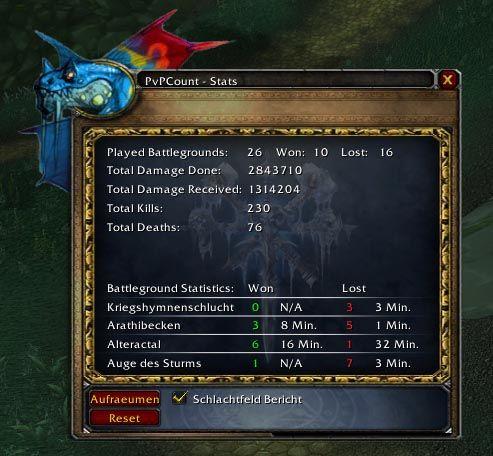
PvPCount is a small addon what counts all the enemies you killed (PvE as well as PvP).

It also shows how much damage you did and received from the enemy.

It counts all the wins and loses on battlegrounds so you can say how many BGs you have lost or won the last days ...

I just wrote that addon for me personally, but someone might find it usefull.

Console Command: /pvpcount or /pc
Stats Window: /pc stats

--- Still in Developement: BETA Version - Please report Bugs and Whishes =)

BTW: I speak english and german =)

---------------------------------------------------------------------------------------
HowTo Install

Please use if possible the CURSE Client to install it.

NOTE: As for version 0.4.2 Step 1 is not needed any more, because the zip file now contains that folder "PvPCount" - Just extract the file into your Addons Folder

1.) If you want to do it by hand, just go to your World Of Warcarfat\Interface\Addons Folder and create a new folder called "PvPCount" (case sensitive)

2.) Next extract the ZIP File into that folder.

3.) In WoW go to your character screen (before you enter the world) and click the "Addons"-Button on the bottom right. Make sure, PvPCount is activated.

4.) In Game you can list all options by typing /pc or /pvpcount into the chat. I'm sorry, but a MiniMap-Button will follow =)

The important command is:

/pc stats - opens a window with stats
  Optional Files - PvPCount
Sorry, there are currently no optional files available.
  Comments - PvPCount
Post A Reply Comment Options
Old 11-12-2009, 09:04 AM  
BJRubino
A Defias Bandit

Forum posts: 3
File comments: 44
Uploads: 0
English Only & Updates?

Grim,

Not sure if you figured it out, but to get English only, just delete the file "Locale-deDE.lua" in the PvPCount folder.

Also, are there any updates for this mod? Seems to be working fine so far, but just curious if this is still being maintained.

Thanks,
BJR
BJRubino is offline Report comment to moderator   Edit/Delete Message Reply With Quote
Old 09-04-2008, 04:08 PM  
GrissomXIX
A Chromatic Dragonspawn
 
GrissomXIX's Avatar

Forum posts: 180
File comments: 24
Uploads: 0
Nice Addon

So far so good, however I would ask that you try to separate the German from the English on English only clients as most of the information shown with "/pc" is in German. Same with the "/pc stats" frame, the information at the bottom is in German along with the top button.

Also when I disable announcements after they're enabled, they keep going and it's not tracking the BGs I play.

Quote:
Originally Posted by My Chat Window
[03:02] PvPCount: Counts all your PvP Kills, stats and more
[03:02] Usage: /pc {announce | cleanup | consolestats | reset | show | showInChat | showsmall | stats | profile | standby | about}
[03:02] - announce: [On] Schreibt nach dem BG einen kurzen Bericht in den Schlachtfeld-Chat
[03:02] - cleanup: L?t nicht ben?te Datens?e
[03:02] - consolestats: Zeigt die Statistik im Chatfenster
[03:02] - reset: Loescht die PvPCount Datenbank
[03:02] - show: Zeigt das PvPCount Fenster
[03:02] - showInChat: [On] Zeigt im Chat Statistik
[03:02] - showsmall: [On] Kleines verschiebbares Fenster mit Siege/Tode Informationen
[03:02] - stats: Zeigt die Statistik
[03:02] - profile: [Default] Set profile for this addon.
[03:02] - standby: [Active] Suspend/resume this addon.
[03:02] - about: Show information about the addon.
__________________
"Only one is a wanderer, two together are always going somewhere." - Alfred Hitchock [Vertigo]

Last edited by GrissomXIX : 09-04-2008 at 04:48 PM.
GrissomXIX is offline Report comment to moderator   Edit/Delete Message Reply With Quote
Post A Reply


Category Jump:


The Network:
EQInterface | EQ2Interface | LoTROInterface | MMOInterface | War.MMOUI | WoWInterface | VGInterface | Allakhazam | Thottbot | Wowhead | Zam


©2009 MMOUI / ZAM Network
vBulletin - Copyright ©2000 - 2010, Jelsoft Enterprises Ltd.