Addon Info.
Change Log
Optional Files (0)
Archived (14)
Comments (146)
Addon Information
Works with WoTLK
Download Latest Version.
To add favorites please register for a free account. If you already have one you need to login. How do I install this? (FAQ)
Recompense's Portal Bug Reports Feature Requests
Author:
Version:
1.1
Date:
11-15-2008 07:37 AM
Size:
74.67 Kb
Downloads:
6,563
Favorites:
186
MD5:
Pictures
Click to enlarge
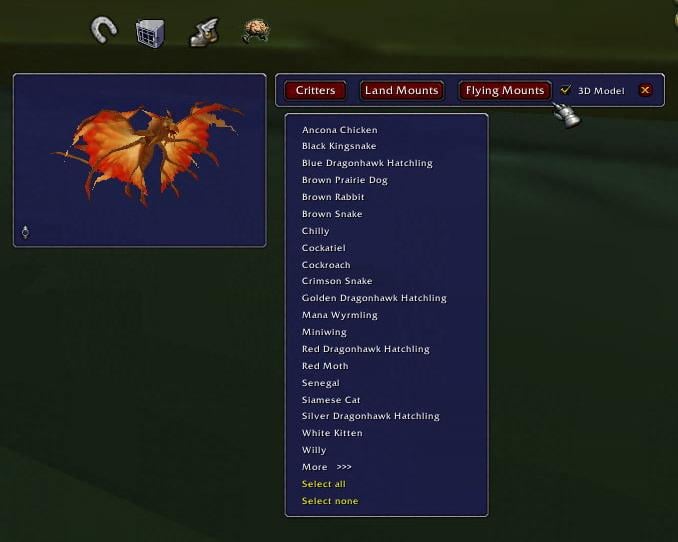
Main menu bar, 3D model viewer, critters dropdown list, and the Livestock Buttons
Livestock   Updated this week!   Popular!
Livestock: For all your companion needs
Now that your pets and mounts don't take up space in your bags, Livestock lets you manage them intelligently. This addon sorts your companions into land mounts, flying mounts, and vanity pets. Then, with the push of a button, you can randomly summon any of the three, or designate a favorite pet to have out on command. You can also have Livestock always keep a pet by your side, and have it dismiss your vanity pet when you are in PVP battle and it would give away your position.

You can even tell Livestock to put you on a random land or flying mount depending on whether the area you're in lets you fly or not.
You can summon critters, land mounts, and flying mounts in various ways - see below for details.
Planned Updates and Localization Help:
Because I am getting lots of suggestions and a few bug reports from users, I have a section of the FAQ devoted to seeing what's in store for the next version. If you're wondering if I'm working on something, that is the place to check. I will try to keep it as up-to-date as possible!

Livestock currently only completely works for the enUS, deDE and frFR clients. If you are on another client, Livestock will work but will show all English strings. However, it will classify all your mounts as land mounts and slow mounts - defeating much of the purpose of using the addon. If you are willing to help localize the addon for your language, please let me know - you'd only need to provide some simple translations and I'd do the rest.
Slash Commands:
  • Use "/livestock" to bring up the main menu bar.
  • Use "/livestock reset" to move the four Livestock Buttons (described below) back to their default positions.
  • Use "/livestock scale <scale>" to change the size of the Livestock Buttons (described below). They will be reset to the lower center of the screen and resized. If you use scales larger than 1.5, the buttons might be pushed off the screen by the rescaling before you can move them manually. You have been warned.
  • Use "/livestock redo" to force Livestock to reset and rewrite your menus. This is helpful if you are seeing nothing in your menus at all, or you learned a new mount and it's not showing up correctly. It should restore your menus with all visible mounts checked and remind you to go through and uncheck any you don't want to include.
Livestock Options and Preferences:
You can find the options for Livestock in the Addons tab of the Blizzard Interface options menu. The "Livestock" tab has the major options, while the "Livestock Preferences" tab has tweaks to customize Livestock's behavior. You can read more about the preferences in the FAQ.
Building Your Summon Checklists
Before you randomly summon a vanity pet (critter) or mount, you must build its checklist first. If you try to use Livestock to randomly summon an animal before you do this, it will prompt you to build the checklists.
Open the Livestock menu bar and click one of the three buttons to open a list of the critters, land mounts, and flying mounts you can summon. You will notice that your slow and epic mounts appear in your mount menus. If you wish to hide slow mounts, you can do so by accessing the Filter Options in the Livestock Options frame.
As you move your mouse over the animals in the menus, you will see them appear in the 3D model window if you've enabled it in the main menu. (The slider at the bottom of the viewer controls how fast your animal rotates so you can view it from all angles. Excessive rotation speed may result in animal complaints.)
Select the animals you want for each checklist by clicking on them individually or by clicking "Select / Unselect All" at the bottom. If you are in the vanity pets menu, you can designate a favorite pet by right-clicking it.
Random Summons
Once you've made your checklist, you can summon your pets and mounts randomly through unique Livestock buttons, keybinds, or macros (action buttons).
Livestock Keybinds: Open the WoW keybinding menu and assign keybinds to the various functions you want. You can assign keybinds to random pets, random mounts, dismiss whichever pet you have out, or summon your random pet.
Livestock Buttons: In the options menu, choose which buttons you would like to show/hide in the first set of options. The critter button resembles a pet carrier, the land mount a horseshoe, the flying mount a winged boot, and smart mounting (described below) a running brain. These can be placed anywhere on the screen, can be scaled with /livestock scale <scale>, and can be reset to the center with /livestock reset. To move them, hold down Ctrl, Alt, or Shift and drag the button to its desired location.
For the Critter button, you can summon a guaranteed different pet by left-clicking, or dismiss your current critter by right-clicking. You can summon your favorite pet by holding down Alt, Shift, or Ctrl and clicking the button.
Livestock Macros: Make sure your macro window is closed first! Open the options menu and click any of the three top macro buttons to create a macro that will summon a random animal. These macros will go in your individual character macros and can be placed on your action bars. The bottom macro button creates a smart mount macro (explained below).
For the Critter macro, you can summon a guaranteed different critter by left-clicking, or dismiss your current critter by right-clicking.

To have a macro that summons your favorite pet, you can use "/run Livestock.SummonFavoritePet()" in a macro of your choosing.
Smart Mounting
The most sophisticated part of Livestock is its "Smart Mount" feature. When you activate Smart Mounting through macro, button, or keybind, the addon checks to see where you are, if you're in combat or not, and what class you are. It then mounts you up using the following logic:
  • If you're in combat, then it does nothing unless you're a druid or a shaman. If you are, it toggles Travel Form or Ghost Wolf, respectively.
  • If you're already on a land mount, then you will dismount. If you're already on a flying mount, then you will only dismount if the flying mount is on the ground (unless you've told Livestock otherwise in the preferences). If you're in the air, nothing happens.
  • If you're not in combat, the addon puts you on a land or flying mount based on where you are and if you've learned Cold Weather Flying:
  • Azeroth - summons a random land mount.
  • Outlands - summons a random flying mount, unless you have no flying mounts. Then it summons a random land mount.
  • Northrend - summons a random land mount, unless you have Cold Weather Flying. Then, it summons a random flying mount. In Wintergrasp, you will be restricted to summoning land mounts. In Dalaran, you can only summon land mounts unless you're in the Sewer Exit Pipe or Krasus' Landing. In those two areas only, you can summon a flying mount.
  • If you're a druid, you have the option to incorporate Swift Flight Form and Flight Form into Smart Mounting. You can toggle this option with "/livestock druid" or by checking the appopriate box in the Livestock Options panel. If you do include Flight Forms, then whenever you are in a flying area (including Northrend but only with Cold Weather Flying), Livestock will use Swift Flight Form as top priority, then epic flying mounts, then (normal) Flight Form, then slow flying mounts.
Druids will also use Aquatic Form when they are swimming with Smart Mounting.
Bug Reports and Feature Requests
If you find unexpected behavior in Livestock, especially in locales other than enUS, please check the FAQ first to see if it has been addressed and if there is a possible fix.
Please report any bugs you find with Livestock -- or feature requests you'd like to see -- using the "Report Bugs" or "Feature Request" button underneath the Download button, up and to the right. I appreciate your feedback and support.
If you are reporting a bug, the following information is helpful: Any error messages that you saw, where you were (if you can give coordinates, that's excellent), what you were trying to do, what your menus looked like, and what class you play.
Thanks!
Well-deserved credit goes to the following people:
  • Khanthal (Uldum), for the original idea and being our MT so often!
  • A BIG thank you to Sbo (UI and Macros forum, Live) who helped me figure out what was the issue with Dalaran and Wintergrasp as well as suggesting the way to get around it.
  • Grimgear (UI and Macros forum, Live) for helping troubleshoot a bug, pointing me to keybindings, and suggesting rotation speed. Also for pointing out how best to adjust my GUI to compensate for localization.
  • Lunessa (UI and Macros forum, Live) for pointing me to Blizzard's instructions on creating panels in the Interface menu.
  • Xelron (UI and Macros forum, Live) for helping construct debug messages to get more information and indirectly convincing me to make my own dropdowns.
  • Ro (UI and Macros forum, Beta) for the 3D model viewer idea. Ro also originally suggested making my own custom dropdowns, which I thought was beyond me!
  • Elloria and Tgulics (WoWInterface) for helping spread the word and test the addon in its early stages and for suggesting highlighting the buttons when they're clicked.
  • The MVPs (UI and Macros forum) for providing the resources needed to accomplish this one as well as stepping in and answering my questions from time to time. Special thanks to Alestane and Iriel for helping me with secure handlers.
  • kdkunde (WoWInterface) for helping translate this mod into German so far!
  • Vastilia (WoWInterface) and Yorgl (Curse) for helping translate into French!
  • Certainly not least, Brenkite (Uldum) for being my personal troubleshooter and moral support.
  Change Log - Livestock
Version 1.1:

- Livestock is now free software under the Gnu GPLv3. This mainly means you are free to modify it as you like without needing to ask my permission. You may also distribute any modified versions as you see fit, provided that you release your versions under the Gnu GPLv3 as well. For further details, see the gpl.txt file.
- Smart Mounting functionality should be restored in Northrend - i.e. using Smart Mounting when you don't have Cold Weather Flying should summon a land mount. I haven't gotten a level 77 character to test it yet, but the code is taken from an earlier version which worked fine in the Beta. Long story short: I think it should be fine; if it's not, please let me know.
- Livestock should no longer "automatically" summon a vanity pet under the following conditions: when you are channeling a spell, when you are eating or drinking, or when you have Stealth / Prowl / Shadowmeld / Vanish / Invisiblity on.
- Added a new preference option for Shamans to have Smart Mounting cast Water Walking when underwater.
- Added a new preference option to disable "automatic" pet summoning whenever you are flagged for PVP.
- Double-clicking a pet or mount in the Livestock dropdown menus will summon that pet or mount. (Unless you're a druid in a shapeshift form and you try to get on a mount.)

Version 1.0.7a:

- Small code tweak: v1.0.7 had a bug where if you didn't have the checkbox checked for automatically summoning a pet, you'd still summon a pet until you checked and unchecked the box. This was because of a change in the automatic-summoning code from v1.0.6.5 to v1.0.7 but is now fixed.
- Fixed an error that was causing some night elves to not have access to the option for dismissing a pet when you enter Stealth, which includes Shadowmeld. All night elves, regardless of class, should now have access to this option.
- Fixed an issue where characters without pets would get spammed to select a pet to summon even if they had the "automatically summon" option unchecked.
- Livestock now lets you designate a favorite pet. You indicate the pet by right-clicking it in the dropdown menu, and can then summon it with a separate keybind or by ALT-, CTRL-, or SHIFT-clicking the Livestock critters button. See the macro section for how to make a macro to access the favorite button.
- Added a suboption for "summon a pet on moving" that lets you instead summon your favorite pet when you move.
- Added a suboption for "dismiss a pet when you stealth" that restricts your dismissing a pet to only occur when you are PVP flagged. If for some reason you notice that your pet is NOT dismissing when you stealth and are flagged, please submit a bug report that lets me know your class, race, what spell you were using (Stealth, Prowl, Vanish, FD, Invis, or Shadowmeld), and how you became flagged (Arena, Battleground, typed /pvp, on a PVP server in a contested/hostile zone, you weren't flagged and you attacked someone who was, etc.)
- When you are on the Shattered Sun daily quest "Blast the Gateway" you should no longer see a random pet / favorite pet replace the 'Living Flare' companion if you have an automatic summon option checked. Your random pet / favorite pet summoning should resume when your Living Flare successfully destroys the gateway. This fix is currently only localized for the enUS client.

Version 1.0.6.5:

- Minor change to the code to adjust for the fact that the tooltip parser was not reading non-English tooltips appropriately. (Thanks, Vastilia at WoWInterface!)
- Change log up to this version removed from hosting site and included in the .zip file instead.
  Optional Files - Livestock
Sorry, there are currently no optional files available.
  Archived Versions - Livestock
File Name
Version
Size
Author
Date
1.0.7a
59kB
Recompense
11-01-2008 08:17 AM
1.0.6.5
58kB
Recompense
10-30-2008 04:57 AM
1.0.6.4
54kB
Recompense
10-29-2008 01:24 PM
1.0.6.3
52kB
Recompense
10-27-2008 02:09 AM
1.0.6.2
52kB
Recompense
10-24-2008 11:17 PM
1.0.6.1
51kB
Recompense
10-24-2008 01:27 AM
1.0.5.3
51kB
Recompense
10-22-2008 03:27 AM
1.0.5.2
51kB
Recompense
10-20-2008 07:16 PM
1.0.5
51kB
Recompense
10-20-2008 05:31 AM
1.0.4
49kB
Recompense
10-17-2008 08:06 AM
1.0.3
48kB
Recompense
10-16-2008 02:04 AM
1.0.2
47kB
Recompense
10-14-2008 09:41 PM
1.0.1
47kB
Recompense
10-14-2008 07:44 PM
1.0
47kB
Recompense
10-12-2008 09:17 AM
  Comments - Livestock
Post A Reply
Author Comments Comment Options
Old 11-17-2008, 09:43 PM  
Phanx
A Flamescale Wyrmkin
 
Phanx's Avatar
Interface Author - Click to view interfaces

Forum posts: 113
File comments: 405
Uploads: 15
With regard to the paladin issue, you could do it in reverse -- whenever the player activates Crusader Aura, assume they want to mount, and set an OnUpdate handler to summon their mount once the GCD finishes.

Anyway, what I actually came to post is that Livestock's smart mounting doesn't work consistently for my shaman in Northrend. I'm 72, so no Cold Weather Flying yet. My ground mounts show up just fine in Livestock's GUI ("/livestock"). However, it frequently gets "stuck" and won't summon a ground mount, just cast Ghost Wolf.

I ordinarily use a lengthy custom macro, but when the issue occurs, it is not resolved by using just:
/click LivestockComboButton

I'd actually prefer that Livestock never cast Ghost Wolf. My custom mounting macro handles Ghost Wolf separately, as I want to be able to cast it out of combat with a modifier key. Same goes for druid forms -- while you already provide options to disable casting certain forms, I'd rather just have a blanket "no forms" option.
Phanx is offline Report comment to moderator   Edit/Delete Message Reply With Quote
Old 11-15-2008, 01:43 PM  
Recompense
A Murloc Raider
 
Recompense's Avatar
Interface Author - Click to view interfaces

Forum posts: 4
File comments: 72
Uploads: 9
Quote:
Originally posted by WitchKing
I'm not sure if this is feasible or not, but would it be possible to have paladin's Crusader Aura toggled automatically when mounting? I've tried playing with the macros a bit to see if I could just add a line to cast Crusader Aura, but that doesn't work with the Global Cooldown.

Any ideas?
Unfortunately, no - the GCD prevents using a mount and getting the aura on at the same time. I can't think of any way around this at the moment, but I will see if there's any way I can gimmick it in.
Recompense is offline Report comment to moderator   Edit/Delete Message Reply With Quote
Old 11-15-2008, 01:28 PM  
WitchKing
A Kobold Labourer
 
WitchKing's Avatar

Forum posts: 0
File comments: 7
Uploads: 0
I'm not sure if this is feasible or not, but would it be possible to have paladin's Crusader Aura toggled automatically when mounting? I've tried playing with the macros a bit to see if I could just add a line to cast Crusader Aura, but that doesn't work with the Global Cooldown.

Any ideas?
WitchKing is offline Report comment to moderator   Edit/Delete Message Reply With Quote
Old 11-15-2008, 08:11 AM  
retsam3349
A Kobold Labourer

Forum posts: 0
File comments: 2
Uploads: 0
Quote:
Originally posted by Recompense
retsam3349 and txamethyst:

This is in the works for the next release of Livestock, but it's not a simple fix. I just started a new job and haven't had access to the net for a while, so I haven't been able to get much work done on an update. AND I missed the launch of WOTLK :P

For now, I regret to say that the best solution is to use land and flying mount keybinds separately. Smart mounting worked fine in the beta when I coded it for Northrend before v1.0.5, and now I have to redo that code and work it in with the changes I made since then. Sorry for the delay!
thanks for the update. No hurry. ;-)
retsam3349 is offline Report comment to moderator   Edit/Delete Message Reply With Quote
Old 11-15-2008, 02:21 AM  
Recompense
A Murloc Raider
 
Recompense's Avatar
Interface Author - Click to view interfaces

Forum posts: 4
File comments: 72
Uploads: 9
Quote:
Originally posted by retsam3349
I too have this issue in Northrend. I really love this addon and can't wait for a fix. Thanks for making this great addon and keeping it updated!
retsam3349 and txamethyst:

This is in the works for the next release of Livestock, but it's not a simple fix. I just started a new job and haven't had access to the net for a while, so I haven't been able to get much work done on an update. AND I missed the launch of WOTLK :P

For now, I regret to say that the best solution is to use land and flying mount keybinds separately. Smart mounting worked fine in the beta when I coded it for Northrend before v1.0.5, and now I have to redo that code and work it in with the changes I made since then. Sorry for the delay!
Recompense is offline Report comment to moderator   Edit/Delete Message Reply With Quote
Old 11-14-2008, 11:37 AM  
retsam3349
A Kobold Labourer

Forum posts: 0
File comments: 2
Uploads: 0
Quote:
Originally posted by txamethyst
first, i love this mod - i'm a pet/mount addict.

my problem: when trying to use smart mount in northrend it tries to give me a flying mount, which isn't possible yet. is it an addon problem or just me?
I too have this issue in Northrend. I really love this addon and can't wait for a fix. Thanks for making this great addon and keeping it updated!
retsam3349 is offline Report comment to moderator   Edit/Delete Message Reply With Quote
Old 11-13-2008, 07:54 PM  
txamethyst
Premium Member
 
txamethyst's Avatar
Premium Member

Forum posts: 13
File comments: 23
Uploads: 0
first, i love this mod - i'm a pet/mount addict.

my problem: when trying to use smart mount in northrend it tries to give me a flying mount, which isn't possible yet. is it an addon problem or just me?
txamethyst is offline Report comment to moderator   Edit/Delete Message Reply With Quote
Old 11-04-2008, 08:03 PM  
Movarrin
A Deviate Faerie Dragon

Forum posts: 12
File comments: 61
Uploads: 0
As I understand the change in mechanics sometime around 2.0, when you take an action, it takes place immediately on your client, and you see, but the server may not actually receive it at that time. Which is why you sometimes think you stealthed, but then you're not stealthed. Same thing here. The client showed me stealthed, but the server didn't know it yet. The addon queried the server and got the non-updated state of my toon and so summoned the pet.
Movarrin is offline Report comment to moderator   Edit/Delete Message Reply With Quote
Old 11-04-2008, 02:17 PM  
Recompense
A Murloc Raider
 
Recompense's Avatar
Interface Author - Click to view interfaces

Forum posts: 4
File comments: 72
Uploads: 9
Quote:
Originally posted by Movarrin
I tested the new "not while flagged" option and ran into one issue.

I was on my broom and riding into Dun Baldar. I hit my stealth key during a sharp turn and all of a sudden I was unstealthed with a pet out.

Not sure how or why it happened. Maybe because I dismounted by stealthing? I don't know. But I did get stuck unstealthed with my cooldown wasted and hoping no one shot me for another 10 seconds.

After that I was forced to turn off the Automatically summon. Maybe that's where the "not while flagged option" should be? Don't even summon a pet while I'm flagged?

Maybe we can get like a ctrl_click on the critter button option to turn off the auto-summon of critter and ctrl_click to re-enable it?

Just thinking out loud so my critters don't get me killed.
I noticed this issue, Movarrin - from what I can tell, it has to do with too many things happening at once. There's a very small period of time after you hit Stealth (tested on my rogue) during which the game doesn't know that you're Stealthed. You have the buff and your bars change, but without getting technical, when Livestock asks "Are you stealthed?", the game responds "Nope!" I've found that I can replicate this if I mount up, jump, stealth in the air, and before I land start using the mouse buttons to control my direction for when I land. Many times if I time it right, I'll get behavior like yours but haven't figured out how to prevent it programatically.

In that small small window of time, if you use a movement key, you'll drop the stealth buff and summon a pet, which is kinda why I was reluctant to put in an "always have a pet up" option anyway.

I am going to see about changing the flag to restrict summoning with a PVP flag instead of dismissing, as you suggested. Ctrl-clicking on the critter button isn't a bad idea, but there's no way to duplicate that behavior for the keybind and macro methods of picking a pet and I want to be as consistent as possible. Thanks for the testing and continued support
Recompense is offline Report comment to moderator   Edit/Delete Message Reply With Quote
Old 11-04-2008, 10:23 AM  
Movarrin
A Deviate Faerie Dragon

Forum posts: 12
File comments: 61
Uploads: 0
I tested the new "not while flagged" option and ran into one issue.

I was on my broom and riding into Dun Baldar. I hit my stealth key during a sharp turn and all of a sudden I was unstealthed with a pet out.

Not sure how or why it happened. Maybe because I dismounted by stealthing? I don't know. But I did get stuck unstealthed with my cooldown wasted and hoping no one shot me for another 10 seconds.

After that I was forced to turn off the Automatically summon. Maybe that's where the "not while flagged option" should be? Don't even summon a pet while I'm flagged?

Maybe we can get like a ctrl_click on the critter button option to turn off the auto-summon of critter and ctrl_click to re-enable it?

Just thinking out loud so my critters don't get me killed.

Last edited by Movarrin : 11-04-2008 at 10:25 AM.
Movarrin is offline Report comment to moderator   Edit/Delete Message Reply With Quote
Old 11-02-2008, 02:58 PM  
Recompense
A Murloc Raider
 
Recompense's Avatar
Interface Author - Click to view interfaces

Forum posts: 4
File comments: 72
Uploads: 9
Quote:
Originally posted by Elloria
I don't blame you for not wanting to rework the mod to make that idea work. I still love it even if it doesnt have that :P

as far as the evocation thing goes. I will log in today and try that to make sure it works. I did NOT have a pet out and it was trying to summon the pet (like it should) so your mod was working correctly. ill let you know here shortly if that fixes it thanks!
Elloria, I was looking at the wrong info yesterday - you need UnitChannelInfo("player") not UnitCastingInfo("player")

Technically, if you're casting a spell, you're not channeling a spell, and if you're not channeling a spell, you're not casting a spell... ugh ><

So you need to check for channeling a spell - which means do everything I said before and use UnitChannelInfo("player") instead. Tested it today now that I have a chance to, and it looks fine.
Recompense is offline Report comment to moderator   Edit/Delete Message Reply With Quote
Old 11-02-2008, 12:32 PM  
Elloria
A Chromatic Dragonspawn
 
Elloria's Avatar
Interface Author - Click to view interfaces

Forum posts: 162
File comments: 231
Uploads: 20
Quote:
Originally posted by Recompense
Something's confusing me though - were you casting evocation WITH a pet out and it was trying to summon a new one? That shouldn't be happening...
I don't blame you for not wanting to rework the mod to make that idea work. I still love it even if it doesnt have that :P

as far as the evocation thing goes. I will log in today and try that to make sure it works. I did NOT have a pet out and it was trying to summon the pet (like it should) so your mod was working correctly. ill let you know here shortly if that fixes it thanks!
__________________
LOL WUT?
Elloria is offline Report comment to moderator   Edit/Delete Message Reply With Quote
Old 11-02-2008, 12:23 PM  
Recompense
A Murloc Raider
 
Recompense's Avatar
Interface Author - Click to view interfaces

Forum posts: 4
File comments: 72
Uploads: 9
Quote:
Originally posted by Twidget
Hi,
LOVE this mod!!!
Couple of suggestions I didn't see in the upcoming FAQ.
Could you add a button to the Interface/Addons control panel to bring up the pet config screen (where the 3D view is) so a person wouldn't have to type /livestock to see that screen. Right now with 2 different places to configure the mod it can get confusing.
Also, could you make it so that when we are looking at the 3D setup screen we could summon a particular pet right from there by clicking a button. Would never need to look at Blizzard's crappy pet ui again... yay!

Thanks for all your hard work!
Twidget
Hi Twidget, I'll think about these in the upcoming release but I am working on changing the layout right now, which will take a while to do. Please make a note of it through the feature request option so I can keep track of it and won't forget it!

Edit: I'm not going to adjust the menu layout - it's too complicated for me to want to do, so I will probably sneak these changes into the next version.

Last edited by Recompense : 11-02-2008 at 02:17 PM.
Recompense is offline Report comment to moderator   Edit/Delete Message Reply With Quote
Old 11-02-2008, 12:07 PM  
Twidget
A Kobold Labourer
 
Twidget's Avatar

Forum posts: 0
File comments: 84
Uploads: 0
Hi,
LOVE this mod!!!
Couple of suggestions I didn't see in the upcoming FAQ.
Could you add a button to the Interface/Addons control panel to bring up the pet config screen (where the 3D view is) so a person wouldn't have to type /livestock to see that screen. Right now with 2 different places to configure the mod it can get confusing.
Also, could you make it so that when we are looking at the 3D setup screen we could summon a particular pet right from there by clicking a button. Would never need to look at Blizzard's crappy pet ui again... yay!

Thanks for all your hard work!
Twidget
Twidget is offline Report comment to moderator   Edit/Delete Message Reply With Quote
Old 11-01-2008, 02:31 PM  
gezus
A Kobold Labourer

Forum posts: 0
File comments: 12
Uploads: 0
works like a charm .. thanx so much :P

Teh Gez
gezus is offline Report comment to moderator   Edit/Delete Message Reply With Quote
Post A Reply


Category Jump:



