| Go to Page... |

Addon for:
oUF.
oUF.
Pictures
File Info

| Compatibility: | Legion (7.0.3) |
| Updated: | 09-29-16 03:41 PM |
| Created: | unknown |
| Downloads: | 63,481 |
| Favorites: | 197 |
| MD5: | |
| Categories: | oUF: Layouts, Raid Mods, Unit Mods |
oUF Nivaya 

News
- Updated for 7.0.3.
- Only for use with oUF 1.6.9+!
- If you have any questions or feature requests, please read the FAQ at the bottom of this page first.
- Most likely coming soon: Boss Frames
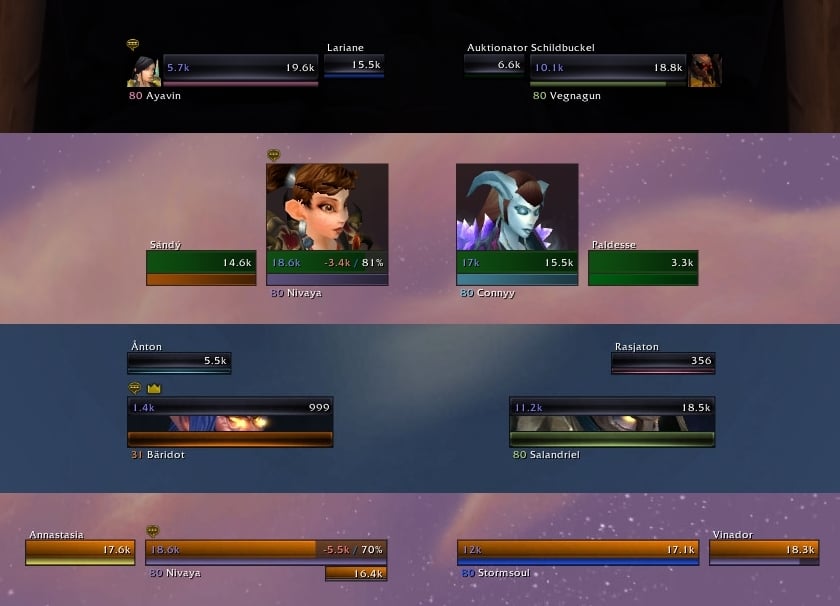
oUF_Nivaya is a unitframe addon with low memory and cpu usage. It is based on oUF by Haste, but still it offers the possibility to configure a large variety of settings ingame to adapt functionality and appearance.
So in order to use it you need the oUF core! If there happen to be any bugs or errors, feel free to report them here. However, before reporting bugs make sure you definitly have the latest release of both this layout and oUF!
Ingame Config
This Layout comes with an ingame configuration dialog, which is included as load-on-demand module accessible via "/ouf". You can change settings like frame positions and sizes, portrait settings, use of custom textures and fonts (using SharedMedia), buff / debuff position and size and alot more. Also you can toggle all my custom features and adjust settings concerning the Healer Mode.
Positioning: "Unlocking" the frames enables you to freely move the Player Frame, the Party Frame and the Raid Frames via mouse dragging. All other units stay anchored to those, however all the relative positions can be changed in the options too. By default, the target frame is automatically positioned symmetrically to the player frame as you move it. You can unlock the frames in the settings dialog or by typing "/ouf lock" or "/ouf unlock" (they both toggle).
Of course, if you don't change any source codes, you can update the layout without losing your own settings. More over this, it doesn't use significantly more memory or cpu time than other oUF layouts (currently it's about 90kb, excluding the config module).
Supported Frames
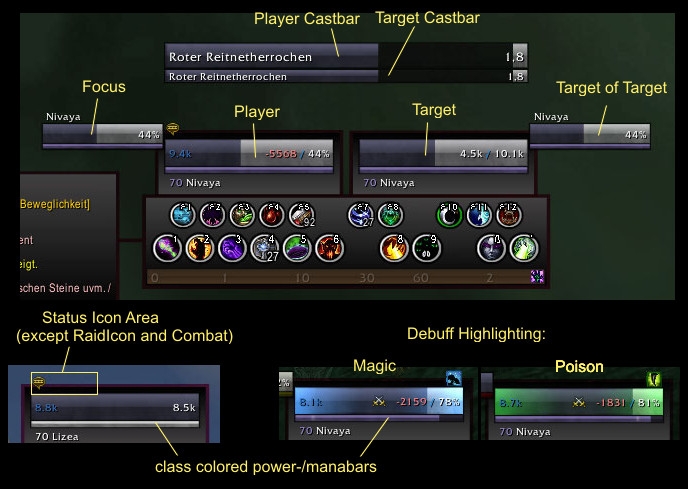
- Player, Target and Pet
- Target of Target and Focus
- Target of Target of Target and Focus Target (both optional)
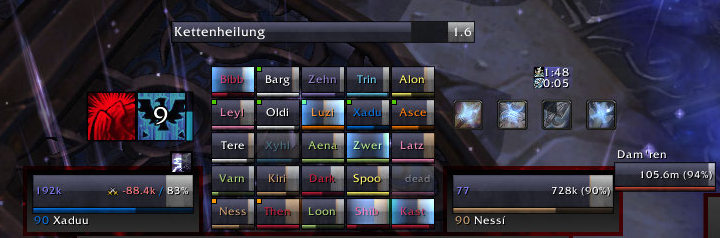
- Party and Raid (also optional, both "Grid"-like, party including player, raid up to 40 players)
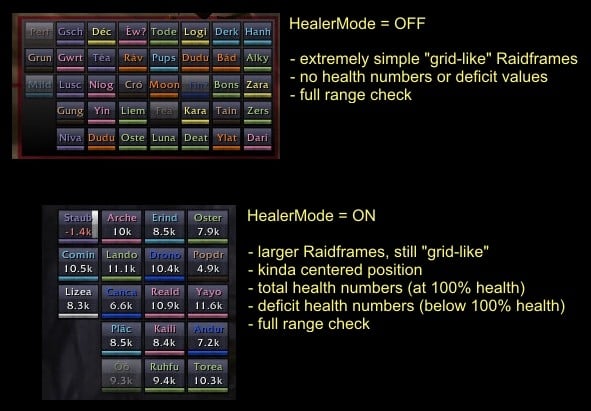
The "Healer Mode"
There are two different modes for Party-/Raidframes display. The first is a very minimalistic "grid-like" setup, containing no numbers at all. The second one has slightly larger frames and contains more information like health and deficit values. This one is supposed to be used by healers, but of course you can choose the one you prefer. Both setups are shown in the screenshots.
Also, in case you want to use both setups with different characters, I have included an option that makes the layout automatically pick the healer mode based on your character class. You can adjust this behaviour in the configuration dialog ("/ouf"). More over this, the layout is able to remember different positions and raidframe settings for both modes.
More Features
- Castbar support for player, target, target of target and focus (can be disabled)
- Built-in aggro coloring
- Built-in heal prediction
- Fancy debuff highlighting (A debuff filter is enabled by default, so you will only see highlighting for debuffs you can cure).
- Options to automatically color health- and/or manabars by class or mobtype.
- Adjustable colors, textures, fonts, positions and sizes for most frames and elements.
Supported oUF Modules
- oUF_PowerSpark
- oUF_Smooth
- oUF_TotemBar
- oUF_Experience
- oUF_Reputation
- oUF_GCD (Make sure to set a reference spell as described here, otherwise it won't work. I can't do that for you since those spell names are localized.)
FAQ
Here I'll answer all those questions which become a little bit annoying when I have to answer them a gazillion times in the comments.

Q: "I want my raid groups to grow from left to right instead of right to left / from top to bottom instead of bottom to top."
A: Open the config module and go to the raidframes page. There you'll find an option called "Spacing between raidgroups". For this value, positive values make the raidgroups grow from left to right (bottom to top), negative values make them grow from right to left (top to bottom).
Q: "I have a SharedMedia Addon with additional fonts/textures/whatever and I can't pick them from your config or they are not saved on relog/reloadui."
A: The problem here is, that these addons must be loaded before the layout, or else their stuff won't be recognized. This is usually achieved by adding the addon in question to the OptionalDeps in the .toc files of the layout and its config module. You can do that yourself or if you want it to be permanently added, tell me.
Q: "I'd like to edit the text tags on my unit frames (health, mana, etc)."
A: Currently you cannot change them ingame, but there are tag functions for HP, power, names, levels, classification and status information. You can find them in "tags.lua".
Q: "Can you add buff/debuff/hot/dot indicators to the raidframes?"
A: Very unlikely.
Q: "Can you add [insert random big feature]? I miss it from Pitbull/Grid."
A: My layout is not meant to be a replacement for Pitbull or Grid. It is meant to be lightweight without denying you the possibility to adjust the basic appearance and functionality. I am currently very satisfied with the features and I probably won't add more biggies. However, as long as I play WoW, I will keep it updated and working. Of course, you may always ask for easy-to-add improvements. But I really don't have much time currently, so you should prepare to wait a little bit before it will be done.
Credits
Credits go to Seiyu and his layout "oUF_Pazrael", since I used that as a template for my layout and learned alot about LUA by improving it further and further.
r65
- fixed role icon display.
r64
- updated for 7.0.3, make sure to also update the oUF core to 1.6.9+!
r63
- replaced role icons with role indicators in the form of little dots in the upper left corner for each group unit frame.
- role assignment indicators are now also visible in raidgroups.
- added option to hide health text / health deficit text in healer mode.
- fixed color update bug in config module.
r62
- player frame position (and all derived frame positions) are now saved separately for healer mode and normal mode.
- cast bar position is now saved separately for healer mode and normal mode.
r61
- bug fix release for MoP 5.3.
- updated to work with oUF 1.6.5.
- disabled alternative ressource displays (soul shards, holy power, runes, totem bar), because getting them to work again takes more time. use other addons for that instead.
r60
- Added support for oUF_Swing (anchored to player castbar).
- Fixed unit names not updating correctly in raids and battlegrounds (requires oUF 1.5.5+).
- Fixed config error on updating unit name positions.
- Fixed dungeon role icon postions (didn't differentiate between healermode and non-healermode).
r59
- Added an option to display all debuffs, not only your own.
- Fixed classification tag.
- Removed support for oUF_RuneBar and replaced it with the rune bars from oUF.
- New position for rune bars and totem bars, similar to HolyPower and SoulShards.
- Added option to change the position of rune bars and totem bars (positions tab).
r58
- Added .frequentUpdates to health tags (global) and power tags (player only).
- Updated CanDispel table to reflect changes made in WoW 4.0.
- LFDrole icons positions now correctly complies with the vertical groups setting.
- Fixed LFDrole icons not correctly updating.
- Clicking on the LDB icon will open the config again.
- More tag conversions (names, levels, classification).
r56
- Fixed a bug causing an error message when changing textures.
r55
- Fixed clicks going into void on party/raidframes.
- First go on tags (HP/power/status of all units).
- Blizzards Raidframes will be completely hidden now (including the manager).
r53
- Improved position and size of SoulShards and HolyPower.
- Added option to change the position of SoulShards and HolyPower (positions tab).
- Fixed errors with oUF_Experience and oUF_Reputation.
- Added mouseover show/hide for oUF_Experience and oUF_Reputation (again).
r52
- Fixed bug that prevented all frames from showing up with oUF 1.5.1+.
- No more packaged oUF. Get the release version!
r50/51
- Only works with WoW 4.0.1+!
- Included oUF 1.5 beta in the .zip until it will be released.
- Added option to change maximum heal prediction overflow.
- Added option to limit maximum number of visible raid groups.
- Added HolyPower display (Paladin).
- Added SoulShards display (Warlock).
- Added support for the new HealPrediction element in oUF.
- Added option to toggle HealPrediction.
- Removed oUF_HealComm4 support (done by HealPrediction).
r48
- Added option to display combo points as text value.
- Fixed TotemBar position (Shaman).
- Fixed RuneBar position (Deathknight).
- Fixed Castbar display problems for ToT and focus frames.
- fixed role icon display.
r64
- updated for 7.0.3, make sure to also update the oUF core to 1.6.9+!
r63
- replaced role icons with role indicators in the form of little dots in the upper left corner for each group unit frame.
- role assignment indicators are now also visible in raidgroups.
- added option to hide health text / health deficit text in healer mode.
- fixed color update bug in config module.
r62
- player frame position (and all derived frame positions) are now saved separately for healer mode and normal mode.
- cast bar position is now saved separately for healer mode and normal mode.
r61
- bug fix release for MoP 5.3.
- updated to work with oUF 1.6.5.
- disabled alternative ressource displays (soul shards, holy power, runes, totem bar), because getting them to work again takes more time. use other addons for that instead.
r60
- Added support for oUF_Swing (anchored to player castbar).
- Fixed unit names not updating correctly in raids and battlegrounds (requires oUF 1.5.5+).
- Fixed config error on updating unit name positions.
- Fixed dungeon role icon postions (didn't differentiate between healermode and non-healermode).
r59
- Added an option to display all debuffs, not only your own.
- Fixed classification tag.
- Removed support for oUF_RuneBar and replaced it with the rune bars from oUF.
- New position for rune bars and totem bars, similar to HolyPower and SoulShards.
- Added option to change the position of rune bars and totem bars (positions tab).
r58
- Added .frequentUpdates to health tags (global) and power tags (player only).
- Updated CanDispel table to reflect changes made in WoW 4.0.
- LFDrole icons positions now correctly complies with the vertical groups setting.
- Fixed LFDrole icons not correctly updating.
- Clicking on the LDB icon will open the config again.
- More tag conversions (names, levels, classification).
r56
- Fixed a bug causing an error message when changing textures.
r55
- Fixed clicks going into void on party/raidframes.
- First go on tags (HP/power/status of all units).
- Blizzards Raidframes will be completely hidden now (including the manager).
r53
- Improved position and size of SoulShards and HolyPower.
- Added option to change the position of SoulShards and HolyPower (positions tab).
- Fixed errors with oUF_Experience and oUF_Reputation.
- Added mouseover show/hide for oUF_Experience and oUF_Reputation (again).
r52
- Fixed bug that prevented all frames from showing up with oUF 1.5.1+.
- No more packaged oUF. Get the release version!
r50/51
- Only works with WoW 4.0.1+!
- Included oUF 1.5 beta in the .zip until it will be released.
- Added option to change maximum heal prediction overflow.
- Added option to limit maximum number of visible raid groups.
- Added HolyPower display (Paladin).
- Added SoulShards display (Warlock).
- Added support for the new HealPrediction element in oUF.
- Added option to toggle HealPrediction.
- Removed oUF_HealComm4 support (done by HealPrediction).
r48
- Added option to display combo points as text value.
- Fixed TotemBar position (Shaman).
- Fixed RuneBar position (Deathknight).
- Fixed Castbar display problems for ToT and focus frames.
 |
Comment Options |
 04-09-17, 11:37 AM
|
|
|
A Defias Bandit

Forum posts: 1
File comments: 12
Uploads: 0
|
PLEASE UDATE
I hope this gets updated soon...I love it.It works but has some errors..Why is that no oUF Layouts getting updated? It looks like the only unit frame adons that are use way too much memory!! That is very sad....I do want to ask if there is any way to change the font and bar style in this one..I have tried to use shared media but it does not work..
|

|

|
| osiris093 |
| View Public Profile |
| Send a private message to osiris093 |
| Find More Posts by osiris093 |
| Add osiris093 to Your Buddy List |
|
01-01-17, 01:45 PM
|
|
|
A Kobold Labourer
Forum posts: 0
File comments: 4
Uploads: 0
|
Update?
It's been awhile since this addon was last updated, I hope it's not dead. I've received a few errors nothing game breaking but still keeps propping up.
Code:
30x [ADDON_ACTION_BLOCKED] AddOn 'oUF_Nivaya' tried to call the protected function 'CompactRaidFrameManager:Hide()'. !BugGrabber\BugGrabber.lua:573: in function <!BugGrabber\BugGrabber.lua:573> [C]: in function `Hide' oUF_Nivaya\init_and_config.lua:436: in function <oUF_Nivaya\init_and_config.lua:422> Locals: |
|
|
|
| madhatter79 |
| View Public Profile |
| Send a private message to madhatter79 |
| Find More Posts by madhatter79 |
| Add madhatter79 to Your Buddy List |
|
10-12-16, 11:46 AM
|
|
|
A Deviate Faerie Dragon

Forum posts: 12
File comments: 34
Uploads: 0
|
Hi, I like nivBuffs very much
Can you fix it?  |
|
|
|
| cbdgv |
| View Public Profile |
| Send a private message to cbdgv |
| Find More Posts by cbdgv |
| Add cbdgv to Your Buddy List |
|
07-26-16, 05:10 PM
|
|
|
A Murloc Raider
Forum posts: 4
File comments: 29
Uploads: 0
|
Any chance we can get an update on this layout have been playing for years with it, love it, but now it's bugging out on me
 |
|
|
|
| Cholerabob |
| View Public Profile |
| Send a private message to Cholerabob |
| Find More Posts by Cholerabob |
| Add Cholerabob to Your Buddy List |
|
02-02-16, 11:43 AM
|
||
|
A Kobold Labourer
Forum posts: 0
File comments: 3
Uploads: 1
|
Re: Remove timer on buffs/debuffs
if u leave in game setting the number on your action bar they remove the timer on buff/debuff then u can install omnicc
Last edited by haru85 : 02-02-16 at 01:31 PM.
|
|
|
|
|
| haru85 |
| View Public Profile |
| Send a private message to haru85 |
| Find More Posts by haru85 |
| Add haru85 to Your Buddy List |
|
04-10-15, 08:02 AM
|
|
|
A Kobold Labourer
Forum posts: 0
File comments: 1
Uploads: 0
|
Remove timer on buffs/debuffs
anyone knows how can I remove the timer on buffs/debuffs?
Really appreciate it. |
|
|
|
| SaSoDuEs |
| View Public Profile |
| Send a private message to SaSoDuEs |
| Find More Posts by SaSoDuEs |
| Add SaSoDuEs to Your Buddy List |
|
10-21-14, 04:25 AM
|
|||
|
A Kobold Labourer

Forum posts: 0
File comments: 1
Uploads: 0
|
 I would really appreciate an update for 6.0.2.. my UI just doesn't feel the same anymore I would really appreciate an update for 6.0.2.. my UI just doesn't feel the same anymore |
||
|
|
|
| Valkyrieqt |
| View Public Profile |
| Send a private message to Valkyrieqt |
| Find More Posts by Valkyrieqt |
| Add Valkyrieqt to Your Buddy List |
|
10-15-14, 05:11 PM
|
||
|
A Firelord

 Forum posts: 463
File comments: 82
Uploads: 2
|
|
|
|
|
|
| JDoubleU00 |
| View Public Profile |
| Send a private message to JDoubleU00 |
| Find More Posts by JDoubleU00 |
| Add JDoubleU00 to Your Buddy List |
|
10-15-14, 04:39 PM
|
|
|
A Firelord
Forum posts: 463
File comments: 82
Uploads: 2
|
Any chance for an update for 6.0.2?
|
|
|
|
| JDoubleU00 |
| View Public Profile |
| Send a private message to JDoubleU00 |
| Find More Posts by JDoubleU00 |
| Add JDoubleU00 to Your Buddy List |
|
11-10-13, 11:10 PM
|
||
|
A Warpwood Thunder Caller
Forum posts: 94
File comments: 237
Uploads: 6
|
|
|
|
|
|
| Luzzifus |
| View Public Profile |
| Send a private message to Luzzifus |
| Find More Posts by Luzzifus |
| Add Luzzifus to Your Buddy List |
|
11-09-13, 07:25 PM
|
|
|
A Murloc Raider
Forum posts: 4
File comments: 29
Uploads: 0
|
I am going to name my first born after you Dear Sir or Mam . TY TY TY for updating this
|
|
|
|
| Cholerabob |
| View Public Profile |
| Send a private message to Cholerabob |
| Find More Posts by Cholerabob |
| Add Cholerabob to Your Buddy List |
|
10-31-13, 12:43 AM
|
|
|
A Warpwood Thunder Caller
Forum posts: 94
File comments: 237
Uploads: 6
|
If anybody knows what causes some units in the raidframes to sometimes be compressed to a single vertical line for players joining a flex or lfr raid while it is already running, please tell me! I'm trying to track that one down for weeks now but cannot find it since it's not really reproducible and only happens kinda randomly.
Thanks in advance! |
|
|
|
| Luzzifus |
| View Public Profile |
| Send a private message to Luzzifus |
| Find More Posts by Luzzifus |
| Add Luzzifus to Your Buddy List |
|
10-16-13, 10:28 PM
|
|
|
A Kobold Labourer
Forum posts: 0
File comments: 1
Uploads: 0
|
best layout
big thx for update
|
|
|
|
| borklogin |
| View Public Profile |
| Send a private message to borklogin |
| Find More Posts by borklogin |
| Add borklogin to Your Buddy List |
|
08-27-13, 10:32 AM
|
|
|
A Deviate Faerie Dragon
Forum posts: 16
File comments: 56
Uploads: 0
|
return!
This was my all-time favorite ouF layout, going to check out the new version!
|
|
|
|
| neov |
| View Public Profile |
| Send a private message to neov |
| Find More Posts by neov |
| Add neov to Your Buddy List |
|
07-18-13, 06:26 PM
|
|
|
A Kobold Labourer
Forum posts: 0
File comments: 1
Uploads: 0
|
oUF Nivaya layout won't load
Ok, I give up. Been trying to load any oUF layout with no sucsess. Below is a specific lua error I am getting for the Nivaya layout. Only thing I can think of is a conflict with another addon, but wouldn't know where to begin with figuring that out. Weird thing is that oUF Nivaya seems to be loaded in the interface page, but nothing on screen.
Date: 2013-07-18 19:17:22 ID: 1 Error occured in: Global Count: 1 Message: ..\AddOns\oUF_Nivaya\tags.lua line 104: attempt to index field 'TagEvents' (a nil value) Debug: oUF_Nivaya\tags.lua:104: in main chunk Locals: number = <function> defined @Interface\AddOns\oUF_Nivaya\init_and_config.lua:661 classification = <table> { elite = " %s+" trivial = "%s" normal = "%s" worldboss = "%s" rareelite = "%s+ Rar" rare = " %s Rar" } (*temporary) = nil (*temporary) = <function> defined @Interface\AddOns\oUF_Nivaya\tags.lua:97 (*temporary) = "attempt to index field 'TagEvents' (a nil value)" AddOns: Swatter, v4.3.1 (<%codename%>) NPCScan, v5.0.0.5 NPCScanAutoAdd, v1.5 NPCScanOverlay, v5.0.0.3 NPCScanOverlayBroker, v1.2.3 AckisRecipeList, v2.4.8 AckisRecipeListQuickScan, v5.3.0.-1.0.8 ACP, v3.4.3 Altoholic, v5.3.001 ArkInventory, v30328 ArkInventoryRules, v AskMrRobot, v1.0.9.0 Atlas, v1.25.00 AtlasArena, v1.4.02 AtlasBattlegrounds, v1.25.01 AtlasBurningCrusade, v1.25.00 AtlasCataclysm, v1.25.00 AtlasClassicWoW, v1.25.00 AtlasDungeonLocs, v1.25.00 AtlasOutdoorRaids, v1.25.00 AtlasScenarios, v1.25.01 AtlasTransportation, v1.25.01 AtlasWorldEvents, v3.04 AtlasWrathoftheLichKing, v1.25.00 AtlasLoot, vv7.06.00 AtlasLootCataclysm, vv7.06.00 AtlasLootClassicWoW, vv7.06.00 AtlasLootLoader, vv7.06.00 AtlasLootMistsofPandaria, vv7.06.00 AtlasLootSource, vv0.3 AtlasMajorCities, vv1.5.3 AtlasMajorCitiesEnhanced, vv1.01 AtlasQuest, v4.8.4 Auctionator, v3.1.4 Babylonian, v5.1.DEV.332(/embedded) BattlePetsList, v0.2.1 BlizzBuffsFacade, v5.0.4 ButtonFacade, v5.3.394 CLCDK, v5.2.2 Collectinator, v2.0.2 Configator, v5.1.DEV.344(/embedded) CookingHelper, v2.02 DataStore, v5.3.001 DataStoreAchievements, v5.3.001 DataStoreAgenda, v5.3.001 DataStoreAuctions, v5.3.001 DataStoreCharacters, v5.3.001 DataStoreContainers, v5.3.001 DataStoreCrafts, v5.3.001 DataStoreCurrencies, v5.3.001 DataStoreInventory, v5.3.001 DataStoreMails, v5.3.001 DataStorePets, v5.3.001 DataStoreQuests, v5.3.001 DataStoreReputations, v5.3.001 DataStoreSpells, v5.3.001 DataStoreStats, v5.3.001 DataStoreTalents, v5.3.001 DBMArchaeology, v DBMCore, v DBMInterrupts, v5.1.0 DBMLDB, v DBMRaidLeadTools, v DBMSpellTimers, v DominosBufftimes, v EasyiLvl, v1.4 FBTrackingFrame, v1.2m FishingBuddy, v1.2n Gatherer, v4.3.1 GatherMate2, v1.26 gFrames, v1.1 gFramesRaid, v1.1 gMedia, v2.21 GreenWall, v1.3.0 HideMiniMapButtons, v1.2 Ion, vHydrogen-6 IonMenuBar, vHydrogen-4 IonPetBar, vHydrogen-3 Masque, v5.3.394 MasqueCaith, v5.3.86 MasqueCleanUI, v5.10 MasqueDarion, v4.1.2 MasqueDarkscail, v1 MasqueDiabloIII, v1.4 MasqueElegance, v5.3.0 MasqueGears, v5.3.72 MasqueGrunge, v1 MasqueOnyx, v5.3.80 MasqueRenaitre, vv5.33 MasqueShining, v1 MasqueSleek, v5.3.0 MasqueTrinity, vCentauri-3 MinimapButtonFrame, v3.1.10b MinimapButtonFrameSkinPack, v3.0.1 NerienOvaleScripts, v5.3.5 NPCScanEx, v1.2.2 Omen, v3.1.8 OmniCC, v5.3.1 OPie, vLime 5 OPieMasque, v5.3.0.7 oUF, v1.6.5 oUFNivaya, v Ovale, v5.3.6 PetBattleTeams, vr37 3.2.5 PetTracker, v PetTrackerAlerts, v PetTrackerJournal, v PetTrackerSwitcher, v PokemonTrainer, v1.3.0 Postal, v3.5.1 Prat30, v3.5.6 Prat30HighCPUUsageModules, v Prat30Libraries, v Quartz, v3.1.3 RecipeProfit, v4.0.3 RecipeRadar, v1.430 Recount, v SexyMap, v2.4.8 Spade, v1.7 TidyPlates, v6.11.3 TidyPlatesGraphite, v TidyPlatesGrey, v TidyPlatesNeon, v TidyPlatesQuatre, v TidyPlatesHub, v TidyPlatesWidgets, v Tipsy, v$project-version$ Titan, v5.1.21.50300 TitanBag, v5.1.21.50300 TitanClock, v5.1.21.50300 TitanCurrency, v5.8 TitanDurability, v1.24 TitanGatherer, v4.0.0 TitanGold, v5.1.21.50300 TitanGP, v3.00 TitanLocation, v5.1.21.50300 TitanLootType, v5.1.21.50300 TitanMail, v5.3.0.0 TitanPerformance, v5.1.21.50300 TitanPoints, v5.1r6 TitanProfessions, v4.0.2 TitanQuests, v3.0.9 TitanRaidIds, v2.4.71 TitanRecount, v4.0.0 TitanRepair, v5.1.21.50300 TitanRoll, v TitanSocial, v5.3r23 TitanVolume, v5.1.21.50300 TitanXP, v5.1.21.50300 TomTom, vv50300-1.0.1 TradeSkillInfo, vv2.2.11 WeakAuras, v1.4.7.10 ZygorGuidesViewer, v4.0 BlizRuntimeLib_enUS v5.3.0.50300 <us> (ck=ec2) |
|
|
|
| Dantien |
| View Public Profile |
| Send a private message to Dantien |
| Find More Posts by Dantien |
| Add Dantien to Your Buddy List |
|
