About Medley
This addon allows you to further customize events in the game with sounds! By either using already built-in sound files or your own custom ones, you can add effects or notifications to make the game more enjoyable and/or helpful to you.  It is named "Medley" because it fit's the definition quite nicely: "an arrangement made from a series of melodies, often from various sources."
Medley was created using Ace3 libraries, Quixote 2.0 and is localization-ready. It also has a launcher for DataBroker!
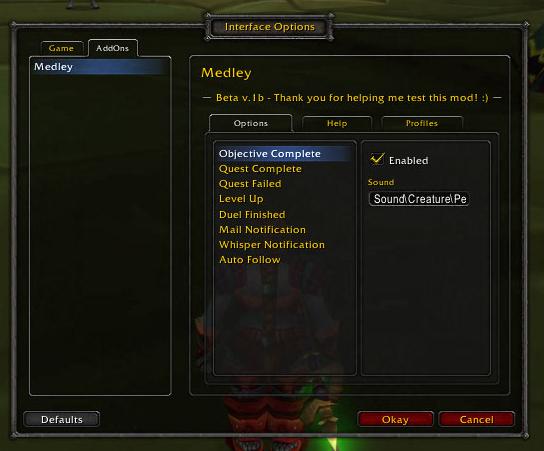
Type /medley to bring up the options or you can find it in the "AddOns" section of WoW's default Interface panel.
Current Features
- Enable/disable the different sounds
- Use built-in game sound files
- Use custom sound files
- Profiles for different configurations
Supported Events
Here is a list of the events Medley currently supports along with the default sounds:
- Quest objective completion - Peon says "Ready to work!"
- Quest full completion - Peon says "Work complete!"
- Quest failed - Orc death cry
- Level up - Lots of drums beating
- Duel finished - A crowd cheers
- Mail notification - A low pitch thump
- Whisper notification - A "wisp" noise
- Auto follow - This is the only one not customizable at this time, if enabled your character will automatically do the train emote once when first following someone.
- Achievement notification - A crowd cheers
Remember that the default sounds can be changed and you can always go back to them by resetting your profile.
I plan to
add several more as I work on the mod and I am open to suggestions on what to add next. I'd love to fit as many events as possible in here so to give everyone the freedom to customize Medley to their liking.
Possible/suggested sounds to add:- New title earned notification
- Aggro alert
- Minimap pinged
- Ready check (would be enhanced)
- Guild MOTD change notification
- Guild kick/demote/promote/gquit/join notifications
- Guildmate sign on/off
- Friend sign on/off
- Hunter pet happiness/loyalty change
- Hunter pet level up
- Health/mana low warning
- Durability low warning
- Rogue combo points at max (5)
- Reputation level up
I'm just listing these out quickly at the moment, they may or may not end up being possible once I do more research into the events/API. Keep the suggestions coming though!
NOTE: These customizations do NOT REPLACE current game sounds, but play along with them. If you are using another mod that adds sounds to events, you may want to disable those specific sounds in Medley or in the other mod to avoid having them all play at the same time.
How to...
Use In-Game Sounds
To use a sound file that is built-in to the game, browse these two lists:
http://www.wowwiki.com/API_PlaySoundFile_SoundList
http://www.wowwiki.com/API_PlaySoundFile_SoundList2
If you have WoW up at the same time, copy and paste the line of code ("/script blah blah") into your chat frame and you should hear the sound played for you. You can test which in-game sounds you like most this way! There are hundreds listed there though, so be warned!

Be careful of the "ambience" sounds because they are usually long looping sounds. Try to stick to ones that look short to test.
When you decide on an in-game sound to use, copy and paste the file path into the corresponding input box for the event you want to change (see screenshot to the right). The sound path must follow this format example: "Path\To\Sound\File.wav", but you don't have to use just wav files.
NOTE: Make sure to delete the extra backslashes that are in the path names, instead of "Path\\To\\Sound\\File.wav" it should be Path\To\Sound\File.wav. Otherwise the game will not recognize the sound.
Use Custom Sounds
To use a custom sound file that is not already in the game, make sure that file is in the Medley/Sounds folder and then type the path into the corresponding box like so:
Interface\AddOns\Medley\sounds\SOUNDNAME.wav ... change "SOUNDNAME" to the exact file name of the sound and make sure to use the correct extension (.wav, .mp3, whatever the file is) or it will not work.
Feedback
I appreciate any and all feedback on this mod, especially since it is my first one! Whether you have bug reports,
suggestions for new events, or need help please feel free to post comments here.
WowAce project page: http://www.wowace.com/projects/medley/
Known Issues- Mail notification may play twice when new mail is received


 It is named "Medley" because it fit's the definition quite nicely: "an arrangement made from a series of melodies, often from various sources."
 Be careful of the "ambience" sounds because they are usually long looping sounds. Try to stick to ones that look short to test.
 10-16-08, 10:27 PM



 Send me suggestions!
