Addon Information
Works with 3.3
Download Latest Version.
To add favorites please register for a free account. If you already have one you need to login. How do I install this? (FAQ)
Author:
Version:
3.3.004
Date:
03-16-2010 03:26 AM
Size:
53.62 Kb
Downloads:
322,461
Favorites:
923
MD5:
Pictures
Click to enlarge
AB timers with a narrowed zone map (Cartographer colored icons)
WSG flag carriers with HP percent
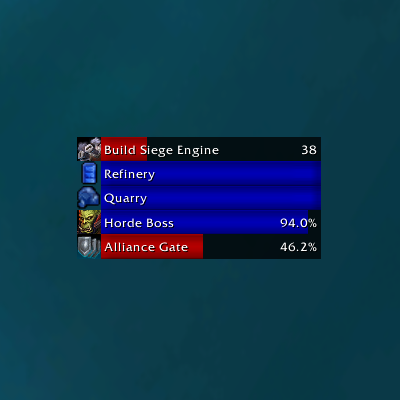
AV and WG timers using alternate bar layout
Capping   Popular! (More than 5000 hits)
Capping is just another battleground timer mod with some extras.

YouTube Intro

Current Features:
  • All battlegrounds/arenas have start timers
  • Alterac Valley - Node timers, auto quest turnins, and sync
  • Arathi Basin - Node timers and final score estimation
  • Eye of the Storm - Flag respawn timer, flag carrier display, and final score estimation
  • Isle of Conquest - Node timers and siege engine timer
  • Warsong Gulch - Flag respawn timer and flag carrier display with health percent
  • Wintergrasp - Start timer, wall alerts, and auto show zone map
  • Zone Map - Change scale, narrow, and hide border
  • Other - Port expiration timers, queue wait timers, scoreboard/capture bar/vehicle seat repositioning
  • Looking For Group - LFGStatusIcon support for LFD wait/port timers

How to use:
  • Show options - "/capping" or right-click on a timer bar/anchor
  • Toggle anchor - left-click on a timer bar or use options menu
  • Send time info to SAY - shift left-click on that timer bar
  • Send time info to BG - ctrl left-click on that timer bar
  • Hide timer bar (also leaves queue if related) - ctrl, shift, or alt right-click on that timer bar
  • Target carrier (in WSG or EotS) - left-click on the carrier's display
  • Send carrier info to BG - ctrl left-click on the carrier's display

Why no auto-release and auto-join?:
  • I try not to promote bad habits in my mods.
  • No auto-release because knowing when you should or should not release is a part of being a smart player in battlegrounds. For example, say there is five seconds left to capture blacksmith and you die there. Auto-release will send you to the starting area, but if you wait five seconds, you release to blacksmith graveyard.
  • Another reason not to use auto-release is to have time to spy on the flag carrier after a failed kill attempt.
  • Auto-join was useful when there were single queues and long wait time/afk time. Today is different, of course.
  • I'm not telling you how to play, just giving you my reasons.

Why no convenient "Incoming" and such buttons?:
  • The users and I had a discussion about this before when Capping was on wowace. If spoiled, the users would not type something important if there's no lazy way to do it. Am I right?.
  • Messages probably no mod covers:
    1. Incoming? Well, how many? From which direction?
    2. Incoming BS. Oh wait, they're going LM now.
    3. Incoming BS, but we're all here already. I mean fight at the flag, they're capping.
    4. Need help at MT...3 enemies behind
    5. Incoming DR...3 stealth
    6. Flag carrier going ramp side, almost dead
    7. Flag carrier on the way up the roof, behind tree
    8. ...and so on
  • Don't you love seeing "INCOMING BS" "INCOMING BS" "INCOMING BS" with 2 enemies incoming and 5 people already defending? After about 5 more come to help chase these 2 kills, you get spammed "BS CLEAR".
  • Plenty of standalone mods that do this, so use those if needed.

Known issues:
  • Narrow map setting will not work if Mapster is installed. Disabling the battlemap module in Mapster will fix this.


Recently, I had some requests for donation info, so here it is. Do not feel obligated; donations (or lack of) will not determine what features I do or do not implement.
  Change Log - Capping
3.3.003-4 03/16/2010:
- added special alerts to Wintergrasp timer
- sync to DBM for IoC Siege Engine timer
- added Wintergrasp alerts for walls being damaged or destroyed

3.3.002 12/12/2009:
- fix current icon mapping issues
- no longer check siege engine's buff time in Isle of Conquest

3.3.001 12/08/2009:
- toc for 3.3
- added option to change spark color
- added option to save settings per character
- added option to reset zone map position
- added option to reset all settings

3.2.006 09/29/2009:
- fix errors on zone map load on clean variables
- fix potential error with node detection
- cleanups

3.2.004 09/23/2009:
- update queue timers to support new 3.2.2 changes
- fixed mouseover highlighting for carrier targets
- clean up many unused variables

3.2.003 09/04/2009:
- organized code between files
- optimized node conflict detection code
- multiplier for Wintergrasp timer seems to be no longer necessary
- added a new layout for timer bars
- added ConfigMode support

3.2.002 08/13/2009:
- replaced event message parsing with POI landmark scanning
- removed all unnecessary node localization due to new method
- Siege Engine timer can now be retrieved by targeting it
- use map filename instead of zone name for detecting battlegrounds

3.2.001 08/04/2009:
- added timer to WSG when three minutes remain
- updated frFR and deDE localization, everyone else is outta luck
- minor tweaks and removed 3.2 compat checks

3.1.005 07/25/2009:
- many random localization changes, don't know anything got messed up
- would be nice to get some localization updates before 3.2
- sync is now auto-requested, but syncing is no longer broad casted
- attempt to sync WSG carrier names
- attempt to sync IoC siege engine timer

3.1.004 (Beta) 07/10/2009:
- beta support for 3.2 and Isle of Conquest (needs localization)
- merged all the battleground files into one
- cleaned up Wintergrasp code
- use more global strings instead of translations
- added option to make the timer bars non-interactive

3.1.003 05/22/2009:
- nil out global reference to CappingLocale
- the timer text is no longer a font size smaller and hour format changed

3.1.002 05/08/2009 - fix SetTexCoord error

3.1.001 04/14/2009:
- updated for 3.1
- now use the GetWintergraspWaitTime function
- removed chat syncing of Wintergrasp time since it's not so useful anymore
- removed showing the redundant timer bar in Wintergrasp that shows when the battle will end
- slightly improved timer bar performance
- timer bar background colors is now colored as the darkened foreground's
- sparks' height adjusted to better fit the bar's height
- added font shadow
  Archived Versions - Capping
File Name
Version
Size
Author
Date
3.3.003
54kB
totalpackage
03-14-2010 02:18 PM
3.3.002
52kB
totalpackage
12-12-2009 04:50 PM
3.2.006
52kB
totalpackage
09-29-2009 02:23 PM
3.1.005
54kB
totalpackage
07-24-2009 05:11 AM
3.0.019
61kB
totalpackage
02-14-2009 04:16 AM
  Comments - Capping
Post A Reply Comment Options
Old 08-24-2010, 06:40 PM  
totalpackage
A Deviate Faerie Dragon
 
totalpackage's Avatar
Interface Author - Click to view interfaces

Forum posts: 12
File comments: 736
Uploads: 2
Quote:
Originally posted by tinyu
is this able to work with the stuff like the towers on Hellfire Peninsula?
What features of Hellfire towers need support? Capping can already move the capture bar and the world status frame.
totalpackage is offline Report comment to moderator  
Reply With Quote
Old 08-16-2010, 10:49 AM  
tinyu
wowui.incgamers staff
 
tinyu's Avatar
Interface Author - Click to view interfaces

Forum posts: 404
File comments: 224
Uploads: 11
is this able to work with the stuff like the towers on Hellfire Peninsula?
__________________

Lothaer
Admin @ wowui.incgamers.com
Titan Dev Team Member.
tinyu is offline Report comment to moderator  
Reply With Quote
Old 07-05-2010, 12:12 PM  
bonzoid
A Kobold Labourer

Forum posts: 0
File comments: 2
Uploads: 0
Ah, that was it.

Thanks, much.
bonzoid is offline Report comment to moderator  
Reply With Quote
Old 07-05-2010, 09:13 AM  
totalpackage
A Deviate Faerie Dragon
 
totalpackage's Avatar
Interface Author - Click to view interfaces

Forum posts: 12
File comments: 736
Uploads: 2
Re: Zone map missing

Quote:
Originally posted by bonzoid
I've managed to lose my zone map. Full (shift) reset hasn't worked nor has deleting all the Capping saved variables I could find and reinstalling.

Any ideas?

Thanks.
Sorry for the late reply, this comment got buried with my other mods. Make sure your make is enabled to be shown in the first place by checking the dropdown box in the world map.
totalpackage is offline Report comment to moderator  
Reply With Quote
Old 06-17-2010, 02:47 AM  
bonzoid
A Kobold Labourer

Forum posts: 0
File comments: 2
Uploads: 0
Zone map missing

I've managed to lose my zone map. Full (shift) reset hasn't worked nor has deleting all the Capping saved variables I could find and reinstalling.

Any ideas?

Thanks.
bonzoid is offline Report comment to moderator  
Reply With Quote
Old 06-11-2010, 07:18 PM  
totalpackage
A Deviate Faerie Dragon
 
totalpackage's Avatar
Interface Author - Click to view interfaces

Forum posts: 12
File comments: 736
Uploads: 2
Quote:
Originally posted by MrDarkflame
Any plans to add LDB options or does anyone know an addon like this but for LDB?
I haven't kept up with it, but check out battlegroundfu or something like that and it's alternatives.
totalpackage is offline Report comment to moderator  
Reply With Quote
Old 06-10-2010, 10:59 PM  
MrDarkflame
A Kobold Labourer

Forum posts: 0
File comments: 1
Uploads: 0
Any plans to add LDB options or does anyone know an addon like this but for LDB?
MrDarkflame is offline Report comment to moderator  
Reply With Quote
Old 05-13-2010, 03:59 AM  
yoshimo
A Defias Bandit

Forum posts: 2
File comments: 64
Uploads: 0
Quote:
Originally posted by scarfyrre
The 'You are not in a raid group" is a known bug. It's not from this add-on (since I don't have it...yet), and we've not figured out if any add-on causes it. My husband and I both play, have different add-ons, and we get it constantly.

I think it's on Blizzard's side.
It is not really a bug, you could argue about it, but
In the past any commtraffic sent to "RAID" while being in a BG, would silently fail
Nowadays you get the "you arent in a raid " message.
It's the addons that need to add a check for that currently.
You could use StopAddonMessage or YAIAP /you arent in a party fix (debug mode) to find out the addon causing this message.
yoshimo is offline Report comment to moderator  
Reply With Quote
Old 04-30-2010, 09:48 PM  
Jexx
A Deviate Faerie Dragon

Forum posts: 10
File comments: 110
Uploads: 0
I've been getting this error while running the latest version here while in various BG's. Doesn't seem to cause any problems or make Capping quit working, but here it is nonetheless.

[20:48:18] Interface\AddOns\Capping\core.lua:653: TexCoord out of range
[C]: ?
[C]: in function `SetTexCoord'
Interface\AddOns\Capping\core.lua:653: in function `SetValue'
Interface\AddOns\Capping\core.lua:586: in function `SetValue'
Interface\AddOns\Capping\core.lua:596: in function <Interface\AddOns\Capping\core.lua:588>
Jexx is offline Report comment to moderator  
Reply With Quote
Old 04-22-2010, 11:36 AM  
scarfyrre
A Kobold Labourer

Forum posts: 0
File comments: 4
Uploads: 0
Quote:
Originally posted by totalpackage
How sure are you that Capping is doing it and not anything else?
The 'You are not in a raid group" is a known bug. It's not from this add-on (since I don't have it...yet), and we've not figured out if any add-on causes it. My husband and I both play, have different add-ons, and we get it constantly.

I think it's on Blizzard's side.
scarfyrre is offline Report comment to moderator  
Reply With Quote
Old 04-09-2010, 12:10 PM  
totalpackage
A Deviate Faerie Dragon
 
totalpackage's Avatar
Interface Author - Click to view interfaces

Forum posts: 12
File comments: 736
Uploads: 2
Quote:
Originally posted by pewter77
I'm almost positive this is it, i am running the latest version downloaded here, i backed up my ui, deleted everything for a fresh wow, WTF, Interface Folders and every time i got into a bg, it would spam my chat with that.
Almost positive is negative. Make sure by running Capping by itself. That spam usually comes from unit frame mods.
totalpackage is offline Report comment to moderator  
Reply With Quote
Old 04-09-2010, 04:42 AM  
pewter77
A Kobold Labourer

Forum posts: 0
File comments: 2
Uploads: 0
I'm almost positive this is it, i am running the latest version downloaded here, i backed up my ui, deleted everything for a fresh wow, WTF, Interface Folders and every time i got into a bg, it would spam my chat with that.
pewter77 is offline Report comment to moderator  
Reply With Quote
Old 04-06-2010, 01:35 PM  
totalpackage
A Deviate Faerie Dragon
 
totalpackage's Avatar
Interface Author - Click to view interfaces

Forum posts: 12
File comments: 736
Uploads: 2
Quote:
Originally posted by pewter77
in battlegrounds this addon spams me with "you are not in a group"
How sure are you that Capping is doing it and not anything else?
totalpackage is offline Report comment to moderator  
Reply With Quote
Old 04-04-2010, 07:31 PM  
pewter77
A Kobold Labourer

Forum posts: 0
File comments: 2
Uploads: 0
in battlegrounds this addon spams me with "you are not in a group"
pewter77 is offline Report comment to moderator  
Reply With Quote
Old 04-02-2010, 06:05 AM  
FlareLT
A Kobold Labourer

Forum posts: 0
File comments: 2
Uploads: 0
Hi,

Wow 3.3.2, Capping 3.3.004.

Server: private (therefore will understand if author will ignore this bug report, but still - decided to report in case it helps somehow ).

Below is the error I get when I enter Battlegrounds (in this case - WSG).

Code:
Date: 2010-04-02 13:14:45
ID: 1
Error occured in: Global
Count: 1
Message: ..\AddOns\Capping\battlegrounds.lua line 524:
   attempt to index global 'AlwaysUpFrame3' (a nil value)
Debug:
   [C]: ?
   Capping\battlegrounds.lua:524: func()
   Capping\core.lua:156: CheckCombat()
   Capping\battlegrounds.lua:541:
      Capping\battlegrounds.lua:526
   Capping\battlegrounds.lua:627: func()
   Capping\core.lua:156: CheckCombat()
   Capping\battlegrounds.lua:710: StartWSG()
   Capping\core.lua:370: ZoneCheck()
   Capping\core.lua:330: ?()
   Capping\core.lua:145:
      Capping\core.lua:144
AddOns:
  Swatter, v5.7.4568 (KillerKoala)
  Corpse, v3.3.0.2
  AnnoyingBuffReminder, v
  AucAdvanced, v5.7.4568 (KillerKoala)
  AucFilterBasic, v5.7.4568 (KillerKoala)
  AucFilterOutlier, v5.7.4568.2531
  AucMatchUndercut, v5.7.4568.2531
  AucStatClassic, v5.7.4568 (KillerKoala)
  AucStatHistogram, v5.7.4568 (KillerKoala)
  AucStatiLevel, v5.7.4568 (KillerKoala)
  AucStatPurchased, v5.7.4568 (KillerKoala)
  AucStatSales, v5.7.4568.2842
  AucStatSimple, v5.7.4568 (KillerKoala)
  AucStatStdDev, v5.7.4568 (KillerKoala)
  AucStatWOWEcon, v5.7.4568.2530
  AucUtilAHWindowControl, v5.7.4568.3311
  AucUtilAppraiser, v5.7.4568.2530
  AucUtilAskPrice, v5.7.4568.3175
  AucUtilAutoMagic, v5.7.4568.3142
  AucUtilCompactUI, v5.7.4568.2530
  AucUtilEasyBuyout, v5.7.4568.3583
  AucUtilFixAH, v5.7.4568 (KillerKoala)
  AucUtilGlypher, v5.7.4568.2545
  AucUtilItemSuggest, v5.7.4568.3108
  AucUtilPriceLevel, v5.7.4568.2545
  AucUtilScanButton, v5.7.4568.2530
  AucUtilScanFinish, v5.7.4568.2530
  AucUtilScanProgress, v5.7.4568.2530
  AucUtilSearchUI, v5.7.4568.3655
  AucUtilSimpleAuction, v5.7.4568.4553
  AucUtilVendMarkup, v5.7.4568.2530
  AutoDecline, v1.5.30000
  Babylonian, v5.1.DEV.130
  Bartender4, v4.4.2
  BeanCounter, v5.7.4568 (KillerKoala)
  Capping, v3.3.004
  Clique, vwowi:revision
  Configator, v5.1.DEV.130
  DBMCore, v
  DBMPvP, v
  DebugLib, v5.1.DEV.130
  DrDamage, v1.7.7_release-3
  Enchantrix, v5.7.4568 (KillerKoala)
  EnchantrixBarker, v5.7.4568 (KillerKoala)
  ErrorMonster, v3
  Gatherer, v3.1.14
  Grid, v1.30300.1265
  GridAutoFrameSize, v2.3.9
  GridManaBars, v1.0
  IceHUD, v1.6 (Revision: 480)
  Informant, v5.7.4568 (KillerKoala)
  InspectEquip, v1.7.4
  MikScrollingBattleText, v5.4.78
  MinimapButtonFrame, v3.0.9
  MinimapButtonFrameSkinPack, v3.0
  OmniCC, v2.5.9
  OpenAll, v1
  ParanoiaEPA, v	1.12.1
  PlayerNotes, v
  Prat30, v3.3.7 
  Prat30Libraries, v
  RatingBuster, v
  SellOMatic, vv1.2.0
  Skada, v1.2-26
  SkadaAbsorbs, v1.0
  SkadaDamage, v1.0
  SkadaDamageTaken, v1.0
  SkadaEnemies, v1.0
  SkadaHealing, v1.0
  SkadaThreat, v1.0
  SlideBar, v5.7.4568 (KillerKoala)
  Stubby, v5.7.4568 (KillerKoala)
  TomTom, vwowi:revision
  tomtomtargetarrow, vr14
  WeaponQuickSwap, v
  XPerl, v3.0.8
  XPerlArcaneBar, v
  XPerlParty, v
  XPerlPartyPet, v
  XPerlPlayer, v
  XPerlPlayerBuffs, v
  XPerlPlayerPet, v
  XPerlTarget, v
  XPerlTargetTarget, v
  ZOMGBuffs, v$Revision: 149 $
  ZOMGBuffsBlessings, v$Revision: 141 $
  ZOMGBuffsBlessingsManager, v$Revision: 141 $
  ZOMGBuffsBuffTehRaid, v$Revision: 141 $
  ZOMGBuffsLog, v$Revision: 141 $
  ZOMGBuffsPortalz, v$Revision: 141 $
  ZOMGBuffsSelfBuffs, v$Revision: 141 $
  BlizRuntimeLib_enUS v3.3.2.30300 <server_name_removed:)>
  (ck=a92)
Anyway, capping still seems to work, but [score/player count/flag carrier] display section looks broken (for example shows only alliance mark, and not horde one; does not show score or player count) until score changes (then it updates, and looks as it should be).

If interested - I could investigate this issue further, for example: if this issue only shows up when entering WSG before it has begun (or if it also happens when I enter WSG which is already in progress), if this happens only during first battleground entered for that WoW session, or for subsequent ones too, what happens if I disable all other addons, etc. Didn't want to double-check all those things before I get feedback here (this means before I get response that anyone here is interested in this issue )

P.S. thanks for this nice addon anyway!
FlareLT is offline Report comment to moderator  
Reply With Quote
Post A Reply


Category Jump:


The Network:
EQInterface | EQ2Interface | LoTROInterface | MMOInterface | War.MMOUI | WoWInterface | VGInterface | Allakhazam | Thottbot | Wowhead | TankSpot | Zam


©2009 MMOUI / ZAM Network
vBulletin - Copyright ©2000 - 2010, Jelsoft Enterprises Ltd.