| Go to Page... |


| Updated: | 12-04-11 12:58 PM |
| Created: | unknown |
| Downloads: | 272,797 |
| Favorites: | 796 |
| MD5: |
MoveAnything 

MoveAnything enables you to move, scale, hide and adjust transparency of just about any screen element in WoW, offering tools to help you customize your UI. Some other frame modifications is also possible using MA's Frame Editors(introduced in 11.b2).
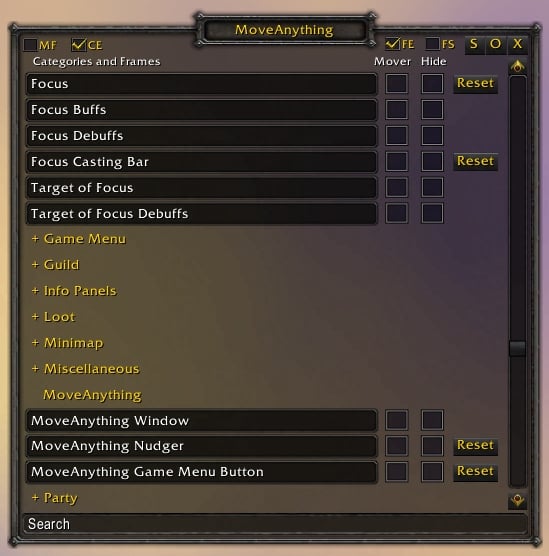
Type /move to show the main window or click the button below the game menu. This main window contains a list of Blizzard's frames(any element not in the list can be added to the Custom Frames category by either /move frameName, /hide frameName or one of the move/hide keybindings).
Maintained by Wagthaa of Earthen Ring EU since the pre-WotLK patch. Kudos to Skrag(original author), Jason(vanilla mod) & Vincent(tbc) for earlier versions.
Reporting Bugs:
- Report bugs here - Include the LUA error message if applicable!
- If the problem is with a certain frame, always try to reset the frame and reload before modifying it again. If the problem persists please report it at the above link.
- Make sure you are running the latest version! You would be surprised how much time is wasted by reports of issues that are already resolved.
- The LUA error message should be from an addon such as Swatter(a part of Auctioneer) or BugSack if at all possible. If the issue you are reporting is the result of a LUA error and you don't include this you might as well not bother posting.
- If you feel like being helpful include your MA profile as an exported textstring in the report.
- Any comment on Curse or forum post on WoWInterface containing a full error report will be deleted, as one of those quickly takes up more than half a page.
Screenshots
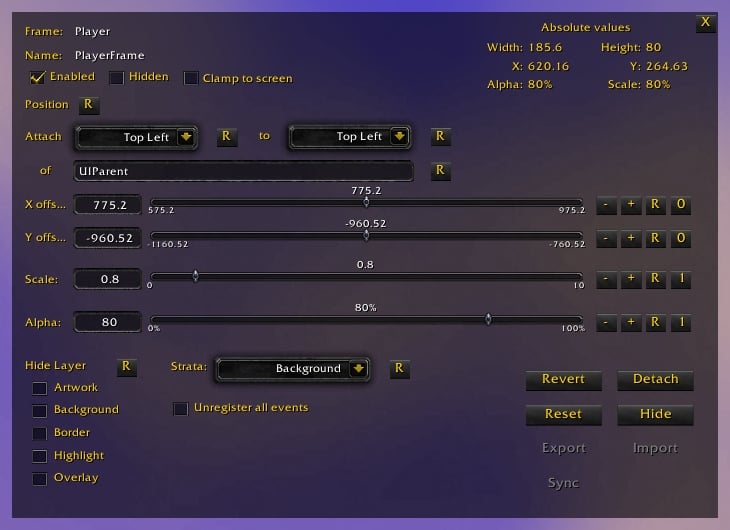
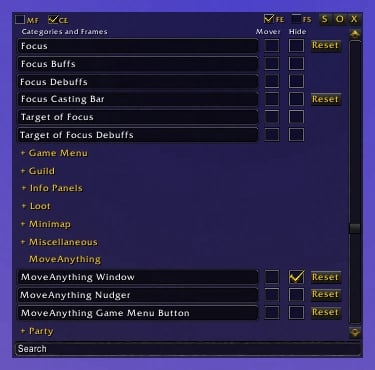
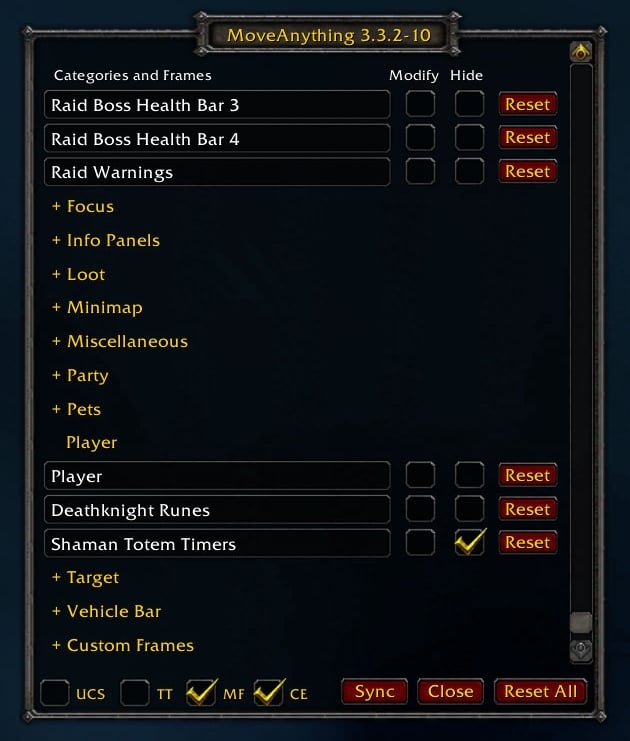
- All screenshots was taken with a customized button skin loaded. Buttons will appear as other buttons in your WoW.
Quick Reference for MoveAnything
Main window:
- Move - toggles a mover for the frame
- Hide - toggles hiding of the frame
- Reset - undoes MA's changes to frame and removes frame from list if custom
- MF - Modified Frames - toggles whether to only show modified frames in the list
- CE - Collapse/Expand - collapses/expands all categories
- FS - Frame Stack - toggles Blizzard's Frame Stack tooltip
- M - Movers - toggles all movers. Shift click clears the list
- FE - Frame Editors - toggles visibility on all open frame editors. Shift click clears the list, closing all frame editors
- S - Sync - synchronizes all frames modified by MoveAnything
- O - Options - opens options
- X - Close - closes the MA window. Ctrl-Alt-Shift click reloads ui
Interacting with the movers:
- Left-Drag - moves frame
- Left-Drag the small buttons - scales frame
- Right-Click - stops moving frame
- Shift Right-Click - toggles visibility of the mover, while still allowing modifications to the frame
- Mousewheel - adjusts alpha blend
- Control-Click - opens a frame editor
Key Bindings:
- Toggle MA window - toggles MoveAnything's main window
- Move frame - Safe - toggles moving of the first found parent frame, from MA's default list or a top level frame if possible
- Edit frame - Safe - toggles a frame editor for the frame, picking a modified, a default or a top level frame in that order
- Hide frame - Safe - hides frame at cursor, from MA's default list or a top level frame if possible
- Reset frame - Safe - resets frame at cursor, from MA's default list or a top level frame if possible
- Move frame - Exact - toggles moving of the exact frame at cursor
- Edit frame - Exact - toggles a frame editor for the exact frame at cursor
- Hide frame - Exact - hides the exact frame at cursor
- Reset frame - Exact - resets the exact frame at cursor
- Update frames - updates all frames influenced by MA
Slash Commands:
- /move - toggles MA window
- /move frameName - toggles moving of frame named "frameName"
- /hide frameName - toggles visibility of frame named "frameName"
- /mafe frameName - toggles a frame editor for frame named "frameName"
- /unmove frameName - resets frame named "frameName"
- /movelist - lists profiles
- /moveimport profileName - import settings from profile into the current profile
- /moveexport profileName - exports settings into named profile
- /movedelete profileName - deletes named profile
/move, /mafe, /unmove and /hide accepts several shorthands: last, minimap, buffs, debuffs, player, target, targetoftarget, focus & pet.
Tips: - Work in progress
- Quickest way to modify a frame - Go into Keybindings, scroll down to MoveAnything and bind a key to "Move Frame - Safe". They key you bound now toggles a mover on the topmost frame underneath your mouse cursor.
- Easiest way to reset a frame - Bind a key to "Reset Frame - Safe" as described above and press it while hovering your mouse cursor above the element you want to reset. Check the chatframe to verify it's the right frame before clicking the key again to confirm.
- Moved something by mistake - Type /unmove last and it will reset the last frame you interacted with.
- Figuring out frame names for use with /move, /hide, /mafe and /unmove - Use the "FS" checkbox to show Blizzard's Frame Stack tooltip. This tooltip displays a list of frames currently underneath your mouse cursor, divided by what screen layer they are in(aka framestrata).
Current issues:
- Frames jumping when switching graphics from windowed to windowed-maximized mode have been reported.
12.2.3:
fixed issue with SideDressUpFrame
12.2.2:
fixed issue with AuctionFrame
made a few changes to the frame list
12.2.1:
updated toc version to 40300
made a few changes to the frame list
12.2.0:
updated toc version to 40200
fixed issue causing a Raid UI mover popping up
fixed issue causing movers active on protected frames to no longer toggle off when entering combat
fixed issue that could cause a LUA error when resetting all profiles
fixed ComboFrame scaling and positioning issue
fixed XP Bar width issue
fixed VehicleMenuBarActionButtonFrame mover size
fixed reverting element in a Frame Editor when a mover was active
hardcoded a position modifier for WorldStateAlwaysUpFrame till a generic fix is found
added Arena Enemy Pet frames, AuctionProgressFrame, LookingForGuildFrame & GuildChallengeAlertFrame to the list
12.1.5:
updated toc version to 40100
added TalentMicroButtonAlert to the list
12.1.4:
a line was left commented out from debugging
12.1.3:
fixed issue with individual bag movers positional offset after first login when starting wow.
12.1.2:
fixed issue inside the virtual buffs mover, was missing error handler parameter for xpcall
12.1.1:
made bag movers use the size of the actual container instead of a predefined value
removed a line of debugging code that made it into release 12
12.1:
fixed issue with bag scaling when the generic mover wasn't modified
fixed a couple issues when having modified both the generic and individual bags
12:
fixed issue causing MAFE to throw an error when used with a freshly modified element
fixed issue causing scaling to be unavailable in MAFE
made the various option frames properly hide the GameMenu when shown while modified
fixed error when resetting ChatEditBoxesMover and made the individual chatframe editboxes link to it
12.b1.2:
added BNToastFrame to the list
fixed a couple timing issues that was affecting the talent frame and tooltip movers
renamed "Update positions" keybinding to "Synchronize all elements"
12.b1.1:
fixed a couple issues with the bags
12.b1:
first many steps of a massive code restructuring
addon stability and error reporting improved
new virtual movers: bags, chat edit, generic frame editor
added more Blizzard frames to the list
made arena frames movable all the times by loading blizzards arenaui if the frames is modified
preliminary testing indicates that the ESC unbinding issue is gone, but as this has been a notorious issue I'm reluctatant to say that it has been fixed
fixed issue causing some info panels to become unfunctional and require reshowing
added Minimap to allowed types, due to certain addons using this type directly
fixed issue causing QuestFrame to remain visible when closing it by clicking the Cancel button
fixed issue causing MoveAnything to reenable sound effects
added option to suppress error messages
added option to disable sync of pending frames when leaving combat
11.4.5:
fixed UI Panel issue with exclusive center panels
made doublewide UI Panels behave properly
fixed pet background when Raid Unit Frames's alpha blend had been modified
made an attempt to fix the issue that some people have been having with rightclicking buffs
fixed error when moving ClassTrainerFrame while it was shown
11.4.4:
fixed error with AuctionDressUpFrame when AuctionFrame was modified
fixed issue with protected ui panels not opening during combat unless opened before
fixed issue with the game menu popping up when escape was pressed though open frames was closed
stopped locking tooltip to allow other addons to move it
made an attempt at the issue afflicting some people with RaidUnitFramesMover
sync error handler will from now on only be calling a custom error handler, i.e. it won't call blizzard's default error handler
added support for the third ui panel
no longer locks PlayerFrame in place by overwriting it's SetPoint, this was causing taint and resulted in the vehicle bar being stuck.
added "Force lock position" checkbox to frame editor, will overwrite the element's SetPoint if checked
made tab key cycle through frame editor textfields and fixed resetting position values of elements that are detached from their parent
11.4.3:
rerolled a fix for some conditions that was closing UI Panels as a side effect
11.4.2:
fixed lua error caused by options updating code getting called prematurely
11.4.1:
fixed a last minute lua error
11.4:
implemented profiles in place of character specific settings
implemented frame groups, use checkboxes on frame editor, shift click clears all groups from the frame and ctrl-alt-shift click clears the group from all frames. holding shift while modifying a frame will keep changes from propagating to the group
added frame editor keybindings
added import/export dialog for profiles and frames
fixed issue when positioning FramerateLabel with a mover
fixed error on logout
fixed issue with LibExtraTip
11.3.3:
fixed PlayerBuffsFrame conflict with addons that moves TemporaryEnchantFrame
rewrote parts of shapeshift/stance/aura/stealth/aspect bar movers(both horizontal and vertical)
changed bag item detection to work for all container items(regardless of addon providing it)
rewrote entry point methods to suport rewritings of a frame's GetName method(such as QuestGuru's rewrite of QuestLogFrame:GetName)
made GossipFrame hide itself when QuestFrame is opened while modified
added raid groups to the list and fixed PVP Window
11.3.2:
changed mover's visual appearance to make them easier to see
bank bags can now only be moved while at the bank
fixed issue with BankFrame initially opening without items when moved
fixed issue causing ReputationWatchBar to forget it's stored width and height
fixed an issue that may cause an error when attaching a mover to a custom frame
fixed issue that could leave a frame flagged as user placed
11.3.1:
fixed issue with PlayerBuffsMover
11.3:
MA will now detach movers from protected frames when entering combat, movers will be reattached once combat has ended
implemented virtual movers for the blizzards new raid ui
added "M" checkbox for toggling movers to the main window, shift-click clears the stored list
made "FE" checkbox clear the list of frame editors when shift-clicked
fixed issue with bank bags
fixed issue preventing the first action button on BasicActionButtonsMover from switching when stealthing/shapeshifting
fixed issues with BasicActionButtonsVerticalMover
fixed issue with dynamicly created children of hidden virtual movers(affected several buffs/debuffs frames)
fixed issue with Target of Focus Debuffs virtual mover, also renamed the mover to FocusFrameToTDebuffsMover
fixed issue with PlayerBuffsMover, discontinued individual moving of TemporaryEnchantFrame as part of the fix
11.2:
fixed scaling issue with bank bags
fixed ShapeshiftButtonsMover's reset position
fixed potential issue with Target, Focus & PartyMember DebuffsMovers
added checkbox for UnregisterAllEvents to FE
changed version format
11.b4.2:
fixed some issues with virtual movers
fixed issue with PlayerBuffsMover
hardened frame editor code and made some usability updates
fixed some issues with the nudger
rewrote sync errorhandler to longer hook the regular error handler and added call stack to error output
added Level Up Display to the frame list
enabled tooltips by default in new installations
11.b4.1:
updated .toc version to the correct number
removed a line of debugging code that made it in to the last release
11.b4:
fixed potential flaw in the new error handler
fixed lua error that occured when the Eclipse Bar had been moved
11.b3.7:
made frame synchronization fault tolerate
11.b3.6:
fixed issue with PlayerBuffsMover
11.b3.5:
fixed issue that would cause an error during initialization if any of the PartyMemberDebuffsMovers was hooked
fixed error when PaladinPowerBar and ShardFrame was moved
fixed issue with buff scaling when using PlayerBuffsMover
applied a fix to stop FramerateLabel from jumping when detaching a mover
11.b3.4:
fixed error on login that occured when another addon reanchored a modified frame to one of it's own frames that on reload/relog didn't exist when MA initialization ran
disabled alpha blending and scaling of FramerateLabel
11.b3.3:
fixed issue when resetting MultiBarRightHorizontalMover or MultiBarLeftHorizontalMover
fixed error when attaching a mover to elements that didn't at some point inherit from Frame
11.b3.2:
fixed issue with forced lock frames not resetting to their original position
11.b3.1:
fixed issue with PlayerBuffsMover when Consolidated Buffs was enabled
11.b3:
updated frame list for 4.0.1, including new resource frames for druids, paladins and warlocks as well as the Class Ability Proc frame for some classes
handled compatibility issue with LunarSphere
fixed an issue that would cause hidden frames to be reshown
added /mafe command for the frame editor
rewrote frame wrappers to use a standardized api
implemented a forced lock options for some frames, which will now require a reload before SetPoint is released. was made to deal with the vehicle bar, boss health frames and a 4.0.1 issue with the base action bar
stored FocusFrame scale no matter what the nature of the modification
11.b2:
fixed frame list headings positions
movers are now created as needed, removing the previous limit of 20
added checkbox "FS" for toggling Blizzard's framestack tooltip
added frame editor adding several new frame modifications as well as making finetuning easier
control click a mover or the nudger or just click a frame name in the list to open one
added checkbox "FE" for toggling all frame editors visibility
added virtual movers for several frames' buffs and debuffs
buff movers: Player, Target, Focus (requires Larger Focus to be checked in Interface -> Unit Frames)
debuff movers: Player, Target, Target of Target, Pet, Focus, PartyMember1-4
debuff mover for the new Target of Focus frame that is coming in 4.0.1 is commented out at the bottom of MoveAnythingVirtualMovers.xml till 4.0.1 is released, remove the prefixed <!-- and the trailing --> if you want to use it earlier
renamed the optional file for user changes from UserVariables.lua to UserMods.lua
11.b1:
updated to run with WoW 4.0.1, though a full test won't be done until my character copy is completed. it will show as outdated unless you update the toc to 40000
dropped wow version from version string
added search field to the frame list. use * as a wildcard, ^ to match the start of a string and $ for the end
added Blizzard Interface Options tab
added square minimap feature
updated the ui
locked MicroMenu Buttons to prevent jumping to default location when changing talents
WorldMapFrame added to the list of frames which MoveAnything won't touch
fixed issue that may cause the capture bar to be placed off screen
fixed issue with the vertical shapeshift buttons mover
3.3-10.b5:
few updates to the frame list: added Calendar Event & Vehicle Action Bar, and moved PVP -> Flags Frame to Misc. -> Top Center Status Display
added pruning of data storage elements that no longer have any useful settings
slight change to sync code
added option to show the nudger with the main gui due to popular demand. Use "/run MADB.alwaysShowNudger = true" to enable and "/run MADB.alwaysShowNudger = nil" to disable it again
added alt click option to Nudger directional buttons to move in increments of .1
3.3-10.b4:
fixed an issue with scaling elements that are detached from their relative point as well as parent
new procedure for attaching movers to frames. stops frames from jumping, but those last few frames that were jumping may still move a pixel or two
added the main bar leave vehicle button to the list, this is another screen element than the one that appears on the vehicle bar
3.3-10.b3:
fixed an issue with ReputationWatchBar mouseover
fixed toggling hide on frames that aren't currently available
fixed issue with bank bags
3.3-10.b2:
added Chat Channel Configuration, Color Picker, Currency Options, Equipment Manager & Reading Materials to the list
fixed issue which made MA not play nicely with tooltip addons
added Tooltip - Bag Item back to the list after sorting the issues with it
several updates to Info Panel handling
added alpha and scaling to Generic Info Panel movers
3.3-10.b1:
updated frame list, including LFD related frames
unprotected frames can now be moved while in combat
unitframes hidden by MA will no longer unhide themselves
added /hide command to toggle frame visibility
certain frames that was jumping to their default position will no longer do so
blizzard bags no longer act as if they have a will of their own
significantly less chance of taint. I would say it's gone but I've been proven wrong on that account before
fixed the issue where resetting a UI Panel would stop escape from showing the game menu
better support for more UI element types. FontStrings and Textures can now be moved among others
added X and H buttons to the Nudger for stopping moving and hiding the frame respectively
frames moved by this version will now modify the original position points instead of using the lower left corner. this means that many frames functionality won't be broken by MA so easily
full position restore information stored before moving a frame, as a result reloads should be required much less frequently when resetting frames. also to save memory restore positions are no longer stored between game sessions
siblings that are positionally dependent on either a frame or subframe are detached prior to moving, e.g. moving the minimap cluster will detach the durability action figure, the tracker and the vehicle seat indicator in advance so they'll stay at their normal positions
MA now loads the file "UserVariables.lua" from the MoveAnything addon folder. This file will not be contained within the distribution and will allow advanced users to make modifications to MA which will persist though addon updates.
height and width now adjustable on the Quest and Achievement Tracker, currently at the cost of scaling
3.3-9:
Loads of changes, core rewrites and updates, the following if a very brief summary:
Updated frame list. Among the new additions are horizontal movers for the 2 vertical action bars, bag item tooltip, arena enemy frames, vehicle bar and more.
New checkboxes on the GUI: TT and MF. TT toggles tooltips and MF toggles whether to show only modified frames
VehicleBar fixed. If you exit the vehicle while in combat the PlayerFrame can't be moved from it's default position until you leave combat. This will of course never be seen if using any unitframe mod
Renamed /movecopy to /moveimport and added /moveexport.
3.0.2-8:
Fixed TimeManagerClockButton
Added Key Ring Button, Action Bar Page Number, Action Bar Page Up, Action Bar Page Down, Ticket Status & XPBar scaling
3.0.2-7:
Couple UI enhancements.
Keyring, WorldStateCaptureBar and AchievementAlertFrame support added.
Alpha blend added. Not all frames supported yet.
Added a simple data checker/cleaner.
3.0.2-6:
Bags fixed when opened initially during combat and now supports large specialty bags (Reported by Jolls).
MainMenuExpBar and ReputationWatchBar scaling disabled for now.
/move and /unmove now reacts to "last".
3.0.2-5:
Bags fully movable again.
Enlarged MA window slightly and made it properly scrollable by mouse.
Updates to the default frame list.
Improved frame selection for keybindings.
"/unmove framename" - resets the frame "framename".
3.0.2-4:
Fixes Tooltip & Info Panel positioning.
Fixes ArtFrame hiding.
No more tainted hooks left in the code.
Updates to the default frame list.
More, safer and smarter key bindings.
3.0.2-3:
Initial code cleanup and optimization.
Updates to the default frame list.
3.0.2-2:
Moved MoveAnything's Game Menu button to below the normal list, fixes issue with other addons on the Game Menu(reported by Narcal)
Fixed moving/hiding of MiniMap Tracking(reported by ColdCat)
Added new frames and removed a bunch of old ones
Custom frames can now always be reset. Doing so removes them from the list
3.0.2-1:
Stripped support for moving the standard blizzard bags for now, due to a positioning issue(reported by Ragtu).
3.0.2:
Initial release for WotLK. Just a couple quick fixes to get it running with WoW 3.0.2.
 |
Comment Options |
 10-29-22, 07:23 AM
|
|
|
A Kobold Labourer
Forum posts: 0
File comments: 13
Uploads: 0
|
FYI:
|

|

|
| thottstation |
| View Public Profile |
| Send a private message to thottstation |
| Find More Posts by thottstation |
| Add thottstation to Your Buddy List |
|
04-20-22, 12:22 AM
|
|
|
A Wyrmkin Dreamwalker
 Forum posts: 55
File comments: 370
Uploads: 2
|
One of the best WoW addons ever created.
|
|
|
|

| Deadlyz |
| View Public Profile |
| Send a private message to Deadlyz |
| Find More Posts by Deadlyz |
| Add Deadlyz to Your Buddy List |
|
03-09-21, 05:59 PM
|
||
|
A Kobold Labourer
Forum posts: 0
File comments: 1
Uploads: 0
|
|
|
|
|
|
| Darcilyn |
| View Public Profile |
| Send a private message to Darcilyn |
| Find More Posts by Darcilyn |
| Add Darcilyn to Your Buddy List |
|
01-28-21, 06:08 AM
|
|
|
A Kobold Labourer
Forum posts: 0
File comments: 3
Uploads: 0
|
Hi, which its the option to move that in red circle? Thats the banner that pops u when moving mouse over anything targetable.
https://ibb.co/PjTpWj3 |
|
|
|
| nexadok |
| View Public Profile |
| Send a private message to nexadok |
| Find More Posts by nexadok |
| Add nexadok to Your Buddy List |
|
01-02-21, 07:20 PM
|
||
|
A Kobold Labourer
Forum posts: 0
File comments: 1
Uploads: 0
|
Re: Finding a Frame
|
|
|
|
|
| Skirtoo |
| View Public Profile |
| Send a private message to Skirtoo |
| Find More Posts by Skirtoo |
| Add Skirtoo to Your Buddy List |
|
12-29-20, 11:48 PM
|
|
|
A Kobold Labourer
Forum posts: 0
File comments: 10
Uploads: 0
|
Finding a Frame
I've spent the last 40 minutes going through every damn option in each section trying to find that world/zone/extra power thing that pops up over your action bars? Mine is smack in the center of the two rows of bars I have and for the life of me I can't find it.
I used that stack thingy whatever, that gives that blue pop up with Martian written in it. I think it's called World Button but that doesn't make sense. I'm discouraged also because you don't seem to comment here and I refuse to create a Twitch account just so I can make a post on your Curse page. Halp? |
|
|
|
| Rhaevyn |
| View Public Profile |
| Send a private message to Rhaevyn |
| Find More Posts by Rhaevyn |
| Add Rhaevyn to Your Buddy List |
|
01-11-19, 07:42 AM
|
|
|
A Cyclonian
Forum posts: 44
File comments: 180
Uploads: 0
|
How do I anchor things together? For example, I want to move arena frames, and I only want to move arena player 1, then I basically want player 2,3,4,5 to be underneath it exactly in the same separation that initially it has.
If I want to do them one by one, I have to go by how I feel the separation is, and we know humans, we do mistakes. I hope that make sense of what I'm trying to do. |
|
|
|
| Xully |
| View Public Profile |
| Send a private message to Xully |
| Find More Posts by Xully |
| Add Xully to Your Buddy List |
|
07-27-18, 04:10 AM
|
|
|
A Deviate Faerie Dragon
Forum posts: 10
File comments: 18
Uploads: 0
|
This is what i get when MA is activated:
Message: Interface\AddOns\MoveAnything\FrameList.lua:275: hooksecurefunc(): MainMenuExpBar_SetWidth is not a function Time: Fri Jul 27 13:03:57 2018 Count: 1 Stack: Interface\AddOns\MoveAnything\FrameList.lua:275: hooksecurefunc(): MainMenuExpBar_SetWidth is not a function [C]: ? Interface\AddOns\MoveAnything\FrameList.lua:275: in function `runOnce' Interface\AddOns\MoveAnything\API.lua:224: in function <Interface\AddOns\MoveAnything\API.lua:219> (tail call): ? [C]: ? Interface\AddOns\MoveAnything\MoveAnything.lua:1291: in function `SyncFrames' Interface\AddOns\MoveAnything\MoveAnything.lua:1262: in function `SyncAllFrames' Interface\AddOns\MoveAnything\MoveAnything.lua:5808: in function <Interface\AddOns\MoveAnything\MoveAnything.lua:5410> Locals: <none> |
|
|
|
| Danyl |
| View Public Profile |
| Send a private message to Danyl |
| Find More Posts by Danyl |
| Add Danyl to Your Buddy List |
|
07-18-18, 05:59 PM
|
|
|
A Kobold Labourer
Forum posts: 0
File comments: 68
Uploads: 0
|
BfA fixes
Also posted on curse.. I am not a good Githhub person and this helped me. Its comment 4109:
Go to curse and look at comment 4109 there is a temp fix by a user there. https://www.curseforge.com/wow/addon...g?page=2#c4109 https://www.dropbox.com/sh/8n6lq0bfa...kTsUe6SOa?dl=0 is the site for the fix he posted. |
|
|
|
| Enigma_TL |
| View Public Profile |
| Send a private message to Enigma_TL |
| Find More Posts by Enigma_TL |
| Add Enigma_TL to Your Buddy List |
|
07-18-18, 01:34 PM
|
|
|
A Deviate Faerie Dragon
Forum posts: 10
File comments: 10
Uploads: 0
|
Just FYI, the most up-to-date version (that I've found) is on Curse here:
https://www.curseforge.com/wow/addons/move-anything Hasn't been updated for BFA/8.0 yet, but hopefully soon. Last update was in January. Edit: If you go to the author's GitHub page, there are some fixes someone else posted for 8.0 if you're comfortable using GitHub or self-editing files. I made the changes in my local copy and it seems to be working now, but YMMV. https://github.com/Resike/MoveAnything/pull/1/files Edit2: There's also people posting fixes on the Curse page, if you'd rather use that.
Last edited by Destructor2012 : 07-18-18 at 01:50 PM.
|
|
|
|
| Destructor2012 |
| View Public Profile |
| Send a private message to Destructor2012 |
| Find More Posts by Destructor2012 |
| Add Destructor2012 to Your Buddy List |
|
02-17-18, 10:44 PM
|
|
|
A Kobold Labourer
Forum posts: 0
File comments: 1
Uploads: 0
|
I'm guessing that this addon is done. Nobody is going to update it? Shame. Can anyone recommend another addon that does what this one did?
|
|
|
|
| Corvall |
| View Public Profile |
| Send a private message to Corvall |
| Find More Posts by Corvall |
| Add Corvall to Your Buddy List |
|
03-25-17, 09:12 AM
|
||
|
A Kobold Labourer
Forum posts: 0
File comments: 1
Uploads: 0
|
Re: Overlapping frames
Last edited by [email protected] : 03-25-17 at 09:14 AM.
|
|
|
|
|
| [email protected] |
| View Public Profile |
| Send a private message to [email protected] |
| Find More Posts by [email protected] |
| Add [email protected] to Your Buddy List |
|
11-06-16, 06:38 AM
|
|
|
A Kobold Labourer
Forum posts: 0
File comments: 49
Uploads: 0
|
There is an addon named ls:toasts. That does a few pretty things to these "toast"-messages.
I like it so far - just remember after setting some things in it to reload the UI to avoid taints.  And please read the addon description: /lstoasts needs to be entered twice. 1st time just makes the options appear in the interface settings of WoW. 2nd time gets you to the settings then. Reload UI after setup. |
|
|
|
| erebos |
| View Public Profile |
| Send a private message to erebos |
| Find More Posts by erebos |
| Add erebos to Your Buddy List |
|
07-28-16, 09:24 AM
|
|
|
A Kobold Labourer
Forum posts: 0
File comments: 10
Uploads: 0
|
FRAMES
I can not locate the frames of intens in red circles
 
Last edited by LightHorse : 07-28-16 at 09:25 AM.
|
|
|
|
| LightHorse |
| View Public Profile |
| Send a private message to LightHorse |
| Find More Posts by LightHorse |
| Add LightHorse to Your Buddy List |
|
07-20-16, 12:58 AM
|
|
|
A Kobold Labourer
Forum posts: 0
File comments: 40
Uploads: 0
|
Hello! Can you update MoveAnything please?
|
|
|
|
| Horotu |
| View Public Profile |
| Send a private message to Horotu |
| Find More Posts by Horotu |
| Add Horotu to Your Buddy List |
|
Support AddOn Development!
You have just downloaded by the author . If you like this AddOn why not consider supporting the author? This author has set up a donation account. Donations ensure that authors can continue to develop useful tools for everyone.
*Clicking the donate button above will take you to PayPal.com

*Clicking the donate button above will take you to Pledgie.com
