| Go to Page... |

Pictures
File Info


| Compatibility: | Rise of Azshara (8.2.0) |
| Updated: | 02-28-20 12:56 PM |
| Created: | 10-22-08 10:06 PM |
| Downloads: | 292,540 |
| Favorites: | 1,791 |
| MD5: |
Overachiever 

Tools and tweaks to make the lives of players seeking achievements a little bit easier.
Overachiever is highly configurable and has many features, many (but not all) of which are listed below. Most features can be disabled and/or tweaked.
Options can be found using the /oa command or at Interface Options -> AddOns tab -> Overachiever.
A Few Highlights
- New tabs added to the GUI:
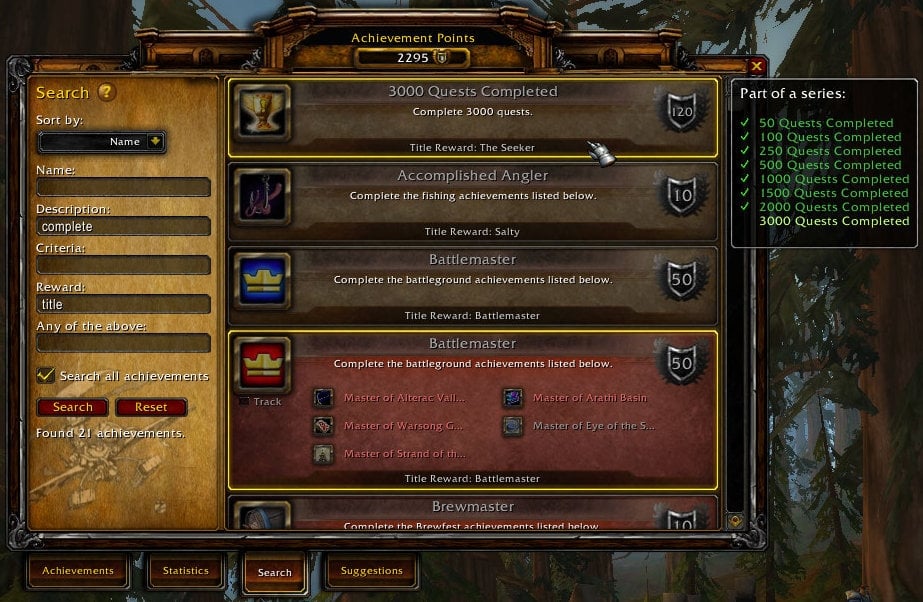
- Search: Search for achievements by name, description, reward, and more. (Quickly search by name using slash commands like "/ach food".)
- Suggestions: Get suggested achievements based on your current location, active holiday events, etc.
- Watch: Create custom watch lists of achievements.
- Related: See how achievements relate to each other.
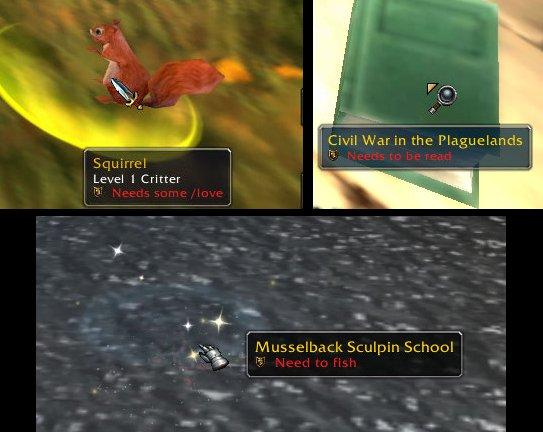
- Tooltip and audio reminders for objectives you find in the world (and in your bags).
- Automatically track exploration achievements as you travel.
- Automatically track timed achievements when the timer starts.
Achievement Tooltip Enhancements
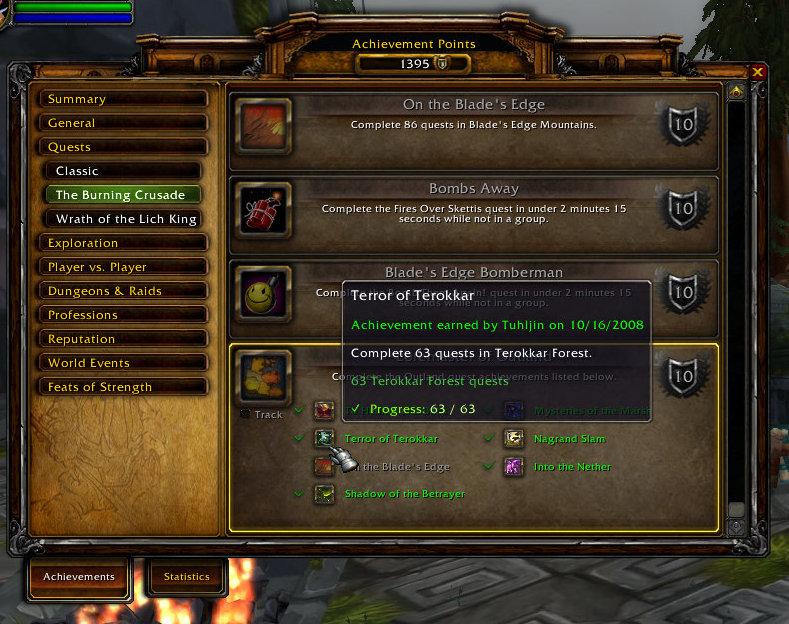
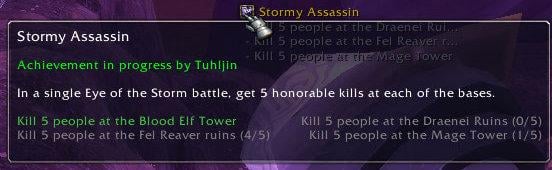
- Add information from progress bars and normally-hidden progress information. (For example, "Progress: 5/10" or "Assault 2 bases (0/2).")
- Compare progress using chat links: Display your progress below that of the player who linked the achievement.
- Optionally add the achievement's ID to its tooltip. (Convenient for addon authors.)
- Ctrl+click on an achievement link to open the GUI to that achievement. Ctrl+click again to track it.
GUI Enhancements
- Draggable Frames: The achievement frame is draggable.
- New tabs added to the default achievement frame, as highlighted above.
- Cooking Trade Skill UI:
- Display icons next to recipes you need to cook for "The Northrend Gourmet", "The Legion Menu", and similar achievements. Ctrl+click on one of these recipes to open the UI to the achievement that requires it.
- Works with the default UI, Advanced Trade Skill Window, Skillet, and lilsparky's branch of Skillet. (Users of lilsparky's branch must Alt+click instead of Ctrl+click to open to the achievement.)
- Display a tooltip when the cursor is over certain achievements in the GUI:
- ''Part of a series'': Give the names of other achievements in the series and its relation to them.
- ''Required by'': Give the names of any meta-achievements that list this achievement as a criteria.
- Meta-criteria (achievements displayed as the criteria for obtaining a larger achievement) in the GUI use a detailed achievement tooltip instead of simply giving the date the criteria was completed (or nothing if it isn't complete).
Tooltip and Audio Reminders
- Add information to units', items', and/or world objects' tooltips to help you complete...
- "To All The Squirrels I've Loved Before", "To All The Squirrels Who Shared My Life": Do I need to /love this critter?
- "Pest Control": Have I exterminated this critter?
- "Well Read", "Higher Learning": Have I read this book?
- "The Scavenger," "Outland Angler," "Northrend Angler": Have I fished this type of node?
- "It's Happy Hour Somewhere", "Tastes Like Chicken": Have I consumed this food or drink?
- "Northern Exposure", "Medium Rare", and many others: Do I need to kill this creature? (Includes many dungeon and raid-based achievements.)
- Holiday Achievements:
- "Let It Snow": Do I need to use a Handful of Snowflakes on this player?
- "Fistful of Love": Do I need to use a Handful of Rose Petals on this player?
- "Shake Your Bunny-Maker": Do I need to use Spring Flowers on this player?
- Sound Reminder: Choose a sound to play when one of the above tooltip reminders shows up if you need to do something.
Key Bindings
You can associate key bindings with each of the new tabs added to the Achievement frame using the standard key binding interface. The new bindings are located under the heading "Overachiever."
Localization
Localized to one degree or another for English, Spanish, German, French, Italian, Korean, Portuguese, Russian, simplified Chinese, and traditional Chinese. Translations generously provided by your fellow overachievers.
Disabling Modules
Some of Overachiever's features are implemented using modules, namely Overachiever_Tabs and Overachiever_Trade. Modules have their own folders that should be placed inside the Interface\AddOns folder alongside Overachiever. They can be enabled or disabled as you would a separate addon. Additionally, the individual tabs of the Tabs module (Search, Suggestions, Watch, Related) can be disabled by deleting or renaming the corresponding .lua files (Search.lua, Suggestions.lua, etc.).
Donations
This is a one-man project that can be quite time-consuming, depending on Blizzard's whims. All donations of any size are appreciated.
< Donate with PayPal >
Thanks for your support!
- Tuhljin
The change log lists changes of particular note to users, not every change made.
v1.0.9
- Updated TOC for WoW patch 8.3.
- Fix missing tooltip textures for achievement reminders and missing checkmark texture for completed achievements in various places (recent reminders, series list, meta requirements).
- Add options to show reminder text for kill-criteria achievements and the "Azeroth at War..." (mission table) achievements when the achievement is complete.
- Suggestions Tab:
-- Added suggestions for Chamber of Heart.
-- Added suggestions related to Black Empire Assaults on Uldum and Vale of Eternal Blossoms.
-- Added suggestion for Mardivas's Laboratory.
-- Fix Mechagon Island suggestions not appearing. (Now listed under "Mechagon.")
-- Added "The Fourth War" to War Campaign Ships suggestions.
-- Added "Scrappy's Best Friend" to Mechagon Island suggestions.
-- Added suggestions for the Battle for Darkshore warfront.
-- Added suggestions for the Battle for Stromgarde heroic warfront.
-- Added suggestion for revamped Deepwind Gorge battleground.
- Fix other variables leaking into global scope.
v1.0.8
- Updated TOC for WoW patch 8.2.5.
- Remove possible unneeded/misleading error messages and fix variables leaking into global scope.
v1.0.7
- Corrected references to Blizzard sound files.
- Reminder sound selection dropdown:
-- Now divides sounds from other addons into alphabetical groups to better handle large numbers of sounds.
-- Added a few more Blizzard sounds.
v1.0.6
- Updated TOC for WoW patch 8.2.
- Suggestions Tab: New suggestions added for the zones Mechagon Island and Nazjatar, the dungeon Operation: Mechagon, and the raid The Eternal Palace.
- "Shake Your Bunny-Maker": Updated tooltip check to match its new requirements.
v1.0.5
- Updated for WoW patch 8.1.
- "Eat Your Greens" (new): Added an option to display a reminder tooltip for eating plants in Nazmir.
- Suggestions Tab:
-- Added suggestions for the Battle for Stromgarde warfront.
-- Added suggestions for the dungeons Freehold, Shrine of the Storm, Waycrest Manor, Siege of Boralus, Atal'Dazar, The MOTHERLODE!!, The Underrot, Temple of Sethraliss, and Kings' Rest.
-- Added more suggestions for Tol Dagor (dungeon).
- Battle for Azeroth's "Adventurer of..." achievements: Added "need to kill" reminders for the criteria that needed manual entry of mob IDs.
- "To All the Squirrels..." achievements: Fix reminder tooltip not showing for certain critters that aren't / are no longer technically classed as critters (such as the sheep in Elwynn Forest).
- Attempt to make the draggable achievement frame feature more compatible with other addons.
- Recent Reminders feature:
-- If a recently spotted objective is complete, then its tooltip text is now colored green and will have a checkmark next to it.
-- "Azeroth at War..." achievements: Missions can now be flagged as recently spotted objectives.
-- Fixed an issue where reminders triggered by a timer resulted in a tooltip indicating recently spotted objectives but with none listed.
v1.0.4
- "Azeroth at War: The Barrens", "Azeroth at War: After Lordaeron", "Azeroth at War: Kalimdor on Fire" (new): Added an option to display a reminder tooltip in the mission UI for completing missions.
- "Three Sheets to the Wind" (new): Added an option to display a reminder tooltip for acquiring drinks.
- Suggestions Tab:
-- Added suggestions for Tol Dagor (dungeon) and the War Campaign Ships (Banshee's Wail and Wind's Redemption).
-- Removed suggestions that are now Feats of Strength.
- Fixed an issue where tooltips indicating whether an item needs to be consumed would appear even when the related option's checkbox was unchecked.
- Fixed reminder tooltip not showing for some mobs required for Legion's "Adventurer of..." achievements.
- Cache module: Fixed an issue that prevented the use of stored data from the opposing faction if a character of that faction hadn't been logged into since the release of a new WoW build or Overachiever version. (Data for the other faction should generally be considered reliable enough to use even if it will be rebuilt when you next log into a character of that faction.)
v1.0.3
- Trade module: "The Kul Tiran Menu" or "The Zandalari Menu" is now considered when determining if you need to cook a recipe.
- Fixed an issue where some of the opposing faction's achievements were sometimes automatically tracked in battlegrounds.
- Cache module:
-- This module now improves the accuracy of cross-faction data. For instance, the meta-achievement "Master of Warsong Gulch" requires a different version of "Quick Cap" for each faction. Without the cache module, only the "Quick Cap" for your own faction indicates that it is required by another achievement. With Overachiever_Cache enabled, both versions now indicate this.
-- For a complete cache, you will need to have logged into both an Alliance and a Horde character. (Most of the time, this is a non-issue. Most cached data is not faction specific. Even faction-specific achievements usually provide the same data to both factions.)
-- The tooltip indicating an achievement is required for a meta-achievement can now display an Alliance or Horde icon to show when the cache indicates the requirement is exclusive to one faction.
-- Fixed an issue where populating the cache while logged into a character of one faction prevented data from the other faction from being added.
v1.0.2
- Correct an issue that prevents the cache module from being loaded.
v1.0.1
- A new module has been added, Overachiever_Cache. When enabled (which it is by default), it should reduce load times once its cache is populated. The cache is rebuilt whenever Overachiever runs after a new build of WoW was released. (If the option "Startup: Throttle achievement lookup" is enabled, then this may improve performance instead of load time.)
- Trade module: Fix achievement information not showing in Cooking window.
- Suggestions Tab:
-- Added numerous suggestions for Battle for Azeroth zones.
-- Add more suggestions to the Draenor garrison.
-- Suggest "Choppin' Even More Logs" to Horde characters in their garrison instead of "Choppin' Some Logs" since the wrong faction's version was showing if the series progressed. (WoW API gives Alliance version as part of the series regardless of your faction.)
-- Suggest "Chromie Homie" at Wyrmrest Temple in Dragonblight (instead of only when actually inside The Deaths of Chromie scenario).
- Added achievements for Battle for Azeroth zones to exploration auto-tracking.
v1.0.0
- Updated for Battle for Azeroth beta and pre-patch, WoW patch 8.0.x. Updated TOC and made many required changes.
- This release is backward compatible with Legion. (This may not be the case for future releases.)
- Reworked the achievement search system. Searches should generally take less time and they now allow other activity to continue during a search.
- Search Tab:
-- "Personal" type split into "Personal" and "Other." The latter are achievements that do not have a category which belongs in the base UI. (Since all of them are unlisted achievements, selecting the "Other" type causes the search to include unlisted achievements even when the box to do so is unchecked.)
-- Added an option to direct searches started by slash commands (like "/ach") to the Search tab.
- When not directed to the Search tab, slash commands that searched for achievements will now also search through unlisted achievements. Excludes the "silent" slash commands such as "/achs". (When directed to the tab, whether they include unlisted achievements is determined by the relevant checkbox found there.)
- Minimap tooltips are now properly supported by the tooltip reminders feature. Up/down arrows (indicating a node's relative vertical position) do not prevent the reminder from showing and multiple nodes showing in the tooltip at once are now handled.
- Suggestions Tab: Added suggestions for Seething Shore.
- Tabs module: Added text overlay to indicate when the achievement completion filter (earned or incomplete) has caused an achievement to be omitted from the Suggestions or Related tabs.
- Improved ability to toggle tracking an achievement by ctrl+clicking on its link. Overachiever will now attempt to toggle tracking when the selected achievement is part of a series to which the linked achievement belongs (rather than requiring the linked achievement itself to be selected).
- Option "Startup: Throttle achievement lookup" is now disabled by default and it is automatically disabled for users upgrading from a pre-1.0 version of Overachiever.
v1.0.9
- Updated TOC for WoW patch 8.3.
- Fix missing tooltip textures for achievement reminders and missing checkmark texture for completed achievements in various places (recent reminders, series list, meta requirements).
- Add options to show reminder text for kill-criteria achievements and the "Azeroth at War..." (mission table) achievements when the achievement is complete.
- Suggestions Tab:
-- Added suggestions for Chamber of Heart.
-- Added suggestions related to Black Empire Assaults on Uldum and Vale of Eternal Blossoms.
-- Added suggestion for Mardivas's Laboratory.
-- Fix Mechagon Island suggestions not appearing. (Now listed under "Mechagon.")
-- Added "The Fourth War" to War Campaign Ships suggestions.
-- Added "Scrappy's Best Friend" to Mechagon Island suggestions.
-- Added suggestions for the Battle for Darkshore warfront.
-- Added suggestions for the Battle for Stromgarde heroic warfront.
-- Added suggestion for revamped Deepwind Gorge battleground.
- Fix other variables leaking into global scope.
v1.0.8
- Updated TOC for WoW patch 8.2.5.
- Remove possible unneeded/misleading error messages and fix variables leaking into global scope.
v1.0.7
- Corrected references to Blizzard sound files.
- Reminder sound selection dropdown:
-- Now divides sounds from other addons into alphabetical groups to better handle large numbers of sounds.
-- Added a few more Blizzard sounds.
v1.0.6
- Updated TOC for WoW patch 8.2.
- Suggestions Tab: New suggestions added for the zones Mechagon Island and Nazjatar, the dungeon Operation: Mechagon, and the raid The Eternal Palace.
- "Shake Your Bunny-Maker": Updated tooltip check to match its new requirements.
v1.0.5
- Updated for WoW patch 8.1.
- "Eat Your Greens" (new): Added an option to display a reminder tooltip for eating plants in Nazmir.
- Suggestions Tab:
-- Added suggestions for the Battle for Stromgarde warfront.
-- Added suggestions for the dungeons Freehold, Shrine of the Storm, Waycrest Manor, Siege of Boralus, Atal'Dazar, The MOTHERLODE!!, The Underrot, Temple of Sethraliss, and Kings' Rest.
-- Added more suggestions for Tol Dagor (dungeon).
- Battle for Azeroth's "Adventurer of..." achievements: Added "need to kill" reminders for the criteria that needed manual entry of mob IDs.
- "To All the Squirrels..." achievements: Fix reminder tooltip not showing for certain critters that aren't / are no longer technically classed as critters (such as the sheep in Elwynn Forest).
- Attempt to make the draggable achievement frame feature more compatible with other addons.
- Recent Reminders feature:
-- If a recently spotted objective is complete, then its tooltip text is now colored green and will have a checkmark next to it.
-- "Azeroth at War..." achievements: Missions can now be flagged as recently spotted objectives.
-- Fixed an issue where reminders triggered by a timer resulted in a tooltip indicating recently spotted objectives but with none listed.
v1.0.4
- "Azeroth at War: The Barrens", "Azeroth at War: After Lordaeron", "Azeroth at War: Kalimdor on Fire" (new): Added an option to display a reminder tooltip in the mission UI for completing missions.
- "Three Sheets to the Wind" (new): Added an option to display a reminder tooltip for acquiring drinks.
- Suggestions Tab:
-- Added suggestions for Tol Dagor (dungeon) and the War Campaign Ships (Banshee's Wail and Wind's Redemption).
-- Removed suggestions that are now Feats of Strength.
- Fixed an issue where tooltips indicating whether an item needs to be consumed would appear even when the related option's checkbox was unchecked.
- Fixed reminder tooltip not showing for some mobs required for Legion's "Adventurer of..." achievements.
- Cache module: Fixed an issue that prevented the use of stored data from the opposing faction if a character of that faction hadn't been logged into since the release of a new WoW build or Overachiever version. (Data for the other faction should generally be considered reliable enough to use even if it will be rebuilt when you next log into a character of that faction.)
v1.0.3
- Trade module: "The Kul Tiran Menu" or "The Zandalari Menu" is now considered when determining if you need to cook a recipe.
- Fixed an issue where some of the opposing faction's achievements were sometimes automatically tracked in battlegrounds.
- Cache module:
-- This module now improves the accuracy of cross-faction data. For instance, the meta-achievement "Master of Warsong Gulch" requires a different version of "Quick Cap" for each faction. Without the cache module, only the "Quick Cap" for your own faction indicates that it is required by another achievement. With Overachiever_Cache enabled, both versions now indicate this.
-- For a complete cache, you will need to have logged into both an Alliance and a Horde character. (Most of the time, this is a non-issue. Most cached data is not faction specific. Even faction-specific achievements usually provide the same data to both factions.)
-- The tooltip indicating an achievement is required for a meta-achievement can now display an Alliance or Horde icon to show when the cache indicates the requirement is exclusive to one faction.
-- Fixed an issue where populating the cache while logged into a character of one faction prevented data from the other faction from being added.
v1.0.2
- Correct an issue that prevents the cache module from being loaded.
v1.0.1
- A new module has been added, Overachiever_Cache. When enabled (which it is by default), it should reduce load times once its cache is populated. The cache is rebuilt whenever Overachiever runs after a new build of WoW was released. (If the option "Startup: Throttle achievement lookup" is enabled, then this may improve performance instead of load time.)
- Trade module: Fix achievement information not showing in Cooking window.
- Suggestions Tab:
-- Added numerous suggestions for Battle for Azeroth zones.
-- Add more suggestions to the Draenor garrison.
-- Suggest "Choppin' Even More Logs" to Horde characters in their garrison instead of "Choppin' Some Logs" since the wrong faction's version was showing if the series progressed. (WoW API gives Alliance version as part of the series regardless of your faction.)
-- Suggest "Chromie Homie" at Wyrmrest Temple in Dragonblight (instead of only when actually inside The Deaths of Chromie scenario).
- Added achievements for Battle for Azeroth zones to exploration auto-tracking.
v1.0.0
- Updated for Battle for Azeroth beta and pre-patch, WoW patch 8.0.x. Updated TOC and made many required changes.
- This release is backward compatible with Legion. (This may not be the case for future releases.)
- Reworked the achievement search system. Searches should generally take less time and they now allow other activity to continue during a search.
- Search Tab:
-- "Personal" type split into "Personal" and "Other." The latter are achievements that do not have a category which belongs in the base UI. (Since all of them are unlisted achievements, selecting the "Other" type causes the search to include unlisted achievements even when the box to do so is unchecked.)
-- Added an option to direct searches started by slash commands (like "/ach") to the Search tab.
- When not directed to the Search tab, slash commands that searched for achievements will now also search through unlisted achievements. Excludes the "silent" slash commands such as "/achs". (When directed to the tab, whether they include unlisted achievements is determined by the relevant checkbox found there.)
- Minimap tooltips are now properly supported by the tooltip reminders feature. Up/down arrows (indicating a node's relative vertical position) do not prevent the reminder from showing and multiple nodes showing in the tooltip at once are now handled.
- Suggestions Tab: Added suggestions for Seething Shore.
- Tabs module: Added text overlay to indicate when the achievement completion filter (earned or incomplete) has caused an achievement to be omitted from the Suggestions or Related tabs.
- Improved ability to toggle tracking an achievement by ctrl+clicking on its link. Overachiever will now attempt to toggle tracking when the selected achievement is part of a series to which the linked achievement belongs (rather than requiring the linked achievement itself to be selected).
- Option "Startup: Throttle achievement lookup" is now disabled by default and it is automatically disabled for users upgrading from a pre-1.0 version of Overachiever.
 |
Comment Options |
 07-01-23, 08:31 PM
|
|
|
A Kobold Labourer
Forum posts: 0
File comments: 1
Uploads: 0
|
Overachiever
Why does
 no longer work, although the latest version but when I click on one of the TABS in the game for successes, nothing happens for weeks`` no longer work, although the latest version but when I click on one of the TABS in the game for successes, nothing happens for weeks`` |

|

|
| nexocraftihd |
| View Public Profile |
| Send a private message to nexocraftihd |
| Find More Posts by nexocraftihd |
| Add nexocraftihd to Your Buddy List |
|
05-07-23, 12:07 AM
|
||
|
A Flamescale Wyrmkin
 Forum posts: 113
File comments: 113
Uploads: 1
|
 Re: Re: Fan Update
While I understand that it's a lot of work, you could probably take the addon over at this point. I can't quite get used to Krowi's, as it has more than I need. Overachiever always integrated virtually seamlessly. |
|
|
|
|
| jlrm365 |
| View Public Profile |
| Send a private message to jlrm365 |
| Find More Posts by jlrm365 |
| Add jlrm365 to Your Buddy List |
|
11-14-22, 07:14 AM
|
||
|
A Kobold Labourer
Forum posts: 0
File comments: 2
Uploads: 0
|
Re: Fan Update
|
|
|
|
|
| dburnt |
| View Public Profile |
| Send a private message to dburnt |
| Find More Posts by dburnt |
| Add dburnt to Your Buddy List |
|
06-02-22, 09:59 AM
|
|
|
A Murloc Raider
Forum posts: 8
File comments: 2
Uploads: 4
|
Fan Update
I've been working on a fan update for the last 4 patches of Shadowlands, going back to 9.1. I've been updating only by GitHub how I do not own the rights to the addon itself and have reached out to the author, the reply being an update from them is in the works, I can not update to wowinterface, curse or wago. In the mean time, the versions I'm updating is here https://github.com/Hyphie24/Overachiever/releases (It is the original addon just adding fixes to the original files) This is working with new achievements added in 9.2.5
Last edited by Dman24 : 06-02-22 at 10:00 AM.
|
|
|
|
| Dman24 |
| View Public Profile |
| Send a private message to Dman24 |
| Find More Posts by Dman24 |
| Add Dman24 to Your Buddy List |
|
05-23-22, 03:23 PM
|
||
|
A Defias Bandit
Forum posts: 3
File comments: 43
Uploads: 0
|
Re: Version discrepancy
Hope it can be kept up to date here too. |
|
|
|
|
| xerty |
| View Public Profile |
| Send a private message to xerty |
| Find More Posts by xerty |
| Add xerty to Your Buddy List |
|
02-15-22, 06:32 AM
|
|
|
A Kobold Labourer
Forum posts: 1
File comments: 1
Uploads: 0
|
Version discrepancy
It seems the version here is an older version than the one posted on Curseforge.
Would be great to see this add-on updated also here. (With the impending shutdown of add-on managers by Overwolf I would expect quite some people migrating from Curse to WoWInterface/Wago.) Otherwise it would be better to remove the add-on from here, so that we don't use an outdated version without knowing. |
|
|
|
| Portalbendarwinden |
| View Public Profile |
| Send a private message to Portalbendarwinden |
| Find More Posts by Portalbendarwinden |
| Add Portalbendarwinden to Your Buddy List |
|
10-16-20, 08:52 PM
|
|
|
Premium Member

 Forum posts: 135
File comments: 742
Uploads: 0
|
Updating here?
Coming here to say that I hope you're intending to update here, also, in addition to curseforge. Have used the addon forever, and the various extra abilities are SO USEFUL, thank you!
-Barleduq  |
|
|
|
| Barleduq |
| View Public Profile |
| Send a private message to Barleduq |
| Find More Posts by Barleduq |
| Add Barleduq to Your Buddy List |
|
06-26-19, 04:44 AM
|
|
|
Premium Member
Forum posts: 135
File comments: 742
Uploads: 0
|
Just after patch, error on acquiring Three Sheets to teh Wind items from mailbox
After logging in a few times (trying to clear errors and such) after patch 8.2, I happened to take some items for the THree Sheets to the Wind achievement from my mailbox - I've been buying them on my max alt, and sending them to the other BfA level alts just to pass around the achievement criteria. Now, Overachiever had made noise when I was mousing past some recipes I don't have/don't know that were in my bag (to be sold on AH), so I'm pretty sure it was working. However, as soon as I took the items from the mail message, I got this error:
Code:
Date: 2019-06-26 06:28:00
ID: 7
Error occured in: Global
Count: 1
Message: ..\AddOns\Overachiever\GameTip.lua line 168:
   PlaySoundFile Error - Invalid fileDataID for sound.
Debug:
   [C]: ?
   [C]: PlaySoundFile()
   Overachiever\GameTip.lua:168:
      Overachiever\GameTip.lua:163
   Overachiever\GameTip.lua:269:
      Overachiever\GameTip.lua:244
   Overachiever\GameTip.lua:1126:
      Overachiever\GameTip.lua:1110
   [C]: ?
   ...terface\AddOns\2048\libs\AceHook-3.0\AceHook-3.0.lua:95:
      ...terface\AddOns\2048\libs\AceHook-3.0\AceHook-3.0.lua:87
   [C]: ?
   [C]: ?
   ...AddOns\Auc-Advanced\Libs\LibExtraTip\LibExtraTip.lua:408:
      ...AddOns\Auc-Advanced\Libs\LibExtraTip\LibExtraTip.lua:402
   [C]: SetInboxItem()
   ExtMailUI\ExtMailUI.lua:474: InboxFrameItem_OnEnter()
   Postal\Modules\Express.lua:42:
      Postal\Modules\Express.lua:41
   (tail call): ?
   [string "*:OnEvent"]:3:
      [string "*:OnEvent"]:1
Locals:

AddOns:
I realize it's less than 24 hours after the game came back up, and I'm sure you have a life - but figured you might want to know this to have a pointer to problems. Thank you! -Barleduq |
|
|
|
| Barleduq |
| View Public Profile |
| Send a private message to Barleduq |
| Find More Posts by Barleduq |
| Add Barleduq to Your Buddy List |
|
12-12-18, 09:54 AM
|
|
|
A Kobold Labourer
Forum posts: 0
File comments: 30
Uploads: 1
|
Search seems to not work at all since 8.1, DataStore_Achievements seems to be throwing a pile of errors
|
|
|
|
| Lonarms |
| View Public Profile |
| Send a private message to Lonarms |
| Find More Posts by Lonarms |
| Add Lonarms to Your Buddy List |
|
12-05-17, 03:59 AM
|
|
|
A Kobold Labourer
Forum posts: 0
File comments: 3
Uploads: 0
|
Addon makes the game lag.
When I log in to the game the first time the overachiever addon seems not to work properly on the big map (it works normally on an area but when I zoom out to Eastern Kingdoms, for example, the game starts to lag badly) the only way I found how to avoid that is to reload the addon. Does anyone else have the same problem or it is just me?
|
|
|
|
| Rornard |
| View Public Profile |
| Send a private message to Rornard |
| Find More Posts by Rornard |
| Add Rornard to Your Buddy List |
|
02-17-17, 05:37 AM
|
|
|
A Flamescale Wyrmkin
Forum posts: 106
File comments: 233
Uploads: 10
|
Re: Donations?
the9thresident: Thanks for letting me know. PayPal must have changed something. It should work properly now.
|
|
|
|
| Tuhljin |
| View Public Profile |
| Send a private message to Tuhljin |
| Find More Posts by Tuhljin |
| Add Tuhljin to Your Buddy List |
|
02-13-17, 03:26 AM
|
|
|
A Kobold Labourer
Forum posts: 1
File comments: 60
Uploads: 0
|
Donations?
The link you have used to enter the PayPal system contains an incorrectly formatted item amount.
that's all i get kitty |
|
|
|
| the9thresident |
| View Public Profile |
| Send a private message to the9thresident |
| Visit the9thresident's homepage! |
| Find More Posts by the9thresident |
| Add the9thresident to Your Buddy List |
|
08-26-16, 05:35 PM
|
|
|
A Kobold Labourer
Forum posts: 0
File comments: 30
Uploads: 1
|
Legion Overacheiver
The author did post an update, hopefully it will get posted here as well
|
|
|
|
| Lonarms |
| View Public Profile |
| Send a private message to Lonarms |
| Visit Lonarms's homepage! |
| Find More Posts by Lonarms |
| Add Lonarms to Your Buddy List |
|
07-21-16, 09:45 PM
|
|
|
Premium Member
Forum posts: 135
File comments: 742
Uploads: 0
|
Will this be updated for Legion?
Getting errors on login, I believe my minor patch number is 7.0.3.22280
Code:
Date: 2016-07-21 23:39:36 ID: 31 Error occured in: Global Count: 1 Message: ..\AddOns\Overachiever_Trade\TradeSkills.lua line 478: hooksecurefunc(): TradeSkillFrame_Update is not a function Debug: [C]: hooksecurefunc() Overachiever_Trade\TradeSkills.lua:478: in main chunk Locals: AddOns: Swatter, v5.21f.5579 (SanctimoniousSwamprat) Archy, v6.2.3.2 AucAdvanced, v5.21f.5579 (SanctimoniousSwamprat) AucFilterOutlier, v5.21f.5579.2531(5.21f/embedded) AucMatchUndercut, v5.21f.5579.2531(5.21f/embedded) AucStatSales, v5.21f.5579.2842(5.21f/embedded) AucStatSimple, v5.21f.5579 (SanctimoniousSwamprat) AucStatWOWEcon, v5.21f.5579.2530(5.21f/embedded) AucUtilAHWindowControl, v5.21f.5579.3311(5.21f/embedded) AucUtilAppraiser, v5.21f.5579.2530(5.21f/embedded) AucUtilAskPrice, v5.21f.5579.3175(5.21f/embedded) AucUtilAutoMagic, v5.21f.5579.3142(5.21f/embedded) AucUtilCompactUI, v5.21f.5579.2530(5.21f/embedded) AucUtilEasyBuyout, v5.21f.5579.3583(5.21f/embedded) AucUtilItemSuggest, v5.21f.5579.3108(5.21f/embedded) AucUtilPriceLevel, v5.21f.5579.2545(5.21f/embedded) AucUtilScanButton, v5.21f.5579.2530(5.21f/embedded) AucUtilScanFinish, v5.21f.5579.2530(5.21f/embedded) AucUtilScanProgress, v5.21f.5579.2530(5.21f/embedded) AucUtilScanStart, v5.21f.5579.4784(5.21f/embedded) AucUtilSearchUI, v5.21f.5579.5272(5.21f/embedded) AucUtilSimpleAuction, v5.21f.5579.4546(5.21f/embedded) AucUtilVendMarkup, v5.21f.5579.2530(5.21f/embedded) Awwwww, v2.0.1 Babylonian, v5.1.DEV.332(/embedded) BadBoy, v13.021 BattlePetCount, v1.8.9 BestQuest, v2.03 BodyguardFocusAlert, v1.2 CloakHelmToggle, v1.0.1 Configator, v5.1.DEV.396(/embedded) DataStore, vr56 DataStoreSpells, vr27 DebugLib, v5.1.DEV.337(/embedded) Dresser, v7.0.0.160625 Enchantrix, v5.21f.5579 (SanctimoniousSwamprat) EnchantrixBarker, v5.21f.5579 (SanctimoniousSwamprat) ExaltedWithTheFloor, v1.0 Exonumist, v6.1.0.16 FlightMapEnhanced, v1.8.1 GemHelper, v6.0.6 GuildRosterButtons, v4.0 LibExtraTip, v5.12.DEV.395(/embedded) MetaMap, v7.0.3.0 Overachiever, v0.84 OverachieverTrade, v0.84 Pawn, v2.0.1 QuickQuestItem, v3.0 Skada, v1.4-34 SkadaScroll, v1.5.2 SlideBar, v5.21f.5579 (SanctimoniousSwamprat) Stubby, v5.21f.5579 (SanctimoniousSwamprat) TipHelper, v5.12.DEV.389(/embedded) TomTom, vv70000-1.0.0 WhoFramedWatcherWabbit, v2.2 BlizRuntimeLib_enUS v7.0.3.70000 <none> (ck=863) |
|
|
|
| Barleduq |
| View Public Profile |
| Send a private message to Barleduq |
| Visit Barleduq's homepage! |
| Find More Posts by Barleduq |
| Add Barleduq to Your Buddy List |
|
10-29-15, 01:20 PM
|
|
|
A Cyclonian

Forum posts: 40
File comments: 28
Uploads: 0
|
Another Bug?
Haven't seen this one posted yet and I keep getting it every time I change zones.
(Sorry not in the color that it shows up in the chat log) [Overachiever DEBUG]getAchievementID_cat:ret is Nil. category: 15235 index: 20 argnum: 2 |
|
|
|
| OrcanWonder |
| View Public Profile |
| Send a private message to OrcanWonder |
| Visit OrcanWonder's homepage! |
| Find More Posts by OrcanWonder |
| Add OrcanWonder to Your Buddy List |
|
Author Appreciation Society
This is a one-man project that can be quite time-consuming, depending on Blizzard's whims. All donations of any size are appreciated.
< Donate with PayPal >
Thanks for your support!
- Tuhljin
This is a one-man project that can be quite time-consuming, depending on Blizzard's whims. All donations of any size are appreciated.
< Donate with PayPal >
Thanks for your support!
- Tuhljin
Support AddOn Development!
You have just downloaded by the author . If you like this AddOn why not consider supporting the author? This author has set up a donation account. Donations ensure that authors can continue to develop useful tools for everyone.
*Clicking the donate button above will take you to PayPal.com

*Clicking the donate button above will take you to Pledgie.com
