Category: Graphic UI Mods
Addon Information
Download Latest Version.
To add favorites please register for a free account. If you already have one you need to login. How do I install this? (FAQ)
Author:
Version:
1.3.5
Date:
07-10-2009 04:42 PM
Size:
84.46 Kb
Downloads:
10,721
Favorites:
253
MD5:
Pictures
Click to enlarge
Default Settings
Click to enlarge
Options
Click to enlarge
More Options
GraphPaper   Popular! (More than 5000 hits)
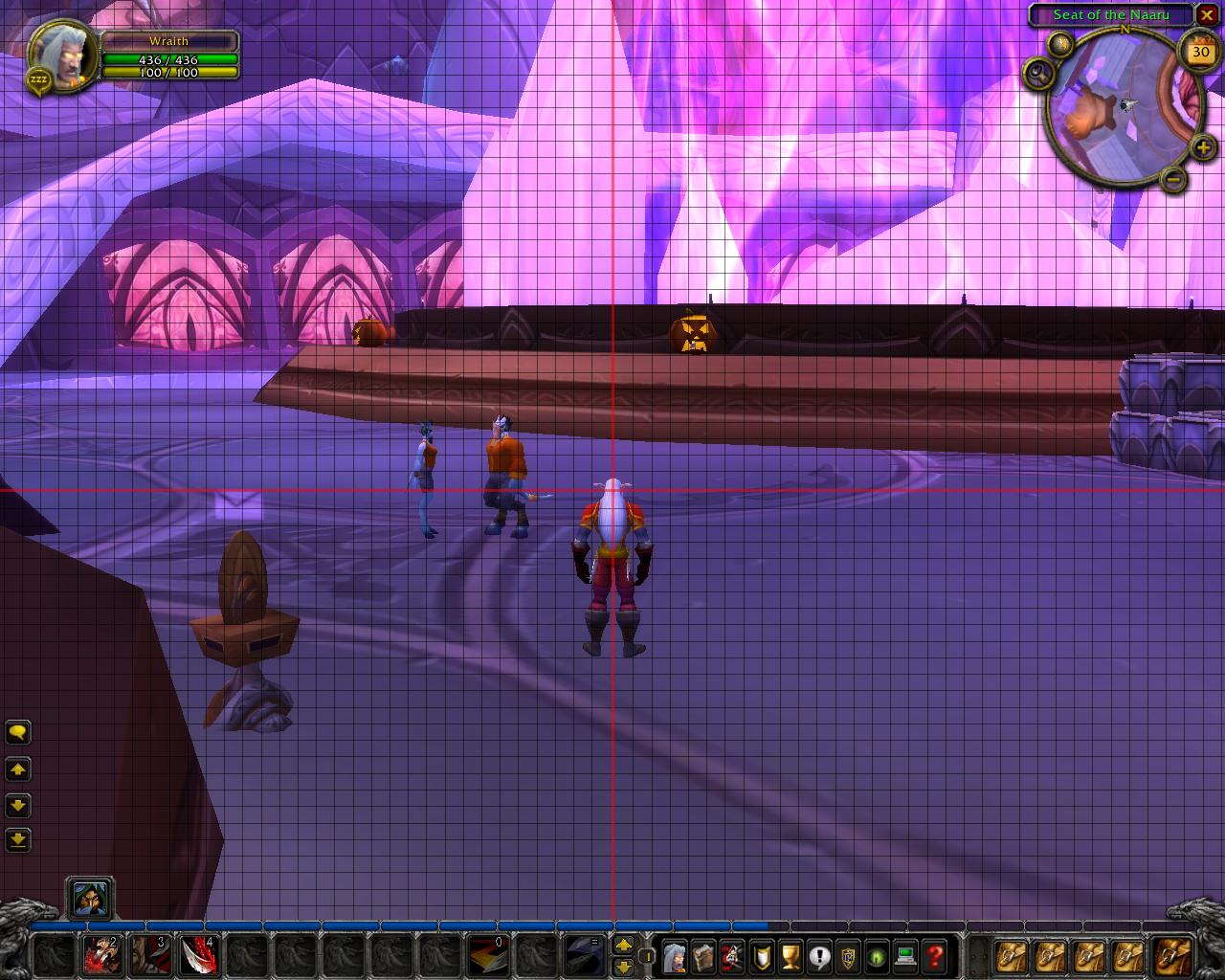
Places a configurable grid on screen to assist in positioning UI components.

Slash Command Options (/graphpaper or /gpaper)
/gpaper config - Open the Interface options panel
/gpaper hide - Hide the grid
/gpaper show - Show the grid
/gpaper # - A number (8 - 128) to set the grid spacing
/gpaper - Toggle hiding/showing the grid

NOTE: To prevent grid lines from vanishing in certain positions then make sure Options -> Video -> Resolution -> Multisampling = 2x (or better).

Translators: To submit a translation please just edit the appropriate file (example: GraphPaper\Locales\deDE.lua) and send it to me.
  Change Log - GraphPaper
Version 1.3.5 (07/10/2009)
- Added ConfigMode support
- Added MMOUI Minion support to TOC file (X-WoWI-ID)

Version 1.3.4 (04/28/2009)
- Library update
- Updated zhTW to use zhCN translations

Version 1.3.3 (03/20/2009)
- Using slash commands will now update the configuration panel if its open

Version 1.3.2 (03/10/2009)
- Updated zhCN file

Version 1.3.1 (03/09/2009)
- Fixed a bug with localization files

Version 1.3 (03/09/2009)
- Now uses Ace3 and supports profiles
- Changed to facilitate localization
- Slash commands changed slightly
- Corrected some minor display bugs

Version 1.2 (11/09/2008)
- Removed the Correction setting as it is now calculated automatically

Version 1.1.1 (11/05/2008)
- Fixed a minor bug

Version 1.1 (11/05/2008)
- Added some new options

Version 1.0.2 (11/03/2008)
- Changed the slash command to /graphpaper or /gpaper

Version 1.0.1 (11/01/2008)
- Added some slash command options and fixed an issue with the "correction" setting not saving/reseting properly

Version 1.0 (10/30/2008)
- Initial release
  Optional Files - GraphPaper
File Name
Version
Size
Author
Date
Type
30300.1
16kB
12-14-2009 04:24 PM
Addon
  Archived Versions - GraphPaper
File Name
Version
Size
Author
Date
1.3.4
84kB
Vrul
04-28-2009 07:33 PM
1.3.3
84kB
Vrul
03-20-2009 03:24 AM
1.2
5kB
Vrul
11-09-2008 08:10 AM
  Comments - GraphPaper
Post A Reply Comment Options
Old 07-11-2009, 01:45 AM  
Trond
A Cliff Giant
 
Trond's Avatar

Forum posts: 74
File comments: 30
Uploads: 0
Just what I was looking for to get my UI elements placed in correct position. Thanks!
__________________
Trond, because you deserve it...?
SDMF
Trond is offline Report comment to moderator   Edit/Delete Message Reply With Quote
Old 04-24-2009, 01:01 PM  
Zabbath
A Kobold Labourer
 
Zabbath's Avatar
Interface Author - Click to view interfaces

Forum posts: 1
File comments: 16
Uploads: 2
could u have changed the TOC to 30100? I'm one of those who don't like to click on "Load Out of Date Addons" :P
Zabbath is offline Report comment to moderator   Edit/Delete Message Reply With Quote
Old 03-19-2009, 08:24 PM  
Aesir
An Aku'mai Servant
 
Aesir's Avatar
Interface Author - Click to view interfaces

Forum posts: 30
File comments: 160
Uploads: 1
LDB Launcher

I was going to request that an LDB panel button launcher be added for quick click access to the grid and config panels of GraphPaper.

But then I decided it might be a decent starter project for me. So, if anyone is interested and wants a clicky button for GraphPaper, you may try out GraphPaper LDB found under the Optional Files tab here at the GraphPaper portal, or on it's own page here:

GraphPaper LDB

Surprisingly, it works on my system. I would be more than surprised if it worked on other people's systems.
__________________
-- æsir
Aesir is offline Report comment to moderator   Edit/Delete Message Reply With Quote
Old 03-15-2009, 11:26 PM  
Kuzah
A Murloc Raider

Forum posts: 9
File comments: 40
Uploads: 0
Quote:
Originally posted by Vrul
To submit a translation please just edit the appropriate file (example: GraphPaper\Locales\deDE.lua) and email it to me.
I am working on a new ui and this definitely helped a ton. THANK YOU!

On a side note would you be up for a lib data broker plugin for gpaper or is there one already out there? (I haven't been able to find one yet)
Kuzah is offline Report comment to moderator   Edit/Delete Message Reply With Quote
Old 03-09-2009, 10:55 PM  
Vrul
A Fallenroot Satyr
 
Vrul's Avatar
Interface Author - Click to view interfaces

Forum posts: 28
File comments: 151
Uploads: 15
Quote:
Originally posted by Aesir
Actually there's a Lua error with 1.3 apparently relating to localization.
Sorry about that. I forgot to trim the commas out after cutting and pasting but it should be fixed now.
Vrul is offline Report comment to moderator   Edit/Delete Message Reply With Quote
Old 03-09-2009, 07:54 PM  
Aesir
An Aku'mai Servant
 
Aesir's Avatar
Interface Author - Click to view interfaces

Forum posts: 30
File comments: 160
Uploads: 1
Quote:
Originally posted by Vrul
To submit a translation please just edit the appropriate file (example: GraphPaper\Locales\deDE.lua) and email it to me.
Actually there's a Lua error with 1.3 apparently relating to localization. Here's the ~!Swatter log:

Code:
Date: 2009-03-09 19:51:44
ID: 1
Error occured in: Global
Count: 1
Message: ..\AddOns\GraphPaper\Locales\deDE.lua line 6:
   unexpected symbol near '='
Debug:
   [C]: ?
The same error occurs for each of the locales (Edited: Except for my locale - enUS), but I don't include each log entry as it's repetitive.

I tried wrapping each non-enUS block of translations with L={ ... } like we see it done in enUS.lua, but that created a different error. Removing the commas at the ends of each line of translation text eliminated the errors - but I have no way of checking whether or not that breaks the translations in some way. Deleting all the non-enUS also 'fixes' the issue, but that doesn't help the localization requirement too much.
__________________
-- æsir

Last edited by Aesir : 03-09-2009 at 08:51 PM.
Aesir is offline Report comment to moderator   Edit/Delete Message Reply With Quote
Old 03-09-2009, 07:51 PM  
Vrul
A Fallenroot Satyr
 
Vrul's Avatar
Interface Author - Click to view interfaces

Forum posts: 28
File comments: 151
Uploads: 15
To submit a translation please just edit the appropriate file (example: GraphPaper\Locales\deDE.lua) and email it to me.
Vrul is offline Report comment to moderator   Edit/Delete Message Reply With Quote
Old 02-21-2009, 09:07 PM  
Vrul
A Fallenroot Satyr
 
Vrul's Avatar
Interface Author - Click to view interfaces

Forum posts: 28
File comments: 151
Uploads: 15
It was /gp originally but there was a conflict with the addon GhostPulse so I changed it to /gpaper. I'll look into changing it so /gpaper toggles the grid on/off for ease of use.

EDIT:

To toggle the grid the slash command is now:
/gpaper

To open the options panel the slash command is now:
/gpaper config

Last edited by Vrul : 03-09-2009 at 07:51 PM.
Vrul is offline Report comment to moderator   Edit/Delete Message Reply With Quote
Old 02-21-2009, 03:35 PM  
Kuzah
A Murloc Raider

Forum posts: 9
File comments: 40
Uploads: 0
First, thank you for this addon. I was using Align, but this one is so much more versatile.

There's one small suggestion I have.

I was wondering if you could add a /gp that would be the same as typing /graphpaper. Every time I want to show the lines I have to type "/graphpaper show" then "/graphpaper hide" but if you added the /gp that would be awesome!
Kuzah is offline Report comment to moderator   Edit/Delete Message Reply With Quote
Old 11-06-2008, 10:29 AM  
Spinhalf
A Defias Bandit

Forum posts: 2
File comments: 49
Uploads: 0
Nice work on this mod

I'm getting this error since the latest upgrade.

Quote:
[2008/11/06 09:22:42-462-x1]: GraphPaper-1.1\GraphPaper.lua:36: bad argument #2 to 'strsplit' (string expected, got nil)
GraphPaper-1.1\GraphPaper.lua:36: in function <Interface\AddOns\GraphPaper\GraphPaper.lua:35>
GraphPaper-1.1\GraphPaper.lua:46: in main chunk
Thanks!
Spinhalf is offline Report comment to moderator   Edit/Delete Message Reply With Quote
Old 11-06-2008, 04:35 AM  
Hapepe82
A Kobold Labourer

Forum posts: 0
File comments: 87
Uploads: 0
This addon is s avery nice idea!! Thank you very much... I have fiddled so often with perfect alignment... It might save me hours for playing instead of configuring
Hapepe82 is offline Report comment to moderator   Edit/Delete Message Reply With Quote
Old 11-06-2008, 01:07 AM  
Vrul
A Fallenroot Satyr
 
Vrul's Avatar
Interface Author - Click to view interfaces

Forum posts: 28
File comments: 151
Uploads: 15
The bug should be fixed now.
Vrul is offline Report comment to moderator   Edit/Delete Message Reply With Quote
Old 11-05-2008, 11:30 PM  
Aesir
An Aku'mai Servant
 
Aesir's Avatar
Interface Author - Click to view interfaces

Forum posts: 30
File comments: 160
Uploads: 1
Quote:
Originally posted by Malice.US
Not that it makes much of a difference, but why don't you give /align 64 a try and see what happens in Align (also works with any value in increments of 32 up till 256)
The documentation for Align isn't so dense that I'd missed the command line switches. However, since you responded indicating that it should work, I decided to test it again and trace through the lua.

The issue I had is that subsequent entries of /align ignore the argument, so when I'd run /align to run it, followed by (for example) /align 64, that just toggled the grid off instead of creating a 64-square wide grid. If I enter /align 64 a second time, it toggles back on with the expected grid. If I edit it, I'll make it so it only toggles off with /align (nil), and otherwise creates a new grid with /align (arg). Thanks.

[Edited: And, yes, thanks for adding in the new option to GP. Playing around with it now.]

Get this !Swatter log at logon:

Date: 2008-11-06 00:52:34
ID: 2
Error occured in: Global
Count: 1
Message: ..\AddOns\GraphPaper\GraphPaper.lua line 36:
bad argument #2 to 'strsplit' (string expected, got nil)

Debug:
[C]: ?
[C]: strsplit()
GraphPaper\GraphPaper.lua:36:
GraphPaper\GraphPaper.lua:35
GraphPaper\GraphPaper.lua:46: in main chunk

__________________
-- æsir

Last edited by Aesir : 11-06-2008 at 12:54 AM.
Aesir is offline Report comment to moderator   Edit/Delete Message Reply With Quote
Old 11-05-2008, 09:51 PM  
Malice.US
A Murloc Raider
 
Malice.US's Avatar

Forum posts: 4
File comments: 32
Uploads: 0
Quote:
Originally posted by Aesir
One difference is that Align does not display a grid at all when selecting a grid size other than the default value (32) on my display (a resolution of 1680x1050).

Not that it makes much of a difference, but why don't you give /align 64 a try and see what happens in Align (also works with any value in increments of 32 up till 256)

Last edited by Malice.US : 11-05-2008 at 09:54 PM.
Malice.US is online now Report comment to moderator   Edit/Delete Message Reply With Quote
Old 11-03-2008, 05:49 PM  
Aesir
An Aku'mai Servant
 
Aesir's Avatar
Interface Author - Click to view interfaces

Forum posts: 30
File comments: 160
Uploads: 1
Quote:
Originally posted by Samasnier
How is this different from Align?
One difference is that Align does not display a grid at all when selecting a grid size other than the default value (32) on my display (a resolution of 1680x1050).

Suggestions for Graphpaper improvements:
* Disconnect the center line from the rest of the grid. If you change the centerline thickness value from the default (thickest) to another value (e.g, thinnest) you'll see that it moves the grid spacing when it probably shouldn't. The 'fix' option might help - but it is imprecise (because it depends upon the human Mark II Eyeball to determine whether you've created a grid that is perfectly symmetrical).

* Change the slider control for grid spacing so that it displays a numerical value and/or provide an input box so that you can set the value by hand. It's helpful to know the size of a grid square, so that you can ensure you're setting up a grid that divides evenly for a given display resolution. I wouldn't be opposed to seeing the ability to set X axis grid values independently of y-axis grid values, since no monitor in common usage has a 1:1 aspect ratio, meaning it would be (potentially) more useful to be able to setup a grid of rectangles, as opposed to a grid of perfect squares.
__________________
-- æsir

Last edited by Aesir : 11-03-2008 at 05:53 PM.
Aesir is offline Report comment to moderator   Edit/Delete Message Reply With Quote
Post A Reply


Category Jump:


The Network:
EQInterface | EQ2Interface | LoTROInterface | MMOInterface | War.MMOUI | WoWInterface | VGInterface | Allakhazam | Thottbot | Wowhead | Zam


©2009 MMOUI / ZAM Network
vBulletin - Copyright ©2000 - 2010, Jelsoft Enterprises Ltd.



