| Go to Page... |

Pictures
File Info
| Compatibility: | Plunderstorm (10.2.6) Classic (1.15.1) WOTLK Patch (3.4.3) |
| Updated: | 03-19-24 06:41 PM |
| Created: | 11-08-08 12:23 PM |
| Downloads: | 33,960 |
| Favorites: | 195 |
| MD5: | |
| Categories: | Action Bar Mods, Bags, Bank, Inventory |
10.2.6
Select 

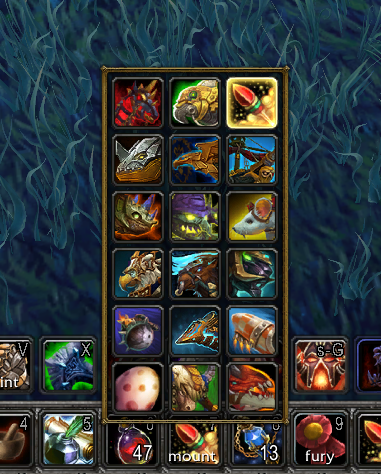
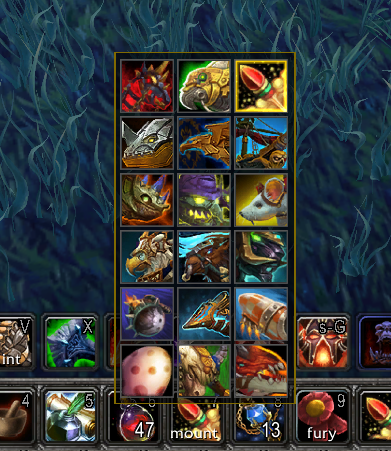
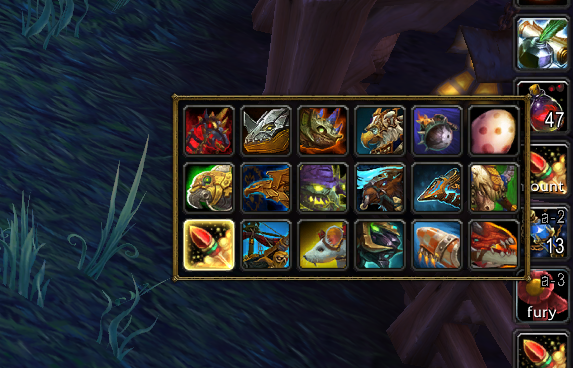
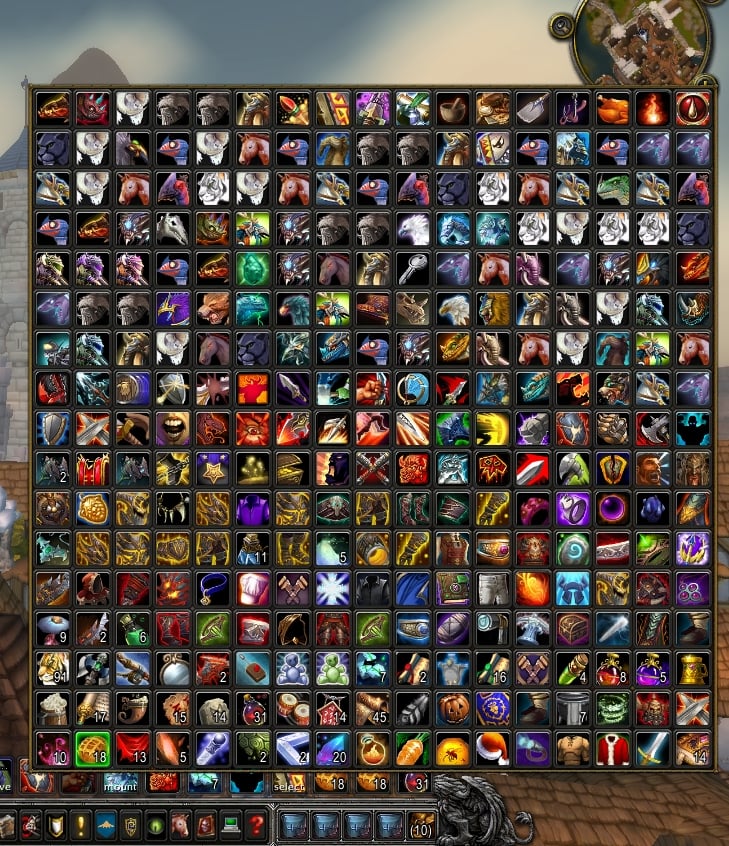
This addon adds the /select macro command you can use instead of /use or /cast to use an item or spell among a list. Right-clicking your macro from the bars will pop out a menu where you can change the item or spell to use.
This version works on Retail/Shadowlands, Classic Era and The Burning Crusade Clients clients.
How to Use
- Create a macro with this line: /select item or spell, item or spell, etc
- Drag the macro to your bars.
- The first item or spell will be the default action when you hit the macro.
- Right-click the macro to on your bars to change it to a different item or spell.
For instance, warriors may find this useful:
/select Battle Shout, Commanding ShoutWhen you create that macro it will cast Battle Shout every time it's hit. If you join a group with a death knight and want to use Commanding Shout instead, right-click the macro on your bars and choose Commanding Shout. Now the macro will display and cast Commanding Shout.
You can also embed the /select within a larger macro. For mages:
/focus [@focus,noexists][@focus,dead][mod:alt]This is a standard focus-sheep macro. When you want to change what polymorph spell to use, right-click the macro on your bars and pick another. It will use that new polymorph until you decide to change it again.
/select [@focus,exists][] Polymorph(Sheep), Polymorph(Turtle), Polymorph(Rabbit), Polymorph(Black Cat)
You can also shorten the above macro by using a search:keyword to find all Polymorph variants:
/focus [@focus,noexists][@focus,dead][mod:alt]Search:Keywords
/select [@focus,exists][] spell:Polymorph
To help add items and spells to your /select macros, search:keywords are usable in place of an item or spell name. These search through your bags and spellbooks to fill the flyout with items and spells that match the keyword(s).
The officially supported searches are:
item:id or partial name
Add an item by its item:id or all items in your bags or worn that contain the partial name.
Examples: item:1234, item:Bandage, item:Ore
spell:id or partial name
Add a spell by its numerical id or all spells that contain the partial name.
Examples: spell:1234, spell:Shout, spell:Polymorph
type:ItemType
Add all items that contain the keyword in one of its type fields. See www.wowpedia.com/ItemType for a full list.
Examples: type:Quest, type:Food, type:Herb, type:Leather
equipslot:slot
As with the /equipslot command, this lets you equip items into the given slot. See the in-game options for a table of slot numbers and what goes there.
Examples: equipslot:13, equipslot:19
The following works in the current modern version of WoW, but not the Classic Era or The Burning Crusade Classic clients:
mount:flying, land, favorite*, favflying*, favland* or partial name
Add all flying, land, favorite, favorite flying, favorite land mounts or mounts that contain the partial name.
Examples: mount:flying, mount:Raptor, mount:favflying
profession:primary, secondary, any or partial name
Adds all primary professions, secondary professions or any professions.
Examples: profession:Primary, profession:Any, profession:Herb
toy:favorite, any or partial name
Adds favorite toys, all toys or toys that contain the partial name.
Examples: toy:Crash, toy:favorite, toy:any
The following works in the Classic Era or The Burning Crusade Classic clients but not the modern version of WoW:
ranks:spell partial name
Adds all ranks of a spell in your spellbook that contain the partial name. (Remember to turn on the option Show Subtext on Spell Tooltips to ranks display in tooltips!)
Examples: ranks:Light Heal, ranks:Blessing, ranks:Curse
[condition] support
Just like /cast and /castsequence, /select can use [conditions]. Every [condition] used by the macro system is supported. Some examples:
/select [flyable] Name of flying mount, Another flying mount; Name of land mount
/select [@focus,exists][] spell:Polymorph
/select [combat] Master Healing Potion, Healthstone; [nocombat] item:Food & Drink
/select [spec:1] Conjured Mana Cake, Cobo Cola; Conjured Mana Cake, Frybread
/select [nopet] spell:Summon Demon; Grimoire of Sacrifice
Macro length "tax"
To do its magic, Select needs to add a line like this to all macros that contain a /select command:
/click [btn:2]S001M;S001AIt will do this on its own and it will recreate this line if it's accidentally deleted or altered. You don't need to worry about it except to remember that when writing your /select macros your macro needs at least 26 characters free for it to add this line (if it's not already there).
Limitations
- Only the first /select in a macro will be recognized. Any others in the same macro will be ignored.
- When you create or edit a macro in combat (you should be fighting!) it will wait until you leave combat to turn the macro on or make changes from your edit.
- If you gain an item or spell that wasn't available as you entered combat, that item or spell won't be in the flyout until you leave combat.
Frequently Asked Questions
Q: What action bar addons does this support?
A: All of them! Default too, of course. If you can drop a Blizzard macro onto the button then Select should work with that button. However, if the macros are outside the game's standard macro slots, Select won't be aware of them.
Q: Can I add companion pets to /select?
A: Yes and no. There's a game limitation that prevent changing the icon easily. That said, pet:name, pet:favorite and pet:any work. But be aware it uses one icon for all pets.
Q: Can I change the order that items or spells list in the menu?
A: If you want certain items to list before others, add them manually. ie: /select x-51 nether-rocket x-treme, mount:flying will list the x-51 rocket first.
Q: Tyrael's Charger is missing from my land mounts!
A: Tyrael's Charger can fly so it's grouped with the flying mounts. But if you want to add it to your land mounts you can add it manually: /select tyrael's charger, mount:land
Q: Can you make the popout menu align to the action/macro button?
A: No, sorry. The secure methods to get the menu working in combat prohibits anchoring willy nilly.
If you have any suggestions, comments or bugs to report, feel free to post them in comments here. Thanks!
03/19/2024 version 3.5.6
- toc update for 10.2.6 patch
03/10/2024 version 3.5.5
- toc update for 1.15.1 patch
01/16/2024 version 3.5.4
- toc update for 10.2.5 patch
11/21/2023 version 3.5.3
- Workaround for Blizzard's GetActionInfo bug on 10.2 clients which causes Select to not display proper tooltip, macro name or yellow arrow when mouseover of action buttons containing a select macro. This bug with Blizzard's GetActionInfo does not otherwise impact Select's functionality. (Note: This workaround uses macro names to identify macros which are not 100% reliable since macros can share a name.)
11/07/2023 version 3.5.2
- toc update for 10.2 patch
10/19/2023 version 3.5.1
- Fix for Classic Era clients lua error when attempting to register mount events
10/19/2023 version 3.5.0
- Items that have a quality (reagents, potions, etc.) will now display their quality overlay on the flyout buttons
- When selecting a named item without a search (eg. Refreshing Healing Potion instead of item:Healing) and the item has a quality, it will add all qualities of that item to the flyout
- Mount support added to WotLK Classic clients (Note: Toy support not added yet since WotLK uses a primitive toy API and more work needed)
- Reworked how clients are classified internally
- toc update for 3.4.3 patch
09/05/2023 version 3.4.17
- toc update for 10.1.7 patch
08/24/2023 version 3.4.16
- Fix for container lua errors in Classic Era clients
- toc update for 1.14.4 amd 3.4.2 patches
07/11/2023 version 3.4.15
- toc update for 10.1.5 patch
05/02/2023 version 3.4.14
- Fix for potential cache issue on cold logins
05/02/2023 version 3.4.13
- Added option Ignore CVar Changes for Dragonflight clients (this has no effect on classic clients) to ignore changes to ActionButtonUseKeyDown cvar. WARNING: While this option is enabled, if you or another addon changes the cvar, Select may cease to work until a reload. This is a workaround for one of Blizzard's bugs in the Dragonflight client relating to /click syntax and other addons making frequent changes to this cvar. This is Blizzard's bug to fix and unfortunately it's still not fixed in 10.1.
- Fix for toy filtering when gathered toys disagrees with all toys
- toc update for icon and 10.1.0 patch
03/21/2023 version 3.4.12
- toc update for 10.0.7 patch
01/30/2023 version 3.4.11
- Fix for spells with subtexts broken by last update.
01/29/2023 version 3.4.10
- Fix for spells that begin with an exclamation mark (!) being stripped of the exclamation mark.
01/25/2023 version 3.4.9
- toc update for 10.0.5 patch
01/19/2023 version 3.4.8
- Fix for WotLK Ulduar patch
- toc update for 3.4.1 patch
12/11/2022 version 3.4.7
- Dragonriding mounts now have their own mount category: /select mount:dragonriding, or /select mount:favdragonriding. (/select m:dragonriding or /select m:fdragon are shortened versions.)
- /select toy:favorite will now only select favorite toys and not include toys like Jiggle's Favorite Toy (unless it's actually a favorite).
- Fix for mounts being learned not being immediately available in mount searches.
- Fix for the favorite status of a mount not being immediately available in mount searches.
11/15/2022 version 3.4.6
- toc update for 10.0.2 patch
11/12/2022 version 3.4.5
- More work on secure buttons to make them behave with ActionButtonUseKeyDown.
- The options 'Use Item Or Spell While Selecting', 'Use But Don't Select With <Alt>' and 'Use Item or Spell On Right Click' should now work if your ActionButtonUseKeyDown is 0 in Dragonflight clients.
- Note: On 10.0.2 Dragonflight clients, the /click line in macros requires two more characters to define whether the click is a down or up event to match your ActionButtonUseKeyDown setting. This is in addition to the prior two to pass a mouse button. This means if your macro was already pushing 255 characters, a couple character may be dropped at the end.
11/02/2022 version 3.4.4
- Workaround for Blizzard (yet again) changing how secure buttons work with ActionButtonUseKeyDown on 10.0.2 beta clients.
10/28/2022 version 3.4.3
- Workaround for Blizzard's bug in 10.0.0 clients where ActionButtonUseKeyDown cvar determines if a /click requires a button (this may require another update if they hotfix it before 10.0.2 patch)
- Fix for /select by itself not summoning options panel
10/25/2022 version 3.4.2
- Update for Dragonflight clients.
- Fix for 10.0.0 clients inability to use selection action.
- Note: For pre-patch clients (10.0.0), /select needs two more characters in a macro to do its thing. If your /select macros were 254+ characters, this will cut them short. In 10.0.2 the need for two extra characters may be going away.
10/19/2022 version 3.4.1
- Fix for Dragonflight beta clients (10.0.2) inability to use selected action.
- Known issue: Alt+click and right click of flyout buttons are behaving as an unmodified left click. This should be corrected soon.
10/04/2022 version 3.4.0
- Update for Dragonflight client support
- Beta/PTR users will need to load out of date addons for this to work until the Dragonflight Pre-Patch
- Added no:<search> filter to exclude items and spells added by previous filters. eg. /select toy:Hearthstone, no:Card will remove the Autographed Hearthstone Card from the flyout
- Select will be a bit more assertive on control of the icon for /select macros to fix issues with macro icons not updating
- Removed broken 'Don't Override #showtooltip' option
- Note: On Dragonflight clients, two more characters are needed for the macro length 'tax'. If your /select macros already hit the 255 macro length, they may not function as expected. Shadowlands and Classic clients should not be affected.
09/03/2022 version 3.3.5
- Fix for retail vs client detection
09/02/2022 version 3.3.4
- Fix for addition of WotLK WOW_PROJECT_ID
09/01/2022 version 3.3.3
- toc update for WotLK Classic
08/16/2022 version 3.3.2
- toc update for 9.2.7 patch
06/08/2022 version 3.3.1
- Classic and BCC: Added alias 'r' for ranks. /select r:Flash Heal is now equivalent to /select ranks:Flash Heal
06/05/2022 version 3.3.0
- Reworked how toys are cached
- Fix for select causing toy journal filters to invert after 9.2.5 patch
- Fix for toy:favorites disappearing when filters hide favorite toys on login/reload
- Classic and BCC: Fix for unlearned ranks of spells appearing in flyouts
05/31/2022 version 3.2.3
- toc update for 9.2.5 patch
05/22/2022 version 3.2.2
- Added wago and curse project IDs to toc
05/12/2022 version 3.2.1
- Fix to make wowup recognize the wowinterface provider. (May require a rescan of folders in wowup)
04/28/2022 version 3.2.0
- Added rows:<number> keyword to specify how many rows/columns to make the flyout. For instance '/select spell:teleport, rows:1' will make the flyout one skinny row of buttons rather than multiple rows/columns.
- Updated interface options panel to include rows:<number> help.
- Option 'Don't Override #showtooltip' will now prompt for a reload, since changing this option requires a reload.
- Updated toc for Classic and BCC clients.
02/22/2022 version 3.1.5
- Update toc for 9.2 patch
11/02/2021 version 3.1.4
- Update toc for 9.1.5 patch
09/02/2021 version 3.1.3
- Potential fix for ranks filter on classic clients when a spell has no rank.
08/22/2021 version 3.1.2
- Added a search cache to improve performance when equipslot, item, spell, mount or toy search filters are used.
- Initialization now waits for the data load pass of the cache to complete.
- Rather than waiting until you need to use a flyout (or entering combat during which flyouts can't be changed), flyouts are now filled slowly over time upon login to cache them.
06/29/2021 version 3.1.1
- Potential fix for rank 10+ appearing before rank 9 in ranks:search flyouts on BCC/Classic clients.
- Updated toc for 9.1.0 patch
06/19/2021 version 3.1.0
- Added ranks:search filter for Classic Era and The Burning Crusade Classic Clients (not Retail), to add all ranks of a spell to a flyout. /select ranks:Curse of Agony will add all ranks of spells containing Curse of Agony in its name to the flyout. (If you've turned off the option Show Subtext on Spell Tooltips, you may want to turn it back on if you use this filter, so ranks display in the tooltips.)
- Updated interface options panel for the new ranks:search, made the retail-only (and new classic-only) notifications a different color to stand out, and renamed Retail to Modern clients.
- Some global references made local
05/18/2021 version 3.0.9
- Update for The Burning Crusade Classic
03/13/2021 version 3.0.8
- Updated toc for 9.0.5 patch
12/12/2020 version 3.0.7
- Fix for ranged weapons not being offered in /select equipslot:16 on retail clients.
12/07/2020 version 3.0.6
- Fix for m:mountID filter not working.
12/05/2020 version 3.0.5
- Fix for @cursor not working with /select macros.
10/24/2020 version 3.0.4
- The toy filter now accepts itemIDs. /select toy:156833 will now select Katy's Stampwhistle if you have it.
10/13/2020 version 3.0.3
- Shadowlands pre-patch release.
09/28/2020 version 3.0.2
- A more definite fix for toys not loading when multiple addons are data caching stuff on login. Thanks Cellanoid for your help debugging this. :D
- Fix for newly-created /select macros not saving their initial default value without something being actively selected.
09/24/2020 version 3.0.1
- Potential fix for issues caching toys on cold login and when new toys learned.
09/02/2020 version 3.0.0
Select has been completely rewritten. Changes include:
- This version supports Retail (8.3), Shadowlands (9.0) and Classic (1.13) clients. Elements that aren't available on Classic (such as mount:search, toy:search and profession:search) will not be loaded or enabled. Note: for Shadowlands beta/ptr or Classic clients, you'll need to load out of date addons.
- New filter equipslot:<slot> will allow you to select and equip items for the given slot. For instance: /select equipslot:13 will let you swap trinkets to the top trinket slot on a right-click of the macro, and use the top trinket on a left-click or keybind of the macro.
- You can choose which direction a flyout opens with flyout:<direction> in the macro. For instance /select equipslot:14, flyout:left will open a flyout to the left of the button containing the macro.
- To select items or spells with commas in their name, surround them with quotes, such as: /select Magic Rooster, 'Yulei, Daughter of Jade', Core Hound.
- Right click will select an item or spell from the flyout menu now.
- The /select command by itself will summon the options window.
- The options window has been updated to reflect new settings, filters and more information on usage.
- Added new option 'Use Flat Style' to display flyouts and their buttons in a flatter style.
- Added new option 'Show Subtext on Spell Tooltips'. When spells have a subtext such as Heal(Rank 1) or Polymorph(Turtle) it will add the subtext to tooltips. This is default enabled in Classic WoW where spell ranks play a greater role.
- Added new option 'Select Only Soulbound Equipslots' to not include bind-on-equip gear that you loot into select flyouts.
- Added new option 'Use Item Or Spell On Right Click' that will make right-clicks mimic the behavior of the Alt modifier, and use an item or spell as it's selected. Note: for equipslot:<slot>, selecting will always equip the item regardless of click or modifier.
- If the option 'Use But Don't Select with Alt' is enabled, this will also apply to the Right Click if 'Use With Right Click' is enabled.
- When units are involved in conditionals (out of range, invalid, etc), the macro should now reflect that unit during the condition (if the action button/bars supports this behavior) before the action is used.
- Items in the flyout now have a colored border to reflect their rarity, if applicable.
- Open flyouts can now be dismissed with the ESCape key (or whatever you've mapped to the game menu) while in combat.
- Passive spells will no longer show in spell:search filters (but you can add them separately to a /select if you still want them).
- When a filter:search is used, items and spells are added to the flyout in alphabetical order for that specific filter:search. For instance '/select Magic Rooster, type:Quest, spell:Portal' will add the Magic Rooster first, then all quest items sorted alphabetically, then all Portal spells sorted alphabetically last.
- Mounts found as the result of a mount:search that are not currently summonable will now add to flyouts, such as the Darkwater Skate that only works under water.
- Added new option 'Only Select Summonable Mounts' to remove these mounts that can't be currently summoned from mount:search flyouts.
- Flyout button creation is deferred until needed.
- Fix for some default flyout spells like spell:Polymorph only picking one spell.
- Removed the need to aggressively set attributes or build flyouts.
- Flyouts that cease to be used are no longer filled.
Notes for users of Select 2.x:
- Options like 'Use But Don't Select with Alt' will carry over from 2.x to 3.x.
- All existing /select macros should continue to work without change.
- After updating from 2.x to 3.x, the initial loaded selection from every flyout will reset to the first available item or spell across all characters. This one-time reset is due way selected items and spells are saved.
- If you're updating this manually, you will need to exit the game completely before updating. There are new files that won't be recognized if added while logged into the game.
- This version has considerably changed the files/folders in the Select addon folder. If you feel comfortable doing it, you can delete the old one before installing this. But the old files are harmless if they remain, they will not be loaded. Auto-updating clients may possibly do this for you too.
02/01/2020 version 2.5.3
- Updated toc for 8.3 patch
12/24/2018 version 2.5.2
- If 'UberTooltips' cvar is disabled, then all additional tooltip info from Select is no longer added
- Added option 'Don't Add Macro To Tooltip' in interface options to not append macro tooltips with the /select command used in the macro
- Updated toc for 8.1 patch
08/26/2018 version 2.5.1
- Added mount:aquatic (and mount:favaquatic) keywords to select aquatic mounts (water striders, seahorses, etc)
07/01/2018 version 2.5.0
- NOTE: This version is for Battle for Azeroth only
- Updated for Battle for Azeroth
02/07/2018 version 2.4.13
- Fix for mount m:<mountID|spellID> filter
02/07/2018 version 2.4.12
- Optimized mount filters
01/21/2018 version 2.4.11
- Fix for potential mini lockup if you have many select macros and enter combat for the first time: unused flyouts are created over time after login instead of all at once as you enter combat for the first time.
- Fix for search in the ToyBox not working while Select is enabled.
- Fix for toys not found when newer filters (expansions, unusuable) hiding them.
08/29/2017 version 2.4.10
- toc update for 7.3 patch
04/24/2017 version 2.4.9
- A better fix for icons reverting to a red question mark.
04/09/2017 version 2.4.8
- Fix for icons reverting to a red question mark when zoning. (Let me know if any are still experiencing this, could be some timing issue involved too.)
03/28/2017 version 2.4.7
- Fix for other addons putting non-strings into UISpecialFrames. à²*_à²*
- toc update for 7.2 patch
10/24/2016 version 2.4.6
- toc update for 7.1 patch
6/4/2016 version 2.4.5
- Fix for attempt to cache empty bag slots.
- Fix for not all spell tabs checked in spell filters.
- Fix for mount:spellID filters
5/27/16 version 2.4.4
- Fix for Cooldown_SetTimer renamed to Cooldown_Set
5/17/16 version 2.4.3
- Fix for Legion mount API changes
5/14/16 version 2.4.2
- Fix for cold login issues: toys not being cached, macro icons not initialized properly and lua error
5/13/16 version 2.4.1
- Fix for source filters getting unchecked on login and when toys change
5/13/16 version 2.4.0
- toc update for 7.0 Legion Beta
- Fix for renamed toybox API calls
- Fix for cooldown anchors going bonkers
3/17/16 version 2.3.13
- mount:<number> (or m:<number>) will add a mount by spellID
- Fix for lua error when flyout is empty and action button undefined
- Fix for lua error when flyout is a single number
12/22/15 version 2.3.12
- Fix for specific keywords not doing an exact match, causing mount:land to only list favorite land mounts (and mount:flying to list only favorite flying mounts)
11/29/15 version 2.3.11
- Fix for mount filters that don't match their spell name (ie chauffeured mekgineer's chopper vs summon chauffeur)
6/22/15 version 2.3.10
- toc update for 6.2
3/30/15 version 2.3.9
- Fix for spells with colons in their name (like Power Word: Shield, Teleport: Moonglade)
2/28/15 version 2.3.8
- Fix for toy sources being cleared on login
2/24/15 version 2.3.7
- toc update for 6.1
10/31/14 version 2.3.6
- Fix for toy searches failing after zoning (removed cache wipe)
- Removed checks for WoD client
10/14/14 version 2.3.5
- 6.0 patch
9/30/14 version 2.3.4
- Flyouts removed from UISpecialFrames on entering combat, prohibited from joining UISpecialFrames during combat
9/30/14 version 2.3.3
- moved copying of flyout->action attributes from unsecure OnAttributeChanged to secure state driver snippet
9/23/14 version 2.3.2
- Toybox item support toy:favorite,any,partial search:keyword
9/4/14 version 2.3.1,
- Fix for lua error when attempting to show tooltip of a spell no longer known
8/29/14 version 2.3.0,
- Rewrite
- All /selects are state-driven
- Searches case insensitive
- Options panel reworked
- Full WoD mount support
7/21/14 version 2.2.0,
- Initial fixes for WoD beta
unreleased version 2.1.6,
- made index,actionType local in Select_Menu.lua SetAction hooksecurefunc
2/23/14 version 2.1.5,
- Fix for handling of invalid/missing [condition]als
2/20/14 version 2.1.4,
- Fix for hyphenated item:searches
1/14/14 version 2.1.3,
- Fix for mounts not completely loading on login
12/26/13 version 2.1.2,
- Frames join UISpecialFrames only when they're shown (out of combat)
9/11/13 version 2.1.1,
- toc update for 5.4
6/22/13 version 2.1.0,
- State driver added
- Flyouts indexed by their list instead of their macro
- DontSelectWithAlt option
- Item cache added
5/19/13 version 2.0.13,
- toc update
- summonpet works in combat
- Menus at top of screen grow downward
5/5/13 version 2.0.12,
- Added mount:favorites filter if Select Favorite Mounts loaded
4/18/13 version 2.0.11,
- BAG_UPDATE unregistered if all menus populated
- Added Select_PerCharacter_Settings to restore initial actions to last attributes
- Removed profiling tools
4/06/13 version 2.0.10,
- Removed G_!Roster
- Added profiling tools
3/28/13 version 2.0.9,
- Removed internal pet system
- Added G_PetRoster
2/18/13 version 2.0.8,
- Added macrotext support
- Centralized timer system
- Internal pet system
1/26/13 version 2.0.7,
- Added tooltips to /select macros
9/23/12 version 2.0.6,
- Added nil,1 to GetItemCount in parent:OnShow
- Added throttled UpdateMacroIcons on BAG_UPDATE, PLAYER_EQUIPMENT_CHANGED
9/21/12 version 2.0.5,
- Rewrite release
11/08/08 version 1.0.0,
- Initial release
- toc update for 10.2.6 patch
03/10/2024 version 3.5.5
- toc update for 1.15.1 patch
01/16/2024 version 3.5.4
- toc update for 10.2.5 patch
11/21/2023 version 3.5.3
- Workaround for Blizzard's GetActionInfo bug on 10.2 clients which causes Select to not display proper tooltip, macro name or yellow arrow when mouseover of action buttons containing a select macro. This bug with Blizzard's GetActionInfo does not otherwise impact Select's functionality. (Note: This workaround uses macro names to identify macros which are not 100% reliable since macros can share a name.)
11/07/2023 version 3.5.2
- toc update for 10.2 patch
10/19/2023 version 3.5.1
- Fix for Classic Era clients lua error when attempting to register mount events
10/19/2023 version 3.5.0
- Items that have a quality (reagents, potions, etc.) will now display their quality overlay on the flyout buttons
- When selecting a named item without a search (eg. Refreshing Healing Potion instead of item:Healing) and the item has a quality, it will add all qualities of that item to the flyout
- Mount support added to WotLK Classic clients (Note: Toy support not added yet since WotLK uses a primitive toy API and more work needed)
- Reworked how clients are classified internally
- toc update for 3.4.3 patch
09/05/2023 version 3.4.17
- toc update for 10.1.7 patch
08/24/2023 version 3.4.16
- Fix for container lua errors in Classic Era clients
- toc update for 1.14.4 amd 3.4.2 patches
07/11/2023 version 3.4.15
- toc update for 10.1.5 patch
05/02/2023 version 3.4.14
- Fix for potential cache issue on cold logins
05/02/2023 version 3.4.13
- Added option Ignore CVar Changes for Dragonflight clients (this has no effect on classic clients) to ignore changes to ActionButtonUseKeyDown cvar. WARNING: While this option is enabled, if you or another addon changes the cvar, Select may cease to work until a reload. This is a workaround for one of Blizzard's bugs in the Dragonflight client relating to /click syntax and other addons making frequent changes to this cvar. This is Blizzard's bug to fix and unfortunately it's still not fixed in 10.1.
- Fix for toy filtering when gathered toys disagrees with all toys
- toc update for icon and 10.1.0 patch
03/21/2023 version 3.4.12
- toc update for 10.0.7 patch
01/30/2023 version 3.4.11
- Fix for spells with subtexts broken by last update.
01/29/2023 version 3.4.10
- Fix for spells that begin with an exclamation mark (!) being stripped of the exclamation mark.
01/25/2023 version 3.4.9
- toc update for 10.0.5 patch
01/19/2023 version 3.4.8
- Fix for WotLK Ulduar patch
- toc update for 3.4.1 patch
12/11/2022 version 3.4.7
- Dragonriding mounts now have their own mount category: /select mount:dragonriding, or /select mount:favdragonriding. (/select m:dragonriding or /select m:fdragon are shortened versions.)
- /select toy:favorite will now only select favorite toys and not include toys like Jiggle's Favorite Toy (unless it's actually a favorite).
- Fix for mounts being learned not being immediately available in mount searches.
- Fix for the favorite status of a mount not being immediately available in mount searches.
11/15/2022 version 3.4.6
- toc update for 10.0.2 patch
11/12/2022 version 3.4.5
- More work on secure buttons to make them behave with ActionButtonUseKeyDown.
- The options 'Use Item Or Spell While Selecting', 'Use But Don't Select With <Alt>' and 'Use Item or Spell On Right Click' should now work if your ActionButtonUseKeyDown is 0 in Dragonflight clients.
- Note: On 10.0.2 Dragonflight clients, the /click line in macros requires two more characters to define whether the click is a down or up event to match your ActionButtonUseKeyDown setting. This is in addition to the prior two to pass a mouse button. This means if your macro was already pushing 255 characters, a couple character may be dropped at the end.
11/02/2022 version 3.4.4
- Workaround for Blizzard (yet again) changing how secure buttons work with ActionButtonUseKeyDown on 10.0.2 beta clients.
10/28/2022 version 3.4.3
- Workaround for Blizzard's bug in 10.0.0 clients where ActionButtonUseKeyDown cvar determines if a /click requires a button (this may require another update if they hotfix it before 10.0.2 patch)
- Fix for /select by itself not summoning options panel
10/25/2022 version 3.4.2
- Update for Dragonflight clients.
- Fix for 10.0.0 clients inability to use selection action.
- Note: For pre-patch clients (10.0.0), /select needs two more characters in a macro to do its thing. If your /select macros were 254+ characters, this will cut them short. In 10.0.2 the need for two extra characters may be going away.
10/19/2022 version 3.4.1
- Fix for Dragonflight beta clients (10.0.2) inability to use selected action.
- Known issue: Alt+click and right click of flyout buttons are behaving as an unmodified left click. This should be corrected soon.
10/04/2022 version 3.4.0
- Update for Dragonflight client support
- Beta/PTR users will need to load out of date addons for this to work until the Dragonflight Pre-Patch
- Added no:<search> filter to exclude items and spells added by previous filters. eg. /select toy:Hearthstone, no:Card will remove the Autographed Hearthstone Card from the flyout
- Select will be a bit more assertive on control of the icon for /select macros to fix issues with macro icons not updating
- Removed broken 'Don't Override #showtooltip' option
- Note: On Dragonflight clients, two more characters are needed for the macro length 'tax'. If your /select macros already hit the 255 macro length, they may not function as expected. Shadowlands and Classic clients should not be affected.
09/03/2022 version 3.3.5
- Fix for retail vs client detection
09/02/2022 version 3.3.4
- Fix for addition of WotLK WOW_PROJECT_ID
09/01/2022 version 3.3.3
- toc update for WotLK Classic
08/16/2022 version 3.3.2
- toc update for 9.2.7 patch
06/08/2022 version 3.3.1
- Classic and BCC: Added alias 'r' for ranks. /select r:Flash Heal is now equivalent to /select ranks:Flash Heal
06/05/2022 version 3.3.0
- Reworked how toys are cached
- Fix for select causing toy journal filters to invert after 9.2.5 patch
- Fix for toy:favorites disappearing when filters hide favorite toys on login/reload
- Classic and BCC: Fix for unlearned ranks of spells appearing in flyouts
05/31/2022 version 3.2.3
- toc update for 9.2.5 patch
05/22/2022 version 3.2.2
- Added wago and curse project IDs to toc
05/12/2022 version 3.2.1
- Fix to make wowup recognize the wowinterface provider. (May require a rescan of folders in wowup)
04/28/2022 version 3.2.0
- Added rows:<number> keyword to specify how many rows/columns to make the flyout. For instance '/select spell:teleport, rows:1' will make the flyout one skinny row of buttons rather than multiple rows/columns.
- Updated interface options panel to include rows:<number> help.
- Option 'Don't Override #showtooltip' will now prompt for a reload, since changing this option requires a reload.
- Updated toc for Classic and BCC clients.
02/22/2022 version 3.1.5
- Update toc for 9.2 patch
11/02/2021 version 3.1.4
- Update toc for 9.1.5 patch
09/02/2021 version 3.1.3
- Potential fix for ranks filter on classic clients when a spell has no rank.
08/22/2021 version 3.1.2
- Added a search cache to improve performance when equipslot, item, spell, mount or toy search filters are used.
- Initialization now waits for the data load pass of the cache to complete.
- Rather than waiting until you need to use a flyout (or entering combat during which flyouts can't be changed), flyouts are now filled slowly over time upon login to cache them.
06/29/2021 version 3.1.1
- Potential fix for rank 10+ appearing before rank 9 in ranks:search flyouts on BCC/Classic clients.
- Updated toc for 9.1.0 patch
06/19/2021 version 3.1.0
- Added ranks:search filter for Classic Era and The Burning Crusade Classic Clients (not Retail), to add all ranks of a spell to a flyout. /select ranks:Curse of Agony will add all ranks of spells containing Curse of Agony in its name to the flyout. (If you've turned off the option Show Subtext on Spell Tooltips, you may want to turn it back on if you use this filter, so ranks display in the tooltips.)
- Updated interface options panel for the new ranks:search, made the retail-only (and new classic-only) notifications a different color to stand out, and renamed Retail to Modern clients.
- Some global references made local
05/18/2021 version 3.0.9
- Update for The Burning Crusade Classic
03/13/2021 version 3.0.8
- Updated toc for 9.0.5 patch
12/12/2020 version 3.0.7
- Fix for ranged weapons not being offered in /select equipslot:16 on retail clients.
12/07/2020 version 3.0.6
- Fix for m:mountID filter not working.
12/05/2020 version 3.0.5
- Fix for @cursor not working with /select macros.
10/24/2020 version 3.0.4
- The toy filter now accepts itemIDs. /select toy:156833 will now select Katy's Stampwhistle if you have it.
10/13/2020 version 3.0.3
- Shadowlands pre-patch release.
09/28/2020 version 3.0.2
- A more definite fix for toys not loading when multiple addons are data caching stuff on login. Thanks Cellanoid for your help debugging this. :D
- Fix for newly-created /select macros not saving their initial default value without something being actively selected.
09/24/2020 version 3.0.1
- Potential fix for issues caching toys on cold login and when new toys learned.
09/02/2020 version 3.0.0
Select has been completely rewritten. Changes include:
- This version supports Retail (8.3), Shadowlands (9.0) and Classic (1.13) clients. Elements that aren't available on Classic (such as mount:search, toy:search and profession:search) will not be loaded or enabled. Note: for Shadowlands beta/ptr or Classic clients, you'll need to load out of date addons.
- New filter equipslot:<slot> will allow you to select and equip items for the given slot. For instance: /select equipslot:13 will let you swap trinkets to the top trinket slot on a right-click of the macro, and use the top trinket on a left-click or keybind of the macro.
- You can choose which direction a flyout opens with flyout:<direction> in the macro. For instance /select equipslot:14, flyout:left will open a flyout to the left of the button containing the macro.
- To select items or spells with commas in their name, surround them with quotes, such as: /select Magic Rooster, 'Yulei, Daughter of Jade', Core Hound.
- Right click will select an item or spell from the flyout menu now.
- The /select command by itself will summon the options window.
- The options window has been updated to reflect new settings, filters and more information on usage.
- Added new option 'Use Flat Style' to display flyouts and their buttons in a flatter style.
- Added new option 'Show Subtext on Spell Tooltips'. When spells have a subtext such as Heal(Rank 1) or Polymorph(Turtle) it will add the subtext to tooltips. This is default enabled in Classic WoW where spell ranks play a greater role.
- Added new option 'Select Only Soulbound Equipslots' to not include bind-on-equip gear that you loot into select flyouts.
- Added new option 'Use Item Or Spell On Right Click' that will make right-clicks mimic the behavior of the Alt modifier, and use an item or spell as it's selected. Note: for equipslot:<slot>, selecting will always equip the item regardless of click or modifier.
- If the option 'Use But Don't Select with Alt' is enabled, this will also apply to the Right Click if 'Use With Right Click' is enabled.
- When units are involved in conditionals (out of range, invalid, etc), the macro should now reflect that unit during the condition (if the action button/bars supports this behavior) before the action is used.
- Items in the flyout now have a colored border to reflect their rarity, if applicable.
- Open flyouts can now be dismissed with the ESCape key (or whatever you've mapped to the game menu) while in combat.
- Passive spells will no longer show in spell:search filters (but you can add them separately to a /select if you still want them).
- When a filter:search is used, items and spells are added to the flyout in alphabetical order for that specific filter:search. For instance '/select Magic Rooster, type:Quest, spell:Portal' will add the Magic Rooster first, then all quest items sorted alphabetically, then all Portal spells sorted alphabetically last.
- Mounts found as the result of a mount:search that are not currently summonable will now add to flyouts, such as the Darkwater Skate that only works under water.
- Added new option 'Only Select Summonable Mounts' to remove these mounts that can't be currently summoned from mount:search flyouts.
- Flyout button creation is deferred until needed.
- Fix for some default flyout spells like spell:Polymorph only picking one spell.
- Removed the need to aggressively set attributes or build flyouts.
- Flyouts that cease to be used are no longer filled.
Notes for users of Select 2.x:
- Options like 'Use But Don't Select with Alt' will carry over from 2.x to 3.x.
- All existing /select macros should continue to work without change.
- After updating from 2.x to 3.x, the initial loaded selection from every flyout will reset to the first available item or spell across all characters. This one-time reset is due way selected items and spells are saved.
- If you're updating this manually, you will need to exit the game completely before updating. There are new files that won't be recognized if added while logged into the game.
- This version has considerably changed the files/folders in the Select addon folder. If you feel comfortable doing it, you can delete the old one before installing this. But the old files are harmless if they remain, they will not be loaded. Auto-updating clients may possibly do this for you too.
02/01/2020 version 2.5.3
- Updated toc for 8.3 patch
12/24/2018 version 2.5.2
- If 'UberTooltips' cvar is disabled, then all additional tooltip info from Select is no longer added
- Added option 'Don't Add Macro To Tooltip' in interface options to not append macro tooltips with the /select command used in the macro
- Updated toc for 8.1 patch
08/26/2018 version 2.5.1
- Added mount:aquatic (and mount:favaquatic) keywords to select aquatic mounts (water striders, seahorses, etc)
07/01/2018 version 2.5.0
- NOTE: This version is for Battle for Azeroth only
- Updated for Battle for Azeroth
02/07/2018 version 2.4.13
- Fix for mount m:<mountID|spellID> filter
02/07/2018 version 2.4.12
- Optimized mount filters
01/21/2018 version 2.4.11
- Fix for potential mini lockup if you have many select macros and enter combat for the first time: unused flyouts are created over time after login instead of all at once as you enter combat for the first time.
- Fix for search in the ToyBox not working while Select is enabled.
- Fix for toys not found when newer filters (expansions, unusuable) hiding them.
08/29/2017 version 2.4.10
- toc update for 7.3 patch
04/24/2017 version 2.4.9
- A better fix for icons reverting to a red question mark.
04/09/2017 version 2.4.8
- Fix for icons reverting to a red question mark when zoning. (Let me know if any are still experiencing this, could be some timing issue involved too.)
03/28/2017 version 2.4.7
- Fix for other addons putting non-strings into UISpecialFrames. à²*_à²*
- toc update for 7.2 patch
10/24/2016 version 2.4.6
- toc update for 7.1 patch
6/4/2016 version 2.4.5
- Fix for attempt to cache empty bag slots.
- Fix for not all spell tabs checked in spell filters.
- Fix for mount:spellID filters
5/27/16 version 2.4.4
- Fix for Cooldown_SetTimer renamed to Cooldown_Set
5/17/16 version 2.4.3
- Fix for Legion mount API changes
5/14/16 version 2.4.2
- Fix for cold login issues: toys not being cached, macro icons not initialized properly and lua error
5/13/16 version 2.4.1
- Fix for source filters getting unchecked on login and when toys change
5/13/16 version 2.4.0
- toc update for 7.0 Legion Beta
- Fix for renamed toybox API calls
- Fix for cooldown anchors going bonkers
3/17/16 version 2.3.13
- mount:<number> (or m:<number>) will add a mount by spellID
- Fix for lua error when flyout is empty and action button undefined
- Fix for lua error when flyout is a single number
12/22/15 version 2.3.12
- Fix for specific keywords not doing an exact match, causing mount:land to only list favorite land mounts (and mount:flying to list only favorite flying mounts)
11/29/15 version 2.3.11
- Fix for mount filters that don't match their spell name (ie chauffeured mekgineer's chopper vs summon chauffeur)
6/22/15 version 2.3.10
- toc update for 6.2
3/30/15 version 2.3.9
- Fix for spells with colons in their name (like Power Word: Shield, Teleport: Moonglade)
2/28/15 version 2.3.8
- Fix for toy sources being cleared on login
2/24/15 version 2.3.7
- toc update for 6.1
10/31/14 version 2.3.6
- Fix for toy searches failing after zoning (removed cache wipe)
- Removed checks for WoD client
10/14/14 version 2.3.5
- 6.0 patch
9/30/14 version 2.3.4
- Flyouts removed from UISpecialFrames on entering combat, prohibited from joining UISpecialFrames during combat
9/30/14 version 2.3.3
- moved copying of flyout->action attributes from unsecure OnAttributeChanged to secure state driver snippet
9/23/14 version 2.3.2
- Toybox item support toy:favorite,any,partial search:keyword
9/4/14 version 2.3.1,
- Fix for lua error when attempting to show tooltip of a spell no longer known
8/29/14 version 2.3.0,
- Rewrite
- All /selects are state-driven
- Searches case insensitive
- Options panel reworked
- Full WoD mount support
7/21/14 version 2.2.0,
- Initial fixes for WoD beta
unreleased version 2.1.6,
- made index,actionType local in Select_Menu.lua SetAction hooksecurefunc
2/23/14 version 2.1.5,
- Fix for handling of invalid/missing [condition]als
2/20/14 version 2.1.4,
- Fix for hyphenated item:searches
1/14/14 version 2.1.3,
- Fix for mounts not completely loading on login
12/26/13 version 2.1.2,
- Frames join UISpecialFrames only when they're shown (out of combat)
9/11/13 version 2.1.1,
- toc update for 5.4
6/22/13 version 2.1.0,
- State driver added
- Flyouts indexed by their list instead of their macro
- DontSelectWithAlt option
- Item cache added
5/19/13 version 2.0.13,
- toc update
- summonpet works in combat
- Menus at top of screen grow downward
5/5/13 version 2.0.12,
- Added mount:favorites filter if Select Favorite Mounts loaded
4/18/13 version 2.0.11,
- BAG_UPDATE unregistered if all menus populated
- Added Select_PerCharacter_Settings to restore initial actions to last attributes
- Removed profiling tools
4/06/13 version 2.0.10,
- Removed G_!Roster
- Added profiling tools
3/28/13 version 2.0.9,
- Removed internal pet system
- Added G_PetRoster
2/18/13 version 2.0.8,
- Added macrotext support
- Centralized timer system
- Internal pet system
1/26/13 version 2.0.7,
- Added tooltips to /select macros
9/23/12 version 2.0.6,
- Added nil,1 to GetItemCount in parent:OnShow
- Added throttled UpdateMacroIcons on BAG_UPDATE, PLAYER_EQUIPMENT_CHANGED
9/21/12 version 2.0.5,
- Rewrite release
11/08/08 version 1.0.0,
- Initial release
Optional Files (0)
Archived Files (42)
File Name |
Version |
Size |
Author |
Date |
3.5.5 |
56kB |
Gello |
03-10-24 12:25 PM |
|
3.5.4 |
56kB |
Gello |
01-16-24 03:58 PM |
|
3.5.3 |
56kB |
Gello |
11-21-23 12:30 PM |
|
3.5.2 |
56kB |
Gello |
11-07-23 03:30 PM |
|
3.5.1 |
56kB |
Gello |
10-19-23 01:43 PM |
|
3.5.0 |
56kB |
Gello |
10-19-23 12:07 PM |
|
3.4.17 |
56kB |
Gello |
09-05-23 04:44 PM |
|
3.4.16 |
56kB |
Gello |
08-24-23 04:05 AM |
|
3.4.15 |
56kB |
Gello |
07-11-23 06:00 PM |
|
3.4.14 |
56kB |
Gello |
05-02-23 05:58 PM |
|
3.4.13 |
55kB |
Gello |
05-02-23 03:18 AM |
|
3.4.12 |
55kB |
Gello |
03-21-23 03:07 AM |
|
3.4.11 |
55kB |
Gello |
01-30-23 05:31 AM |
|
3.4.10 |
55kB |
Gello |
01-29-23 12:05 PM |
|
3.4.9 |
55kB |
Gello |
01-25-23 04:58 AM |
|
3.4.8 |
55kB |
Gello |
01-19-23 06:02 PM |
|
3.4.7 |
54kB |
Gello |
12-11-22 12:31 PM |
|
3.4.6 |
54kB |
Gello |
11-15-22 11:15 AM |
|
3.4.5 |
54kB |
Gello |
11-12-22 11:34 AM |
|
3.4.4 |
54kB |
Gello |
11-02-22 03:01 PM |
|
3.4.3 |
54kB |
Gello |
10-28-22 01:39 AM |
|
3.4.2 |
53kB |
Gello |
10-25-22 05:38 PM |
|
3.4.1 |
53kB |
Gello |
10-19-22 04:34 PM |
|
3.4.0 |
53kB |
Gello |
10-04-22 09:55 AM |
|
3.3.5 |
53kB |
Gello |
09-03-22 03:26 AM |
|
3.3.4 |
53kB |
Gello |
09-02-22 04:33 PM |
|
3.3.3 |
53kB |
Gello |
09-01-22 01:56 AM |
|
3.3.2 |
53kB |
Gello |
08-16-22 06:29 PM |
|
3.3.1 |
53kB |
Gello |
06-08-22 05:10 PM |
|
3.3.0 |
53kB |
Gello |
06-05-22 11:40 AM |
|
3.2.3 |
52kB |
Gello |
05-31-22 09:05 AM |
|
3.2.2 |
52kB |
Gello |
05-22-22 06:20 PM |
|
3.2.1 |
52kB |
Gello |
05-12-22 06:32 PM |
|
3.2.0 |
52kB |
Gello |
04-28-22 07:08 PM |
|
3.1.5 |
51kB |
Gello |
02-22-22 04:40 PM |
|
3.1.4 |
51kB |
Gello |
11-02-21 09:46 AM |
|
3.1.3 |
51kB |
Gello |
09-02-21 04:56 AM |
|
3.1.2 |
51kB |
Gello |
08-22-21 09:10 AM |
|
3.1.1 |
49kB |
Gello |
06-29-21 04:51 PM |
|
3.1.0 |
49kB |
Gello |
06-19-21 05:51 PM |
|
3.0.9 |
48kB |
Gello |
05-18-21 06:56 PM |
|
3.0.8 |
47kB |
Gello |
03-13-21 04:58 AM |
 |
Comment Options |
 10-19-23, 03:32 PM
|
|
|
A Pyroguard Emberseer
 Forum posts: 1360
File comments: 829
Uploads: 56
|
Code:
local toyCache = {}
for i=1,C_ToyBox.GetNumToys() do
   local toyID = C_ToyBox.GetToyFromIndex(i)
   if toyID and toyID > 0 then
      if PlayerHasToy(toyID) and C_ToyBox.IsToyUsable(toyID) then
         toyCache[toyID] = {C_ToyBox.GetToyInfo(toyID)}
      end
   end
end
for k,v in pairs(toyCache) do
   print(k)
   print(v[2])
end
Edit: Hmm, it wasn't as trivial as that, it appears the list of toys is not cached on the client on a cold login. There was no GET_ITEM_INFO_RECEIVED or equivalent while they're queried from server so seems like some kind of retry timer would be needed.
Last edited by Dridzt : 10-20-23 at 07:28 AM.
|

|

|
| Dridzt |
| View Public Profile |
| Send a private message to Dridzt |
| Find More Posts by Dridzt |
| Add Dridzt to Your Buddy List |
|
10-19-23, 02:04 PM
|
|||
|
A Kobold Labourer
Forum posts: 0
File comments: 2
Uploads: 0
|
Re: Re: v.3.5.0 Classic Era Error
|
||
|
|
|
| Rabble |
| View Public Profile |
| Send a private message to Rabble |
| Find More Posts by Rabble |
| Add Rabble to Your Buddy List |
|
10-19-23, 01:47 PM
|
||
|
A Molten Giant
Forum posts: 521
File comments: 582
Uploads: 75
|
Re: v.3.5.0 Classic Era Error
|
|
|
|
|
| Gello |
| View Public Profile |
| Send a private message to Gello |
| Find More Posts by Gello |
| Add Gello to Your Buddy List |
|
10-19-23, 01:44 PM
|
|||
|
A Pyroguard Emberseer
Forum posts: 1360
File comments: 829
Uploads: 56
|
Re: Re: Collections now on Wrath Classic (3.4.3)
The main reason to have toys easily accessible in a flyout is there's some real utility there (portable mailbox, wormhole + dimensional rippers etc are classed as toys in wotlk) not just fun / cosmetic items. |
||
|
|
|
| Dridzt |
| View Public Profile |
| Send a private message to Dridzt |
| Find More Posts by Dridzt |
| Add Dridzt to Your Buddy List |
|
10-19-23, 01:00 PM
|
|
|
A Kobold Labourer
Forum posts: 0
File comments: 2
Uploads: 0
|
v.3.5.0 Classic Era Error
I'm receiving this error today in Classic Era on log in after updating to v3.5.0:
Message: Frame:RegisterEvent(): Frame:RegisterEvent(): Attempt to register unknown event "NEW_MOUNT_ADDED" Time: Thu Oct 19 11:53:33 2023 Count: 1 Stack: Frame:RegisterEvent(): Frame:RegisterEvent(): Attempt to register unknown event "NEW_MOUNT_ADDED" [string "=[C]"]: in function `RegisterEvent' [string "@Interface/AddOns/Select/data/cache.lua"]:174: in function `Enable' [string "@Interface/AddOns/Select/main.lua"]:98: in function `?' [string "@Interface/AddOns/Select/main.lua"]:73: in function <Interface/AddOns/Select/main.lua:71> Locals: (*temporary) = Frame { 0 = <userdata> LEARNED_SPELL_IN_TAB = <function> defined @Interface/AddOns/Select/data/cache.lua:596 PLAYER_EQUIPMENT_CHANGED = <function> defined @Interface/AddOns/Select/data/cache.lua:591 BAG_UPDATE = <function> defined @Interface/AddOns/Select/data/cache.lua:584 SPELLS_CHANGED = <function> defined @Interface/AddOns/Select/data/cache.lua:596 } (*temporary) = "NEW_MOUNT_ADDED" Edit: tried to comment out references to the event NEW_MOUNT_ADDED in /Select/data/cache.lua and this just then exposed a similar error with the event MOUNT_JOURNAL_SEARCH_UPDATED. Commenting out references to this second event then lead to cascading errors with the function updateMountCache(). After commenting out the call to updateMountCache() on line 176, the errors stopped and the addon is now otherwise working for me.
Last edited by Rabble : 10-19-23 at 01:10 PM.
|
|
|
|
| Rabble |
| View Public Profile |
| Send a private message to Rabble |
| Find More Posts by Rabble |
| Add Rabble to Your Buddy List |
|
10-19-23, 12:16 PM
|
||
|
A Molten Giant
Forum posts: 521
File comments: 582
Uploads: 75
|
Re: Collections now on Wrath Classic (3.4.3)
|
|
|
|
|
| Gello |
| View Public Profile |
| Send a private message to Gello |
| Find More Posts by Gello |
| Add Gello to Your Buddy List |
|
10-16-23, 02:59 PM
|
||
|
A Molten Giant
Forum posts: 521
File comments: 582
Uploads: 75
|
Re: Collections now on Wrath Classic (3.4.3)
 |
|
|
|
|
| Gello |
| View Public Profile |
| Send a private message to Gello |
| Find More Posts by Gello |
| Add Gello to Your Buddy List |
|
10-16-23, 07:35 AM
|
|
|
A Pyroguard Emberseer
Forum posts: 1360
File comments: 829
Uploads: 56
|
Collections now on Wrath Classic (3.4.3)
I can't seem to find a way to use Select for Toys in Wrath Classic P4.
Tried type:Toy and toy:any. Since 3.4.3 mounts, nocombat pets, toys and heirlooms have moved to the (new) collections interface.
Last edited by Dridzt : 10-16-23 at 08:27 AM.
|
|
|
|
| Dridzt |
| View Public Profile |
| Send a private message to Dridzt |
| Find More Posts by Dridzt |
| Add Dridzt to Your Buddy List |
|
11-26-22, 04:50 PM
|
||
|
A Molten Giant
Forum posts: 521
File comments: 582
Uploads: 75
|
If you turned off ActionButtonUseKeyDown (/console ActionButtonUseKeyDown 0)--and no addon switched it back--then /clicks would only work when the key is released and would probably work when buttons are unlocked. If ActionButtonUseKeyDown is enabled (/console ActionButtonUseKeyDown 1) then /clicks only work when they key goes down. |
|
|
|
|
| Gello |
| View Public Profile |
| Send a private message to Gello |
| Find More Posts by Gello |
| Add Gello to Your Buddy List |
|
11-26-22, 02:18 PM
|
||
|
A Kobold Labourer
Forum posts: 1
File comments: 12
Uploads: 2
|
- Logged in with Bartender enabled, started combat, cannot left-click any Select button, but can right-click and the flyout pops up. - Shadowmeld to leave combat, disable Bartender. - Start combat with Blizzard bars, can left-click Select button. - Reenabled Bartender, same behaviour as before. - Created new profile in Bartender, left-click works! - First difference in the settings I noticed was that my default profile had "Button Lock" disabled (i.e., I could move buttons on/off the bars) compared to the new profile where it was enabled. - Enabled "Button Lock" in default profile, left-click works in combat! So it seems that the Select buttons do not work (for me?) when buttons are unlocked. Not sure what is going on there, but there is some hint on the setting in Bartender: "NOTE: When the buttons are unlocked, actions will always trigger on key release, instead of key press" Maybe it's related to that? Anyway, thanks for confirming it was an issue on my end, so that I was able to find the culprit 
Last edited by dodga : 11-26-22 at 02:19 PM.
|
|
|
|
|
| dodga |
| View Public Profile |
| Send a private message to dodga |
| Find More Posts by dodga |
| Add dodga to Your Buddy List |
|
11-26-22, 06:08 AM
|
||
|
A Molten Giant
Forum posts: 521
File comments: 582
Uploads: 75
|
|
|
|
|
|
| Gello |
| View Public Profile |
| Send a private message to Gello |
| Find More Posts by Gello |
| Add Gello to Your Buddy List |
|
11-25-22, 06:30 PM
|
||||
|
A Molten Giant
Forum posts: 521
File comments: 582
Uploads: 75
|
Blizzard has sort of broken secure buttons. If your ActionButtonUseKeyDown is 1, then you need the X 1 (technically X should be LeftButton but X 1 is already too many macro characters taken up); if it's 0 you don't need anything. And some addons out there are setting ActionButtonUseKeyDown to their own preferred value. To date none of my addons set a cvar. imho that's something the user should choose and not an addon unless it's designed to change cvars. So stuff is kind of broken and I'm waiting for Blizzard to fix stuff on their end too.
Last edited by Gello : 11-25-22 at 06:31 PM.
|
|||
|
|
|
| Gello |
| View Public Profile |
| Send a private message to Gello |
| Find More Posts by Gello |
| Add Gello to Your Buddy List |
|
11-25-22, 04:34 PM
|
|||||
|
A Kobold Labourer
Forum posts: 1
File comments: 12
Uploads: 2
|
Out of combat everything works fine, e.g., changing the selection, and using it. I tried different macros, e.g.,
Last edited by dodga : 11-25-22 at 05:22 PM.
|
||||
|
|
|
| dodga |
| View Public Profile |
| Send a private message to dodga |
| Find More Posts by dodga |
| Add dodga to Your Buddy List |
|
11-25-22, 04:27 PM
|
||
|
A Molten Giant
Forum posts: 521
File comments: 582
Uploads: 75
|
|
|
|
|
|
| Gello |
| View Public Profile |
| Send a private message to Gello |
| Find More Posts by Gello |
| Add Gello to Your Buddy List |
|
11-25-22, 12:38 PM
|
|
|
A Kobold Labourer
Forum posts: 1
File comments: 12
Uploads: 2
|
Recently I noticed that I cannot use the selected thing during combat.
Did that change? I could swear I was able to use the current selection while in combat  |
|
|
|
| dodga |
| View Public Profile |
| Send a private message to dodga |
| Find More Posts by dodga |
| Add dodga to Your Buddy List |
|
