| Go to Page... |

| Compatibility: | Chains of Domination (9.1.0) |
| Updated: | 07-06-21 04:20 PM |
| Created: | 11-24-08 03:34 PM |
| Downloads: | 58,513 |
| Favorites: | 307 |
| MD5: | |
| Categories: | Character Advancement, Action Bar Mods, Bags, Bank, Inventory, Utility Mods |
QuestClicks 

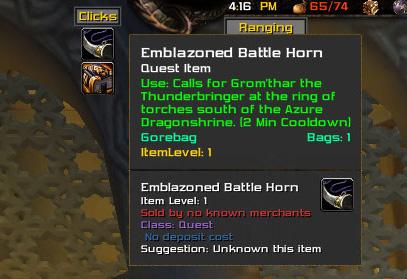
QuestClicks generates a dynamic bar of up to 12 buttons to make your life easier. Originally, this add-on was created in response to the large number of usable quest items introduced in WoLK – the kind where the quest giver would hand you an item and tell you to go somewhere and use it. Throw parachutes to troops, thaw people out with a flamethrower, planting acorns in dead dragons, and the like.
Having to dig through bags to find these items and add them to a bar, only to have to get rid of them after the quest was completed, was a pain. I wrote QuestClicks to create temporary buttons for them to make this easier.
Over the years, the default WoW interface has adopted some of this burden, and now many items like this show up in the quest tracker on-screen. There are still some that don’t, however. In addition, there are a lot of other annoying instances where you pick up an item and need to find it to click on it – recipes, ore nuggets, herb parts, motes, toys, etc.
QuestClicks has optional categories for all of these types of items and more. If you pick up something you can learn or collect, you’ll get a button for it. Click it, learn the recipe, and the button goes away by itself.
You can even add your own items (see the GUI panel in your interface configuration window for details).
Currently, the following categories of items can be enabled to generate buttons automatically:
- Quest Starters (Items that say “This item begins a quest’)
- Combinable Items (Motes, Crystalized stuff, and the like, if you have the minimum number of required items to perform the combination)
- Trade Skill items (Milling Herbs, Prospecting Ores, etc. Only shows up if you have the skill and the required minimum quantity of items to perform the action.)
- Artifact Boosters (Add XX Artifact Power to your current artifact)
- Toys and Pets (But only if you don’t already have them in your collection)
- Garrison Rewards (Currently, items that give you spec-specific equipment, more planned)
- Profession Recipes (if you know the profession, have enough skill, and don’t know the recipe)
- Lootable Containers (Faction world quest rewards, blingtron boxes, etc)
- Oneshot Boosts (Ancient Mana Gems, Faction Rep boosters, Nethershards, and the like)
Generally, anything I can think of that allows me to not have to dig through my inventory – and prevents me from missing collectable goodies – gets included in the add-in as I get the chance to add them, and I’m very open to suggestions on additional categories to add.
===================
v9.1.0 (58095)
- TOC update for WoW 9.1
- Added Patch 9.1 Lootable Containers
v9.0.3 (56685)
- Fixed TOC for the API version change in the pre-patch
- Added openables from Shadowlands
v9.0.1 (55789)
- Updated for Shadowlands Pre-Patch
v8.3.2 (54129)
- Added a new category : Zone Dependent Usables. These will show buttons for items that are conditionally usable based on your location. There are a number of these in patch 8.3 that can only be used in Uldum and the Vale of Eternal Blossoms. This implementation should handle most items from older zones, though it needs some testing for that and maybe a bit of tweaking. So far I've found 5 different ways Blizz words this on tooltips.
- Added Island Expedition pouches to Lootable Containers
- Added some lines to the output of the iteminfo command to make including additional items easier
- Cleaned up some code internally
v8.3.1 (54039)
- Added various caches from completing N'Zoth assaults to the Lootable Containers category
- Moved BFA lootable containers from Additions category to Lootable Containers category
- Added filter for gear tokens that your current character can't use
v8.3.0 (53857)
- Updated for v80300 interface (Visions of N'Zoth).
- Added various relic fragments from 8.3 to the combines list
- Resolve a SetPoint error due to interface changes in WoW 8.2
v8.2.0 (53150)
- Updated for v80200 interface. Added BFA items from original zones and from the 8.2 expansion zones
v8.1.0 (52267)
- Updated TOC for patch 8.1 (Tides of Vengeance)
v8.0.1 (51069)
- Updated TOC for interface v80000
- Added a few Battle for Azeroth items
v7.3.32 (50139)
- Expanded the utility function "/qclicks iteminfo" to provide additional details.
- Added a "behind-the-scenes" function : /qclicks findrelics will display all of the relics you are carrying in your inventory (shows item links). You can also specify a type : /qclicks findrelics Arcane will only showing arcane relics. Filter is case sensitive (needs to be Arcane, not arcane) because I'm lazy and because this feature is really for my own sanity in sorting out the pile of relics I was carrying around.
- Corrected item ID for Kyparite Fragments to make them show up when combinable
- Slightly altered clause for reputation gain items because some say "Increase" and some say "Increases". I'm sure I'll find other variations at some point.
- Added clause for Withered upgrades from the Collapse scenario in Suramar to the One Time Boosts category
- Added "Greater Tribute of the Broken Isles" as its own clause, since it doesn't have identifiable text (thanks tntdruid)
- Added Northrend herb partials (thanks again to tntdruid)
- Added follower gear upgrade items from Draenor to the Garrison Rewards category
v7.3.31 (49945)
- v7.3.30 broke the "Already Known" check for recipes, so I rewrote the way this is detected, along with the way requirements are determined. Instead of parsing out all of the text and determining what skill and skill level is required to use a recipe (or other Clause matching item) we now scan for "Already Known" text, and for "Requires " with the text in red. Red "Requires..." indicates that the item requires something (skill, level, etc) that the player doesn't have, so we use that as a shortcut to not generate buttons for items you can't use. These checks are now called "Blockers", and are checked for in a single pass. Blocker information is cached just like other information scans to speed things up.
- We now listen for the CHAT_MSG_SKILL event and the PLAYER_LEVEL_UP events. When we see them come up, we clear the recipe and blockers caches, as we might now be able to use items we couldn't before.
- Added a clause for reputaion gain items that are worded as "Grants ... reputation" (Argus) in addition to the normal "Increases reputation..." wording. (Thanks Tnrdruid for mentioning these)
v7.3.30 (49765)
- Rewrote entire clause evaluation system. We now have a list of clauses that is updated when categories are enabled or disabled. Instead of separate functions and loops to check for various types of items based on tooltip clauses, we now examine the item tooltip lines against the list of active clauses so we can do the whole thing with a single function.
- Added a category for "Lootable Containers" for things like World Quest Tribute
- Added a category for "Oneshot Boosts", such as Ancient Mana, Nethershards, etc.
- Added additional item types to the Garrison Rewards category (Champion boosters)
- Removed an errant debugging message when evaluating cooking recipes
- Added a new slash command option : /qclicks iteminfo [ItemLink] displays the results of GetItemInfo (for dev purposes)
v7.3.29 (49599)
- Added mining, skinning, and herbalism partials (nuggets, stems, etc.) to combinables list.
- Added a new optional category : Toys and Pets. Won't display buttons for ones you already know.
- Added a new optional category : Garrison Rewards. These can be items that give you spec-specific gear. In a future version, this category will also include items that allow you to boost your followers.
- Added a new optional category : Recipes. Only recipes that you don't already know and have the appropriate professions at a sufficient level will generate buttons.
- Updated some code to deal with a rare issue where saved variables are not loaded correctly, resulting in an error when QuestClicks tries to position the window on load. If QC detects a problem with the RelativePosition saved variable, it will reset to the center of the screen.
v7.3.28
- Included artifact boosters into their own caching system. Not strictly necessary, but it keeps them separate from the other caches.
- When checking or unchecking an option category, all of the caches are now cleared. If this isn't done, items from those categories won't appear/disappear from the bar until a UI reload or relog.
- Fixed oversight with TOC update that didn't include new version number :) (OOPS!)
v7.3.27
- Resolved outstanding issues with PlaySound and errors thrown by HasKey() (The HasKey function was removed from the API).
- Added new optional category of automatic items called "Artifact Boosters", which will add buttons for the many "Grants XX Artifact Power to your currently equipped Artifact" items.
v7.3.26
- Change revision numbering system.
- Fixed problem with the PlaySound system
V1.25b (43459)
- Corrected a bug with the new caching system that was preventing combinable/tradeskill items from working properly.
V1.25a (42992)
- Corrected bug that was preventing QuestClicks from loading if you don't also have ButtonFacade
V1.25 (42798)
- Really added Cataclysm Ore and Herbs this time... Don't know where I got the Item IDs I used in 1.24 :)
- Added "Tahret Dynasty Mallet" to the default inclusion list as it is not being detected properly.
- Small change to the way LibButtonFacade is detected to attempt to resolve issues with addons that include older versions of the LibButtonFacade library.
V1.24 (42519)
- New caching system for item evaluation results that should eliminate/vastly reduce any noticable stutter when picking up items.
- Added Cataclysm ore items to the prospectable list, herbs to the millable list, and enchanting essence to the combinable list.
V1.23 (42071)
- New method of detecting quest items that are not flagged as Quest Items by Blizzard. This should cause the bar to automatically display items that were not displaying for some Cataclysm quests.
V1.22 (41076)
- Update to correct issue introduced by BAG_UPDATE event changes in patch 4.0.3. QuestClicks should no longer cause unreasonably long zoning times with the 4.0.3 client.
V1.21 (39578)
- Updated for Cataclysm/Patch 4.0.1 (Updated usage of "this" and frame creation)
- Removed the startup spam accidently added in the 1.20 build.
- Added some items from the Worgen starting area that were not showing up on the bar.
- Fixed addon not properly responding to being disabled after logging out/back in.
V1.20 (38358)
- Added the ability to specify a number of buttons per row/column (depending on bar orientation). Settable in the config.
- Corrected a bug causing errors to be thrown when displaying the contents of the extras/exlcusion lists.
- (Partially) corrected the problem of the bar resetting to the center of the screen when the addong has been disabled/reenabled. This still isn't perfect (the bar may move a small amount) and it may require that you reset the bar's position the first time after updating to Version 1.20+
V1.19 (35092)
- Fixed a bug that prevented item counts from updating properly when reducing from 2 to 1.
- Fixed a load order issue in TOC file that could cause trouble if QuestClicks was the only addon you are using.
- Updated TOC for Patch 3.3
V1.18 (33166)
- Fixed bug in 1.17 that was preventing milling/prospecting from working properly.
V1.17 (32301)
- TOC Update for patch 3.2
- Converted the internal additions lists (Additions, Trades, Combines) to use Item IDs instead of names. This reduces the size of the addon considerably, as it is no longer necessary to store the (often long) full names of the items and it is also not necessary to have them in the localization file with their translations. Added benefit that new items in the lists won't break translations.
- Beginnings of support for Key Binding to the most recently used button, but it is not activated yet because I'm not happy with the implementation so far.
V1.16a
- Minor update to resolve an issue that could potentially result in "nil comparison" error messages.
V1.16 (30399)
- Moved the update history to "Update_Log.txt" and out of QuestClicks.lua
- Typing /qclicks without any parameters now opens the GUI configuration panel.
- Added "drag and drop" buttons in the GUI panel for adding and removing items to the Exclusion and Extras lists.
- Reworked the layout of some elements of the GUI panel to accomodate new buttons.
- Extras and Excludes lists now use Item IDs internally instead of links. Recommend that you clear your lists (but not 100% necessary)
- If you have an item on your cursor and you drop it on the Anchor Frame, it will be added to the Extras List.
- BUGFIX: "Quest Starters" and "Quest Starter Alerts" always resetting to On upload loading has been fixed.
- BUGFIX: Cooldown overlays will now move properly with their buttons when items are inserted into the QuestClicks bar.
- BUGFIX: If you have more than one stack of an item that appears on the QuestClicks bar, only one button for that item will be created.
V1.15 (29050)
- Reformatted some code, cleaned things up a bit. Expanded some commenting. Removed unused code
- New button creating code to optimize the addon. Buttons that don't change are not "recreated" each cycle.
- Rewrote the way the inventory is scanned to eliminate multiple loops. Keyring and Inventory are treated as bags now
- Removed the old (pre V1.10) profile variables.
- Included localization updates from Xandokan, and a couple of items that weren't triggering buttons (because of the way WoW displays them)
V1.14 (27853)
- Added "Quest Starter Notification", alerts you when you pick up an item that starts a quest
- Quest Starter Items will now be marked with a green "*" where you would see quantity text for stackable items
V1.13 (26442)
- Check for validity of itemLink passed to QuestClicksItemHasUseClause
- Implemented caching of items after scanning their tooltips to improve performance
- TOC Update for patch 3.10
V1.12 (23231)
- Added "Padding" between buttons, from 0 to 20 pixels. Settable via the Blizz-Options Panel
- New Category: Quest Starters - Add anything that says "This Item Begins a Quest" to the bar
- Added additional detection for Quest items via scanning for "Use:" in tooltips of items flagged as "Quest"
- Removed Pre 1.10 configuration variables from SavedVariables
-Corrected some problems with my own guesses at French translation (Thanks again, Laumac... I'm sure I've got more :))
V1.11 (19711)
- Fixed the /qclicks resetpos command to actually move the bar
- Remove the spammy debug message about prospecting/milling macros
- Added a "Reset Position" button to the Options Panel
- Added French translations for Milling Herbs
V1.10 (16854)
- Added support for Milling (similar to Prospecting)
- Milling and Prospecting now create "Macros" that will mill or prospect the item on the button
- Added optional support for ButtonFacade
- Should be more intelligent about placement of the tooltip window to avoid overlapping the bar
- Converted SavedVariable storage to a single Profile variable. Old variables will be removed in 1.11
- Note: The French localization for Milling and Herb Names will be updated in the next version.
V1.09 (13622)
- Added localization capability and French translation (provided by Laumac)
- Added the Key Ring as a supported search container (Defaults to off)
V1.08
- Added a configuration GUI, accessible via the Blizzard addon options system.
- Reconfigured what used to be called "collapsibles" into a more flexible format.
- Added "Additions", "Combines", and "Trades" categories
V1.07
- It is now possible to right-click the title frame to collapse the QuestClicks bar
- Items your character is wearing are now possible inclusions in the QuestClicks bar
- Major refactoring of several code sections, including the item evaluation and button creation code
- Cleaned up the formatting of the source via text editor changes
V1.06
- Added buttons for "Collapsible" items (motes, crystallized, and enchanting essences)
V1.05
- Made sure Anchor status is updated when reloading the UI/logging back in
- Only respond to Mouse Up events to prevent "double activating" items
- Added "extras" list (/qclicks addextra (itemlink), /qclicks removeextra (itemlink), etc) for items that the detection routine doesn't pick up automatically
V1.04
- Added stack size information for any stackable item you have more than one of
- Added the ability to lock the bar's location with the "lock" command
- Added the ability to hide the anchor (title) frame with the "anchor" command
- Figured out why right clicks weren't working and enabled them
- Resolved a bug that would sometimes result in a UI error about setting the tooltip to empty
V1.03 - Added Scaling
- /qclicks scale # (Where 1 is 1, 2, 3, 4, or 5) sets button size
- Cleaned up positioning of buttons in left and right orientation
V1.02 - Added a few new features:
- Cooldown display on items
- Exclude list (/qclicks exclude, /qclicks unexclude, /qclicks clearlist, /qclicks list)
V1.01 - Fixed a bug in the /qclicks direction command
 |
Comment Options |
 07-07-21, 06:40 AM
|
||
|
A Deviate Faerie Dragon
 Forum posts: 11
File comments: 139
Uploads: 3
|
|
|

|

|
| Gorebag |
| View Public Profile |
| Send a private message to Gorebag |
| Find More Posts by Gorebag |
| Add Gorebag to Your Buddy List |
|
12-31-20, 05:10 AM
|
|
|
A Kobold Labourer
Forum posts: 0
File comments: 10
Uploads: 0
|
You do know that the quest/objective tracker already has the icons of the items next to the quest, yes? I mean yours if very fancy, but I was just curious.
|
|
|
|
| Rhaevyn |
| View Public Profile |
| Send a private message to Rhaevyn |
| Find More Posts by Rhaevyn |
| Add Rhaevyn to Your Buddy List |
|
12-20-20, 04:07 AM
|
|
|
A Murloc Raider
Forum posts: 6
File comments: 394
Uploads: 0
|
Hello! This addon is so useful!
Here are some suggestions for more clicks: - Fallen Adventurer's Cache (item id 184395) from the rares in the Maw. They only let you carry 1 at a time and can't loot another until you open the old one, so it definitely gets annoying trying to find and click each one in your bags when you get it. - Chest rewards from the daily callings. The ones I have so far are Tribute of the Ambitious (item id 181732), Bounty of the Grove Wardens (181475), Tribute of the Duty-Bound (181733).
Last edited by Aisenfaire : 12-20-20 at 06:12 PM.
|
|
|
|
| Aisenfaire |
| View Public Profile |
| Send a private message to Aisenfaire |
| Find More Posts by Aisenfaire |
| Add Aisenfaire to Your Buddy List |
|
10-15-20, 03:58 PM
|
|
|
A Deviate Faerie Dragon
Forum posts: 11
File comments: 139
Uploads: 3
|
Version 9.0.1
Updated to accommodate changes to the Shadowlands UI (Backdrops, specifically).
Also an attempted fix for the addon sometimes losing where the window should show up. |
|
|
|
| Gorebag |
| View Public Profile |
| Send a private message to Gorebag |
| Find More Posts by Gorebag |
| Add Gorebag to Your Buddy List |
|
02-17-20, 02:37 PM
|
|
|
A Deviate Faerie Dragon
Forum posts: 11
File comments: 139
Uploads: 3
|
What's New in v8.3.2
I've added a new category for zone-dependent items. These are for things like the banners you can use in Uldum to summon help, etc. These items will only appear if they are usable in the zone you are in (unless you have added them to your additions list, or they match for some other reason). I never end up using these things because I forget they are there.
I know I spelled dependent wrong in the options menu... it'll have to wait for 8.3.3 for a fix to that. Also added the pouches you get from island expeditions as Lootable Containers and the map pieces as Combines. |
|
|
|
| Gorebag |
| View Public Profile |
| Send a private message to Gorebag |
| Find More Posts by Gorebag |
| Add Gorebag to Your Buddy List |
|
01-20-20, 12:57 PM
|
|
|
A Deviate Faerie Dragon
Forum posts: 11
File comments: 139
Uploads: 3
|
Update 8.3.0 is uploaded
I've updated the version number and cleaned up an error that was introduced by an interface change in 8.2 (SetPoint).
In addition, I've added the six types of combinable relic fragments from Visions of N'Zoth under the Combines category. |
|
|
|
| Gorebag |
| View Public Profile |
| Send a private message to Gorebag |
| Find More Posts by Gorebag |
| Add Gorebag to Your Buddy List |
|
06-29-18, 10:26 AM
|
|
|
Premium Member
 Forum posts: 55
File comments: 138
Uploads: 3
|
["33284"] = {1, nil, L("Additions")}, -- Gjalerbron Cage Key
["33290"] = {1, nil, L("Additions")}, -- Large Gjalerbron Cage Key ["36770"] = {1, nil, L("Additions")}, -- Zort's Protective Elixir ["36771"] = {1, nil, L("Additions")}, -- Sturdy Crates ["21746"] = {1, nil, L("Additions")}, -- Lucky Red Envelope ["35792"] = {1, nil, L("Additions")}, -- Mage Hunter Personal Effects ["152097"] = {1, nil, L("Additions")}, -- Lightforged Bulwark ["37265"] = {1, nil, L("Additions")}, -- Tua'kea's Breathing Bladder ["40652"] = {1, nil, L("Additions")}, -- Scarlet Onslaught Trunk Key ["40641"] = {1, nil, L("Additions")}, -- Cold Iron Key ["44751"] = {1, nil, L("Additions")}, -- Hyldnir Spoils ["63027"] = {1, nil, L("Additions")}, -- [Brazier Torch] --- Reward Bags --- ["156683"] = {1, nil, L("Additions")}, -- Satchel of Helpful Goods ["51999"] = {1, nil, L("Additions")}, -- Satchel of Helpful Goods ["52000"] = {1, nil, L("Additions")}, -- Satchel of Helpful Goods ["67248"] = {1, nil, L("Additions")}, -- Satchel of Helpful Goods ["52001"] = {1, nil, L("Additions")}, -- Satchel of Helpful Goods ["52002"] = {1, nil, L("Additions")}, -- Satchel of Helpful Goods ["52003"] = {1, nil, L("Additions")}, -- Satchel of Helpful Goods ["156688"] = {1, nil, L("Additions")}, -- Icy Satchel of Helpful Goods ["156682"] = {1, nil, L("Additions")}, -- Otherworldy Satchel of Helpful Goods ["36143"] = {1, nil, L("Additions")}, -- Icy Satchel of Helpful Goods ["156689"] = {1, nil, L("Additions")}, -- Scorched Satchel of Helpful Goods --- Pet Bag --- ["144345"] = {1, nil, L("Additions")}, -- Pile of Pet Goodies Still missing some reward bags |
|
|
|
| Tntdruid |
| View Public Profile |
| Send a private message to Tntdruid |
| Find More Posts by Tntdruid |
| Add Tntdruid to Your Buddy List |
|
02-19-18, 09:10 AM
|
|
|
A Deviate Faerie Dragon
Forum posts: 11
File comments: 139
Uploads: 3
|
Version 7.3.32 is uploaded
New version is uploaded. Mostly item additions and corrections, clause tweaks, etc. I did add a new slash command function: /qclicks findrelics that will display item links for all of the relics in your inventory. I had almost a bunch of them piled up and this was an easy shortcut to evaluate them.
|
|
|
|
| Gorebag |
| View Public Profile |
| Send a private message to Gorebag |
| Find More Posts by Gorebag |
| Add Gorebag to Your Buddy List |
|
02-18-18, 01:27 PM
|
||
|
A Deviate Faerie Dragon
Forum posts: 11
File comments: 139
Uploads: 3
|
|
|
|
|
|
| Gorebag |
| View Public Profile |
| Send a private message to Gorebag |
| Find More Posts by Gorebag |
| Add Gorebag to Your Buddy List |
|
02-18-18, 08:36 AM
|
|
|
Premium Member
Forum posts: 55
File comments: 138
Uploads: 3
|
Northrend herb
["108352"] = {10, nil, L("Combines")}, -- Goldclover Leaf ["108354"] = {10, nil, L("Combines")}, -- Tiger Lily Petal ["108355"] = {10, nil, L("Combines")}, -- Lichbloom Stalk ["108356"] = {10, nil, L("Combines")}, -- Icethorn Bramble ["108353"] = {10, nil, L("Combines")}, -- Adder's Tongue Stem ["108357"] = {10, nil, L("Combines")}, -- Talandra's Rose Petal ["108358"] = {10, nil, L("Combines")}, -- Deadnettle Bramble |
|
|
|
| Tntdruid |
| View Public Profile |
| Send a private message to Tntdruid |
| Find More Posts by Tntdruid |
| Add Tntdruid to Your Buddy List |
|
02-07-18, 02:27 AM
|
|||
|
Premium Member
Forum posts: 55
File comments: 138
Uploads: 3
|
 |
||
|
|
|
| Tntdruid |
| View Public Profile |
| Send a private message to Tntdruid |
| Find More Posts by Tntdruid |
| Add Tntdruid to Your Buddy List |
|
02-06-18, 07:49 PM
|
||
|
A Deviate Faerie Dragon
Forum posts: 11
File comments: 139
Uploads: 3
|
New version is uploaded and pending approval. Includes these updates and a rework of the requirements checking system. |
|
|
|
|
| Gorebag |
| View Public Profile |
| Send a private message to Gorebag |
| Find More Posts by Gorebag |
| Add Gorebag to Your Buddy List |
|
01-27-18, 07:50 AM
|
|
|
Premium Member
Forum posts: 55
File comments: 138
Uploads: 3
|
Some missing items:[Greater Army of the Light Insignia]
[Greater Army of the Light Insignia]. [Greater Valarjar Insignia]. [Court of Farondis Insignia]. [Nightfallen Insignia]. [Army of the Light Insignia] |
|
|
|
| Tntdruid |
| View Public Profile |
| Send a private message to Tntdruid |
| Find More Posts by Tntdruid |
| Add Tntdruid to Your Buddy List |
|
01-21-18, 11:06 AM
|
|
|
A Deviate Faerie Dragon
Forum posts: 11
File comments: 139
Uploads: 3
|
So, as I play through legion content, I'm finding an ever-increasing list of things to add QuestClicks buttons for. With 7.3.30, I've added a couple of new categories (lootable containers like the faction world-quest reward boxes) and oneshot boosts (Gain X ancient mana, carry X more ancient mana, gain X reputation with Y, etc).
This version also represents a big change for how some items are identified. Prior to this, each category of "clause" items (where we search an items tooltip for specific words) had its own function. That was getting unwieldy as the list of categories got bigger. In 7.3.30, I've rewritten all of this functionality and the categories that function via clauses now turn on and off items in a single clause list that gets scanned once for each item. While this will slightly improve performance, the real benefit is that it makes adding new clauses much simpler than before and reduces the total number of places for bugs to crop up I haven't reached Argus yet, so I'm sure I'll find new things there, and as always I'm open to suggestions. |
|
|
|
| Gorebag |
| View Public Profile |
| Send a private message to Gorebag |
| Find More Posts by Gorebag |
| Add Gorebag to Your Buddy List |
|
01-05-18, 01:39 PM
|
|
|
A Deviate Faerie Dragon
Forum posts: 11
File comments: 139
Uploads: 3
|
I've just uploaded version 7.3.29, with a number of fun changes, including:
- Three new optional categories! "Toys and Pets", "Garrison Rewards", and "Recipes". The "Toys and Pets" and "Recipes" categories will not show a button if you already know the result, and Recipes will verify that you have the ability to learn them before creating a button for them. - Gathering partials (ore nuggets, plant parts, skinning scraps) added to combinables lists. - A fix for a rare bug that I ran into while updating things I also rewrote the description to more accurately portray what QuestClicks does these days, since the original issue the add-on was written to address has (somewhat) been addressed by Blizzard, though not entirely. |
|
|
|
| Gorebag |
| View Public Profile |
| Send a private message to Gorebag |
| Find More Posts by Gorebag |
| Add Gorebag to Your Buddy List |
|
Support AddOn Development!
You have just downloaded by the author . If you like this AddOn why not consider supporting the author? This author has set up a donation account. Donations ensure that authors can continue to develop useful tools for everyone.
*Clicking the donate button above will take you to PayPal.com

*Clicking the donate button above will take you to Pledgie.com
