Addon Information
Works with 3.2
Download Latest Version.
To add favorites please register for a free account. If you already have one you need to login. How do I install this? (FAQ)
Author:
Version:
0.11
Date:
05-09-2009 05:53 AM
Size:
23.85 Kb
Downloads:
65,368
Favorites:
493
MD5:
Pictures
EventHorizon   Popular! (More than 5000 hits)
Bad news, everyone: I quit WoW, my account expires on August 11th, and unfortunately Taroven quit too. Unless someone takes over, this addon is officially abandoned. So tick that "Load out of date AddOns" check box and hope for the best!
I just wanted to say thanks for using my AddOns and for all the support, feedback, bug reports, and kind words. Very much appreciated. Bye!


Description
Displays timer bars for you most important abilities' target debuffs (including DoT ticks), cooldowns, and player buffs. All bars share a common time scale to make it easier to plan the next casts in your rotation.
Currently supported classes are Druid, Hunter, Mage, Paladin (Retribution), Priest (Shadow), Rogue, Shaman (Elemental) and Warlock.

Dezzimal was kind enough to put a video on youtube, demonstrating and explaining the addon. Edit: I just found another video showing the AddOn on a Destru Warlock.

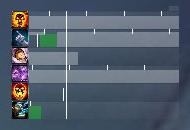
Here's what it looks like in action on a Shadow Priest (at 1 FPS ):

The big white line is the current time. Future events are on the right side, past events on the left. So as time goes by, the events scroll from right to left.
The green bars are your cast bars. They use exactly the same times that your normal cast bar would display, with all haste modifiers applied.
You can also see cooldowns, DoTs, and their ticks (predicted in the future, and from the combat log in the past).
The white lines that appear before the cast times are the times when you press the button (send the cast message to the server). The difference between this line and the start of the cast is your lag.

Settings
There's no options GUI, and there won't be.
You can move the frame around by dragging this little handle in the upper right corner.
You can toggle the main frame with /eventhorizon or /ehz.
If you want to change anything else, you have to edit the config.lua files. You can open these files in any text editor, for example notepad.
We try to keep these files clean and well-documented. (Comments start with "--".) If an option is not as clear as it should be, please let us know.

Let's say you've changed some settings. When a new version comes out, you'd have to manually merge the config.lua file. To prevent this, you can create a file named EventHorizon/myconfig.lua. If present, this file will be read after config.lua, thus overwriting the settings in config.lua. Here's my myconfig.lua:
Code:
local config = EventHorizon.config -- <-always keep this as the first line
config.bgcolor = {0,0,0,0.3}
config.bordercolor = {0,0,0,0.3}
config.gcdColor = {.5,.5,.5,.3}
config.future = 15
config.width = 150*(15+3)/(9+3)
config.iconborder = nil
If you'd like to show/hide the addon under certain conditions, please have a look at Goose. The frame you have to add is called EventHorizonFrame, a good start for a condition is "[combat] show;hide". If you're worried that you might accidentally move the frame while in combat, you could also use Goose to hide EventHorizonHandle.

FAQ
How can I change the colors for bars?
At the moment you can't. It's one of the features planned for v1.0.

What about trinkets?
I don't think that tracking trinket procs is a useful feature. EventHorizon is designed to present you with information relevant to decision-making. Sure, you could occasionally refresh a DoT when a trinket buff is about to fade. But the overall gain in DPS (assuming there even is one!) would be very small. So I don't think it's worth cluttering the interface with two more bars.
That being said, it's already possible to track the proc spells from trinkets. For an example look at the Sundial of the Exiled in the comments of the Priest module.

Notes
The addon is intended for level 80 raid chars. While leveling your rotation doesn't really matter anyways, mobs just die too fast.
If you want to help us develop and fine-tune the existing modules, please contact me via PM.
When you report a bug, please include as much relevant information as possible. (Class/spec/how to reproduce/etc) Get an addon like Bugsack for copypasteable error messages. If your bug report is very long, please send it as a PM.
If you have suggestions/feedback feel free to leave a comment.

Credits
Taroven for adding the Druid, Warlock, and Rogue modules, being helpful on IRC and for pushing me to add more features.
Dezzimal for the nice video.
Psychosomatic for the Paladin module.
Binkenstein for helping me with the Elemental module.
  Change Log - EventHorizon
v0.11:
Class modules: The file myconfig.lua is now loaded if present, e.g. EventHorizon_Druid/myconfig.lua
Shaman: Added spells Lava Lash, Stormstrike, and Earth Shock when specced Enhancement.
Bugfix: Disabling the GCD indicator with config.gcdStyle=nil won't cause any more errors.

v0.10b:
Druid: Cleaned up comments. Added simple Eclipse tracking (duration and cooldown, no proc info). Rip set to refreshable to fix tick timing with Glyph of Shred.
Hunter: Arcane Shot not tracked when Explosive Shot is talented. Moved Steady Shot to above Kill Shot. Cleaned up some oddities with the comments.
Rogue: Moved ShS nearer to the bottom.
Warlock: Added Glyph of Life Tap for all specs. Added Drain Soul when specced Death's Embrace.

v0.10a:
Mage: Added Winter's Chill tracking to the Frostbolt bar. Also added Blizzard, but it's commented out by default.
Paladin: Added Protection spells, required talent Hammer of the Righteous.
Paladin: Changed required talent for shared Prot/Ret spells to Divine Strength.
Paladin: Reordered all spells to reflect current prioritization.
Warlock: Show Immolate only if Unstable Affliction isn't talented.

v0.10:
Warlock fixed: The spell ID of Conflagrate changed.
Hunter: Added Black Arrow.
Removed stuff for 3.09.

v0.9c
Fixed: Using the slash command will now completely disable the addon. The state is saved in the SavedVar.
Fixed: Indicators are now hidden when their bar is hidden.

v0.9b
Fixed: Ticks from channeled spells were not properly unregistered. This could sometimes lead to disappearing ticks in other spells bars.

v0.9a
Fixed: Overlapping segments won't flicker anymore.
Added config.auraunit field for spell configs to specify a non-default unit (e.g. 'player' for debuffs).
Paladin: Set Divine Storm as required talent for all spells to make the module Retribution-only.
Mage: Added Arcane and (some) Frost spells. Added talent requirements for Fire spells. Added Fireball.
Getting ready for 3.1: Druids' Berserk and Paladins' Divine Storm talent index changes, Warlocks' Siphon Life gets removed. These also should work now on the PTR.

v0.9
The spell bars that depend on talents are now created/shown/hidden when the talents change. Reloading the UI is no longer necessary. Should be working in both 3.0 and 3.1.
Added Paladin module from Psychosomatic. Retribution only, still needs talent dependencies.
Priest: Added talent dependencies.

v0.8
Bar segments are optionally textured now instead of using a solid color.
Added slash commands /eventhorizon and /ehz to toggle the visibility of the main frame.
Added the ability to track debuffs which are unique per mob. The debuff bars get a slightly different color when they were not applied by you.
Druid: The Mangle bars now track Mangle and Trauma debuffs. Added cooldown for Mangle - Bear. Added DoT ticks for Insect Swarm and Moonfire.
Mage: The Scorch bar now tracks both Imp Scorch and Winter's Chill.
Tweaked the default texture a bit.

v0.7b
Removed some settings in the class files that were overwriting settings in the master config.

v0.7a
Warlock: Show Incinerate if Emberstorm is talented, otherwise show Shadow Bolt. Removed Molten Core bar and Backdraft tracking from the default config, as they have no influence on the rotation.
Bugfix: The default anchoring of the handle wasn't working.

v0.7
Added config.spacing = <number> to set the space between two bars.
Added config.iconborder = <boolean> option to toggle the default Blizzard icon border.
Added config.scale = <number> option to scale the main frame.
Added GCD indicator:
config.gcdStyle = 'line' displays the end of the GCD as a thin line.
config.gcdStyle = 'bar' displays the GCD as a bar from now to the end.
config.gcdStyle = nil disables the GCD indicator.
config.gcdColor = {r,g,b,a} sets the color.
The handle and the background frame are now parented to the main frame. If you use Goose to show/hide EventHorizon, you only need to specify conditions for EventHorizonFrame.

v0.6a
Added minstacks=<number> syntax. The Imp. Scorch debuff bar is shown only when five stacks are applied.
Fixed Rogue Hunger for Blood talent index.
Major bug fixed: In some cases the main frame was created multiple times.

v0.5
Added modules for Druids, Hunters, [FFB-]Mages, Rogues and Warlocks.
Most of the settings were moved to the config.lua files. When you want to change something, look there first.
Spell frames can now be shown/hidden depending on stance. Look at the Druid config for an example.
Spell frames can now be created depending on talents. When changing the spec, you may need to reload the interface. Again, look at the Druid config.
Added an (optional) backdrop frame. Enabled by default.

v0.4
Bugfix: When the target dies, predicted ticks are now removed.
Bugfix: Textures of 1 pixel width should now be visible even when the UI scale is low.

v0.3
Minor bug fix.

v0.2
Predicted DoT/MF ticks lying in the past are now replaced by actual ticks taken from the combat log.
If SWP is refreshed after the last tick occured, it's treated like it was recast.

v0.1a
Forgot to add the background texture. -.-

v0.1
Initial beta release.
  Optional Files - EventHorizon
File Name
Version
Size
Author
Date
Type
Discontinued
32kB
10-11-2009 01:54 AM
Patch
Loco 1
1kB
10-04-2009 06:54 PM
Patch
0.11.3
1019B
09-02-2009 06:23 AM
Addon
0.2b
2kB
08-03-2009 05:49 PM
Addon
0.11.4
1kB
07-09-2009 10:48 PM
Addon
0.11.3
1kB
07-08-2009 11:38 AM
Addon
  Archived Versions - EventHorizon
File Name
Version
Size
Author
Date
0.10b
23kB
Tifi
05-03-2009 05:24 AM
0.10a
25kB
Tifi
04-25-2009 04:00 AM
0.10
24kB
Tifi
04-16-2009 08:43 AM
0.9c
23kB
Tifi
04-06-2009 07:01 AM
0.9
22kB
Tifi
03-24-2009 11:24 AM
0.8a
20kB
Tifi
03-14-2009 06:58 AM
0.8
19kB
Tifi
02-21-2009 12:57 PM
0.7b
19kB
Tifi
02-18-2009 05:28 PM
0.7a
19kB
Tifi
02-18-2009 12:09 PM
0.6a
18kB
Tifi
02-15-2009 11:20 AM
0.4
8kB
Tifi
01-09-2009 01:48 PM
0.3
8kB
Tifi
12-30-2008 05:35 PM
0.2
8kB
Tifi
12-20-2008 11:57 AM
0.1a
8kB
Tifi
12-19-2008 11:47 AM
  Comments - EventHorizon
Post A Reply Comment Options
Old 10-04-2009, 01:24 AM  
Taroven
A Murloc Raider
Interface Author - Click to view interfaces

Forum posts: 5
File comments: 301
Uploads: 9
Re: size

Quote:
Originally posted by Snickersnee
is there any way to make it bigger?
First off, go here for the latest version of EventHorizon. This page is obsolete.

Second, to make EH bigger, head to config.lua in your EventHorizon directory and adjust config.width and config.height.

config.width is the width of the frame.
config.height is the height of each individal bar within the frame.

Reload your interface after saving each adjustment with one of these commands:

/reloadui
/rl
/console ReloadUI()
__________________
Enjoy my work? Buy me a cookie!
Author of EventHorizon Continued and its modules.
What am I doing right now?
Taroven is offline Report comment to moderator   Edit/Delete Message Reply With Quote
Old 10-03-2009, 06:16 PM  
Snickersnee
A Defias Bandit
 
Snickersnee's Avatar

Forum posts: 3
File comments: 2
Uploads: 0
size

is there any way to make it bigger?
Snickersnee is offline Report comment to moderator   Edit/Delete Message Reply With Quote
Old 10-02-2009, 12:02 AM  
Astrocanis
A Wyrmkin Dreamwalker

Forum posts: 59
File comments: 14
Uploads: 0
Re: help

Quote:
Originally posted by vonpanzer
ok, i need help moving this thing, think of me as a coding retard, and explain to me in baby layman terms what to do to get this thing out of the middle of the screen and to the right or to the top, i love the addon but the lack of config options ingame is a bit ...meh
When you mouse over the very top right corner, there's a little gray box - click and drag.
Astrocanis is offline Report comment to moderator   Edit/Delete Message Reply With Quote
Old 10-01-2009, 11:15 PM  
vonpanzer
A Kobold Labourer

Forum posts: 0
File comments: 1
Uploads: 0
help

ok, i need help moving this thing, think of me as a coding retard, and explain to me in baby layman terms what to do to get this thing out of the middle of the screen and to the right or to the top, i love the addon but the lack of config options ingame is a bit ...meh
vonpanzer is offline Report comment to moderator   Edit/Delete Message Reply With Quote
Old 09-23-2009, 01:17 AM  
Taroven
A Murloc Raider
Interface Author - Click to view interfaces

Forum posts: 5
File comments: 301
Uploads: 9
Re: Re: Read me!

Quote:
Originally posted by mrflippo
would this be suitable change for the arc mage change? I'm sorry if it was already mentioned

------------
-- Arcane --
------------
-- Arcane Blast
self:NewSpell({
spellID = 42897,
cast = true,
debuff = 36032, -- Arcane Blast debuff
auraunit = 'player',
minstacks = 4,
requiredTalent = {1,30}, -- ABar
Sure. I'll throw it in. I'll probably leave out the minstacks field though.
Edit: Wow, I hadn't looked at the Mage config for a while... Keeping the minstacks field, just updating for the patch.
__________________
Enjoy my work? Buy me a cookie!
Author of EventHorizon Continued and its modules.
What am I doing right now?

Last edited by Taroven : 09-23-2009 at 03:27 AM.
Taroven is offline Report comment to moderator   Edit/Delete Message Reply With Quote
Old 09-22-2009, 08:51 PM  
mrflippo
A Kobold Labourer

Forum posts: 0
File comments: 1
Uploads: 0
Re: Read me!

Quote:
Originally posted by Taroven
Beta 5 of my continued branch may be found here as soon as the file is approved.
would this be suitable change for the arc mage change? I'm sorry if it was already mentioned

------------
-- Arcane --
------------
-- Arcane Blast
self:NewSpell({
spellID = 42897,
cast = true,
debuff = 36032, -- Arcane Blast debuff
auraunit = 'player',
minstacks = 4,
requiredTalent = {1,30}, -- ABar
mrflippo is offline Report comment to moderator   Edit/Delete Message Reply With Quote
Old 09-18-2009, 02:13 AM  
Taroven
A Murloc Raider
Interface Author - Click to view interfaces

Forum posts: 5
File comments: 301
Uploads: 9
Read me!

Beta 5 of my continued branch may be found here as soon as the file is approved.
__________________
Enjoy my work? Buy me a cookie!
Author of EventHorizon Continued and its modules.
What am I doing right now?
Taroven is offline Report comment to moderator   Edit/Delete Message Reply With Quote
Old 09-16-2009, 04:46 AM  
Taroven
A Murloc Raider
Interface Author - Click to view interfaces

Forum posts: 5
File comments: 301
Uploads: 9
Re: Read me!

Quote:
Originally posted by Taroven
I've updated my branch to v0.11 Beta 3 with the fix below. The file is already approved.

My branch is now a fully functional addon. Please update EventHorizon here before submitting any bug reports or requesting features.

If you have made changes to config.lua, make sure to back them up. If your personal changes have been made via myconfig.lua, you don't have anything to worry about.

Edit: If you're using my version, please move the discussion to there.
There was a bit of a glitch on the first upload of that. Beta 4 has been released.

I was apparently very wrong when I thought of a quick fix for the "now" indicator. Fix has been fixed, which is now fixed, and so on and so forth.
Taroven is offline Report comment to moderator   Edit/Delete Message Reply With Quote
Old 09-15-2009, 09:02 PM  
Taroven
A Murloc Raider
Interface Author - Click to view interfaces

Forum posts: 5
File comments: 301
Uploads: 9
Read me!

I've updated my branch to v0.11 Beta 3 with the fix below. The file is already approved.

My branch is now a fully functional addon. Please update EventHorizon here before submitting any bug reports or requesting features.

If you have made changes to config.lua, make sure to back them up. If your personal changes have been made via myconfig.lua, you don't have anything to worry about.

Edit: If you're using my version, please move the discussion to there.

Last edited by Taroven : 09-15-2009 at 09:03 PM.
Taroven is offline Report comment to moderator   Edit/Delete Message Reply With Quote
Old 09-15-2009, 06:52 PM  
Taroven
A Murloc Raider
Interface Author - Click to view interfaces

Forum posts: 5
File comments: 301
Uploads: 9
Re: solution to the problem regarding the spells that are shown

Quote:
Originally posted by docmidnight
<snip>
this will make eventhorizon check your talents when ever you call upon it. so it wont be outdated if you, for example: have it disabled for restoration spec, respec, then open up eventhorizon for your dps spec.
Thanks. I'll apply the changes to my branch immediately. Expect a new version within the hour.

Edit: For the DIY types using my branch, the line number you're looking for is 1134.

Edit2: Still need someone to test the potential fix for dragging the frame offscreen a few posts below.

Last edited by Taroven : 09-15-2009 at 06:56 PM.
Taroven is offline Report comment to moderator   Edit/Delete Message Reply With Quote
Old 09-15-2009, 02:38 AM  
docmidnight
A Kobold Labourer

Forum posts: 0
File comments: 3
Uploads: 0
solution to the problem regarding the spells that are shown

how to reproduce
1 go into one spec
2 call /ehz
then again to hide it
3 /ehz
4 respec to a different spec
4 /ehz

result:
the eventhorizon has the data for your first spec.

the only way to allow eventhorizon to see your new spells is to reloadui or respec again twice, which will empty your mana and cannot be done in combat.


I added after line 1120 in EventHorizon.lua
Code:
			EventHorizon:CheckTalents()
so that portion starting at line 1115 looks like this
Code:
	SlashCmdList['EVENTHORIZON'] = function()
		if self.isActive then
			self:Deactivate()
			mainframe:UnregisterEvent('PLAYER_TALENT_UPDATE')
		else
			self:Activate()
			EventHorizon:CheckTalents()

		end
		self.db.isActive = self.isActive
	end

	if not self.db.isActive then
		self:Deactivate()
		mainframe:UnregisterEvent('PLAYER_TALENT_UPDATE')
	end

this will make eventhorizon check your talents when ever you call upon it. so it wont be outdated if you, for example: have it disabled for restoration spec, respec, then open up eventhorizon for your dps spec.

Last edited by docmidnight : 09-15-2009 at 02:41 AM.
docmidnight is offline Report comment to moderator   Edit/Delete Message Reply With Quote
Old 09-15-2009, 01:39 AM  
Taroven
A Murloc Raider
Interface Author - Click to view interfaces

Forum posts: 5
File comments: 301
Uploads: 9
Re: Re: Help...need to move interface

Would someone mind testing this for me?

Using my branch (under the Optional Files section here), add the following entry to line#1094 of EventHorizon.lua.

Code:
		mainframe:SetClampedToScreen(1) --New line, next 2 are for reference and don't need to be modified
		mainframe:SetPoint(unpack(anchor))
		handle:SetPoint(unpack(self.db.point))
If it doesn't throw an error at you, try dragging EH off screen and tell me what happens.
Taroven is offline Report comment to moderator   Edit/Delete Message Reply With Quote
Old 09-15-2009, 12:30 AM  
Repaxan
A Kobold Labourer

Forum posts: 0
File comments: 8
Uploads: 0
Re: Help...need to move interface

Quote:
Originally posted by InsideURhead
I had accidently moved my EventHorizon add-on flush with the upper portion of the screen. I can't click on the tab on the upper right corner of the add-on to move it. I've tried deleting EventHorizon and resinstalling it but it still ends up flush with the top of my screen. I've even played with screen resolutions but that didn't work. I need the add-on for my rotation. Can someone help me resolve this?

-Insideurhead
Delete Eventhorizon's settings in your WTF folder.
Repaxan is offline Report comment to moderator   Edit/Delete Message Reply With Quote
Old 09-14-2009, 01:11 PM  
InsideURhead
A Kobold Labourer

Forum posts: 0
File comments: 1
Uploads: 0
Help...need to move interface

I had accidently moved my EventHorizon add-on flush with the upper portion of the screen. I can't click on the tab on the upper right corner of the add-on to move it. I've tried deleting EventHorizon and resinstalling it but it still ends up flush with the top of my screen. I've even played with screen resolutions but that didn't work. I need the add-on for my rotation. Can someone help me resolve this?

-Insideurhead
InsideURhead is offline Report comment to moderator   Edit/Delete Message Reply With Quote
Old 09-09-2009, 04:33 PM  
Taroven
A Murloc Raider
Interface Author - Click to view interfaces

Forum posts: 5
File comments: 301
Uploads: 9
Quote:
Originally posted by Lordzakken
Playing a SP in raids i'm very interested in every addon that helps me to maximize my dps.
Regarding Event Horizon, how does this addon manages dotting multiple targets?
Does it keeps track of every mob or only the one targeted?
EH is tuned for tunnel vision, meaning it will only show your current target. Target switches are seamless, as the addon does retain enough info about previous targets to give accurate tick counters on a switch.
Taroven is offline Report comment to moderator   Edit/Delete Message Reply With Quote
Post A Reply


Category Jump:


The Network:
EQInterface | EQ2Interface | LoTROInterface | MMOInterface | War.MMOUI | WoWInterface | VGInterface | Allakhazam | Thottbot | Wowhead | Zam


©2009 MMOUI / ZAM Network
vBulletin - Copyright ©2000 - 2009, Jelsoft Enterprises Ltd.



