| Go to Page... |

Pictures
File Info


| Updated: | 09-25-12 02:20 AM |
| Created: | 01-01-09 09:51 PM |
| Downloads: | 38,524 |
| Favorites: | 279 |
| MD5: |
LunarSphere 

About LunarSphere
LunarSphere is an all-class version of the popular "sphere" addons that exist for various classes within World of Warcraft. It's home can be found at:
www.lunaraddons.com
If you like what you see and are in a giving mood, I could always use some more energy drinks and cookies ^_^ You can donate via the link below, and I'll give you my thanks in advance!

Details of LunarSphere
When it comes to "sphere" addons, examples that come to mind are the following addons:
- Cryolysis (Mage)
- HolyHope (Paladin)
- Necrosis (Warlock)
- Sabella (Rogue)
- Serenity (Priest)
- Totemus (Shaman)
- Venantes (Hunter)
What separates this addon from the other sphere addons listed above is that every button is customizable. When you load up LunarSphere for the first time, you can load up a template for your specific class (Warriors, Druids, and now Death Knights have some sphere addon love) which will contain every spell that your character knows and attach it to the sphere (if you level up and learn new spells, you'll need to manually add them to the sphere, or, if you never changed your sphere layout, you can just reload the template again).
If you've never seen any of these addons, or need to know more about LunarSphere, here you go:
Features
Sphere
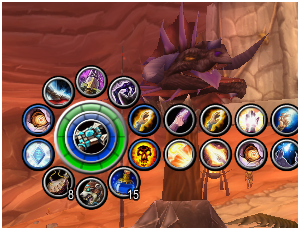
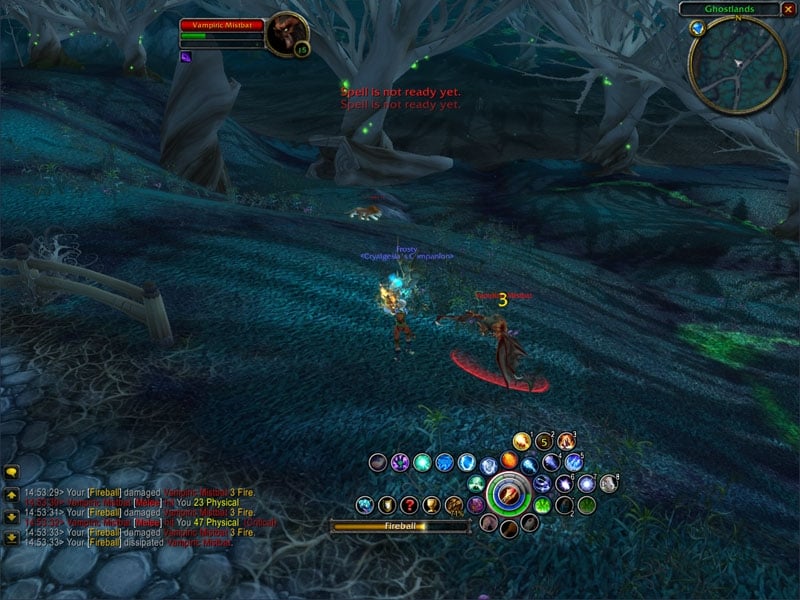
LunarSphere gives you a large sphere on the screen. Around said sphere, you will find 10 buttons that circle around it. These buttons, known as "main buttons," can take left, middle, and right click assignments to store spells, items, or macros. These buttons can also be turned into menu buttons, allowing an additional 12 buttons per menu button to exist, giving a total of 130 total buttons that you could possibly use, if you desire. The sphere can also function like a button, making the total up to 131 buttons.
Sphere Gauges/Display
The sphere provides up to two gauges (They look like rings or circular bars) that can display certain information such as health, mana, experience, rep, combo points, and more. You can also set text to be displayed on the middle section of the sphere, to also display your health, mana, rep, and more.
Buttons
The buttons can take actions that to assign them, but there are also special button types that you can assign the the button, such as "Use strongest water," "Use random epic flying mount," "Apply best Instant Poison to Main-hand" and more. Some can be seen as specific for certain classes, other button types can be used by all. Lots of "auto bar" type action assignments will happen within LunarSphere, if you assign such actions.
Reagent Restocking
LunarSphere can restock reagents from a custom list you define. Helpful for tailors who constantly need to restock on thread, or rogues you need poisons, hunters with ammo, priests with candles, and more.
Random Speeches
The random speeches that were trademark of most sphere addons? Yeah, LunarSphere can do that too. The addon comes pre-loaded with a few speeches for your mounts and for resurrecting people, but the sky is the limit since you can create your own speeches and assign them to items and spells that are used. Great for roleplayers, great for people who want to annoy their raid, or make them laugh.
Skinning
LunarSphere lets you skin the buttons with over 38 circular button skins and any color tinting you want to apply to them. LunarSphere was built to be customizable to fit most, if not all interfaces, no matter the color or design.
... and more
Tooltip handling and coloring, junk item selling, bank restocking, user interface object hiding (such as the action bar artwork, the main menu buttons, the mini-map zoom buttons, and more), and more can be handled by LunarSphere. If you want to use it as a full action bar replacement, you can hide all the action bars, assign the menu buttons and bag opening features to LunarSphere buttons, and clean up your screen.
Memory management
A lot of the extra bells and whistles of LunarSphere can be disabled so that it doesn't tie up lots of memory. In fact, with all features running, LunarSphere runs on about 850kb of memory and can replace between 3 and 10 addons, depending on the features used.
Longevity
Lastly, LunarSphere was made to last. When new drinks, food, potions, mounts, bandages and more are added to World of Warcraft, LunarSphere will usually pick up those new items without a version update. When new spells come out, you can just add them to your sphere just like dragging a spell from your spellbook to an action bar. That's some of the power and flexibility that LunarSphere provides, so that the only time you need to update LunarSphere will be for bells and whistle feature updates or bug fixes, but never so that you can finally use your new spell.
User Manual and various help that might be needed
I have a website setup for LunarSphere, as well as all my other project. It can be found at www.lunaraddons.com and with it there are FAQs, a User Manual, forums and more to help you out and to help me out, since responding to people from various sites is easier at one central location.
LunarSphere can be overwhelming at first. Lots of beta testers who helped with the project have said that after getting used to it, LunarSphere became really easy to setup and use, and they loved the power it provides.
Bug Reporting, Feature Requests, Comments and More
I would prefer comments on LunarSphere to be made on the LunarSphere website, but if you must, you can mention stuff here as well. I'll probably be a lot more open to things on the forums, though... =)
LunarSphere Public Release
Version 1.11
Changelog:
Mists of Pandaria compatability
[*] Most of the major problems caused by WoW 5.0 have been fixed.
[*] Some problems remain and it is quite possible i will be re-writing a lot of LunarSpheres code over the next few months.
Known Issues
[*] Spells replaced by talents will dissapear from LS when loading templates and occasionally on reloading the UI/game client.
The problem is caused by the way blizzard replaces these spells, LS currently can not tell the replacement spell from the original and as such removes them when they aren't found in the spellbook.
The only way around this is by using macros
(Asphyxiate, Faerie Swarm, Aspect of the Iron Hawk, Greater Invisibility, Chi Torpedo, Eternal Flame, Fist of Justice, Mindbender, Shuriken Toss, Earthgrab Totem, Soul Link, Blood Fear, Impending Victory, Safeguard, Cobra Shot)
[*] Under Menu Bar Tabs Toggle Dungeon Journal and Toggle Mounts and Pets are not available
[*] Companion pets can not be added to any button
Version 1.10
Changelog:
Feature Additions
Feature Changes
Bug Fixes
================================================
LunarSphere Public Release
Version 1.09
Changelog:
Feature Additions
Feature Changes
Bug Fixes
================================================
LunarSphere Public Release
Version 1.08
Changelog:
Bug Fixes
================================================
LunarSphere Public Release
Version 1.07
Changelog:
Bug Fixes
================================================
LunarSphere Public Release
Version 1.06
Changelog:
Feature Additions
Feature Changes
Bug Fixes
Version 1.11
Changelog:
Mists of Pandaria compatability
[*] Most of the major problems caused by WoW 5.0 have been fixed.
[*] Some problems remain and it is quite possible i will be re-writing a lot of LunarSpheres code over the next few months.
Known Issues
[*] Spells replaced by talents will dissapear from LS when loading templates and occasionally on reloading the UI/game client.
The problem is caused by the way blizzard replaces these spells, LS currently can not tell the replacement spell from the original and as such removes them when they aren't found in the spellbook.
The only way around this is by using macros
(Asphyxiate, Faerie Swarm, Aspect of the Iron Hawk, Greater Invisibility, Chi Torpedo, Eternal Flame, Fist of Justice, Mindbender, Shuriken Toss, Earthgrab Totem, Soul Link, Blood Fear, Impending Victory, Safeguard, Cobra Shot)
[*] Under Menu Bar Tabs Toggle Dungeon Journal and Toggle Mounts and Pets are not available
[*] Companion pets can not be added to any button
Version 1.10
Changelog:
Feature Additions
- WOW 4.0 patch compliance. Yay! (There are too many things to list as "fixed" or "changed" because of the 4.0 update, sooo ... this is all you get for an explaination)
- Sphere/Gauge Event: Power(x) added, where "x" is none, Eclipse, Holy Power, or Soul Shards. Some classes had a new power mechanic added, and LS will now show you the information from that as well.
- Sphere Text: Show Percentages added. If a sphere text event it set that can show a value or a percentage, this option will be visible.
- Buttons - Rogues now have a Shadow Dance stance added to their stance selections. Sadly, Shadow Dance and Vanish will share the SAME stance information, so be warned.
- Templates - Users may now overwrite templates with the same name! If a template is selected when Save is clicked, the template name field and all sections the original template had saved with it will be auto-filled in. By keeping the name the same, you will overwrite the template with the new data.
Feature Changes
- Tab - Other: Modified the display location for the coordinates that are shown on the minimap when time and coordinates are turned on.
Bug Fixes
- Fixed an issue where the "Show Count" feature, if turned on for some button types (such as "Toggle Spellbook"), would result in an error.
- Fixed an issue where some users (not all) who are using the Dual Spec template feature of LunarSphere might get an error upon logging into the game while already in their second spec.
- Fixed an issue where the button settings window would show old texture information for pet action bar icons or bag icons.
- Fixed an issue where templates that were being hot-swapped were not clearing out buttons that no longer exist.
- Fixed an issue where spells given during spec changes were not recognized when the hot-swap dual spec template feature was used. A delay of 0.5 seconds was added before template swapping to ensure that all spells were loaded before the template is applied.
================================================
LunarSphere Public Release
Version 1.09
Changelog:
Feature Additions
- Templates Tab: Support for Dual Spec templates has been added. Basically, create a template for each spec, select the template from your list of templates to be made into a primary or secondary spec template and click one of the new "Primary" and "Secondary" template buttons (Right clicking the button will remove the Primary or Secondary status of the template). If you have "Hotswap Templates" turned on, this is fast and easy. If you do NOT have hotswap templates turned on, this WILL force a UI reload if you change specs and have a template attached to it.
- Buttons: The "Toggle Backpack" and "Toggle Bag" button types have new functionality to mimic the bags more accurately. With "Edit Button" mode OFF, you can DRAG the bag icon off of the bag button and move it to a new bag slot that is on LunarSphere, or swap it with another bag at the bank. If the bag is empty, you can drag a new bag onto it to switch out the bag as well. Lastly, you can drop an item that is on your cursor onto a LunarSphere bag button and that bag will take the item (if it can). In other words, the bag button types now function like the original bag buttons on the default WOW UI.
- DrDamage Support: LunarSphere now has official support via DrDamage, so all the DrDamage text on the LunarSphere buttons can now be handled via DrDamage. This means that you now have access to showing two sets of text on a button (instead of the standard one) and you can set the size of the DrDamage text via the DrDamage addon's interface options. While DrDamage supports LunarSphere now, LunarSphere is still in charge of providing information to DrDamage, meaning that if DrDamage has a new version that handles things differently than before, it will still query LunarSphere for the information it needs and LS will provide it. If LS changes its button database for any reason, the DrDamage support function within LS will be updated as well. This stance of support should ensure than DrDamage and LunarSphere play together very nicely for a very long time.
- Debug Tab: A new option has been added near the bottom, called "Epic Random Flying (310% only)." Turning this option on will force LunarSphere to pick from the 310% mounts first (if they exist), before going down to the 280% speed mounts for the "Use Epic Random Flying Mount" button types. This is only useful for those who have a ton of 310% speed mounts, so you can have a random rotation without getting 280% speed mounts.
Feature Changes
- Mount Buttons: The "Random Ground Mount" and "Random Flying Mount" button types no longer show a generic mount icon, nor do the tooltips say generic mount text. Now, the mount to be used till be shown on the button, and the tooltip will reflect it.
- Mount Buttons: The tooltip for the mount button type will update when you have your mouse over the button, so you will see the next mount you will summon without having to move the mouse back onto the button.
- Skin Tab: The way the sphere's skin is handled has been changed a little bit. If the "Use Sphere Click Icon" feature is turned on, the sphere's texture will be set to whatever the sphere's "show icon" setting is set to in the sphere's button settings window. However, the new functionality is that if no texture is found (due to a spell not being on the click action, or the "Show Icon" is set to off for a stance, for example, the normal sphere skin will be used instead. An example of how this could be awesome is if you are a rogue and want your sphere to show your character portrait while you are not stealthed, and the stealth icon when you are stealthed. By turning the "Show Icon" feature off in the Button Settings window for the sphere itself while in humanoid form and turning it on and setting it to the click action for stealth, you will achieve this goal. A little advanced, but it works.
- Macros: Now, when equipment is changed, macro icons will be re-evaluated and updated if there is new items found. Useful for macros that target an inventory slot, like ammo or trinket macros.
- Reagent Tab: Now, you users can specify up to 99,999 reagents to be purchased at the limit, instead of 9,999. This was changed to make ammo user's lives easier, now that ammo sizes have increased dramatically. Also, the box of the reagent number has been increased in width to fit
Bug Fixes
- Fixed an issue where the new Celestial Steed mount was not recognized as a mount. Its scalable speed will also be considered.
- Fixed an issue where the Death Knight flying mount would be classified as a ground mount as well.
- Fixed an issue where a few other mounts were not being recognized properly. Mounts include the Mimiron's Head, Swift Flight Form (Druid, it now scales), and the Engineering flying mounts.
- Fixed an issue where "Use Random Epic Flying Mount" would pick the first non-epic mount it would find (and typically, always the same one), if no epic mounts were found. Now, it will pick a random non-epic mount if no epic mounts were found.
- Fixed an issue where having "Show Count" turned on for a button and set to a click action for an Equipment Set would result in an error. This would also happen for "Use last submenu action" button types that grabbed a hold of an Equipment Set button.
- Fixed an issue where the button type of "Toggle Spellbook" would cause execution taint, preventing users from casting spells from the spellbook.
- Fixed an issue where having "Show Count" turned on for a button and set to a macro would result in an error.
- Fixed an issue where LunarSphere could try to buy reagents that have no names (due to server item data still being cached) and, if a reagent was saved without a name as well, this could be problematic, resulting in lots of reagents being bought that shouldn't have. Extremely rare situation, but it could still happen.
- Fixed various taint issues that could affect the vehicle UI
- Fixed an issue where turning on DrDamage support for Tooltips wouldn't work unless the DrDamage support for buttons was turned on. Now, these options operate separate of each other.
- Fixed an issue where the combo point displays for gauges and sphere text would not update unless you switched targets. Now, the proper events are captured to ensure the combo points are updated.
- Fixed an issue where playing as a stance using character and turning on and then off the Hide UI feature for hiding the Action Buttons would sometimes prevent the stance action bars to re-appear.
- Fixed an issue where loading a template would also bring with it the sphere's old position that was saved with the template. The sphere wouldn't be moved until the UI was reloaded. Now, the current sphere location will be used when the new template is brought over and saved to the new template data.
- Fixed an issue where auto-vendoring of junk would not work with a few select NPCs that sold nothing, but could buy back items. Auto-vendoring of junk should work properly in all cases now.
================================================
LunarSphere Public Release
Version 1.08
Changelog:
Bug Fixes
- Fixed an issue where the old April Fools joke code was not compatible with WOW 3.3.3 and as such, caused errors. This code has been REMOVED.
================================================
LunarSphere Public Release
Version 1.07
Changelog:
Bug Fixes
- Fixed an issue with keybinds and other addons, such as Dominos.
================================================
LunarSphere Public Release
Version 1.06
Changelog:
Feature Additions
- Stance Support: Based upon user input and tests, I have turned on Stance Support for Warlocks. I have no clue if this works properly other than what people have told me, sooo ... I guess you get Stances if you want them, Warlocks =)
- Button Type: Added a new mount button type called "Random non-epic mount" that will summon a non-epic mount for you, if you want to use random slow mounts to run with your slow mounted friends =)
- Speech Tab: Added a new speech command for people to use. It's simple, and is kinda HTML like. It plays sound files. Wooooow. Anyway, the command is this:
<sound=SOUNDPATH_AND_SOUND_TO_PLAY>
If I wanted to have the Headless Horseman saying "Get over here you idiot!" when I use the DK's "Get Over Here" spell, simply make a speech in a script with this in it:
<sound=Sound\Creature\HeadlessHorseman\Horseman_Beckon_01.wav>
and assign that script to the DK's spell and there you have it. Enjoy. - Settings Interface: Option sliders now have text boxes instead of the number for what value the slider has. This allows the user to type in values that they would like to use (within the range of the slider ranges), for those instances where the screen resolution prevented the slider from falling on the right number the user wanted. The values for a lot of the sliders have been increased as well, to accommodate the new numbers.
- Templates: New option added, called "Allow hotswap templates" which will allow for users to switch templates without a user interface reload. When turning this option from off to on, the game will reload to make sure it has the code it needs. As long as you leave it on, you'll be able to hot-swap stuff.
Feature Changes
- Buttons: The "PVP" button will now show either the Alliance or the Horde PVP icon, based upon character's faction.
- Buttons: The Button Types that use a random epic flying mount will now ignore all 280% speed mounts if you have at least one 310% mount. Thus, you will always get your fastest mounts when using the random feature. If you want the slower 280% mounts too, I advise using the "Random Flying Mount" button types, and not the epic ones ... but you'll also get the 150% speed ones.
- Hide UI: The "Hide Bottom Bar" Hide UI option used to also hide the background images for the vehicle interface. Now, it shows the vehicle bar background so the floating vehicle buttons and aimming controls don't look silly anymore.
Bug Fixes
- Fixed an issue where flying mounts were not being properly sorted for the "Use epic flying mount" button types, and non-epic mounts were being counted as epic.
- Fixed an issue where users that had "Templates" disabled in the Memory tab would experience a loading error that would break LunarSphere.
- Fixed an issue where users with "Hide main menu buttons" turned on would recieve errors due to a bug in Blizzard's code calling a function that no longer exists.
- Fixed an issue where the "PVP Toggle" menu type didn't work.
- Fixed an issue where the "Dungeon Finder Toggle" menu type would cause errors.
- Fixed an issue where loading a template with a specifically assigned mount or pet to a button would not actually load the mount/pet onto the button.
- Fixed an issue where swapping a pet or mount buttons while in "Edit Button" mode would not carry over the pet/mount summoning button code.
- Fixed an issue where non-epic flying mounts were being mixed up with flying mounts in the item detection code. When the flying mount speed for non-epic mounts was changed from 100 to 150, LS was not aware and left the original rules in place.
- Fixed an issue where some mounts were not properly recognized for what they were (Mechano-hog wasn't recognized as an epic ground mount, and some of the drakes which have INCORRECT tooltips have also been converted to their 310% bad selfs). I also added Arthas's mount, the new Valentine's mount, and the Death Knight flying mount, since those tooltips are awkward and don't really tell the speed properly.
- Fixed an issue where hiding the default action bar buttons would screw with the possess bar to make it unstable and work *sometimes* which, while in a raid, is totally unacceptable. This fix is not fully tested, so if it still freaks out, I will need to do more work.
- Fixed an issue where hiding and then showing the action bar buttons with LunarSphere, while on a Warrior, would break the action bar and require a reload of the interface.
 |
Comment Options |
 12-28-19, 01:07 PM
|
|
|
A Fallenroot Satyr
Forum posts: 21
File comments: 1
Uploads: 0
|
LS updated for classic!
I've updated LS so it now works in WoW Classic.
Get it here: https://www.curseforge.com/wow/addon...ere-fan-update Cheers! |

|

|
| fullmoon_sulfuras |
| View Public Profile |
| Send a private message to fullmoon_sulfuras |
| Find More Posts by fullmoon_sulfuras |
| Add fullmoon_sulfuras to Your Buddy List |
|
08-02-18, 12:49 AM
|
|
|
A Kobold Labourer
Forum posts: 0
File comments: 3
Uploads: 0
|
This addon replaces Action Bars?
I use Bartender4, instead of the default action bars.
Will this mess with Bartender, or are the buttons in this addon simply additional "Action Bars"? |
|
|
|
| mac300 |
| View Public Profile |
| Send a private message to mac300 |
| Find More Posts by mac300 |
| Add mac300 to Your Buddy List |
|
06-22-15, 01:11 PM
|
|
|
A Deviate Faerie Dragon
Forum posts: 10
File comments: 25
Uploads: 0
|
Well, it's been delisted from curse and marked as abandoned, so I guess thats it then.
 Edit: Looks like someone updated it over on curse: http://www.curse.com/addons/wow/lunarsphere-fan-update 
Last edited by Xaemyl : 09-13-15 at 10:19 AM.
|
|
|
|
| Xaemyl |
| View Public Profile |
| Send a private message to Xaemyl |
| Find More Posts by Xaemyl |
| Add Xaemyl to Your Buddy List |
|
10-17-14, 07:46 PM
|
|
|
A Kobold Labourer
Forum posts: 0
File comments: 68
Uploads: 0
|
6.0.2 update?
|
|
|
|
| Enigma_TL |
| View Public Profile |
| Send a private message to Enigma_TL |
| Find More Posts by Enigma_TL |
| Add Enigma_TL to Your Buddy List |
|
03-12-13, 02:07 PM
|
|
|
A Kobold Labourer
Forum posts: 0
File comments: 68
Uploads: 0
|
5.2 Updates
Is LS Still alive or officaly dead? Was wondering about a 5.2 update. Still seems to run ok but have been getting some errors.
|
|
|
|
| Enigma_TL |
| View Public Profile |
| Send a private message to Enigma_TL |
| Find More Posts by Enigma_TL |
| Add Enigma_TL to Your Buddy List |
|
12-03-12, 01:02 AM
|
|
|
A Kobold Labourer
Forum posts: 0
File comments: 1
Uploads: 0
|
Polymorph?
There seems to be a bit of a problem with the polymorph spells and adding them to the buttons. The main spell doesn't not show up, and the others: Pig, Black Cat, Turtle and Rabbit (these ones are not glyphs they're in the spell book as different spells) only show up as the default polymorph spell. I think that this may be due to WoW actually classifying all the polymorph spells as different ranks of each other. So even though they all show up with their own icons, they're technically the same spell. The error message I got was:
Date: 2012-12-02 22:54:38 ID: 1 Error occured in: Global Count: 7 Message: ..\AddOns\LunarSphere\lib\moduleObject.lua line 1146: attempt to index a nil value Debug: [C]: ? LunarSphere\lib\moduleObject.lua:1146: LunarSphere\lib\moduleObject.lua:1010 Locals: AddOns: BlizzBugsSuck, v5.1.0.1 Swatter, v4.0.6 (<%codename%>) WowheadLooter, v50006 NPCScanOverlay, v5.0.0.3 NPCScanOverlayBroker, v1.2.0 Accountant, v4.08.50100 AckisRecipeList, v2.4.2 ACP, v3.4.1 Altoholic, v5.1.001 Auctionator, v3.0.7 Auditor2, v5.0 AutoLootToggle, v40200.09 Babylonian, v5.1.DEV.332(/embedded) BadBoy, v11.234 BadBoyCCleaner, v3.62 BadBoyLevels, v2.94 Bazooka, vv2.2.1 BrokerAuditor, v5.0 BrokerEverything, v5.1.1 BrokerEverythingConfig, v0.5 BrokerRecount, v1.0 Configator, v5.1.DEV.344(/embedded) DataStore, v5.1.001 DataStoreAchievements, v5.1.001 DataStoreAgenda, v5.1.001 DataStoreAuctions, v5.1.001 DataStoreCharacters, v5.1.001 DataStoreContainers, v5.1.001 DataStoreCrafts, v5.1.001 DataStoreCurrencies, v5.1.001 DataStoreInventory, v5.1.001 DataStoreMails, v5.1.001 DataStorePets, v5.1.001 DataStoreQuests, v5.1.001 DataStoreReputations, v5.1.001 DataStoreSpells, v5.1.001 DataStoreStats, v5.1.001 DataStoreTalents, v5.1.001 DBMCore, v DebugLib, v5.1.DEV.312(/embedded) Decursive, v2.7.2.3 ElkFactions, v1.0.0-14 FishingBuddy, v1.2d Gatherer, v4.0.6 GatherMate2, v1.23.1 GFWFactionFriend, v5.0 GoGoMount, v5.0.12 GuildGreet, v5.0.0 HelmNCloak, v50100-1 Informant, v5.14.5335 (KowariOnCrutches) LibExtraTip, v5.12.DEV.324(/embedded) LunarSphere, v1.09 LunarSphereExporter, v1.10 Omen, v3.1.7 Overachiever, v0.69 OverachieverTrade, v0.69 Pawn, v1.7.3 PetTracker, v PetTrackerAlerts, v PetTrackerSwitcher, v Postal, v3.5.0 Prat30, v3.5.3 Prat30HighCPUUsageModules, v Prat30Libraries, v Quartz, v3.1.1 RangeDisplay, vv4.1.2 RealIDToons, v2.1.14 Recount, v SilverDragon, vv3.0.2 SpeakinSpell, v5.1.0.01 SpeakinSpellPatches, v5.1.0.01 Stubby, v5.14.5335 (KowariOnCrutches) SwindlerPreventer, v5.0.1 (15799) BETA TheUndermineJournalGE, v2.3.20121126 TipHelper, v5.12.DEV.315(/embedded) TomTom, vv50100-1.0.1 TradeSkillDW, v1.86 UndressButton, v5.1 WoWPro, v2.4.0A WoWProAchievements, v2.4.0A WoWProDailies, v2.4.0A WoWProLeveling, v2.4.0A WowProProfession, v2.4.0A WoWProWorldEvents, v2.4.0A BlizRuntimeLib_enUS v5.1.0.50100 <us> (ck=8af)
Last edited by Deltethnia : 12-03-12 at 01:42 AM.
|
|
|
|
| Deltethnia |
| View Public Profile |
| Send a private message to Deltethnia |
| Find More Posts by Deltethnia |
| Add Deltethnia to Your Buddy List |
|
10-15-12, 02:19 AM
|
|
|
A Murloc Raider
Forum posts: 4
File comments: 4
Uploads: 0
|
O.O
Its updated!? ZOMG Thank you so much!!!! I love this addon I was playing with the addon even though a bug was poping up on my screen constantly just because i use this addon for everything. It is amazing and I love it. Now i can love it even more with out bugs |
|
|
|
| Persephanie |
| View Public Profile |
| Send a private message to Persephanie |
| Find More Posts by Persephanie |
| Add Persephanie to Your Buddy List |
|
07-22-12, 04:17 AM
|
|
|
A Kobold Labourer
Forum posts: 0
File comments: 1
Uploads: 0
|
anyone playing the beta who would like to try out a MoP compatible version of LS head over to
http://lunaraddons.com/forum/index.php?topic=1695.0 i've been working out some problems with LS and aside from a few minor bugs it's looking good thus far
Last edited by N3od3ath : 07-22-12 at 04:23 AM.
|
|
|
|
| N3od3ath |
| View Public Profile |
| Send a private message to N3od3ath |
| Find More Posts by N3od3ath |
| Add N3od3ath to Your Buddy List |
|
12-03-11, 06:41 AM
|
|
|
A Kobold Labourer
Forum posts: 0
File comments: 34
Uploads: 0
|
Does anyone know if there is a simular alternative?
|
|
|
|
| Tr909Tom |
| View Public Profile |
| Send a private message to Tr909Tom |
| Find More Posts by Tr909Tom |
| Add Tr909Tom to Your Buddy List |
|
10-08-11, 08:23 PM
|
|||
|
A Kobold Labourer
Forum posts: 0
File comments: 3
Uploads: 0
|
Re: @ Moongaze
|
||
|
|
|
| snuzzle |
| View Public Profile |
| Send a private message to snuzzle |
| Find More Posts by snuzzle |
| Add snuzzle to Your Buddy List |
|
08-23-11, 10:23 PM
|
|
|
A Deviate Faerie Dragon
 Forum posts: 16
File comments: 37
Uploads: 2
|
 @ Moongaze
Is thre ever going to be an update here or elsewhere? It would be polite to at least let people know...
__________________
George Orwell: "Political language is designed to make lies sound truthful and murder respectable, and to give the appearance of solidity to pure wind." |
|
|
|
| Thors Liebling |
| View Public Profile |
| Send a private message to Thors Liebling |
| Find More Posts by Thors Liebling |
| Add Thors Liebling to Your Buddy List |
|
01-22-11, 11:14 PM
|
|
|
A Flamescale Wyrmkin
Forum posts: 89
File comments: 28
Uploads: 1
|
Getting 2 errors, and lunarsphere is failing to load:
LunarSphere-1.09\LunarSphere.lua:348 attempt to index field 'dropdownData' (a nil value) (x1) LunarSphere-1.09\lib\moduleButton.lua:280 attempt to index a nil value (x1) Any ideas what might be causing this? Edit: seems to be an issue with Atlasloot Advanced Search......
__________________
Last edited by todd3835 : 01-22-11 at 11:18 PM.
|
|
|
|
| todd3835 |
| View Public Profile |
| Send a private message to todd3835 |
| Find More Posts by todd3835 |
| Add todd3835 to Your Buddy List |
|
01-12-11, 07:32 AM
|
||
|
A Kobold Labourer
Forum posts: 0
File comments: 43
Uploads: 0
|
Last edited by Shnissigah : 01-12-11 at 07:33 AM.
|
|
|
|
|
| Shnissigah |
| View Public Profile |
| Send a private message to Shnissigah |
| Find More Posts by Shnissigah |
| Add Shnissigah to Your Buddy List |
|
12-19-10, 06:31 AM
|
|
|
A Deviate Faerie Dragon
Forum posts: 19
File comments: 13
Uploads: 0
|
IS it posible to place buttons sowhere else not arround sphere? I mean like in bartender or necrosis. For example: I place sphere in middle of screen and Buttons below.
|
|
|
|
| drakeh |
| View Public Profile |
| Send a private message to drakeh |
| Find More Posts by drakeh |
| Add drakeh to Your Buddy List |
|
11-23-10, 08:45 PM
|
|
|
A Murloc Raider
Forum posts: 5
File comments: 63
Uploads: 9
|
Issues with the 4.0.3 patch that I know of:
The "Use best mount" button types will pick flying mounts when you can't fly. Also, Templates don't have new spells, and won't until Cataclysm comes out most likely  |
|
|
|
| MoongazeMods |
| View Public Profile |
| Send a private message to MoongazeMods |
| Find More Posts by MoongazeMods |
| Add MoongazeMods to Your Buddy List |
|
Support AddOn Development!
You have just downloaded by the author . If you like this AddOn why not consider supporting the author? This author has set up a donation account. Donations ensure that authors can continue to develop useful tools for everyone.
*Clicking the donate button above will take you to PayPal.com

*Clicking the donate button above will take you to Pledgie.com
