Category: oUF: Layouts
Addon Information
Works with 3.2
Download Latest Version.
To add favorites please register for a free account. If you already have one you need to login. How do I install this? (FAQ)
Freebaser's Portal Bug Reports Feature Requests
Author:
Version:
2.0
Date:
11-16-2009 07:57 PM
Size:
520.90 Kb
Downloads:
11,845
Favorites:
137
MD5:
Pictures
Click to enlarge
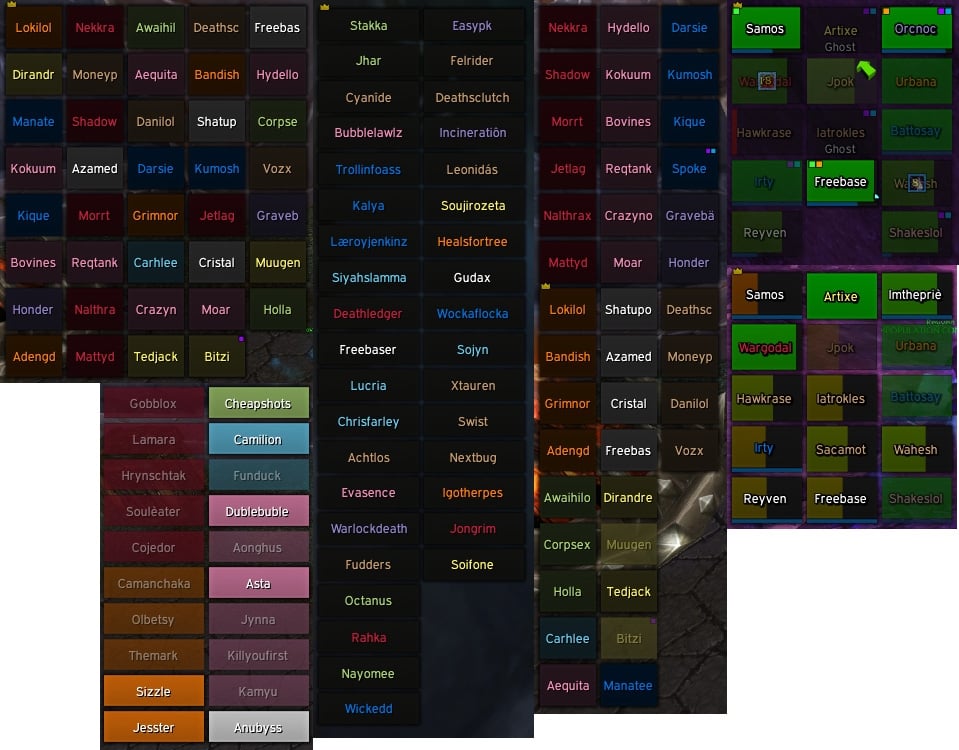
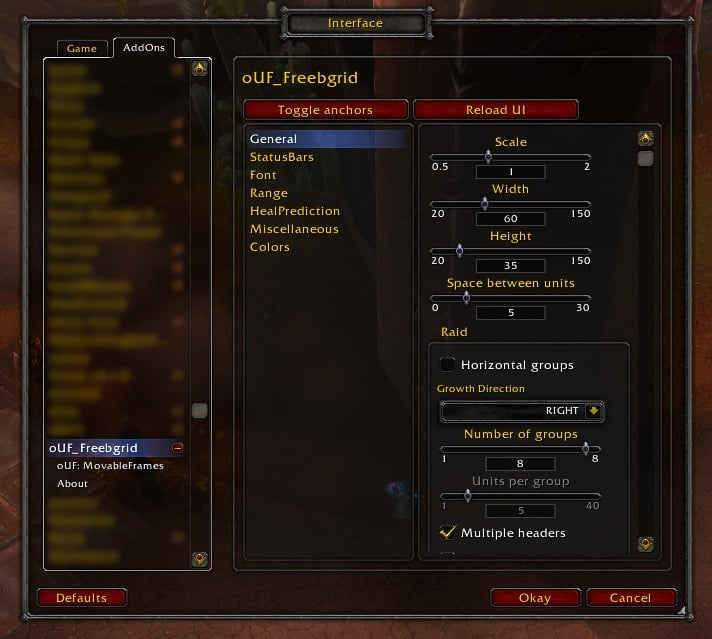
oUF Freebgrid   Popular! (More than 5000 hits)
oUF core and ReadyCheck are now embedded.

Party/Raid unit frames using the oUF framework. Originally based on oUF_Grid by zariel.

Units Supported:
-- party
-- raid
-- party/raid pets(and vehicles)
-- maintanks
-- maintanks targets

Features:
-- Class buff indicators
-- Debuff highlighting
-- Custom debuffs
-- Aggro indicator
-- Mouseover highlight
-- LibHealComm
-- Vertical/horizontal bars
-- Power bars
-- Highlight targeted unit
-- Focus highlight

Plugins:
-- oUF_ReadyCheck(embedded)

A detailed log can be found here http://freebaser.net/cgit/oUF_Freebgrid/log/
  Change Log - oUF Freebgrid
v2.0
-- new border with aggro coloring
-- oRA3 tank list fix
-- healcomm update
-- option to toggle Blizz party frames
-- fix frame bg not hiding
-- random tweaks and code cleanup

v1.9
-- added raid pets
-- fix moveable frame
-- use oRA3 sorted tanks

v1.8
-- updated to HealComm4
-- raid debuffs can use spellIDs
-- tag updates
-- misc tweaks

v1.7
-- indicator/tag updates
-- font changes
-- omgwtf its moveable!

v1.6
-- move debuffs to another file
-- ouf update

v1.5.3
-- fix dispell for real

v1.5.2
-- fix dispellClass
-- add a new tag

v1.5.1
-- typo

v1.5
-- oUF and libHealComm update
-- new center indicator to track time remaining
-- debuff tweaks
-- toc update

v1.4
-- add solo option

v1.3
-- removed banzai
-- add aggro tag/indicator
-- healcomm update
-- use built in oUF range
-- fix frame background when using less than 8 raid groups

v1.2
-- added MTs
-- optional frame background
-- license update

v1.1
-- fix debuffs not showing
-- new font

v1.0
-- more config options
-- focus highlight
-- right click menu
-- raid assistant
-- options for group growth - see config.lua

v0.99
-- Names now dynamically change length based on frame size (thanks Cladhaire)
-- Tags moved to a separate file and include better spell localization support
-- oUF core and plugins are embedded, making it standalone
-- improved the config options in the freebgrid.lua
-- libHealComm updated to r53
-- option for incHeal text and the ability to disable the healcomm bar

v0.91
-- libHealComm updated
-- banzai update
-- target border fix(thanks Guardix)
-- Renew tag only show is mine
-- default group growth is horizontal
-- removed the party drop down menu

v0.9
-- oUF_SpellRange support
-- remove indicators from mt targets
-- only attempt banzai if unit is player
-- out of mana border highlight(if manabars enabled)
-- various fixes/cleanup

v0.83
-- Only apply HealComm to freebgrid

v0.82
-- fixed a typo
-- xml first in .toc
-- t is not nil again!

v0.81
-- t is not nil!

v0.8
-- Color code rewrite
-- Set MainTank target to ignore HealComm
-- option to reverse hp and background color
-- change delay time on Readycheck

v0.7
-- Added MainTanks and MainTanks Target

v0.6
-- Added aggro color to names
-- updated the .toc >.<

v0.5
-- Fixed an issue with names
-- removed font shadow
-- updated to the newest libHealComm

v0.4
-- Party pets
-- Custom Debuff Icons and Highlighting
-- Some Name/Health changes with Classcolors
-- Updated some Class Indicators
-- ReadyCheck update
-- Selected target border

v0.3
-- backdrop adjustments
-- fixed hp / mp bar spacing
-- works with 1.3.3

v0.2
-- Health bars Vertical or Horizontal
-- Mana bar support also Vertical or Horizontal
-- Custom Class Indictors(still developing)
-- LibHealComm support(included)
-- ReadyCheck support
-- Raid Icon and Leader support
-- Ability to turn certain features off in the .lua
  Optional Files - oUF Freebgrid
File Name
Version
Size
Author
Date
Type
0.2
3kB
09-02-2009 08:19 PM
Patch
  Archived Versions - oUF Freebgrid
File Name
Version
Size
Author
Date
1.9
520kB
Freebaser
10-25-2009 01:04 AM
1.8
520kB
Freebaser
10-23-2009 06:46 PM
1.7
495kB
Freebaser
09-05-2009 10:28 PM
1.6
111kB
Freebaser
08-27-2009 08:24 PM
1.5.3
111kB
Freebaser
08-16-2009 03:21 AM
1.4
106kB
Freebaser
08-03-2009 03:35 PM
1.3
106kB
Freebaser
07-26-2009 08:39 PM
1.2
290kB
Freebaser
07-04-2009 08:12 PM
  Comments - oUF Freebgrid
Post A Reply Comment Options
Old 11-22-2009, 04:42 AM  
Icerat
A Fallenroot Satyr

Forum posts: 23
File comments: 42
Uploads: 0
Re: Re: Tied to KGPanel?

How do i get the Pet showing functionality back that was in 1.8, when i have Party Pets on it wouldn't show extra space unless the player had a pet, with the latest build it shows a gap under the player all the time.

How hard would it be to to have an option to show pets in party and not in raid and in raid and not party?
Icerat is offline Report comment to moderator   Edit/Delete Message Reply With Quote
Old 11-21-2009, 12:14 AM  
richerich
A Fallenroot Satyr
 
richerich's Avatar
Interface Author - Click to view interfaces

Forum posts: 28
File comments: 396
Uploads: 5
Re: Tied to KGPanel?

Quote:
Originally posted by nessin
Second Edit:
Another failure at my almost non-existant LUA skills, is there a way to turn the Freebgrid frame completely transparent, the background that is?
go to "Interface\AddOns\oUF_Freebgrid\config.lua"

change this:

Code:
frameBG = true,			-- apply raid Background?
to

Code:
frameBG = false,			-- apply raid Background?


Quote:
Originally posted by nessin
Is there any way to use a kgPanel (or I suppose any third-party frame) as an anchor for Freebgrid? Trying to get it to fit into a panel and I'd prefer to keep it clean by doing that rather than digging out exact coordinates if at all possible. I tried editting the config with the panel name, but that didn't work.
Run this script while hover your mouse over the raidframes:
Code:
/run print(GetMouseFocus():GetName())
... and just print in the frame shown in the chatlog to kgpanels.
__________________


Dajova UI

Dajova UI Mini

Last edited by richerich : 11-21-2009 at 12:18 AM.
richerich is offline Report comment to moderator   Edit/Delete Message Reply With Quote
Old 11-09-2009, 04:39 PM  
nessin
A Murloc Raider

Forum posts: 4
File comments: 4
Uploads: 0
Tied to KGPanel?

Is there any way to use a kgPanel (or I suppose any third-party frame) as an anchor for Freebgrid? Trying to get it to fit into a panel and I'd prefer to keep it clean by doing that rather than digging out exact coordinates if at all possible. I tried editting the config with the panel name, but that didn't work.

Edit:
On a slightly unrelated note, anyone know how to test a raid frame like this, seeing a full 25 man raid, without going into Alterac Valley and wasting space in the battleground?

Second Edit:
Another failure at my almost non-existant LUA skills, is there a way to turn the Freebgrid frame completely transparent, the background that is?

Last edited by nessin : 11-11-2009 at 10:54 AM.
nessin is offline Report comment to moderator   Edit/Delete Message Reply With Quote
Old 11-01-2009, 06:38 PM  
st0nedpenguin
A Murloc Raider
 
st0nedpenguin's Avatar
Interface Author - Click to view interfaces

Forum posts: 4
File comments: 52
Uploads: 6
Is there any way to get the raid groups to spawn round a central anchor as the raid grows, like Grid will?

I'm referring to the groups spawning like this:

...............[1]
.............[1][2]
...........[1][2][3]
.........[1][2][3][4]

Etc.

Last edited by st0nedpenguin : 11-01-2009 at 06:46 PM.
st0nedpenguin is offline Report comment to moderator   Edit/Delete Message Reply With Quote
Old 10-30-2009, 07:05 PM  
Strongbow
A Deviate Faerie Dragon
 
Strongbow's Avatar

Forum posts: 10
File comments: 98
Uploads: 0
Like this:

Code:
local addonName = "oUF_Freebgrid"
local addonPath = "Interface\\Addons\\"..addonName
local mediaPath = addonPath.."\\media\\"

FreebgridDefaults = {
	texture = mediaPath.."flatsmooth",
	highlightTex = mediaPath.."white",
	borderTex = mediaPath.."border",
	iconborder = mediaPath.."border2",
	trans = mediaPath.."trans",
	
	height = 25,
	width = 50,

	scale = 0.9,
	
	font = mediaPath.."SEMPRG__.ttf",
	fontsize = 9,
	
	symbols = mediaPath.."SEMPRG__.ttf",
	symbolsSize = 9,
	symbols1 = mediaPath.."SEMPRG__.ttf",
	symbols1Size = 9,

	aurafont = mediaPath.."squares.ttf",
	indicatorSize = 6,	-- Size of the Corner Indicators

	iconSize = 14,	-- Size of raid symbols, leader, etc.
	debuffsize = 16,
	
	locked = true, -- false to move frames

	position = {"LEFT", "UIParent", "LEFT", 10, 320},
	
	point = "TOP", --[[ usage: "TOP", "LEFT", "RIGHT", "BOTTOM"
						this is the unit anchor so TOP would make units grow down and LEFT would make units grow RIGHT etc. SEE growth COMMENT! ]]--
						
	growth = "RIGHT", --[[ usage: "UP", "DOWN", "LEFT", "RIGHT"
						This defines how additional groups should be added.
						if point = "TOP" or "BOTTOM" this MUST be "LEFT" or "RIGHT". 
						if point = "LEFT" or "RIGHT" this MUST be "UP" or "DOWN" ]]--
						
	spacing = 5,	-- space between units and raid groups

	solo = false,
	partyON = false,	-- dude?
	partyPets = true,	-- has no effect if partyON is false
	reverseColors = false,	-- Reverse Units color
	highlight = true,		-- MouseOver Highlight?
	indicators = true, 		-- Class Indicators?
	vertical = true,		-- Vertical bars?
	manabars = true,		-- Mana Bars?
	Licon = true,			-- Leader icon?
	ricon = true,			-- Raid icon?
	noHealbar = true,		-- Disable HealComm Bar
	Healtext = true,		-- Enable HealComm Text
	frameBG = true,			-- apply raid Background?
	
	MTs = false, 			-- Main Tanks?
	MTposition = {"TOPLEFT", "UIParent", "TOPLEFT", 10, -150},
	
	focusHighlightcolor = {.8, .8, .2, .7},
	petColor = {.1, .8, .3},
	
	numRaidgroups = 5,		-- Number of Raid Groups
	
	dispellPriority = {
		["Magic"] = 4,
		["Poison"] = 3,
		["Disease"] = 1,
		["Curse"] = 2,
		["None"] = 0,
	},
}
-Strongbow-
Strongbow is offline Report comment to moderator   Edit/Delete Message Reply With Quote
Old 10-29-2009, 06:15 PM  
Freebaser
Premium Member
 
Freebaser's Avatar
Premium Member
Interface Author - Click to view interfaces

Forum posts: 46
File comments: 107
Uploads: 5
Quote:
Originally posted by Strongbow
Getting this message with the latest version.

Date: 2009-10-29 21:28:34
ID: 1
Error occured in: Global
Count: 1
Message: ..\AddOns\oUF_Freebgrid\freebgrid.lua line 202:
attempt to concatenate local 'first' (a nil value)
Debug:
[C]: ?
oUF_Freebgrid\freebgrid.lua:202: func()
oUF_Freebgrid\oUF\ouf.lua:91:
oUF_Freebgrid\oUF\ouf.lua:89
(tail call): ?

-Strongbow-
What does your config.lua look like? I need this to troubleshoot.

Code:
point = "TOP",
growth = "RIGHT",
solo = true,
partyON = true,
pets = true,
frameBG = true,
numRaidgroups = 8,
Freebaser is offline Report comment to moderator   Edit/Delete Message Reply With Quote
Old 10-29-2009, 04:39 PM  
Strongbow
A Deviate Faerie Dragon
 
Strongbow's Avatar

Forum posts: 10
File comments: 98
Uploads: 0
Getting this message with the latest version.

Date: 2009-10-29 21:28:34
ID: 1
Error occured in: Global
Count: 1
Message: ..\AddOns\oUF_Freebgrid\freebgrid.lua line 202:
attempt to concatenate local 'first' (a nil value)
Debug:
[C]: ?
oUF_Freebgrid\freebgrid.lua:202: func()
oUF_Freebgrid\oUF\ouf.lua:91:
oUF_Freebgrid\oUF\ouf.lua:89
(tail call): ?

-Strongbow-
Strongbow is offline Report comment to moderator   Edit/Delete Message Reply With Quote
Old 10-29-2009, 04:23 PM  
Freebaser
Premium Member
 
Freebaser's Avatar
Premium Member
Interface Author - Click to view interfaces

Forum posts: 46
File comments: 107
Uploads: 5
Quote:
Originally posted by kndrt
Can anyone help? How to make red border agro indicator around frame instead of red point on bottom of frame?
This will be in the next update.
Freebaser is offline Report comment to moderator   Edit/Delete Message Reply With Quote
Old 10-29-2009, 07:18 AM  
kndrt
A Kobold Labourer

Forum posts: 0
File comments: 1
Uploads: 0
Can anyone help? How to make red border agro indicator around frame instead of red point on bottom of frame?
kndrt is offline Report comment to moderator   Edit/Delete Message Reply With Quote
Old 10-27-2009, 12:00 PM  
Crapa
A Kobold Labourer

Forum posts: 0
File comments: 11
Uploads: 0
Quote:
Originally posted by Freebaser
You probably have oRA3 installed. Its a bug with the layout. You can disable the oRA3 code towards the bottom of freebgrid.lua.
It didn't make the trick.
I simply disabled oRA3
Crapa is offline Report comment to moderator   Edit/Delete Message Reply With Quote
Old 10-27-2009, 11:22 AM  
Crapa
A Kobold Labourer

Forum posts: 0
File comments: 11
Uploads: 0
Yes you are right.
Thanks for the clue
Crapa is offline Report comment to moderator   Edit/Delete Message Reply With Quote
Old 10-27-2009, 11:19 AM  
Freebaser
Premium Member
 
Freebaser's Avatar
Premium Member
Interface Author - Click to view interfaces

Forum posts: 46
File comments: 107
Uploads: 5
Quote:
Originally posted by Crapa
Hi,

In Alterac Valley, it seems everyone is considered as a MT.
Didn't happen with 1.7.
Don't know if someone else noticed this.
You probably have oRA3 installed. Its a bug with the layout. You can disable the oRA3 code towards the bottom of freebgrid.lua.
Freebaser is offline Report comment to moderator   Edit/Delete Message Reply With Quote
Old 10-27-2009, 10:01 AM  
Crapa
A Kobold Labourer

Forum posts: 0
File comments: 11
Uploads: 0
Hi,

In Alterac Valley, it seems everyone is considered as a MT.
Didn't happen with 1.7.
Don't know if someone else noticed this.
Crapa is offline Report comment to moderator   Edit/Delete Message Reply With Quote
Old 10-27-2009, 06:54 AM  
Freebaser
Premium Member
 
Freebaser's Avatar
Premium Member
Interface Author - Click to view interfaces

Forum posts: 46
File comments: 107
Uploads: 5
Quote:
Originally posted by Tekkub
Playing a little with the latest version (I haven't merged since v0.99) I have a few thoughts for you.

* movable, locked and position are too much. Just have a default position and the locking.
* is this LoD compatible? I'd much prefer to use AddonLoader to load this UF only when I'm in a raid. I don't use it in party or solo, so I'd rather it not load at all times.
* Icons for debuffs suck... I'm sorry, I can't correlate a dozen icons to their debuff type on the fly, and they block vital info when they're up. You should give an option to show text tags that the healer in question can remove. I can give you the code for this if you need.
* Aggro, I think you're using a corner dot right now? Text helps me here as well, I currently use "^^" (has aggro) "--" (losing) and "++" (about to pull aggro)... using red/yellow/orange. Maybe an option for this?
* My hubby has issues with combat rez as a boomkin. He's not watching the frames so when they say "rez the priest" he has some issues finding said priest quickly. To make this easy for him I ensure the player name is displayed when dead, "dead" is below the name, and class color is very easy to pick out (background and name). The same goes for DC'd units, I try to avoid greying out the player name at all times.
* pets are nice to have up, but mixing them in gets in my way. Pets are sort of an afterthought, I like to heal them when I can, but I don't really care who they belong to. Maybe an option to have the pets grow off the group in the opposite direction? If the group grows down, grow pets up off the top, all grouped together.

Wow, bit ranty there. Basically I can boil it down to this: Everything in my version is in three lines of text and the corner dots. Top line is incoming heals. Center is health deficit or player name (if >90% HP or dead/ghost/DC, always class-colored). Bottom line is everything else... dead/ghost/DC, debuffs, aggro. As I said this was all based on v0.99, so that might not mesh too well with 1.9, but maybe it will.

Oh and a side note, does this somehow disable the party frames at all times? That's really annoying for people that only use it in raid and want the default frames in party. If the party option is off you shouldn't hide the default frames.
*Moveable and locked are both needed. Moveable == false allows the config position to always override the user saved position.

*I'll have to check into the LoD. I'm pretty sure it will require the user to write their own Addonloader script to fit their needs.

*Debuff icons are useful to me because I can identify what the debuff is and what type(by the colored border). I understand it my not be for everyone, so having the option you suggested will be considered in one of the next versions.

*I agree the aggro indicator could be better, but I haven't had an idea that didn't interfere with another feature on the frame.

*I'm working on an algorithm that detects player class/spec, raid encounter and predetermines who should be battle rezzed, then outputs "REZ ME" on the player's frame, while also illuminating brighter than the sun.

*Pets really are only there for the few fights where pets/vehicles may be important to someone, otherwise I would turn it off.

*Blizz party frames are disabled. Thats my fault and there will be an option to enable them next update.


Quote:
Found a minor bug. The party/raid background doesn't always get completely removed once you leave said party/raid. Just below my characters portrait you see a small grey box where the freebgrid party was.
This should be an easy fix but for whatever reason the events RAID_ROSTER_UPDATE and PARTY_MEMBERS_CHANGED doesn't seem to fire when "player" (you) leave a group. A quick /console reloadui will make it go away for now.
Freebaser is offline Report comment to moderator   Edit/Delete Message Reply With Quote
Old 10-27-2009, 12:57 AM  
def9
A Theradrim Guardian

Forum posts: 60
File comments: 28
Uploads: 0
Found a minor bug. The party/raid background doesn't always get completely removed once you leave said party/raid. Just below my characters portrait you see a small grey box where the freebgrid party was.

def9 is offline Report comment to moderator   Edit/Delete Message Reply With Quote
Post A Reply


Category Jump:


The Network:
EQInterface | EQ2Interface | LoTROInterface | MMOInterface | War.MMOUI | WoWInterface | VGInterface | Allakhazam | Thottbot | Wowhead | Zam


©2009 MMOUI / ZAM Network
vBulletin - Copyright ©2000 - 2009, Jelsoft Enterprises Ltd.