Addon Information
Works with 3.3
Download Latest Version.
To add favorites please register for a free account. If you already have one you need to login. How do I install this? (FAQ)
Author:
Version:
3.3.003
Date:
01-16-2010 06:51 PM
Size:
16.03 Kb
Downloads:
38,717
Favorites:
396
MD5:
Pictures
Click to enlarge
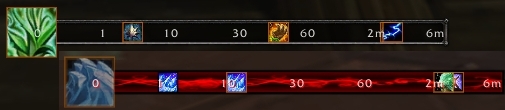
Default setup with Druid spells on top; customized with Mage spells on bottom
CoolLine   Popular! (More than 5000 hits)
CoolLine is a spell/item cooldown mod that displays icons on a single bar/line to give you an idea of when it will be ready. No statusbar timer and no text timer.

CoolLine is inspired by Forte_Cooldown (a module in the ForteXorcist package). CoolLine is basically a stripped down and standalone version written from scratch. The name comes from putting "cooldown" and "timeline" together (yes, lame).


How to Use:
  • Change settings - "/coolline" or check Interface Options -> AddOns
  • Change position and size - unlock to make it draggable and resizable
  • Filter/unfilter a spell or item cooldown - "/coolline Spell Item Name Link"
  • Add more fonts/texture - CoolLine uses LibSharedMedia


External Support:
  • CoolLine.NewCooldown(name, icon, endtime, isplayer)
    • name - unique string id of the cooldown, used as a look-up id
    • icon - string icon path used to display image on the bar
    • endtime - numerical time when the icon should expire, based on GetTime()
    • isplayer - boolean value used to determine if the icon is colored by spell
  • CoolLine.ClearCooldown(unused, name)


Notes:
  • Only one spell/item will be shown in an event that multiple spells/items share the same cooldown (whichever appeared first).
  • By design, icons will often overlap; if you do not like it, this type of cooldown mod is not for you.
  • If you like the idea of this mod but want more, I highly suggest checking out ForteXorcist or Ellipsis. I'll most likely ignore requests to make CoolLine more similar to them.
  • CoolLine only does spell/item cooldowns and NOT buff/debuff cooldowns, flight timers, time til enrage, etc; this will NOT change so don't ask.


Recently, I had some requests for donation info, so here it is. Do not feel obligated; donations (or lack of) will not determine what features I do or do not implement.
  Change Log - CoolLine
3.3.003 01/16/2010 - removed "30" tick and added "3" tick
3.3.002 01/11/2010 - added LibSharedMedia-3.0 callback support

3.3.001 12/08/2009:
- updated toc for 3.3
- added option to increase icon size
- added option to reset settings

3.2.005 10/30/2009 - fix an issue where cooldowns refreshed to global cooldown did not update properly (ie. Shield Slam with Sword and Board)

3.2.004 10/07/2009:
- added option to save settings per character
- make death knight rune detection more robust to cooldown changes

3.2.003 09/04/2009:
- allow external access to useful CoolLine functions
- added ConfigMode support

3.2.002 08/04/2009 - fix spell cooldowns triggering when runes are on cooldown

3.2.001 08/04/2009:
- toc to 3.2
- fade icons out a bit faster
- text now have a shadow

3.1.006 07/24/2009:
- switched to a 6-minute time scale instead of 10
- performance tweaks
- added more font size values

3.1.004 05/30/2009:
- icons' alpha now constant
- slightly reduced icon fade time

3.1.003 05/22/2009 - slightly tweaked layout

3.1.002 04/24/2009:
- added an optional visual that lets you know if and where a spell is on cooldown when you attempt to cast it

3.1.001 04/14/2009:
- updated for 3.1
- slightly improved performance

3.0.005 03/25/2009:
- prevent error caused by default variables
- replaced "10m" with "9m" because of the offset and size, bar is still 10m long
- added AddonLoader support, set to "delay" by default

3.0.004 02/22/2009 - several minor performance tweaks

3.0.003 02/14/2009:
- slash command to add/remove filter now accepts spell or item links
- added coloring to distinguish player spell from pet/item cooldowns

3.0.002 02/09/2009 - attempt to make it work with other locales

3.0.001 02/09/2009 - Initial upload
  Archived Versions - CoolLine
File Name
Version
Size
Author
Date
3.3.002
16kB
totalpackage
01-11-2010 08:54 PM
3.3.001
16kB
totalpackage
12-08-2009 12:04 AM
3.2.005
16kB
totalpackage
10-30-2009 05:27 AM
3.1.006
15kB
totalpackage
07-24-2009 04:16 PM
  Comments - CoolLine
Post A Reply Comment Options
Old 01-24-2010, 10:41 AM  
walbuls
A Kobold Labourer

Forum posts: 0
File comments: 4
Uploads: 0
Quote:
Originally posted by totalpackage
About Tidal Waves, look at CoolLine's description...all of it.
I see we can add it manually and even after looking at ckeurk's post im lost on how to do it lol If you have some spare time to type hat i need to add that would be awesome, if not its no big deal. Your add-on is still fantastic without it.

Last edited by walbuls : 01-24-2010 at 10:42 AM.
walbuls is offline Report comment to moderator   Edit/Delete Message Reply With Quote
Old 01-23-2010, 11:29 PM  
bluenjoy
A Murloc Raider
 
bluenjoy's Avatar

Forum posts: 7
File comments: 65
Uploads: 1
Hi,

Is there a way I can see my Internal Cooldown for my trinkets (like ForteXorcist) such as....Greatness Str?
__________________
-Biggie

Last edited by bluenjoy : 01-23-2010 at 11:29 PM.
bluenjoy is offline Report comment to moderator   Edit/Delete Message Reply With Quote
Old 01-20-2010, 09:17 PM  
totalpackage
A Deviate Faerie Dragon
 
totalpackage's Avatar
Interface Author - Click to view interfaces

Forum posts: 11
File comments: 619
Uploads: 2
About Tidal Waves, look at CoolLine's description...all of it.
totalpackage is online now Report comment to moderator   Edit/Delete Message Reply With Quote
Old 01-20-2010, 09:16 PM  
totalpackage
A Deviate Faerie Dragon
 
totalpackage's Avatar
Interface Author - Click to view interfaces

Forum posts: 11
File comments: 619
Uploads: 2
Quote:
Originally posted by FynexFox
...The only thing I DON'T like about CoolLine is resizing it. The drag handle can make keeping certain proportions hard. Are there any plans for using input boxes to determine height and width?
Nope, input boxes in dropdown menus are a pain and very slow. Not worth it for settings you do not need to change often.
totalpackage is online now Report comment to moderator   Edit/Delete Message Reply With Quote
Old 01-20-2010, 07:56 PM  
walbuls
A Kobold Labourer

Forum posts: 0
File comments: 4
Uploads: 0
Quote:
Originally posted by totalpackage
That's a proc'ed buff. It is possible to show it on CoolLine if you look at CoolLine's "External Support" on the description tab, but it would require some work.
I would also like to know how to get TidalWaves to show.
walbuls is offline Report comment to moderator   Edit/Delete Message Reply With Quote
Old 01-20-2010, 05:09 AM  
FynexFox
A Kobold Labourer

Forum posts: 1
File comments: 5
Uploads: 0
Hey, I just downloaded CoolLine and I must say I really enjoy it. Coming from Forte_Xorcist this is just the stripped down bit of it I needed.

The only thing I DON'T like about CoolLine is resizing it. The drag handle can make keeping certain proportions hard. Are there any plans for using input boxes to determine height and width?

Last edited by FynexFox : 01-20-2010 at 05:09 AM.
FynexFox is offline Report comment to moderator   Edit/Delete Message Reply With Quote
Old 01-17-2010, 12:55 PM  
ckeurk
A Kobold Labourer
 
ckeurk's Avatar
Interface Author - Click to view interfaces

Forum posts: 0
File comments: 11
Uploads: 2
name - --aura = 53390,--Tidal Waves
[1] = 51562,--Tidal Waves Rank 1
[2] = 51563,--Tidal Waves Rank 2
[3] = 51564,--Tidal Waves Rank 3
[4] = 51565,--Tidal Waves Rank 4
[5] = 51566,--Tidal Waves Rank 5
icon - Interface\\ I seek
endtime - 15sc
isplayer - ?

Last edited by ckeurk : 01-17-2010 at 12:57 PM.
ckeurk is offline Report comment to moderator   Edit/Delete Message Reply With Quote
Old 01-17-2010, 08:54 AM  
totalpackage
A Deviate Faerie Dragon
 
totalpackage's Avatar
Interface Author - Click to view interfaces

Forum posts: 11
File comments: 619
Uploads: 2
Quote:
Originally posted by ckeurk
...I would like to Tidal wave in Coolline, how to have cd ??
Thanks
That's a proc'ed buff. It is possible to show it on CoolLine if you look at CoolLine's "External Support" on the description tab, but it would require some work.
totalpackage is online now Report comment to moderator   Edit/Delete Message Reply With Quote
Old 01-17-2010, 06:37 AM  
ckeurk
A Kobold Labourer
 
ckeurk's Avatar
Interface Author - Click to view interfaces

Forum posts: 0
File comments: 11
Uploads: 2
Salut totalpackage !
I would like to Tidal wave in Coolline, how to have cd ??
Thanks
ckeurk is offline Report comment to moderator   Edit/Delete Message Reply With Quote
Old 01-14-2010, 07:24 PM  
totalpackage
A Deviate Faerie Dragon
 
totalpackage's Avatar
Interface Author - Click to view interfaces

Forum posts: 11
File comments: 619
Uploads: 2
Since I've been playing a prot paladin for a bit now, I've noticed how the 10 second and under area can get a bit crowded. I'll remove the 30 second tick and add maybe a 3 or 5 depending on testing. Rest will stay the same.
totalpackage is online now Report comment to moderator   Edit/Delete Message Reply With Quote
Old 01-12-2010, 11:36 AM  
Kogasu
A Kobold Labourer

Forum posts: 0
File comments: 25
Uploads: 0
Quote:
Originally posted by xXVegâsXx
is it possible to change the maximum time displayed on the timeline?

now there are 6min at the end, but i want only 3min.

and can i change the displayed timestamps?

now there are 0, 1, 10, 30, 60, 2m, 6m

i want 0, 1, 5, 10, 30, 60, 3m.

i think i only have to change these numbers somewhere in the *.lua file, but i dont know where?

edit: i found the lines where i can change the numbers that are displayed on the timeline. now my only problem is that the cooldowns shown there are there like the old version with 6min. anybody know what i have to change in the lua?
The answer to your question is detailed in earlier comments.
Kogasu is online now Report comment to moderator   Edit/Delete Message Reply With Quote
Old 01-12-2010, 08:18 AM  
xXVegâsXx
A Kobold Labourer

Forum posts: 1
File comments: 12
Uploads: 2
is it possible to change the maximum time displayed on the timeline?

now there are 6min at the end, but i want only 3min.

and can i change the displayed timestamps?

now there are 0, 1, 10, 30, 60, 2m, 6m

i want 0, 1, 5, 10, 30, 60, 3m.

i think i only have to change these numbers somewhere in the *.lua file, but i dont know where?

edit: i found the lines where i can change the numbers that are displayed on the timeline. now my only problem is that the cooldowns shown there are there like the old version with 6min. anybody know what i have to change in the lua?

Last edited by xXVegâsXx : 01-12-2010 at 08:26 AM.
xXVegâsXx is offline Report comment to moderator   Edit/Delete Message Reply With Quote
Old 01-10-2010, 07:56 PM  
walbuls
A Kobold Labourer

Forum posts: 0
File comments: 4
Uploads: 0
Re: Re: weird problem

Quote:
Originally posted by totalpackage
The background texture you're using is not registered by the time CoolLine requests it (addon loading order problem). It is fixable, and it is on my to-do list.
Thanks for the reply. Looking forward to the fix.
walbuls is offline Report comment to moderator   Edit/Delete Message Reply With Quote
Old 01-09-2010, 07:28 PM  
totalpackage
A Deviate Faerie Dragon
 
totalpackage's Avatar
Interface Author - Click to view interfaces

Forum posts: 11
File comments: 619
Uploads: 2
Re: weird problem

Quote:
Originally posted by walbuls
Not sure what is causing this but my coolline looses is looks and goes back to a default state everytime i logout/change characters/reload ui. The only way to get it back to normal is to go into the options and select any of the edit functions and all the looks return. Know what is causing this by chance? Thanks...
The background texture you're using is not registered by the time CoolLine requests it (addon loading order problem). It is fixable, and it is on my to-do list.
totalpackage is online now Report comment to moderator   Edit/Delete Message Reply With Quote
Old 01-09-2010, 02:43 AM  
walbuls
A Kobold Labourer

Forum posts: 0
File comments: 4
Uploads: 0
weird problem

Not sure what is causing this but my coolline looses is looks and goes back to a default state everytime i logout/change characters/reload ui. The only way to get it back to normal is to go into the options and select any of the edit functions and all the looks return. Know what is causing this by chance? Thanks


walbuls is offline Report comment to moderator   Edit/Delete Message Reply With Quote
Post A Reply


Category Jump:


The Network:
EQInterface | EQ2Interface | LoTROInterface | MMOInterface | War.MMOUI | WoWInterface | VGInterface | Allakhazam | Thottbot | Wowhead | Zam


©2009 MMOUI / ZAM Network
vBulletin - Copyright ©2000 - 2010, Jelsoft Enterprises Ltd.


