Download
(9 Kb)
Download
Updated: 07-01-11 07:01 AM
Pictures
File Info
Tested:Hour of Twilight 4.3
Updated:07-01-11 07:01 AM
Created:02-13-09 02:58 PM
Downloads:8,197
Favorites:124
MD5:
This AddOn is 4.3 compatible
Class Colors  Popular! (More than 5000 hits)
Version: 4.2.0.51
by: Phanx, Akkorian
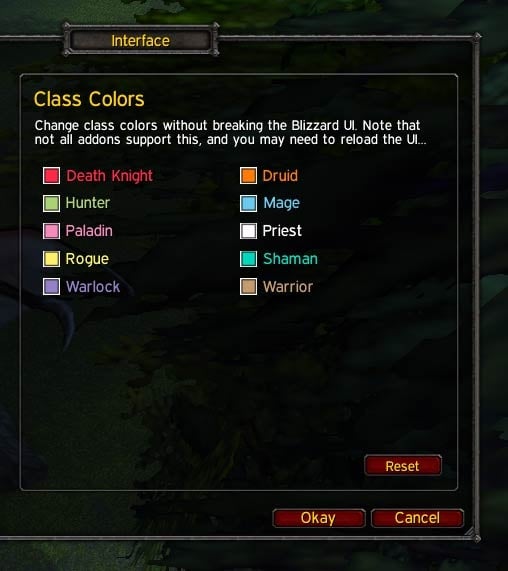
Class Colors allows you to change class colors without tainting the Blizzard UI.

It is supported by many pouplar addons, and also applies your custom colors to parts of the default UI that are normally class-colored.

Type “/classcolors” for options, or browse to the Class Colors panel in the standard Interface Options window.


Localization

Class Colors is compatible with English, Deutsch (deDE), Español (esES/esMX), Français (frFR), Português (ptBR), Русский (ruRU), 한국어 (koKR), 简体中文 (zhCN), and 正體中文 (zhTW) clients.


Frequently Asked Questions

If you have a question that isn’t answered here, feel free to post a comment!

How do I get class colors on my friends list?

Class Colors only colors parts of the default UI which are already colored. If you want to see names in other parts of the default UI colored by class, install an addon like Awbee’s FriendColor or yleaf’s yClassColor. Both of them will use any custom colors you set through Class Colors.

What’s wrong with addons like !ReTeal?

Addons like !ReTeal directly alter the Blizzard class color table, which causes all code which reads from that table to become “tainted”. Once this happens, Blizzard restrictions on code security cause certain parts of the UI to stop working. Some examples of problems caused by tainting the Blizzard class color table include being unable to view the raid panel while in combat, and being unable to set main tanks and main assists from the right-click menu in the raid panel.

Class Colors solves this problem by not touching Blizzard’s table at all. Instead, it creates a new table. Since this new table isn’t created or used by any Blizzard code, it doesn’t taint anything, and its values can be changed as much as you like. The downside is that any addon that would normally read from Blizzard’s table must be updated to check for the new table, and read from it instead if it exists.

How can I make my addon support Class Colors?

Essentially, all you need to do is check for and read from CUSTOM_CLASS_COLORS instead of RAID_CLASS_COLORS. However, due to the vagaries of addon load order, and the fact that Class Colors users can change class colors at any time, it is strongly recommended that you register for a callback when colors change, and delay caching class colors until the PLAYER_LOGIN event. See the API documentation for details!


Bug Reports

If you encounter a problem with Class Colors, please submit a bug report ticket with the following information:
  • Addon version (ex: 4.0.1.11)
  • WoW client version and locale (ex: 4.0.1 enUS)
  • Description of the problem
  • Steps to reproduce the problem
  • Whether the problem occurs when all other addons are disabled
  • Exact text of any related error messages (without lists of local variables or installed addons, please!)
  • Screenshot, if the problem is graphical
Remember to check on your ticket after a few days, as I may need more information from you in order to identify or fix the problem.
Version 4.2.0.51
  • Updated for WoW 4.2

Version 4.1.0.49
  • Updated for WoW 4.1
  • Removed the IterateClasses metamethod since nobody uses it
  • Changed the GetColoredName override to more closely emulate the original Blizzard function, as requested by Funkydude on WowAce

Version 4.0.3.43
  • Fixed LFR browser and who list coloring

Version 4.0.3.40
  • Fixed raid panel coloring

Version 4.0.1.36
  • Someday I will remember to turn off debugging before posting a release...

Version 4.0.1.35
  • Updated Blizzard UI coloring for WoW 4.0

Version 4.0.1.33
  • Removed a function that no longer exists in WoW 4.0
  • Guild panel coloring hasn't been updated yet

Version 3.3.3.29
  • Player names in the raid panel will now always be colored correctly
  • Added additional checks to prevent GetPlayerInfoByGUID usage errors

Version 3.3.0.26
  • Added coloring of class names in the channel pane of the chat config window

Version 3.3.0.24
  • Added coloring of names in the LookingForRaid interface
  • Fixed drycode errors

Version 3.3.0.22
  • Updated for WoW 3.3
  • Removed coloring for parts of the UI that aren't normally colored. This functionality may or may not reappear in a separate addon at a later date.
Post A Reply Comment Options
Old 12-17-11, 07:07 AM  
devilArt
A Murloc Raider

Forum posts: 8
File comments: 33
Uploads: 0
raid/party member on the minimap and world map are still default color
devilArt is offline Report comment to moderator  
Reply With Quote
Old 07-09-11, 10:37 AM  
Dainton
A Flamescale Wyrmkin
 
Dainton's Avatar
AddOn Author - Click to view AddOns

Forum posts: 115
File comments: 61
Uploads: 1
I posted a bug about the PaperDollFrame level being broken. Not sure if it tells you when you have new bugs on here or not. There's also a fix for it with it to make your life easier.
Dainton is offline Report comment to moderator  
Reply With Quote
Old 07-01-11, 07:12 AM  
Akkorian
A Flamescale Wyrmkin
 
Akkorian's Avatar
AddOn Author - Click to view AddOns

Forum posts: 107
File comments: 124
Uploads: 2
Version 4.2.0.51
  • Updated for WoW 4.2
__________________
“Be humble, for you are made of earth. Be noble, for you are made of stars.” — Serbian proverb
Akkorian is offline Report comment to moderator  
Reply With Quote
Old 06-29-11, 02:28 PM  
Dridzt
A Molten Giant
AddOn Author - Click to view AddOns

Forum posts: 666
File comments: 667
Uploads: 66
4.2

Code:
local PLAYER_LEVEL = (PLAYER_LEVEL:gsub( "\124c%%s", "|cff%%02x%%02x%%02x"))
local PLAYER_LEVEL_NO_SPEC = (PLAYER_LEVEL_NO_SPEC:gsub( "\124c%%s", "|cff%%02x%%02x%%02x" ))
near the top of ClassColorsBlizz.lua should fix it for 4.2 (string.replace was removed)
Dridzt is online now Report comment to moderator  
Reply With Quote
Old 11-25-10, 11:36 PM  
Phanx
A Pyroguard Emberseer
 
Phanx's Avatar
AddOn Author - Click to view AddOns

Forum posts: 1160
File comments: 1264
Uploads: 24
Version 4.0.3.40
  • Fixed raid panel coloring
Last edited by Phanx : 11-25-10 at 11:37 PM.
Phanx is offline Report comment to moderator  
Reply With Quote
Old 11-20-10, 01:38 PM  
Phanx
A Pyroguard Emberseer
 
Phanx's Avatar
AddOn Author - Click to view AddOns

Forum posts: 1160
File comments: 1264
Uploads: 24
I'm not raiding currently, but I'll see if I can get some people together to check that out.
Phanx is offline Report comment to moderator  
Reply With Quote
Old 11-19-10, 10:56 PM  
Grungra
A Murloc Raider

Forum posts: 6
File comments: 14
Uploads: 0
Class colors in blizzard's raid window

Since the last patch, the raid window was getting the colors wrong, if I moved people around from group to group they would take the same color as my character... if I played on mage they would all turn light blue, as hunter they would go all green. Did they change something on their code that would make that happen? No errors at all, just the coloring of all raiders regardless of class would end up being the same color as the character I had in raid at the time. It looks funny to have a raid full of the same class.

Disabled ClassColors and the problem went away.
Grungra is offline Report comment to moderator  
Reply With Quote
Old 11-07-10, 12:11 AM  
Phanx
A Pyroguard Emberseer
 
Phanx's Avatar
AddOn Author - Click to view AddOns

Forum posts: 1160
File comments: 1264
Uploads: 24
Fixed. Someday I will remember to turn off debugging before posting a release...
Phanx is offline Report comment to moderator  
Reply With Quote
Old 11-06-10, 10:53 PM  
Seerah
Fishing Trainer
 
Seerah's Avatar
WoWInterface Super Moderator
AddOn Author - Click to view AddOns

Forum posts: 8672
File comments: 532
Uploads: 21
debug print() statements were accidentally left in

For users: to get rid of the messages spamming your chat frame, open up ClassColorsBlizz.lua in any text editor, find each instance of the word print and place two dashes -- in front of it. There are about 13 of them.
__________________
"You'd be surprised how many people violate this simple principle every day of their lives and try to fit square pegs into round holes, ignoring the clear reality that Things Are As They Are." -Benjamin Hoff, The Tao of Pooh

Seerah is offline Report comment to moderator  
Reply With Quote
Old 11-05-10, 03:57 AM  
Haleth
Look at the post
 
Haleth's Avatar
WoWInterface Super Moderator
AddOn Author - Click to view AddOns

Forum posts: 800
File comments: 859
Uploads: 17
That's fair enough. However, the character frame does have a class colored text in the default UI since 4.0.1. Ignore the missing textures in the screenshot.


Code:
function PaperDollFrame_SetLevel()
	local primaryTalentTree = GetPrimaryTalentTree();
	local classDisplayName, class = UnitClass("player"); 
	local classColor = CUSTOM_CLASS_COLORS[class];
	local classColorString = format("ff%.2x%.2x%.2x", classColor.r * 255, classColor.g * 255, classColor.b * 255);
	local specName;
	
	if (primaryTalentTree) then
		_, specName = GetTalentTabInfo(primaryTalentTree);
	end
	
	if (specName and specName ~= "") then
		CharacterLevelText:SetFormattedText(PLAYER_LEVEL, UnitLevel("player"), classColorString, specName, classDisplayName);
	else
		CharacterLevelText:SetFormattedText(PLAYER_LEVEL_NO_SPEC, UnitLevel("player"), classColorString, classDisplayName);
	end
end
As for the nameplates, it's strange that you've never seen them class colored. They should be for enemy players.
Last edited by Haleth : 11-05-10 at 04:11 AM.
Haleth is offline Report comment to moderator  
Reply With Quote
Old 11-02-10, 09:35 PM  
Phanx
A Pyroguard Emberseer
 
Phanx's Avatar
AddOn Author - Click to view AddOns

Forum posts: 1160
File comments: 1264
Uploads: 24
Addons have no access to the class-colored player blips, and can only "modify" some other types of blips through a special API that only allows setting the texture, not setting the vertex color, so even if it were possible to replace the class blips, you would have to edit the texture file yourself in Photoshop or a similar program.

The default UI does not color the player name in the character frame, so I won't do anything with that.

Nameplates are only class-colored if you enable the option, and then only in enemy player nameplates, and then only under some circumstances I've never encountered. I have that option enabled, but have never seen class colors in anyone's nameplate, enemy player or otherwise. For that reason, I haven't been inclined to jump into the convoluted and inefficient mess that is the world of nameplate modification.
Phanx is offline Report comment to moderator  
Reply With Quote
Old 11-01-10, 10:34 AM  
Haleth
Look at the post
 
Haleth's Avatar
WoWInterface Super Moderator
AddOn Author - Click to view AddOns

Forum posts: 800
File comments: 859
Uploads: 17
Is there any chance to extend the functionality to map blips, nameplates, and the character frame player name?
Haleth is offline Report comment to moderator  
Reply With Quote
Old 10-16-10, 03:15 PM  
Phanx
A Pyroguard Emberseer
 
Phanx's Avatar
AddOn Author - Click to view AddOns

Forum posts: 1160
File comments: 1264
Uploads: 24
Version 4.0.1.33
  • Removed a function that no longer exists in WoW 4.0
  • Guild panel coloring hasn't been updated yet

I'll try to get an update for the guild panel out soon.
Phanx is offline Report comment to moderator  
Reply With Quote
Old 10-15-10, 10:55 AM  
eiszeit
A Cliff Giant
 
eiszeit's Avatar
AddOn Author - Click to view AddOns

Forum posts: 78
File comments: 182
Uploads: 9
Using it. Loving it. <3
__________________
IF HOME IS WHERE THE HEART IS... WHERE DO YOU GO WHEN YOU DON'T HAVE A HEART?
ALSO KNOWN AS: LYN
eiszeit is offline Report comment to moderator  
Reply With Quote
Old 07-16-10, 07:50 PM  
Phanx
A Pyroguard Emberseer
 
Phanx's Avatar
AddOn Author - Click to view AddOns

Forum posts: 1160
File comments: 1264
Uploads: 24
You are using an outdated, and thus unsupported, version of !ClassColors. The current version does not even have a file named ClassColorsExtras.lua. I just downloaded it myself from this page to verify, since your addon list claims you are running 3.3.3.29, but as expected, that file does not exist in the ZIP. Completely delete the addon, download a fresh copy, and reinstall it from that fresh copy.

__
Last edited by Phanx : 07-16-10 at 07:53 PM.
Phanx is offline Report comment to moderator  
Reply With Quote
Post A Reply


Category Jump: