Download
(60 Kb)
Download
Updated: 10-02-11 02:03 AM
Pictures
File Info
Tested:Hour of Twilight 4.3
Updated:10-02-11 02:03 AM
Created:03-26-09 11:25 PM
Downloads:10,650
Favorites:103
MD5:
This AddOn is 4.3 compatible
FreebTip  Popular! (More than 5000 hits)
Version: 2.0.3
by: Freebaser [More]
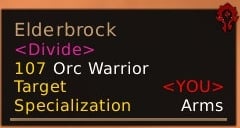
FreebTip changes the default look of the game tooltip. It has no in-game configuration, so check the .lua file for options.

Some Features:
-- Item rarity border color
-- Unit's target
-- Class colored names
-- Guild tag coloring
-- healthbar values
-- level difficulty coloring
-- hide titles and realms
-- Power bar
-- Mutiple linked item tooltips

Want talents in your tooltip? Try TipTacTalents
v2.0.3
-- support IDCard and UISpecialFrames

v2.0.2
-- hopefully fix chat clicks

v2.0.1
-- fix right click

v2.0
-- PowerBar
-- Show unlimited number of linked item tooltips

v1.6
-- Update itemref tooltip on changes(i.e. border properly updates when you select a different item)
-- hide realm name option

v1.5.4
-- option to hide in combat
-- moved the dead text to the regular info line instead of making a new line

v1.5.3
-- fix border from flippin out
-- Title line text size slightly increase
-- Raid icon size decreased
-- fix unkown level text
-- option for class colored borders

v1.5.2
-- raid icons
-- manyitemtooltips support
-- fix boss levels and add dead text

v1.5.1
-- fix name colors

v1.5
-- code clean up
-- font support
-- various tweaks

v1.4.2
-- fix statusbar color from switching >.>

v1.4
-- add color statusbar option

v1.3
-- tweak the appearance
-- update for 3.2

v1.1
-- Only anchor the cursor on worldframes
Archived Files (8)
File Name
Version
Size
Author
Date
2.0.2
60kB
Freebaser
09-26-11 12:52 AM
1.6
58kB
Freebaser
02-12-11 04:01 PM
1.5.4
143kB
Freebaser
12-02-10 06:58 AM
1.5.3
58kB
Freebaser
11-06-10 09:53 PM
1.5.2
57kB
Freebaser
10-11-10 11:03 PM
1.5.1
57kB
Freebaser
10-04-10 10:13 PM
1.5
57kB
Freebaser
10-04-10 04:29 PM
1.4.2
4kB
Freebaser
09-05-09 08:25 PM


Post A Reply Comment Options
Old 04-12-12, 07:08 PM  
pingumania
A Kobold Labourer

Forum posts: 0
File comments: 16
Uploads: 0
this ads outline to the sell price string, put it into the style function
Code:
	for i=1,2 do
		if ( _G["GameTooltipMoneyFrame"..i] ) then
		  _G["GameTooltipMoneyFrame"..i.."PrefixText"]:SetFontObject("GameTooltipText")
		  _G["GameTooltipMoneyFrame"..i.."PrefixText"]:SetShadowColor(0, 0, 0, 0)
		  _G["GameTooltipMoneyFrame"..i.."SuffixText"]:SetFontObject("GameTooltipText")
		  _G["GameTooltipMoneyFrame"..i.."SuffixText"]:SetShadowColor(0, 0, 0, 0)
		  _G["GameTooltipMoneyFrame"..i.."GoldButton"]:SetNormalFontObject("GameTooltipText")
		  _G["GameTooltipMoneyFrame"..i.."SilverButton"]:SetNormalFontObject("GameTooltipText")
		  _G["GameTooltipMoneyFrame"..i.."CopperButton"]:SetNormalFontObject("GameTooltipText")
		else
		  break
		end
	end
	
	for i=1,2 do
		if ( _G["ItemRefTooltipMoneyFrame"..i] ) then
		  _G["ItemRefTooltipMoneyFrame"..i.."PrefixText"]:SetFontObject("GameTooltipText")
		  _G["ItemRefTooltipMoneyFrame"..i.."PrefixText"]:SetShadowColor(0, 0, 0, 0)
		  _G["ItemRefTooltipMoneyFrame"..i.."SuffixText"]:SetFontObject("GameTooltipText")
		  _G["ItemRefTooltipMoneyFrame"..i.."SuffixText"]:SetShadowColor(0, 0, 0, 0)
		  _G["ItemRefTooltipMoneyFrame"..i.."GoldButton"]:SetNormalFontObject("GameTooltipText")
		  _G["ItemRefTooltipMoneyFrame"..i.."SilverButton"]:SetNormalFontObject("GameTooltipText")
		  _G["ItemRefTooltipMoneyFrame"..i.."CopperButton"]:SetNormalFontObject("GameTooltipText")
		else
		  break
		end
	end
my code is probably not the best solution
Last edited by pingumania : 04-12-12 at 07:10 PM.
pingumania is offline Report comment to moderator  
Reply With Quote
Old 02-25-12, 10:18 PM  
teslax
A Kobold Labourer

Forum posts: 0
File comments: 2
Uploads: 0
Can i also turn off the health bar in the tooltips? I only found a way to disable the mana bar in the lua
teslax is offline Report comment to moderator  
Reply With Quote
Old 01-22-12, 10:09 PM  
Poreo
A Warpwood Thunder Caller

Forum posts: 94
File comments: 151
Uploads: 0
Would it be possible to make Class colored border work with Aurora ?
Poreo is offline Report comment to moderator  
Reply With Quote
Old 10-02-11, 02:08 AM  
Freebaser
Premium Member
 
Freebaser's Avatar
AddOn Author - Click to view AddOns

Forum posts: 96
File comments: 262
Uploads: 8
Re: mouseover color: player/npc -> information signs

Originally posted by Tonyleila
If you first mouseover a player/npc and then an information sign the background is blue for some reason untill you mouseover the shild again
Not sure why the "OnShow" event doesn't work for doodads every time. I'll have to investigate more.
Freebaser is offline Report comment to moderator  
Reply With Quote
Old 09-30-11, 03:14 PM  
Tonyleila
A Fallenroot Satyr
 
Tonyleila's Avatar
AddOn Author - Click to view AddOns

Forum posts: 21
File comments: 435
Uploads: 11
mouseover color: player/npc -> information signs

If you first mouseover a player/npc and then an information sign the background is blue for some reason untill you mouseover the shild again
__________________
Don't be racist. Be like PANDA.
They're BLACK, WHITE AND ASIAN!

Author of: LeilaUI and Aurora: Missing Textures
Arsenal link

__________________
Tonyleila is offline Report comment to moderator  
Reply With Quote
Old 09-29-11, 05:11 PM  
tardmrr
Lua Ninja
Featured Addon Author

Forum posts: 129
File comments: 131
Uploads: 15
Your multi-tips (ItemRefTooltip2, etc) are not properly closed when the user hits the escape key. The solution to this is to add them to the list of frames that should be closed when the user hits escape (UISpecialFrames). To accomplish this, add this line immediately after creating your tooltips:

Code:
table.insert(UISpecialFrames, tip:GetName())

Additionally, I'd like to request that you add support for my addon IDCard which adds item icons to item tooltips. Doing so is another simple addition to the code executed immediately after creating a new tooltip:

Code:
if(IDCard) then IDCard:RegisterTooltip(tip) end
Thanks!
Last edited by tardmrr : 09-29-11 at 05:12 PM.
tardmrr is offline Report comment to moderator  
Reply With Quote
Old 09-26-11, 06:05 PM  
Maxen
A Deviate Faerie Dragon

Forum posts: 17
File comments: 196
Uploads: 0
Seems to be working fine now (2.0.2) !

Thanks !
Last edited by Maxen : 09-27-11 at 07:44 AM.
Maxen is offline Report comment to moderator  
Reply With Quote
Old 09-25-11, 08:42 PM  
Freebaser
Premium Member
 
Freebaser's Avatar
AddOn Author - Click to view AddOns

Forum posts: 96
File comments: 262
Uploads: 8
Originally posted by Maxen
Can't left click (ie on name in chat to whisper people) with 2.0.1 ...

edit: setting multiTip = false fixed my problem...
shift-LeftClick, should work until I can fix it.
Freebaser is offline Report comment to moderator  
Reply With Quote
Old 09-25-11, 08:22 PM  
Maxen
A Deviate Faerie Dragon

Forum posts: 17
File comments: 196
Uploads: 0
Can't left click (ie on name in chat to whisper people) with 2.0.1 ...

edit: setting multiTip = false fixed my problem...
Last edited by Maxen : 09-25-11 at 08:27 PM.
Maxen is offline Report comment to moderator  
Reply With Quote
Old 09-25-11, 03:30 PM  
Freebaser
Premium Member
 
Freebaser's Avatar
AddOn Author - Click to view AddOns

Forum posts: 96
File comments: 262
Uploads: 8
Originally posted by Saith90
Thanks for the fix

But, if i put 'powerbar = true' to 'false', i still can see the powerbar ingame
Settings "powerbar = false" hides it for me.
Freebaser is offline Report comment to moderator  
Reply With Quote
Old 09-25-11, 01:03 PM  
Saith90
A Kobold Labourer

Forum posts: 0
File comments: 19
Uploads: 0
Thanks for the fix

But, if i put 'powerbar = true' to 'false', i still can see the powerbar ingame
Saith90 is offline Report comment to moderator  
Reply With Quote
Old 09-24-11, 03:36 PM  
Saith90
A Kobold Labourer

Forum posts: 0
File comments: 19
Uploads: 0
Can't make a right click anymore in the chat with the new version.
Saith90 is offline Report comment to moderator  
Reply With Quote
Old 09-22-11, 06:21 PM  
monkey5206
A Kobold Labourer

Forum posts: 0
File comments: 1
Uploads: 0
How can I change the color of the rare, elite and rareelite?
monkey5206 is offline Report comment to moderator  
Reply With Quote
Old 09-18-11, 07:28 AM  
bizzy100
A Kobold Labourer

Forum posts: 0
File comments: 28
Uploads: 1
How can I change the font? I tried changing it but it either bugged out and had the wow default font or the health bar suddenly disappeared.

EDIT: Never mind, solution on page 2. Changed the outline from OUTLINEMONOCHROME to just OUTLINE and it worked.
Last edited by bizzy100 : 09-18-11 at 07:42 AM.
bizzy100 is offline Report comment to moderator  
Reply With Quote
Old 08-25-11, 08:23 AM  
Raq
A Defias Bandit

Forum posts: 2
File comments: 18
Uploads: 0
Where is the Mana/Energy/Rage/etc bar underneath the Health bar??
I have no change to see how much Mana that my Target or whoever i mouse-over got, and that is sort of annoying :P

WOULD LOVE TO GET A MANA BAR!!
As other has requested as well
Other than that, lovley design..!
Raq is offline Report comment to moderator  
Reply With Quote
Post A Reply


Category Jump:


