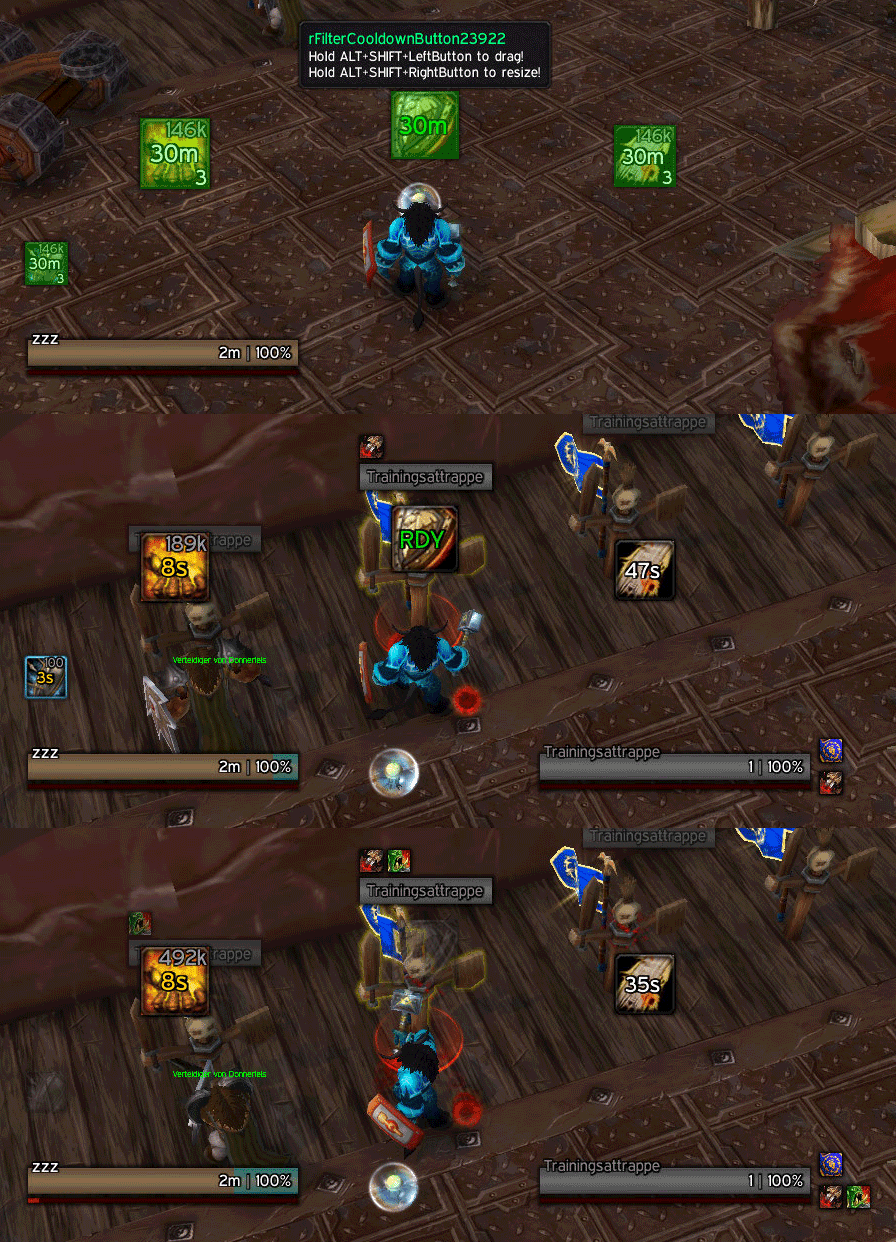
Download
(75 Kb)
Download
Updated: 03-15-12 12:43 PM
Pictures
File Info
Tested:Hour of Twilight 4.3
Updated:03-15-12 12:43 PM
Created:04-09-09 11:46 AM
Downloads:12,574
Favorites:131
MD5:
This AddOn is 4.3 compatible
rFilter3  Popular! (More than 5000 hits)
Version: 40300.03
by: zork [More]

WARNING: THIS MOD IS FOR ADVANCED ONLY! IT EATS PUPPIES AND LOVES KITTENS!
Intro
Simple mod that allows, buff, debuff and cooldown tracking.
Installation
The zip contains 3 folders:
- rTextures just contains textures I'm using
- SpellID is a mod that will enhance your tooltip with a spellID information
- rFilter3 contains the filter addon with the config.lua
Locking / unlocking
If you use the move attribute (see documentation) you can move and resize that icon ingame. To do that use the "/rf" or "/rfilter" slash command.
Config
rFilter3 has a config.lua. You can set the spellIDs and units you want to track spells on there. To get a spellID from a certain buff/debuff just hover it and write down the spellID. (Make sure you have the spellID mod installed)

Some spells have the same buff/debuff effect and can overcast each other. There is a list of those spells here: http://elitistjerks.com/f15/t107452-...buffs_debuffs/

You can define different buff, debuff and cooldown lists for different chars and different specs. Use conditions to split them up.
The number values in the brackets are IMPORTANT. They have to count up from 1. Don't mess them up.

lua Code:
  1. -------------------------------------
  2.   -- rFILTER 3 - CONFIG DOCUMENTATION
  3.   -- zork, 2011
  4.   -------------------------------------
  5.  
  6.   -------------------------------------
  7.   -- GENERAL
  8.   -------------------------------------
  9.  
  10.   highlightPlayerSpells = true  --player spells will have a blue border
  11.   updatetime            = 0.2   --how fast should the timer update itself
  12.  
  13.   -------------------------------------
  14.   -- BUFFS / DEBUFFS
  15.   -------------------------------------
  16.  
  17.   spec            = nil,          --nil, 1, 2 or 3 (optional), the talent tree you want to track the spell (nil will make it work in any tree)
  18.   visibility_state = "[combat] show; hide",         --STRING (optional) attribute that lets you show/hide the frame on a given state condition. example: "[stance:2] show; hide"
  19.   spellid         = 469,          --NUMBER, the spellid to track this will represent the icon if none is found
  20.   spelllist       = {             --TABLE (optional), you can check spell lists in case the same effect is given by more that one buff/debuff. your spell needs to be in the list aswell! list is sorted by index.
  21.                       [1] = 469,
  22.                       [2] = 79105,
  23.                       [3] = 6307,
  24.                       [4] = 90364,
  25.                     },
  26.   size            = 26,           --NUMBER, the size of the icon
  27.   pos             = {             --TABLE, the position of the icon (http://www.wowwiki.com/API_Region_SetPoint)
  28.                       a1 = "BOTTOM",
  29.                       a2 = "BOTTOM",
  30.                       af = "UIParent",
  31.                       x = 130,
  32.                       y = 107
  33.                     },
  34.   unit            = "player",     --STRING, UnitID (http://www.wowwiki.com/UnitId), the unit that should be tracked
  35.   validate_unit   = true,         --true/false (optional), only show the icon if unit is found
  36.   hide_ooc        = true,         --true/false (optional), hide icon out of combat
  37.   ismine          = false,        --true/false, track if the spell casted is actually MY spell (hide same buffs/debuffs from other players)
  38.   desaturate      = true,         --true/false, desaturate the icon if not found
  39.   match_spellid   = false,        --true/false (optional), in case you not only match the name but the spell id of the buff/debuff
  40.   move_ingame     = true,         --true/false (optional), in case you want to move the frame ingame, the size will be the MINIMUM frame size you can resize to, so adjust the size in case you need lower minimum size ingame
  41.   alpha           = {             --TABLE, Set the alpha values of your icons (transparency)
  42.                       found = {
  43.                         frame = 1,
  44.                         icon = 1,
  45.                       },
  46.                       not_found = {
  47.                         frame = 0.4,
  48.                         icon = 0.6,
  49.                       },
  50.                     },
  51.  
  52.   -------------------------------------
  53.   -- COOLDOWNS
  54.   -------------------------------------
  55.  
  56.   spec            = nil,          --nil, 1, 2 or 3 (optional), the talent tree you want to track the spell (nil will make it work in any tree)
  57.   visibility_state = "[combat] show; hide",         --STRING (optional) attribute that lets you show/hide the frame on a given state condition. example: "[stance:2] show; hide"
  58.   spellid         = 469,          --NUMBER, the spellid to track this will represent the icon if none is found
  59.   size            = 26,           --NUMBER, the size of the icon
  60.   pos             = {             --TABLE, the position of the icon (http://www.wowwiki.com/API_Region_SetPoint)
  61.                       a1 = "BOTTOM",
  62.                       a2 = "BOTTOM",
  63.                       af = "UIParent",
  64.                       x = 130,
  65.                       y = 107
  66.                     },
  67.   unit            = "player",     --STRING, UnitID (http://www.wowwiki.com/UnitId), the unit that should be tracked
  68.   hide_ooc        = true,         --true/false (optional), hide icon out of combat
  69.   desaturate      = true,         --true/false, desaturate the icon if not found
  70.   move_ingame     = true,         --true/false (optional), in case you want to move the frame ingame, the size will be the MINIMUM frame size you can resize to, so adjust the size in case you need lower minimum size ingame
  71.   alpha           = {             --TABLE, Set the alpha values of your icons (transparency)
  72.                       cooldown = {
  73.                         frame = 1,
  74.                         icon = 0.6,
  75.                       },
  76.                       no_cooldown = {
  77.                         frame = 1,
  78.                         icon = 1,
  79.                       },
  80.                     },

Example config from my warrior tank:
http://code.google.com/p/rothui/sour...er3/config.lua
SVN
http://code.google.com/p/rothui/sour...trunk/rFilter3
40300.03
- added the visibility_state attribute for buffs, debuffs and cooldowns

40300.02
- changed the talent tree identifictation based on a suggestion of Monolit. The spec value now acepts: nil, 1, 2 or 3. Check the documentation for more info.

40300.01
- updated for patch 4.3

4.011
- updated toc for patch 4.2

4.010
- added slash command for locking / unlocking. Use "/rf" or "/rfilter" for more info ingame
- all frames that have the move attribute and are in the same spec that you have defined can be moved

4.009
- added ingame movability again
Code:
  - Add the move attribute to any spell you want to move ingame (see documentation)
  - Ingame: LEFT MOUSE+ALT+SHIFT = DRAG
                RIGHT MOUSE+ALT+SHIFT = RESIZE
4.008
- rFilter3 has a new config attribute for buffs and debuffs called "match_spellid". The value can be true or false. With the spell given is nailed down by spellid in.

4.007
- updated TOC for patch 4.1

4.006
- removed the global spec settings
- it is now possible to set a spec per icon

Code:
        -- 1 is your first spec 
        -- 2 is your second spec
        -- false or nil will remove the spec tracking
Check config.lua for examples

4.005
- added the updatetimer to the config
- added two new config options to hide icons if the unit being tracked is not available or if you are out of combat. check config.lua examples.

Code:
        validate_unit = true, --only show the icon if unit is found
        hide_ooc      = true, --hide icon out of combat
* validate_unit is possible for buff/debuff tracking. icons will only be displayed if the unit being tacked exists.
* hide_ooc is possible for buffs, debuffs and cooldowns. icons will be hidden if out of combat if that value is available and set to true.

4.004
- added spelllists for buffs and debuffs

4.003
- added ismine check to confg

4.002
- added cooldowns
- specs are now part of the config aswell
- positions are now part of the config
- ingame moving/sizing removed

Btw...cooldowns FINALLY work correctly even with global CD . Showed some l0ve.

4.001
- cata release with ingame moving and sizing aswell as locking

002
- empty table if the char is not set

001
- err
Optional Files (0)


Archived Files (14)
File Name
Version
Size
Author
Date
40300.02
75kB
zork
01-14-12 06:41 AM
40300.01
75kB
zork
11-30-11 11:50 AM
4.011
80kB
zork
06-29-11 04:18 PM
4.010
79kB
zork
06-03-11 08:39 AM
4.009
78kB
zork
06-03-11 07:18 AM
4.008
77kB
zork
06-03-11 05:03 AM
4.007
77kB
zork
04-28-11 02:26 PM
4.006
77kB
zork
02-25-11 02:22 PM
4.005
77kB
zork
02-25-11 02:04 PM
4.004
77kB
zork
11-05-10 07:51 AM
4.003
77kB
zork
10-30-10 04:36 AM
4.002
76kB
zork
10-26-10 04:44 PM
4.001
77kB
zork
10-24-10 03:43 PM
002
4kB
zork
04-10-09 04:15 AM


Post A Reply Comment Options
Old 04-14-12, 06:36 AM  
suin
A Kobold Labourer

Forum posts: 0
File comments: 3
Uploads: 0
I really love rFilter3! Thanks for the great work!
suin is offline Report comment to moderator  
Reply With Quote
Old 04-03-12, 09:08 AM  
zork
A Molten Giant
 
zork's Avatar
AddOn Author - Click to view AddOns

Forum posts: 787
File comments: 2736
Uploads: 53
Depends. If the icon is displayed under your player auras you can track it. Otherwise it is a server side effect and you need special holypower addons to track it.
__________________
| Simple is beautiful.
| Blog | Roth UI | Roth UI FAQ | GoogleCode | DevShots | TheBigOne | Guild | zorker.de

"I wonder what the non-pathetic people are doing tonight?" - Rajesh Koothrappali (The Big Bang Theory)
Last edited by zork : 04-03-12 at 09:09 AM.
zork is offline Report comment to moderator  
Reply With Quote
Old 04-03-12, 08:06 AM  
WAHAHAHA
A Kobold Labourer

Forum posts: 0
File comments: 1
Uploads: 0
HI ,this addon is very cool .

I have a little problem, how to track pal's holy power?

I use spellID=85705 ,but it can't show

Thx
WAHAHAHA is offline Report comment to moderator  
Reply With Quote
Old 03-16-12, 02:26 AM  
zork
A Molten Giant
 
zork's Avatar
AddOn Author - Click to view AddOns

Forum posts: 787
File comments: 2736
Uploads: 53
Actually you brought me a good idea. That counts.
__________________
| Simple is beautiful.
| Blog | Roth UI | Roth UI FAQ | GoogleCode | DevShots | TheBigOne | Guild | zorker.de

"I wonder what the non-pathetic people are doing tonight?" - Rajesh Koothrappali (The Big Bang Theory)
zork is offline Report comment to moderator  
Reply With Quote
Old 03-15-12, 08:45 PM  
F1NCH
A Kobold Labourer
 
F1NCH's Avatar

Forum posts: 0
File comments: 25
Uploads: 0
Originally Posted by zork
Added it and updated the documentation. Example

That is actually pretty neat. You can now show/hide an icon based ony any macro condition possible.
Sehr geil

Aber sorry nochmal für die Arbeit^^
__________________
Zum Lügen gehören immer 2, einer der lügt und einer der's glaubt!
F1NCH is offline Report comment to moderator  
Reply With Quote
Old 03-15-12, 12:45 PM  
zork
A Molten Giant
 
zork's Avatar
AddOn Author - Click to view AddOns

Forum posts: 787
File comments: 2736
Uploads: 53
Added it and updated the documentation. Example

That is actually pretty neat. You can now show/hide an icon based ony any macro condition possible.
__________________
| Simple is beautiful.
| Blog | Roth UI | Roth UI FAQ | GoogleCode | DevShots | TheBigOne | Guild | zorker.de

"I wonder what the non-pathetic people are doing tonight?" - Rajesh Koothrappali (The Big Bang Theory)
Last edited by zork : 03-15-12 at 12:53 PM.
zork is offline Report comment to moderator  
Reply With Quote
Old 03-15-12, 03:07 AM  
zork
A Molten Giant
 
zork's Avatar
AddOn Author - Click to view AddOns

Forum posts: 787
File comments: 2736
Uploads: 53
Hmm...interesting. Not yet possible but I got an idea.

visibility state-driver
http://www.wowace.com/addons/bartend...-state-header/

Code:
    actionbar:1/.../6 or bar:1/.../6 — Given action bar page is selected
    bonusbar:5 — The possess bar is active (controlling a vehicle or another player)
    button:1/.../5/<virtual click> or btn:1/.../5/<virtual click> — Macro activated with the given mouse button
    channeling:<spell name> — Channeling the given spell
    combat — In combat
    cursor — What the cursor is currently holding, see API_GetCursorInfo for types
    dead — Target is dead
    equipped:<item type> or worn:<item type> — item type is equipped (item type can be an inventory slot, item type, or item subtype)
    exists — Target exists
    flyable — In a zone where flying is allowed (this does not check if you have Cold Weather Flying, if you are in a flyable zone, but do not have this skill, the macro fails)
    flying — Mounted or in flight form AND in the air
    group:party/raid — You are in the given type of group
    harm — Can cast harmful spells on the target
    help — Can cast helpful spells on the target
    indoors — Self explanatory
    modifier:shift/ctrl/alt or mod:shift/ctrl/alt — Holding the given key
    mounted — Self explanatory
    outdoors — Self explanatory
    party — Target is in your party
    pet:<pet name or type> — The given pet is out
    raid — Target is in your raid/party
    spec:1/2 — Currently active talents
    stance:0/1/2/.../n — In a stance
    form:0/.../n — In a form which is no stance by itself (shadowdance)
    stealth — Stealthed
    swimming — Self explanatory
    unithasvehicleui — The target of the macro has vehicle UI
    vehicleui — The player has vehicle UI
Example:
Code:
RegisterStateDriver(myIconFrame, "visibility", "[spec:1]hide;[nocombat]fade:30;[target=target,noexists]fade:30;show")
The state driver would only affect the condition under which the icon frame can be shown at all. The check on the icon itself is a different story.
__________________
| Simple is beautiful.
| Blog | Roth UI | Roth UI FAQ | GoogleCode | DevShots | TheBigOne | Guild | zorker.de

"I wonder what the non-pathetic people are doing tonight?" - Rajesh Koothrappali (The Big Bang Theory)
Last edited by zork : 03-15-12 at 12:15 PM.
zork is offline Report comment to moderator  
Reply With Quote
Old 03-14-12, 05:25 PM  
F1NCH
A Kobold Labourer
 
F1NCH's Avatar

Forum posts: 0
File comments: 25
Uploads: 0
Originally Posted by zork
PUPPY DETECTED. LOADING GUNS.

Hint...the info page tell you about the spec attribute.
Das mit dem Talent Spec weiß ich ja, geht aber allgemein um Katze/Bär, im selben Spec^^
__________________
Zum Lügen gehören immer 2, einer der lügt und einer der's glaubt!
F1NCH is offline Report comment to moderator  
Reply With Quote
Old 03-14-12, 09:48 AM  
zork
A Molten Giant
 
zork's Avatar
AddOn Author - Click to view AddOns

Forum posts: 787
File comments: 2736
Uploads: 53
PUPPY DETECTED. LOADING GUNS.

Hint...the info page tell you about the spec attribute.
__________________
| Simple is beautiful.
| Blog | Roth UI | Roth UI FAQ | GoogleCode | DevShots | TheBigOne | Guild | zorker.de

"I wonder what the non-pathetic people are doing tonight?" - Rajesh Koothrappali (The Big Bang Theory)
Last edited by zork : 03-14-12 at 10:00 AM.
zork is offline Report comment to moderator  
Reply With Quote
Old 03-14-12, 09:26 AM  
F1NCH
A Kobold Labourer
 
F1NCH's Avatar

Forum posts: 0
File comments: 25
Uploads: 0
Hi^^
Erstmal, tolles Addon!
Habe leider aber ein kleines Problem...
Ich bin Druide und als Katze brauche ich Wildes Brüllen, als Bär Pulverisieren. Wie bekomme ich es hin das wenn ich in Katzengestalt bin Wildes Brüllen und in Bärengestalt Pulverisieren an der selben Stelle angezeigt wird? Gibt es einen Stance-Befehl?

Habe mal einen Screen gemacht, im roten Kreis sieht man, das obwohl ich Katze bin das Pulverisieren Icon dort ist, es wechselt zwar wenn ich Wildes Brüllen nutze, aber sobald der Kampf vorbei ist, ist dort wieder das Pulverisieren Icon^^

http://www.abload.de/img/rfilter3-probpkky4.jpg

Hoffe kannst mir evtl. helfen^^
__________________
Zum Lügen gehören immer 2, einer der lügt und einer der's glaubt!
Last edited by F1NCH : 03-14-12 at 09:28 AM.
F1NCH is offline Report comment to moderator  
Reply With Quote
Old 01-30-12, 04:08 AM  
Monolit
A Cliff Giant
AddOn Author - Click to view AddOns

Forum posts: 76
File comments: 370
Uploads: 6
Originally Posted by leizeQ
Originally Posted by zork
Hmm. I think I got you. Gonna add it.

*edit*
Update is available. You can now change the spec setting to: nil, 1, 2 or 3
when we are this far ... what about making it this way:
1. tree = 1 (2^0)
2. tree = 2 (2^1)
3. tree = 4 (2^2)

and then we can make some multitree version:
1.+3. tree = 5
1.+2. tree = 3
2.+3. tree = 6
1.+2.+3. tree = 7(=nil)

so then you can set spec = 1 or 2 or 3 or 4 or 5 or 6 or 7 and do some binary magic around it (;

just my thought
or you could just add another optional var for secondary spec and modify spec checking function a little:
Code:
    if f.spec and f.spec ~= GetPrimaryTalentTree(false, false, GetActiveTalentGroup()) then
	  if not f.spec2 or f.spec2 and  f.spec2 ~= GetPrimaryTalentTree(false, false, GetActiveTalentGroup()) then 
		  f.iconframe:SetAlpha(0)
		  return
	   end
    end
then in config you can just do it like this (example from my warrior config)
Code:
	  table.insert(cfg.rf3_CooldownList, {
		spec = 1, -- for arms 
		spec2 = 2, -- and fury
        spellid = 86346, -- Colossus Smash
        pos = { a1 = "BOTTOMLEFT", a2 = "BOTTOM", af = "MainFilterFrame", x = 3, y = 0 },
        size = 36,
        desaturate = true,
        move_ingame     = false,
        alpha = {
          cooldown = {
            frame = 1,
            icon = 0.6,
          },
          no_cooldown = {
            frame = 1,
            icon = 1,
          },
        },
	  })
Monolit is offline Report comment to moderator  
Reply With Quote
Old 01-25-12, 12:10 PM  
leizeQ
A Murloc Raider
 
leizeQ's Avatar
AddOn Compiler - Click to view compilations

Forum posts: 8
File comments: 48
Uploads: 1
Originally Posted by zork
Hmm. I think I got you. Gonna add it.

*edit*
Update is available. You can now change the spec setting to: nil, 1, 2 or 3
when we are this far ... what about making it this way:
1. tree = 1 (2^0)
2. tree = 2 (2^1)
3. tree = 4 (2^2)

and then we can make some multitree version:
1.+3. tree = 5
1.+2. tree = 3
2.+3. tree = 6
1.+2.+3. tree = 7(=nil)

so then you can set spec = 1 or 2 or 3 or 4 or 5 or 6 or 7 and do some binary magic around it (;

just my thought
leizeQ is offline Report comment to moderator  
Reply With Quote
Old 01-25-12, 02:53 AM  
zork
A Molten Giant
 
zork's Avatar
AddOn Author - Click to view AddOns

Forum posts: 787
File comments: 2736
Uploads: 53
__________________
| Simple is beautiful.
| Blog | Roth UI | Roth UI FAQ | GoogleCode | DevShots | TheBigOne | Guild | zorker.de

"I wonder what the non-pathetic people are doing tonight?" - Rajesh Koothrappali (The Big Bang Theory)
zork is offline Report comment to moderator  
Reply With Quote
Old 01-22-12, 09:39 AM  
zork
A Molten Giant
 
zork's Avatar
AddOn Author - Click to view AddOns

Forum posts: 787
File comments: 2736
Uploads: 53
It's actually not that bad at all. The onUpdated checks every icon available. The UNIT_AURA and other EVENTS would be fired per icon. Which may result in more function calls.
Plus if you don't like the update every 0.2 seconds just change the timer.
__________________
| Simple is beautiful.
| Blog | Roth UI | Roth UI FAQ | GoogleCode | DevShots | TheBigOne | Guild | zorker.de

"I wonder what the non-pathetic people are doing tonight?" - Rajesh Koothrappali (The Big Bang Theory)
Last edited by zork : 01-22-12 at 09:40 AM.
zork is offline Report comment to moderator  
Reply With Quote
Old 01-22-12, 07:51 AM  
Monolit
A Cliff Giant
AddOn Author - Click to view AddOns

Forum posts: 76
File comments: 370
Uploads: 6
Originally Posted by zork
Hmm. I think I got you. Gonna add it.

*edit*
Update is available. You can now change the spec setting to: nil, 1, 2 or 3
good news

I was working on that add-on a little, trying to modify it to fit my needs and noticed 1 interesting thing... even if nothing goes on it still checks 5 times a second (0.2 timer) for every added icon which produce pretty high CPU usage if you have allot of stuff added there.

OnUpdate is only needed to get our timer working.
So would it make sense to actually go with handling icon updates on per-event basis? i.e. we don't need to always check for cooldowns, we can just start our OnUpdate script for timer once SPELL_UPDATE_COOLDOWN event was fired, same thing with Buffs and Debuffs: we just watch for UNIT_AURA and then start our timer.
Monolit is offline Report comment to moderator  
Reply With Quote
Post A Reply


Category Jump:


