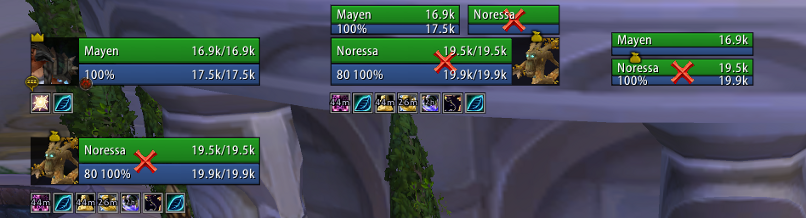
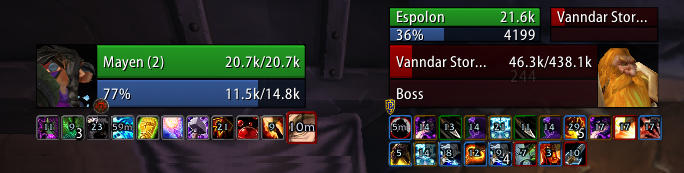
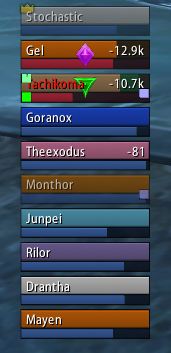
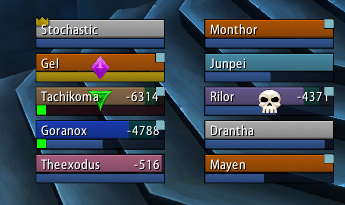
The main focus of SUF is having a simplistic configuration, while maintaining flexibility that the vast majority of users care about, this prevents unnecessary bloat that sacrifices performance. While you aren't going to be able to set that you want the health bar to be exactly 3.14 pixels outside of the health bar, you can change options that you actually care about such as bar height, ordering, frame height and so on. All configuration can be done on multiple units at the same time through the global configuration, meaning if you want to set the height of Player and Target frames to 50, but then you want to set the height of Target's Target and Target's Target of Target to 30 you can easily do that with changing only two options, instead of having to do it four times for each unit.
Should you be one of those people who needs a little bit of extra configuration then do not despair! An advanced configuration option is included that will enable more unit and general settings giving you better control over everything
Slash commands: /shadoweduf (/suf)
Anchoring
For those who are driven crazy because their frames look to be half a pixel off center of your player frames, you can simply anchor the frame to the player frames and solve the hassle of aligning everything. For example, the target frames are anchored to the right of the player frame, and the Target of Target frames are anchored to the top of the player frames (In the screenshots).
If you tried to drag player, all the other frames will follow it in the same anchoring. Each frame can still be manually positioned and put wherever you want, but this gives you a way of easily anchoring everything and keeping frames nice and aligned without having to use a ruler.
Visibility
Entire units and modules can be enabled or disabled based on zone type; for example, say you want to enable party targets while in arenas but not in a raid instance, or maybe you want to see your targets cast bar in arenas but not in raid instances you can easily change the module to only be enabled in arena zone types. You don't have to swap any profiles or do anything manually.
Units
Supports unit frames are as follows:
Player: Player, pet, pet target General: Target, Target of Target, Target of Target of Target, Focus, Focus Target Party: Party, Party pets, Party targets Raid: Raid, Main tank, Main tank target, Main assist, Main assist target Arenas: With the arena frame module you can add Arena, Arena target, Arena pet units
Features
Tags: Includes a simple tagging system that can be customized in virtually any way using Lua, so even if something isn't included by default odds are you can make the tags
Incoming heals: Supports LibHealComm-4.0 for incoming heal data which gives you more accurate information including heal over times and channels like Tranquility and Penance
Auras: Can be set to only show auras you casted, or can cast on others. Can enlarge auras that you casted, and hide the cooldown ring on the timers of auras you didn't cast as well to make it more obvious which ones you casted and which ones you didn't
Aura timers: You will need a mod such as OmniCC to show timers on buffs and debuffs
Fader: Fades frames when out of combat and inactive (100% mana/no target)
Druid power/rune/totem bars: Supports simple rune and totem bars as well as Druid mana bars for the player frame
Highlighting: Can highlight frames off of mouseover, debuffs you can cure, aggro, target and focus
Range checking: Fades frames out that are out of range of you
Exportable layouts: If you have a layout, or your friend has a layout you want to try out you can export/import SUF layouts by going to /suf -> Layout Manager
Profiles: You can change from any profile to another one without reloading your UI, should you want to use a completely different layout based on zone you can easily switch profiles without hassle
Pretty much all the general unit frame settings are in, health bars, cast bars, power bars, portraits, indicators and so on.
Modules
Basic module support is included, should you be interested in building a module see the documentation on github for more information.
Author: Shadowed <shadowed.wow@gmail.com>
Date: Tue Nov 3 23:11:29 2009 -0800
- Combat fader will now fade back in when the player is casting a spell
- Localization update
- Updated LibHealcomm to 1.5.3
- Added [hp:color] tag, returns a color code of the units health left, works the same as color bar by health, but in color code form
- Changed [abs:incheal] to be rounded, no more decimal incoming heal values
- Always registering for threat updates now, too annoying to try and figure out what's going wrong with the other version
- Moved code around to support the new [hp:color] tag
- Added option to disable cooldown rings completely, not exposing it yet
Date: Mon Oct 26 08:33:45 2009 -0700
- Updated LibHealComm-4.0
Date: Sun Oct 25 13:13:00 2009 -0700
- Removed duplicate check for creating child units
Date: Sat Oct 24 20:40:49 2009 -0700
- Fixed "Hide in 5-man raid option" now hides when there are 6 or more people in a raid rather than 5 or more
- Fixed typo in "Hide in 5-man raid" option for party frames, it's supposed to hide party frames in a raid with more than 5 people (as description indicates)
- Localization update
- Updated LibHealComm-4.0 to 1.5.2
Date: Thu Oct 22 11:51:15 2009 -0700
- Fixed UpdateThreat not resetting the hasPercent flag, might fix the delay in threat update
Date: Tue Oct 20 18:02:42 2009 -0700
- Updated LibHealComm-4.0 and LibWrapperHealComm-1.0
- Removed another incoming heal reference
- Library update
- Changed incoming heal bar to be hidden as soon as the heal changes instead of delaying it until next health update
Date: Mon Oct 19 07:18:51 2009 -0700
- Added UnregisterUpdateFunc
- Fixed aggro updates being registered for units that did not need it
Date: Fri Oct 16 22:26:31 2009 -0700
- Registered UpdateThreat to be called when the frame does a full update, should fix aggro warnings become stuck for targets sometimes
- Fixed temporary enchants not being updated when refreshed before they end
- Changed power API calls to check <= 0 rather then == 0 before displaying a number, should fix -longnumbehere when doing the Drak'Tharon Keep last boss
- Fixed a bug in [smart:curmaxpp] causing it to not update correctly
Merge: 2b67262 a5e537b
Date: Thu Oct 15 16:58:55 2009 -0700
Merge branch 'master' of git@github.com:Shadowed/ShadowedUnitFrames
Date: Tue Oct 13 18:45:15 2009 -0700
- Localizaiton update (Thanks wowui.cn!)
Once more with more feeling!
- Once more with feeling
Reverted before playing with wowace repo
Date: Mon Oct 12 20:34:38 2009 -0700
- Fixed indicators changing everytime an option was changed when using mover frames
- Fixed leader frame being recreated everytime OnEnable is called (Oops!)
- Moved aura examples to the auras file rather then the movers
SUF alpha build 5dd1ed1 (one before latest 53a1036), WoW 3.2.2.10505 live, 5-man party inside Halls of Lightning heroic (no vehicles involved other than the flight to Ulduar summoning stone). One hunter in party ("Character 1" in the dump below), pet showed up fine initially as a party pet frame.
But later on there was a bad-pull trash wipe between the last and second-last bosses. Coming back, the hunter had his pet out; never saw the party pet frame for it again during the run.
Code:
---- Child dump
Frame SUFChildpartypet1, unit parent party1, unit partypet1, unit owner partypet1, guid 0xF5408F8BC4000544, actual guid nil, shown nil, visible nil, format partypet%d, parentUnit party1, point BOTTOMLEFT, pointParent SUFHeaderpartyUnitButton1, parent SUFHeaderpartyUnitButton1, attrib exists false, attrib disableSwap nil, attrib isVehicle true, status nil.
Frame SUFChildpartytarget1, unit parent party1, unit party1target, unit owner party1target, guid 0xF1300070FB0A4D26, actual guid nil, shown nil, visible nil, format party%dtarget, parentUnit party1, point TOPLEFT, pointParent SUFHeaderpartyUnitButton1, parent SUFHeaderpartyUnitButton1, attrib exists nil, attrib disableSwap nil, attrib isVehicle nil, status nil.
Frame SUFChildpartypet2, unit parent party2, unit partypet2, unit owner partypet2, guid nil, actual guid 0xF1408F8BC40011FB, shown nil, visible nil, format partypet%d, parentUnit party2, point BOTTOMLEFT, pointParent SUFHeaderpartyUnitButton2, parent SUFHeaderpartyUnitButton2, attrib exists 1, attrib disableSwap nil, attrib isVehicle true, status nil.
Frame SUFChildpartytarget2, unit parent party2, unit party2target, unit owner party2target, guid 0x0200000003A974A4, actual guid 0x0200000003A974A4, shown 1, visible 1, format party%dtarget, parentUnit party2, point TOPLEFT, pointParent SUFHeaderpartyUnitButton2, parent SUFHeaderpartyUnitButton2, attrib exists nil, attrib disableSwap nil, attrib isVehicle nil, status nil.
Frame SUFChildpartypet4, unit parent party4, unit partypet4, unit owner partypet4, guid nil, actual guid nil, shown nil, visible nil, format partypet%d, parentUnit party4, point BOTTOMLEFT, pointParent SUFHeaderpartyUnitButton4, parent SUFHeaderpartyUnitButton4, attrib exists false, attrib disableSwap nil, attrib isVehicle true, status nil.
Frame SUFChildpartytarget4, unit parent party4, unit party4target, unit owner party4target, guid 0xF1300070FB0A4D26, actual guid nil, shown nil, visible nil, format party%dtarget, parentUnit party4, point TOPLEFT, pointParent SUFHeaderpartyUnitButton4, parent SUFHeaderpartyUnitButton4, attrib exists nil, attrib disableSwap nil, attrib isVehicle nil, status nil.
---- Parent dump
Frame SUFHeaderpartyUnitButton2, wrapped? true, last unit party2, unit party2, unit owner party2, guid 0x020000000261177B, actual guid 0x020000000261177B (Character1), shown 1, visible 1, total children 2, children SUFChildpartypet2, SUFChildpartytarget2
Frame SUFHeaderpartyUnitButton1, wrapped? true, last unit party1, unit party1, unit owner party1, guid 0x0200000003A974A4, actual guid 0x0200000003A974A4 (Character2), shown 1, visible 1, total children 2, children SUFChildpartypet1, SUFChildpartytarget1
Frame SUFHeaderpartyUnitButton4, wrapped? true, last unit party4, unit party4, unit owner party4, guid 0x0200000000DCC4D0, actual guid 0x0200000000DCC4D0 (Character3), shown 1, visible 1, total children 2, children SUFChildpartypet4, SUFChildpartytarget4
---- Party setting dump
scale = [1]
hideAnyRaid = [true]
offset = [20]
attribAnchorPoint = [left]
hideSemiRaid = [false]
enabled = [true]
width = [190]
sortOrder = [ASC]
sortMethod = [INDEX]
height = [50]
attribPoint = [TOP]
---- Main tank setting dump
scale = [1]
unitsPerColumn = [5]
attribAnchorPoint = [left]
columnSpacing = [5]
groupBy = [GROUP]
hideAnyRaid = [true]
enabled = [false]
offset = [20]
hideSemiRaid = [false]
groupFilter = [MAINTANK]
width = [190]
maxColumns = [2]
sortOrder = [ASC]
sortMethod = [INDEX]
height = [50]
attribPoint = [TOP]
---- Main assist setting dump
scale = [1]
unitsPerColumn = [5]
attribAnchorPoint = [left]
columnSpacing = [5]
groupBy = [GROUP]
hideAnyRaid = [true]
enabled = [false]
offset = [20]
hideSemiRaid = [false]
groupFilter = [MAINASSIST]
width = [190]
maxColumns = [2]
sortOrder = [ASC]
sortMethod = [INDEX]
height = [50]
attribPoint = [TOP]
Originally posted by yoshimo i dont think that the wowapi returns wether you can use purge or tranqu-shot for buffs. They also wont return spellid, so keeping a list for removable buffs wont help really.
I'm not really sure how it works in Pitbull 4... but it works using the "Default Buffs, mine" filter. On friendly NPC's I see buffs cast by myself (ie Pack or Nature Aspect), and on enemies I see Magic and Enrage buffs (the types that I can dispel).
frenzy20: See above for the highlighting issue. The beta version also has a new [incheal:name] tag that will show incoming health if there is any, name otherwise. It will not however, show it in green.
moda618: You can't, the "Aura border style" in /suf -> General is the closet you can get to changing thickness.
I saw a post saying arena frame highlights on target weren't working. Thought i should point out party target highlighting is very bugged and mostly never works.
You can get it working sometimes by spamming the checkbox on and off and mashing the f2-5 keys.
-"Show curable only" is only a feature for debuffs which is nice for cleansing/abolishing the raid as a healer. I am looking for something to only show Purge'able/Tranq'able BUFFS on my target.
i dont think that the wowapi returns wether you can use purge or tranqu-shot for buffs. They also wont return spellid, so keeping a list for removable buffs wont help really.
borbies: Happiness coloring is done using the friendly, neutral, hostile colorings in /suf -> Colors, but there is no separate option.
You might want to try "Show curable only" it might work for you, but I'm not positive on that.
/suf -> Units -> <unit> -> Widget Size, change weighting on the health bar.
-That sucks I would like to officially request this. I like my pet's 'happy' color to be the same as mine for a good clean look, but I don't want all friendly NPC's to have the same color as hunter class color.
-"Show curable only" is only a feature for debuffs which is nice for cleansing/abolishing the raid as a healer. I am looking for something to only show Purge'able/Tranq'able BUFFS on my target.
Originally posted by Shadowed ...
frenzy20: You can't, I have some plans for raid frame improvements, but those are on hold until I have more time.
I'll look into highlight not working for SUF arena.
...
The problem with the raid frames not showing in party with the option checked was a matter of a reloadui and selecting "Show player in party" under party options. Also had to change some visibility settings, but everything seems to work now. Reloadui didn't fix the highlight issue in the arena frames.
yoshimo: Yea I saw your message on IRC but forgot to get back to you, I need to look at the textures still since I think those are built specifically for circle icons and I'd need a new set for them to work alone. But it is something I'll add.
frenzy20: You can't, I have some plans for raid frame improvements, but those are on hold until I have more time.
I'll look into highlight not working for SUF arena.
Zeherah: There isn't, filters are meant to be simple as the aura options in general.
I tested the new LFG-Tool on the PTR and noticed that the BlizzardUnitFrames show the selected role for a player.
Cross for a healer, shield for a tank, sword for dps.
I think it would be useful to see them on SUF as well, to know at once who is the tank/healer in a PUG assembled by this tool.
After playing with SUF some more, I've run into a few more things that seem like bugs:
The first: I'm trying to figure out how to show the raid frames all the time, I checked the box under Units -> Raid -> Raid -> "Show party as raid", I thought this would do what I wanted, but it didn't seem to have any effect.
The main reason for this is I use my raid frames to see debuffs that need to be cleansed on my party(via the grid aura indicator functionality).
If this is not what that option is for, is there any other way such as a /script command or code modification to always show the raid frames?
The second, in SUF Arena: Setting it to highlight focus/target doesn't work.
Originally posted by Shadowed No the point of the directions I gave you is to add an entirely new tag text that you can move independantly of the health bar left text. That's what the "Text Management" option in /suf does, adds new tag text.
Sorry I'm an idiot, I missed the part where you said to turn on advanced before so I was thinking you were talking about the text tags. I got it working perfectly now thank you! I also downloaded the new version with the spell rank disable so I'm good to go!
One other thing that may already be in there but I haven't seen, is there a way to have different options (primarily buffs/debuffs) displayed depending on whether the target is friendly or hostile? When healing a target I find I'm interested in filtering different buffs and debuffs than I am on a target I'm fighting.
No the point of the directions I gave you is to add an entirely new tag text that you can move independantly of the health bar left text. That's what the "Text Management" option in /suf does, adds new tag text.
Originally posted by Shadowed
Just enable advanced settings in /suf then go to /suf -> Text Management, add a new tag text to the Health Bar called "Outside top left", then go to /suf -> Units -> <unit> -> Text/Tags (Don't remember which) and move the new text called "Outside top left" outside of the frame.
I'm assuming this approach won't work if I am already using the health bar left text for something else? It gave me an idea though, I setup the empty bar text to display above the bar, then shrunk the empty bar down to the minimum size. I tried setitng it to 0 which worked, but then when I relogged the bar text wouldn't display, so I had to change it to the smallest setting I could find above 0. It'll do for now, but it'd be really nice if there was a less hacky approach to it that didn't involve giving up my existing bar texts. Other than that I love how easily configurable everything is.
I also am trying to figure out if there's any way to disable the rank display in the castbar. I can't seem to find a spot where it can be configured. I don't really need to see the rank of spell cast if there's a way to disable it.
You have just downloaded by the author . If you like this AddOn why not consider supporting the author? This author has set up a donation account. Donations ensure that authors can continue to develop useful tools for everyone.
*Clicking the donate button above will take you to PayPal.com
*Clicking the donate button above will take you to Pledgie.com



