Tidy Threat: Small enough for a gnome, tough enough for a tauren..
Tidy Threat: Detail Window
Tidy Threat
Tidy Threat...
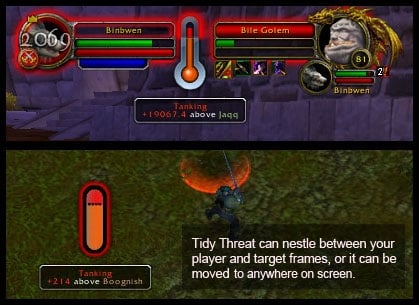
...is a threat monitor, obviously. It's clean and minimalistic, while delivering a lot of information.
The vertical bar shows your threat compared to the maximum threat for the rest of your group. In other words, if you are the top threat holder, it will also show how much your threat exceeds the next highest.
Unlike many single-bar threatmeters, Tidy Threat indicates a value above 100%, making it useful for us tanks.
The bar are colored, depending on the threat condition. Groovy, eh?
New in 1.4: Added threat Rank to the detail window. Also, Tidy Threat will now only pop up (while in auto-hide) when there's more than one threat (including yourself) on a target.
New in 1.3: Auto-hide option, and Audible warning. See below for more info.
New in 1.2: Now can display the raw threat difference.
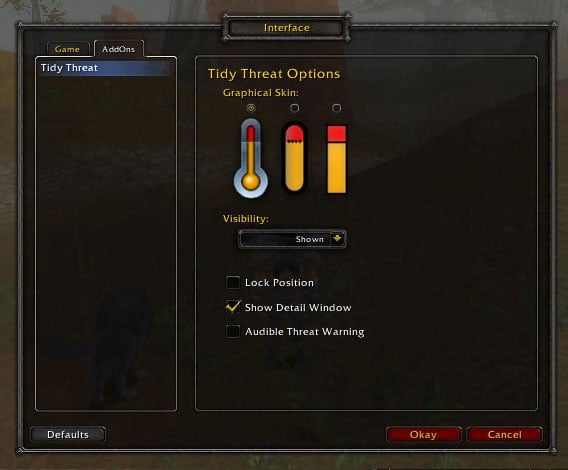
Options
There's no GUI configuration screen (Someday I'll learn how to do that), but you can access all the features using the command line:
/ttt autohide will hide Tidy Threat while not in combat.
/ttt show will show Tidy Threat, and disable auto-hide.
/ttt detail will enable the popup detail window.
/ttt sound will enable the High Threat warning sound.
/ttt lock will lock the position of Tidy Threat.
/ttt reset will restore TidyThreat to factory settings.
Technical Details
The vertical bar is actually two different statusbars, stacked on top of each other:
The lower bar displays the player's threat, measured in percentage, with 100% indicating aggro.
The upper bar/extension activates only when the player exceeds 100% threat, and shows the difference between the maximum threat and the player's own threat; ie. your Threat Lead.
Code:
ThreatLead = PlayerThreat - MaximumGroupThreat
As MaximumGroupThreat approaches 100% (Drawing aggro), ThreatLead becomes very small, and the upper bar gets very thin. Since threat is most important when there's danger of aggro migration, the upper bar's maximum range is set to display up to 68% of the ThreatLead.
If enabled, a warning sound will play at 80% threat. If you want to change it, you'll have to poke in the code. (Let me know if this value seems low or high.)
Of note, Tidy Threat makes use of Wow's internal Threat engine, restricting it to the update schedule of the server. Sometimes the meter will seem choppy or slow; It's an issue with ALL current threat meters. :-(
Also, you need to have threat for the server to report threat; If you're a hunter or warlock, and you send your pet after something, you won't be able to see the threat data until YOU attack. Use a low/threat-damage spell to open the fight, if you're worried about aggro.
History
The inspiration for this project came from Blizzard's own, 'Classic Threat Meter'; Apparently, their own built-in threat monitor was removed because it was deemed, "Too Complicated" and "Not minimalistic". This is my own attempt at creating a practical, raid-worthy threat monitor, which is simple enough for a new player to understand.
Inevitably, I will have missed something obvious; Please post bugs and complaints to the comments.. :-)
Change Log - Tidy Threat
1.6:
* Fade and Mirror Image should display somewhat properly, now :-D
---
1.5:
* Modified /ttt reset to flush the old variables... running that command should clear bad config data, which was resulting in LUA errors.
---
I didn't do such a good job documenting changes.. oops
---
1.1:
* Now saves position/visibility/lock between sessions! :-D
* Threat Lead extension bar range has been changed from 33% to 68%.
* Clamped to screen area
* New command: /reset
To answer your question; I had been considering it. In fact, I created an account over at Curse and started setting up a project page, but I was not fond of the interface (ok, I hated it) and never finished.
But, I'm curious; is there good reason to host on Curse, other than for the exposure/hits? No, I'm not being rhetorical, I'm genuinely interested, and willing to change my mind.
Quote:
Originally posted by yoruichi Hi, first my compliments on the neat threat addon *bows*
Second, I was wondering you have plans to post it on curse.com in the near future ?
Regards,
Yoru
Last edited by danltiger : 11-16-2009 at 05:55 PM.
Finally got time to do a quick update for the scaling. Take a look at the 2nd line in TidyThreat.lua..
Hope that helps!
Quote:
Originally posted by Rhyanon This is a very nice little threat meter. I'll try and use this in our next raid to see how it works out for me as a healer.
Would it be able to add an option to scale the whole thing? I really like the looks, but it's just too huge for my minimal UI
Haven't forgotten about ya! Been busy/tired with my new job, so my free time has been limited. I'll try to get an update posted next week (the weekend should give me a moment to take a look)
Quote:
Originally posted by Rhyanon Aye, just noticed that while I was tanking heroic HoL this evening. First wondering where that was coming from, but then quickly realised it could only be Tidy Threat.
Really love your addon. Be it tanking, or as dps.. it's showing the threat in a very nice way which I'd prefer anytime over viewing numbers on Omen.
Originally posted by danltiger
To clarify, Tidy Threat adds a detailed threat measurement to the tooltip (an improvement over the default), which is what I was referring to. I have not been advertising that feature on the project page - since it's still under development - but it's there, and it seems to work well. When I'm tanking, I find it helpful to watch packs of AoE mobs by mousing-over and glancing at the tooltip. [/b]
Aye, just noticed that while I was tanking heroic HoL this evening. First wondering where that was coming from, but then quickly realised it could only be Tidy Threat.
Really love your addon. Be it tanking, or as dps.. it's showing the threat in a very nice way which I'd prefer anytime over viewing numbers on Omen.
To clarify, Tidy Threat adds a detailed threat measurement to the tooltip (an improvement over the default), which is what I was referring to. I have not been advertising that feature on the project page - since it's still under development - but it's there, and it seems to work well. When I'm tanking, I find it helpful to watch packs of AoE mobs by mousing-over and glancing at the tooltip.
Quote:
Originally posted by Rhyanon That's perfectly true. But I play a tank at times too, and also have a little hunter alt that gets my attention at times.
If a scaling option wouldn't be much hassle for you to do, I'd love to see it in one of the future updates Would probably do it myself, but coding is just not my cup of tea ... -.-
[i]As a healer, you might not find much use in the main program, since you'd have to be selecting the target you're measuring threat for, but the mouseover threat (shown in the tooltip) has been quite useful when I'm healing. [/b]
That's perfectly true. But I play a tank at times too, and also have a little hunter alt that gets my attention at times.
If a scaling option wouldn't be much hassle for you to do, I'd love to see it in one of the future updates Would probably do it myself, but coding is just not my cup of tea ... -.-
I don't see any problem putting in some option to scale it, other than the detail window text becoming unreadable (I'll restrict the scaling to the graphical components)
As a healer, you might not find much use in the main program, since you'd have to be selecting the target you're measuring threat for, but the mouseover threat (shown in the tooltip) has been quite useful when I'm healing.
Quote:
Originally posted by Rhyanon This is a very nice little threat meter. I'll try and use this in our next raid to see how it works out for me as a healer.
Would it be able to add an option to scale the whole thing? I really like the looks, but it's just too huge for my minimal UI
Updated! How's this work for you? Just use the standard ol' /autohide thingy..
Quote:
Originally posted by vpr I was just writing back to tell you that I tried it on my macbook and the same problem was happening. A new /ttt command would be great, as I use MSBT and another addon named AggroNotifier to let me know that I've drawn aggro.
I'd like to only see this meter pop up when I'm not playing solo (I don't play a pet class) so seeing my threat isn't so important in solo play.
Thanks!
~vpr
Last edited by danltiger : 10-04-2009 at 11:31 AM.
Originally posted by danltiger Actually, you were right. It was "working" for me, because I'd had it manually hidden (/ttt hide).
I'll probably add another /ttt command, since I personally like the meter to pop up and warn me when I enter combat, regardless of my group or pet status.
I was just writing back to tell you that I tried it on my macbook and the same problem was happening. A new /ttt command would be great, as I use MSBT and another addon named AggroNotifier to let me know that I've drawn aggro.
I'd like to only see this meter pop up when I'm not playing solo (I don't play a pet class) so seeing my threat isn't so important in solo play.
Actually, you were right. It was "working" for me, because I'd had it manually hidden (/ttt hide).
I'll probably add another /ttt command, since I personally like the meter to pop up and warn me when I enter combat, regardless of my group or pet status.
Quote:
Originally posted by vpr No, I haven't... I'll give it a try. Haven't been playing as much recently. I'll report back.


