| Go to Page... |

Pictures
File Info
| Updated: | 11-04-10 02:16 AM |
| Created: | 07-07-09 06:01 PM |
| Downloads: | 92,798 |
| Favorites: | 303 |
| MD5: |
Ghost: Pulse 3 

Ghost: Pulse is a WoW addon in the spirit of Jim's Cooldown Pulse.
This is the first beta released to the public en large.
Please report bugs in the comments only after reading about the known issues and so on.
Please report bugs in the comments only after reading about the known issues and so on.
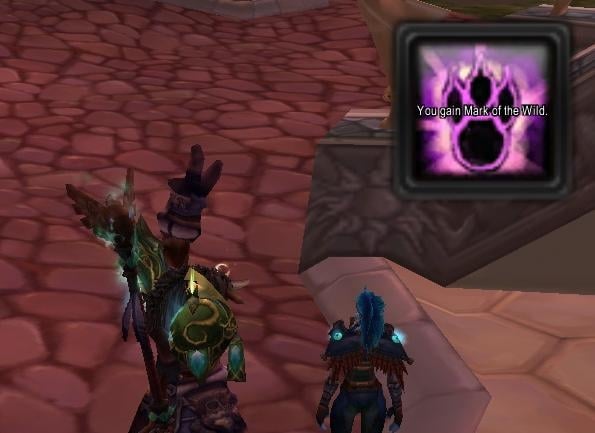
When things happen, GP will tell you. Out of the box, GP can alert you when...
- A spell/ability comes off cooldown.
- A pet's spell/ability comes off cooldown.
- A trinket, potion or other item comes off cooldown.
- A buff is applied to you, or fades.
- A debuff is applied to you, or fades.
- You get low on health.
- A group member dies, or is resurrected.
- A target (or focus) enemy player or NPC casts a spell.
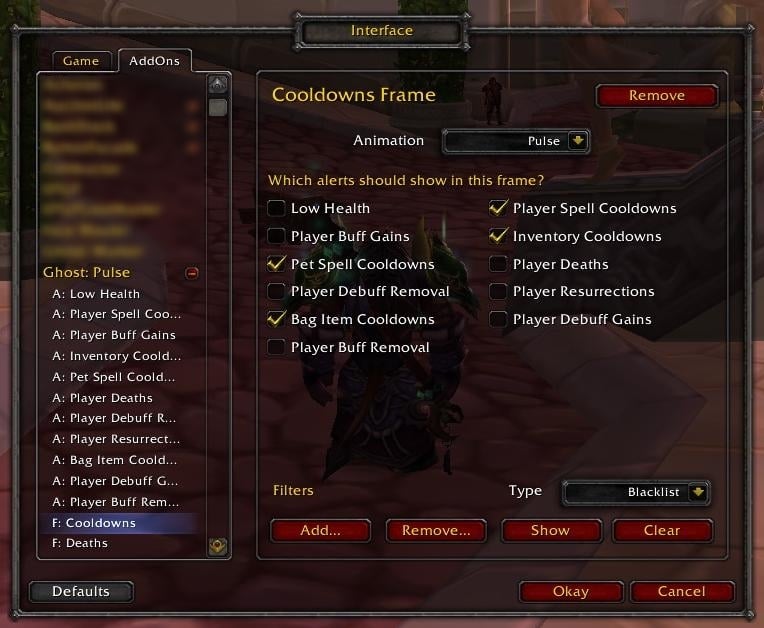
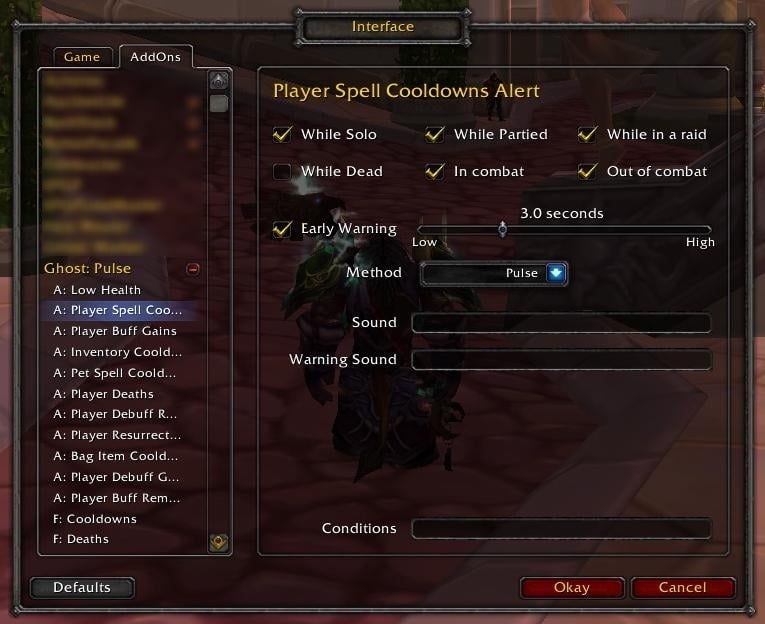
Type /gp or /pulse to configure. NOTE: GP3 will not upgrade your GP2 configuration. Sorry, but you'll have to reconfigure from scratch.

Installation
GP3 is distributed in one archive, but is actually two add-ons: One for the config/pulse engine, and the other is the basic alerts module. Be sure you unpack GP and install the folders contained inside appropriately.
Add-on Authors
GP3 is designed to allow you to integrate support for displaying your own custom pulses from within your own add-ons. Although it is certainly possible to do this with the first beta, I would advise against coding against this build since the primary function used to pulse things will be changing soon-ish. I will keep you updated and let you know when this 'API' is stable, as well as providing proper documentation on how to register your own categories and make calls to cause pulses to show.
Changes from Ghost: Pulse 2
Here is the list of things changed since GP2. It is not necessarily complete, but should give everyone a good idea about what to expect.
Display
- Button Facade support.
- Early warning mechanism has been re-designed so warnings can now be pulses as an option, while retaining MSBT and Blizzard FCT methods as options also.
- Use of the 3.1 animation system to reduce CPU usage when actually showing pulses. This has also enabled 'zoom in' and 'zoom out' animation options on a per-frame basis, as well as the usual 'fade' method.
Functionality
- Re-coded spell cooldowns system will correct track pet cooldowns even if they're not on your pet action bar.
- Re-coded bag item cooldowns system will correctly identify the item that was used and is now on cooldown (GP2 would get this right only occasionally). Items such as Mana Gems and so on will now work quite happily as expected.
- Many alerts in GP2 that didn't offer early warnings now do.
Technical
- GREATLY reduced memory and CPU utilisation. Very much improved over GP2. Minimal CPU usage while pulses are 'pending', with almost zero usage while completely idle.
- Extensible API for other authors to add GP support to their own addons. This will allow other authors to provide the Riposte/Overpower etc support that I am personally unable to do well since I don't have a character with those abilities and hence can't provide any sort of guarantees on.
- Re-coded to move away from Ace-2 to reduce the 'bulkiness' of the distribution. GP is also now shipped as two addons (pulse engine and configuration UI in one, basic alerts in another).
- Use of the standard Blizzard Add-on configuration interface.
Not Yet Implemented Features (will be done ASAP)
- LibSharedMedia support for sounds. Can still be configured to play sound files, but you must know and specify the full 'path' to the sound you want to play.
- Control over the duration and alpha level of the pulses.
- Profile switching. Currently, GP3 internally supports and implements profiles but access to them is not yet implemented in the UI. You have one default profile for the time being. Button Facade settings are on a per-profile basis however, ready for when the UI is opened up to support profiles.
Known Issues
- Sounds configured for alerts are not saving/loading properly in all cases.
- Removing a frame does not remove the ability to try to edit that frame's details, resulting in Lua errors if you try to do so. Reloading the UI after removing a frame, however, prevents access to that now-extinct frame's editor.
Removed Features
I know people hate it when their favorite obscure feature gets removed, but in the interests of a more streamlined and lightweight addon, some things have had to go. Feel free to ask if they can make a comeback though. I may do it, I may say "that's for another addon author to do" or I may just say "no wai!". You can always ask. :P
- Specifics. With this feature, you could tell GP2 to alert only when debuffs reached a certain stack count for example, or to override the sound used for a particular item. I am unsure if/when/how I'll redo this for a future GP3 release.
- Several alerts will not ship with GP3 by default, instead being deferred to enterprising addon authors to implement. These include optimal Life Tap and Mana Potion usage for example.
- Black/whitelists on a per alert basis. Currently, GP3 supports filtering at the frame level only, as this is simpler for most people. If demand exists, I may re-implement alert-level filtering again.
Change Log
3.0 beta 18: 2010-11-2
- Fixed filter editing bug.
3.0 beta 17: 2010-10-16
- First release for patch 4.0.1.
3.0 beta 16: 2010-02-21
- More tweaks for bag items.
- Performance optimizations.
3.0 beta 15: 2010-02-14
- Rewrote the bag items scanning to account for targetable things like Saronite Bombs.
3.0 beta 14: 2009-12-10
- Updated ToC to 3.3
3.0 beta 13: 2009-10-06
- Last tweaking for the 'sticky' icons problem. When starting up, GP3 will now pulse all your frames to initialize them - this is by design. They should no longer do an initialization pulse once or twice after log in.
- Added the ability to filter by stack count. When adding to a filter, you may use =, < and > with a number to filter by stack count. For example, "Lifebloom>1" (no quotes) in a whitelist will show Lifebloom only when it hits two or three stacks. For now, don't use spaces between the name and the comparison operator or the number. As another example, "Impale<2" (again, no quotes) in a blacklist will not show Impale if it's only stacked once.
3.0 beta 12: 2009-10-03
- Fixed a bug when refreshing buffs/debuffs that were already present.
- Hopefully fixed the problem where the empty pulses appear at startup and remain visible until something happens. Let me know if it's still persisting for anyone.
3.0 beta 11: 2009-08-10
- Further tweaking to remedy the empty pulse problem. Working around a new weird little bug in BF or WoW itself (still haven't figured out which).
3.0 beta 10: 2009-08-07
- Fixed a bug when starting from a clean slate.
3.0 beta 9: 2009-08-07
- Updated ToC for 3.2.
- Fixed a Button Facade problem in GP that resulted from the 3.2 BF update (my issue - shouldn't have been doing it the way I was).
3.0 beta 8: 2009-08-02
- The frame filters now support buffs and debuffs specified by the spell ID that is reported in the combat log, to differentiate between buffs/debuffs that have the same names as each other.
3.0 beta 7: 2009-07-26
- Added target and focus enemy spell cast alerts.
3.0 beta 6: 2009-07-26
- Added support for Blizzard FCT. If an early warning method is set to 'Both' or 'Text' (was 'MSBT'), then early warnings will be issued using MSBT if it's installed and enabled, otherwise they will be issued via Blizzard's FCT (if it is enabled in the Blizzard Interface options).
- Added global options for controlling whether you see alerts when in arenas, battlegrounds and the world in general.
3.0 beta 5: 2009-07-23
- Fixed a nil problem when determining spell cast times.
3.0 beta 4: 2009-07-22
- Fixed the problem with Mind Blast and Lava Burst. The problem turned out to be that any spell with both a cast time and a cooldown wouldn't work. Only instants with a cooldown. This is now fixed.
3.0 beta 3: 2009-07-16
- Fixed the mage Water Elemental spell cooldowns. Going to look at a proper implementation so it works for vehicles also, but this build was to get the mages sorted first.

3.0 beta 2: 2009-07-13
- Fixed the wording for early warning text in MSBT mode.
- MSBT mode early warning should now pulse the correct sound (well, it will when I get the sound options loading/saving problem fixed).
- Added 'Show Text' as a per-alert configuration option.
- [Hopefully] fixed a problem with Buffs/Debuffs not alerting under certain conditions.
- Filter add/remove dialog boxes will now clear their previous text when adding/removing more than one item in a single session.
3.0 beta 1: 2009-07-08
- First public beta for general download.
3.0 beta 18: 2010-11-2
- Fixed filter editing bug.
3.0 beta 17: 2010-10-16
- First release for patch 4.0.1.
3.0 beta 16: 2010-02-21
- More tweaks for bag items.
- Performance optimizations.
3.0 beta 15: 2010-02-14
- Rewrote the bag items scanning to account for targetable things like Saronite Bombs.
3.0 beta 14: 2009-12-10
- Updated ToC to 3.3
3.0 beta 13: 2009-10-06
- Last tweaking for the 'sticky' icons problem. When starting up, GP3 will now pulse all your frames to initialize them - this is by design. They should no longer do an initialization pulse once or twice after log in.
- Added the ability to filter by stack count. When adding to a filter, you may use =, < and > with a number to filter by stack count. For example, "Lifebloom>1" (no quotes) in a whitelist will show Lifebloom only when it hits two or three stacks. For now, don't use spaces between the name and the comparison operator or the number. As another example, "Impale<2" (again, no quotes) in a blacklist will not show Impale if it's only stacked once.
3.0 beta 12: 2009-10-03
- Fixed a bug when refreshing buffs/debuffs that were already present.
- Hopefully fixed the problem where the empty pulses appear at startup and remain visible until something happens. Let me know if it's still persisting for anyone.
3.0 beta 11: 2009-08-10
- Further tweaking to remedy the empty pulse problem. Working around a new weird little bug in BF or WoW itself (still haven't figured out which).
3.0 beta 10: 2009-08-07
- Fixed a bug when starting from a clean slate.
3.0 beta 9: 2009-08-07
- Updated ToC for 3.2.
- Fixed a Button Facade problem in GP that resulted from the 3.2 BF update (my issue - shouldn't have been doing it the way I was).
3.0 beta 8: 2009-08-02
- The frame filters now support buffs and debuffs specified by the spell ID that is reported in the combat log, to differentiate between buffs/debuffs that have the same names as each other.
3.0 beta 7: 2009-07-26
- Added target and focus enemy spell cast alerts.
3.0 beta 6: 2009-07-26
- Added support for Blizzard FCT. If an early warning method is set to 'Both' or 'Text' (was 'MSBT'), then early warnings will be issued using MSBT if it's installed and enabled, otherwise they will be issued via Blizzard's FCT (if it is enabled in the Blizzard Interface options).
- Added global options for controlling whether you see alerts when in arenas, battlegrounds and the world in general.
3.0 beta 5: 2009-07-23
- Fixed a nil problem when determining spell cast times.
3.0 beta 4: 2009-07-22
- Fixed the problem with Mind Blast and Lava Burst. The problem turned out to be that any spell with both a cast time and a cooldown wouldn't work. Only instants with a cooldown. This is now fixed.
3.0 beta 3: 2009-07-16
- Fixed the mage Water Elemental spell cooldowns. Going to look at a proper implementation so it works for vehicles also, but this build was to get the mages sorted first. :)
3.0 beta 2: 2009-07-13
- Fixed the wording for early warning text in MSBT mode.
- MSBT mode early warning should now pulse the correct sound (well, it will when I get the sound options loading/saving problem fixed).
- Added 'Show Text' as a per-alert configuration option.
- [Hopefully] fixed a problem with Buffs/Debuffs not alerting under certain conditions.
- Filter add/remove dialog boxes will now clear their previous text when adding/removing more than one item in a single session.
3.0 beta 1: 2009-07-08
- First public beta for general download.
- Fixed filter editing bug.
3.0 beta 17: 2010-10-16
- First release for patch 4.0.1.
3.0 beta 16: 2010-02-21
- More tweaks for bag items.
- Performance optimizations.
3.0 beta 15: 2010-02-14
- Rewrote the bag items scanning to account for targetable things like Saronite Bombs.
3.0 beta 14: 2009-12-10
- Updated ToC to 3.3
3.0 beta 13: 2009-10-06
- Last tweaking for the 'sticky' icons problem. When starting up, GP3 will now pulse all your frames to initialize them - this is by design. They should no longer do an initialization pulse once or twice after log in.
- Added the ability to filter by stack count. When adding to a filter, you may use =, < and > with a number to filter by stack count. For example, "Lifebloom>1" (no quotes) in a whitelist will show Lifebloom only when it hits two or three stacks. For now, don't use spaces between the name and the comparison operator or the number. As another example, "Impale<2" (again, no quotes) in a blacklist will not show Impale if it's only stacked once.
3.0 beta 12: 2009-10-03
- Fixed a bug when refreshing buffs/debuffs that were already present.
- Hopefully fixed the problem where the empty pulses appear at startup and remain visible until something happens. Let me know if it's still persisting for anyone.
3.0 beta 11: 2009-08-10
- Further tweaking to remedy the empty pulse problem. Working around a new weird little bug in BF or WoW itself (still haven't figured out which).
3.0 beta 10: 2009-08-07
- Fixed a bug when starting from a clean slate.
3.0 beta 9: 2009-08-07
- Updated ToC for 3.2.
- Fixed a Button Facade problem in GP that resulted from the 3.2 BF update (my issue - shouldn't have been doing it the way I was).
3.0 beta 8: 2009-08-02
- The frame filters now support buffs and debuffs specified by the spell ID that is reported in the combat log, to differentiate between buffs/debuffs that have the same names as each other.
3.0 beta 7: 2009-07-26
- Added target and focus enemy spell cast alerts.
3.0 beta 6: 2009-07-26
- Added support for Blizzard FCT. If an early warning method is set to 'Both' or 'Text' (was 'MSBT'), then early warnings will be issued using MSBT if it's installed and enabled, otherwise they will be issued via Blizzard's FCT (if it is enabled in the Blizzard Interface options).
- Added global options for controlling whether you see alerts when in arenas, battlegrounds and the world in general.
3.0 beta 5: 2009-07-23
- Fixed a nil problem when determining spell cast times.
3.0 beta 4: 2009-07-22
- Fixed the problem with Mind Blast and Lava Burst. The problem turned out to be that any spell with both a cast time and a cooldown wouldn't work. Only instants with a cooldown. This is now fixed.
3.0 beta 3: 2009-07-16
- Fixed the mage Water Elemental spell cooldowns. Going to look at a proper implementation so it works for vehicles also, but this build was to get the mages sorted first. :)
3.0 beta 2: 2009-07-13
- Fixed the wording for early warning text in MSBT mode.
- MSBT mode early warning should now pulse the correct sound (well, it will when I get the sound options loading/saving problem fixed).
- Added 'Show Text' as a per-alert configuration option.
- [Hopefully] fixed a problem with Buffs/Debuffs not alerting under certain conditions.
- Filter add/remove dialog boxes will now clear their previous text when adding/removing more than one item in a single session.
3.0 beta 1: 2009-07-08
- First public beta for general download.
 |
Comment Options |
 10-18-12, 10:38 PM
|
||
|
A Kobold Labourer
Forum posts: 0
File comments: 4294967295
Uploads: 0
|
Re: MoP version
|
|

|

|
| skyrim117 |
| View Public Profile |
| Send a private message to skyrim117 |
| Find More Posts by skyrim117 |
| Add skyrim117 to Your Buddy List |
|
09-03-12, 06:05 AM
|
|
|
A Defias Bandit
 Forum posts: 2
File comments: 781
Uploads: 7
|
oh my god i love you, could never get the spellbook scan to work properly
|
|
|
|
| Sockz0r |
| View Public Profile |
| Send a private message to Sockz0r |
| Find More Posts by Sockz0r |
| Add Sockz0r to Your Buddy List |
|
08-31-12, 09:13 AM
|
|
|
A Kobold Labourer
Forum posts: 0
File comments: 13
Uploads: 0
|
MoP version
here: https://dl.dropbox.com/s/xj5sok8g0rs...3-mop.zip?dl=1
What changed: ToC interface version changed to 50001 `GetNumRaidMembers() > 0` changed to `UnitInRaid('player')` `GetNumPartyMembers() > 0` changed to `UnitInParty('player')` Spellbook scanning working. Enjoy
Last edited by ardente : 08-31-12 at 03:50 PM.
|
|
|
|
| ardente |
| View Public Profile |
| Send a private message to ardente |
| Find More Posts by ardente |
| Add ardente to Your Buddy List |
|
07-14-11, 12:35 AM
|
|
|
A Kobold Labourer
Forum posts: 0
File comments: 13
Uploads: 0
|
Patches for 4.2 COMBAT_LOG_EVENT format.
Players.lua@20 local function HandleCombatLog(timeStamp, event, _, sourceGuid, sourceName, sourceFlags, _, destGuid, destName, destFlags) Spells.lua@208 local function HandleCombatLog(timeStamp, event, _, sourceGuid, sourceName, sourceFlags, _, destGuid, destName, destFlags, _, spellId, spellName, spellSchool, ...) Monitor.lua@194 local function HandleSpellAuraGained(sourceGuid, sourceName, sourceFlags, _, destGuid, destName, destFlags, _, spellId, spellName, spellSchool, auraType) Monitor.lua@212 local function HandleSpellAuraRemoved(sourceGuid, sourceName, sourceFlags, _, destGuid, destName, destFlags, _, spellId, spellName, spellSchool, auraType) Monitor.lua@226 local function HandleCombatLog(timeStamp, event, _, ...)
Last edited by ardente : 07-16-11 at 01:07 PM.
|
|
|
|
| ardente |
| View Public Profile |
| Send a private message to ardente |
| Find More Posts by ardente |
| Add ardente to Your Buddy List |
|
06-28-11, 06:53 PM
|
|
|
A Kobold Labourer
Forum posts: 0
File comments: 10
Uploads: 0
|
Any update for 4.2?
I made combat handler changes this time too, but this time it didnt do the trick. |
|
|
|
| VisualDeadlock |
| View Public Profile |
| Send a private message to VisualDeadlock |
| Find More Posts by VisualDeadlock |
| Add VisualDeadlock to Your Buddy List |
|
05-07-11, 04:39 PM
|
||
|
A Kobold Labourer
Forum posts: 0
File comments: 1
Uploads: 0
|
Re: GP3: Fix for 4.1
Players.lua local function HandleCombatLog(timeStamp, event, sourceGuid, sourceName, sourceFlags, destGuid, destName, destFlags) to local function HandleCombatLog(timeStamp, event, hideCaster, sourceGuid, sourceName, sourceFlags, destGuid, destName, destFlags) and Spells.lua local function HandleCombatLog(timeStamp, event, sourceGuid, sourceName, sourceFlags, destGuid, destName, destFlags, spellId, spellName, spellSchool, ...) to local function HandleCombatLog(timeStamp, event, hideCaster, sourceGuid, sourceName, sourceFlags, destGuid, destName, destFlags, spellId, spellName, spellSchool, ...) works now! |
|
|
|
|
| balbaroy |
| View Public Profile |
| Send a private message to balbaroy |
| Find More Posts by balbaroy |
| Add balbaroy to Your Buddy List |
|
05-06-11, 04:33 AM
|
|
|
A Kobold Labourer
Forum posts: 0
File comments: 10
Uploads: 0
|
GP3: Fix for 4.1
I was having problems with GP3 since 4.1 - it wouldn't pulse the graphic when an ability came off of cooldown. I was waiting to see if the author would update the addon, but so far, he hasn't that I have seen.
Anyways, I decided to risk it and take a look at the code and I think I fixed it. At least it seems to work for me. I haven't uploaded the addon, or contacted the author, of course, credit for the addon goes to him. Anyways, this is what I did to fix the addon: Ghost Pulse basics folder -Open Players.LUA -Find "COMBAT_LOG_EVENT_UNFILTERED(timestamp, event, sourceGUID, sourceName, sourceFlags, destGUID, destName, destFlags, ...)" and replace with "COMBAT_LOG_EVENT_UNFILTERED(timestamp, event, hideCaster, sourceGUID, sourceName, sourceFlags, destGUID, destName, destFlags, ...)" -save and close file -Open Spells.LUA file -Find "COMBAT_LOG_EVENT_UNFILTERED(timestamp, event, sourceGUID, sourceName, sourceFlags, destGUID, destName, destFlags, ...)" and replace with "COMBAT_LOG_EVENT_UNFILTERED(timestamp, event, hideCaster, sourceGUID, sourceName, sourceFlags, destGUID, destName, destFlags, ...)" -save and close file These two steps did the trick. Thanks, I hope this helps anybody out there with this issue. |
|
|
|
| VisualDeadlock |
| View Public Profile |
| Send a private message to VisualDeadlock |
| Find More Posts by VisualDeadlock |
| Add VisualDeadlock to Your Buddy List |
|
05-04-11, 04:12 PM
|
||
|
A Kobold Labourer
Forum posts: 0
File comments: 10
Uploads: 0
|
Re: 4.1 Broken?
At the moment, I am using Doom Cooldown pulse, but I much prefer Ghost Pulse. |
|
|
|
|
| VisualDeadlock |
| View Public Profile |
| Send a private message to VisualDeadlock |
| Find More Posts by VisualDeadlock |
| Add VisualDeadlock to Your Buddy List |
|
05-02-11, 08:42 AM
|
|
|
A Kobold Labourer
Forum posts: 0
File comments: 8
Uploads: 0
|
4.1 Broken?
This add-on is still working for me, but my bugsack is catching a lot of errors relating to this.
Any fans know an update to get rid of these or is the author looking at an update? Much appreciated |
|
|
|
| thecraftybee |
| View Public Profile |
| Send a private message to thecraftybee |
| Find More Posts by thecraftybee |
| Add thecraftybee to Your Buddy List |
|
03-20-11, 05:43 AM
|
|
|
A Kobold Labourer
Forum posts: 0
File comments: 3
Uploads: 0
|
Hello.
I was wondering if it's possible to resize the icon? Mine is in the middle of the screen and is about 5*5cm. Really disturbing when you raid. I most admit I like the old Ghost the icon wasn't so big and you could just registry it enough when it flashed. And it showed when the cd of the spell was about to go off. I don't seem to be able to do that on Ghost 3. Thanks in advance. Illu Edit: addet more text
Last edited by Illulady : 03-20-11 at 05:48 AM.
|
|
|
|
| Illulady |
| View Public Profile |
| Send a private message to Illulady |
| Find More Posts by Illulady |
| Add Illulady to Your Buddy List |
|
02-28-11, 04:26 PM
|
|
|
A Deviate Faerie Dragon
Forum posts: 19
File comments: 280
Uploads: 12
|
seems to be some sort of issue with bartender 4 and the water elemental freeze spell. bartender seems to block this addon from working with pet spells. had to disable bartender4 to track pet spells.
can you add an option to change the overlay color of a pet's cooldown, like a different color from a water elemental's freeze to the mages frost nova? (they share an icon so its confusing which one is off cd)
Last edited by Codex : 02-28-11 at 05:50 PM.
|
|
|
|
| Codex |
| View Public Profile |
| Send a private message to Codex |
| Find More Posts by Codex |
| Add Codex to Your Buddy List |
|
01-06-11, 09:08 PM
|
|
|
A Murloc Raider
Forum posts: 4
File comments: 79
Uploads: 0
|
GP3 doesn't seem to be tracking a hunter's Kill Command properly...
|
|
|
|
| TGulics |
| View Public Profile |
| Send a private message to TGulics |
| Find More Posts by TGulics |
| Add TGulics to Your Buddy List |
|
01-01-11, 02:39 PM
|
|
|
A Kobold Labourer
Forum posts: 0
File comments: 7
Uploads: 0
|
I don't know if this has been addressed before or if it's been changed in some not-for-the-public version, but I'd like to suggest this change.
I find it counter-intuitive and rather annoying that the mouse wheel changes do not respect the locked state of this add-on. I mean, if I locked the frame, I should be able to scroll my mouse's wheel all I want without being spammed by messages saying that some add-on is ignoring my decision for it to stay locked in the position I told it to and changing its scalings. Ranting aside, I included these lines to fix that for me, starting at line 374 (my alterations are lines 377-379 (lines 4-6 below): Lua Code:
|
|
|
|
| .e- |
| View Public Profile |
| Send a private message to .e- |
| Find More Posts by .e- |
| Add .e- to Your Buddy List |
|
12-29-10, 01:34 PM
|
||
|
A Kobold Labourer
Forum posts: 0
File comments: 3
Uploads: 0
|
Also, I get no pulses. At all. For anything. |
|
|
|
|
| NoxDineen |
| View Public Profile |
| Send a private message to NoxDineen |
| Find More Posts by NoxDineen |
| Add NoxDineen to Your Buddy List |
|
12-26-10, 12:23 PM
|
||
|
A Murloc Raider
Forum posts: 7
File comments: 5
Uploads: 6
|
This is currently not working with any holy word spell cooldowns, quite frustrating but still a great mod. Is there a way to make the frames smaller? |
|
|
|
|
| LatexHealer |
| View Public Profile |
| Send a private message to LatexHealer |
| Find More Posts by LatexHealer |
| Add LatexHealer to Your Buddy List |
|
Support AddOn Development!
You have just downloaded by the author . If you like this AddOn why not consider supporting the author? This author has set up a donation account. Donations ensure that authors can continue to develop useful tools for everyone.
*Clicking the donate button above will take you to PayPal.com

*Clicking the donate button above will take you to Pledgie.com
