| Go to Page... |

| Compatibility: | Dragonflight (10.0.2) |
| Updated: | 12-15-22 03:15 AM |
| Created: | 07-16-09 10:43 PM |
| Downloads: | 1,903,494 |
| Favorites: | 1,303 |
| MD5: |
LUI v2211 

LUI v2211 Dragonflight 10.0.2 Edition, with new versioning

Important:
- For technical support please go to the LUI Discord Server
To access the Twitter integration stuff, either disable the Chat module or type /share
If you are doing a new install and you see that the frames are overlapping, or unaligned, you need to move the frames yourself:
Chat (BottomLeft): Go over it and right click on "General" tab of the chat frame, click Unlock Window and drag the tab around until you have the frame in a position you like.
Omen (MiddleLeft): Type "/omen config" (without quotes) and uncheck Lock Omen, drag it around, once you're done, check Lock Omen again.
Recount (MiddleRight) Type "/recount config" (without quotes) and go to Window and uncheck Lock Window. Move it around, and lock it back up when you're done. You're free to re-enable the Report, File, Config icons if you want.
Raid (BottomRight): Type "/lui", go in Unitframes and change the Raid settings. Then move the lone raid frame with your name around. You may need to reload UI for changes to apply (Fix pending)
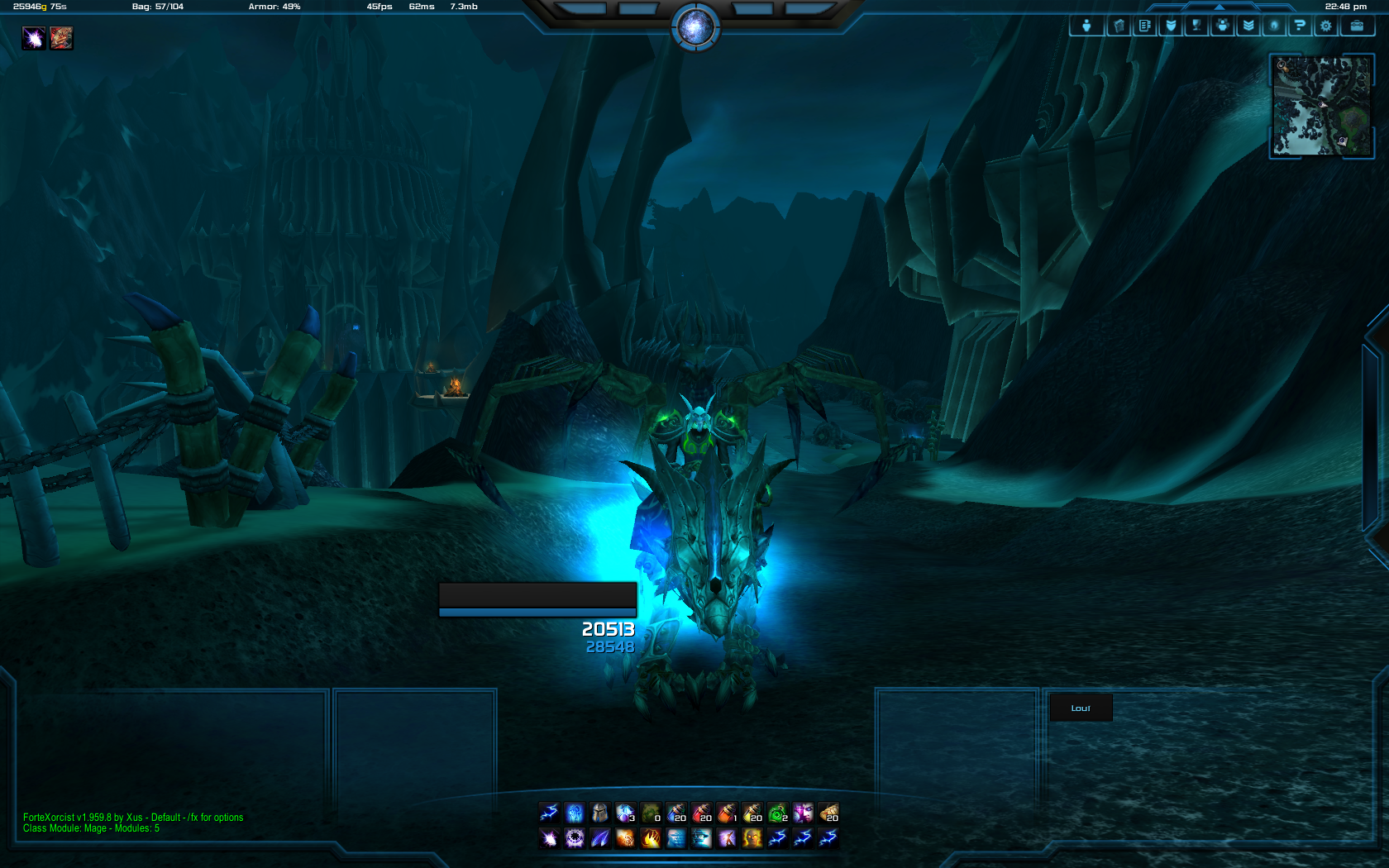
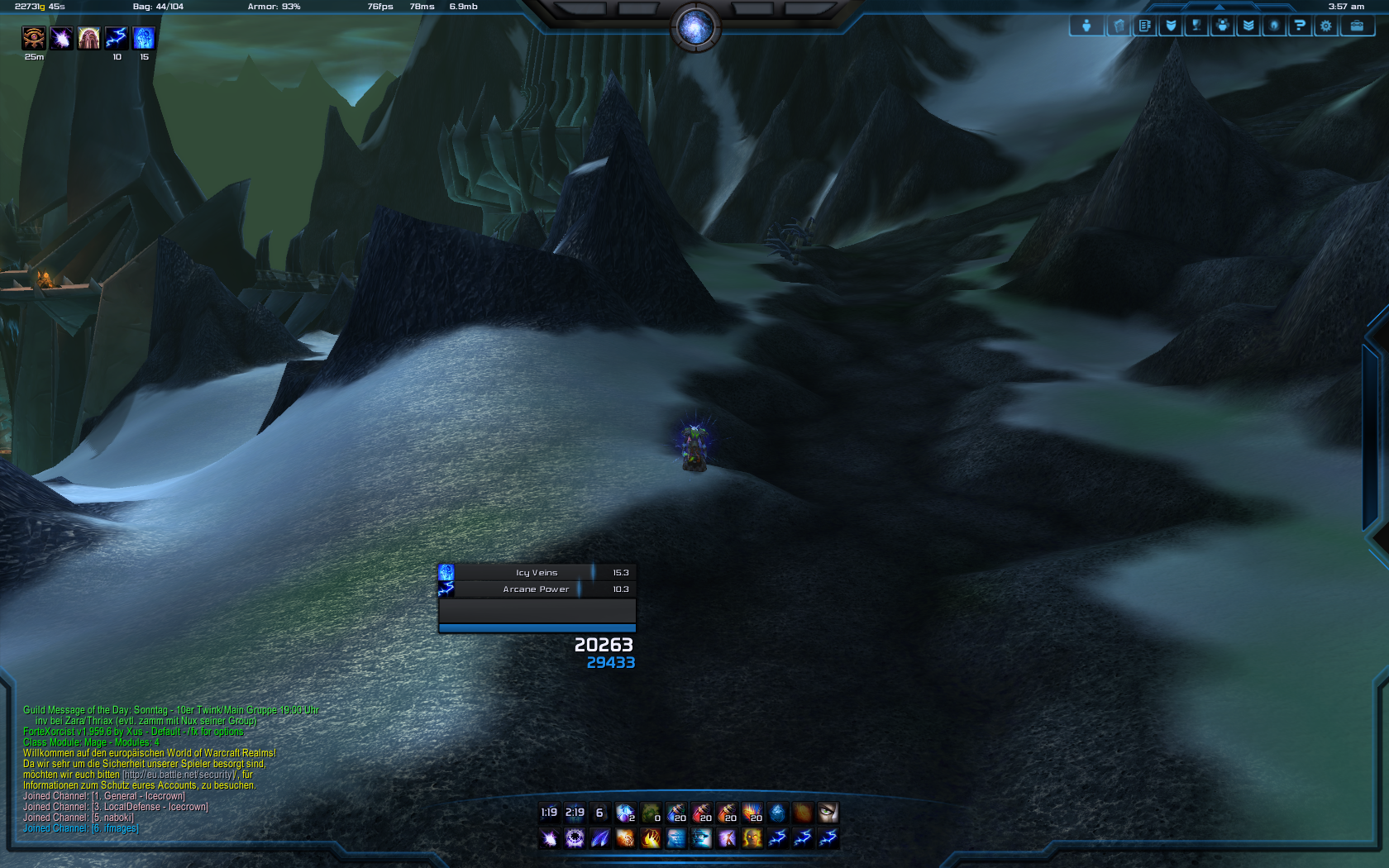
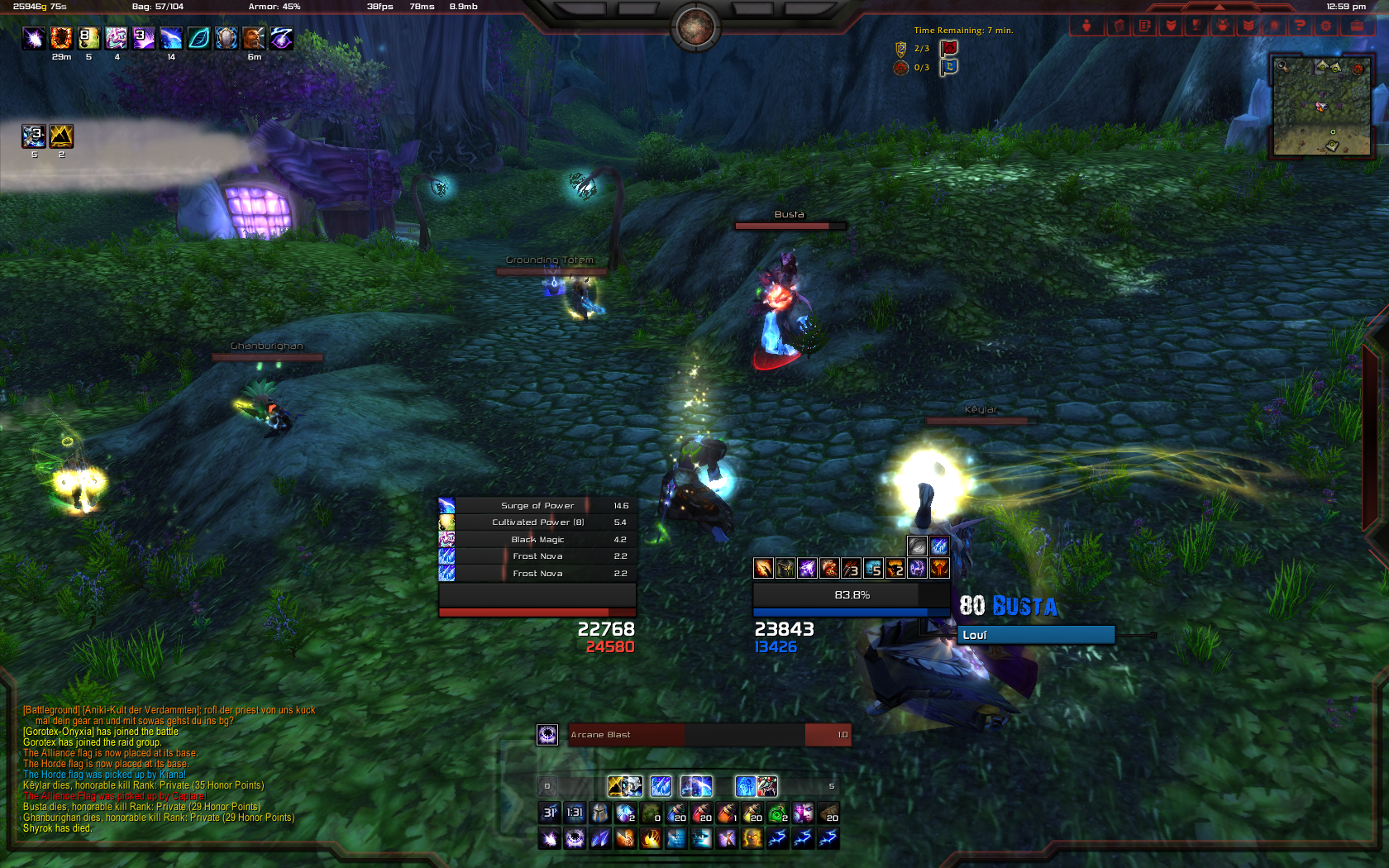
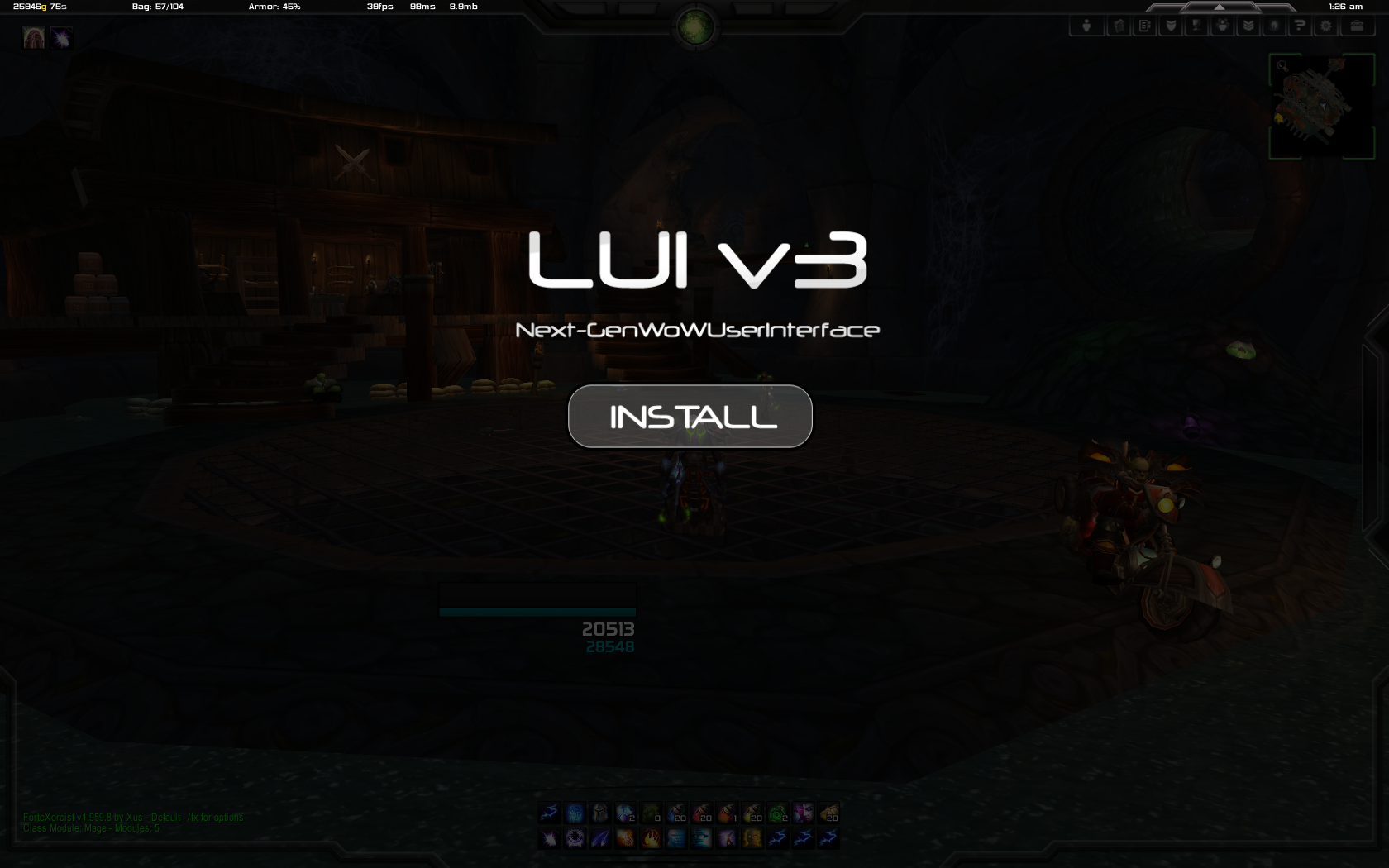
LUI is a World of Warcraft User Interface overhaul dedicated to replace the standard Blizzard UI in a way you cannot imagine.
Main Features of LUI:
- Full automatic installation
- Support for all addons
- Support for all resolutions from 1280 pixels in width up to 1920
- Over 200 Textures that will make your WoW look better than ever before.
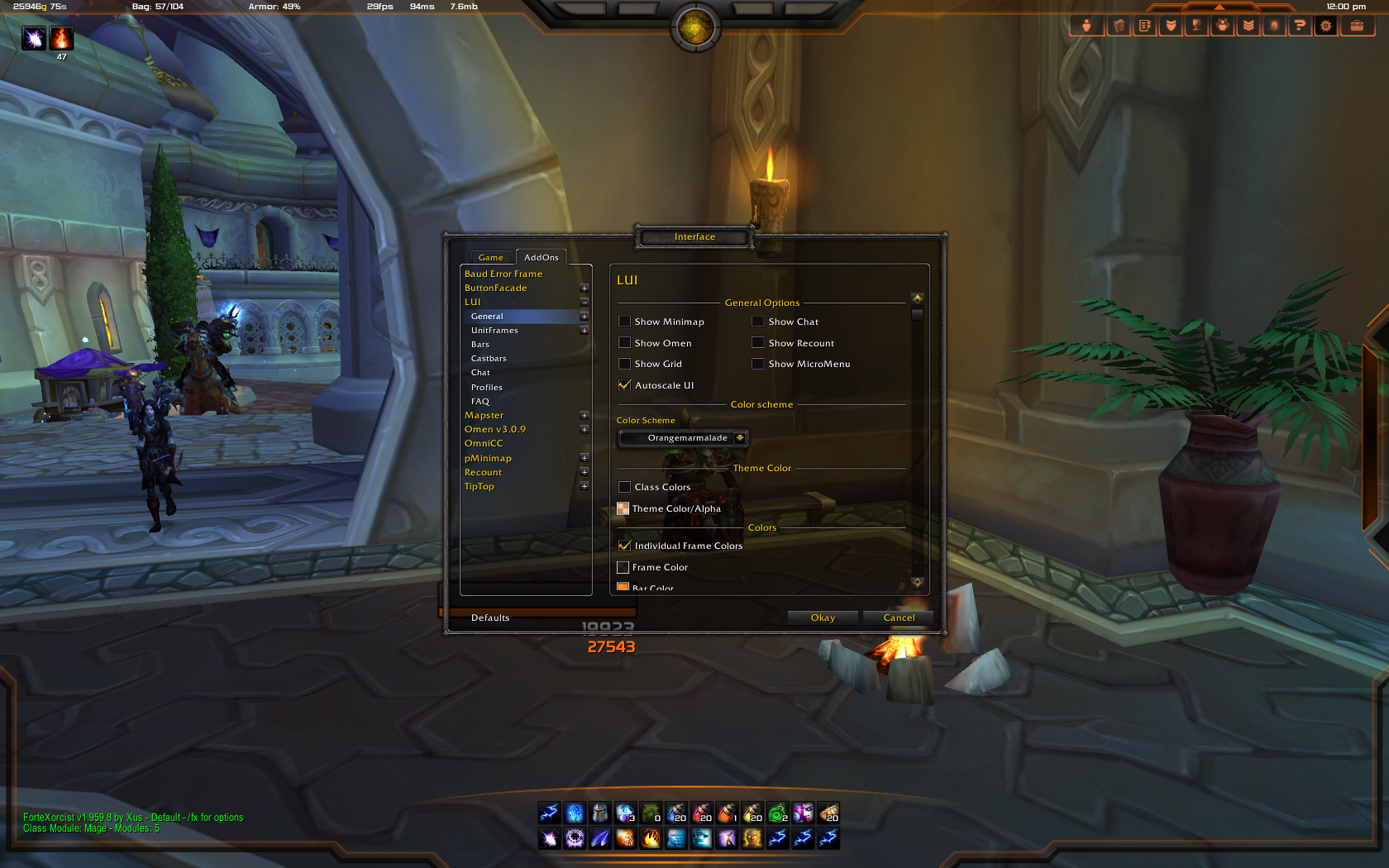
- Option Panel with more than 3000 possibilities to make your UI unique.
Installation:
- (Optional) Rename your WTF and Interface folders to keep a backup of your old UI.
- Put the Interface Folder into your WoW Directory
- Start WoW
- Enable all Addons
- Enjoy!
Addons:
LUI
Bartender4
Masque
Omen
Recount
Embedded oUF
BugSack
Optional Addons found in the Extras folder
SPTimers (replacing the defunct Forte)
Details
Note: If you pick Grid, Grid2 or Vuhdo make sure you go in the lui options, under Frames, then "Raid" and choose the appropriate name from the dropdown menu to have the texture correctly applied.
Thanks to all of you for waiting so long!
I hope you like it!
LUI v3.7
---------------------
Work for 5.0.4
Updated to r507
LUI v3.6.8
---------------------
http://lui.maydia.org/board/viewtopic.php?f=8&t=8523
LUI v3.6.6
---------------------
- Fixed additional bugs from 3.6.5
LUI v3.6.5
---------------------
http://lui.maydia.org/board/viewtopic.php?f=8&t=8172
LUI v3.6.4Beta
---------------------
http://lui.maydia.org/board/viewtopic.php?f=8&t=8104
LUI v3.6.4
---------------------
http://lui.maydia.org/board/viewtopic.php?f=8&t=7846
LUI v3.6.1
---------------------
3.6 Announcement, Read it: http://web3.india025.server4you.de/board/viewtopic.php?f=8&t=7476
3.6.1 Changelog: http://web3.india025.server4you.de/board/viewtopic.php?f=8&t=7575
LUI v3.5.5
---------------------
http://web3.india025.server4you.de/board/viewtopic.php?f=8&t=7352
LUI v3.5.3
---------------------
http://web3.india025.server4you.de/board/viewtopic.php?f=8&t=7178
LUI v3.5.2
---------------------
UI Elements:
- New texture for the infotext bar at the top. This one is much much larger. There should be no differences for people using small resolutions (up to 1680x1050) and should come as a nice feature for people using larger ones (1920x1020) or even have dual/triple monitor setups.
- You can now attach the Raid Texture Panel to Blizzard's default raid frames by using the dropdown menu.
Unitframes:
- Vengeance has been updated again.
- Added Firelands Stuff to Raid Debuffs Icons, if you are using the LUI raid frames instead of Grid.
- Fixed a few issues with Health and Power Updates.
- If a boss has an Alternate Power, it will be displayed in place of the power bar. An example would be Onyxia and her Electrical Charge bar.
- Fixed some issues with the Reputation and Experience bars.
- Fixed issues when petframe was disabled.
- Added some more options concerning Party Frame Visibility
Infotext:
- Fixed the faction logo for BattleNet Friends. So now you can tell your friends are being traitors and will be marked with traitorous logos next to their opposite-faction characters.
Fader:
- Fixed a few comat issues.
Chat:
- Potentially fixed an error that would appear on extremely rare cases, and would end up disappearing after the ui is reloaded. Written as "potentially" due to the extremely rare and probably unreproducible nature of said error.
Extra Modules:
- There was a screw up in the 3.5.1 release that caused the Interrupt and Merchant module (after following instructions) to still not work. This has been fixed.
- Along the lines, the Merchant module has been rewritten to fixes any errors that caused its exclusion in the first place.
- Some options of the Merchant module (such as the Item Quality) may have been reset as a result of this.
- Meh
LUI v3.5.1
---------------------
Addon Support:
- Added fix for Recount having huge font unless modified. You no longer need to modify Recount to have LUI's intended font size.
- You can now choose the font size you want for Recount under the options - General > Addons
Unitframes:
- Fixed an issue with the unitframes when they were disabled.
- The Player XP and Rep Bar should now come in front of the Health/Mana Text when mouse is hovered.
- Fixed an issue with Unitframes Layouts causing havoc under certain situations
- The Swing Timer and Vengeance Bars have been updated.
InfoText:
- Fixed an issue related to fonts that appeared under certain situations.
- Updated to 4.2's Combat Log Event to fix lag during combat.
- Fixed an issue with the Friends infotext not displaying in 4.2.
MicroMenu:
- There is a new button on the micromenu for the Encounter Journal, you can find it marked with a skull, next to the dungeon finder button.
- Fixed an issue with the talent point reminder where it wasn't the intended color if you selected to use a white colored micromenu.
Options:
- Sorted the options menu so everything should be easier to find, including clicking on the white Module section to easily enable/disable certain modules within LUI
Extra Modules:
- Remove the Merchant extra module from the basic package because it is not handled by anyone on the dev team, and it is causing quite a few errors to many people.
- For LUI to load extra modules, you need to move the Extras.Xml file out of the modules folder (next to the LUI.xml), this was done to prevent your Extras.xml file from being overwritten if you were to update LUI.
- For those who had a working Merchant module and want to continue using them, just move the Extras.xml file out of the modules folder.
LUI v3.5
---------------------
Unitframes
The LUI Unitframe is now embed with the LUI addon, no more troubles with oUF not being loaded on first install, bugging the whole process. (Somehow, i think someone will still manage it)
The Unitframes have been improved alot in terms of performance, and lots of bugs were fixed.
Options have been added to Import and Export new unitframes setups, as well as being able to switch between various setups without much hassle! Import a layout, or exporting one, may or may not cause severe lag.
Added an Alternative Power Bar, used by Blizzard for many raiding encounters.
Arena Frames were added, which include frames for your opponents, their pets and their targets.
Added Heal Predictions.
BossTarget Frames added, but disabled by default.
New Raid Frames have been added, in case you do not wish to use Grid or similar addons. Take note those are somewhat experimental for now.
Unitframes now uses the same raid icons textures as the nameplates, because those are 20% cooler.
DataText
DataText has been improved alot. Efficiency and performance went up to eleven.
Now have two more info text bars. Along with having things in the Top Left and Top Right, you can now have datatexts in the Bottom left and Bottom Right.
Removed most of the UI Reloads required when enabling / disabling things.
Most option changes are now instantaneous.
New entries: Currency, DualSpec and Instance Info datatexts.
Added option to choose if you want infotext to work during combat or not.
Added option to display Home or World Latency in the bar, or both.
Added option to display your combined gold on the server, or just the current toon's gold.
Left-Clicking on the Gold will now switch between server gold and toon gold. Instead of opening the bags.
Fixed the infamous INVITE PENDING issue with the calendar...again. Blame Blizzard for having buggy API, not us.
Bags
Fixed some other bugs that prevented the bags or bank from correctly updating.
Added the Sort Button fix.
Misc.
Blizzard Errors not disabled by default anymore. This should reduce confusion by alot.
Updated the ColorPicker to Ace3, no more Ace2 libraries!
Updated and Improved the AutoAccept Invites function.
Added the Merchant and Hix_Interrupter into the main UI. Mostly because of the cooked version in fact. Their original authors will still have to update them.
LUI v3.403
---------------------
- Fixed several minor problems.
- Updated Libraries
- Please download again
LUI v3.4
---------------------
- Fixed tons of Bugs
- Added Color Schemes Management (Import/Export/Save/CreateNewSchemes)
- Added Blizzard RaidMenu Support (left button at MicroMenu)
- Added many Options for several Modules
- Optimized thousands lines of code
- Added new Friends / Guild InfoText
- Rewritten Bags Modules
- Added new Developer API for easy way to create your own Modules
- All oUF Frames are now dragable
LUI v3.305 Beta
---------------------
- Fixed MicroMenu OnClick Handler for Blizzard UIPanel Management
LUI v3.304 Beta
---------------------
- Added Tooltip Module Options (not final)
- Added Micromenu Friends/Guild ClickHandler
- Added Cooldowns Module Options (not final)
- Aura Module completely rewritten
- Fixed Worldmap Move Button
- Fixed Tooltip Module oUF Dependency
- Fixed Chat Module Width/Height Reset after reload
- Fixed Micromenu Spellbook Icon
- Fixed Forte/Tooltip Modules (were linked together)
- Fixed Chat BN Conversation Window Style
- Fixed Aura Growth Problem
- Fixed Cancel Aura Problem (!)
- Fixed Aura Database Issues
- Fixed InfoTexts Enable/Disable State
- Fixed Recount/Skada Show/Hide Button
- Fixed Forte oUF Dependency
- Fixed Forte Module Behaviour (Loads automatically if Forte is installed)
- Fixed Forte Spelltimer Y Offset for Classes with extra Bar (Holypower, Eclipse, Soulshard, Totems, Runes)
LUI v3.303 Beta
---------------------
- Fixed 1280x1024 Installation Problem
LUI v3.302 Beta
---------------------
- Fixed potential EnhancedColourPicker Problem
LUI v3.301 Beta
---------------------
- Fixed Blizzard RaidFrame Container
- Fixed Blizzard Group Frame
- Fixed Fixed Auras Auratimer Problem
- Fixed Party Aura Problems
LUI v3.3 Beta
---------------------
- Added support for all addons
- Splittet LUI into modules
- Overworked the whole code
- Added complete new ColorManagement
- Added complete new PanelManagement
- Reworked the whole Database Structur
- Reworked the whole OptionPanel
- Added tons of new cool Options
- Added Tooltip LUI Module
- Added Minimap LUI Module
- Added Nameplates LUI Module
- Added Worldmap LUI Module
- Added Cooldown LUI Module
- Added Bags LUI Module
- Added Eclipse, HolyPower, Soulshard Support
- Fixed All known Bugs/Problems
- Updated all Addons for 4.01
LUI v3.025
---------------------
- Added Warlock Sommuns DropDownList
- Reworked complete Chat
- Added tons of new Chat Options
- Added Party ShowInRaid Option
- Reworked Minimap Options
- Added Minimap Texture Toggle Option
- Fixed Time 12 hour format Bug
- Fixed FortExorcist Bug
- Fixed Combo Points
- Fixed several Problems with Ace Libraries when Addons like Grid, Forte, oUF are disabled
- Fixed several smaller Bugs
LUI v3.024
---------------------
- Reworked Rogue Combo Points
- Added Rogue Combo Point Options
- Fixed several Bugs (because of Patch 3.3.5)
LUI v3.023
---------------------
- Added Bottom Bar Texture Options
- Fixed Unit Frames Vehicle Bugs
- Fixed Unit Frame Bar Frame Level Problems
- Fixed Patch v3.3.5 Chat Issues
- Fixed Grid v3.3.5 Issue
- Fixed Player Castbar Enable/Disable Bug
- Fixed Forte Error when oUF is removed
- Fixed Player ManaText Formatting Bug
- Fixed Chat tabs/windows reseting Bug
- Fixed several other tiny things
LUI v3.022
---------------------
- Fixed several smaller Bugs
- Fixed missing second ChatBackground
- Added Shaman TotemBar Options
- Added Death Knight RuneBar Options
- Added Druid Mana Options
- Added Instance Difficulty Option
- Added bottom BarTexture Options
LUI v3.021
---------------------
- Fixed several smaller Bugs
LUI v3.02
---------------------
- Added Invididual SidebarColor
- Added Invidiual FrameBorderColor
- Added optional Non-Gradient Frame Textures
- Clock Options (LocalTime/ServerTime, 12/24h Mode)
- Added Individual Omen Aggrobar Color
- Added FortExcorist BarColor/Spark Color Options.
- Fixed FortExorcist Spelltimer FrameLock
- Fixed FortExorcist Cooldowntimer FrameLock
- Added oUF Player Auras
- Added ouF ToT Auras
- Deleted Bars Amount Dropdown Option (please use Bartender)
- Added Individual BarTexture Anchor
- Added BarTexture Animation Toggle Function
- Added Individual Bar Texture Animation Height Option
- Added BarTexture X / Y Offset Option
- Added Individual RightSidebar Anchor (Default: Bar10)
- Added Individual LeftSidebar Anchor (Default: Bar9)
- Added new OptionPanel (resizable, moveable, well structured)
- Seperated UnitFrame Options for each Frame
- Added oUF Color Default Options
- Added tons of Options for each UnitFrame
- Added Fullbar Options
- Added Text Formating Options
- Added additional Name Text Options
- Added Portrait Options
- Added UnitFrame Symbol Options
- Reworked about 10.000 Lines of Code
- Optimized tons of functions
- Restructured all LUI options
LUI v3.01
---------------------
- Added Guild Overview at the top
- Added Friends Overview at the top
- Added Player Auras Positioning
- Added Castbars Enable/Disable option
- Added Support for all Languages
- Fixed Focus Castbar Height
- Fixed Player Weapon Enchant
- Fixed Target Info Text Positon
- Fixed Saurang Bloodpower
- Fixed Bag Replacement Bug
- Removed Power Auras
- Added Clique
- Added Interface Folder :-)
 |
Comment Options |
 10-26-22, 09:03 AM
|
|
|
A Defias Bandit
Forum posts: 3
File comments: 1
Uploads: 0
|
Update for 10.0
Hi,
Just curious, but will this be updated for 10.0? I used to run this UI back in the day, but recently came back to wow after a hiatus and would really love to use it again. |

|

|
| Pandabull |
| View Public Profile |
| Send a private message to Pandabull |
| Find More Posts by Pandabull |
| Add Pandabull to Your Buddy List |
|
03-20-22, 08:09 PM
|
|
|
A Kobold Labourer
Forum posts: 0
File comments: 1
Uploads: 0
|
hello
guys can you help me i play the most time with my retri pala and i need pallypower but i dont know how i can make that it works. ty |
|
|
|
| dardb |
| View Public Profile |
| Send a private message to dardb |
| Find More Posts by dardb |
| Add dardb to Your Buddy List |
|
02-06-21, 01:50 PM
|
||
|
A Kobold Labourer
 Forum posts: 0
File comments: 4
Uploads: 2
|
this tends to be working for me at least at the moment.... LUI FULL CORE Installation packages: 1. Interface 333 => # Interface: 90001 => LUI v3.33 Shadowlands Pre-Patch Edition https://github.com/deathwatchgaming/...n/Interface333 2. Interface 334 => # Interface: 90002 => LUI v3.34 Shadowlands Edition https://github.com/deathwatchgaming/...n/Interface334 2. Interface 335 => # Interface: 90005 => LUI v3.35 Shadowlands Edition https://github.com/deathwatchgaming/...n/Interface335
Last edited by DeathwatchGaming : 03-12-21 at 12:22 AM.
|
|
|
|
|
| DeathwatchGaming |
| View Public Profile |
| Send a private message to DeathwatchGaming |
| Visit DeathwatchGaming's homepage! |
| Find More Posts by DeathwatchGaming |
| Add DeathwatchGaming to Your Buddy List |
|
08-23-20, 01:06 AM
|
|
|
A Murloc Raider
Forum posts: 4
File comments: 30
Uploads: 0
|
Hello, I wanted to ask you whether the LUI with Shadowlands again actively developed and always brought up to date.
I grew up with it back in the days of BC and have many great memories and it would be a tragedy if such a great UI would not be continued. Keep up the good work greetings 3eist |
|
|
|
| 3eist |
| View Public Profile |
| Send a private message to 3eist |
| Visit 3eist's homepage! |
| Find More Posts by 3eist |
| Add 3eist to Your Buddy List |
|
03-26-20, 08:08 AM
|
|
|
A Kobold Labourer
Forum posts: 0
File comments: 1
Uploads: 0
|
Is there a way to remove the built in unitframes for LUI and use another of my choice, like ZPerl for example?
|
|
|
|
| Motrax |
| View Public Profile |
| Send a private message to Motrax |
| Visit Motrax's homepage! |
| Find More Posts by Motrax |
| Add Motrax to Your Buddy List |
|
02-13-20, 12:38 AM
|
|
|
A Kobold Labourer
Forum posts: 0
File comments: 1
Uploads: 0
|
the update of 8.3 just made my day.
thank youuuuuuuuuuuuuuuuuuuu. no words can describe how much i appreciate it.
|
|
|
|
| trenttang |
| View Public Profile |
| Send a private message to trenttang |
| Visit trenttang's homepage! |
| Find More Posts by trenttang |
| Add trenttang to Your Buddy List |
|
07-27-19, 06:08 PM
|
|
|
A Kobold Labourer
Forum posts: 0
File comments: 1
Uploads: 0
|
Drawing of the fight against Azshara
Hello,
How can we move the seal design for the fight against Azshara with Lui v3 ?  Thanks you. K |
|
|
|
| Kyaraa |
| View Public Profile |
| Send a private message to Kyaraa |
| Visit Kyaraa's homepage! |
| Find More Posts by Kyaraa |
| Add Kyaraa to Your Buddy List |
|
06-30-19, 02:30 AM
|
|
|
A Kobold Labourer
Forum posts: 1
File comments: 3
Uploads: 0
|
hi i just installed Lui (wow 8.2) i am receiving this lua notification
Code:
Message: Interface\AddOns\LUI\scripts\WorldMapFix.lua:12: attempt to index global 'WorldMapCompareTooltip1' (a nil value)
Time: Sun Jun 30 10:23:32 2019
Count: 1
Stack: Interface\AddOns\LUI\scripts\WorldMapFix.lua:12: attempt to index global 'WorldMapCompareTooltip1' (a nil value)
Interface\AddOns\LUI\scripts\WorldMapFix.lua:12: in main chunk

Locals: addonname = "LUI"
LUI = <table> {
 defaults = <table> {
 }
 NewInputNumber = <function> defined @Interface\AddOns\LUI\devapi.lua:1010
 Profiler = <table> {
 }
 NewWidth = <function> defined @Interface\AddOns\LUI\devapi.lua:1056
 NewEnable = <function> defined @Interface\AddOns\LUI\devapi.lua:885
 UnregisterComm = <function> defined @Interface\AddOns\Masque\Libs\CallbackHandler-1.0\CallbackHandler-1.0.lua:153
 GetDefaultVal = <function> defined @Interface\AddOns\LUI\LUI.lua:676
 Lib = <table> {
 }
 SyncAddonVersion = <function> defined @Interface\AddOns\LUI\LUI.lua:315
 chatcommands = <table> {
 }
 SetDefaultModulePrototype = <function> defined @Interface\AddOns\Masque\Libs\AceAddon-3.0\AceAddon-3.0.lua:409
 NewPosY = <function> defined @Interface\AddOns\LUI\devapi.lua:1036
 IsEnabled = <function> defined @Interface\AddOns\Masque\Libs\AceAddon-3.0\AceAddon-3.0.lua:451
 GetDBVar = <function> defined @Interface\AddOns\LUI\LUI.lua:650
 RegisterModule = <function> defined @Interface\AddOns\LUI\LUI.lua:1511
 Opposites = <table> {
 }
 UnregisterMessage = <function> defined @Interface\AddOns\Masque\Libs\CallbackHandler-1.0\CallbackHandler-1.0.lua:153
 Update = <function> defined @Interface\AddOns\LUI\LUI.lua:421
 hooks = <table> {
 }
 NewOffsetY = <function> defined @Interface\AddOns\LUI\devapi.lua:1044
 NewInput = <function> defined @Interface\AddOns\LUI\devapi.lua:992
 Points = <table> {
 }
 UnregisterAllComm = <function> defined @Interface\AddOns\Masque\Libs\CallbackHandler-1.0\CallbackHandler-1.0.lua:174
 SetEnabledState = <function> defined @Interface\AddOns\Masque\Libs\AceAddon-3.0\AceAddon-3.0.lua:424
 Hook = <function> defined @Interface\AddOns\Bartender4\libs\AceHook-3.0\AceHook-3.0.lua:274
 InstallOmen = <function> defined @Interface\AddOns\LUI\addons\omen.lua:12
 OnEnable = <function> defined @Interface\AddOns\LUI\LUI.lua:1863
 FetchScript = <function> defined @Interface\AddOns\LUI\LUI.lua:765
 Module = <function> defined @Interface\AddOns\LUI\LUI.lua:597
 Media = <table> {
 }
 OnInitialize = <function> defined @Interface\AddOns\LUI\LUI.lua:1805
 NewModule = <function> defined @Interface\AddOns\Masque\Libs\AceAddon-3.0\AceAddon-3.0.lua:235
 GetName = <function> defined @Interface\AddOns\Masque\Libs\AceAddon-3.0\AceAddon-3.0.lua:279
 name = "LUI"
 Disable = <function> defined @Interface\AddOns\Masque\Libs\AceAddon-3.0\AceAddon-3.0.lua:314
 NewColor = <function> defined @Interface\AddOns\LUI\devapi.lua:953
 Kill = <function> defined @Interface\AddOns\LUI\LUI.lua:215
 InstallGrid = <function> defined @Interface\AddOns\LUI\addons\grid.lua:12
 Unhook = <function> defined @Interface\AddOns\Bartender4\libs\AceHook-3.0\AceHook-3.0.lua:418
 Print = <function> defined @Interface\AddOns\Bartender4\libs\AceConsole-3.0\AceConsole-3.0.lua:54
 NewPosX = <function> defined @Interface\AddOns\LUI\devapi.lua:1032
 SetDamageFont = <function> defined @Interface\AddOns\LUI\LUI.lua:393
 L = <table> {
 }
 Debug = <function> defined @Interface\AddOns\LUI\debug.lua:148
 argcheck = <function> defined @Interface\AddOns\LUI\debug.lua:137
 RegisterComm = <function> defined @Interface\AddOns\LUI\libs\AceComm-3.0\AceComm-3.0.lua:60
 NewSelect = <function> defined @Interface\AddOns\LUI\devapi.lua:1074
 Info = <table> {
 }
 UnregisterEvent = <function> defined @Interface\AddOns\Masque\Libs\CallbackHandler-1.0\CallbackHandler-1.0.lua:153
 RegisterAddon = <function> defined @Interface\AddOns\LUI\LUI.lua:1505
 SetDefaultModuleLibraries = <function> defined @Interface\AddOns\Masque\Libs\AceAddon-3.0\AceAddon-3.0.lua:367
 NewNamespace = <function> defined @Interface\AddOns\LUI\LUI.lua:1557
 Blizzard = <table> {
 }
|
|
|
|
| Dekarius |
| View Public Profile |
| Send a private message to Dekarius |
| Visit Dekarius's homepage! |
| Find More Posts by Dekarius |
| Add Dekarius to Your Buddy List |
|
12-30-18, 11:47 AM
|
|
|
A Kobold Labourer
Forum posts: 0
File comments: 14
Uploads: 0
|
Will LUI be updated for 8.1?
|
|
|
|
| Laorne |
| View Public Profile |
| Send a private message to Laorne |
| Visit Laorne's homepage! |
| Find More Posts by Laorne |
| Add Laorne to Your Buddy List |
|
08-31-18, 11:23 AM
|
|
|
A Kobold Labourer
Forum posts: 0
File comments: 1
Uploads: 0
|
Extras folder missing
In the description it says that an extras folder will contain SPtimers to replace the defunct Forte addon. When I download the package I can see no such folder.
Thanks |
|
|
|
| liamxsquee |
| View Public Profile |
| Send a private message to liamxsquee |
| Visit liamxsquee's homepage! |
| Find More Posts by liamxsquee |
| Add liamxsquee to Your Buddy List |
|
08-22-18, 06:41 PM
|
|||
|
A Kobold Labourer
Forum posts: 0
File comments: 3
Uploads: 0
|
Re: Re: Druid
 |
||
|
|
|
| Deathbloom |
| View Public Profile |
| Send a private message to Deathbloom |
| Visit Deathbloom's homepage! |
| Find More Posts by Deathbloom |
| Add Deathbloom to Your Buddy List |
|
08-22-18, 06:08 PM
|
||
|
A Kobold Labourer
Forum posts: 0
File comments: 5
Uploads: 0
|
Re: Druid
|
|
|
|
|
| jay003jay |
| View Public Profile |
| Send a private message to jay003jay |
| Visit jay003jay's homepage! |
| Find More Posts by jay003jay |
| Add jay003jay to Your Buddy List |
|
08-16-18, 01:32 PM
|
|
|
A Kobold Labourer
Forum posts: 0
File comments: 3
Uploads: 0
|
Druid
Hello anybody that uses this UI as a druid I love this UI but cant find the druid bar anybody know how i can make it appear
Thanks |
|
|
|
| Deathbloom |
| View Public Profile |
| Send a private message to Deathbloom |
| Visit Deathbloom's homepage! |
| Find More Posts by Deathbloom |
| Add Deathbloom to Your Buddy List |
|
07-18-18, 11:41 AM
|
|||
|
A Defias Bandit
Forum posts: 3
File comments: 15
Uploads: 0
|
|
||
|
|
|
| ZeroEdgeir |
| View Public Profile |
| Send a private message to ZeroEdgeir |
| Visit ZeroEdgeir's homepage! |
| Find More Posts by ZeroEdgeir |
| Add ZeroEdgeir to Your Buddy List |
|
07-18-18, 02:54 AM
|
||
|
A Kobold Labourer
Forum posts: 0
File comments: 1
Uploads: 0
|
Will this addon be updated for Battle for Azeroth? Pleeeeeeeeeaaaaaaaaseeee with a cherry on top !  |
|
|
|
|
| Mordexis |
| View Public Profile |
| Send a private message to Mordexis |
| Visit Mordexis's homepage! |
| Find More Posts by Mordexis |
| Add Mordexis to Your Buddy List |
|
Support AddOn Development!
You have just downloaded by the author . If you like this AddOn why not consider supporting the author? This author has set up a donation account. Donations ensure that authors can continue to develop useful tools for everyone.
*Clicking the donate button above will take you to PayPal.com

*Clicking the donate button above will take you to Pledgie.com
