Category: Plug-Ins & Patches
Addon Information
Works with 3.2
Download Latest Version.
To add favorites please register for a free account. If you already have one you need to login. How do I install this? (FAQ)
suicidalkatt's Portal Bug Reports Feature Requests

This file is a Addon for Tidy Plates by danltiger. You must have that installed before this Addon will work.

Author:
Version:
v1.5
Date:
11-21-2009 08:45 AM
Size:
323.59 Kb
Downloads:
5,163
Favorites:
87
MD5:
Pictures
Click to enlarge
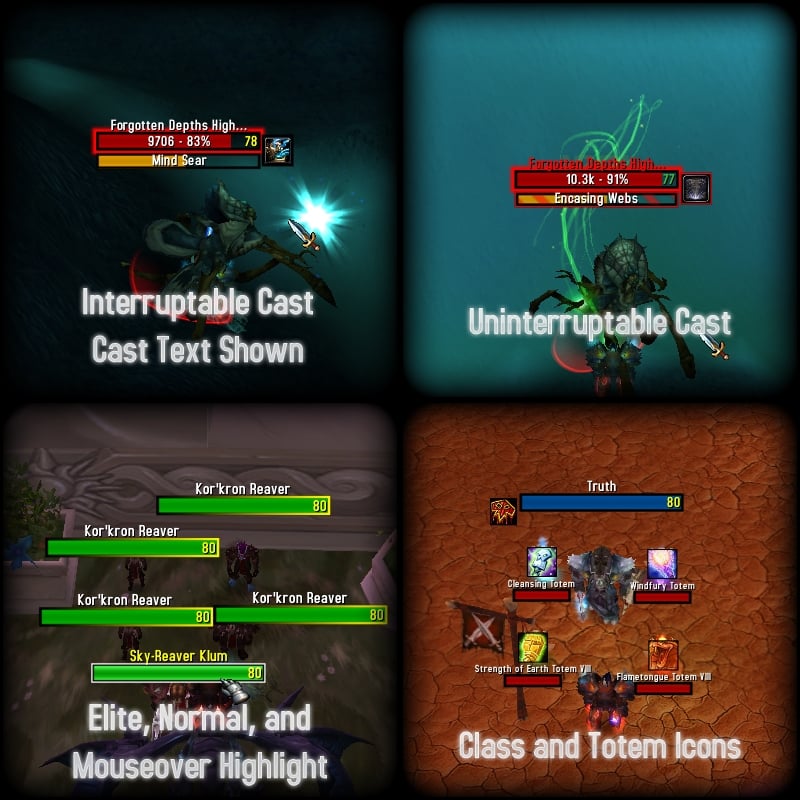
Clean Plates in action!
Click to enlarge
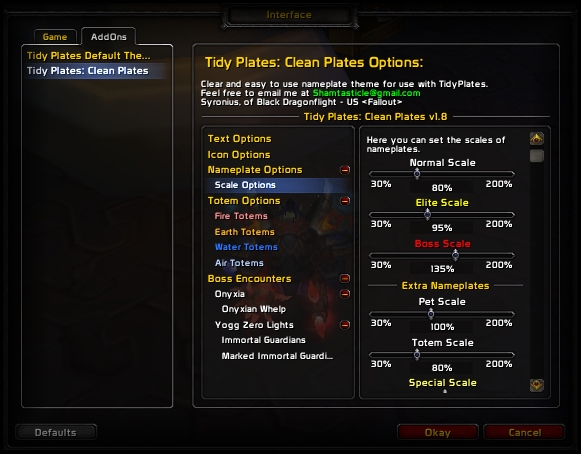
Clean Plates Options
Click to enlarge
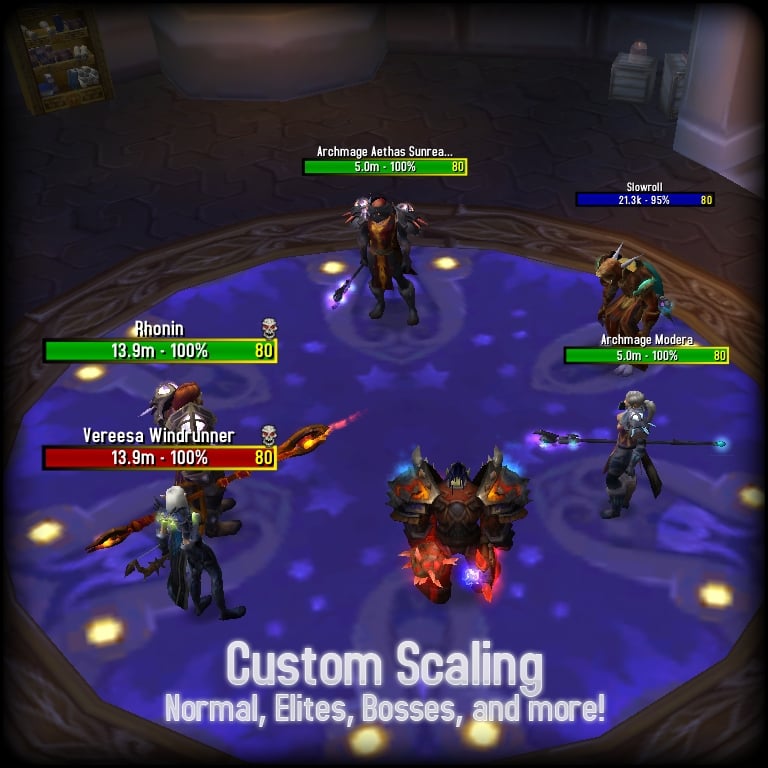
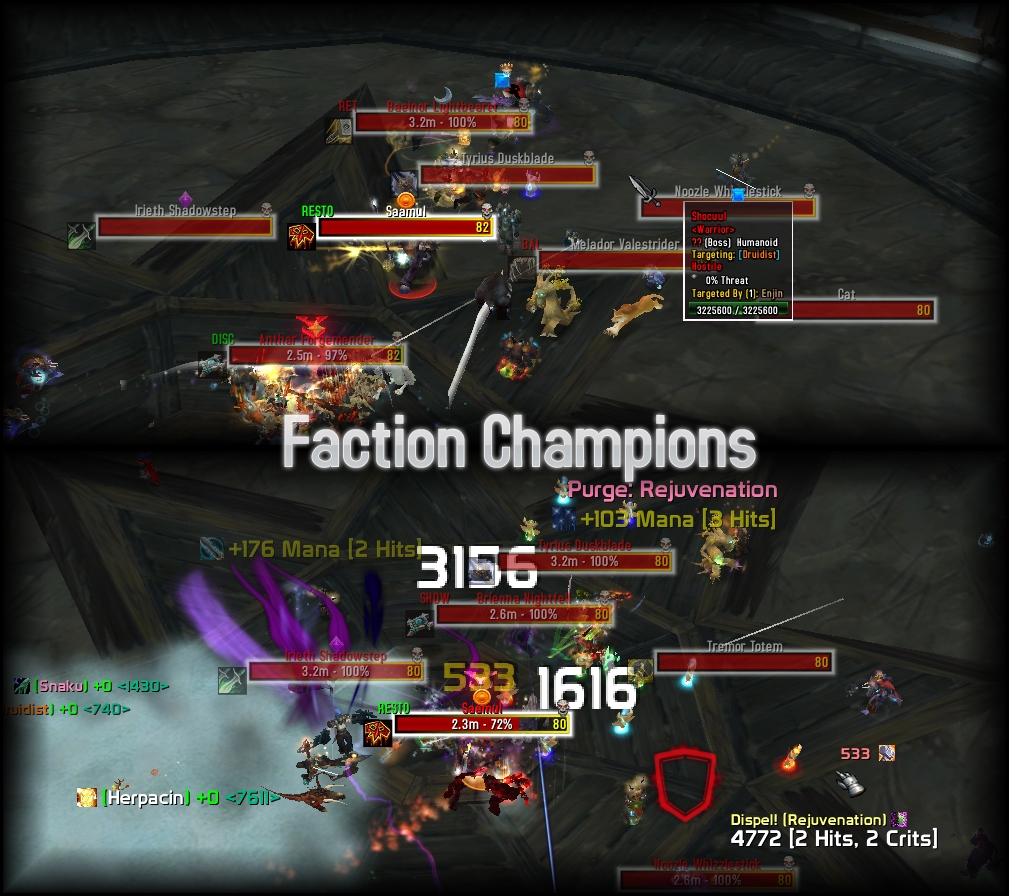
Faction Champions
Tidy Plates: CleanPlates   Updated less than 3 days ago!   Popular! (More than 5000 hits)
These require Tidy Plates to function!!
As well as Tidy Plates: Additional Special Text 3 for spell casting text!!

Download here: Tidy Plates: Additional Special Text 3 ~ Used to make the spell cast text work. (Included in 1.5)
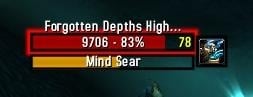
  • Spell Cast Text now included!! (Requires Tidy Plates Special Text 3 ~ Included in v1.5) ~ New! v1.5
  • Flametongue Totem Icon Fixed!! ~ New! v1.4
  • Now Includes more custom settings and saved variables!! ~ New! v1.4
  • Faction Champion Class and Totem Icons!! ~ New! v1.4
  • Now Includes Totem Icons!! ~ New! v1.3
  • Now with Class Icons and HP Special Truncated Text! (Millions and Thousands Conversion Text) ~ New! v1.2a

CleanPlates theme brought to you by Syronius of Black Dragonflight <Fallout>


Clear and easy to use nameplate theme for use with TidyPlates.

Special thanks to Sidoh, Linkbmez, Tumbus, and Quse.

Message me at Shamtasticle@gmail.com!

Other Themes by me:
Threat Plates:

Download Here


Please post comments!


All older versions are going to be archived for users wanting to use older textures:

v1.0 (Click to Enlarge)


Download v1.0 Here (OLD)

v1.1 (Click to Enlarge)


Download v1.1 Here (OLD)

  Change Log - Tidy Plates: CleanPlates
--[[1.5]]--
  • Implemented cast bar text ( Additional Spell Text 3 included in the package ).

--[[1.4b]]--
  • Fixed Faction Champion Spec text for the druids.
  • Fixed Spelling for "Noozle" from "Nozle" * mage *.
  • Forgot to package Windfury Totem icon texture ( Now included ).
--[[1.4]]--
  • Threat glow is now more brilliant!!
  • Now Includes more custom settings and saved variables!!
  • Faction Champion Class and Totem Icons introduced!!
  • Flametongue Totem Icon Fixed!!
--[[1.3]]--
  • Special Thanks to Sidoh for helping test these changes.
  • Implemented new totem Icons!
  • Flametongue totem seems to generate a random texture ( bug unknown )
--[[1.2a]]--
  • Updated for new 5.3 Features and better clarity.
  • Changed Textures and text for better clarity and functionality.
  • Added new Truncated HP "smart" text.
  • Fixed a typo in the cast bar overlay texture.
  Archived Versions - Tidy Plates: CleanPlates

File Name
Version
Size
Author
Date
v1.4b
313kB
suicidalkatt
11-18-2009 10:56 PM
v1.4
295kB
suicidalkatt
11-18-2009 12:35 PM
v1.3
200kB
suicidalkatt
11-13-2009 12:48 PM
v1.2a
95kB
suicidalkatt
10-08-2009 03:20 PM
v1.2
95kB
suicidalkatt
10-08-2009 12:24 PM
v1.1
96kB
suicidalkatt
10-01-2009 10:25 AM
v1.0
576kB
suicidalkatt
09-15-2009 03:48 AM
  Comments - Tidy Plates: CleanPlates
Post A Reply Comment Options
Old 11-19-2009, 01:42 PM  
suicidalkatt
A Murloc Raider
 
suicidalkatt's Avatar
Interface Author - Click to view interfaces

Forum posts: 8
File comments: 135
Uploads: 7
Quote:
Originally posted by G00DFe77a
Would it be possible to change the color of some of the totem nameplates or omit some of the totem nameplates entirely? For example, I would like to see tremor totems show up in orange, earthbind totems in yellow, and not see any of the other totems the enemy has put down.
Since these plates are currently not a "multi plate" styled Tidy Plates theme ( more information on this is available on the addon's page ), it is currently not possible, however I do plan to update this layout to a multi-plate theme that will actually include custom BOSS nameplates.

*small example*


With 3.3 there are going to be some changes to how nameplates are shown and their options. Some of these options include the disabling of friendly and enemy pet and totem nameplates. So I'll have to dump some coding later.

I'll be converting these to a multi plate style sooner or later with custom totem nameplates that will be much more defined than a simple icon.

So feel free to favorite these and expect an update soon :P
__________________


Author of the Ultimate Shaman UI
Author of Tidy Plates: Clean Plates 1.4b
Author of Tidy Plates: Threat Plates v1.5

Last edited by suicidalkatt : 11-19-2009 at 02:00 PM.
suicidalkatt is online now Report comment to moderator   Edit/Delete Message Reply With Quote
Old 11-19-2009, 12:27 PM  
G00DFe77a
A Defias Bandit

Forum posts: 2
File comments: 12
Uploads: 0
Would it be possible to change the color of some of the totem nameplates or omit some of the totem nameplates entirely? For example, I would like to see tremor totems show up in orange, earthbind totems in yellow, and not see any of the other totems the enemy has put down.
G00DFe77a is offline Report comment to moderator   Edit/Delete Message Reply With Quote
Old 11-19-2009, 03:13 AM  
bozothecrayon
A Murloc Raider
 
bozothecrayon's Avatar

Forum posts: 4
File comments: 8
Uploads: 0
"You can change the textures or fonts however you'd like."
as broad as this statement is please let me know if i am doing anything wrong as far as tampering with your work. as much as i like things to be "so-so" i still believe in keeping with a mod authors intentions and hard work that they have put into their mod.

what i did after reading your post is simply place a copy and paste of the GOTHIC.ttf file in the "Fonts" folder. GOTHICB actually made names a tad to big and took away from the cleanliness of clean plates. : p

i then changed all the font settings to:

typeface = font.."GOTHIC.ttf",


for the glaze texture i have bypassed any need for sharedmedia by placing a copy of the Glaze.tga in the "Artwork" folder renamed to "CP_Glaze.tga" and then simply changed the lines in the .lua to:

texture = texture.."CP_Glaze",

i am no modder or know how to code and this is just done in a hodge-podge fashion which i hope is acceptable. i have a lot of respect for you guys and gals that make the mods i use everyday to make wow a better game. so even if i did this wrong and hope you let me know if it is i want to say thanks again.
__________________
let me start by saying nothing...

Last edited by bozothecrayon : 11-19-2009 at 03:16 AM.
bozothecrayon is offline Report comment to moderator   Edit/Delete Message Reply With Quote
Old 11-18-2009, 08:50 PM  
suicidalkatt
A Murloc Raider
 
suicidalkatt's Avatar
Interface Author - Click to view interfaces

Forum posts: 8
File comments: 135
Uploads: 7
Quote:
Originally posted by bozothecrayon
shared media has no font folder : / i see a font folder in clean plates but i also see an artwork folder for the bar textures. since he didn't want me to move the glaze.tga into that folder i am hesitant to move any font into the font folder and reference it in the lua code
You can change the textures or fonts however you'd like.

However with this new version I've added Shared Media embeds.

So now that line you changed for the bar texture can now be:

texture = Media:Fetch('statusbar', 'Glaze'),

So the same method can be applied to your font setting:

font = Media:Fetch('font', 'Century Gothic Bold'),

Let me know how this goes if you use it!
__________________


Author of the Ultimate Shaman UI
Author of Tidy Plates: Clean Plates 1.4b
Author of Tidy Plates: Threat Plates v1.5
suicidalkatt is online now Report comment to moderator   Edit/Delete Message Reply With Quote
Old 11-18-2009, 08:15 PM  
bozothecrayon
A Murloc Raider
 
bozothecrayon's Avatar

Forum posts: 4
File comments: 8
Uploads: 0
Quote:
Originally posted by Airanna
If you look in the same general area of the LUA file as the texture entry, you'll find various entries (Name, Level, Special Text, Special Text 2). Simply replace the Accidental Presidency.ttf with the path to your prefered font in the same manner as redirecting the bar texture to a Shared Media texture.


edit:
Code:
config.name = {
	typeface =						font.."Accidental Presidency.ttf",
replace "Accidental Presidency.ttf" with "//Interface/Addons/Shared Media/Fonts/Century Gothic Bold.ttf" for example.
shared media has no font folder : / i see a font folder in clean plates but i also see an artwork folder for the bar textures. since he didn't want me to move the glaze.tga into that folder i am hesitant to move any font into the font folder and reference it in the lua code
__________________
let me start by saying nothing...
bozothecrayon is offline Report comment to moderator   Edit/Delete Message Reply With Quote
Old 11-18-2009, 07:47 PM  
Airanna
A Kobold Labourer

Forum posts: 0
File comments: 5
Uploads: 1
Quote:
Originally posted by bozothecrayon
is there anyway i can change the font to match what i use as a "global" font for all my mods. Century Gothic Bold is by far the clearest font to my eyes that i have found [/b]
If you look in the same general area of the LUA file as the texture entry, you'll find various entries (Name, Level, Special Text, Special Text 2). Simply replace the Accidental Presidency.ttf with the path to your prefered font in the same manner as redirecting the bar texture to a Shared Media texture.


edit:
Code:
config.name = {
	typeface =						font.."Accidental Presidency.ttf",
replace "Accidental Presidency.ttf" with "//Interface/Addons/Shared Media/Fonts/Century Gothic Bold.ttf" for example.

Last edited by Airanna : 11-18-2009 at 07:49 PM.
Airanna is offline Report comment to moderator   Edit/Delete Message Reply With Quote
Old 11-18-2009, 07:19 PM  
bozothecrayon
A Murloc Raider
 
bozothecrayon's Avatar

Forum posts: 4
File comments: 8
Uploads: 0
i'll ask here since last time i did not know i'd need to modify the theme instead of the core mod. : p

thank you! not only for your theme but your help before on changing the texture of the bar to match my other mods.

i have shared media running and have just updated to 1.4. i'll tweak the lua per your instructions again but doing so has me curious...

is there anyway i can change the font to match what i use as a "global" font for all my mods. Century Gothic Bold is by far the clearest font to my eyes that i have found
__________________
let me start by saying nothing...
bozothecrayon is offline Report comment to moderator   Edit/Delete Message Reply With Quote
Old 11-18-2009, 01:52 PM  
Imperfection
A Kobold Labourer
 
Imperfection's Avatar

Forum posts: 0
File comments: 15
Uploads: 0
Thank you for this answer.
Imperfection is offline Report comment to moderator   Edit/Delete Message Reply With Quote
Old 11-18-2009, 01:10 PM  
suicidalkatt
A Murloc Raider
 
suicidalkatt's Avatar
Interface Author - Click to view interfaces

Forum posts: 8
File comments: 135
Uploads: 7
Quote:
Originally posted by Imperfection
I search it since some times but, would it be possible to don't show pet/totems/mobs nameplate (or simply show only players) ?
In version 1.4 more options have been made available, however pets cannot be toggled on or off since there is currently no way to add conditions for pets with the current version of Tidy Plates.
__________________


Author of the Ultimate Shaman UI
Author of Tidy Plates: Clean Plates 1.4b
Author of Tidy Plates: Threat Plates v1.5
suicidalkatt is online now Report comment to moderator   Edit/Delete Message Reply With Quote
Old 11-14-2009, 02:01 PM  
Imperfection
A Kobold Labourer
 
Imperfection's Avatar

Forum posts: 0
File comments: 15
Uploads: 0
I search it since some times but, would it be possible to don't show pet/totems/mobs nameplate (or simply show only players) ?
Imperfection is offline Report comment to moderator   Edit/Delete Message Reply With Quote
Old 11-10-2009, 10:31 PM  
suicidalkatt
A Murloc Raider
 
suicidalkatt's Avatar
Interface Author - Click to view interfaces

Forum posts: 8
File comments: 135
Uploads: 7
Quote:
Originally posted by Zephurus
Thanks, it works now. But is there a way to see the casting-spell names ? I only see an icon and there is no name
No there is no name.

However with the next version of Tidy Plates, this may be available.
__________________


Author of the Ultimate Shaman UI
Author of Tidy Plates: Clean Plates 1.4b
Author of Tidy Plates: Threat Plates v1.5

Last edited by suicidalkatt : 11-13-2009 at 01:38 PM.
suicidalkatt is online now Report comment to moderator   Edit/Delete Message Reply With Quote
Old 11-10-2009, 10:30 PM  
Zephurus
A Kobold Labourer

Forum posts: 0
File comments: 3
Uploads: 0
Quote:
Originally posted by suicidalkatt
Since Tidy Plates is basically just re-does your default wow nameplates you may want to ensure you even have cast bars showing for your targets nameplates.

Go to Interface > Game Tab > Combat > Cast Bars > On Nameplates.

Hope this helps.
Thanks, it works now. But is there a way to see the casting-spell names ? I only see an icon and there is no name
Zephurus is offline Report comment to moderator   Edit/Delete Message Reply With Quote
Old 11-10-2009, 04:17 PM  
suicidalkatt
A Murloc Raider
 
suicidalkatt's Avatar
Interface Author - Click to view interfaces

Forum posts: 8
File comments: 135
Uploads: 7
Quote:
Originally posted by Zephurus
I cant get the casting bar working; it just doesnt show. There is no config options in the Interface Menu as well >.<

I currently have 2 addons that display targets' casting bar: Icehud and Pitbull4; i wonder if CleanPlates doesnt like them or something.
Since Tidy Plates is basically just re-does your default wow nameplates you may want to ensure you even have cast bars showing for your targets nameplates.

Go to Interface > Game Tab > Combat > Cast Bars > On Nameplates.

Hope this helps.
__________________


Author of the Ultimate Shaman UI
Author of Tidy Plates: Clean Plates 1.4b
Author of Tidy Plates: Threat Plates v1.5

Last edited by suicidalkatt : 11-10-2009 at 04:38 PM.
suicidalkatt is online now Report comment to moderator   Edit/Delete Message Reply With Quote
Old 11-10-2009, 07:44 AM  
Zephurus
A Kobold Labourer

Forum posts: 0
File comments: 3
Uploads: 0
I cant get the casting bar working; it just doesnt show. There is no config options in the Interface Menu as well >.<

I currently have 2 addons that display targets' casting bar: Icehud and Pitbull4; i wonder if CleanPlates doesnt like them or something.
Zephurus is offline Report comment to moderator   Edit/Delete Message Reply With Quote
Old 11-04-2009, 07:13 AM  
suicidalkatt
A Murloc Raider
 
suicidalkatt's Avatar
Interface Author - Click to view interfaces

Forum posts: 8
File comments: 135
Uploads: 7
Quote:
Originally posted by Rufio
does Author Clean Plates works with Threat Plates? The Threatfeedback looks realy cool!
You cannot have two themes enabled in your addons list at the same time.

Since threat plates is basically clean plates with added attributes, you may just want to download threat plates :P.
__________________


Author of the Ultimate Shaman UI
Author of Tidy Plates: Clean Plates 1.4b
Author of Tidy Plates: Threat Plates v1.5

Last edited by suicidalkatt : 11-04-2009 at 07:54 AM.
suicidalkatt is online now Report comment to moderator   Edit/Delete Message Reply With Quote
Post A Reply


Category Jump:

Support AddOn Development!

You have just downloaded by the author . If you like this AddOn why not consider supporting the author? This author has set up a donation account. Donations ensure that authors can continue to develop useful tools for everyone.




The Network:
EQInterface | EQ2Interface | LoTROInterface | MMOInterface | War.MMOUI | WoWInterface | VGInterface | Allakhazam | Thottbot | Wowhead | Zam


©2009 MMOUI / ZAM Network
vBulletin - Copyright ©2000 - 2009, Jelsoft Enterprises Ltd.