Addon Information
Works with 3.2
Download Latest Version.
To add favorites please register for a free account. If you already have one you need to login. How do I install this? (FAQ)
Author:
Version:
v3.1
Date:
11-07-2009 06:05 AM
Size:
32.71 MB
Downloads:
2,637
Favorites:
50
MD5:
Pictures
Click to enlarge
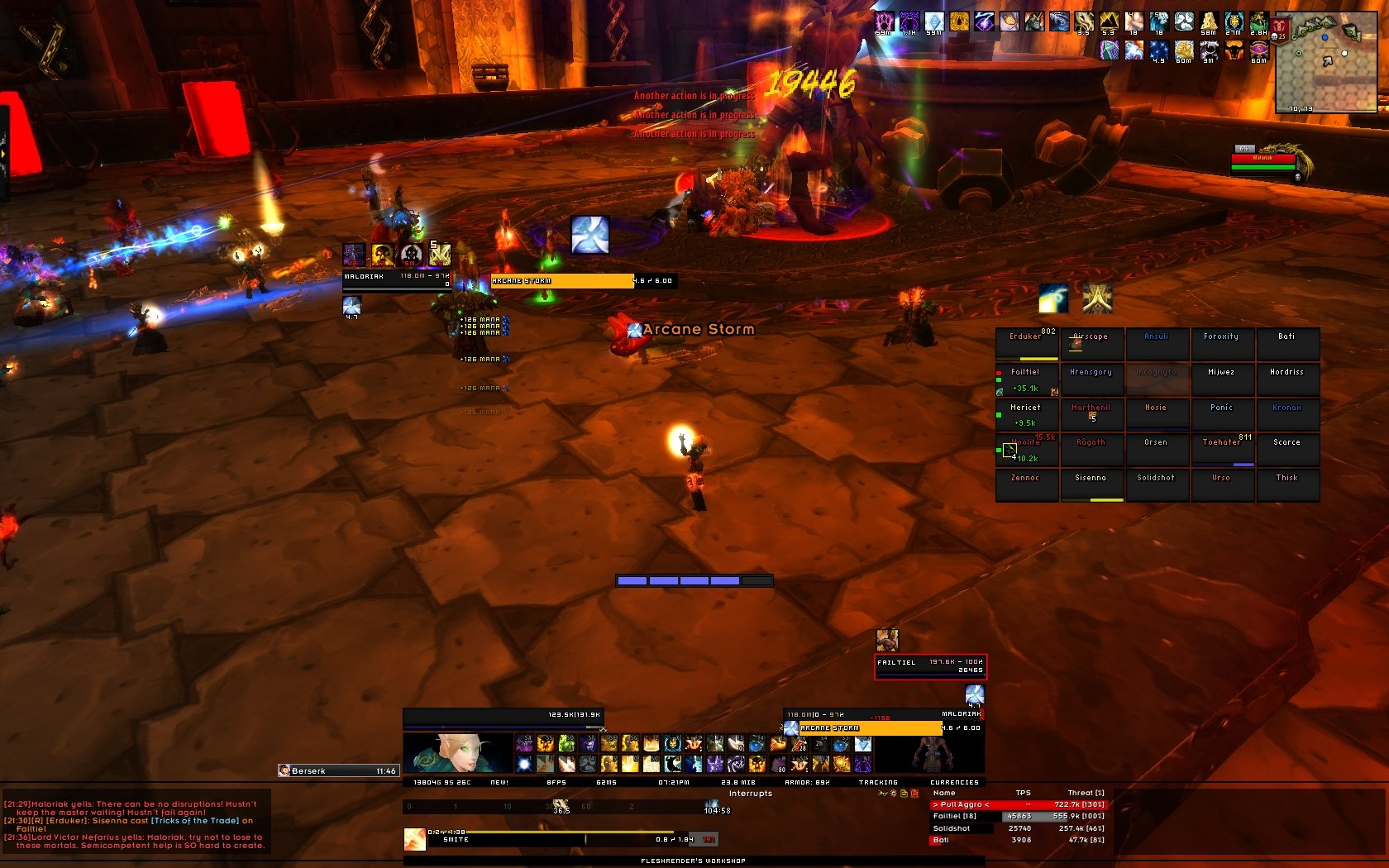
Raid
Click to enlarge
Tanking on my paladin - (dxe is not sorted properly)
Click to enlarge
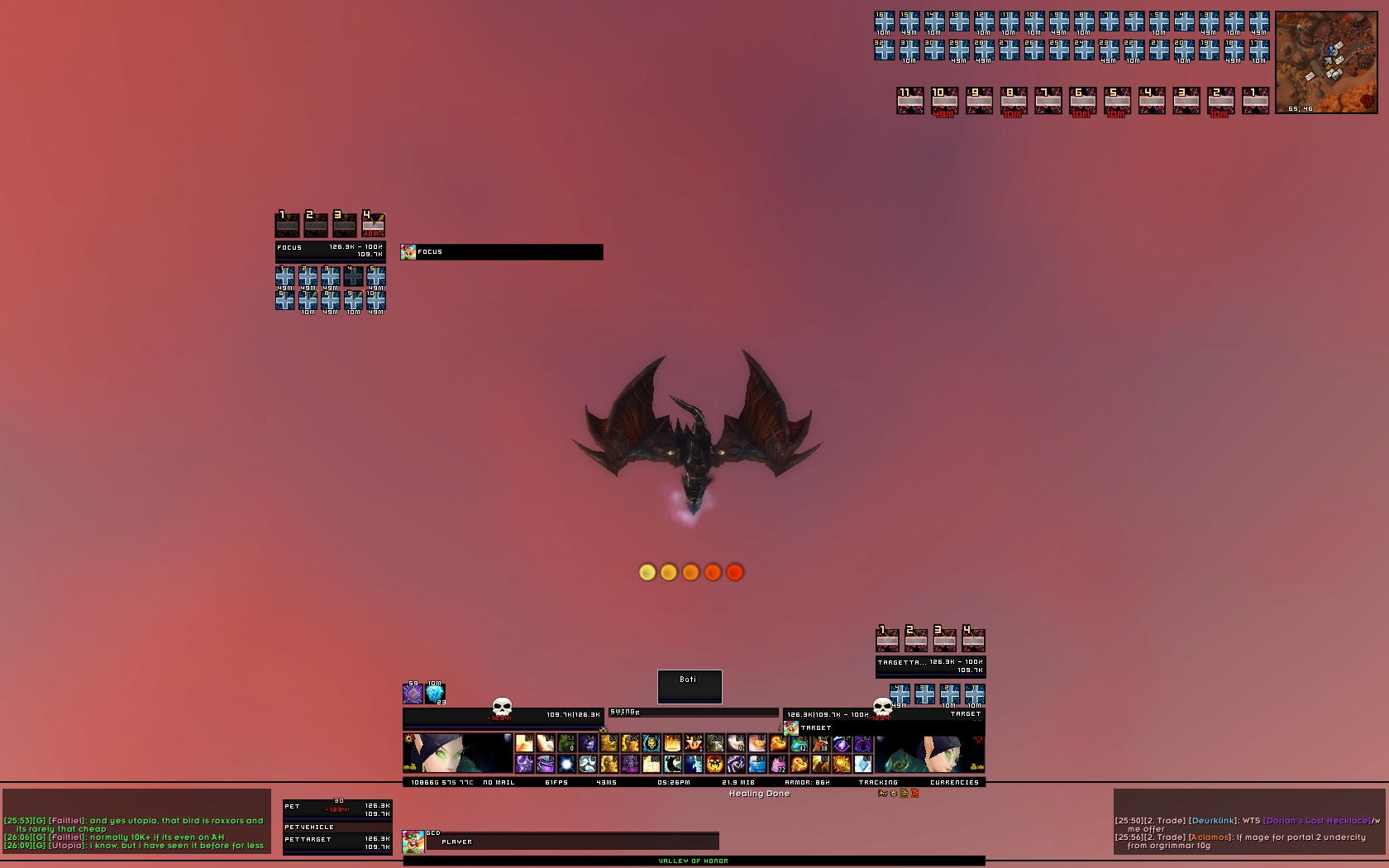
Focus+target casting
Click to enlarge
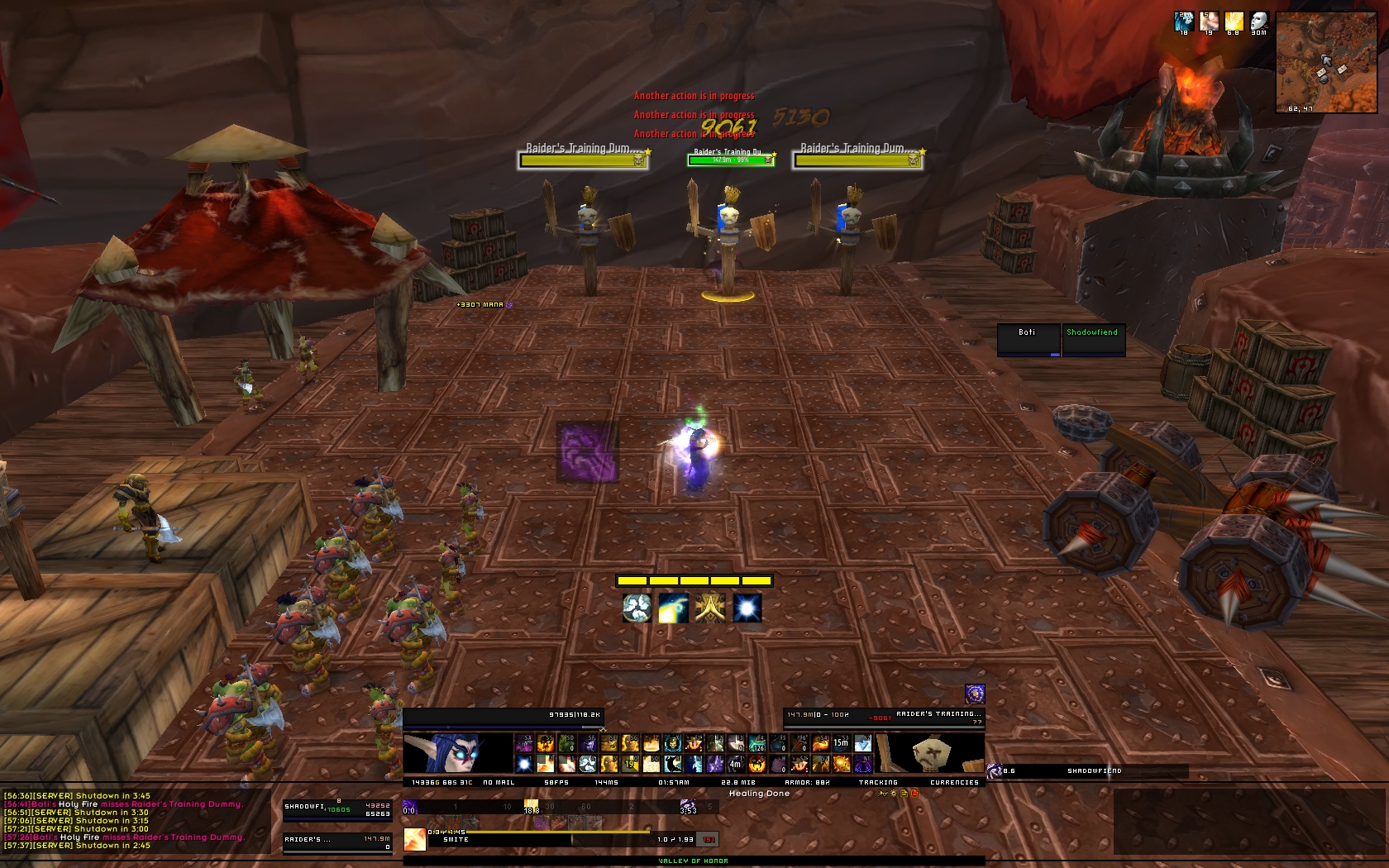
OOC
Click to enlarge
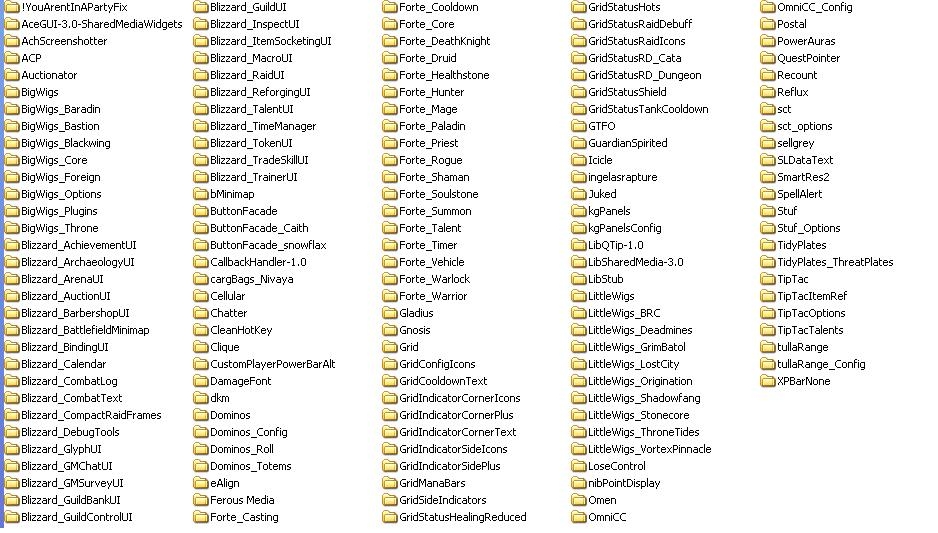
Addons list
Bati's UI

Feel free to visit my blog : http://holynovanow.wordpress.com/
Soon here will be hosted my UI.

NOTE : If you get errors from Surge track, pls update it, but if you hate the random sounds (hope the guy that creat this will change soon) you will need to select none each time you log in. Right click on the icon from the minimap button bar and in the meniu, go to general. Sounds are at the bottom. Select none... (sorry again for this). Will try to replace it soon if is still causing those sounds.

To complete some requests i have did some changes.
- added questhelper (you will need to enable if you gonna use it)
- added xpbarnone (you will need to enable if you gonna use it)

Code:
/xpbn config
- added actionator (you will need to enable if you gonna use it)

- added Gladius and Gladimish

Resolution is 1680*1050 and i won't do other versions because my free time is limited, but i will update this since i actually need it.

How?
1. Back up your Font, Interface and WTF folder and delete them from WoW directory
2. Unzipp Bati UI_v2 in your WoW directory
3. Rename in WTF folder:
- Your Account Name Here ex: ALLEX24
- Your Server Name Here ex: Shadowsong
- Your Character Name Here ex: Miruna
4. Log in and type: /reflux switch Bati3 - case sensitive
5. In case u are using v1 or for any reason u will download that one the command is /reflux switch Bati case sensitive
6. In case u are using v2 or for any reason u will download that one the command is /reflux switch Bati2 case sensitive

What If?
After I did the UI I did test it and a few things might not show as you can see in the print screens:
1. If mini map button bag and pvp icon will be lost on the screen (some where middle right) just take it like you can see here (left click on it and drag it):


2. Chat window might be not in place. If is so unlock the window, resize it and place it like u see in the print screens. All the other settings are like mine.
3. Chat window has another color. Just right click on chat tab, then on color square and set to zero the transparency.


Everything else should be in place, but, if something is not wright pls don't hesitate to post about it and I will see what I can.
Also, provide a print screen with what is wrong and be sure u did everything u read above.


Addons: see picture below pls.
Note: All the credit for mods are given to the ones that actually made them. All I have done was to put them together.

Don't update
- Shared Media (u will loose a lot of borders, textures, fonts)
- Forte Exorcist (or, if you do, only take the 3 parts I use: Casting, Cooldown, Core)
- GridStatusRaidIcons because I modified it a bit so will be more visible. Instead of transparency 0.4 is 0.9.
Code:
/grid config
-> Profiles
Grid has a few profiles:
-bati 3 is for a dps class and is positioned bottom left, above chat.
-Bati 10 is for a 10 man raid with frames a bit bigger
-Bati 25 is for 25 man raids and frame's dimensions are a bit changed (has raid icons)
-Bati 225 is for 25 man raids and frame's dimensions are a bit changed
Just load what profile u want to use.

Action bars
As you can see I only have 15 buttons showed. Stance bar is hiden on the right hand side of the main action bar. You will be able to see it with mouse over it. Same for micromenu (bottom right corner of the screen).
Minimap Button Bag will have a small icon for Dominos. What you can do:

* Left Click = configuration mode
* Shift + Left Click = Binding mode
* Right Click = Option Menu

When you have the bars on your screen you can (need to be with mouse over them):

* Right Click = to configure (a small window will open)
* Middle Click = hide/show
* Mouseweel = set opacity

So... if you want to sort your spells/actions and bindings go on Minimap Button Bag and select the icon for Dominos
- Left Click = configuration mode then go on each bar you want to have it visible and Middle Click = hide/show
- close the configuration mode, put your spells there and go on Minimap button bag and select the icon for Dominos
- Shift + Left Click = Binding mode, so now you can set your bindings.
When you are done close biding mode and go on Minimap Button Bag and select the icon for Dominos
-Left Click = configuration mode, then go on each bar you want to have it hide and Middle Click = hide/show


This is not a light UI. Normally should be 16 Mib but in raids will go pretty high if u don't reset Recount but will stay medium at 19-20 Mib.


  Change Log - Bati's UI
Version 3.1

-added questhelper (you will need to enable if you gonna use it)
-added xpbarnone (you will need to enable if you gonna use it)
Code:
/xpbn config
-added actionator (you will need to enable if you gonna use it)[/color]
-added Gladius and Gladimish
-updated a few Addons

--------------------------------------------------------
-----------------------------------------------------------------------------------
--------------------------------------------------------

Version 3

-added Class timers
-removed class modules from ForteExorcist
-redid the unit frames
-updated a few mods

--------------------------------------------------------
-----------------------------------------------------------------------------------
--------------------------------------------------------
Version 2

Removed a few mods that was tacking unecesary space.
Changed
Bartender with Dominos, (u will have 3 more visible buttons, stance bar (right to action bar 1. u can see it with mouse over it. Drag your stances there)
AZCast Bar with Castbars,
sMinimap with PocketPlot,
Combuctor with Bagnon ( i have noticed a bug to combuctor so i replace it)

Added:
SurgeTrack (works not only for priests)
Raid target icons
Party for 5 players grup. U will need to enable it alone.
Interface/addons/stuf
-go to party 1 (uncheck Hide) - same for all 5 frames. (party 2, party 3, party 4)
  Archived Versions - Bati's UI
File Name
Version
Size
Author
Date
v2
30MB
Bati
10-13-2009 05:01 PM
v1
29MB
Bati
10-04-2009 09:12 AM
  Comments - Bati's UI
Post A Reply Comment Options
Old Today, 02:08 AM  
Vânîøn
A Kobold Labourer

Forum posts: 0
File comments: 6
Uploads: 0
Re: Re: Focus Annoying

Quote:
Originally posted by Bati
@ Vânîøn
Go in Interface->Addons-> aSettings-> open the lua file. Just delete the line with local AcceptInvites = true
thx for the fast help btw thx for uploading your UI... Great Work I Love it
__________________


Vânîøn is offline Report comment to moderator   Edit/Delete Message Reply With Quote
Old Yesterday, 12:42 AM  
Bati
A Murloc Raider

Forum posts: 9
File comments: 98
Uploads: 1
Re: Focus Annoying

Quote:
Originally posted by Garthok1106
just wondering if you are having a problem with your focus target aswell, whenever i try to set a focus it says "***TaintForced***" is blocking the action, i click to disable and reloadui but i still get the same error message
No unit mod will work with focus from right clicking the target.
If you want to set focus get a macro with /focus.
Problem solved.

@ Vânîøn
Go in Interface->Addons-> aSettings-> open the lua file. Just delete the line with local AcceptInvites = true
Bati is offline Report comment to moderator   Edit/Delete Message Reply With Quote
Old Yesterday, 12:17 AM  
Vânîøn
A Kobold Labourer

Forum posts: 0
File comments: 6
Uploads: 0
aSettings?

Hey,

is there a Config Screen for the addon aSettings? i wont to turn that auto accapt invite off...

sry for my englisch xD im from Germany
__________________


Last edited by Vânîøn : 11-21-2009 at 12:18 AM.
Vânîøn is offline Report comment to moderator   Edit/Delete Message Reply With Quote
Old Yesterday, 05:26 PM  
Garthok1106
A Kobold Labourer

Forum posts: 0
File comments: 3
Uploads: 0
Focus Annoying

just wondering if you are having a problem with your focus target aswell, whenever i try to set a focus it says "***TaintForced***" is blocking the action, i click to disable and reloadui but i still get the same error message
Garthok1106 is offline Report comment to moderator   Edit/Delete Message Reply With Quote
Old 11-20-2009, 12:27 AM  
Bati
A Murloc Raider

Forum posts: 9
File comments: 98
Uploads: 1
Quote:
Originally posted by whiLd
First off I love the UI.
I have a quick question.
I am unable to right click the target's portrait and inspect the target.

When I right click there is an option to inspect, but when I click it, nothing happens.

What do I need to do to inspect a target?
Hey there and ty for your love:P
Anyway, to answer you: i specially log this morning to see if I can inspect and it works... I have no idea why is not working for you. No one else reported this till now, so maybe try to reinstall the pack...? or just Stuf and the lua file.
Bati is offline Report comment to moderator   Edit/Delete Message Reply With Quote
Old 11-19-2009, 10:28 PM  
whiLd
A Kobold Labourer

Forum posts: 0
File comments: 1
Uploads: 0
First off I love the UI.
I have a quick question.
I am unable to right click the target's portrait and inspect the target.

When I right click there is an option to inspect, but when I click it, nothing happens.

What do I need to do to inspect a target?
whiLd is offline Report comment to moderator   Edit/Delete Message Reply With Quote
Old 11-19-2009, 04:19 AM  
Bati
A Murloc Raider

Forum posts: 9
File comments: 98
Uploads: 1
Quote:
Originally posted by ralisk
Which addon is announcing castings in raid / BG chat?

For example: " << Cast Pain Suppression on Ashei, last 8 seconds! >>

Thanks, sorry for all the newb questions :P
Is Guardian Spirited
Bati is offline Report comment to moderator   Edit/Delete Message Reply With Quote
Old 11-19-2009, 03:27 AM  
ralisk
A Kobold Labourer

Forum posts: 0
File comments: 11
Uploads: 0
Which addon is announcing castings in raid / BG chat?

For example: " << Cast Pain Suppression on Ashei, last 8 seconds! >>

Thanks, sorry for all the newb questions :P
ralisk is offline Report comment to moderator   Edit/Delete Message Reply With Quote
Old 11-18-2009, 07:54 AM  
ralisk
A Kobold Labourer

Forum posts: 0
File comments: 11
Uploads: 0
Re: Re: Health bars above characters...

Quote:
Originally posted by Bati
what bars? You mean the nameplates?
Would like to see a print screen but first try "Ctrl+V" when you are in game.
That will disable the name plates for friendly targets. If you problem is enemy targets then press "V"
It was the name plates :P I have never used those before! lol

Thank you!
ralisk is offline Report comment to moderator   Edit/Delete Message Reply With Quote
Old 11-18-2009, 07:25 AM  
Bati
A Murloc Raider

Forum posts: 9
File comments: 98
Uploads: 1
Re: Health bars above characters...

Quote:
Originally posted by ralisk
When I log onto my priest I see all these bars over peoples heads, is there a way to disable them?

Thanks!
what bars? You mean the nameplates?
Would like to see a print screen but first try "Ctrl+V" when you are in game.
That will disable the name plates for friendly targets. If you problem is enemy targets then press "V"
Bati is offline Report comment to moderator   Edit/Delete Message Reply With Quote
Old 11-18-2009, 07:06 AM  
ralisk
A Kobold Labourer

Forum posts: 0
File comments: 11
Uploads: 0
Health bars above characters...

When I log onto my priest I see all these bars over peoples heads, is there a way to disable them?

Thanks!
ralisk is offline Report comment to moderator   Edit/Delete Message Reply With Quote
Old 11-15-2009, 10:26 AM  
Bati
A Murloc Raider

Forum posts: 9
File comments: 98
Uploads: 1
how the unit frames from stuf works:
- are 4 areas (that i have active):
- clickeble area
- healt bar
- mana bar
- portrait
Clickeble area is under all the mentioned frames, so yes, i could make it to have the portrait included but that will leave a big part empty and still active.
Bati is offline Report comment to moderator   Edit/Delete Message Reply With Quote
Old 11-15-2009, 10:23 AM  
Bati
A Murloc Raider

Forum posts: 9
File comments: 98
Uploads: 1
Quote:
Originally posted by Anafi
And the First Aid problem?
I can't heal by clicking on player's portrait :/
well feed and inner fire are settled with satrina buff frame so are not related with Stuf. Thats why they stay.
About clicking on portret... do you have some hiden bars under it? first aid pannel... i find it really strange.
or.... you might have in that area track button (invisible) it happen from simple minimap sometimes to be lost on the screen. and, why would you heal by clicking on portrait? The area where the stuf is active are healtbar and mana bar. You won't be able to select the player from portrait. Only from healt and mana bar.

Last edited by Bati : 11-15-2009 at 10:29 AM.
Bati is offline Report comment to moderator   Edit/Delete Message Reply With Quote
Old 11-15-2009, 10:01 AM  
Anafi
A Kobold Labourer
 
Anafi's Avatar

Forum posts: 0
File comments: 4
Uploads: 0
Quote:
Originally posted by Bati
Hello Anafi

1. In the character sheet, before you enter in game go to add-ons and uncheck: stuff raid and stuff raid options.
2. the mail is from simple minimap. You should be able to drag it over the minimap. I d'ont know whay it's still appearing. It shouldn't. Just... find it a place on the minimap I guess.
And the First Aid problem?
I can't heal by clicking on player's portrait :/
Anafi is offline Report comment to moderator   Edit/Delete Message Reply With Quote
Old 11-15-2009, 08:05 AM  
Bati
A Murloc Raider

Forum posts: 9
File comments: 98
Uploads: 1
Quote:
Originally posted by Anafi
Hey Batì, another time me.

I got a little problem: http://img21.imageshack.us/img21/1152/problemle.jpg
When im in a bg they appear in my screen I've moved them but i don't know how to remove them.
Other two little problems that doesn't matter a lot:
Well Fed and inner fire doesn't disappear when ooc, and,
when i click on my portrait or on a player frame opens the Firt Aid panel,
it is normal?

Sorry for my english, thank you for share this wonderful UI.
ànafi
Hello Anafi

1. In the character sheet, before you enter in game go to add-ons and uncheck: stuff raid and stuff raid options.
2. the mail is from simple minimap. You should be able to drag it over the minimap. I d'ont know whay it's still appearing. It shouldn't. Just... find it a place on the minimap I guess.

Last edited by Bati : 11-15-2009 at 08:07 AM.
Bati is offline Report comment to moderator   Edit/Delete Message Reply With Quote
Post A Reply


Category Jump:


The Network:
EQInterface | EQ2Interface | LoTROInterface | MMOInterface | War.MMOUI | WoWInterface | VGInterface | Allakhazam | Thottbot | Wowhead | Zam


©2009 MMOUI / ZAM Network
vBulletin - Copyright ©2000 - 2009, Jelsoft Enterprises Ltd.


