Category: Combat Mods
Addon Information
Works with 3.2
Download Latest Version.
To add favorites please register for a free account. If you already have one you need to login. How do I install this? (FAQ)
Author:
Version:
1.0
Date:
10-04-2009 01:11 PM
Size:
317.77 Kb
Downloads:
400
Favorites:
17
MD5:
Pictures
Click to enlarge
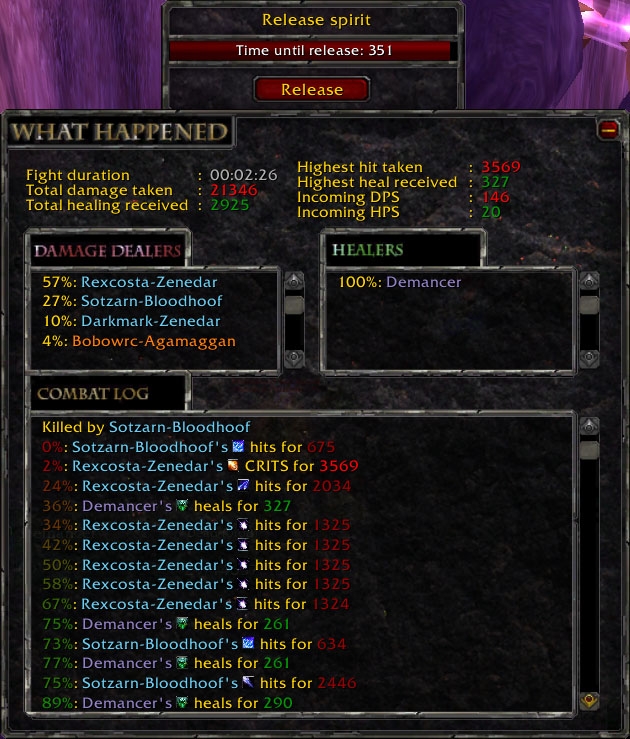
WhatHappened main view
WhatHappened
Ever died in 0.2 seconds and wondered what the heck happened? Tried using the "What happened to me?" in the combat log but ended up with sixty lines of "x gains 2 mana from y"?

WhatHappened gives you a fast summary of all the damage and healing on you in your last fight without any other events getting in the way.

It also customizes your resurrection dialogues, among other things it keeps track of who is starting to resurrect you, giving you the time left on the cast and who is doing it.

Usage

Install, fight, and die. WhatHappened will show a summary of the specifics resulting in your death.

WhatHappened comes with a mini-map icon which you can click to always have access to data about your latest death. You can also turn off automatic showing of the info screen and simply click the mini-map icon when you want the info.

For settings type /wh or /whathappened, or right-click the mini-map icon.

What WhatHappened does not do

WhatHappened does not give any information about damage you or any friendly players did. It also does not give information about damage done to friendly players or pets.

It simply registers damage and healing done to you. Nothing more nothing less.

Disclaimer

This addon has been under testing for a few weeks now and there should be no serious problems. However there might be some occassional inconsistencies with recorded data, so I'd appreciate reports on any weird behaviour.

Known issues

There are still some instances where the source name can not be found (I've had it happen on rare occasions on some boss fights). This will be fixed with the next update.

This problem is "cosmetical" (does not effect the functionality of the addon) but can give many error messages. If this happens, for now simply turn off lua-errors in the interface settings (of WoW) and you won't notice it.
  Optional Files - WhatHappened
Sorry, there are currently no optional files available.
  Comments - WhatHappened
Post A Reply Comment Options
Old 11-07-2009, 09:12 PM  
Zlaire
A Kobold Labourer
Interface Author - Click to view interfaces

Forum posts: 0
File comments: 3
Uploads: 1
Re: Re: Re: Re: Font and Fontsize

Quote:
Originally posted by bvcyp
Will you upload a new version soon?
Should be coming any day now.. working on a weird little bug that happens under certain circumstances (no damage/healing is recorded, or most of it missing).

Only happens when testing on my druid.

As soon as I find and fix that I'll get the new version out.
Zlaire is offline Report comment to moderator   Edit/Delete Message Reply With Quote
Old 10-26-2009, 01:58 PM  
bvcyp
A Kobold Labourer

Forum posts: 0
File comments: 18
Uploads: 0
Re: Re: Re: Font and Fontsize

Will you upload a new version soon?


Quote:
Originally posted by Zlaire
I found the problem. It seems I used the name "CombatTextFont" for the text in the combat log.

But that name collides with the internal "CombatTextFont" of WoW, so if you change the size of the combat text in WoW (using some other addon which I assume you've done) you will change the size of WhatHappened's text as well.

I will upload a fix for this shortly.

(if you want to fix it yourself right away you can open the whathappened.xml and replace all CombatTextFont (there should be 4) with something like WhatHappened_CombatTextFont instead and the problem will go away).

Thanks for the report, stuff like this is hard to find when testing yourself.
bvcyp is offline Report comment to moderator   Edit/Delete Message Reply With Quote
Old 10-05-2009, 03:04 PM  
Zlaire
A Kobold Labourer
Interface Author - Click to view interfaces

Forum posts: 0
File comments: 3
Uploads: 1
Re: Re: Font and Fontsize

I found the problem. It seems I used the name "CombatTextFont" for the text in the combat log.

But that name collides with the internal "CombatTextFont" of WoW, so if you change the size of the combat text in WoW (using some other addon which I assume you've done) you will change the size of WhatHappened's text as well.

I will upload a fix for this shortly.

(if you want to fix it yourself right away you can open the whathappened.xml and replace all CombatTextFont (there should be 4) with something like WhatHappened_CombatTextFont instead and the problem will go away).

Thanks for the report, stuff like this is hard to find when testing yourself.

Last edited by Zlaire : 10-05-2009 at 03:11 PM.
Zlaire is offline Report comment to moderator   Edit/Delete Message Reply With Quote
Old 10-05-2009, 02:38 PM  
Zlaire
A Kobold Labourer
Interface Author - Click to view interfaces

Forum posts: 0
File comments: 3
Uploads: 1
Re: Font and Fontsize

Quote:
Originally posted by bvcyp
[b]Dear Addoncreator! :-)

I just downloaded your addon, I like it. But I need to know, where I can change the font / and especially the font SIZE!
Wow that's weird. I'll take a look at it right away.

Last edited by Zlaire : 10-05-2009 at 02:38 PM.
Zlaire is offline Report comment to moderator   Edit/Delete Message Reply With Quote
Old 10-05-2009, 11:45 AM  
bvcyp
A Kobold Labourer

Forum posts: 0
File comments: 18
Uploads: 0
Question Font and Fontsize

Dear Addoncreator! :-)

I just downloaded your addon, I like it. But I need to know, where I can change the font / and especially the font SIZE!

Take a look:

bvcyp is offline Report comment to moderator   Edit/Delete Message Reply With Quote
Post A Reply


Category Jump:


The Network:
EQInterface | EQ2Interface | LoTROInterface | MMOInterface | War.MMOUI | WoWInterface | VGInterface | Allakhazam | Thottbot | Wowhead | Zam


©2009 MMOUI / ZAM Network
vBulletin - Copyright ©2000 - 2009, Jelsoft Enterprises Ltd.


