Category: Data Mods
Addon Information
Works with 3.2
Download Latest Version.
To add favorites please register for a free account. If you already have one you need to login. How do I install this? (FAQ)
Author:
Version:
1.0
Date:
10-14-2009 10:10 PM
Size:
11.66 Kb
Downloads:
230
Favorites:
16
MD5:
Pictures
Click to enlarge
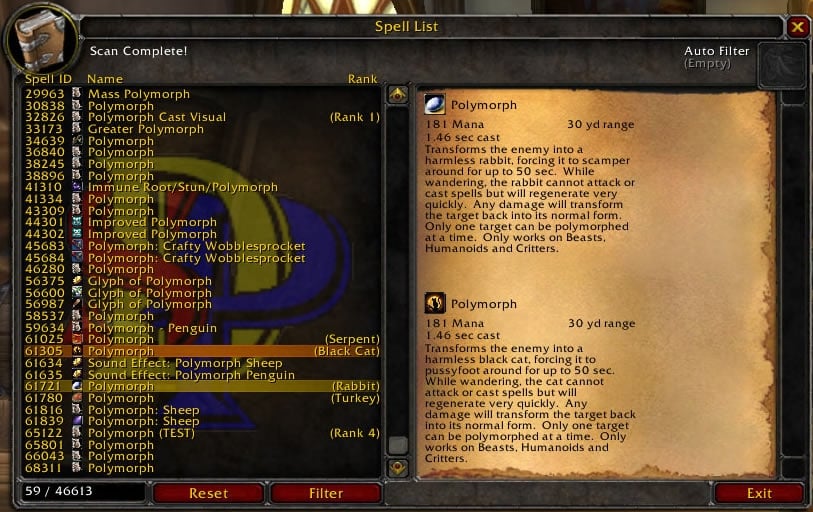
Spell List Frame
Spell List
SpellList can be accessed by typing /SpellList or /SL
For a list of commands, type "/SL help"


-===- Scanner -===-
SpellList is coded with a live scanner and filtering algorithm that uses FPS limit code to throttle itself to an acceptable rate.
This rate can be adjusted, but changes don't carry over between sessions.


-===- Display -===-
Spells shown in the list can be selected to keep its description in the details pane.
This allows you to mouseover another spell and compare descriptions for both spells.
Spells can also be linked into chat by Shift-clicking it in the list.


-===- Filtering -===-
Filtering can be done either by command line, using the filter text box that appears after clicking
the "Filter" button on the SpellList Window, or dropping a spell or item into the auto filter box in
the top right corner of the SpellList window.

Filter Inputs:
Auto Filter Box - Any item or spell can be dropped into this area to start. Note only items with a use effect have a spell attached to it. If an item given doesn't have a spell attached, the filter will be set to the item's name.
Filter Text Box - Spell ID or Name may be given. To look for a specific rank of a spell, you must supply the name in the format, "Spell Name(Rank #)". This is the same format accepted by the /cast command. If an empty rank "()" is provided, the filter will search for spells matching the name given, if any, with no rank.
Command Line - The command line system is able to set the filter using the same rules as the Filter Text Box by using "/SL filter". This method also allows the use of spell and item links, using the same rules for the respective spell or item as the Auto Filter Box. Using the command line input for the filter will automaticly show the SpellList window. Note linking an item that you do not have may not detect the spell on it. This is a limitation on the game client and not anything I have any control over.

If the filter is supplied with an empty string or the Auto Filter Box is clicked without the cursor holding something, the filter will reset and display all spells found in the database. Alternatively, you may type "/SL reset" to clear the filter.
  Comments - Spell List
Post A Reply Comment Options
Old 10-15-2009, 02:22 PM  
SDPhantom
A Deviate Faerie Dragon
 
SDPhantom's Avatar
Interface Author - Click to view interfaces

Forum posts: 12
File comments: 8
Uploads: 7
Quote:
Originally posted by vard
Does the addon work with all class spells, or just the one you're playing?
It doesn't matter what class you're playing. The scanner doesn't care what's in your spellbook. It scans through a range of spell IDs and asks the game client what spell is associated with each ID. If the client responds with a spell, the addon stores it in its list. Most of these spells are abandoned spell prototypes, quest triggers, and crafting recipes along with item, mob, class, and talent effects.
__________________
Quote:
Use at your own risk, but if anything serious should happen, blame Blizzard's crappy script engine.
SDPhantom is offline Report comment to moderator   Edit/Delete Message Reply With Quote
Old 10-15-2009, 11:33 AM  
vard
A Kobold Labourer

Forum posts: 0
File comments: 35
Uploads: 4
Does the addon work with all class spells, or just the one you're playing?
vard is offline Report comment to moderator   Edit/Delete Message Reply With Quote
Old 10-15-2009, 03:32 AM  
Zveroboi
A Murloc Raider

Forum posts: 5
File comments: 58
Uploads: 0
So, it looks like my manyaly filtering SBF going to be much more comfortable? thx a lot.
__________________
Yes, my english = worst english ever...sry
Zveroboi is offline Report comment to moderator   Edit/Delete Message Reply With Quote
Post A Reply


Category Jump:


The Network:
EQInterface | EQ2Interface | LoTROInterface | MMOInterface | War.MMOUI | WoWInterface | VGInterface | Allakhazam | Thottbot | Wowhead | Zam


©2009 MMOUI / ZAM Network
vBulletin - Copyright ©2000 - 2009, Jelsoft Enterprises Ltd.



