*** Version 1.6.1 is temporarily unavailable while I work on a new version. In the interim, you can still download version 1.4. ***
This addon accelerates key bindings so that they are activated by key press rather than key release. This allows you to activate your abilities faster than you could otherwise. This can really make a difference for situations where you need to react quickly, like when casting heals, when dispelling, when interrupting spells, or in PvP. In these situations, the addon can have an effect similar to reducing your network latency by 100ms. Of course, the exact impact depends entirely upon how much time you personally spend between key press and release.
"Dude, this addon is going to increase my DPS by so much!" No, it's not. DPS rotations (or even priority systems) are not to any great extent affected by latency. Because they're predictable, good players can anticipate what's coming next and compensate for latency. In fact, if you're a good player who is already compensating for the press-to-release latency, you may actually find that your DPS goes down when you first use this addon until you learn to readjust to the reduced latency. Find a target dummy and practice your rotation until you're comfortable with the changed timing.
Configuration
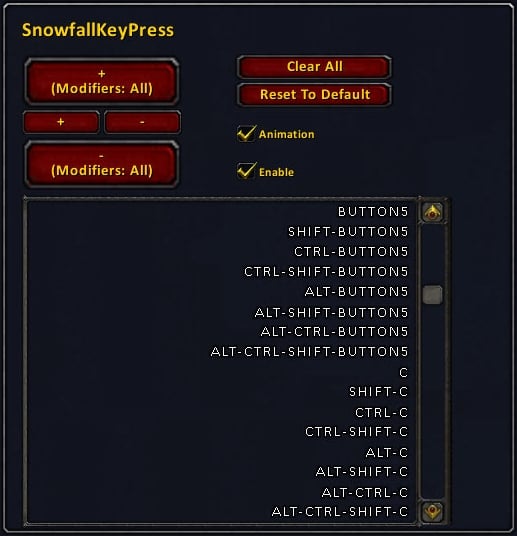
There is an in-game configuration GUI accessible through the usual Options->Interface->Addons menu. From this panel, you can add or remove keys and mouse buttons to be accelerated. You can also globally enable or disable all key acceleration.
The GUI provides exceptionally fast entry--you can enter your whole keyboard in seconds and all your mouse buttons in a few more seconds. The easiest way to understand this GUI is to start by hitting the "Clear All" button and then adding and removing some keys. In order to add just one key or mouse button, hover over the "+" button and type the key or press the mouse button (including whatever modifiers you desire). In order to remove that key, hover over the "-" button and type that same key with its modifiers. In order to enter all 8 of a key's modified and unmodified combinations with just one key press, hover over the "+ (Modifiers: All)" button and type the key.
If you want to do mass entry of modified and unmodified keys and mouse buttons, hit the "Clear All" button. Then hover over the "+ (Modifiers: All)" button and face-roll your way across keyboard and mouse buttons. You're done.
The default configuration accelerates all the modified and unmodified keys on a standard 104-key US keyboard (except PRINTSCREEN) plus mouse buttons 3-5. If you'd like to get back to this configuration at any time, simply hit the "Reset To Defaults" button.
Mouse Buttons
SnowfallKeyPress accelerates key bindings of mouse buttons, but it doesn't accelerate mouse button clicks that interact directly with frames without any associated key binding. This means that although SnowfallKeyPress is compatible with click-casting addons like Clique and Vuhdo, it won't accelerate their mouse clicks. Vuhdo already provides its own mouse click acceleration, though, and perhaps Clique will at some point, as well. Until then, you can add support yourself by navigating to Interface\Addons\Clique, editing Clique.lua and CliqueOptions.lua, searching for instances of "AnyUp", and replacing them with "AnyDown".
Mouse scroll-wheel bindings do not need any acceleration, so don't be concerned that SnowfallKeyPress offers no way to accelerate them. Each "tick" of the mouse scroll wheel is, in effect, already a simultaneous press and release.
Reduced the size of the default button animation by 25%, which should help keep it from obscuring other indicators on buttons.
Added the ability for other addons to customize the SnowfallKeyPress button animations. An example is included.
Removed the deprecated Lua configuration capability (the SnowfallKeyPressSettings folder). This functionality was superseded by the in-game GUI in version 1.2, so it's not needed any longer.
Added button press animations (enable or disable through the configuration panel).
Made some infrastructure changes that should be invisible to the user, but which should improve compatibility with addons written in the future that may have more complex behaviors than we generally see in addons today.
i've noticed an issue in v1.6.1.
bartender's keybinds isn't accelerated. only 1st bar accelerated (got animation and button push reaction) but not the others. i think it's caused by bartender's specific keybindings, because when you bind 1st bar using bartender it binds Blizzard's keybindings (Action Button 1 and so on), but when you binding 2nd and others it uses his owns which you can see in "Key Bindings" menu. Bartender got own submenu in Key Bindings called "Bartender4 Bar "n" "(where "n" - number of the bar).
can you fix it, based on information i've provided?
and sorry for my "english"
i hope u understand what i mean
__________________
Last edited by Deadlycuts : 03-12-2010 at 06:23 AM.
Hi there. Having a strange thing happen with this addon and Bartender on my druid. In moonkin form, when I press my various spell keys (some macros, some straight from spellbook), I keep getting the error message "Must be in cat form". When I disabled Keypress, the problem went away. Any thoughts?
Originally posted by Tanque In addition to being a bit more stable, v1.4 has a much smaller memory footprint than v1.6. I'm kind of glad it was rolled back.
SnowfallKeyPress doesn't track key release at all. That's why I was suggesting just building a timer and setting the button state back to normal after the timer expires (200ms is probably a reasonable time).
You could use the existing AnimationGroups in the SnowfallKeyPressAnimation example and just modify them so that they don't actually animate anything, they just represent timers. Then you could do AnimationGroup:SetScript("OnFinished", SetButtonStateNormal), where SetButtonStateNormal is a function you'd build that in turn called button:SetButtonState("NORMAL"). You'd might also want to point the "OnStop" handler to your same function.
Then you could do AnimationGroup:SetScript("OnPlay", SetButtonStatePushed), where SetButtonStatePushed is a function you'd build that in turn called button:SetButtonState("PUSHED").
On key press, then, you'd do AnimationGroup:Stop() to make sure the previous button was in its normal state, then change the button associated with that AnimationGroup, then do AnimationGroup:Play() to set the state to pushed and then back to normal after the timer expired.
When you get it working, you may want to share it with others on wowinterface. The way I've set up the custom animation facility naturally allows you to just release what you've done as an addon for others to enjoy.
What you'd like to do should be possible using the custom animations facility of SnowfallKeyPress. Have a look at the SnowfallKeyPressAnimation folder. It sounds like you're pretty capable with addon editing, so I'll just try to give you some ideas. You'd probably want to simply call button:SetButtonState("PUSHED") from your SnowfallKeyPress animation handler (instead of having the star animation). You'd also want some means of setting the state back to normal after a delay, so you could either use Blizzard's animation system as a timer with OnFinished as a callback handler, or you could create an OnUpdate function as the timer (probably less efficient). Then when the timer expired, you could call button:SetButtonState("NORMAL").
I'm an experienced coder, but not with lua (I work with perl and php mainly). With the help of your guide/tips I got the PUSHED state to work just fine via the addon, but I'm having troubles finding the event/script to use to track the key release. The "AnyUp" event isn't firing at all. This is an example of the code I'm testing with:
All I want is as you said, PUSHED state while the key is being held down, and NORMAL state when the key is released. I must be ****ing up some pretty basic stuff here, because in my mind this SHOULD work! Any help would be appreciated.
What you'd like to do should be possible using the custom animations facility of SnowfallKeyPress. Have a look at the SnowfallKeyPressAnimation folder. It sounds like you're pretty capable with addon editing, so I'll just try to give you some ideas. You'd probably want to simply call button:SetButtonState("PUSHED") from your SnowfallKeyPress animation handler (instead of having the star animation). You'd also want some means of setting the state back to normal after a delay, so you could either use Blizzard's animation system as a timer with OnFinished as a callback handler, or you could create an OnUpdate function as the timer (probably less efficient). Then when the timer expired, you could call button:SetButtonState("NORMAL").
I hate doing this, but after trying to fiddle around with it myself for a few hours to no avail (your code is pretty obfuscated, no offence :P) I gave up and came here.
I, like some other people I've seen in these comments would like to request a way to add support for (bartender +) ButtonFacade keypress animations in this addon. I'm just too used to the keypress feedback given by my ButtonFacade style/setup, and trying to "re-learn" it with your star animation is proving difficult.
Really appreciate your work, and I hope you won't get too annoyed at my "feature request"!
Hi Jarrot. You could go into Options->KeyBindings and bind a key or mouse button to "Target Mouseover", and this will be by default perform the targeting on key/button press rather than release.
I don't plan to accelerate mouse button clicks directly on frames, because there are many complex behaviors that can occur (selecting, dragging, etc.) that are special cases per addon. It would be better for those addons to decide what mouse clicks to accelerate rather than for special cases for each addon to be included in SnowfallKeyPress.
You have just downloaded by the author . If you like this AddOn why not consider supporting the author? This author has set up a donation account. Donations ensure that authors can continue to develop useful tools for everyone.
*Clicking the donate button above will take you to PayPal.com
*Clicking the donate button above will take you to Pledgie.com


