Download
(58 Kb)
Download
Updated: 02-20-12 03:53 AM
Pictures
File Info
Tested:Hour of Twilight 4.3
Updated:02-20-12 03:53 AM
Created:06-05-10 05:49 PM
Downloads:14,544
Favorites:114
MD5:
This AddOn is 4.3 compatible
PhanxBuffs  Popular! (More than 5000 hits)
Version: 4.3.2.98
by: Phanx, Akkorian
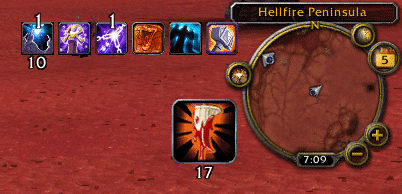
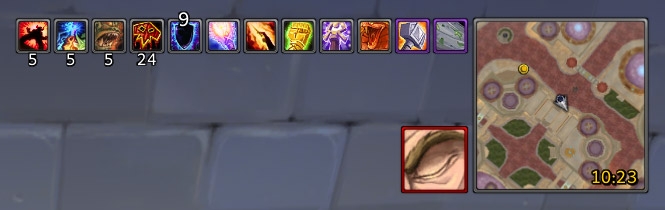
PhanxBuffs is a basic replacement for the default UI’s buff, debuff, and temporary enchant (weapon buff) frames.

It looks and acts basically like the default buff frames, with a few improvements:
  • Buff and debuff icons are sorted by their remaining duration
  • Text timers are shown only when less than 30 seconds remain on the buff or debuff
  • Weapon buff icons can show the spell or item that buffed your weapon, instead of the weapon itself
  • Buff tooltips show the name of the party or raid member who cast the buff on you
  • Buffs or debuffs you never want to see can be hidden (eg. Chill of the Throne)
  • Wrap icons to more than one row, with configurable row lengths
  • Buff and debuff frames are movable
  • Basic configuration options
  • Masque skinning support

Usage

Options are available by typing “/pbuff” or navigating to the PhanxBuffs panel in the standard Interface Options window.

Add a buff/debuff to the ignore list by right-clicking it while holding down the Alt and Shift keys.

Add/remove a buff/debuff to/from the ignore list by typing “/pbuff buff Zomg Uber Buff” or “/pbuff debuff Zomg Evil Debuff”. Buff/debuff names provided with these commands must be properly spelled, capitalized, and punctuated.


Buff Cancelling in Cataclysm

Blizzard added new restrictions on buff cancelling for addons in WoW 4.0. As a result, PhanxBuffs and any other addon which provides a filterable buff display can no longer directly cancel buffs when you right-click on them.

As a workaround, you can cancel buffs while out of combat by right-clicking on them twice. The first time you right-click, a red overlay will appear on the buff. Right-click again to cancel the buff, or left-click to hide the overlay and keep the buff. The workaround also supports removing weapon buffs, and removing debuffs your character can dispel.

If you need right-click buff cancelling in combat, try Aptus Aura Frames, Bison, or NivBuffs.

You could also try my new addon CancelMyBuffs, which provides a slightly different way to cancel buffs quickly.


Localization

PhanxBuffs is compatible with English, Deutsch (deDE), Español (esES/esMX), Français (frFR), Português (ptBR), Русский (ruRU), 한국어 (koKR), 简体中文 (zhCN), and 正體中文 (zhTW) game clients.

PhanxBuffs is currently translated into English, Español, Français, Русский, 한국어, and 正體中文.

Note that the "Show weapon buff sources" option currently does not work in ptBR and zhCN clients, because the requred translations are missing.

If you can provide translations for any locale, please send me a PM.


Feature Requests

If there’s something you’d like to see added to PhanxBuffs, feel free to submit a feature request ticket. Keep in mind, though, that PhanxBuffs is intentionally quite basic. Most requests will probably be declined, especially requests for more detailed configuration options.


Bug Reports

If you encounter a problem with PhanxBuffs, please submit a bug report ticket with the following information:
  • Addon version (ex: 4.0.1.11)
  • WoW client version and locale (ex: 4.0.1 enUS)
  • Description of the problem
  • Steps to reproduce the problem
  • Whether the problem occurs when all other addons are disabled
  • Exact text of any related error messages (WITHOUT lists of local variables or installed addons, please!)
  • Screenshot, if the problem is graphical
Remember to check on your ticket after a few days, as I may need more information or ask you to try a possible solution.
Version 4.3.2.98
  • Fixed some issues with vehicle support

Version 4.3.0.96
  • Repackaged with missing options panel library

Version 4.3.0.95
  • Updated skinning support for Masque (previously ButtonFacade)

Version 4.3.0.92
  • Updated for WoW 4.3
  • Removed support for pre-Cataclysm-only weapon buffs
  • Added partial zhCN translations from wowuicn

Version 4.2.0.87
  • Updated for WoW 4.2
  • Fixed the slash command for (un)ignoring (de)buffs

Version 4.1.0.85
  • Fixed the third weapon enchant icon for rogues
  • Updated the Russian translations


Version 4.0.6.82
  • Fixed the weapon buffs frame error
  • Fixed the Text Outline option
  • Added support for thrown weapon enchants

Version 4.0.6.79
  • Added a Text Size option
  • Added a Max Timer Duration option to change when the timer text is shown
  • Added an Icon Spacing option, and removed the separate Buff Spacing and Debuff Spacing options
  • Added Spanish and Russian translations
  • Fixed weapon enchant detection in Russian clients
  • Changed the Buff Columns and Debuff Columns options to accept values as low as 1

Version 4.0.3.67
  • Try to be smarter about switching to vehicle buffs
  • Make sure the default UI’s “Consolidate Buffs” option is turned off

Version 4.0.3.65
  • Fixed weapon buff tracking for buffs whose tooltip text doesn’t match their spell or item name

Version 4.0.1.61
  • Fixed an issue with some (de)buffs not appearing correctly in combat after using the right-click cancel overlay
  • Fixed an issue with the Debuff Columns setting
  • Switched to per-character storage of (de)buff ignore lists

Version 4.0.1.57
  • Added out-of-combat right-click buff cancel workaround (see description for details)
  • Fixed command-line buff/debuff ignore list management

Version 4.0.1.50
  • Fixed shaman weapon buff sources (spell IDs changed in WoW 4.0)

Version 4.0.1.48-beta
  • Removed buff cancelling in WoW 4.0 for now — see description for details
  • Updated ButtonFacade support

Version 3.3.3.36-beta
  • Added options for buff and debuff icons per row
  • Fixed an error in the ButtonFacade support

Version 3.3.3.35-beta
  • Fixed weapon buffs and vehicle auras when anchored from the left
  • Improved weapon buff and debuff borders for users without ButtonFacade
  • Removed workaround for ButtonFacade skins with missing textures; update to ButtonFacade r320 or higher

Version 3.3.3.32-beta
  • Fixed ButtonFacade border coloring for skins that don't have all the expected texture layers

Version 3.3.3.31-beta
  • Added an option to move the buff and debuff frames
  • Added an option to grow buffs and debuffs from left to right, instead of right to left
  • Improved ButtonFacade border coloring for weapon buffs and typed debuffs
  • Fixed rank detection for weapon buff spells
  • Fixed more font scaling issues

Version 3.3.3.24-beta
  • Fixed font choice not saving properly
  • Fixed debuff stack/timer text size not scaling properly with debuff size
  • Fixed ButtonFacade border coloring for weapon buffs and typed debuffs (to some extent; at least it doesn't trigger errors now)
  • Hide (de)buff stack counts for stacks of one, since there seem to be a number of (de)buffs that don't actually stack but report having one stack

Version 3.3.3.22-beta
  • Added translated weapon buff keywords from wowhead.com for German, Spanish, French, and Russian locales
  • Still need translated weapon buff keywords for Korean, Simplified Chinese, and Traditional Chinese locales
  • Still need translations for the options text for all locales

Version 3.3.3.20-beta
  • Added support for ButtonFacade skinning; requires ButtonFacade r317 or higher
  • Fixed several issues with weapon buff source display

Version 3.3.3.7-beta
  • First public release
Post A Reply Comment Options
Old 01-22-12, 08:15 PM  
Phanx
A Pyroguard Emberseer
 
Phanx's Avatar
AddOn Author - Click to view AddOns

Forum posts: 1163
File comments: 1264
Uploads: 24
Attention Masque users:
The version of Masque on WoWInterface is out of date, and will cause errors with PhanxBuffs.
Please download the latest version of Masque from its WowAce project page:

http://www.wowace.com/addons/masque/files/468-r378/
Phanx is offline Report comment to moderator  
Reply With Quote
Old 01-12-12, 08:38 PM  
Phanx
A Pyroguard Emberseer
 
Phanx's Avatar
AddOn Author - Click to view AddOns

Forum posts: 1163
File comments: 1264
Uploads: 24
Please do not post error messages or other bug reports in comments. Use the bug tracker, as is clearly linked and explained in the addon description.

Originally Posted by 2ndHouse
... the tooltip for Broker LFG when you are in que (the one that shows if you are waiting for a tank, healer, dps) is hidden under my PhanxBuffs ...
Sounds like something that should be addressed in Broker LFG.
Last edited by Phanx : 01-13-12 at 12:55 AM.
Phanx is offline Report comment to moderator  
Reply With Quote
Old 01-12-12, 08:24 AM  
2ndHouse
A Kobold Labourer

Forum posts: 0
File comments: 1
Uploads: 0
Tooltip strata

I'm not really sure if this is a problem with PhanxBuffs or Broker LFG, but the tooltip for Broker LFG when you are in que (the one that shows if you are waiting for a tank, healer, dps) is hidden under my PhanxBuffs. The tooltip needs to be on top of PhanxBuffs. The normal Broker tooltip displays fine (before I joine a que), but once I join the que the tooltip strata changes.
2ndHouse is offline Report comment to moderator  
Reply With Quote
Old 08-27-11, 03:29 AM  
Phanx
A Pyroguard Emberseer
 
Phanx's Avatar
AddOn Author - Click to view AddOns

Forum posts: 1163
File comments: 1264
Uploads: 24
No, and I have no plans to add any such functionality. If you don't care about the buffs enough to see them all the time, just hide them, and/or use any one of the dozens of available addons that tell you what buffs you should have, but don't, based on your current group composition.
Phanx is offline Report comment to moderator  
Reply With Quote
Old 08-26-11, 10:38 AM  
bobbank
A Kobold Labourer

Forum posts: 0
File comments: 54
Uploads: 0
I found this mod to be very lightweight, low CPU usage, and easy to configure.

But I was wonder - is there any way to replicate the new Blizzard functionality of consolidating certain kinds of buffs? I find that saves a huge amount of screen real estate.

Thank you.
bobbank is offline Report comment to moderator  
Reply With Quote
Old 07-02-11, 04:17 PM  
Siannus
A Defias Bandit
AddOn Author - Click to view AddOns

Forum posts: 3
File comments: 49
Uploads: 1
Ok, problem:

Options are available by typing "/pbuff" or navigating to the PhanxBuffs
panel in the standard Interface Options window.


Typing /pbuff gets you: Tyoe /help for a listing of a few commands!

Going into Interface/Addons, PhanxBuffs is not listed.

Edit: NVM, I fixed it. It helps if you delete the old saved variables and reenable it in addons. Doh!
Last edited by Siannus : 07-02-11 at 04:35 PM.
Siannus is offline Report comment to moderator  
Reply With Quote
Old 07-02-11, 10:06 AM  
Siannus
A Defias Bandit
AddOn Author - Click to view AddOns

Forum posts: 3
File comments: 49
Uploads: 1
Originally posted by Akkorian
Version 4.2.0.87
  • Updated for WoW 4.2
I love you man! I so hate the Blizz default and Ill be damned if Im gonna use some over bloated addon to do something so little. This addon youve done is golden to me. Thank you for the update!
Siannus is offline Report comment to moderator  
Reply With Quote
Old 07-01-11, 07:10 AM  
Akkorian
A Flamescale Wyrmkin
 
Akkorian's Avatar
AddOn Author - Click to view AddOns

Forum posts: 107
File comments: 124
Uploads: 2
Version 4.2.0.87
  • Updated for WoW 4.2
__________________
“Be humble, for you are made of earth. Be noble, for you are made of stars.” — Serbian proverb
Akkorian is offline Report comment to moderator  
Reply With Quote
Old 06-30-11, 11:29 AM  
Kiirsten
A Kobold Labourer

Forum posts: 0
File comments: 12
Uploads: 0
is this going to be fixed or shall we change addon?
Kiirsten is offline Report comment to moderator  
Reply With Quote
Old 06-29-11, 06:24 PM  
buffarms
A Kobold Labourer

Forum posts: 0
File comments: 2
Uploads: 0
I too am anxiously awaiting/hoping for a post-patch fix! I miss my pretty big buff blocks.
buffarms is offline Report comment to moderator  
Reply With Quote
Old 06-28-11, 03:59 PM  
Siannus
A Defias Bandit
AddOn Author - Click to view AddOns

Forum posts: 3
File comments: 49
Uploads: 1
Broken

This addon is now broken in 4.2

Would like an update, or a replacement
Siannus is offline Report comment to moderator  
Reply With Quote
Old 05-01-11, 07:50 PM  
ithzor
A Kobold Labourer

Forum posts: 0
File comments: 5
Uploads: 0
Originally posted by Akkorian
Hi ithzor,

There isn’t an option to make the icons grow up instead of down, and I don’t plan to add one right now. You could play around with the positioning math in the “UpdateLayout” functions in the code if you wanted to change it yourself.
I'm looking at it atm and I begin to bleed from my eyes trying to comprehend it . I've read SOME java but I never got any good at it.

So I'm supposed to change something in the anchors and growthAnchors, right? And uh, when you say positioning math, you mean what parameters I give to the function right? (not sure which functions I should give the parameters to either, lol)

I've been googling on SetPoint as well, is that another piece of the puzzle? Not that I fully understood it, but anyway
ithzor is offline Report comment to moderator  
Reply With Quote
Old 05-01-11, 06:31 PM  
Akkorian
A Flamescale Wyrmkin
 
Akkorian's Avatar
AddOn Author - Click to view AddOns

Forum posts: 107
File comments: 124
Uploads: 2
Hi ithzor,

There isn’t an option to make the icons grow up instead of down, and I don’t plan to add one right now. You could play around with the positioning math in the “UpdateLayout” functions in the code if you wanted to change it yourself.
__________________
“Be humble, for you are made of earth. Be noble, for you are made of stars.” — Serbian proverb
Akkorian is offline Report comment to moderator  
Reply With Quote
Old 04-30-11, 06:35 AM  
ithzor
A Kobold Labourer

Forum posts: 0
File comments: 5
Uploads: 0
Growth direction

Yo!

Just wondered if it'd be possible to add if the buffs grow up or down, because as far as I can see you can only change it right from left and always down.

Anyway, thanks for a nice addon =)
ithzor is offline Report comment to moderator  
Reply With Quote
Old 03-15-11, 01:36 PM  
Akkorian
A Flamescale Wyrmkin
 
Akkorian's Avatar
AddOn Author - Click to view AddOns

Forum posts: 107
File comments: 124
Uploads: 2
Hi Mitranim,

I’ll have a new version up in the next few days that fixes this. I don’t have a rogue, so testing the fix is taking a bit of time since I need to wait for friends with rogues to be online and not busy. In the meantime you can download the last version (click on “Other Files” at the top of the page). It will only show you your main hand and off hand poisons, but it should at least work for that.
__________________
“Be humble, for you are made of earth. Be noble, for you are made of stars.” — Serbian proverb
Akkorian is offline Report comment to moderator  
Reply With Quote
Post A Reply


Category Jump:


