Download
(61 Kb)
Download
Updated: 02-19-12 04:46 PM
Pictures
File Info
Tested:Hour of Twilight 4.3
Updated:02-19-12 04:46 PM
Created:06-28-10 04:06 PM
Downloads:12,264
Favorites:56
MD5:
This AddOn is 4.3 compatible
whoa UnitFrames  Popular! (More than 5000 hits)
Version: 4.3.1
by: whoarrior [More]
This addon was inspired by SnowfallUnit from Dayn, but it should stay closer to the original Blizzard UI style.
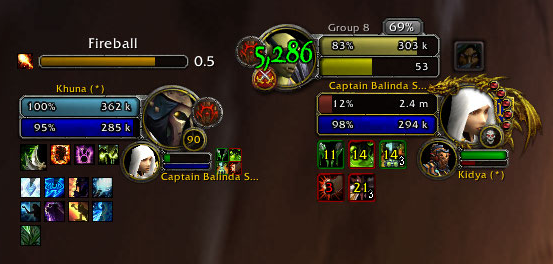
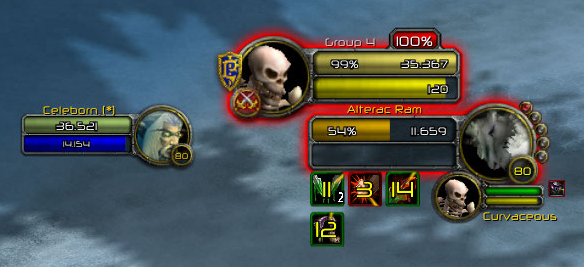
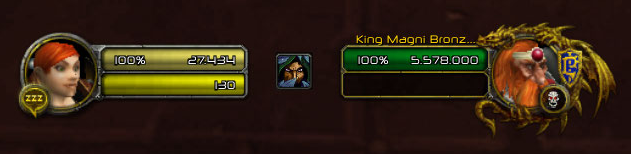
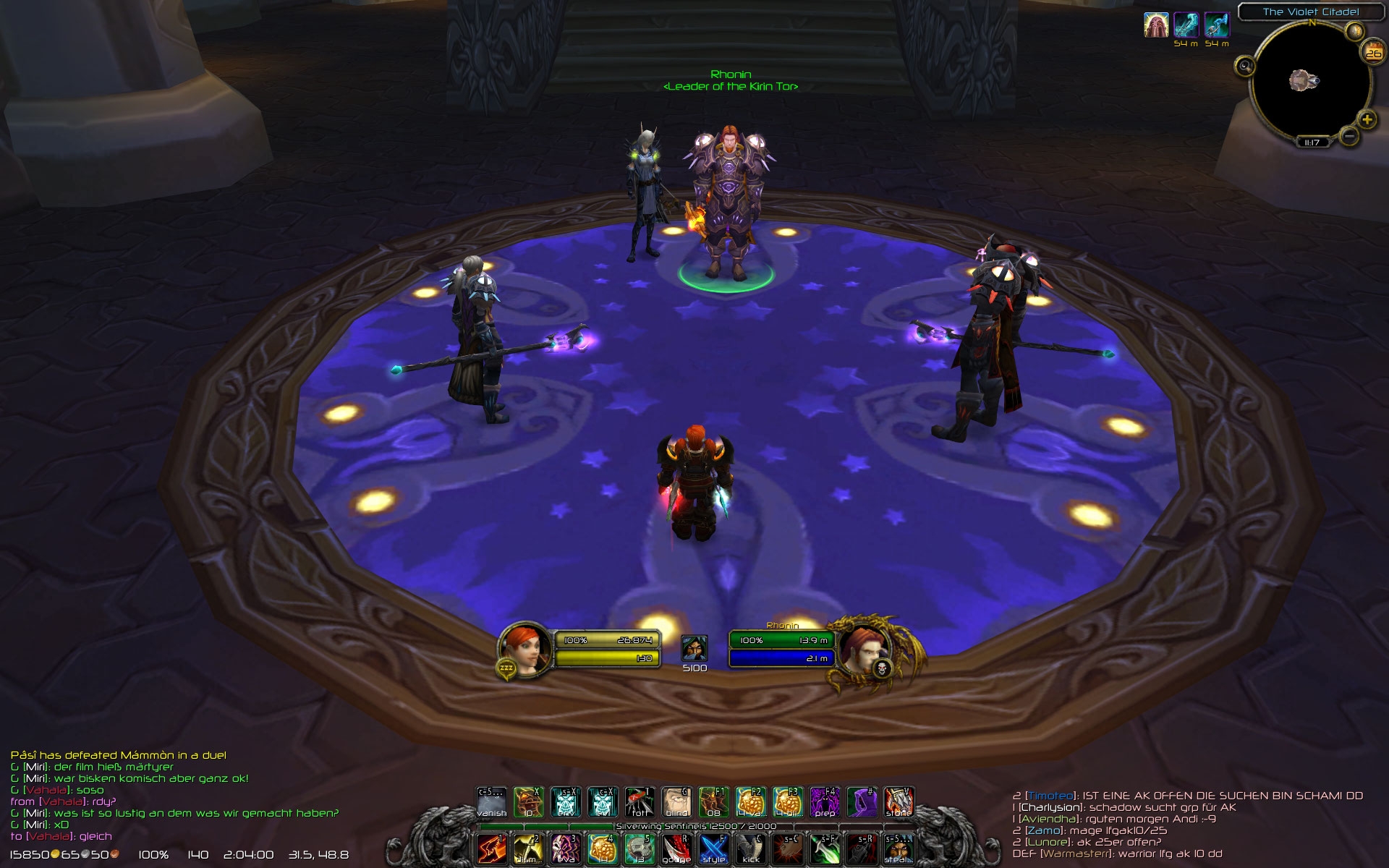
  • modified Blizzard unitframe graphics with fat bars for player-, target- and focusframe
  • uses the normal blizzard configuration
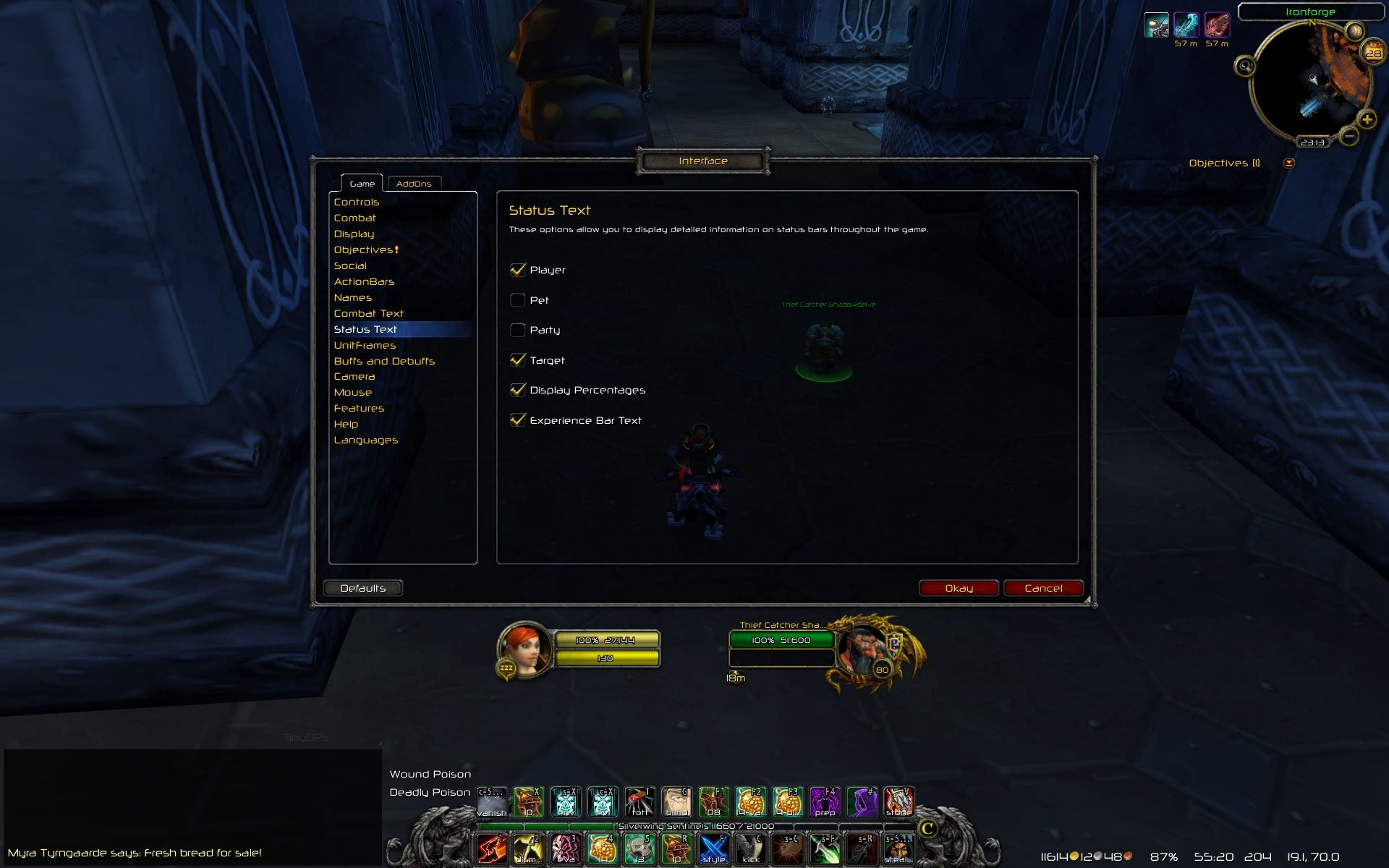
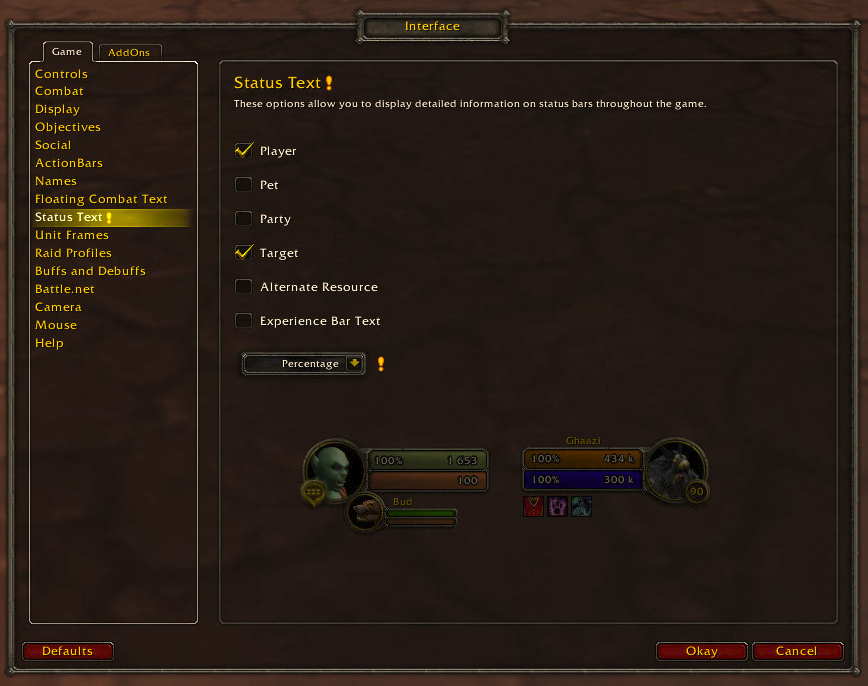
    » interface » game » status text : player, target and display percentages
    » interface » game » unitframes : larger focus frame
  • no gui, configuration in file config.lua (NEW: class specific configuration possible)
  • you can use the standard Blizzard status text or whoaUF custom status text with
    - optional health- and manapoints with 1000 separators
    - optional simple health (rounded health- and manapoints)
    - you can see the percentage and the actual health-/manapoints together, or just the actual health-/manapoints, but you never see the maximum health-/manapoints
    - NEW: optional percentage @manabars
  • threatindicator moved from the target- to the playerframe
  • no charactername visible at the playerframe
  • healthbar classcolored for players and green-yellow-red-grey for npc's
  • you can change the size of buffs/debuffs (target)

HINTS:
  1. You want NO status text at all:
    - disable status text in Blizzard config: » interface » game » status text : player, target
  2. You want the standard Blizzard status text:
    - disable customStatusText in config.lua: customStatusText = false
    - enable status text in Blizzard config: » interface » game » status text : player, target, display percentages
  3. You want the whoaUF custom status text
    - enable customStatusText in config.lua: customStatusText = true
    - enable status text in Blizzard config: » interface » game » status text : player, target, display percentages
  4. You want percentages@manabars
    - same as point 3
    - enable autoManaPercent in config.lua: autoManaPercent = true

(:

P.S. Thanks to Dayn, Evl, Thek, Zork and so on for their great addons.

Code:
FOLDER STRUCTURE

[folder] World of Warcraft

         [folder] Interface

                  [folder] AddOns
         
                           [folder] whoaUnitFrames
                  
                                    [file] config.lua
                                    [file] whoaUnitFrames.lua
                                    [file] whoaUnitFrames.toc

                  [folder] CharacterFrame

                           [file] UI-Player-Portrait.blp
                           [file] UI-Player-Status.blp

                  [folder] TargetingFrame

                           [file] UI-TargetingFrame.blp
                           [file] UI-TargetingFrame-Elite.blp
                           [file] UI-TargetingFrame-PlusMob.blp
                           [file] UI-TargetingFrame-Rare.blp
                           [file] UI-TargetingFrame-Rare-Elite.blp
                           [file] UI-TargetingFrame-RareMob.blp
Version 4.3.1
fixed...
  • the offline text was not displayed
  • the option "buffs on top" @target
Version 4.3 (version number harmonized with game version number)
fixed...
  • performance problems
added...
  • optional percentage for manabars
  • optional use the Blizzard status text
  • class specific configuration possible
Version 1.1
removed...
  • free positioning of player- and targetframe, to fix problems with other addons (you can use any addon which repositions the standard blizzard frames)
added...
  • percentage for the focusframe
  • an option in the config.lua to activate/deactivate thousand separators
  • simple health starts now from 200.000 (if you want to change that value go to whoaUnitFrames.lua line 276)
Version 1.0.5
added...
  • optional simple health (rounded health- and manapoints) => activation in config.lua
Version 1.0.4
added...
  • change the size of buffs/debuffs => editable in config.lua
  • actualization of your target when it get tapped by another player
Version 1.0.3
added...
  • activation/deactivation of classcoloring => editable in config.lua
Version 1.0.2
added...
  • 1000 separator of your choice => editable in config.lua
  • Dead - Ghost - Offline texts => editable in config.lua
Version 1.0.1
fixed...
  • small bars in fat bar graphic if you're in a spike @lord marrowgar
  • playerhealthbarcolor stays green (it should switch to the players classcolor) if you come out of a vehicle as long as you're in combat @gunship battle
  • fixed the position of DK Runes
added...
  • percentage and healthpoints on different frames, for a "better" positioning
Optional Files (0)


Archived Files (8)
File Name
Version
Size
Author
Date
4.3
60kB
whoarrior
12-23-11 05:54 PM
1.1
60kB
whoarrior
02-08-11 11:26 AM
1.0.5
61kB
whoarrior
10-18-10 03:51 PM
1.0.4
62kB
whoarrior
07-12-10 06:12 AM
1.0.3
61kB
whoarrior
07-03-10 12:30 PM
1.0.2
61kB
whoarrior
07-03-10 04:32 AM
1.0.1
61kB
whoarrior
06-30-10 06:30 PM
1.0
60kB
whoarrior
06-28-10 04:06 PM


Post A Reply Comment Options
Old 05-11-12, 10:28 PM  
iammilo
A Kobold Labourer

Forum posts: 0
File comments: 1
Uploads: 0
I like this addon very mucn!
I want to konw how can I change the size of font? My English is poor,sorry...
iammilo is offline Report comment to moderator  
Reply With Quote
Old 04-20-12, 05:48 AM  
Rust
A Kobold Labourer

Forum posts: 0
File comments: 2
Uploads: 0
i will check that later, thanks :*
Rust is offline Report comment to moderator  
Reply With Quote
Old 04-20-12, 04:15 AM  
ckramme
A Chromatic Dragonspawn
 
ckramme's Avatar
AddOn Author - Click to view AddOns

Forum posts: 158
File comments: 150
Uploads: 1
My german is a little rusty, but you can just right-click the portrait and select Unlock. Then move the frame where you want it and the Lock it again.

http://peecee.dk/uploads/042012/WoWS...012_121233.jpg
__________________
55 89 144 233 377 610 987 1597 2584 4181 6765
ckramme is offline Report comment to moderator  
Reply With Quote
Old 04-20-12, 12:53 AM  
Rust
A Kobold Labourer

Forum posts: 0
File comments: 2
Uploads: 0
Position

Hi,

hab mir die Comments schon durchgelesen, finde aber in meiner config.lua keine Zeile wo etwas von Positionen steht :x!
Bitte um Hilfe
Rust is offline Report comment to moderator  
Reply With Quote
Old 04-15-12, 06:00 AM  
ckramme
A Chromatic Dragonspawn
 
ckramme's Avatar
AddOn Author - Click to view AddOns

Forum posts: 158
File comments: 150
Uploads: 1
Scaling

Is there anyway to add scaling to the unitframes?
I looked through the comments and it seems that there at a certain point was scaling, but I just can't find it.
__________________
55 89 144 233 377 610 987 1597 2584 4181 6765
ckramme is offline Report comment to moderator  
Reply With Quote
Old 02-21-12, 10:01 AM  
whoarrior
A Murloc Raider
 
whoarrior's Avatar
AddOn Author - Click to view AddOns

Forum posts: 9
File comments: 37
Uploads: 1
Originally Posted by gr0by
nice work!
can you make the same style for Arena Frame?
/ty
Maybe... i never tought about the Arena Frames.
whoarrior is offline Report comment to moderator  
Reply With Quote
Old 02-21-12, 09:59 AM  
whoarrior
A Murloc Raider
 
whoarrior's Avatar
AddOn Author - Click to view AddOns

Forum posts: 9
File comments: 37
Uploads: 1
Originally Posted by Kasuri
Hi könntest du vllt ne liste von addons machen die du auf dem bildern benutzt? ;D sieht nämlich voll cool aus :3
Viele sind das nicht, um genau zu sein sieht man auf den Bildern neben meinen UnitFrames nur 3 andere Addons. Ich muss auch noch dazusagen, dass alle Bilder mindestens 1 Jahr und älter sind.
1. ein Action Bar Addon wie nMainBar oder TidyBar
http://www.wowinterface.com/download...-nMainbar.html
http://www.wowinterface.com/download...5-TidyBar.html
2. StatBlockCore plus ein paar Data Broker
http://www.wowinterface.com/download...reDisplay.html
http://www.wowinterface.com/downloads/index.php?cid=108
3. irgendein Chataddon, kA welches denn ich komme inzwischen mit dem Standard aus

(:
Last edited by whoarrior : 02-21-12 at 09:59 AM.
whoarrior is offline Report comment to moderator  
Reply With Quote
Old 02-20-12, 08:26 AM  
Kasuri
A Kobold Labourer

Forum posts: 0
File comments: 8
Uploads: 0
Hi könntest du vllt ne liste von addons machen die du auf dem bildern benutzt? ;D sieht nämlich voll cool aus :3
Kasuri is offline Report comment to moderator  
Reply With Quote
Old 02-20-12, 04:07 AM  
gr0by
A Murloc Raider

Forum posts: 4
File comments: 2
Uploads: 0
nice work!
can you make the same style for Arena Frame?
gr0by is offline Report comment to moderator  
Reply With Quote
Old 02-14-12, 03:38 AM  
whoarrior
A Murloc Raider
 
whoarrior's Avatar
AddOn Author - Click to view AddOns

Forum posts: 9
File comments: 37
Uploads: 1
Originally Posted by valodani
Anyone can tell me how can I disable the healing + damage taken shown at the player frame? It is very annoying...
http://www.wowinterface.com/download...ombatText.html

This addon should help.
whoarrior is offline Report comment to moderator  
Reply With Quote
Old 02-01-12, 07:33 AM  
whoarrior
A Murloc Raider
 
whoarrior's Avatar
AddOn Author - Click to view AddOns

Forum posts: 9
File comments: 37
Uploads: 1
@rufio
i had not the time to test that, but i have it on my to-do/test list.

@mönster
HINTS:
  1. You want NO status text at all:
    - disable status text in Blizzard config: » interface » game » status text : player, target
  2. You want the standard Blizzard status text:
    - disable customStatusText in config.lua: customStatusText = false
    - enable status text in Blizzard config: » interface » game » status text : player, target, display percentages
  3. You want the whoaUF custom status text
    - enable customStatusText in config.lua: customStatusText = true
    - enable status text in Blizzard config: » interface » game » status text : player, target, display percentages
  4. You want percentages@manabars
    - same as point 3
    - enable autoManaPercent in config.lua: autoManaPercent = true
@iSpawnAtHome
thanks for the info. i'm actually testing a fix for that. you can expect an update for the beginning of next week.
Last edited by whoarrior : 02-01-12 at 07:34 AM.
whoarrior is offline Report comment to moderator  
Reply With Quote
Old 01-28-12, 01:20 PM  
iSpawnAtHome
A Kobold Labourer
 
iSpawnAtHome's Avatar

Forum posts: 0
File comments: 5
Uploads: 0
the buffs will get bugged if you choose to see them on top of the frame
iSpawnAtHome is offline Report comment to moderator  
Reply With Quote
Old 01-16-12, 07:21 AM  
valodani
A Kobold Labourer

Forum posts: 0
File comments: 70
Uploads: 0
Anyone can tell me how can I disable the healing + damage taken shown at the player frame? It is very annoying...
valodani is offline Report comment to moderator  
Reply With Quote
Old 01-02-12, 11:43 PM  
Mönster
A Kobold Labourer

Forum posts: 0
File comments: 1
Uploads: 0
Hey! I recently started using this AddOn and so far I really love it! I've never been a fan of unit frames before because I never liked their looks, but that's not the case with this one.

There is one thing that I would love though. Would it be possible to have it show health as % and mana as the actual numbers? The main reason for wanting this is to easily distinguish healers from DPS. (Such as Paladins/Shamans)

Thank you!
Mönster is offline Report comment to moderator  
Reply With Quote
Old 12-27-11, 11:55 PM  
Rufio
A Defias Bandit
 
Rufio's Avatar
AddOn Author - Click to view AddOns

Forum posts: 3
File comments: 136
Uploads: 7
how can i edit the ToT and FoT HP/Mana-Bar?

Code:
local function whoa_targetoftargetFrame()
    TargetFrameToTHealthBar:ClearAllPoints()
    TargetFrameToTHealthBar:SetPoint("TOPLEFT", 44, -15)
    TargetFrameToTHealthBar:SetHeight(10)
    TargetFrameToTManaBar:ClearAllPoints()
    TargetFrameToTManaBar:SetPoint("TOPLEFT", 44, -40)
    TargetFrameToTManaBar:SetHeight(1)
end
won't work
Rufio is offline Report comment to moderator  
Reply With Quote
Post A Reply


Category Jump:

