
| Tested: | Hour of Twilight 4.3 |
| Updated: | 07-28-11 10:03 PM |
| Created: | 08-19-10 03:33 AM |
| Downloads: | 13,421 |
| Favorites: | 140 |
| MD5: |

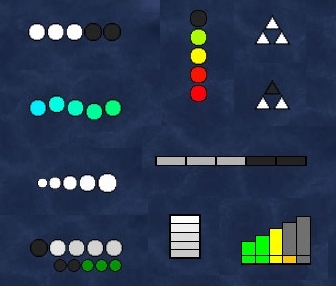
nibPointDisplay is a customizable graphical display of class points and aura stacks. There's a lot of options, so be prepared to get your hands dirty and your interface looking good
nibPointDisplay supports SharedMedia, so you can add any custom textures you'd like. By default it comes with Triangle, Circle, Plain, Soul Shard and Holy Power textures. Please see the bottom of this page for a small SharedMedia guide.
- General
- Combo Points
- Trinkets
- Select from a range of Trinkets to watch
- Death Knight
- Bone Shield
- Shadow Infusion
- Druid
- Astral Alignment
- Lacerate
- Lunar Shower
- Wild Mushroom
- Hunter
- Frenzy Effect
- Ready, Set, Aim...
- Mage
- Arcane Blast
- Fingers of Frost
- Paladin
- Holy Power
- Priest
- Evangelism
- Dark Evangelism
- Mind Melt
- Serendipity
- Shadow Orb
- Rogue
- Bandit's Guile
- Deadly Poison
- Shaman
- Lightning Shield (Fulmination)
- Maelstrom Weapon
- Tidal Waves
- Water Shield
- Warlock
- Soul Shards
- Warrior
- Meat Cleaver
- Sunder Armor
- Thunderstruck
- General Settings
- Hide Default UI point display
- Show at 0 points/stacks
- Hide unused points/stacks
- Hide in..
- Vehicle
- Primary or Secondary Spec
- Direction
- Switch between Horizontal and Vertical
- Reverse orientation
- Position
- X and Y offsets
- Anchor To and From
- Parent it to any panel
- Set Frame Strata and Level
- Point Bars - Each individual point can be customized
- Position/Size
- Set the width/height of the point bars
- Adjust the gap between each point bar
- Background
- Set the Background texture of both the Empty and Full point bars separately
- Set the color of the Empty point bars
- Set the color of the Full point bars
- Set the color of each point differently for when you reach max points
- Border
- Set the Border texture of both the Empty and Full point bars separately
- Adjust Border insets/edge size/color of Empty and Full point bars separately
- Spark
- Allows you to add a "spark" texture to the point bars
- Background Panel
- The Background Panel adds a background to the point display
- Size - Adjust it's Width and Height
- Background - Change the background texture and color
- Border - Fully customize the border. Texture, insets, edge size and color.
- Combat Fader
- Change the Point Display opacity based on player status
- In Combat
- Hurt
- Target selected
- Out of combat
- Profiles (Ace)
If you wish to use your own custom textures, then the best way to do this is with SharedMedia.
Step 1: Install SharedMedia
- Download SharedMedia
- Copy the SharedMedia folder from the download to your Interface\AddOns\ folder
- Inside the Interface\AddOns\SharedMedia\ folder, rename MyMedia.bat.txt to MyMedia.bat
- Double-click MyMedia.bat
Step 2: Install your custom textures
- You can either grab textures from other downloads (such as Power Auras Classic) or create your own. Custom textures will have either a .blp or .tga file extension.
- Move any custom texture files you want to use into the SharedMedia_MyMedia\background\ folder.
- Run the MyMedia.bat file once again to register your new textures.
![]() |
Comment Options |
|
|
|
|
A Kobold Labourer
Forum posts: 1
File comments: 38
Uploads: 0
|
Where is there option to move the display? I must be blind because I can't find it.
|
|
|
|
|
|
|
Feature requests:
1) A simple way to turn a point bar off. It's time consuming to need to adjust opacity and then copy the settings from point bar to point bar. 2) I have a shadow priest. I've set up Dark Evangelism to give me a simple symbol when I've reached five stacks. I'd like to also have that symbol only appear when Archangel is off of cooldown, since that's the only time I can actually use it. This doesn't seem to be possible right now. 3) I'd like to have a mark appear when an ability is off of cooldown. This would be separate from tying things together like request 2. --- Edit: I wonder if I'm using this addon for an unintended purpose. I'm going to check out TellMeWhen, as it's more specific to my needs: http://wow.curseforge.com/addons/tellmewhen/
__________________
spiralofhope.com
Last edited by spiralofhope : 10-07-11 at 03:53 PM.
|
|
|
|
|
|
||
Adding can be a bit tricky, unless you have some programming knowledge. I went ahead and added everything needed for Molten Core to the linked Core.lua file, so follow the instructions below and see the data that was entered as a guide if you want to add any more.
Last edited by Nibelheim : 09-20-11 at 02:24 PM.
|
||
|
|
|
|
||
Or do you just want to confirm something with tha proc I want to add? |
||
|
|
|
|
||
|
||
|
|
|
|
|
|
Is it possible to add other stuff to track? Like stacking procs etc.?
Maybe even using the SpellID (which would be the simplest way I could think of :P)? |
|
|
|
|
|
|
|
A Kobold Labourer
Forum posts: 0
File comments: 1
Uploads: 0
|
Hi.
Ready, set, aim... never shows more than 4 stacks, probably because the buff turns into Fire! (82926) on the 5th stacks procc. Pretty cool addon though ![]() |
|
|
|
|
|
|
A Kobold Labourer
Forum posts: 0
File comments: 4
Uploads: 1
|
Had a question about the addon but I figured it out
![]() <3 Ish
Last edited by Ishtara : 08-16-11 at 09:13 PM.
|
|
|
|
|
|
|
A Warpwood Thunder Caller
Forum posts: 94
File comments: 151
Uploads: 0
|
Works now <3
|
|
|
|
|
|
|
Yay, found the bug. A bad if then line
![]() |
|
|
|
|
|
|
|
A Warpwood Thunder Caller
Forum posts: 94
File comments: 151
Uploads: 0
|
I tried both Trinket 1 and 2, doesn't seem to work. I MAY have set it up wrong though. I looked through the options over and over again. Despite checking the box that said show even where there are no points, nothing appeared
|
|
|
|
|
|
|
A Warpwood Thunder Caller
Forum posts: 94
File comments: 151
Uploads: 0
|
Staying up another hour or so to test this out
![]() |
|
|
|
|
|
|
Trinkets added. Let me know if any errors.
|
|
|
|
|
|
||
|
A Warpwood Thunder Caller
Forum posts: 94
File comments: 151
Uploads: 0
|
![]() jk |
|
|
|
![]() |



