| Go to Page... |


| Compatibility: | Classic (1.15.2) Plunderstorm (10.2.6) WOTLK Patch (3.4.3) |
| Updated: | 04-03-24 03:14 AM |
| Created: | 10-11-10 09:56 PM |
| Downloads: | 145,545 |
| Favorites: | 537 |
| MD5: | |
| Categories: | Buff, Debuff, Spell, Casting Bars, Cooldowns |
Raven 

For feature suggestions and/or bug reports, please use our issue tracker.
Major Features
1) Customizable timer bar and icon configurations to monitor buffs, debuffs and cooldowns
2) Multi-target HoT and DoT tracking bars
3) Timelines to show buff, debuff and cooldown icons sliding along a bar
4) Comprehensive condition checking to support buffing/debuffing, spell rotations, etc.
5) Data broker display with horizontal stripe configuration
6) Value bars to show game and player info plus unit frame data
Installation and Configuration
Install Raven by copying its files into your WoW addons folder (or use your favorite addons update utility).
You can bring up a configuration panel by typing in "/raven" or clicking on Raven's optional minimap button or data broker icon. Raven includes detailed tooltips for most options in the configuration panel.
Raven project page: https://www.curseforge.com/wow/addons/raven
Bufflehead project page: https://www.curseforge.com/wow/addons/bufflehead (for cancelling player buffs in combat)
Compatible with Shadowlands and Classic
The latest releases include support for both retail and classic servers. For classic servers, this release is intended to provide basic compatibility but not to be optimized to exactly match classic's functionality.
Getting Started
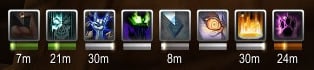
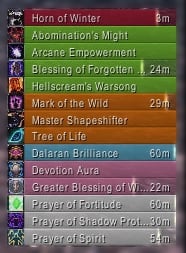
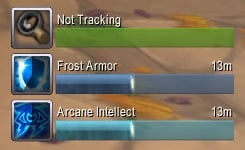
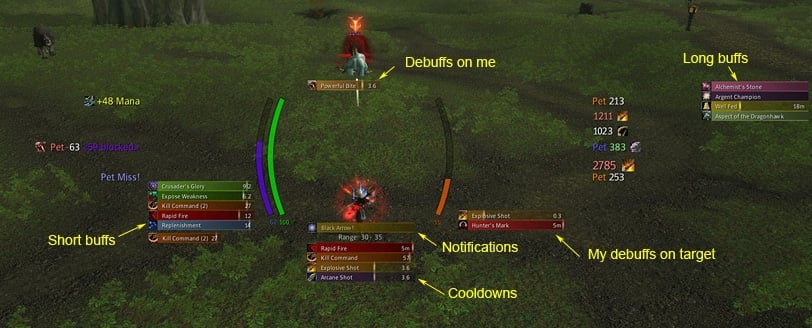
The quickest way to get started with Raven is to use the standard bar groups on the Setup tab of the configuration panel. Standard bar groups offer a variety of presentations of buffs and debuffs on the player, target and focus plus cooldowns for the player.
Select the standard bar groups you want (hint: you probably don't want all the player buff bar groups since that will result in duplicates) and click either the Create As Bars or Create As Icons button. This will create an anchor for each selected bar group near the center of your display that you can move by clicking and dragging.
When you mouse over an anchor you'll see a tooltip with shortcuts for changing the bar group's configuration and for showing test bars. You can lock and unlock the bar group anchors using buttons on the configuration panel Setup tab (locked anchors are hidden, unlocked anchors are visible). The Defaults tab lets you change the appearance of your bars with configuration options for bar dimensions, fonts and textures.
Using Bar Groups
Once you set up standard bar groups, timer bars or icons will be displayed for buffs, debuffs and cooldowns. Bars will be in standard colors which can be customized on the Defaults tab (and overridden in each bar group, see More Customization below).
After using Raven a while, you will probably want to make some adjustments. Perhaps you don't like the default colors of the bars or you want to switch between bars and icons. Or maybe you want a dedicated bar group for the procs and cooldowns you monitor closely during combat.
At this point, it is necessary to understand that there are two types of bar groups: auto bar groups and custom bar groups. Auto bar groups are used to automatically display bars for buffs, debuffs and cooldowns. Most of the standard bar groups (all except Notifications) are pre-configured auto bar groups. Custom bar groups allow you to manually configure bars for a mix of buffs, debuffs, cooldowns and notifications. Typically, custom bar groups are used to present spell rotations and buff/cleansing reminders.
Auto Bar Groups
Open the configuration panel and click on the Bar Groups tab. Using the pull-down menu near the top, select any existing standard bar group (except Notifications) or create a new auto bar group by clicking on the New Auto Group button. A second set of tabs appears that lets you configure the selected bar group.
You use the Buffs, Debuffs, and Cooldowns tabs to specify what kinds of bars to display (and which ones to filter out). These tabs lets you control how the bar group is populated as new buffs, debuffs and cooldowns are detected. For buffs and debuffs, you specify who the action must be on and who it must be cast by. For cooldowns, you specify what kinds of cooldowns to detect. When new buffs, debuffs and cooldowns are detected that match the criteria, bars for them are automatically displayed.
Auto bar groups have filter lists to let you suppress showing unwanted bars. Both black lists (i.e., don't show if on the list) and white lists (i.e., only show if on the list) are supported. You can manage filter lists on the Buff, Debuff and Cooldown tabs.
Custom Bar Groups
While the standard bar groups provide an easy way to get started, you might also want to set up bar groups that contain just the bars you care about during combat. For example, to support your feral druid's DPS rotation you might want bars for the Savage Roar buff on the player, Mangle, Rake and Rip debuffs on the target, and Tiger's Fury and Berserk cooldowns.
To create a new custom bar group, open the Raven configuration panel, select the Bar Groups tab, then click on New Custom Group and enter a name (e.g., "Combat Bars"). This will bring up a new, empty bar group. To add bars, select the Custom Bars tab and click the New button.
When you click the New button, the configuration panel is put into bar creation mode (you won't be able to access other options until you click either Okay or Cancel at the bottom of the scrollable options). Select a bar type (e.g., buff, debuff, cooldown) and then appropriate options. For example, when you select Buff, you can then enter a spell name. Pay particular attention to correctly setting who the action is on and who it is cast by. Click Okay to finishing adding the bar (it is now included in the list of bars and can be customized by clicking on it and adjusting its associated options). You can repeat the bar creation process by clicking New again to add any mix of bar types.
The Custom Bars tab also lets you make changes to bars after they have been added. Select any individual bar to bring up configuration options that let you adjust its color, label text, special effects, and other properties. You can toggle enable to disable the bar.
More Customization
You can further customize bar groups using configuration settings in the General, Layout, Appearance, and Timer Options tabs. The following is a brief description of what each tab supports (mouse over options for explanatory tooltips).
The General tab provides options to enable/disable the entire bar group, rename the bar group, specify how bars are sorted, conditionally show/hide the bar group, and adjust settings for mouse clicks, tooltips, and special effects (e.g., pulsing icons, flashing on expiration).
The Layout and Appearance tabs let you modify the look of the selected bar group. You can adjust the bar group's configuration and the direction that bars grow from the anchor. You can select alternate coloring schemes which, among other things, let you show each spell with a custom color that you can define on the Spells tab. You can adjust dimensions, fonts and textures (after overriding defaults set on the Defaults tab). You can turn on and off particular characteristics (icon, colored bar, spark, label, etc.) and change their relative positions. If you prefer icon-based interfaces, Raven includes configurations featuring large icons with optional mini-bars. You can also attach bar groups to each other to facilitate alignment (including the ability to attach to a bar group's last bar so a stack of bar groups can expand and shrink as needed). Play around some and check out the range of possible designs (hint: you can shift-left-click on a bar group anchor to show test bars).
The Timer Options tab lets you adjust settings related to bar duration and time left. You can set all bars in a group to have a uniform duration (this makes it easy to compare how much time is left on bars with similar, but slightly different, durations). You can specify whether to show bars with unlimited duration (e.g., paladin auras). You can filter bars based on their durations and amount of time left (this is how the standard bar groups separate short buffs from long buffs).
Bar groups can have background panels and borders. Set them up in the Defaults tab to show them for all bar groups or in the Appearance tab for individual bar groups. You can enable a background panel with texture, color, and size (size is specified as padding in pixels from the bar group's bars and icons). You can enable a background border separately with a border design, color, edge size, and inset (inset helps merge panel and border correctly).
Multi-Target Buff and Debuff Tracking
Raven includes multi-target buff and debuff tracking similar to other DoT and HoT timer addons. The Setup tab now includes Buff Tracker and Debuff Tracker standard bar groups. These bar groups will group timer bars for buffs or debuffs that you cast on each target and, by default, will show a header with the target name above its associated timer bars. Optionally, you can include the target name in the timer bar labels instead of showing headers (set Hide Headers on the General tab for the bar group). Use black list and white list filtering capabilities in these bar groups to customize them (e.g., you can make a Beacon of Light tracker by creating a HoT timer bar group with only that spell in its white list). You might want to stick with bar-oriented configurations for these since the headers (which include raid target icons and indicate current target, focus or mouseover unit) are currently designed to work best as bars.
Conditions
Raven monitors a variety of events during play and can display notifications when certain conditions are met. While somewhat complex to set up, conditions are quite powerful and can help with spell rotations, decursing, etc. Raven includes default conditions for each class for basics like making sure you have class-specific buffs during combat.
Conditions can be used in Raven to trigger notifications and to control whether or not bar groups are visible. Generally speaking, once you set up a condition you will want to set up a notification bar to show you when the condition is true. When you configure the Notifications standard bar group on the Setup tab, you automatically get notifications for your configured conditions.
Conditions are configured in Raven under the Conditions tab. To get a feel for setting up conditions, take a minute to look at the default conditions for your class. Select one of the conditions using the pull-down menu near the top. A second set of two tabs (General, Tests) appears with options for configuring the selected condition.
The Tests tab has a summary of settings at the top and a list of available tests below. There are tests for checking status of the player, target and focus, tests for checking for combinations of buffs and defuffs, and tests for checking if spells or items are ready to be used. Selecting a test brings up options specific to that test. For example, the Player Status test lets you check if you are in combat, resting, have more than a certain percentage of your health, how many combo points you have, etc.
All the tests you enable must be true for the overall condition to evaluate to true (the summary at the top is intended to help visualize how the tests combine). You can also add dependencies between conditions that can be helpful for factoring out common tests (e.g., a condition to see if you are in cat form and in combat might be a dependency for other conditions defining a druid's feral spell rotation).
The General tab for each condition allows you to enable/disable the condition and specify if the condition is suitable for triggering a notification. You can also associate a spell with a condition (the spell's icon and color are used to customize notifications based on the condition).
Multiple Characters
Raven is designed to simplify configuration across multiple characters. This is required because each class may make quite different use of timer bars (e.g., some depend on tracking cooldowns while others watch for debuffs to expire on the target). In the Profiles tab, Raven includes the profile options common to Ace3-based addons and, by default, creates a new profile for each character.
In addition to using profiles, Raven shares a variety of settings across characters. This can result in some confusion since it works differently than in other addons (but can simplify configuring Raven if you play several different classes). First, the appearance options on the Defaults tab (dimensions, fonts, textures) apply to all profiles (they can be overridden as needed in any bar group, of course). Second, almost all bar group settings (the primary exception being the actual bars associated with custom groups) are linked between bar groups of the same name in all profiles that have Link Settings enabled (note that Link Settings is no longer enabled by default for standard bar groups on the Setup tab). Third, filter lists are linked by default between auto bar groups of the same name in all profiles, simplifying dealing with unwanted buff, debuff and cooldown bars.
Cancelling Buffs
Raven includes support for right-click cancel of player buffs when out of combat but only limited support for cancelling in combat.*The addon Bufflehead was created to address this. Please check it out and consider using it as a companion addon with Raven.*Raven does include an "in-combat" bar that is useful if you can anticipate which buffs you will need to cancel. You set up the "in-combat" bar with a list of player buffs that you want to be able to cancel in combat. When one of these buffs becomes active, its icon pulses into place on the "in-combat" bar and you can right-click it to cancel.
Final Words
I hope you enjoy using Raven for all your buff, debuff and cooldown needs! Questions and comments are always welcome.
- Fixed new API changes thanks to @arnvid
24 March 2024
- Removed tracking from the player's auto group bars.
- Fixed enemy buffs in target auto group bars.
23 March 2024
- Fixed Cataclysm beta API bug.
22 February 2024
- Split hiding Blizzard's buffs and debuffs into separate configuration options.
9 February 2024
- Disabled the tracking type for auto buffs bars in Classic.
31 January 2024
- Fixed classic-only bug with target-of-target frames.
19 December 2023
- Added new time format that replicates the Blizzard's time format.
- Fixed bugs introduced with previous release.
18 December 2023
- Fixes for 10.2.5 API changes
18 November 2023
- Removed support for range checks in conditions. An unfortunate casualty of Blizzard preventing mods from telling players where to (not) stand during encounters.
16 November 2023
- Fixed bug caused by namespace changes in Classic WoW.
10 November 2023
- Fixed bug caused by Retail changing the addon management API.
24 August 2023
- Fixed bug caused by Classic Era now using part of the Dragonflight API for addons.
25 June 2023
- Fixed bug causing Apotheosis and Power Word: Salvation cooldowns to not be tracked properly.
18 May 2023
- Fixed bug causing Fire Elemental and Storm Elemental to not have their cooldowns tracked properly.
12 May 2023
- Fixed bug caused by tooltip API change.
3 May 2023
- Fixed bug caused by weapon buffs API having changed.
21 April 2023
- Fixed bug to active talent conditions not differentiating between choice talents.
16 March 2023
- Fixed a bug leading to cooldowns to not be cached properly in WotLK.
11 March 2023
- Fixed a bug causing cooldowns to be incorrectly cached.
- Fixed a bug causing Ignore Pain to not be testable as ready for non-Protection Warriors.
19 February 2023
- Fixed a cooldown bug for Arms Warriors, where Whirlwind would not properly trigger a cooldown.
- Fixed bug with item cooldowns no longer working in Dragonflight.
26 January 2023
- Optimized Weapon tooltip Scan for Temporary Weapon Enchants
14 January 2023
- Fixed bug causing Slam's cooldown, when combined with the Storm of Swords talent, to not be testable for conditions.
28 December 2022
- Fixed spelling for global cooldown in options menu, causing errors for some users
- Fixed bug with game version variation detection
- Improved check for TukUI/ElvUI fonts
27 December 2022
- Rewrite of basecode to better handle variations in game versions
- Extracted "Global Cooldown" from "Other" to it's own checkbox in the "Cooldowns" tab for bars
- Fixed issues with Wrath PTR
7 December 2022
- Added toc-file for Wrath of the Lich King.
File Name |
Version |
Size |
Author |
Date |
r650 |
1MB |
Tojaso |
03-24-24 05:45 AM |
|
r648 |
1MB |
Tojaso |
03-23-24 02:08 AM |
|
r647 |
1MB |
Tojaso |
02-22-24 06:08 AM |
|
r646 |
1MB |
Tojaso |
02-09-24 06:21 AM |
|
r643 |
1MB |
Tojaso |
01-31-24 03:53 AM |
|
r642 |
1MB |
Tojaso |
01-19-24 12:52 AM |
|
r640 |
1MB |
Tojaso |
01-18-24 03:04 AM |
|
r639 |
1MB |
Tojaso |
11-18-23 03:43 AM |
|
r638 |
1MB |
Tojaso |
11-16-23 12:39 AM |
|
r637 |
1MB |
Tojaso |
11-13-23 07:15 AM |
|
r636 |
1MB |
Tojaso |
11-13-23 06:42 AM |
|
r635 |
1MB |
Tojaso |
11-13-23 02:06 AM |
|
r634 |
1MB |
Tojaso |
08-24-23 12:12 AM |
|
r632 |
1MB |
Tojaso |
06-25-23 01:48 AM |
|
r631 |
1MB |
Tojaso |
05-18-23 10:23 AM |
|
r630 |
1MB |
Tojaso |
05-18-23 03:51 AM |
|
r629 |
1MB |
Tojaso |
05-13-23 12:42 AM |
|
r628 |
1MB |
Tojaso |
05-11-23 11:30 PM |
|
r627 |
1MB |
Tojaso |
05-03-23 07:32 AM |
|
r626 |
1MB |
Tojaso |
05-03-23 12:12 AM |
|
r625 |
1MB |
Tojaso |
04-21-23 02:28 AM |
|
r624 |
1MB |
Tojaso |
03-16-23 11:21 AM |
|
r623 |
1MB |
Tojaso |
03-11-23 02:53 AM |
|
r622 |
1MB |
Tojaso |
02-19-23 05:57 AM |
|
r616 |
1MB |
Tojaso |
12-30-22 04:19 AM |
|
r541 |
1MB |
Tojaso |
05-19-21 02:39 PM |
|
r539 |
1MB |
Tojaso |
05-04-21 03:00 PM |
|
r534 |
1MB |
Tojaso |
01-25-21 01:38 PM |
 |
Comment Options |
 06-18-21, 11:48 PM
|
||
|
A Chromatic Dragonspawn
 Forum posts: 156
File comments: 2231
Uploads: 5
|
|
|

|

|
| AnrDaemon |
| View Public Profile |
| Send a private message to AnrDaemon |
| Find More Posts by AnrDaemon |
| Add AnrDaemon to Your Buddy List |
|
06-12-21, 04:02 PM
|
|
|
A Deviate Faerie Dragon
Forum posts: 10
File comments: 81
Uploads: 0
|
Hey. I was wondering is it possible to add borders to individual debuff icons rather than one border around the entire debuff bar?
|
|
|
|
| ObscureScience |
| View Public Profile |
| Send a private message to ObscureScience |
| Find More Posts by ObscureScience |
| Add ObscureScience to Your Buddy List |
|
05-06-21, 08:55 AM
|
|
|
A Wyrmkin Dreamwalker
Forum posts: 55
File comments: 370
Uploads: 2
|
Great addon. I like how I can filter out the debuffs I don't want to see.
|
|
|
|

| Deadlyz |
| View Public Profile |
| Send a private message to Deadlyz |
| Find More Posts by Deadlyz |
| Add Deadlyz to Your Buddy List |
|
04-21-21, 05:45 PM
|
||
|
A Defias Bandit
Forum posts: 3
File comments: 548
Uploads: 2
|
Re: target buffs
__________________
Tojaso/Tomber, author of Raven |
|
|
|
|
| Tojaso |
| View Public Profile |
| Send a private message to Tojaso |
| Find More Posts by Tojaso |
| Add Tojaso to Your Buddy List |
|
04-21-21, 02:53 AM
|
|
|
A Chromatic Dragonspawn
Forum posts: 156
File comments: 2231
Uploads: 5
|
You could create a simple "target buffs" frame which will include everything indiscriminately.
|
|
|
|
| AnrDaemon |
| View Public Profile |
| Send a private message to AnrDaemon |
| Find More Posts by AnrDaemon |
| Add AnrDaemon to Your Buddy List |
|
04-20-21, 08:02 PM
|
|
|
A Kobold Labourer
Forum posts: 0
File comments: 4
Uploads: 0
|
target buffs
hi, is there any checkbox or something that lets me see the buffs of my target, with the standard ui I can see what mount etc theyre using..
|
|
|
|
| anton311 |
| View Public Profile |
| Send a private message to anton311 |
| Find More Posts by anton311 |
| Add anton311 to Your Buddy List |
|
03-07-21, 11:41 AM
|
|
|
A Deviate Faerie Dragon
Forum posts: 12
File comments: 39
Uploads: 0
|
Thank you so much for all your help. I got it working this a.m. I think it was the spell list. I had the count checked. I'm so happy to have this working. It will really be a huge help.
|
|
|
|
| datgrl |
| View Public Profile |
| Send a private message to datgrl |
| Find More Posts by datgrl |
| Add datgrl to Your Buddy List |
|
03-06-21, 06:27 PM
|
||
|
A Defias Bandit
Forum posts: 3
File comments: 548
Uploads: 2
|
__________________
Tojaso/Tomber, author of Raven |
|
|
|
|
| Tojaso |
| View Public Profile |
| Send a private message to Tojaso |
| Find More Posts by Tojaso |
| Add Tojaso to Your Buddy List |
|
03-06-21, 06:13 PM
|
||||
|
A Defias Bandit
Forum posts: 3
File comments: 548
Uploads: 2
|
I would recommend using the word Frenzy instead of the spell number for long term compatibility. Blizzard has occasionally changed the spell id for auras for their own reasons. The main advantages of using spell ids are language independence and distinguishing between spells that share the same name, which should not be the case here. The warrior talent Frenzy should never show up on your pet.
__________________
Tojaso/Tomber, author of Raven |
|||
|
|
|
| Tojaso |
| View Public Profile |
| Send a private message to Tojaso |
| Find More Posts by Tojaso |
| Add Tojaso to Your Buddy List |
|
03-06-21, 05:33 PM
|
|||
|
A Deviate Faerie Dragon
Forum posts: 12
File comments: 39
Uploads: 0
|
Hello! Thanks so much for your work on this issue. I really appreciate it. I've been working on this today after seeing your response and I have a couple of questions.
I created a white list with the spell id 272795. When I search for the spell, 3 different id's show up. The one I mentioned is from 8.0.1.27326. Another spell id from the same patch is 272790. Does it make a difference? They both have the same info on the tool tip. I created a bar group and applied the white list with the Frenzy spell ID to the bar group. The new bar group has the settings you outlined above (action on pet, cast by anyone) and the white list is spell list #1. I made it an icon, though. I didn't think it would make a difference. Since I only wanted to track Frenzy, I thought the count would accumulate on the icon. I made sure that 'count' was ticked in the Layout section. Thank you again! |
||
|
|
|
| datgrl |
| View Public Profile |
| Send a private message to datgrl |
| Find More Posts by datgrl |
| Add datgrl to Your Buddy List |
|
03-06-21, 12:21 PM
|
||
|
A Defias Bandit
Forum posts: 3
File comments: 548
Uploads: 2
|
__________________
Tojaso/Tomber, author of Raven |
|
|
|
|
| Tojaso |
| View Public Profile |
| Send a private message to Tojaso |
| Find More Posts by Tojaso |
| Add Tojaso to Your Buddy List |
|
03-06-21, 12:16 PM
|
||
|
A Defias Bandit
Forum posts: 3
File comments: 548
Uploads: 2
|
I first made sure Frenzy was being processed correctly by creating an auto bar group for pet buffs (I simply created the Buffs standard bar group and then, on the Buffs tab, changed from Player to Pet and made sure Cast By was set to Anyone). In this case, Frenzy shows up after casting Barbed Shot as expected, complete with the count increasing with next Barbed Shot. Adding a white list containing only Frenzy to this auto bar group would make this a Frenzy-only display. Next, I created a custom bar group and added a bar for Frenzy (Type: Buff, Action: Frenzy, Action On: Pet, Cast By: Anyone). I did have to disable Warnings when entering the spell name. This bar works the same as the Frenzy bar in the pet buffs auto bar group. The count on the Frenzy bar goes up with reapplication of Barbed Shot. I also used Bestial Wrath to do additional Barbed Shots. Is this the same as what you are seeing? How does it differ from what you are trying to set up? [This comment if copied from my reply to similar question today on curseforge. Feel free to reply on either site since I check both regularly.]
__________________
Tojaso/Tomber, author of Raven |
|
|
|
|
| Tojaso |
| View Public Profile |
| Send a private message to Tojaso |
| Find More Posts by Tojaso |
| Add Tojaso to Your Buddy List |
|
03-06-21, 07:04 AM
|
|
|
A Deviate Faerie Dragon
Forum posts: 12
File comments: 39
Uploads: 0
|
Hi - I love this addon and have been using it for years. I prefer it over other buff/debuff/cd trackers because of its ability to move and size the icons. I'm looking for help to be able to track the Frenzy counts generated by Barbed Shot. I've tried to create it on my own but I'm not getting it to work. Any help would be appreciated.
|
|
|
|
| datgrl |
| View Public Profile |
| Send a private message to datgrl |
| Find More Posts by datgrl |
| Add datgrl to Your Buddy List |
|
02-24-21, 10:24 AM
|
|
|
A Deviate Faerie Dragon
Forum posts: 15
File comments: 32
Uploads: 0
|
I'm curious if we could have a feature where we link the buff to chat upon Shift+Clicking it. I could swear this used to be a default feature of the Blizzard UI and I find myself frequently wanting to do it, but I can't even with the default UI. If Raven could fill in this gap in Blizzard's functionality, it'd be nice!
|
|
|
|
| Koviko |
| View Public Profile |
| Send a private message to Koviko |
| Find More Posts by Koviko |
| Add Koviko to Your Buddy List |
|
12-21-20, 05:06 PM
|
|||
|
A Kobold Labourer
Forum posts: 0
File comments: 2
Uploads: 0
|
Ha ha, yeah. It's not really important just asked out of curiosity, knowing that many people still playing wotlk, and maybe you was one of them :P
|
||
|
|
|
| Kuroi_mato_O |
| View Public Profile |
| Send a private message to Kuroi_mato_O |
| Find More Posts by Kuroi_mato_O |
| Add Kuroi_mato_O to Your Buddy List |
|
https://www.paypal.com/cgi-bin/websc...=72D2BW9L25PRG
