| Go to Page... |

Pictures
File Info

| Compatibility: | Shadows of Argus (7.3.0) |
| Updated: | 10-27-17 04:14 AM |
| Created: | 10-15-10 04:17 AM |
| Downloads: | 197,786 |
| Favorites: | 1,064 |
| MD5: |
Archy - Archaeology Assistant 

Archy is an assistant for Archaeologists that want information at their finger tips.
Features
- Localized for English, French, German, Russian, Spanish, and Traditional Chinese users
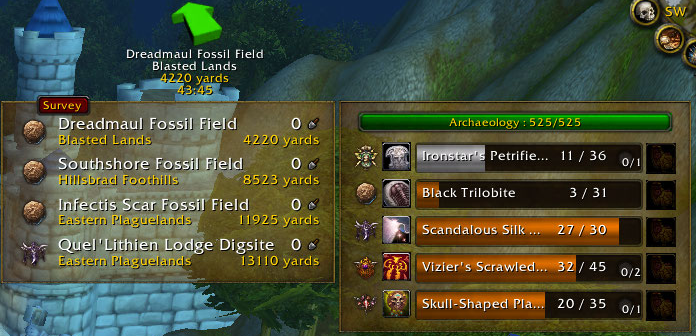
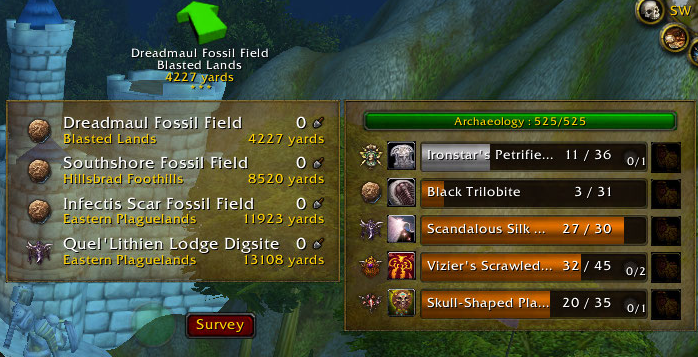
- On-screen customizable and movable list for the dig sites on the continent you are current on
- On-screen customizable and movable list of the artifacts you are researching that can be filtered to display only the races for the continent you are on
- Racial fragment types are shown for each of the dig sites
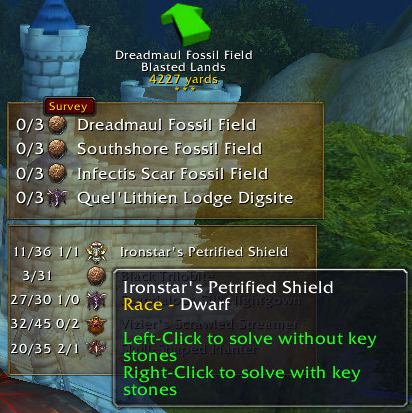
- Solve artifacts with (left click) or without (right click) keystones by clicking on the racial crest icon in the on-screen artifacts list or bind a key for a one stop solve shop
- TomTom support to help you navigate between dig sites
- Able to display dig site boundaries on the battlefield mini map
- Able to automate tracking of dig sites on the minimap, worldmap and battlefield mini map
- Blacklist dig sites in the on-screen digsite list by right clicking on the dig site name. Perfect for when you have a bugged node or a dig site that is in a zone that you dislike.
- Blacklist races so they do not appear in your artifacts on-screen list and won't be used when the artifact solve keybind is pressed
- Sound and text triggers for when you have enough fragments and/or keystones to solve an artifact
- A dig recorder to see where at a dig site you have successful dug
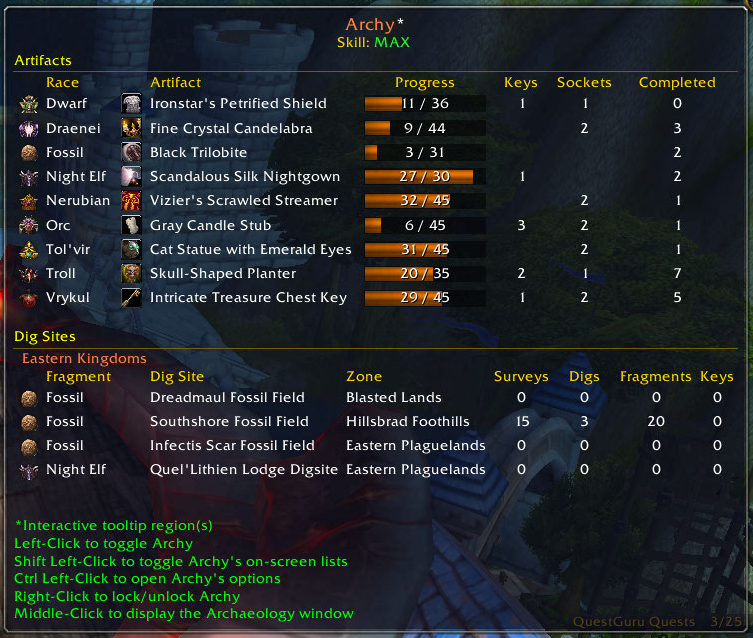
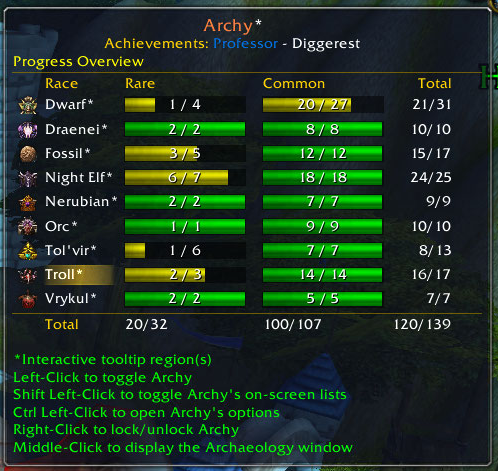
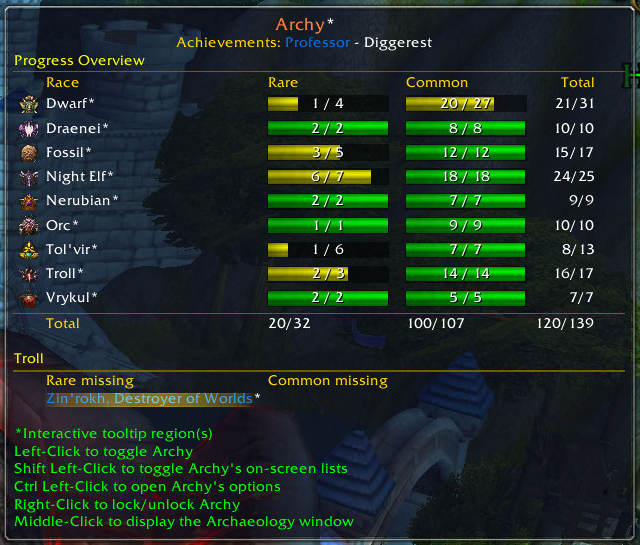
- Extra LDB Tooltip mode showing missing rare artifacts per race and overall archaeology progress.
- many more features
If you wish to report a bug or have a feature suggestion, please file a ticket at the development site;
responses to tickets will always be faster than posting comments.
Upgrading:
Users upgrading from v1.8.11 or earlier need to fully exit the game and restart, a simple reload won't work as there's been new files added.
If you have an old version of Archy (a version prior to 1.8) please delete the addon from your Interface\AddOns folder first then install it
If you would like to help translate Archy into your language, please visit http://wow.wowace.com/addons/archy/localization/
I'm not updating this thing anymore. There are commit notes in the file itself.
v1.8.42
--------
Dridzt:
- Fix for ticket 475: Continents can have more than 4 digsites when using the site randomizers.
- WorldMapShowDigSites checkbox has been removed from the map in 5.3 (it is now a dropdown option)
- Add a better visual cue when crate button activates.
- Add special button for using Lorewalker Items (Map & Lodestone)
- User option for showing/hiding Archy frames.
- Re-arranging options panel.
- update .toc, compatible with WoW 5.3 "Escalation"
v1.8.41
--------
Dridzt:
- Only increment dig counter after survey, else looting 'Ancient Haunt' throws it off
(bonus fix: ticket 467, mantid digs counting twice)
- Remove duplicate 'Lake of Stars DigSite'
- Add option to auto-hide Archy frames in combat (default: off)
- Auto-hide Archy frames during pet battles.
- Updated Libs, western locales mostly done, east/asian pending.
- Offline DigSites DB updated (Mantid)
- Offline Artifacts DB updated (Mantid)
- Update Astrolabe-1.0 to r160
v1.8.40a
--------
James D. Callahan III:
- Update ToC Interface version to 50200.
- Cleanup/fix for the override button.
- Removed broken MBF (Minimap Button Frame) support. The fact that it was even added to begin with seems highly misguided.
- Omit the line in the tooltip with the continent name if continent_name is nil.
v1.8.39
--------
- Bumped ToC Interface to 50100
v1.8.38a
--------
- Fix error when solve is made possible from picking up crated fragments instead of from digging.
v1.8.38
-------
- Tickets 397,432, artifact frame update after handing in fragments for quests (needs verification)
- Ticket 443, fix error when LDB tooltip is disabled from an LDB panel config.
- Ticket 438, autoloot Serpentrider Relics
- Ticket 439, 0 length tooltip bars should hide, thanks to Corwin_MacGregor for patch.
- Minor cosmetic changes/fixes to survey and crate button
- Italian localization
- LDB Tooltip is now much smaller when Archy is hidden (only shows header and usage tips).
- Unintended global from copy-paste.
v1.8.37
-------
- Fixed the long-standing bug with EasyCast survey getting randomly stuck (related to looting and not combat after all)
- Various improvements to the distance indicator and associated buttons.
-- Only show the faded distance indicator bubble for dragging when frames are unlocked and either survey or crate button shown.
-- Reset the distance indicator display after a successful dig when it's faded.
- Shorten the help message for trying to toggle Archy Onscreen Displays while in stealth mode.
-- Only show it once per session to avoid spamming users purposely hiding Archy Lists and using left-click to turn on/off the waypoints and distance indicator/buttons.
v1.8.36
-------
- Our Crate button is now smarter when interacting with a Merchant.
- We need a couple new phrases localized before tagging a release.
- Add an option to hide the new Crate button, same as the Survey one has.
- Our Survey button now looks like... a Survey button?
- Add a warning for the most common user error (trying to show lists with Archy in stealth mode; if it comes up every single page of comments it can't be all their fault)
- Archy will now inform the user if they try to show the artifact and digsite lists while in stealth mode.
v1.8.35
-------
- Improvements to the crate artifacts button.
- Add a tooltip showing the artifact or crate loaded in the button.
- Make it also work for opening 'Crate of <race> Archaeology fragments'.
v1.8.34
-------
- Fix Artifact crating button stalling after first artifact.
- Fix error related to latest feature on chars without Archaeology.
- Fix library packaging problem affecting foreign language clients
(due to curse packager acting up in last tag)
v1.8.32
-------
- Add a button for putting artifacts in a crate instead of looking through the bags to use them individually.
- Fix (hopefully) tickets #418,427, entering combat while easy-casting survey.
v1.8.29
-------
- Fix green background when selecting "None" as background or border texture.
v1.8.28
-------
- First WoW 5.0.4/MoP beta release version, should work on all language clients now.
dridzt:
- Repackage to pickup updated Localization data for DigSites and Artifacts.
- Make it so any missing or bugged (Hello 'Marco's Test POI') are only reported once per session.
- Prepare for release.
- Change the way we calculate MAX_ARCHAEOLOGY_RANK so that it's always in line with the expansion available to the player.
- Solves the issue with Archy showing prompts to visit a trainer while at 525 in pre-MoP patch.
- Issue is fixed for any accounts that haven't bought a previous expansion as well.
- Some digsite updates, thanks to Sidji
- Fix number of surveys per digsite for minimal style; add a variable for easier updates in the future.
- Add the ability to toggle the world map from digsite frame for minimal style as well.
- How about we actually commit the button fixes ;-)
v1.8.26-beta
-------------
dridzt
- .toc update
- Fix continent filtering
- Fix Fishing detection for easy cast survey
- UIPanelButtonTemplate2 -> UIPanelButtonTemplate
- Map data structure fixes
- Update Astrolabe-1.0 to r147 release
- - Digsites offline db update, thanks to sidji (http://www.wowace.com/profiles/sidji/) for most the data.
- MoP RC (build 16016) updates Known issues: continent filter not working (Astrolabe problem?) Not tested on PTR, keep alpha until the patch rolls out and proper testing is possible.
James D. Callahan III:
- Another LibSink fix.
- Changed the LibSink short name for toasts from L["Toast"] to "Archy_Toast" to avoid LibSink collisions.
v1.8.24
-------
Features:
- Keystone details filled in when the server returns item information if it wasn't available on first request.
Bugfixes:
- One-time error for fresh installation 'attempt to index local "races_frame" (a nil value)'
v1.8.23
-------
Features:
- Add an extra option ("Ignore") to the warning for incompatible tomtom setting that dismisses it for the current Archy version even if you keep the problematic setting.
Bugfixes:
- Pull in updated LibBabble-DigSites-3.0 to fix ticket 387, dig site error on French client.
v1.8.22
-------
Features:
- Add a cooldown display to Archy's Survey Button.
Bugfixes:
- Fix keybind conflict with Elephant (Elephant should also choose less generic globals to avoid clashing with other addons)
v1.8.21
-------
Bugfixes:
- Only warn once per session if an incompatible TomTom setting is detected.
v1.8.20
-------
Bugfixes:
- Fix so overal progression and solved counts remain consistent.
Crossing any portal in the game (instance or otherwise) invalidates the client Artifact History who woulda known...
- Some more internal changes, nothing visible for users.
v1.8.19
-------
Features:
- Use a barfill background for rare and common artifacts progress tooltip.
- Some internal changes, no visible changes for users.
- Remove manual CHANGELOG.txt from the .zip
Bugfixes:
- Detect and offer to reset incompatible TomTom setting (workaround for ticket #384 until it can be fixed properly).
v1.8.18
-------
Features:
- Improve frame initialization. The distance indicator and survey button should now always show if Archy lists were visible on last logout / reload.
- Additionally the site distances will not show as '999999' until the player moves after a reload or fresh logon.
- Code cleanup: remove duplicate function that wasn't being called anywhere.
- Internal changes to make the "Toggle Archy" keybind behavior consistent with clicking the LDB/minimap icon (keybing method would fail to properly show the distance indicator at times)
- Improve the interaction between LDB tooltip and combat status.
The tooltip will now hide if the player enters combat (previously it would not show if in combat but would stay visible if it was shown before combat started)
Bugfixes:
- Ticket 382: It is now possible to change / copy / reset profiles when the source and destination profile have different frame styles "Graphical" vs "Minimal".
An automatic /reloadui will happen if needed to spawn the respective secure frames.
- Ticket 383: Modify the map data caching a little to correct an elusive digsite list initialization error.
- Stop the artifact and digsite frames from 'snapping' randomly back to their initial location when the user drags them to re-arrange on screen.
- Ticket 380: Prevent and try to correct corrupted dig site stats saved variables.
v1.8.17
-------
Features:
- Keep the distance indicator from completely disappearing when the survey button is visible and undocked so users can find the anchor to move it around.
Bugfixes:
- Prevent taint from moving the survey button in combat.
- Prevent taint from changing some Archy configuration options in combat as well.
- Update the digsite cache when users toggle the 'filter by continent' option on the tooltip so it can refresh 'on the fly' and show all continent data without a reload.
v1.8.16
-------
Bugfixes:
- Audio and text alerts not firing for subsequent solves of the same common artifact after the first time it's solved during a game session.
- "Mummified Monkey Paw" rare Tolvir project not getting counted as solved in overall progress LDB tooltip.
v1.8.15
-------
Bugfixes:
- Audio and text alerts not working when 'include keystones' option is selected and there's enough keystones to solve in the player's inventory.
- Archy digsite and artifact lists initialization when logging or reloading in combat.
v1.8.14
-------
Features:
- Add a line with cumulative rares/common artifacts solved across all races to the archaeology overview LDB tooltip.
Bugfixes:
- Change Archy delayed initialization from PLAYER_ALIVE to QUEST_LOG_UPDATE to solve issues with failed Archy initialization when reloading interface (/reloadui)
- Change Archy caching of map data to after PLAYER_ENTERING_WORLD to possibly prevent a conflict with BigWigs module enable.
v1.8.13
-------
Features:
- Improve easy cast survey (double-right-click to survey). Temporarily suspend 'click to move' when Archy is shown if it was enabled, restore it when hiding Archy.
- Improve battlefield mini map digsite blobs. No longer necessary to toggle Archy if the mini map wasn't visible.
- Add an option to prevent Archy automating the display of digsites on worldmap/battlefield map and minimap tracking.
v1.8.12
-------
Features:
- Additional LDB tooltip mode: Overall Archaeology progress; click the Archy tooltip header to alternate.
-- Added a hint on LDB tooltip for interactive (clickable) regions.
-- Added an artifact database (current for 4.3.2) and artifact name localization through LibBabble-Artifacts-3.0.
-- When showing the Overal progress tooltip click a race name to show the rares missing for that race.
-- Click on an artifact name from the missing list to get the project spell link.
- Toggle minimap digsite tracking, worldmap and battlefield mini map digsite blobs alongside Archy; use '/archy stealth' or shift-click LDB if you want to hide onscreen lists but keep Archy active and blobs showing.
- Don't update the skill bar if the toon doesn't have Archaeology.
- Re-add digsite tracking on battlefield mini map when Archy is active.
- Do not easy-cast survey if the player has a fishing pole equipped to avoid breaking fishing addons.
- Better handling of combat status for easy-cast.
- Middle click on LDB/minimap icon can be used to toggle the Archaeology UI instead of only to show it.
Bugfixes:
- 'dig sites frame gone missing'; this would happen if the player logged on after having toggled 'show digsites' off from the world map in the previous session.
- 'error on logon' for ptBR game client; in the process pulling in updated LibBabble-DigSites-3.0 ptBR translations by Jizar and Sapolau.
- Play 'ready to solve' sound and/or announce once per artifact for the session instead of once per race.
- Delay loading ArchaeologyUI to solve an issue with missing race icons on Blizzard Archaeology frame.
- Add the missing tooltip hint for opening Archy options from the minimap icon/LDB.
v1.8.11
-------
Bugfixes:
- Error when Archy is enabled on a character that doesn't have the Archaeology profession.
- Archy using keystones for solving regardless of user selection.
- keystone adjustment text eg. (+12) on artifact details and solve button behaviour is now consistent with number of keystones placed in socket by user.
- Artifact list not updating to new artifact after solving.
- Improve combat detection when loading/reloading in combat.
--1.8.10
* Added support for Brazilian Portuguese.
* Fixed issues with resetting the GUI position.
* Fixed issues with logging in or reloading the UI while in combat.
* Properly update the races frame after completing an artifact.
-- 1.8.9
* Locale fix.
* Removed all map blob-drawing code and config options, as this is now handled by the WoW client as of 4.3.
-- 1.8.8
* Miscellaneous fixes and cleanup.
-- 1.8.7-2
* Added missing localization phrase. Bah.
-- 1.8.7
* Fixed artifact solving with keystones.
* Added toast output, which is now the default announcement output.
* Many under-the-hood cleanups.
-- 1.8.5
* New configuration section: Tooltips.
* New configuration option: Tooltip scale.
* Tooltip will now only show out of combat.
-- 1.8.4
* ToC version update for WoW 4.2
* Hopefully fixed the bug with solving via keystones.
* More under-the-hood changes.
-- 1.8.3
* Fixed Lua error that would sometimes occur when using Survey.
* Corrected the announcement of solvable artifacts and keystones.
* Normalized behavior of artifact solving.
* The LDB tooltip is now scrollable again.
* Plugged some small memory leaks.
* Many under-the-hood optimizations.
-- 1.8.2
* A plethora of changes, bugfixes, and memory optimizations. Archy will no longer chew RAM and thereby CPU when freeing said chewed RAM.
v1.8 - May 12, 2011
* Imported all the fixes from the Archy BugFix project on wowinterface.com
* Corrected several entries in the toc
v1.7b7 - 31-Dec-2010
* Fixed a bug where the site blacklisting table wasn't being initialized for some users
* Added color customization for the artifact progress bars in the artifact display options
* Added initial functionality for ArchyData (future data import helper addon)
v1.7b6 - 31-Dec-2010
* Fixed a bug with the survey nodes table not being initialized
* Fixed a bug with the Archy being locked and using a portal
* Changed the default progress bar color to a grayish white.
* If you haven't solve the common artifact before, the progress bar will be the orange-brownish color
* If you can solve the artifact with keystones but haven't attached them yet, the progress bar will be a light green
* Rare projects now have a unique progress bar background
* Added the number of times solved for the current artifact to the icon tooltip
* Added the number of keystones you have in your inventory to the racial crest icon on the artifacts list
v1.7b5 - 30-Dec-2010
* Fixed a spam bug for users that don't use TomTom
* Fixed a bug with the Distance Indicator showing when it shouldn't
* Moved the Artifacts List scale option to the Display Options for Artifacts
v1.7beta4 - 30-Dec-2010
* Massive overhaul of code
* New UI for both dig site list and artifact list. Some of the artifact list UI was inspired by Minimal Archaeology.
* FishingBuddy-based EasyCast (aka double right to survey) has been added but maybe slightly buggy when dealing with combat and mouse look
* LibSink support to push announcements through chat or the various scrolling combat text addons
* Auto fill in keystones for races that you select
* Various UI display options for customising the fonts, backgrounds and borders
* Survey Distance Indicator has been given a skin and is docked to the Dig Site list by default. You can undock it from the Dig Site list and move it around.
* To help combat the dig site boundaries exceed past the minimap, an arrival distance option has been implemented. This will hide the dig site boundaries until you are 400 (by default and changeable) yards away from the dig site center.
* Archy should now play nice with other addons such as Deadly Boss Mods, TukUI, LUIv3, etc.
* The tainting issues should now be resolved
* Frame positioning code has been improved
* Dig Sites should now report the correct zone (or sub zone) they are in, such as Northern Stranglethorn, The Cape of Stranglethorn
* LDB tooltip can have the dig site list filtered to the current continent and a progress bar display added to the artifacts listed
* Plus anything else I have forgotten :(
v1.6.3 - 22-Dec-2010
* Added a missing German localization value which was causing problems
* Fixed an issue with placing a keystone in the Blizzard ArchaeologyUI caused all artifacts to refresh
* Fixed a compatibility issue with several addons
* Added basic LibSharedMedia support to further customize the artifacts and dig sites lists
v1.6.2 - 22-Dec-2010
* Fixed an issue that was causing the Zone Map (or Battlefield Map) tab to not respond when clicked upon
* Fixed an issue when receiving fragments for some localizations
v1.6.1 - 22-Dec-2010
* Localization for Traditional Chinese has been added - Thanks digmouse!
* Fixed a bug related with Minimap icon not setting it's hide setting correctly
* Fixed a bug with the artifacts list background sometimes not extending past the artifact name
* Fixed a bug with a missing localization value for Visit a trainer
* Added an option to set the minimap fragment nodes icon to be either an X or the light blue dot
* Non-english clients should now know when fragments are looted - If not, please PM or email asap so I can resolve the issue
v1.6 - 21-Dec-2010
* Localization for German, French and Russian has been added - Big thanks to Argone, Groumf, lauriano, RustyXXL, Killekille, scouty77 and Anossov
* Settings have been moved from character based to profile based where appropriate (95% of them)
* Races can now be blacklisted for artifact use and display
* Dig Sites list can be sorted by distance
* Able to display the distance to each of the dig sites in the dig sites list
* A survey distance indicator has been added
* Minimap icons have been rewritten to not leak frames
* Minimap survey node has been changed from the X to a cyan dot
* Able to show the dig site boundaries on the minimap
* Able to show the dig site boundaries on the battlefield mini map
* Able to scale the survey distance indicator, dig sites list and artifacts list
* Able to set the opacity of the survey distance indicator, dig sites list and artifacts list
* Able to set the background color for the dig sites list and artifacts list
* Confirmation for creating an artifact when nearing your current skill cap if you are not an Illustrious Archaeologist
* Keybinding options have been added for: Configure Archy, Show/Hide, Solve artifact, Solve artifact with Key stones, Show/Hide Artifacts list, Show/Hide Dig Sites list
v1.5.3 - 13-Dec-2010
* Records successful dig locations within a dig site and places an X at the location on the minimap
* Minimap dig site locations can now be filtered to only show the closest dig site
* A dig counter has been added to the Current Digsites on-screen list
* Reduced the waypoint chatter to TomTom
* The TomTom crazy arrow should not reappear after changing zones or continents
v1.5.2 - 10-Dec-2010
* Fixed a bug that caused a lua error when changing zones.
v1.5.1 - 10-Dec-2010
* Missing races from the default Archaeology UI has been corrected (thanks Dridzt)
* You can now shift-left click the minimap (ldb) icon to toggle the on-screen lists visibility.
* Filtering of the Current Artifact Research on-screen list for races specific to the continent you are on is now available in the Interface Options panel.
* An option to play a sound when you have enough fragments and/or keystones to solve an artifact is now available in the Interface Options panel.
* Easy access to the TomTom waypoint arrival distance and sound trigger options are now available in the Interface Options panel.
v1.5 - 9-Dec-2010
* Cataclysm retail support
v1.4b - 17-Nov-2010
* Fixed a bug that was preventing Archy from loading correctly for some users
v1.4 - 30-Oct-2010
* Added an LDB component
* Added TomTom support (TomTom at this time only supports live as Astrolabe hasn't been updated for Cataclysm)
* Digsites on the current digsite list can be "blacklisted"
* Added an option to have digsites able to be displayed on the minimap
* Added an Interface > Option panel for changing options
* Rare artifact projects will be displayed with a blue name in the artifacts list
* Clicking on an artifact in the artifact list will now open the Archaeology page for that artifact
* Clicking on a digsite in the digsite list will now open the zone map for the digsite
v1.3 - 17-Oct-2010
* Added tooltips to race crest icons and artifacts
* Added current rank and current max rank of your archaeology skill
* Added more functionality to the minimap icon
v1.2 - 16-Oct-2010
* Fixed a couple of bugs when someone doesn't have Archaeology
v1.8.42
--------
Dridzt:
- Fix for ticket 475: Continents can have more than 4 digsites when using the site randomizers.
- WorldMapShowDigSites checkbox has been removed from the map in 5.3 (it is now a dropdown option)
- Add a better visual cue when crate button activates.
- Add special button for using Lorewalker Items (Map & Lodestone)
- User option for showing/hiding Archy frames.
- Re-arranging options panel.
- update .toc, compatible with WoW 5.3 "Escalation"
v1.8.41
--------
Dridzt:
- Only increment dig counter after survey, else looting 'Ancient Haunt' throws it off
(bonus fix: ticket 467, mantid digs counting twice)
- Remove duplicate 'Lake of Stars DigSite'
- Add option to auto-hide Archy frames in combat (default: off)
- Auto-hide Archy frames during pet battles.
- Updated Libs, western locales mostly done, east/asian pending.
- Offline DigSites DB updated (Mantid)
- Offline Artifacts DB updated (Mantid)
- Update Astrolabe-1.0 to r160
v1.8.40a
--------
James D. Callahan III:
- Update ToC Interface version to 50200.
- Cleanup/fix for the override button.
- Removed broken MBF (Minimap Button Frame) support. The fact that it was even added to begin with seems highly misguided.
- Omit the line in the tooltip with the continent name if continent_name is nil.
v1.8.39
--------
- Bumped ToC Interface to 50100
v1.8.38a
--------
- Fix error when solve is made possible from picking up crated fragments instead of from digging.
v1.8.38
-------
- Tickets 397,432, artifact frame update after handing in fragments for quests (needs verification)
- Ticket 443, fix error when LDB tooltip is disabled from an LDB panel config.
- Ticket 438, autoloot Serpentrider Relics
- Ticket 439, 0 length tooltip bars should hide, thanks to Corwin_MacGregor for patch.
- Minor cosmetic changes/fixes to survey and crate button
- Italian localization
- LDB Tooltip is now much smaller when Archy is hidden (only shows header and usage tips).
- Unintended global from copy-paste.
v1.8.37
-------
- Fixed the long-standing bug with EasyCast survey getting randomly stuck (related to looting and not combat after all)
- Various improvements to the distance indicator and associated buttons.
-- Only show the faded distance indicator bubble for dragging when frames are unlocked and either survey or crate button shown.
-- Reset the distance indicator display after a successful dig when it's faded.
- Shorten the help message for trying to toggle Archy Onscreen Displays while in stealth mode.
-- Only show it once per session to avoid spamming users purposely hiding Archy Lists and using left-click to turn on/off the waypoints and distance indicator/buttons.
v1.8.36
-------
- Our Crate button is now smarter when interacting with a Merchant.
- We need a couple new phrases localized before tagging a release.
- Add an option to hide the new Crate button, same as the Survey one has.
- Our Survey button now looks like... a Survey button?
- Add a warning for the most common user error (trying to show lists with Archy in stealth mode; if it comes up every single page of comments it can't be all their fault)
- Archy will now inform the user if they try to show the artifact and digsite lists while in stealth mode.
v1.8.35
-------
- Improvements to the crate artifacts button.
- Add a tooltip showing the artifact or crate loaded in the button.
- Make it also work for opening 'Crate of <race> Archaeology fragments'.
v1.8.34
-------
- Fix Artifact crating button stalling after first artifact.
- Fix error related to latest feature on chars without Archaeology.
- Fix library packaging problem affecting foreign language clients
(due to curse packager acting up in last tag)
v1.8.32
-------
- Add a button for putting artifacts in a crate instead of looking through the bags to use them individually.
- Fix (hopefully) tickets #418,427, entering combat while easy-casting survey.
v1.8.29
-------
- Fix green background when selecting "None" as background or border texture.
v1.8.28
-------
- First WoW 5.0.4/MoP beta release version, should work on all language clients now.
dridzt:
- Repackage to pickup updated Localization data for DigSites and Artifacts.
- Make it so any missing or bugged (Hello 'Marco's Test POI') are only reported once per session.
- Prepare for release.
- Change the way we calculate MAX_ARCHAEOLOGY_RANK so that it's always in line with the expansion available to the player.
- Solves the issue with Archy showing prompts to visit a trainer while at 525 in pre-MoP patch.
- Issue is fixed for any accounts that haven't bought a previous expansion as well.
- Some digsite updates, thanks to Sidji
- Fix number of surveys per digsite for minimal style; add a variable for easier updates in the future.
- Add the ability to toggle the world map from digsite frame for minimal style as well.
- How about we actually commit the button fixes ;-)
v1.8.26-beta
-------------
dridzt
- .toc update
- Fix continent filtering
- Fix Fishing detection for easy cast survey
- UIPanelButtonTemplate2 -> UIPanelButtonTemplate
- Map data structure fixes
- Update Astrolabe-1.0 to r147 release
- - Digsites offline db update, thanks to sidji (http://www.wowace.com/profiles/sidji/) for most the data.
- MoP RC (build 16016) updates Known issues: continent filter not working (Astrolabe problem?) Not tested on PTR, keep alpha until the patch rolls out and proper testing is possible.
James D. Callahan III:
- Another LibSink fix.
- Changed the LibSink short name for toasts from L["Toast"] to "Archy_Toast" to avoid LibSink collisions.
v1.8.24
-------
Features:
- Keystone details filled in when the server returns item information if it wasn't available on first request.
Bugfixes:
- One-time error for fresh installation 'attempt to index local "races_frame" (a nil value)'
v1.8.23
-------
Features:
- Add an extra option ("Ignore") to the warning for incompatible tomtom setting that dismisses it for the current Archy version even if you keep the problematic setting.
Bugfixes:
- Pull in updated LibBabble-DigSites-3.0 to fix ticket 387, dig site error on French client.
v1.8.22
-------
Features:
- Add a cooldown display to Archy's Survey Button.
Bugfixes:
- Fix keybind conflict with Elephant (Elephant should also choose less generic globals to avoid clashing with other addons)
v1.8.21
-------
Bugfixes:
- Only warn once per session if an incompatible TomTom setting is detected.
v1.8.20
-------
Bugfixes:
- Fix so overal progression and solved counts remain consistent.
Crossing any portal in the game (instance or otherwise) invalidates the client Artifact History who woulda known...
- Some more internal changes, nothing visible for users.
v1.8.19
-------
Features:
- Use a barfill background for rare and common artifacts progress tooltip.
- Some internal changes, no visible changes for users.
- Remove manual CHANGELOG.txt from the .zip
Bugfixes:
- Detect and offer to reset incompatible TomTom setting (workaround for ticket #384 until it can be fixed properly).
v1.8.18
-------
Features:
- Improve frame initialization. The distance indicator and survey button should now always show if Archy lists were visible on last logout / reload.
- Additionally the site distances will not show as '999999' until the player moves after a reload or fresh logon.
- Code cleanup: remove duplicate function that wasn't being called anywhere.
- Internal changes to make the "Toggle Archy" keybind behavior consistent with clicking the LDB/minimap icon (keybing method would fail to properly show the distance indicator at times)
- Improve the interaction between LDB tooltip and combat status.
The tooltip will now hide if the player enters combat (previously it would not show if in combat but would stay visible if it was shown before combat started)
Bugfixes:
- Ticket 382: It is now possible to change / copy / reset profiles when the source and destination profile have different frame styles "Graphical" vs "Minimal".
An automatic /reloadui will happen if needed to spawn the respective secure frames.
- Ticket 383: Modify the map data caching a little to correct an elusive digsite list initialization error.
- Stop the artifact and digsite frames from 'snapping' randomly back to their initial location when the user drags them to re-arrange on screen.
- Ticket 380: Prevent and try to correct corrupted dig site stats saved variables.
v1.8.17
-------
Features:
- Keep the distance indicator from completely disappearing when the survey button is visible and undocked so users can find the anchor to move it around.
Bugfixes:
- Prevent taint from moving the survey button in combat.
- Prevent taint from changing some Archy configuration options in combat as well.
- Update the digsite cache when users toggle the 'filter by continent' option on the tooltip so it can refresh 'on the fly' and show all continent data without a reload.
v1.8.16
-------
Bugfixes:
- Audio and text alerts not firing for subsequent solves of the same common artifact after the first time it's solved during a game session.
- "Mummified Monkey Paw" rare Tolvir project not getting counted as solved in overall progress LDB tooltip.
v1.8.15
-------
Bugfixes:
- Audio and text alerts not working when 'include keystones' option is selected and there's enough keystones to solve in the player's inventory.
- Archy digsite and artifact lists initialization when logging or reloading in combat.
v1.8.14
-------
Features:
- Add a line with cumulative rares/common artifacts solved across all races to the archaeology overview LDB tooltip.
Bugfixes:
- Change Archy delayed initialization from PLAYER_ALIVE to QUEST_LOG_UPDATE to solve issues with failed Archy initialization when reloading interface (/reloadui)
- Change Archy caching of map data to after PLAYER_ENTERING_WORLD to possibly prevent a conflict with BigWigs module enable.
v1.8.13
-------
Features:
- Improve easy cast survey (double-right-click to survey). Temporarily suspend 'click to move' when Archy is shown if it was enabled, restore it when hiding Archy.
- Improve battlefield mini map digsite blobs. No longer necessary to toggle Archy if the mini map wasn't visible.
- Add an option to prevent Archy automating the display of digsites on worldmap/battlefield map and minimap tracking.
v1.8.12
-------
Features:
- Additional LDB tooltip mode: Overall Archaeology progress; click the Archy tooltip header to alternate.
-- Added a hint on LDB tooltip for interactive (clickable) regions.
-- Added an artifact database (current for 4.3.2) and artifact name localization through LibBabble-Artifacts-3.0.
-- When showing the Overal progress tooltip click a race name to show the rares missing for that race.
-- Click on an artifact name from the missing list to get the project spell link.
- Toggle minimap digsite tracking, worldmap and battlefield mini map digsite blobs alongside Archy; use '/archy stealth' or shift-click LDB if you want to hide onscreen lists but keep Archy active and blobs showing.
- Don't update the skill bar if the toon doesn't have Archaeology.
- Re-add digsite tracking on battlefield mini map when Archy is active.
- Do not easy-cast survey if the player has a fishing pole equipped to avoid breaking fishing addons.
- Better handling of combat status for easy-cast.
- Middle click on LDB/minimap icon can be used to toggle the Archaeology UI instead of only to show it.
Bugfixes:
- 'dig sites frame gone missing'; this would happen if the player logged on after having toggled 'show digsites' off from the world map in the previous session.
- 'error on logon' for ptBR game client; in the process pulling in updated LibBabble-DigSites-3.0 ptBR translations by Jizar and Sapolau.
- Play 'ready to solve' sound and/or announce once per artifact for the session instead of once per race.
- Delay loading ArchaeologyUI to solve an issue with missing race icons on Blizzard Archaeology frame.
- Add the missing tooltip hint for opening Archy options from the minimap icon/LDB.
v1.8.11
-------
Bugfixes:
- Error when Archy is enabled on a character that doesn't have the Archaeology profession.
- Archy using keystones for solving regardless of user selection.
- keystone adjustment text eg. (+12) on artifact details and solve button behaviour is now consistent with number of keystones placed in socket by user.
- Artifact list not updating to new artifact after solving.
- Improve combat detection when loading/reloading in combat.
--1.8.10
* Added support for Brazilian Portuguese.
* Fixed issues with resetting the GUI position.
* Fixed issues with logging in or reloading the UI while in combat.
* Properly update the races frame after completing an artifact.
-- 1.8.9
* Locale fix.
* Removed all map blob-drawing code and config options, as this is now handled by the WoW client as of 4.3.
-- 1.8.8
* Miscellaneous fixes and cleanup.
-- 1.8.7-2
* Added missing localization phrase. Bah.
-- 1.8.7
* Fixed artifact solving with keystones.
* Added toast output, which is now the default announcement output.
* Many under-the-hood cleanups.
-- 1.8.5
* New configuration section: Tooltips.
* New configuration option: Tooltip scale.
* Tooltip will now only show out of combat.
-- 1.8.4
* ToC version update for WoW 4.2
* Hopefully fixed the bug with solving via keystones.
* More under-the-hood changes.
-- 1.8.3
* Fixed Lua error that would sometimes occur when using Survey.
* Corrected the announcement of solvable artifacts and keystones.
* Normalized behavior of artifact solving.
* The LDB tooltip is now scrollable again.
* Plugged some small memory leaks.
* Many under-the-hood optimizations.
-- 1.8.2
* A plethora of changes, bugfixes, and memory optimizations. Archy will no longer chew RAM and thereby CPU when freeing said chewed RAM.
v1.8 - May 12, 2011
* Imported all the fixes from the Archy BugFix project on wowinterface.com
* Corrected several entries in the toc
v1.7b7 - 31-Dec-2010
* Fixed a bug where the site blacklisting table wasn't being initialized for some users
* Added color customization for the artifact progress bars in the artifact display options
* Added initial functionality for ArchyData (future data import helper addon)
v1.7b6 - 31-Dec-2010
* Fixed a bug with the survey nodes table not being initialized
* Fixed a bug with the Archy being locked and using a portal
* Changed the default progress bar color to a grayish white.
* If you haven't solve the common artifact before, the progress bar will be the orange-brownish color
* If you can solve the artifact with keystones but haven't attached them yet, the progress bar will be a light green
* Rare projects now have a unique progress bar background
* Added the number of times solved for the current artifact to the icon tooltip
* Added the number of keystones you have in your inventory to the racial crest icon on the artifacts list
v1.7b5 - 30-Dec-2010
* Fixed a spam bug for users that don't use TomTom
* Fixed a bug with the Distance Indicator showing when it shouldn't
* Moved the Artifacts List scale option to the Display Options for Artifacts
v1.7beta4 - 30-Dec-2010
* Massive overhaul of code
* New UI for both dig site list and artifact list. Some of the artifact list UI was inspired by Minimal Archaeology.
* FishingBuddy-based EasyCast (aka double right to survey) has been added but maybe slightly buggy when dealing with combat and mouse look
* LibSink support to push announcements through chat or the various scrolling combat text addons
* Auto fill in keystones for races that you select
* Various UI display options for customising the fonts, backgrounds and borders
* Survey Distance Indicator has been given a skin and is docked to the Dig Site list by default. You can undock it from the Dig Site list and move it around.
* To help combat the dig site boundaries exceed past the minimap, an arrival distance option has been implemented. This will hide the dig site boundaries until you are 400 (by default and changeable) yards away from the dig site center.
* Archy should now play nice with other addons such as Deadly Boss Mods, TukUI, LUIv3, etc.
* The tainting issues should now be resolved
* Frame positioning code has been improved
* Dig Sites should now report the correct zone (or sub zone) they are in, such as Northern Stranglethorn, The Cape of Stranglethorn
* LDB tooltip can have the dig site list filtered to the current continent and a progress bar display added to the artifacts listed
* Plus anything else I have forgotten :(
v1.6.3 - 22-Dec-2010
* Added a missing German localization value which was causing problems
* Fixed an issue with placing a keystone in the Blizzard ArchaeologyUI caused all artifacts to refresh
* Fixed a compatibility issue with several addons
* Added basic LibSharedMedia support to further customize the artifacts and dig sites lists
v1.6.2 - 22-Dec-2010
* Fixed an issue that was causing the Zone Map (or Battlefield Map) tab to not respond when clicked upon
* Fixed an issue when receiving fragments for some localizations
v1.6.1 - 22-Dec-2010
* Localization for Traditional Chinese has been added - Thanks digmouse!
* Fixed a bug related with Minimap icon not setting it's hide setting correctly
* Fixed a bug with the artifacts list background sometimes not extending past the artifact name
* Fixed a bug with a missing localization value for Visit a trainer
* Added an option to set the minimap fragment nodes icon to be either an X or the light blue dot
* Non-english clients should now know when fragments are looted - If not, please PM or email asap so I can resolve the issue
v1.6 - 21-Dec-2010
* Localization for German, French and Russian has been added - Big thanks to Argone, Groumf, lauriano, RustyXXL, Killekille, scouty77 and Anossov
* Settings have been moved from character based to profile based where appropriate (95% of them)
* Races can now be blacklisted for artifact use and display
* Dig Sites list can be sorted by distance
* Able to display the distance to each of the dig sites in the dig sites list
* A survey distance indicator has been added
* Minimap icons have been rewritten to not leak frames
* Minimap survey node has been changed from the X to a cyan dot
* Able to show the dig site boundaries on the minimap
* Able to show the dig site boundaries on the battlefield mini map
* Able to scale the survey distance indicator, dig sites list and artifacts list
* Able to set the opacity of the survey distance indicator, dig sites list and artifacts list
* Able to set the background color for the dig sites list and artifacts list
* Confirmation for creating an artifact when nearing your current skill cap if you are not an Illustrious Archaeologist
* Keybinding options have been added for: Configure Archy, Show/Hide, Solve artifact, Solve artifact with Key stones, Show/Hide Artifacts list, Show/Hide Dig Sites list
v1.5.3 - 13-Dec-2010
* Records successful dig locations within a dig site and places an X at the location on the minimap
* Minimap dig site locations can now be filtered to only show the closest dig site
* A dig counter has been added to the Current Digsites on-screen list
* Reduced the waypoint chatter to TomTom
* The TomTom crazy arrow should not reappear after changing zones or continents
v1.5.2 - 10-Dec-2010
* Fixed a bug that caused a lua error when changing zones.
v1.5.1 - 10-Dec-2010
* Missing races from the default Archaeology UI has been corrected (thanks Dridzt)
* You can now shift-left click the minimap (ldb) icon to toggle the on-screen lists visibility.
* Filtering of the Current Artifact Research on-screen list for races specific to the continent you are on is now available in the Interface Options panel.
* An option to play a sound when you have enough fragments and/or keystones to solve an artifact is now available in the Interface Options panel.
* Easy access to the TomTom waypoint arrival distance and sound trigger options are now available in the Interface Options panel.
v1.5 - 9-Dec-2010
* Cataclysm retail support
v1.4b - 17-Nov-2010
* Fixed a bug that was preventing Archy from loading correctly for some users
v1.4 - 30-Oct-2010
* Added an LDB component
* Added TomTom support (TomTom at this time only supports live as Astrolabe hasn't been updated for Cataclysm)
* Digsites on the current digsite list can be "blacklisted"
* Added an option to have digsites able to be displayed on the minimap
* Added an Interface > Option panel for changing options
* Rare artifact projects will be displayed with a blue name in the artifacts list
* Clicking on an artifact in the artifact list will now open the Archaeology page for that artifact
* Clicking on a digsite in the digsite list will now open the zone map for the digsite
v1.3 - 17-Oct-2010
* Added tooltips to race crest icons and artifacts
* Added current rank and current max rank of your archaeology skill
* Added more functionality to the minimap icon
v1.2 - 16-Oct-2010
* Fixed a couple of bugs when someone doesn't have Archaeology
 |
Comment Options |
 05-15-22, 06:22 PM
|
|
|
A Kobold Labourer
Forum posts: 0
File comments: 1
Uploads: 0
|
I am not the official author but back then when BFA was launched, I tried to update Archy so it could work in BFA.... with no success.
After two years without touching it, I tried again last week, and suddenly I found the problem, so it is again working. It turns out that the problem was that I had made a mistake in two lines indicating the type of coordinates. A few days more of work testing other options of the mod, and now I have it fully ported to be used in Shadowlands on my GitHub page. https://github.com/javierhimura/ArchyShadowlands |

|

|
| javier_himura |
| View Public Profile |
| Send a private message to javier_himura |
| Find More Posts by javier_himura |
| Add javier_himura to Your Buddy List |
|
09-17-19, 03:09 PM
|
|
|
A Deviate Faerie Dragon
Forum posts: 17
File comments: 53
Uploads: 0
|
Man I would like to see this get updated. Thanks for putting in the effort.
|
|
|
|
| PeterGunn |
| View Public Profile |
| Send a private message to PeterGunn |
| Find More Posts by PeterGunn |
| Add PeterGunn to Your Buddy List |
|
07-24-18, 01:53 PM
|
|
|
A Kobold Labourer
Forum posts: 0
File comments: 52
Uploads: 0
|
Take your time building Archy the way you need to.
Been using this since day one. Thank you. |
|
|
|
| Kalec |
| View Public Profile |
| Send a private message to Kalec |
| Find More Posts by Kalec |
| Add Kalec to Your Buddy List |
|
07-21-18, 08:30 PM
|
|
|
Premium Member
 Forum posts: 9
File comments: 107
Uploads: 0
|
ok
Thanks for the replay and thanks for the up keep on this addon. been using it since day one and love it
__________________
 -------------------------------------------------------------------------- 
|
|
|
|
| Grilor |
| View Public Profile |
| Send a private message to Grilor |
| Find More Posts by Grilor |
| Add Grilor to Your Buddy List |
|
07-21-18, 06:12 PM
|
||
|
Premium Member

Forum posts: 135
File comments: 742
Uploads: 0
|
Thank you for your willingness to do this. Archy has been my goto since archaeology was implemented in game. Is there anything that we users can help you with, other than not bugging you while you find the time to do this? And do you have another addon for archaeology that you would be willing to recommend for use while we wait for Archy to come back?
 -Barleduq
|
|
|
|
|
| Barleduq |
| View Public Profile |
| Send a private message to Barleduq |
| Find More Posts by Barleduq |
| Add Barleduq to Your Buddy List |
|
07-21-18, 05:35 PM
|
||
|
A Pyroguard Emberseer
 Forum posts: 1196
File comments: 223
Uploads: 34
|
Unfortunately, this isn't a simple fix. Blizzard completely replaced the map system/API, so everything map-related has to be rethought and rewritten. I'm going to be rewriting Archy in its entirety, instead of trying to patch all of this in, to save my sanity and finally get the cleanups I'd been wanting to do for some time now.
__________________
Whenever someone says "pls" because it's shorter than "please", I say "no" because it's shorter than "yes". Author of NPCScan and many other AddOns. |
|
|
|
|
| Torhal |
| View Public Profile |
| Send a private message to Torhal |
| Find More Posts by Torhal |
| Add Torhal to Your Buddy List |
|
07-21-18, 10:44 AM
|
|
|
Premium Member
Forum posts: 9
File comments: 107
Uploads: 0
|
few errors for the guru to look at please
 1st: 2x Archy\Archy-7.3.2.1.lua:1116: attempt to call method 'GetPlayerZonePosition' (a nil value) Archy\Archy-7.3.2.1.lua:1116: in function `UpdatePlayerPosition' Archy\Archy-7.3.2.1.lua:1554: in function `?' ...Ons\Ace3\CallbackHandler-1.0\CallbackHandler-1.0-6.lua:145: in function <...Ons\Ace3\CallbackHandler-1.0\CallbackHandler-1.0.lua:145> [string "safecall Dispatcher[3]"]:4: in function <[string "safecall Dispatcher[3]"]:4> [C]: ? [string "safecall Dispatcher[3]"]:13: in function `?' ...Ons\Ace3\CallbackHandler-1.0\CallbackHandler-1.0-6.lua:90: in function `Fire' Ace3\AceEvent-3.0\AceEvent-3.0-4.lua:120: in function <Ace3\AceEvent-3.0\AceEvent-3.0.lua:119> Locals: nil 2nd: 2x Archy\Race-Race.lua:138: table index is nil Archy\Race-Race.lua:138: in function `AddRace' Archy\Race-Race.lua:78: in function `InitializeRaces' Archy\Archy-7.3.2.1.lua:783: in function <Archy\Archy.lua:725> (tail call): ? [C]: ? [string "safecall Dispatcher[1]"]:9: in function <[string "safecall Dispatcher[1]"]:5> (tail call): ? Ace3\AceAddon-3.0\AceAddon-3.0-12.lua:558: in function `EnableAddon' Ace3\AceAddon-3.0\AceAddon-3.0-12.lua:651: in function <Ace3\AceAddon-3.0\AceAddon-3.0.lua:636> [C]: in function `LoadAddOn' FrameXML\UIParent.lua:445: in function `UIParentLoadAddOn' FrameXML\UIParent.lua:564: in function `TimeManager_LoadUI' FrameXML\UIParent.lua:1191: in function <FrameXML\UIParent.lua:1089> Locals: nil 3rd 2x ...hy\Libs\HereBeDragons-1.0-33\HereBeDragons-Pins-1.0-16.lua:102: attempt to index global 'WorldMapButton' (a nil value) ...hy\Libs\HereBeDragons-1.0-33\HereBeDragons-Pins-1.0-16.lua:102: in main chunk Locals: MAJOR = "HereBeDragons-Pins-1.0" MINOR = 16 pins = <table> { minimapPins = <table> { } Minimap = Minimap { } worldmapPins = <table> { } updateFrame = <unnamed> { } worldmapPinRegistry = <table> { } minimapPinRegistry = <table> { } activeMinimapPins = <table> { } } oldversion = nil HBD = <table> { mapData = <table> { } callbacks = <table> { } RegisterCallback = <function> defined @Ace3\CallbackHandler-1.0\CallbackHandler-1.0.lua:116 transforms = <table> { } microDungeons = <table> { } UnregisterCallback = <function> defined 4th 2x ...s\Archy\Libs\HereBeDragons-1.0\HereBeDragons-1.0-33.lua:125: attempt to call global 'GetWorldMapTransforms' (a nil value) ...s\Archy\Libs\HereBeDragons-1.0\HereBeDragons-1.0-33.lua:125: in function <...s\Archy\Libs\HereBeDragons-1.0\HereBeDragons-1.0.lua:123> ...s\Archy\Libs\HereBeDragons-1.0\HereBeDragons-1.0-33.lua:352: in function `gatherMapData' ...s\Archy\Libs\HereBeDragons-1.0\HereBeDragons-1.0-33.lua:381: in main chunk Locals: (*temporary) = <function> defined =[C]:-1 (*temporary) = nil (*temporary) = "attempt to call global 'GetWorldMapTransforms' (a nil value)" transforms = <table> { } ipairs = <function> defined =[C]:-1 band = <function> defined =[C]:-1 4th 2x Archy\Tooltip.lua:319: attempt to index field 'CONTINENT_RACES' (a nil value) Archy\Tooltip.lua:319: in function `LDBTooltipShow' Archy\Tooltip.lua:556: in function `OnEnter' ChocolateBar\Chocolate.lua:216: in function <ChocolateBar\Chocolate.lua:186> Locals: self = <table> { UpdatePlayerPosition = <function> defined @Archy\Archy.lua:1111 SetDefaultModuleLibraries = <function> defined @Ace3\AceAddon-3.0\AceAddon-3.0.lua:398 SetSinkStorage = <function> defined @!KalielsTracker\Libs\LibSink-2.0\LibSink-2.0.lua:665 EnableModule = <function> defined @Ace3\AceAddon-3.0\AceAddon-3.0.lua:363 modules = <table> { } CancelTimer = <function> defined @Ace3\AceTimer-3.0\AceTimer-3.0.lua:147 IterateEmbeds = <function> defined @Ace3\AceAddon-3.0\AceAddon-3.0.lua:473 SecureHookScript = <function> defined @Ace3\AceHook-3.0\AceHook-3.0.lua:410 SocketClicked = <function> defined @Archy\Archy.lua:468 RawHookScript = <function> defined @Ace3\AceHook-3.0\AceHook-3.0.lua:395 Printf = <function> defined @Ace3\AceConsole-3.0\AceConsole-3.0.lua:69 SetDefaultModulePrototype = <function> defined @Ace3\AceAddon-3.0\AceAddon-3.0.lua:440 GetSinkAce3OptionsDataTable = <function> defined @!KalielsTracker\Libs\LibSink-2.0\LibSink-2.0.lua:508 LDB_Tooltip = <unnamed> { } defaultModuleState = true SpawnToast = <function> defined @Archy\Libs\LibToast-1.0\LibToast-1.0.lua:538 IsEnabled = <function> defined @Ace3\AceAddon-3.0\AceAddon-3.0.lua:482 SKILL_LINES_CHANGED = <function> defined @Archy\Archy.lua:1664 ScheduleTimer = <function> defined @Ace3\AceTimer-3.0\AceTimer-3.0.lua:94 DisableModule = <function> defined @Ace3\AceAddon-3.0\AceAddon-3.0.lua:381 optionsFrame = <unnamed> { } SaveFramePosition = <function> defined @Archy\Interface.lua:1028 UpdateTracking = <function> defined @Archy\Archy.lua:1186 baseName = "Archy" RegisterMessage = <function> defined @Ace3\CallbackHandler-1.0\CallbackHandler-1.0.lua:116 UnregisterMessage = <function> defined @Ace3\CallbackHandler-1.0\CallbackHandler-1.0.lua:179 RegisterBucketEvent = <function> defined @Ace3\AceBucket-3.0\AceBucket-3.0.lua:213 UNIT_SPELLCAST_SENT = <function> defined @Archy\Archy.lua:1679 hooks = <table> { } SetupOptions = <function> defined @Archy\Config.lua:1657 BAG_UPDATE_DELAYED = <function> defined @Archy\Archy.lua:1341 LDBTooltipShow = <function> defined @Archy\Tooltip.lua:272 db = <table> { } SetFramePosition = <function> defined @Archy\Interface.lua:996 SetDefaultModuleState = <function> defined @Ace3\AceAddon-3.0\AceAddon-3.0.lua:418 ResizeGraphicalDigSiteDisplay = <function> defined @Archy\Interface.lua:886 SetEnabledState = <function> defined @Ace3\AceAddon-3.0\AceAddon-3.0.lua:455 Hook = <function> defined @Ace3\AceHook-3.0\AceHook-3.0.lua:274 enabledState = true COMBAT_LOG_EVENT_UNFILTERED = <function> defined @Archy\Archy.lua:1404 RegisterEvent = <function> defined @Ace3\CallbackHandler-1.0\CallbackHandler-1.0.lua:116 ARCHAEOLOGY_FIND_COMPLETE = <function> defined @Archy\Archy.lua:1227 RegisterChatCommand = <function> defined @Ace3\AceConsole-3.0\AceConsole-3.0.lua:85 LOOT_OPENED = <function> defined @Archy\Archy.lua:1476 PLAYER_CONTROL_GAINED = <function> defined @Archy\Archy.lua:1529 IterateModules = <function> defined @Ace3\AceAddon-3.0\AceAddon-3.0.lua:468 RawHook = <function> defined @Ace3\AceHook-3.0\AceHook-3.0.lua:313 DisableProgressBar = <function> defined @Archy\Interface.lua:66 UNIT_SPELLCAST_SUCCEEDED = <function> defined @Archy\Archy.lua:1690 TAXIMAP_OPENED = <function> defined @Archy\Archy.lua:1675 TAXIMAP_CLOSED = <function> defined @Archy\Archy.lua:1671 E that's all of them that I am getting in Bugsack
__________________
--------------------------------------------------------------------------
|
|
|
|
| Grilor |
| View Public Profile |
| Send a private message to Grilor |
| Find More Posts by Grilor |
| Add Grilor to Your Buddy List |
|
09-21-17, 03:25 AM
|
|
|
A Pyroguard Emberseer
Forum posts: 1196
File comments: 223
Uploads: 34
|
The second error is due to the first error. All fixed, now.
__________________
Whenever someone says "pls" because it's shorter than "please", I say "no" because it's shorter than "yes". Author of NPCScan and many other AddOns. |
|
|
|
| Torhal |
| View Public Profile |
| Send a private message to Torhal |
| Find More Posts by Torhal |
| Add Torhal to Your Buddy List |
|
09-05-17, 08:18 PM
|
|
|
Premium Member
Forum posts: 135
File comments: 742
Uploads: 0
|
Additional error
When I clicked the minimap button for archy, just after sending that last error, I received another:
Code:
Date: 2017-09-05 22:17:18
ID: 3
Error occured in: Global
Count: 1
Message: ..\AddOns\Archy\Tooltip.lua line 319:
   attempt to index field 'CONTINENT_RACES' (a nil value)
Debug:
   [C]: ?
   Archy\Tooltip.lua:319: LDBTooltipShow()
   Archy\Tooltip.lua:573: OnClick()
   ...\AddOns\Analyst\Libs\LibDBIcon-1.0\LibDBIcon-1.0.lua:116:
      ...\AddOns\Analyst\Libs\LibDBIcon-1.0\LibDBIcon-1.0.lua:116
Locals:

AddOns:

-- AddOn List removed for redundancy. --

  BlizRuntimeLib_enUS v7.3.0.70300 <none>
  (ck=149b)
|
|
|
|
| Barleduq |
| View Public Profile |
| Send a private message to Barleduq |
| Find More Posts by Barleduq |
| Add Barleduq to Your Buddy List |
|
09-05-17, 08:17 PM
|
|
|
Premium Member
Forum posts: 135
File comments: 742
Uploads: 0
|
ERror after patch
I've been having issues with getting my installation running again, so just getting around to posting this. Received this error on login. I'm leaving my list of addons in place, in case they're relevant.
Code:
Date: 2017-09-05 22:13:09
ID: 1
Error occured in: Global
Count: 1
Message: ..\AddOns\Archy\Race.lua line 114:
   attempt to index local 'textureName' (a nil value)
Debug:
   (tail call): ?
   Archy\Race.lua:114: AddRace()
   Archy\Race.lua:57: InitializeRaces()
   Archy\Archy.lua:784:
      Archy\Archy.lua:726
   (tail call): ?
   [C]: ?
   [string "safecall Dispatcher[1]"]:9:
      [string "safecall Dispatcher[1]"]:5
   (tail call): ?
   ...\AddOns\DataStore\libs\AceAddon-3.0\AceAddon-3.0.lua:558: EnableAddon()
   ...\AddOns\DataStore\libs\AceAddon-3.0\AceAddon-3.0.lua:651:
      ...\AddOns\DataStore\libs\AceAddon-3.0\AceAddon-3.0.lua:636
   [C]: ?
   [C]: LoadAddOn()
   ..\FrameXML\UIParent.lua:421: UIParentLoadAddOn()
   ..\FrameXML\UIParent.lua:444: CombatLog_LoadUI()
   ..\FrameXML\UIParent.lua:1085:
      ..\FrameXML\UIParent.lua:980
Locals:
None
AddOns:
  Swatter, v7.5.5721 (TasmanianThylacine)
  WowheadLooter, v70204
  NPCScanOverlay, v7.0.3.4
  ACP, vr245
  AdvancedXPBar, v7.2.0.170329
  Altoholic, vr183
  Analyst, v1.4.0
  Archy, v7.2.0.1
  AucAdvanced, v7.5.5721 (TasmanianThylacine)
  AucFilterBasic, v7.5.5721 (TasmanianThylacine)
  AucFilterOutlier, v7.5.5721.5459(/embedded)
  AucMatchUndercut, v7.5.5721.5585(/embedded)
  AucStatHistogram, v7.5.5721 (TasmanianThylacine)
  AucStatiLevel, v7.5.5721 (TasmanianThylacine)
  AucStatPurchased, v7.5.5721 (TasmanianThylacine)
  AucStatSales, v7.5.5721.5598(/embedded)
  AucStatSimple, v7.5.5721 (TasmanianThylacine)
  AucStatStdDev, v7.5.5721 (TasmanianThylacine)
  AucStatWOWEcon, v7.5.5721.5613(/embedded)
  AucUtilAHWindowControl, v7.5.5721.5575(/embedded)
  AucUtilAppraiser, v7.5.5721.5719(/embedded)
  AucUtilAskPrice, v7.5.5721.5599(/embedded)
  AucUtilAutoMagic, v7.5.5721.5686(/embedded)
  AucUtilCompactUI, v7.5.5721.5715(/embedded)
  AucUtilEasyBuyout, v7.5.5721.5576(/embedded)
  AucUtilFixAH, v7.5.5721 (TasmanianThylacine)
  AucUtilItemSuggest, v7.5.5721.5651(/embedded)
  AucUtilPriceLevel, v7.5.5721.5633(/embedded)
  AucUtilScanButton, v7.5.5721.5631(/embedded)
  AucUtilScanFinish, v7.5.5721.5720(/embedded)
  AucUtilScanProgress, v7.5.5721.4979(/embedded)
  AucUtilScanStart, v7.5.5721.5347(/embedded)
  AucUtilSearchUI, v7.5.5721.5721(/embedded)
  AucUtilSimpleAuction, v7.5.5721.5705(/embedded)
  AucUtilVendMarkup, v7.5.5721.4828(/embedded)
  AutoRepair, v
  Babylonian, v5.1.DEV.332(/embedded)
  BadBoy, vv7.3.2
  BadBoyCCleaner, vv7.3.0
  BadBoyHistory, v1.31
  BadBoyIgnore, vv7.3.0
  BattlePetAbilityTooltips, v1.0.10
  BattlePetCount, v1.8.15
  BattlePetTabs, v7.2.0.170329
  BeanCounter, v7.5.5721 (TasmanianThylacine)
  BelowAverageItems, v1.25
  BindsWhen, v7.1.0.1
  BOPCraftConfirm, v1.2.3
  BulkBuy, v1.06
  CanIMogIt, v7.3.0.01
  ChatLoot, v1.6.1
  ClassicQuestLog, v1.3.4
  Comix, v7.2.0.1
  Compass, v1.0.7
  Configator, v5.1.DEV.431(/embedded)
  CritterEmote, v1.8
  DarkmoonProfessional, v7.0.3.1
  DataStore, vr63
  DataStoreAchievements, vr45
  DataStoreAgenda, vr25
  DataStoreAuctions, vr48
  DataStoreCharacters, vr40
  DataStoreContainers, vr56
  DataStoreCrafts, vr77
  DataStoreCurrencies, vr35
  DataStoreGarrisons, vr21
  DataStoreInventory, vr50
  DataStoreMails, vr49
  DataStorePets, vr42
  DataStoreQuests, vr42
  DataStoreReputations, vr40
  DataStoreSpells, vr30
  DataStoreStats, vr29
  DataStoreTalents, vr59
  DBMStatusBarTimers, v
  DebugLib, v5.1.DEV.337(/embedded)
  DejaCharacterStats, v730r101
  DragEmAll, v1.0.6
  Dresser, v7.2.0.170329
  Elephant, v3.7.4
  ExaltedWithTheFloor, v2.
  ExecutiveAssistant, v1.0.6
  ExecutiveAssistantFileCabinet, v1.0
  Exonumist, v7.1.0.0
  FactionAddict, v1.47
  FarmIt2, v
  FishingBuddy, v1.7.13h
  FlightMapEnhanced, v2.1.4
  Gatherer, v7.0.5
  GnomishVendorShrinker, v
  GoFish, v7.1.0.1
  Grail, v091
  GrailQuestsenUS, v24920
  GrailReputations, v007
  GuildRosterButtons, v5.0
  HearKitty, v1.7.6b
  HearKittyMandolin, v1.0g
  HearKittySoundPacks, vVolume 2h
  HearKittyYarrr, v1.4g
  HereBeDragons10, v1.19-release
  IgnoreMore, v1.1.1-40300
  InFlightLoad, v7.2.002
  KeepingTabs, v1.5
  KillTrack, vv2.11.2
  LagBar, v3.6
  LibExtraTip, v5.12.DEV.430(/embedded)
  LightHeaded, vv70200-1.0.0-2017-07-31-fa679bd
  Linkerize, v011
  Livestock, v2.6.1
  LootMsgShortener, v0.71
  MetaMap, v7.3.0.1
  MobKillCount, v7.1.0
  MountFarmHelper, v7.1.0
  MyMountspecial, v7.1.0.1
  NameplateColors, vv1.4.0
  NPCScan, v7.2.0.1
  numQuests, v4
  Overachiever, v0.99.9
  Pawn, v2.2.13
  PersonalLootHelper, v1.32
  PetFarmHelper, v7.3.0
  PetLeash, v3.1.3
  PetTracker, v7.1.4
  PetTrackerBreeds, v7.1.4
  PetTrackerSwitcher, v7.1.4
  PetTrackerUpgrades, v7.1.4
  Postal, vv3.5.8
  ProfessionsComplete, v2.4
  QuestPlates, v7.2.0.1
  QuickQuestItem, v3.0
  RangeDisplay, vv4.5.0
  SayRandomQuote, v7.0
  SilverDragon, vv4.0.2
  SilverDragonBurningCrusade, vv4.0.2
  SilverDragonCataclysm, vv4.0.2
  SilverDragonLegion, vv4.0.2
  SilverDragonMists, vv4.0.2
  SilverDragonVanilla, vv4.0.2
  SilverDragonWarlords, vv4.0.2
  SilverDragonWrath, vv4.0.2
  SimpleDing, vv1.0
  SimpleGold, v5.5.2
  Skada, v1.7.2
  Skadacfi, v0.5.1
  SkadaScroll, v1.5.3
  SlideBar, v7.5.5721 (TasmanianThylacine)
  SpeedyGonzales, v1.7.6
  Storyline, v2.0.4
  Stubby, v7.5.5721 (TasmanianThylacine)
  SunriseSunset, v1.02
  TabardAddict, v2.39
  TargetNameplateIndicator, v1.17
  TargetRole, v1.3.0
  TheUndermineJournal, v4.8.20170902
  TinyPad, v2.1.5
  TipHelper, v5.12.DEV.405(/embedded)
  TipTop, v2.19
  TokenSplainer, vr04
  TomTom, vv70200-1.0.0-6d2e98b
  TransmogTokens, v1.4.6
  WhoFramedWatcherWabbit, v2.2.1
  Wholly, v064
  WowheadBagScanner, v1.11
  WoWPro, v7.2.5
  WoWProAchievements, v7.2.5
  WoWProDailies, v7.2.5
  WoWProLeveling, v7.2.5
  WowProProfession, v7.2.5
  WoWProWorldEvents, v7.2.5
  WoWTokenWatch, v1.0.3
  XandY, v1.08
  ZoneAchievementTracker, v7.1.0.0
  BlizRuntimeLib_enUS v7.3.0.70300 <none>
  (ck=138c)
|
|
|
|
| Barleduq |
| View Public Profile |
| Send a private message to Barleduq |
| Find More Posts by Barleduq |
| Add Barleduq to Your Buddy List |
|
10-25-16, 05:00 PM
|
|
|
Premium Member
Forum posts: 135
File comments: 742
Uploads: 0
|
Unable to turn off Archy via the minimap button
I have Archy showing the minimap button. When I logged in today after 7.1 patch, I have the various buttons on my screen - the green dot for distance, the Survey icon that spins for cooldown, the crate, and the one next to it that I don't recognize the icon. The digsite and item pieces panes are NOT visible. Hovering the mouse over the minimap button shows the list of what you can do by clicking the button in various ways. Clicking the button (left click) has no effect on any of this. I'll note, in passing, that my SilverDragon click-to-target rectangle is also there, without the x in the corner to dismiss it. (SD just got updated 15 minutes ago and I haven't applied that update yet. I'm mentioning it because it might be related. Clicking on SD minimap button has no effect, either. I have an error showing up on swatter, and clicking 'close' on *that* window isn't working, either.)
|
|
|
|
| Barleduq |
| View Public Profile |
| Send a private message to Barleduq |
| Find More Posts by Barleduq |
| Add Barleduq to Your Buddy List |
|
07-27-16, 11:39 PM
|
||
|
Premium Member
Forum posts: 135
File comments: 742
Uploads: 0
|
Re: Update?
|
|
|
|
|
| Barleduq |
| View Public Profile |
| Send a private message to Barleduq |
| Find More Posts by Barleduq |
| Add Barleduq to Your Buddy List |
|
07-27-16, 11:05 PM
|
|
|
A Defias Bandit

Forum posts: 2
File comments: 10
Uploads: 0
|
Update?
I'd like to add my voice to anyone else asking for the addon to be updated here as well. There's been recent activity on Curse, but I strongly prefer to use WoWInterface.
 |
|
|
|
| Sofitia |
| View Public Profile |
| Send a private message to Sofitia |
| Find More Posts by Sofitia |
| Add Sofitia to Your Buddy List |
|
07-20-16, 07:49 PM
|
|
|
Premium Member
Forum posts: 135
File comments: 742
Uploads: 0
|
Errors on login
Fresh update, 7.0.3.22277. First login:
Code:
Date: 2016-07-20 21:45:53
ID: 11
Error occured in: Global
Count: 1
Message: ..\AddOns\Archy\Race.lua line 107:
   bad argument #1 to 'pairs' (table expected, got nil)
Debug:
   [C]: ?
   Archy\Race.lua:107: AddRace()
   Archy\Archy.lua:819:
      Archy\Archy.lua:756
   (tail call): ?
   [C]: ?
   [string "safecall Dispatcher[1]"]:9:
      [string "safecall Dispatcher[1]"]:5
   (tail call): ?
   ...\AddOns\DataStore\libs\AceAddon-3.0\AceAddon-3.0.lua:558: EnableAddon()
   ...\AddOns\DataStore\libs\AceAddon-3.0\AceAddon-3.0.lua:651:
      ...\AddOns\DataStore\libs\AceAddon-3.0\AceAddon-3.0.lua:636
   [C]: LoadAddOn()
   ..\FrameXML\UIParent.lua:391: UIParentLoadAddOn()
   ..\FrameXML\UIParent.lua:414: CombatLog_LoadUI()
   ..\FrameXML\UIParent.lua:995:
      ..\FrameXML\UIParent.lua:891
Locals:
None
AddOns:
  Swatter, v5.21f.5579 (SanctimoniousSwamprat)
  WowheadLooter, v60014
  ACP, v3.4.27
  AdvancedXPBar, v7.0.0.160625
  Altoholic, vr167
  Analyst, v1.3.1
  Archy, v6.2.3.2
  AutoRepair, v
  Awwwww, v2.0.1
  Babylonian, v5.1.DEV.332(/embedded)
  BadBoy, v13.021
  BadBoyCCleaner, v
  BadBoyHistory, v1.31
  BattlePetCount, v1.8.9
  BattlePetTabs, v7.0.0.160625
  BelowAverageItems, v1.17
  BetterTooltips, vv2.3.1
  BindsWhen, v6.2.2.5
  BOPCraftConfirm, v1.2.2
  BulkBuy, v1.04
  BulkOrder, vv1.18
  ChatLoot, v1.6.1
  CloakHelmToggle, v1.0.1
  Comix, v6.2.3.0
  Compass, v1.0.5
  Configator, v5.1.DEV.376(/embedded)
  CritterEmote, v1.8
  DarkmoonProfessional, v6.0.3.2
  DataStore, vr56
  DataStoreAchievements, vr42
  DataStoreAgenda, vr23
  DataStoreAuctions, v6.0.001
  DataStoreCharacters, vr36
  DataStoreContainers, vr52
  DataStoreCrafts, vr69
  DataStoreCurrencies, vr31
  DataStoreGarrisons, vr16
  DataStoreInventory, vr44
  DataStoreMails, vr45
  DataStorePets, vr39
  DataStoreQuests, vr36
  DataStoreReputations, vr37
  DataStoreSpells, vr27
  DataStoreStats, vr26
  DebugLib, v5.1.DEV.337(/embedded)
  DragEmAll, v1.0.6
  Dresser, v7.0.0.160625
  Elephant, v3.4.4
  Engravings, v6.0.0.30
  ExaltedWithTheFloor, v1.0
  ExecutiveAssistant, v1.0
  ExecutiveAssistantFileCabinet, v.99a
  Exonumist, v6.1.0.16
  FactionAddict, v1.33
  FarmIt2, v
  FishingBuddy, v1.6c
  FlightMapEnhanced, v1.7.8
  Gatherer, v5.0.0
  GemHelper, v6.0.6
  GoFish, v6.2.2.15
  Grail, v079
  GrailReputations, v007
  GrailWhen, v001
  GuildRosterButtons, v4.0
  HearKitty, v1.7.2
  HearKittySoundPacks, vVolume 2d
  IgnoreMore, v1.1.1-40300
  InFlightLoad, v6.2.001
  KeepingTabs, v1.5
  LagBar, v3.3
  LegacyQuest, vv1.0
  LibExtraTip, v5.12.DEV.390(/embedded)
  LightHeaded, vwowi:revision
  Linkerize, v008
  Livestock, v2.5.0
  LootCountDropCount, v
  MasterPlanA, vA
  MetaMap, v6.2.3.0
  MicroMenu, v1.2.2
  MobKillCount, v1.1
  MountFarmHelper, v2.0
  Pawn, v2.0.1
  PetFarmHelper, v2.0
  PetLeash, v3.0.16.1
  PetTracker, v7.0.0
  PetTrackerBreeds, v
  PetTrackerJournal, v
  PetTrackerSwitcher, v
  PetTrackerUpgrades, v
  Postal, vv3.5.8
  PowerTrackerBar, v70000.1
  QuestPlates, v0.8
  QuickQuestItem, v3.0
  RangeDisplay, vv4.3.2
  RaresTip, vr10
  SanityCheck, vv1.69
  SilverDragon, vv3.2.3
  SimpleDing, v0.8
  SimpleGold, v5.5.0
  Skada, vr626
  Skadacfi, v0.4b
  SkadaScroll, v1.5.2
  SlideBar, v5.21f.5579 (SanctimoniousSwamprat)
  SpeedyGonzales, v1.7.1
  StoreBeGone, v1.2
  Stubby, v5.21f.5579 (SanctimoniousSwamprat)
  SwindlerPreventer, v5.0.1 (15799) BETA
  TabardAddict, v2.32
  TargetRole, v1.2.8
  TheUndermineJournal, v4.2.20160720
  TinyPad, v2.1.1
  TipTop, v2.14.3
  TomTom, vv70000-1.0.0
  TrackOMatic, v1.7.0
  WhoFramedWatcherWabbit, v2.2
  Wholly, v057
  WowheadBagScanner, v1.11
  WoWTokenWatch, v1.0.1
  ZoneAchievementTracker, v6.1.0.15
  BlizRuntimeLib_enUS v7.0.3.70000 <none>
  (ck=b5d)
Code:
Date: 2016-07-20 22:21:26
ID: 20
Error occured in: Global
Count: 1
Message: ..\AddOns\Archy\Interface.lua line 671:
   attempt to concatenate field '?' (a nil value)
Debug:
   Archy\Interface.lua:671:
      Archy\Interface.lua:668
   Archy\Interface.lua:108: RefreshDisplay()
   Archy\Archy.lua:1214: UpdatePlayerPosition()
   Archy\Archy.lua:1670: ?()
   ...ore\libs\CallbackHandler-1.0\CallbackHandler-1.0.lua:145:
      ...ore\libs\CallbackHandler-1.0\CallbackHandler-1.0.lua:145
   [string "safecall Dispatcher[1]"]:4:
      [string "safecall Dispatcher[1]"]:4
   [C]: ?
   [string "safecall Dispatcher[1]"]:13: ?()
   ...ore\libs\CallbackHandler-1.0\CallbackHandler-1.0.lua:90: Fire()
   ...\AddOns\DataStore\libs\AceEvent-3.0\AceEvent-3.0.lua:120:
      ...\AddOns\DataStore\libs\AceEvent-3.0\AceEvent-3.0.lua:119
   [C]: ?
   [C]: CameraOrSelectOrMoveStart()
   [string "CAMERAORSELECTORMOVE"]:2:
      [string "CAMERAORSELECTORMOVE"]:1
Locals:
None
AddOns:
  BlizRuntimeLib_enUS v7.0.3.70000 <none>
  (ck=bc0)
Last edited by Barleduq : 07-20-16 at 08:24 PM.
|
|
|
|
| Barleduq |
| View Public Profile |
| Send a private message to Barleduq |
| Find More Posts by Barleduq |
| Add Barleduq to Your Buddy List |
|
07-19-16, 05:36 PM
|
|
|
A Kobold Labourer
Forum posts: 1
File comments: 24
Uploads: 1
|
Getting the following with todays 7.0.1 patch. Nothing seems to work with it right now. Ace3 was updated already.
Code:
Date: 2016-07-19 19:33:30
ID: 42
Error occured in: Global
Count: 1
Message: ..\AddOns\Archy\Interface.lua line 671:
   attempt to concatenate field '?' (a nil value)
Debug:
   (tail call): ?
   Archy\Interface.lua:671:
      Archy\Interface.lua:668
   Archy\Interface.lua:108: RefreshDisplay()
   Archy\Archy.lua:1214: UpdatePlayerPosition()
   Archy\Archy.lua:1670: ?()
   ...Ons\Ace3\CallbackHandler-1.0\CallbackHandler-1.0.lua:145:
      ...Ons\Ace3\CallbackHandler-1.0\CallbackHandler-1.0.lua:145
   [string "safecall Dispatcher[1]"]:4:
      [string "safecall Dispatcher[1]"]:4
   [C]: ?
   [string "safecall Dispatcher[1]"]:13: ?()
   ...Ons\Ace3\CallbackHandler-1.0\CallbackHandler-1.0.lua:90: Fire()
   Ace3\AceEvent-3.0\AceEvent-3.0.lua:120:
      Ace3\AceEvent-3.0\AceEvent-3.0.lua:119
   [C]: TurnLeftStart()
   [string "TURNLEFT"]:2:
      [string "TURNLEFT"]:1
|
|
|
|
| Rezman |
| View Public Profile |
| Send a private message to Rezman |
| Find More Posts by Rezman |
| Add Rezman to Your Buddy List |
|
Support AddOn Development!
You have just downloaded by the author . If you like this AddOn why not consider supporting the author? This author has set up a donation account. Donations ensure that authors can continue to develop useful tools for everyone.
*Clicking the donate button above will take you to PayPal.com

*Clicking the donate button above will take you to Pledgie.com
