| Go to Page... |

| Compatibility: | Shadowlands patch (9.0.2) Shadowlands pre-patch (9.0.1) |
| Updated: | 11-23-20 04:55 PM |
| Created: | 11-02-10 04:00 PM |
| Downloads: | 18,485 |
| Favorites: | 99 |
| MD5: |
LumUI 

About
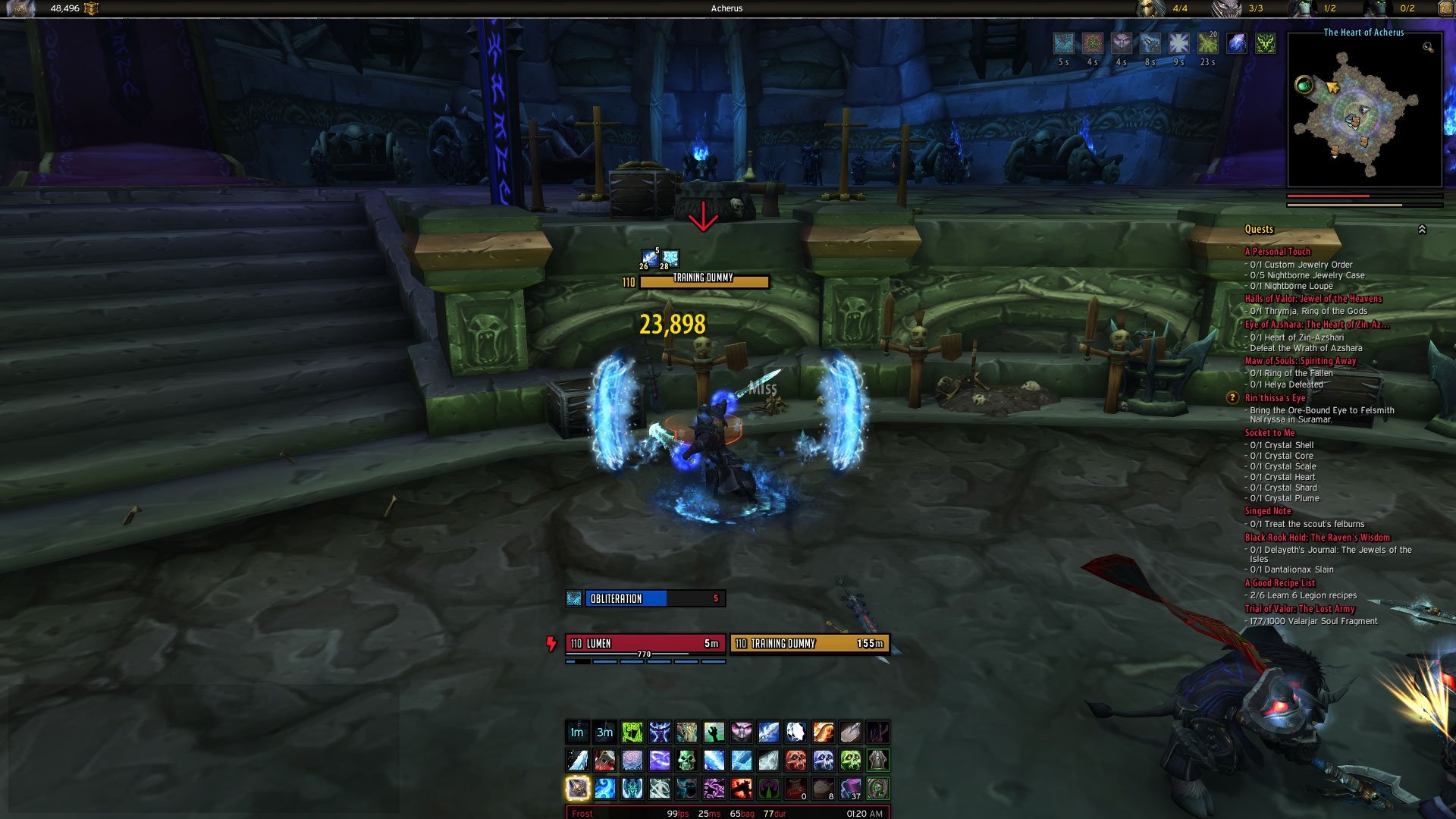
lumUI is a UI Compilation created having in mind utility within an attractive look focused on information. The main element of the UI is my oUF layout, oUF_lumen. This UI is full featured yet keeping it simple and easy to install without needing to configure lots of addons.
Installation & Instructions
1. Backup your Fonts folder (if you have it), Interface and WTF folder.
2.Unzip the archive into the World of Warcraft _retail_ folder. Not the Addons folder, the World of Warcraft _retail_ Folder. This is because inside the archive you will find a Fonts folder and an Interface folder.
3. That's it, there is no WTF because it's not needed by any addon needing configuration (at least important ones).
4. Refer to the individual addons if you need help configuring them. Most of the addons in this pack are configured through Lua editing so they might not be fitted for some users.
5. This UI works out of the package. You might only need to move some elements of the frames around.
6. If you need to override any default options please do so on `config.lua`. Go to LumUI and oUF_Lumen default config files (`defaults.lua`) to see the available options and override your settings on the `config.lua` file (save this file between updates, both for LumUI and OUF_Lumen).
7.In config.lua (LumUI and oUF_Lumen) there is an example to use a more compact centered layout (https://i.imgur.com/b7PG5va.jpg), uncomment the comments files to achieve that layout. Since version 9 LumUI uses a more wide layout with the Action Bars following the layout used by Blizzard default action bars. If you uncomment those files, please disable, reload and re-enable LumUI so the layout resets.

Addons
Keeping addons to a minimum from now on. You can supplement the UI with other addons of your choice.
Notes
* There is a price to pay for a UI with a low need of config and simplicity... most of the stuff is edited in the lua files. Especially all addons that begin with lum (my own) are almost all edited through lua. Open the lua files in the beginning of the files there are lots of configs to tweak stuff.
- Fixes.
- Tweaks.
Version 9.0.3
- Update frames.
- Tweaks.
Version 9.0.2
- Small fix to Libs.
Version 9.0.1
- First fixes pass for Shadowlands.
- Split the settings into defaults and config (override settings here).
Version 8.0.14
- Hopefully fix some bugs for 8.2 in the tooltip mod.
Version 8.0.13
- Update oUF_Lumen Frames (see the addon CHANGELOG for specific changes).
- Update several addons.
- Add Talents to tooltip when pressing Shift.
- Added several UI tweaks (Move Archeology Frame, Add Talents to Tooltip on Shift Press, Add Total Quest Count to the World Map and Add iLevel to Character frame when pressing Shift).
- Hide the vehicle Seat Indicator widget.
- Fix the missing texture for the icons.
- Fix some bugs with the cooldownPulse module.
- Fix when changing specs or talents.
- Cleanup.
Version 8.0.12
- Update addons
- Add Chat Addon
Version 8.0.11
- Cleanup
Version 8.0.10
- First working release for BFA
Version 8.0.9
- Embed base addons (actionbars and buttons [roth]).
- Hopefully everything will be package nicely..
Version 8.0.3
- Bug fixes.
Version 8.0.2
- Update Addons.
Version 8.0.1
- First fixes for BFA pre-patch.
Version 7.3.3
- I kinda screwed up and uploaded the wrong thing! Fixing that! :D.
Version 7.3.2
- Additional Stats in the stats bar right tooltip.
Version 7.3.1
- Bug fixes
Version 7.3
- First release for Legion.
- Change versioning.
Version 2.1
- First release for Warlords of Draenor.
- Fixed some bugs.
- Updated most of the addons (included the modded ones (Bagnon for example)).
- Removed unnecessary addons (Like Cooldown numbers (built in now)).
Version 2.0
- First release for Mists of Pandaria.
- Updated several addons for MoP (almost all Lum addons were updated).
- Temporarily removed lumNoLuv due to need of rewrite.
- Removed lumBags due to cargBags being deprecated.
- Added Bagnon (slightly modded) as the bags addon.
- Added Currency Tracker to track Currencies (Honor, Justice Points...) on Bagnon.
- Added BankStack to automaticaly stack bags and bank!
- Added ProKeybinds addon for macro and spell bindings.
- oUF_lumen still needs some tweakin, testing and also Warlock new Powers among other little things.
Version 1.5
- Updated several addons for 4.06.
- Minor tweaks.
Version 1.5
- Added better totem bar support with timers, styling and other little perks like fading if mounted, etc.
- Added more drop shadows here and there.
- Updated several addons.
- Little bug fixes.
- Now with extra-sugar (don't remember anything else I've changed, I probably did...).
Version 1.4
- First Cataclysm release with several TOC Bumps.
- Minor Bug fixes.
- Updated several addons including oUF_lumen.
- lumStats Tooltip now displays Tol Barad Timer.
Version 1.32
- Fixed the bug with lumCupcakes where the Quest Watchframe would only display 2 quests even when watching more.
- Added oUF_AuraWatch addon.
- Added latest version (Version 1.82) of oUF_lumen.
Version 1.31
- Fixed several bugs on lumSmallTalk.
- Added edit box coloring in lumSmallTalk depending on what type of chat you're using (whisper, raid, guild...).
- Removed the tainting in lumBuffs so you can right click buffs in combat now.
- Added a shadow for panels created via lumDrops. Minimap has a shadow and bottom panel has a shadow now. The second argument of the function controls this.
- Added shadows for Player Buffs / Debuffs - lumBuffs.
- Added last version of oUF_lumen which it adds MainTank Frames and Main Tank Targets. Drop Shadows for Units and some fixes.
Version 1.3
- Added new addon lumNoLove. A buff reminder addon for combat buffs like Shouts. TO DO: Rogue Poisons possibly.
- Removed OmniCC.
- Added tullaCC.
- Added new addon lumCupCakes. Addon with several UI improvements like Quest Level on the quest log, ability to move the Quest Watch Frame and resize it... and possible more in the future.
- Added New version of oUF_lumen with a more smooth texture. Old texture is in the folder lumMedia.
- Added support for oUR_Reputation to oUF_lumen. Added a Tooltip to show current faction standing.
- Changed the Location display from the bottom panel to the top of the Minimap, it's now part of lumMinimapa addon.
- lumStats changed to reflect the location text changes. Tooltips changed.
- Location on the Minimap can be shown only on mouseover. Option to make it colored by zone pvp info.
- Removed ncBindings addon.
- Added ncHoverBind addon.
- Removed nivBuffs addon.
- Added lumBuffs. Since it only styles the buffs/debuffs it doesn't need to use secureheaders and therefore buffs are right clickable in combat.
- Added latest version of lumAutobot with support for guild repairs funds. Alt when visiting a repair merchant ignore the use of guild funds. Guild funds can be toggle ingame by using /autbot guildfunds on/off.
Version 1.21
- Added support for !ClassColors addons for lumDrops and lumStats.
- Added option to lumBags to toggle bank segmentation on/off. Off by default.
- Removed Quest Items separation in the bags of lumBags. Blizzard classify as Quest Item some items that are not so it defeats the purpose.
- Updated oUF_lumen.
Version 1.2
- Updated Freetip.
- Updated lumStats.
- Updated lumBags with some item categories divisions.
- Added addon ncBindings.
Version 1.11
- Removed Bagnon as the bags addon.
- Added lumBags. lumBags is a cargBags2 layout. Light, clean and customizable.
- Added an option to lumDrops to individually color border by class or not (so you can turn off class coloring on the minimap but still leave it on the bottom bar for example).
- Added the new version of nivBuffs that solves some minor bugs.
- Added latest version of oUF_lumen.
Version 1.1
- Fixed a bug with LumSmallTalk preventing clicking on chat links and returning an error.
- Added a Repair module to lumStats (colored by repair %).
- Added addon Butsu.
- Added addon teksLoot
Version 1.01
- Fixed a small bug displaying Tol Barad timer Tooltip. Cataclysm isn't here yet so...
Version 1.0
- Released the compilation.
 |
Comment Options |
 01-18-23, 03:56 PM
|
|
|
A Kobold Labourer
Forum posts: 1
File comments: 18
Uploads: 0
|
Dragonflight
Do you planning in updating it for DF? Saw something going on, on this GitHub branch.
Cheers
Last edited by Katzenhirn : 01-18-23 at 03:56 PM.
|

|

|
| Katzenhirn |
| View Public Profile |
| Send a private message to Katzenhirn |
| Find More Posts by Katzenhirn |
| Add Katzenhirn to Your Buddy List |
|
03-07-22, 07:31 PM
|
|
|
A Kobold Labourer
Forum posts: 0
File comments: 14
Uploads: 0
|
TBC
Can I use this in TBC?
|
|
|
|
| Rosexephon |
| View Public Profile |
| Send a private message to Rosexephon |
| Find More Posts by Rosexephon |
| Add Rosexephon to Your Buddy List |
|
07-13-21, 05:12 PM
|
||
|
A Kobold Labourer
Forum posts: 0
File comments: 10
Uploads: 0
|
I'll see in some weeks the completed version so I can go back to what I had in BFA. I have these stupid issues with the current ui, for example my loss of control information is scaled so much up that the text is somehow in multiple rows and icon too big which throws me off, and I can't find where I can change the scaling of that precise piece of UI, thanks to ElvUI absolutely taking control of everything. I might look for some non-ElvUI stuff while waiting for you to finish this. Don't hurry, do it for yourself. |
|
|
|
|
| Zenier |
| View Public Profile |
| Send a private message to Zenier |
| Find More Posts by Zenier |
| Add Zenier to Your Buddy List |
|
07-12-21, 02:34 PM
|
|||
|
A Frostmaul Preserver
 Forum posts: 268
File comments: 498
Uploads: 2
|
 I might actually at the end of this month, right now got too much work going on, but I will try to finish up the UI! Sorry If I let anyone down.
__________________
My oUF Layout: oUF Lumen
Last edited by neverg : 07-12-21 at 02:34 PM.
|
||
|
|
|
| neverg |
| View Public Profile |
| Send a private message to neverg |
| Find More Posts by neverg |
| Add neverg to Your Buddy List |
|
07-12-21, 08:30 AM
|
||
|
A Kobold Labourer
Forum posts: 0
File comments: 10
Uploads: 0
|
Thanks for the update. I'm too smoothbrain to get that iteration to work other than get it to show in the loaded addons list. I shall, then, from time to time check if this has been updated thanks to your renewed interest in the game. I've heavily modified ElvUi and it's one custom setup to be serviceable, but ElvUI just takes too much control of default UI that's it a mess to find each and every panel and whatever possible and then scale up or down precisely... But do not for the sake of us push new version out.  |
|
|
|
|
| Zenier |
| View Public Profile |
| Send a private message to Zenier |
| Find More Posts by Zenier |
| Add Zenier to Your Buddy List |
|
07-12-21, 03:33 AM
|
|
|
A Frostmaul Preserver
Forum posts: 268
File comments: 498
Uploads: 2
|
Hey.
I've kinda phased out of WoW, lost my interest in this expansion, it was being boring! I might return to try this new patch. The last iteration is here: https://github.com/greven/LumenUI I hadn't finish everything but it was close. Sorry, but yeah, this WoW expansion was a bit of a letdown for me. :/
__________________
My oUF Layout: oUF Lumen |
|
|
|
| neverg |
| View Public Profile |
| Send a private message to neverg |
| Find More Posts by neverg |
| Add neverg to Your Buddy List |
|
06-24-21, 08:12 AM
|
|
|
A Kobold Labourer
Forum posts: 0
File comments: 10
Uploads: 0
|
Hello!
Any update on the rewrite progress? I've had to use some ElvUI as replacement and it's not the same.  |
|
|
|
| Zenier |
| View Public Profile |
| Send a private message to Zenier |
| Find More Posts by Zenier |
| Add Zenier to Your Buddy List |
|
03-08-21, 04:43 AM
|
||
|
A Frostmaul Preserver
Forum posts: 268
File comments: 498
Uploads: 2
|
It's working already, but it's raw in some areas still. It's taking a bit since, well, there was a lot to develop from scratch. Thanks, have fun in the game!
__________________
My oUF Layout: oUF Lumen |
|
|
|
|
| neverg |
| View Public Profile |
| Send a private message to neverg |
| Find More Posts by neverg |
| Add neverg to Your Buddy List |
|
03-08-21, 12:44 AM
|
|
|
A Kobold Labourer
Forum posts: 0
File comments: 1
Uploads: 0
|
Hi neverg,
just signed up to follow your posts. Playing wow on and off, I came back to your interface every time. Really like the clear, minimal design and room to expand it. Hope everything works out and we can start to use your new one soon! Cheers! |
|
|
|
| DonHansDampf |
| View Public Profile |
| Send a private message to DonHansDampf |
| Find More Posts by DonHansDampf |
| Add DonHansDampf to Your Buddy List |
|
02-06-21, 01:00 PM
|
|
|
A Frostmaul Preserver
Forum posts: 268
File comments: 498
Uploads: 2
|
Hey guys. Still in the works.
Sorry it is taking a bit, not very far away now for the first release. But there will be still things to do. Still missing party / raid frames (going to do Raid frames this time). Minimap, some bars, etc, etc. Current iteration:  This will be released under a new addon and I will leave oUF_Lumen LumUI for archive reasons and probably archive LumUI.
__________________
My oUF Layout: oUF Lumen
Last edited by neverg : 02-06-21 at 01:01 PM.
|
|
|
|
| neverg |
| View Public Profile |
| Send a private message to neverg |
| Find More Posts by neverg |
| Add neverg to Your Buddy List |
|
12-28-20, 12:48 PM
|
||
|
A Defias Bandit

Forum posts: 2
File comments: 42
Uploads: 0
|
|
|
|
|
|
| Telaq |
| View Public Profile |
| Send a private message to Telaq |
| Find More Posts by Telaq |
| Add Telaq to Your Buddy List |
|
12-06-20, 04:34 AM
|
||
|
A Kobold Labourer
Forum posts: 1
File comments: 18
Uploads: 0
|
|
|
|
|
|
| Katzenhirn |
| View Public Profile |
| Send a private message to Katzenhirn |
| Find More Posts by Katzenhirn |
| Add Katzenhirn to Your Buddy List |
|
12-02-20, 07:21 AM
|
|
|
A Frostmaul Preserver
Forum posts: 268
File comments: 498
Uploads: 2
|
I'm now in the process of re-writting from scratch my WoW Inteface, LumUI.
It will be called LumenUI actually. oUF_Lumen will be merged into the UI. I do intend to have only 1 addon published and 1 code repo. Do bear with me while I build this new interface if you are interested in my current interface. oUF_Lumen, save some little edge cases and bugs for all the recent changes I did, was written from scratch by and maintained by me. My WoW addons though are a collection of other sources mixed with my code. For instance the bars are rActionBars which haven't been maintained in the last couple of years. In order to catch up with this technical debt I've decided to re-write everything from scratch and merge LumUI and oUF_Lumen into a single Addon (a la TukUI, ElvUI, LSUI, etc...). Expect the same layout but will add some changes. This will allow me to expand on the elements I support and to have confidence in present and future changes. This might take I would say up to a month. In the meantime I will only correct critical bugs as I concentrate on this next chapter for my Interface. This Addon will eventually get deleted in favor of the new one.
__________________
My oUF Layout: oUF Lumen |
|
|
|
| neverg |
| View Public Profile |
| Send a private message to neverg |
| Find More Posts by neverg |
| Add neverg to Your Buddy List |
|
11-29-20, 10:18 PM
|
|||
|
A Warpwood Thunder Caller
Forum posts: 94
File comments: 177
Uploads: 13
|
Re: Re: XP Bar
Code:
local A, ns = ...

local L, C, G = unpack(select(2, ...))

-- ------------------------------------------------------------------------
-- > Your configuration here (will override the defaults.lua settings)
-- ------------------------------------------------------------------------

-- Important: Override each property individually or copy all the defaults

 local actionBars = {
   buttonSize = 33,
   buttonMargin = 3,
   padding = 2,
   keybindsAlpha = 1,
   macroTextAlpha = 0,
   fader = {
     fadeInAlpha = 1,
     fadeInDuration = 0.2,
     fadeInSmooth = "OUT",
     fadeOutAlpha = 1,
     fadeOutDuration = 0.2,
     fadeOutSmooth = "OUT"
   }
 }

-- Example: Compact UI
 C.settings.stats.width = 430
 C.settings.actionBars.bar1.framePoint = {"BOTTOM", UIParent, "BOTTOM", 0, 22}
 C.settings.actionBars.bar2.framePoint = {"BOTTOM", A .. "Bar1", "TOP", 0, 0}
 C.settings.actionBars.bar3.framePoint = {"BOTTOM", A .. "Bar2", "TOP", 0, 0}
 C.settings.actionBars.bar3.startPoint = "BOTTOMLEFT"
 C.settings.actionBars.bar3.numCols = 12
 C.settings.actionBars.stancebar.framePoint = {"BOTTOMLEFT", A .. "Bar3", "TOPLEFT", 1, 7}
 C.settings.actionBars.petbar.framePoint = {"BOTTOMRIGHT", A .. "Bar3", "TOPRIGHT", -1, 7}

-- Example: Set the Minimap to the top right
-- local AurasbuffSize = 30
-- local AurasPosX = -20
-- local AurasPosY = 4

-- C.settings.minimap.parentPoint = "TOPRIGHT"
-- C.settings.minimap.point = "TOPRIGHT"
-- C.settings.minimap.posX = -20
-- C.settings.minimap.posY = -20
-- C.settings.minimap.questTrackerPosX = -64
-- C.settings.minimap.questTrackerPosY = -300
-- C.settings.auras.buffAnchor = {"TOPRIGHT", "Minimap", "TOPLEFT", AurasPosX, AurasPosY}
-- C.settings.auras.buffAnchor2ndRow = {"TOPRIGHT", "Minimap", "TOPLEFT", AurasPosX, AurasPosY - AurasbuffSize - 20}
-- C.settings.auras.debuffAnchor = {"BOTTOMRIGHT", "Minimap", "BOTTOMLEFT", AurasPosX, -AurasPosY}

-- ------------------------------------------------------------------------
__________________
Busy modifying your code for my own UI. |
||
|
|
|
| lanacan |
| View Public Profile |
| Send a private message to lanacan |
| Find More Posts by lanacan |
| Add lanacan to Your Buddy List |
|
11-29-20, 04:42 AM
|
||
|
A Frostmaul Preserver
Forum posts: 268
File comments: 498
Uploads: 2
|
I'll have a look, currently playing so didn't pay much attention to that. I don't use the "compact" layout anymore, but I will fix that. Shall release today with several minor fixes including that. Thanks for reporting.
__________________
My oUF Layout: oUF Lumen |
|
|
|
|

| neverg |
| View Public Profile |
| Send a private message to neverg |
| Find More Posts by neverg |
| Add neverg to Your Buddy List |
|
Thanks for contributing.

Support AddOn Development!
You have just downloaded by the author . If you like this AddOn why not consider supporting the author? This author has set up a donation account. Donations ensure that authors can continue to develop useful tools for everyone.
*Clicking the donate button above will take you to PayPal.com

*Clicking the donate button above will take you to Pledgie.com
