Download
(229 Kb)
Download
Updated: 04-29-12 10:48 AM
Pictures
File Info
Tested:Hour of Twilight 4.3
Updated:04-29-12 10:48 AM
Created:02-03-11 10:34 AM
Downloads:18,075
Favorites:108
MD5:
This AddOn is 4.3 compatible
KuiNameplates  Popular! (More than 5000 hits)
Version: 003
by: Kesava [More]
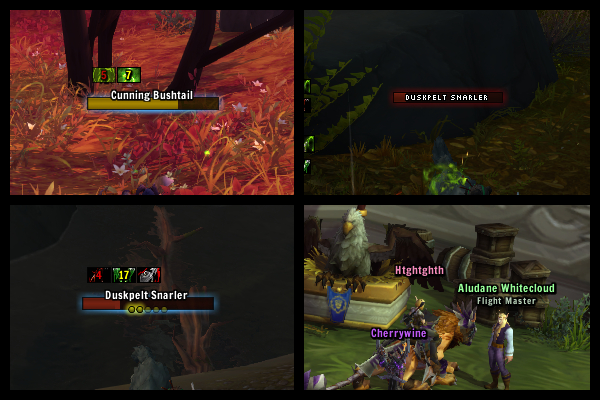
Prettier, lightweight and configurable nameplates. Configurable through interface options (open with /knp or /kuinameplates).
Designed to match oUF_Kui.

Now pixel perfect!
There's now an option to fix aliasing issues, which will make frames appear sharper as long as you're not using UI scale and you're in a "good" resolution. It introduces some graphical lag with nameplates (they'll seem a bit loose) and if the stacking nameplates option in interface settings is enabled, they may appear to jitter a little if too many are visible at the same time. It actually has a positive effect on FPS, however.

Current features:
  • All of the default nameplate features.
  • Max & deficit (or current) display of health on units, depending on settings.
  • Pretty fade in/out animations (which can be disabled with /knp gen fade).
  • Tank mode (recolour health bars when you have threat - disabled by default, /knp tank toggle).
  • Combo points.
  • Automatic toggling of nameplates when you enter or exit combat (disabled by default, /knp gen combat).
  • Cast & incoming healing warnings (disabled by default, /knp cast warnings).
Planned features:
  • Options for fonts, texture & scale.
  • Frame blacklisting.
  • Stuff I can't remember.
r003-fix
- fixed: cast bar un/interruptible status works now. I'm silly.

r003
- added: configuration gui. The slash command /knp (/kuinameplates) now opens the blizzard addon configuration interface at the Kui Nameplates page.
- added: support for ace config profiles.
- added: option to smoothly animate health bar changes (enabled by default).
- added: option to fix frame aliasing issues, enabled by default.
- added: option for font scale.
- added: a shield icon over cast bars during un-interruptible casts.
- changed: raid target icons have been moved to above the health bar.
- changed: two simple "patterns" are now used to determine how health text should be displayed. More on that story later.
- changed: the frame mouse over highlight is now clearer.

- caveat: with fixaa disabled the frame border sometimes displays too large (i.e. frame.bg.fill doesn't completely fill the background)
- caveat: cast bars display incorrectly (too small/large) at certain ui scales.
- caveat: spell icons sometimes display behind the icon background.
- caveat: changing profiles requires a UI reload.

r002.3.5
- updated Kui
- fixed: tank.barcolour now accepts alpha values.

r002.3.4
- fixed: frame glow texture was a bit too large since I changed the frame size last version.

r002.3.3
- bumped TOC to 40300
- added: setting to change the speed of frame fade animations, /knp gen fadespeed. 0.5 by default.
- changed: default frame fade animation length halved.
- changed: frames are now less wide, such that they don't overlap when stacking/spreading plates is enabled.

r002.3.2
- changed: updated Kui
- fixed: now using a custom FrameFade function from kui as a solution to the ADDON_ACTION_BLOCKED spam.

r002.3.1
- changed: updated Kui

r002.3
- changed: bumped toc to 40200
- fixed: cast/heal warnings now work with 4.2

r002.2.2
- changed: health bars will no longer fade out on frames which are not targeting the player when the player is attacking or is in combat.
- fixed: the health bar will no longer appear the wrong colour the first time a frame fades in.
- fixed: health bars will no longer sometimes get stuck displaying the wrong colour, particularly when threat is lost.
- fixed: the default cast bar should no longer sometimes become visible.
- fixed: un/interruptible cast logic is no longer inverted. Seriously this time.
- revert: using the old health bar due to issues in the way the default interface colours it (fixes above).

r002.2.1
- fixed: uninterruptible casts are now definitely correctly recognised.

r002.2
* This version resets configuration once upon loading due to a significant back-end change. I'm hoping this'll be the last time I need to do this.
* This is primarily a performance/bug fix update.
* Vastly improved performance in situations where large amounts of frames are visible at a time.
* Vastly decreased the performance impact of smooth frame fading (gen.fade).
- added: option to fade frames in (not exclusively) when the mouse is over them (/knp gen fademouse, disabled by default).
- added: option to show or hide combo points (/knp gen combopoints, enabled by default).
- added: option to show or hide the cast bar (/knp cast toggle, enabled by default).
- changed: interruptible spells now colour the cast bar red and the red glow is now slightly less transparent (the colours of these will be made configurable later).
- changed: a frame's fade animation can now be interrupted.
- changed: cast/heal warnings and cast bars will no longer show on what is known to be an incorrect frame (if its GUID is known).
- changed: frame highlight texture is no longer the same as the health bar texture.
- changed: the cast.usenames setting is now disabled by default.
- changed: the gen.highlight setting now requires a UI reload.
- changed: cast/heal warning animations now smooth in rather than out.
- fixed: if a frame somehow stores an incorrect GUID, it can now be corrected when the frame is moused over or targeted.
- fixed: a frame's threat status is now correctly reset when it is hidden.
- fixed: a frame's target status is now correctly reset when it is hidden.
- fixed: the currently casting spell's ID is now correctly cleared when the owning frame is hidden.
- fixed: a frame's cast bar will now be updated when it is shown while being targeted.
- fixed: disabling cast warnings without reloading the UI will no longer sometimes cause errors.
- fixed: uninterruptible casts are now correctly recognised.
- fixed: bosses are no longer sometimes incorrectly shown as "??b+"
- fixed: boss level text ("??b") is now always red.
- fixed: health percentages now correctly do not show when health is at 100%.
- fixed: a potential issue where the cast bar is not updated correctly upon targeting a unit.
- fixed: when cast/heal warnings are not visible because the strings are empty, they are now hidden and as such have less of an impact on performance.
- fixed: disabling tank mode while you have threat on a unit will no longer cause its nameplate to stay in the threat colour regardless of its threat status.
- fixed: I am no longer incorrectly multiplying a value by 1. I mean, really.
- revert: frames will no longer stack closer together as this was causing UI action blocked errors.

r002.1.2
- changed: frames stack closer together
- changed: frames now store their GUID when they are moused-over as well as when they are targeted
- changed: when hp.mouseOver is enabled, health texts will also show when frames are targeted
- fixed: frame highlights are no longer in front of any text
- fixed: issue where the wrong frame is targeted for a short time after targeting a frame in situations where many frames have the same name
- fixed: issue where a channeled spell would not be detected upon targeting a frame
- fixed: name text is now always white
- fixed: issue where frames would behave as if there was no target if the target's nameplate was not displayed for any reason

- fixed: issue where gen.fadedAlpha was not obeyed

r002.1.1
- fixed: the cast bar now correctly clears when a frame is hidden (no more reverberating hymn being cast by troggs).

r002.1
* this version resets configuration once upon loading
- added: option to fade all except the targeted frame (/knp gen fadeall), disabled by default
- added: option to hide health text until the frame is moused over (/knp hp mouseover), disabled by default
- added: option to highlight frames when the mouse is over them (/knp gen highlight), enabled by default
- added: option allowing the alpha value to which frames fade out to be changed (/knp gen fadedalpha), .3 by default
- changed: decreased CPU usage by about 40%
- changed: frames are now slightly lower such that they don't completely hide the first line of text in chat bubbles
- changed: options which require a UI reload are displayed differently
- changed: most hp options have been reworded slightly
- fixed: options which require three colours and an alpha value now correctly accept alpha values
- fixed: options which require three colours and an alpha value are now displayed correctly

r002
- added: incoming heal display, shown above health if cast warnings are enabled
- added: option to display spell name under cast bar (enabled)
- added: spell cast delay times (in the same format as ouf_kui)
- changed: cast warnings are now displayed above a frame's name
- changed: cast warnings now use the spell's school colour
- changed: cast bars are now shown for untargeted party members
- changed: spell icon is again displayed to the left of frames
- changed: all cast bar settings are now in the cast group
- fixed: the cast bar will no longer change colour when a cast is delayed
- fixed: GUIDs should be loaded more quickly
- fixed: the cast bar and spell icon are no longer beneath the main frame's glow

- fixed: heal warning will no longer sometimes display a red 0
- fixed: when multiple frames with the same name are visible, one going off screen will no longer clear all references for that name
- fixed: frames which have just been initialised will now store their GUID and name

- fixed: cast warnings/cast bars will now correctly use GUIDs

r001.7.2b
- added: cast warnings. These show the name of the spell being cast by the unit above their nameplate even if they haven't been targeted. Disabled by default (/knp cast warnings).
- changed: defaut intial cast bar colour is now brighter (do /knp reset).

r001.7.1
- added: option to change initial cast bar colour (handling of this will be improved in a later version)
- fixed: the gen.combat setting is now initialised correctly

r001.7
- added: contextual, alternate health display which mimics ouf_Kui. Can be disabled (/knp hp showalt).
- added: cast time (current and maximum duration) display under cast bars. Can be disabled (/knp gen casttime).
- changed: cast bar colour [until a cast is delayed]
- fixed: issue where frame fading would not work until a frame was shown
- fixed: issue where health text is not displayed correctly upon frame creation
- fixed: some potential errors concerning configuration

r001.6.2
- fixed: percentage health is now floor'd rather than ceil'd
- fixed: will no longer cause an error in some situation where config is not set

r001.6.1
- changed: further reduced CPU usage
- changed: spell icons are now displayed on the right side of frames
- changed: castbars now glow red when the spell is uninterruptible rather than yellow (at some point this will be changed entirely or made configurable)
- fixed: won't warn that settings have been reset every load until a setting is changed anymore
- fixed: the spell icon's background is now the same colour as the main background

r001.6
- added: option to change the colour of the threat glow when tank mode is enabled (/knp tank glowcolour)
- changed: the frame backdrop is slightly darker
- changed: reduced CPU usage
- changed: configuration is now categorised
- changed: some settings have had their names and descriptions changed
- changed*: configuration refactored; settings need to be reset as a result
- changed*: code refactoring: less repeated in slash.lua; functions are now stored directly in np rather than np.f; functions specific to frames are now embedded in frames; code now makes more sense in general
- fixed: tank mode was still calling np self [as of last revision]

r001.5.2
- changed: bump TOC to 40100
- fixed: nameplates are now correctly recognised
- fixed: everything else broken with 4.1 (some bugs probably still exist; the cast bar's uninterruptible glow might not work for instance).

- changed: bump Kui TOC to 40100

- fixed: issue where a nameless frame existing in the WorldFrame would cause an "expected string, got nil" error

r001.5.1
- added: option to automatically show/hide enemy nameplates when entering/exiting combat. Disabled by default.
- fixed: automatic combat toggle will now function correctly upon loading
- fixed*: reset option now recreates itself every load

r001.5
- added: multiple options to configure how health text is displayed on units. Default settings replicate the current set up.
- added: option to disable smooth fading.
- added: configuration options now have descriptions.
- changed*: the tankcolour setting now provides a preview of its colour.
- fixed*: values higher than one are no longer accepted by tankcolour.

r001.4
- added: combo points, displayed to the right of frames. These do not currently work for vehicles.
- added*: add-on info to the top of main.lua
- changed: reaction colours slightly (from the default interface)

r001.3
- added: configuration through the commands '/knp' or '/kuinp'
- added: tank mode, which recolours health bars when you have threat. Can be enabled using the slash commands above.
- added: configuration for tank mode (i.e, the colour it uses).
- added*: KuiNameplatesSaved as a saved variable across characters
- changed: default font, to a rounder one
- changed: slash commands now handle invalid arguments and tell you how to use them correctly
- changed: the feedback after changing a setting with a slash command makes a bit more sense
- changed: bars now smoothly fade to any new alpha values (e.g. when clicking a bar, other bars will partially fade out)
- changed*: cast bar and spell icon backgrounds are now parented correctly so I don't need to fiddle around with OnShow
- changed*: moved health bar colouring into np.f:SetHealthColour
- fixed: frames' fade animations shouldn't go weird when the animation is stopped half way through any more

r001.2
- added: cast bars now glow a relatively sickly yellow if the spell cannot be interrupted
- fixed: further reduced CPU usage
- fixed: positions of cast bar and cast bar icon

- fixed: reduced CPU usage
- fixed: initial fade in should be more reliable

r001.1
- changed: frame background is slightly more transparent
- changed: spell icon now has a solid black border rather than various built-in borders
- fixed: health bar colour will now correctly change when a unit decides it doesn't like you any more or vice versa

- changed: health string is now ~1 pixel lower
- changed: frame backdrop is now slightly transparent
- fixed: the name font string now resizes based on the width of the health string, to fix the ellipsis.

r001
- initial release.
Archived Files (7)
File Name
Version
Size
Author
Date
003
229kB
Kesava
04-29-12 09:40 AM
002.3.5
117kB
Kesava
12-29-11 10:46 AM
002.3.4
116kB
Kesava
12-25-11 10:36 AM
002.3.3
116kB
Kesava
12-02-11 03:02 PM
002.3.2
116kB
Kesava
08-25-11 03:00 PM
002.3.1
116kB
Kesava
07-09-11 06:15 PM
002.3
113kB
Kesava
06-29-11 06:00 AM


Post A Reply Comment Options
Old 04-30-12, 09:40 PM  
linguini
A Deviate Faerie Dragon

Forum posts: 18
File comments: 61
Uploads: 0
how can i get this addon to show class colors for enemy name plates?
linguini is offline Report comment to moderator  
Reply With Quote
Old 04-29-12, 03:04 PM  
BadWarlock
A Kobold Labourer

Forum posts: 0
File comments: 7
Uploads: 0
Tell me please how to disable the target level. and the percent нр?
BadWarlock is offline Report comment to moderator  
Reply With Quote
Old 04-20-12, 05:08 AM  
luigee91
A Kobold Labourer
AddOn Author - Click to view AddOns

Forum posts: 0
File comments: 33
Uploads: 2
thank you!!!
luigee91 is offline Report comment to moderator  
Reply With Quote
Old 04-13-12, 07:09 PM  
Pekti
A Kobold Labourer

Forum posts: 0
File comments: 42
Uploads: 0
Re: Re: Updating the addon / saving changes

Originally Posted by Kesava
When you say you've customised it, have you actually edited the .lua files? If not, I don't see why you'd lose settings, it stores them in the same way every other add on does, so unless you're having the same problem with other add ons...
I'm leaning toward you've-modified-the-files, though. In which case you should flag the curse client to ignore the add on so that it doesn't try to replace it when you modify it. If you just copy a single file, the client would still recognise it as "modified" and try to replace it, afaik.

Otherwise, -very- recently I've been working on making configuration better (i.e. providing more options, making a GUI and supporting profiles), and I imagine that'd fix this. I'm not sure when I'll release it, but there's not much work left.
Ahh, okay, I see what you mean. Yeah, the actual .lua files have been modified to suit my needs. Another addon I customize is DBM. Whenever I update it (which with one like DBM, it's pretty often), there's a specific .lua file I backup in order to preserve the changes I've made (yet still update the addon so that it's the most recent version). It's a great idea to just ignore updating KuiNP. Sorry for the confusion, and thanks for the clarification
Pekti is offline Report comment to moderator  
Reply With Quote
Old 04-13-12, 01:12 PM  
Kesava
A Kobold Labourer
AddOn Author - Click to view AddOns

Forum posts: 1
File comments: 64
Uploads: 3
Re: Updating the addon / saving changes

Originally Posted by Pekti
... when I update the addon, my settings are lost...
When you say you've customised it, have you actually edited the .lua files? If not, I don't see why you'd lose settings, it stores them in the same way every other add on does, so unless you're having the same problem with other add ons...
I'm leaning toward you've-modified-the-files, though. In which case you should flag the curse client to ignore the add on so that it doesn't try to replace it when you modify it. If you just copy a single file, the client would still recognise it as "modified" and try to replace it, afaik.

Otherwise, -very- recently I've been working on making configuration better (i.e. providing more options, making a GUI and supporting profiles), and I imagine that'd fix this. I'm not sure when I'll release it, but there's not much work left.
Kesava is offline Report comment to moderator  
Reply With Quote
Old 04-13-12, 09:52 AM  
Pekti
A Kobold Labourer

Forum posts: 0
File comments: 42
Uploads: 0
Updating the addon / saving changes

Hi! Thank you for all of your hard work on this addon. It really is a great one that I am so very happy to use

I have a question for you regarding updating the addon. I've customized the settings so that I could tweek the details and whatnot to appear as I want them to. But when I update the addon (via the curse client, etc), my settings are lost and I have to start over from scratch. So my question is this: is there a file in particular that I can save/backup and copy into the new, updated folder in order to maintain my settings? Hope that makes sense. Thanks so much!
Pekti is offline Report comment to moderator  
Reply With Quote
Old 02-11-12, 05:13 AM  
Deadlysnipez
A Murloc Raider

Forum posts: 4
File comments: 9
Uploads: 1
found
Last edited by Deadlysnipez : 02-11-12 at 05:24 AM.
Deadlysnipez is offline Report comment to moderator  
Reply With Quote
Old 12-30-11, 04:46 AM  
Monsterl
A Kobold Labourer

Forum posts: 0
File comments: 2
Uploads: 0
Re: Re: Barcolour and Alpha

Originally Posted by Kesava
Fadedalpha works for me, I suspect you're not typing the second D (understandable).
lol you are right about the second D. Sorry about that.
The barcolour is working now. Thanks for the quick fix.
Last edited by Monsterl : 12-30-11 at 04:47 AM.
Monsterl is offline Report comment to moderator  
Reply With Quote
Old 12-29-11, 10:47 AM  
Kesava
A Kobold Labourer
AddOn Author - Click to view AddOns

Forum posts: 1
File comments: 64
Uploads: 3
Re: Barcolour and Alpha

Originally Posted by Monsterl
etc
Fadedalpha works for me, I suspect you're not typing the second D (understandable). Tank barcolour wasn't working for me either though, which is strange. I'm sure it was. But I've just uploaded a change (2.3.5) which seems to fix it.
Kesava is offline Report comment to moderator  
Reply With Quote
Old 12-29-11, 12:35 AM  
Monsterl
A Kobold Labourer

Forum posts: 0
File comments: 2
Uploads: 0
Barcolour and Alpha

Hi there. Love your nameplate ui. Beautiful and Simple.

The set bar colour does not seems to work for me.
I usually tank and would like to set the HaveThreat bars to blue.
However changing the settings only change the bar as some shades of yellow.

Also the fadealpha does not seems to register.

Could you please help take a look?

Many Thanks
Monsterl is offline Report comment to moderator  
Reply With Quote
Old 11-10-11, 09:02 AM  
Kesava
A Kobold Labourer
AddOn Author - Click to view AddOns

Forum posts: 1
File comments: 64
Uploads: 3
Working on getting this to display better with anti-aliasing disabled recently. I didn't put much thought into it before, but I keep seeing it in screenshots and it really bugs me.

(edit: haven't done this for 2.3.4)
(edit again: this is now on curse, so you can use their client to update if you so wish)
Last edited by Kesava : 12-26-11 at 10:10 AM.
Kesava is offline Report comment to moderator  
Reply With Quote
Old 10-20-11, 11:14 AM  
akgis
A Deviate Faerie Dragon
AddOn Author - Click to view AddOns

Forum posts: 18
File comments: 61
Uploads: 4
Originally posted by Kesava
Works fine here. I wasn't using that and I haven't seen any other changes which would affect nameplates yet. None of the changes I gave you would've broken it either.
Might been some of my other addon messing up I will try again, sorry about that.
__________________
akgis is offline Report comment to moderator  
Reply With Quote
Old 10-20-11, 09:21 AM  
Kesava
A Kobold Labourer
AddOn Author - Click to view AddOns

Forum posts: 1
File comments: 64
Uploads: 3
Originally posted by akgis
This addon isnt working on PTR atm maybe cause of the divide by 0 change
Works fine here. I wasn't using that and I haven't seen any other changes which would affect nameplates yet. None of the changes I gave you would've broken it either.
Kesava is offline Report comment to moderator  
Reply With Quote
Old 10-20-11, 06:00 AM  
akgis
A Deviate Faerie Dragon
AddOn Author - Click to view AddOns

Forum posts: 18
File comments: 61
Uploads: 4
This addon isnt working on PTR atm maybe cause of the divide by 0 change
__________________
akgis is offline Report comment to moderator  
Reply With Quote
Old 10-18-11, 01:31 AM  
Anja
A Kobold Labourer

Forum posts: 0
File comments: 9
Uploads: 0
Anja is offline Report comment to moderator  
Reply With Quote
Post A Reply


Category Jump:

Support AddOn Development!

You have just downloaded by the author . If you like this AddOn why not consider supporting the author? This author has set up a donation account. Donations ensure that authors can continue to develop useful tools for everyone.



