This is a small addon for add fast and efficiently smooth borders to your frames!
You dont need to create a texture for all of your frames annymore. Just this little addon and some code below.
The benefit? The border remains the same, even if the window's size changes. It always looks like it should be.
It's a LUA bases addon. So there are no ingame configurations.
So ok, and how can you use it?
It's quite simple!
!Beautycase has some simple functions.
Create a border
Code:
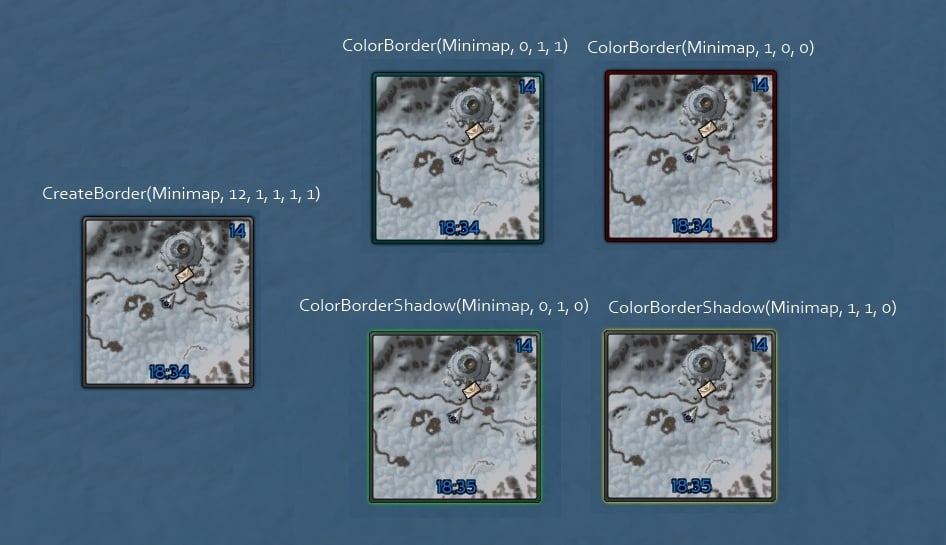
CreateBorder(myFrame, borderSize, R, G, B, uL1, uL2, uR1, uR2, bL1, bL2, bR1, bR2)
myFrame-> The name of your frame, It must be a frame not a texture
borderSize-> The size of the simple square Border. 10-12 looks amazing with the default beautycase texture
R, G, B -> The colors of the Border. r = Red, g = Green, b = Blue
uL1, uL2 -> top left x, top left y
uR1, uR2 -> top right x, top right y
bL1, bL2 -> bottom left x, bottom left y
bR1, bR2 -> bottom right x, bottom right y
Shorter method to add a border with no spacing
Code:
CreateBorder(myFrame, borderSize, r, g, b)
Or simple just one number (x) for the same distance on all corners
Code:
CreateBorder(myFrame, borderSize, r, g, b, x)
Change the border/shadow color
"
a" is the alpha, its is an alternative possibility and is not needed
Code:
ColorBorder(self, r, g, b, a)
Code:
ColorBorderShadow(self, r, g, b, a)
Change the border/shadow texture
Why? So when you want to use different textures like a "normal" texture
and a white texture for debuff highlight or as indicator for something
Code:
SetBorderTexture(myFrame, texture.tga)
SetBorderShadowTexture(myFrame, texture.tga)
Get infos about the beautycase border on a frame
Code:
local size, texture, r, g, b, alpha = GetBorderInfo(myFrame)
Try it out und you will see how easy you can add a cool border to your frames!
NEW FEATURES!
Code:
    myFrame:CreateBorder(borderSize)
    myFrame:SetBorderSize(borderSize)

    myFrame:SetBorderPadding(number or [uL1, uL2, uR1, uR2, bL1, bL2, bR1, bR2])

    myFrame:SetBorderTexture(texture)
    myFrame:SetBorderShadowTexture(texture)

    myFrame:SetBorderColor(r, g, b)
    myFrame:SetBorderShadowColor(r, g, b)

    myFrame:HideBorder()
    myFrame:ShowBorder()

    myFrame:GetBorder() - true if has a beautycase border, otherwise false

    local borderSize, texture, r, g, b, alpha = myFrame:GetBorderInfo()
Change the texture
You dont like the texture included in !Beautycase? Want your own?
So go into the !Beautycase/media folder and change the textureNormal.tga
file with a file of your choice.
Problems
How or where can i put these code snippets into a file or get to work?
First: DONT'T put the code snippets into the beautycase file.
Create a little addons and put the code in its .lua file.
------------------------------------------------------------
You want to skin the frames of an addon.
For example Pitbull or Omen but you get an error message?
So watch out.
WoW initalize all addon alphabetically.
So when you created a addon like "myAddon" and want
to "CreateBorder(aPitbullFrame, ...)" you can only get an error message because
you want to create a border on a frame which at that time does not exist.
Loading ... !Beautycase
Loading ... aAddon
Loading ... bAddon
Loading ... cAddon
Loading ... myAddon > CreateBorder(aPitbullFrame, ...) > Error. This frame does not exist
Loading ... Omen
Loading ... Pitbull > CreatePitbullUnitFrames
|
So thats one of the most mistake.
You cannot create a border on a frame that does not exist.
In the example below you must create a addon whose first character must be greater than "p"
The some for Omen and other addons. (z is a good character)
Thats the point why this addon is called !Beautycase and not Beautycase.
Its loaded as one of the first addons so that you can use the !Beautycase functions very early in a addon
------------------------------------------------------------
How can i find out the name of an frame?
Create a macro
|
/print GetMouseFocus():GetName()
|
Go over the frame you want to give a border and use this macro
Your frame has no name? Than the only solution is to insert the beautycase
code directly into the source data/function of these addon.
If you have no idea how to do this. Ask other people on the wowi/other ui forums.
There are to many wow addons, so I can't give some help with this problems.
If they have no ideas, you can even try it on the comment function of these addon.




 09-05-19, 05:42 PM




 Font?
Font?


