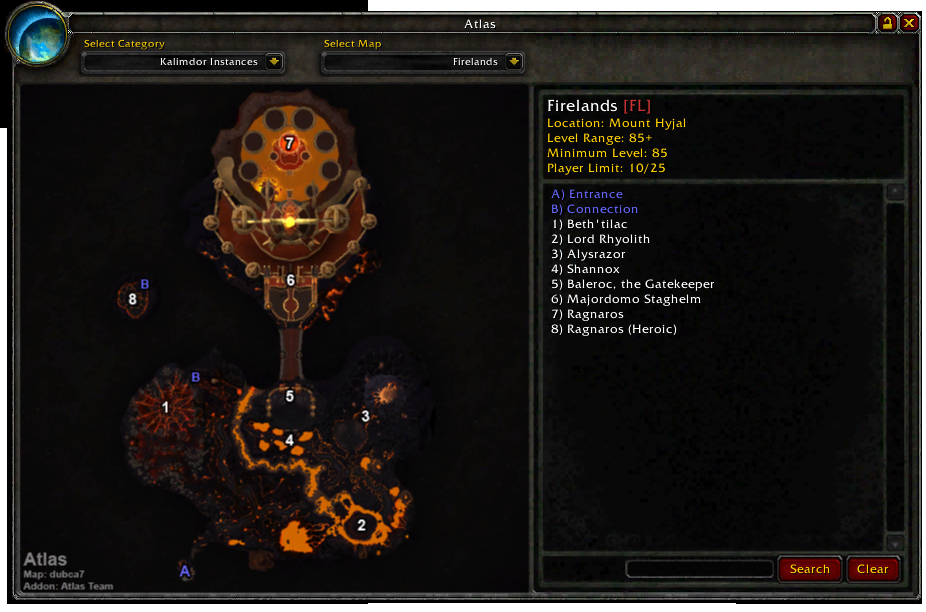
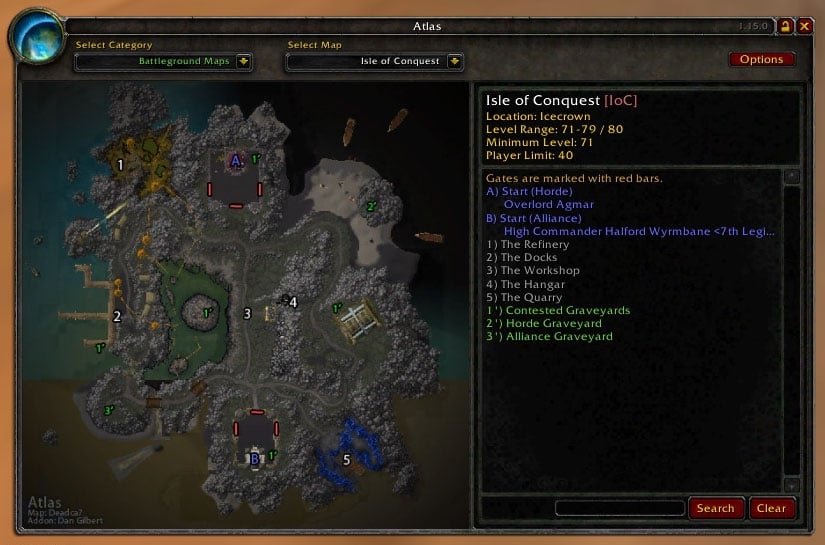
Download
(4 MB)
Download
Updated: 12-06-11 07:27 AM
Pictures
File Info
Tested:Hour of Twilight 4.3
Updated:12-06-11 07:27 AM
Created:unknown
Downloads:4,417,059
Favorites:5,460
MD5:
This AddOn is 4.3 compatible
Atlas  Popular! (More than 5000 hits)
Version: v1.21.1
by: arith, deadca7, Dynaletik, tinyu
Atlas, a World of Warcraft instance map browser
Copyright 2005 - 2010 Dan Gilbert
Copyright 2010 - Lothaer
Copyright 2011 - Arith Hsu


About Atlas

For some reason, Blizzard decided to include beautiful maps for every area of Azeroth except instances. You can still see the area surrounding you in the minimap when you're in an instance, but never the overall layout of the entire dungeon. This is where Atlas comes in. The core of Atlas is basically an image viewer. However, it's the images that come with Atlas that make it worthwhile: a map for every instance in the game. Furthermore, the maps are marked with the locations of bosses and other points of interest. Atlas also includes maps of battlegrounds, dungeon locations, flight points, and outdoor raid bosses.

After installing Atlas, you'll notice a new icon on the minimap that looks like part of a little globe (you can right-click the icon to drag it around the minimap's frame). Click this icon to open up the main Atlas window, which displays the maps and legend. You can alternatively use the slash-command /atlas. The drop-downs at the top of the window enable you to navigate between the maps. You can also drag the Atlas window around the screen. Lock it in place with the little lock button in the upper-right corner.

At the bottom of the legend is a small text-entry field as well as Search and Reset buttons. Type part of a word or name in the box and click the Search button, and the legend's entries are reduced to only those that match your text. Note that the search is performed only on the entries for the current map, not all the entries in the database. While not so useful for instances with only a few entries like Ragefire Chasm, the search comes in handy when there are a ton of entries, like for Blackrock Depths or the AtlasMajorCities plug-in. If you want to get the whole list back, just click Reset.


Configuration

Atlas has a few simple options, accessible from the Options button in the upper-right corner of the main window, or with the slash-command /atlas options. A few of the settings aren't very self-explanatory so here's some more information about them.
  • "Auto-Select Instance Map" detects the instance that you're in when you open Atlas, and then automatically switches to the appropriate map. This feature doesn't work in instances that have more than one map, like Blackrock Spire, Dire Maul, or many of the Outland instances. In this case, Atlas remembers the last map you had open.
  • "Right-Click for World Map" makes the World Map open when you right-click anywhere on the Atlas window. This is useful when you want to quickly switch from Atlas to the World Map.
  • "Clamp Window to Screen" makes it so that you can't drag the Atlas window off the edge of the screen. The rest of the options are pretty straightforward. The Reset Position button is useful if the Atlas window ever gets dragged completely off-screen and you can't get it back.


Atlas Plugins

Atlas has a built-in plugin system allowing for the easy addition of map packs. In fact, Atlas ships with four of these plugins (for battlegrounds, dungeon locations, flight points, and outdoor raid bosses). If you're interested in making your own Atlas map pack, I suggest you start with one of these four as a guide. You can contact me or post on the Atlas forums if you need help, however I suggest you do as much research as possible beforehand. Furthermore, there are several Atlas plugins that do more than simply provide additional maps.
  • AtlasLoot provides a loot table for each boss
  • AtlasQuest displays the quests associated with each instance.
  • AtlasMajorCities displays each major cities and all the NPCs, merchants, vendors, trainers info.


Before Installing
  • Any previous versions of Atlas including Atlas' built-in plugins must be deleted prior to installation.
  • Atlas plugins (AtlasLoot, AtlasQuest, etc.) designed for any version of Atlas prior to this one may need to be deleted as they may not be compatible.


How to Install


Integration
  • LibDataBroker (LDB)
  • Titan Panel
  • myAddOns


Website

http://atlasmod.com/phpBB3/


Contact

Name: Arith Hsu
Email: atlas.wowaddon @ gmail.com


Authors Team
  • Arith - Project Manager
  • Dynaletik - Co-author
  • Deadca7 - Artist
  • Lothaer - Co-author


License

Atlas is released under the GNU General Public License (GPL).
For the full license text please see: gpl-v2-enUS.txt


Localization

We are looking for volunteers to help on translating Atlas. Many of our previous translators now seldom play WoW. If you are interested in helping translating Atlas, please visit our forum: http://atlasmod.com/phpBB3/ or contact Lothaer to get some more details. Currently Atlas has been translated into following languages:
  • German
  • Spanish
  • French
  • Russian
  • Simplified Chinese
  • Traditional Chinese
v1.21.1 (Dec. 06, 2011)
- Maps Updated:
- Dragon Soul (dubca7, Dynaletik)
- End Time (dubca7, Dynaletik)
- Well of Eternity (dubca7, Dynaletik)
- Hour of Twilight (dubca7, Dynaletik)
- Caverns of Time (dubca7, Dynaletik)
- Fixed Gnomeregan map info to point to correct dungeon ID
- Fixed Dragon Soul map's auto-selection issue (Dynaletik)
- Translation update
- zhCN translation update (dh0000)
- Copy esES to esMX
- Added ptBR and ptPT translation (Barkend, limited translation for now)
- Lib update:
- Update Lib-BabbleSubZone to release 4 to prevent from multiple addons
loaded the same lib and causing translation missing issue

v1.21.0 (Nov. 29, 2011)
- Update TOC to support WoW 4.3
- Splitted plugins into separated addons
- Atlas_Battlegrounds
- Atlas_DungeonLocs
- Atlas_OutdoorRaids
- Atlas_Transportation
- Splitted dungeon maps into separated modules based on the expansion sets;
*** NOTE that if you would like to have all the dungeon maps to be displayed
in Atlas, you have to download all the modules.
- Atlas_BurningCrusade
- Atlas_ClassicWoW
- Atlas_WrathoftheLichKing
- New Feature:
- Added boss description as game tooltip to the map which was associated
with Dungeon Journal
- Fixed Frozen Halls dungeons missing in level categorizing method (Celellach)
- Dungeon information enhancement: now the dungeons' level range, recommended
level range, minimum level, and player limit will be synchronized with
Dungeon Finder info.
- New Maps Added:
- The Dragon Soul (dubca7, Dynaletik)
- Well of Eternity (dubca7, Dynaletik)
- Hour of Twilight (dubca7, Dynaletik)
- End Time (dubca7, Dynaletik)
- Maps Updated:
- Firelands (dubca7)
- Baradin Hold (dubca7)
- Caverns of Time Dungeon Entrance (dubca7)
- Throne ff the Four Winds (dubca7)
- The Bastion Of Twilight (dubca7)
- The Sunken Temple Instance / Entrance (dubca7, Dynaletik, Celellach)
- Translation Updated
- German (Dynaletik)
- Russian (StingerSoft)
- French (Khiria)
- Traditional Chinese (arith)
- Simplified Chinese (ananhaid)
- Spanish (maqjav)
- Russian (StingerSoft)
Optional Files (15)
File Name
Version
Size
Author
Date
Type
4.7.1
1012kB
03-27-12 10:30 PM
Addon
1.3.5
2MB
12-17-11 07:34 AM
Addon
v2.6
2MB
12-08-11 08:15 AM
Addon
v1.21.1
2MB
12-06-11 07:26 AM
Addon
v1.21.1
1MB
12-06-11 07:25 AM
Addon
v1.21.0
374kB
11-29-11 08:55 AM
Addon
v1.21.0
482kB
11-29-11 08:54 AM
Addon
v1.21.0
4MB
11-29-11 08:53 AM
Addon
v1.21.0
4MB
11-29-11 08:52 AM
Addon
v1.21.0
4MB
11-29-11 08:51 AM
Addon
v4.2.0.29
3MB
08-18-11 12:36 PM
Addon
v1.5.2
7MB
07-21-10 03:21 AM
Addon
0.0d
822kB
02-19-10 04:48 PM
Patch
1.15.2
15MB
12-13-09 04:57 PM
Patch
3.1.1
7MB
09-05-07 05:46 AM
Addon


Archived Files (5)
File Name
Version
Size
Author
Date
v1.21.0
4MB
arith
11-29-11 08:50 AM
v1.20.0
19MB
arith
06-28-11 10:03 AM
v1.19.2
19MB
arith
05-29-11 07:31 PM
v1.19.1
19MB
arith
05-06-11 09:10 AM
v1.19.0
19MB
arith
04-28-11 08:37 AM


Post A Reply Comment Options
Old 04-05-12, 07:01 AM  
Maelynn
A Deviate Faerie Dragon
 
Maelynn's Avatar

Forum posts: 15
File comments: 154
Uploads: 0
Originally Posted by edgeblade
Might be helpful to post something in the addon description that says that you have to download the modules separately now for pre-Cataclysm maps. I had no idea until I looked in the comments as to why those maps no longer displayed.
Agreed. I had no idea what had gone wrong, tried installing both Atlas and Atlasloot several times, but my maps didn't show. I only learned of the split through the comments here, which isn't really the usual method of informing people of such addon-breaking changes.
__________________
Just remember... if the world didn't suck, we'd all fall off.
Maelynn is offline Report comment to moderator  
Reply With Quote
Old 12-29-11, 01:13 PM  
edgeblade
A Defias Bandit

Forum posts: 3
File comments: 15
Uploads: 0
Might be helpful to post something in the addon description that says that you have to download the modules separately now for pre-Cataclysm maps. I had no idea until I looked in the comments as to why those maps no longer displayed.
edgeblade is offline Report comment to moderator  
Reply With Quote
Old 12-14-11, 04:50 PM  
moondoggy
A Fallenroot Satyr
 
moondoggy's Avatar
AddOn Compiler - Click to view compilations

Forum posts: 20
File comments: 29
Uploads: 1
Haven't tried this but once since the new "split" style of addon. It was in Scholo and no data was showing on right hand side. There was a map on left but no labels,mobs,loot,etc. Btw yes I DO have this along with the other seperate files installed (including classic wow). No errors in bug sack tho
moondoggy is offline Report comment to moderator  
Reply With Quote
Old 12-07-11, 08:27 PM  
stargatingit
Premium Member
Premium Member

Forum posts: 2
File comments: 9
Uploads: 0
Originally Posted by AnrDaemon
Originally Posted by stargatingit
All the vanilla dungeon maps seem to be missing. I get a blank page w/ the text "Current selected dungeon does not have a corresponding map image associated with. Please make sure you have installed the corresponding Atlas map modules." I've uninstalled and reinstalled 3 times now w/ same result. No error messages or anything, just no maps and I have all the modules installed, i checked. Thanks.
Uninstalled and reinstalled WHAT?
Do you have Atlas Classic WoW module installed?
Sorry, I didn't realize that you had split out all the modules from the application. Works now. Thanks. Sorry for my confusion.
stargatingit is offline Report comment to moderator  
Reply With Quote
Old 12-07-11, 06:23 PM  
AnrDaemon
A Black Drake
AddOn Author - Click to view AddOns

Forum posts: 86
File comments: 2130
Uploads: 6
Well, the problem is that "Auto-select instance map" does not work for me.
Tried SW Stockades.
AnrDaemon is offline Report comment to moderator  
Reply With Quote
Old 12-07-11, 02:16 PM  
AnrDaemon
A Black Drake
AddOn Author - Click to view AddOns

Forum posts: 86
File comments: 2130
Uploads: 6
Originally Posted by stargatingit
All the vanilla dungeon maps seem to be missing. I get a blank page w/ the text "Current selected dungeon does not have a corresponding map image associated with. Please make sure you have installed the corresponding Atlas map modules." I've uninstalled and reinstalled 3 times now w/ same result. No error messages or anything, just no maps and I have all the modules installed, i checked. Thanks.
Uninstalled and reinstalled WHAT?
Do you have Atlas Classic WoW module installed?
AnrDaemon is offline Report comment to moderator  
Reply With Quote
Old 12-07-11, 08:17 AM  
stargatingit
Premium Member
Premium Member

Forum posts: 2
File comments: 9
Uploads: 0
All the vanilla dungeon maps seem to be missing. I get a blank page w/ the text "Current selected dungeon does not have a corresponding map image associated with. Please make sure you have installed the corresponding Atlas map modules." I've uninstalled and reinstalled 3 times now w/ same result. No error messages or anything, just no maps and I have all the modules installed, i checked. Thanks.
Last edited by stargatingit : 12-07-11 at 08:18 AM.
stargatingit is offline Report comment to moderator  
Reply With Quote
Old 12-06-11, 08:14 AM  
Spiderkeg
A Deviate Faerie Dragon

Forum posts: 13
File comments: 190
Uploads: 0
Originally Posted by AnrDaemon
Originally Posted by Spiderkeg
I just experienced this upon killing Mekgineer Thermaplugg:

Message: Interface\AddOns\Atlas\Core\Atlas.lua:527: attempt to concatenate global 'maxLevel' (a nil value)
Time: 12/02/11 12:54:45
Count: 1
Stack: Interface\AddOns\Atlas\Core\Atlas.lua:527: in function `Atlas_MapRefresh'
Interface\AddOns\Atlas\Core\Atlas.lua:673: in function `Atlas_Refresh'
Interface\AddOns\Atlas\Core\Atlas.lua:974: in function `Atlas_AutoSelect'
Interface\AddOns\Atlas\Core\Atlas.lua:987: in function `Atlas_OnShow'
[string "*:OnShow"]:1: in function <[string "*:OnShow"]:1>
[C]: ?
[C]: in function `Show'
Interface\FrameXML\UIParent.lua:2037: in function `ShowUIPanel'
Interface\AddOns\Atlas\Core\Atlas.lua:433: in function `Atlas_Toggle'
Interface\AddOns\Atlas\Core\Atlas.lua:370: in function `OnClick'
Interface\AddOns\Bazooka\Bazooka.lua:1251: in function <Interface\AddOns\Bazooka\Bazooka.lua:1248>
1. Install something like Swatter (could be forund inside Norganna addon packages) or BugSac.
2. Report to the author of actually offending addon. In this case it was Bazooka.
Actually, uh, no. Atlas is missing the map for Gnomereagan, thus the error was being thrown. I have the Old World maps installed, and it seems as if this one is mysteriously missing. I appreciate your effort, but Bazooka, while mentioned in the error, was not instrumental to the error... merely helping to launch of Atlas.
Spiderkeg is offline Report comment to moderator  
Reply With Quote
Old 12-03-11, 05:56 PM  
AnrDaemon
A Black Drake
AddOn Author - Click to view AddOns

Forum posts: 86
File comments: 2130
Uploads: 6
Originally Posted by Spiderkeg
I just experienced this upon killing Mekgineer Thermaplugg:

Message: Interface\AddOns\Atlas\Core\Atlas.lua:527: attempt to concatenate global 'maxLevel' (a nil value)
Time: 12/02/11 12:54:45
Count: 1
Stack: Interface\AddOns\Atlas\Core\Atlas.lua:527: in function `Atlas_MapRefresh'
Interface\AddOns\Atlas\Core\Atlas.lua:673: in function `Atlas_Refresh'
Interface\AddOns\Atlas\Core\Atlas.lua:974: in function `Atlas_AutoSelect'
Interface\AddOns\Atlas\Core\Atlas.lua:987: in function `Atlas_OnShow'
[string "*:OnShow"]:1: in function <[string "*:OnShow"]:1>
[C]: ?
[C]: in function `Show'
Interface\FrameXML\UIParent.lua:2037: in function `ShowUIPanel'
Interface\AddOns\Atlas\Core\Atlas.lua:433: in function `Atlas_Toggle'
Interface\AddOns\Atlas\Core\Atlas.lua:370: in function `OnClick'
Interface\AddOns\Bazooka\Bazooka.lua:1251: in function <Interface\AddOns\Bazooka\Bazooka.lua:1248>
1. Install something like Swatter (could be forund inside Norganna addon packages) or BugSac.
2. Report to the author of actually offending addon. In this case it was Bazooka.
AnrDaemon is offline Report comment to moderator  
Reply With Quote
Old 12-02-11, 10:56 AM  
Spiderkeg
A Deviate Faerie Dragon

Forum posts: 13
File comments: 190
Uploads: 0
I just experienced this upon killing Mekgineer Thermaplugg:

Message: Interface\AddOns\Atlas\Core\Atlas.lua:527: attempt to concatenate global 'maxLevel' (a nil value)
Time: 12/02/11 12:54:45
Count: 1
Stack: Interface\AddOns\Atlas\Core\Atlas.lua:527: in function `Atlas_MapRefresh'
Interface\AddOns\Atlas\Core\Atlas.lua:673: in function `Atlas_Refresh'
Interface\AddOns\Atlas\Core\Atlas.lua:974: in function `Atlas_AutoSelect'
Interface\AddOns\Atlas\Core\Atlas.lua:987: in function `Atlas_OnShow'
[string "*:OnShow"]:1: in function <[string "*:OnShow"]:1>
[C]: ?
[C]: in function `Show'
Interface\FrameXML\UIParent.lua:2037: in function `ShowUIPanel'
Interface\AddOns\Atlas\Core\Atlas.lua:433: in function `Atlas_Toggle'
Interface\AddOns\Atlas\Core\Atlas.lua:370: in function `OnClick'
Interface\AddOns\Bazooka\Bazooka.lua:1251: in function <Interface\AddOns\Bazooka\Bazooka.lua:1248>

Locals: zoneID = "Gnomeregan"
data = <table> {
SilithystMustFlow = <table> {
}
CoTOldStratholme = <table> {
}
LostCityOfTolvir = <table> {
}
OnyxiasLair = <table> {
}
TheNexus = <table> {
}
UlduarE = <table> {
}
DireMaulNorth = <table> {
}
BlackTempleBasement = <table> {
}
BlackwingLair = <table> {
}
RazorfenKraul = <table> {
}
StratholmeGauntlet = <table> {
}
AuchindounEnt = <table> {
}
TheSunkenTemple = <table> {
}
DLDeepholm = <table> {
}
Gundrak = <table> {
}
RubySanctum = <table> {
}
CFRTheSteamvault = <table> {
}
KarazhanEnd = <table> {
}
HCBloodFurnace = <table> {
}
AzjolNerub = <table> {
}
CFRSerpentshrineCavern = <table> {
}
RazorfenDowns = <table> {
}
FHTheForgeOfSouls = <table> {
}
CoilfangReservoirEnt = <table> {
}
DireMaulWest = <table> {
}
AuchAuchenaiCrypts = <table> {
}
CFRTheUnderbog = <table> {
}
Naxxramas = <table> {
}
UlduarEnt = <table> {
}
UtgardeKeep = <table> {
}
WailingCavernsEnt = <table> {
}
DLOutland = <table> {
}
GnomereganEnt = <table> {
}
Gnomeregan = <table> {
}
BlackrockDepths = <table> {
}
FHHallsOfReflection = <table> {
}
TheDeadmines = <table> {
}
TheOculus = <table> {
}
DrakTharonKeep = <table> {
}
EyeOfTheStorm = <table> {
}
TempestKeepBotanica = <table> {
}
WailingCaverns = <table> {
}
StratholmeCrusader = <table> {
}
TheEyeOfEternity = <table> {
}
VioletHold = <table> {
}
CavernsOfTimeEnt = <table> {
}
AuchManaTombs = <table> {
}
CoTDragonSoulA = <table> {
}
CoTHyjalEnt = <table> {
}
CoTDragonSoulC = <table> {
}
UlduarHallsofStone = <table> {
}
TrialOfTheChampion = <table> {
}
TheBastionOfTwilight = <table> {
}
AhnKahet = <table> {
}
IcecrownCitadelB = <table> {
}
HCTheShatteredHalls = <table> {
}
WarsongGulch = <table> {
}
TransAllianceWest = <table> {
}
TransHordeNorthrend = <table> {
}
ZulAman = <table> {
}
BaradinHold = <table> {
}
TransDeepholm = <table> {
}
ObsidianSanctum = <table> {
}
AuchSethekkHalls = <table> {
}
CoTOldHillsbrad = <table> {
}
TheBattleForGilneas = <table> {
}
Maraudon = <table> {
}
UlduarC = <table> {
}
TheVortexPinnacle = <table> {
}
HalaaPvP = <table> {
}
UlduarD = <table> {
}
TheSunkenTempleEnt = <table> {
}
DoomLordKazzak = <table> {
}
ThroneOfTheFourWinds = <table> {
}
DLNorthrend = <table> {
}
UlduarA = <table> {
}
RagefireChasm = <table> {
}
MoltenCore = <table> {
}
StrandOfTheAncients = <table> {
}
TransHordeOutland = <table> {
}
BlackfathomDeeps = <table> {
}
BlackrockSpireUpper = <table> {
}
AlteracValleySouth = <table> {
}
GruulsLair = <table> {
}
ZangarmarshPvP = <table> {
}
TransAllianceNorthrend = <table> {
}
HCMagtheridonsLair = <table> {
}
TransAllianceEast = <table> {
}
IcecrownEnt = <table> {
}
UldamanEnt = <table> {
}
HallsOfOrigination = <table> {
}
TransHordeEast = <table> {
}
TheTempleofAhnQiraj = <table> {
}
Uldaman = <table> {
}
TransAllianceOutland = <table> {
}
TempestKeepMechanar = <table> {
}
Skettis = <table> {
}
TheStonecore = <table> {
}
TransHordeWest = <table> {
}
TempestKeepTheEye = <table> {
}
DLEast = <table> {
}
ZulG

As you can see, the error was so long that the error was cut off at the end.
Spiderkeg is offline Report comment to moderator  
Reply With Quote
Old 11-30-11, 10:08 AM  
AnrDaemon
A Black Drake
AddOn Author - Click to view AddOns

Forum posts: 86
File comments: 2130
Uploads: 6
The map legend in the top-right corner is not updated with map change.
AnrDaemon is offline Report comment to moderator  
Reply With Quote
Old 11-29-11, 07:30 PM  
arith
A Kobold Labourer
 
arith's Avatar
AddOn Author - Click to view AddOns

Forum posts: 1
File comments: 18
Uploads: 12
Originally Posted by Belial_69699
Date: 2011-11-23 18:53:52
ID: 1
Error occured in: Global
Count: 2
Message: ...nterface\AddOns\Atlas\Core\AtlasJournalEncounter.lua line 38:
attempt to call global 'ToggleEncounterJournal' (a nil value)
Please try on WoW 4.3
arith is offline Report comment to moderator  
Reply With Quote
Old 11-29-11, 07:29 PM  
arith
A Kobold Labourer
 
arith's Avatar
AddOn Author - Click to view AddOns

Forum posts: 1
File comments: 18
Uploads: 12
Release: Atlas v1.21.0

Release: Atlas v1.21.0 (Nov. 29, 2011)

Changes: v1.21.0 (Nov. 29, 2011)
  • Update TOC to support WoW 4.3
  • Splitted plugins into separated addons
    • Atlas_Battlegrounds
    • Atlas_DungeonLocs
    • Atlas_OutdoorRaids
    • Atlas_Transportation
  • Splitted dungeon maps into separated modules based on the expansion sets;
  • NOTE that if you would like to have all the dungeon maps to be displayed in Atlas, you have to download all the modules.
    • Atlas_BurningCrusade
    • Atlas_ClassicWoW
    • Atlas_WrathoftheLichKing
  • New Feature:
    • Added boss description as game tooltip to the map which was associated with Dungeon Journal
  • Fixed Frozen Halls dungeons missing in level categorizing method (Celellach)
  • New maps added:
    • The Dragon Soul (dubca7, Dynaletik)
    • Well of Eternity (dubca7, Dynaletik)
    • Hour of Twilight (dubca7, Dynaletik)
    • End Time (dubca7, Dynaletik)
  • Maps updated:
    • Firelands (dubca7)
    • Baradin Hold (dubca7)
    • Caverns of Time Dungeon Entrance (dubca7)
    • Throne ff the Four Winds (dubca7)
    • The Bastion Of Twilight (dubca7)
    • The Sunken Temple Instance / Entrance (dubca7, Dynaletik, Celellach)
  • Translation updated
    • German (Dynaletik)
    • Russian (StingerSoft)
    • French (Khiria)
    • Traditional Chinese (arith)
    • Simplified Chinese (ananhaid)
    • Spanish (maqjav)
    • Russian (StingerSoft)


Download Links
arith is offline Report comment to moderator  
Reply With Quote
Old 11-27-11, 09:02 AM  
Bastiene
A Fallenroot Satyr

Forum posts: 21
File comments: 34
Uploads: 0
No maps

Was in Auchinae crypts today and when I opened atlas, where the map normally is it was just a open window, no map

was running the beta version, going back to the previous version now.
Last edited by Bastiene : 11-27-11 at 09:07 AM.
Bastiene is offline Report comment to moderator  
Reply With Quote
Old 11-23-11, 05:56 PM  
Belial_69699
A Kobold Labourer
 
Belial_69699's Avatar

Forum posts: 0
File comments: 40
Uploads: 0
Date: 2011-11-23 18:53:52
ID: 1
Error occured in: Global
Count: 2
Message: ...nterface\AddOns\Atlas\Core\AtlasJournalEncounter.lua line 38:
attempt to call global 'ToggleEncounterJournal' (a nil value)
Debug:
[C]: ToggleEncounterJournal()
...nterface\AddOns\Atlas\Core\AtlasJournalEncounter.lua:38: Atlas_JournalEncounter_InstanceButton_OnClick()
[string "*:OnClick"]:1:
[string "*:OnClick"]:1
AddOns:
Swatter, v5.12.5198 (QuirkyKiwi)
ACP, v3.3.16
Align, v
Atlas, v1.21.0
AtlasBattlegrounds, v1.21.0
AtlasDungeonLocs, v1.21.0
AtlasOutdoorRaids, v1.21.0
AtlasTransportation, v1.21.0
AtlasLoot, vv6.04.04
AtlasLootCataclysm, vv6.04.04
AtlasLootClassicWoW, vv6.04.04
AtlasLootLoader, vv6.04.04
AtlasLootWrathoftheLichKing, vv6.04.04
AtlasQuest, v4.6.6
AucAdvanced, v5.12.5198 (QuirkyKiwi)
AucFilterBasic, v5.12.5198 (QuirkyKiwi)
AucFilterOutlier, v5.12.5198.5194(5.12/embedded)
AucMatchUndercut, v5.12.5198.4828(5.12/embedded)
AucScanData, v5.12.5198 (QuirkyKiwi)
AucStatHistogram, v5.12.5198 (QuirkyKiwi)
AucStatiLevel, v5.12.5198 (QuirkyKiwi)
AucStatPurchased, v5.12.5198 (QuirkyKiwi)
AucStatSales, v5.12.5198.4838(5.12/embedded)
AucStatSimple, v5.12.5198 (QuirkyKiwi)
AucStatStdDev, v5.12.5198 (QuirkyKiwi)
AucStatWOWEcon, v5.12.5198.4828(5.12/embedded)
AucUtilAHWindowControl, v5.12.5198.5133(5.12/embedded)
AucUtilAppraiser, v5.12.5198.5194(5.12/embedded)
AucUtilAskPrice, v5.12.5198.5162(5.12/embedded)
AucUtilAutoMagic, v5.12.5198.5184(5.12/embedded)
AucUtilCompactUI, v5.12.5198.5016(5.12/embedded)
AucUtilEasyBuyout, v5.12.5198.4897(5.12/embedded)
AucUtilFixAH, v5.12.5198 (QuirkyKiwi)
AucUtilItemSuggest, v5.12.5198.5144(5.12/embedded)
AucUtilPriceLevel, v5.12.5198.4861(5.12/embedded)
AucUtilScanButton, v5.12.5198.5159(5.12/embedded)
AucUtilScanFinish, v5.12.5198.5159(5.12/embedded)
AucUtilScanProgress, v5.12.5198.4979(5.12/embedded)
AucUtilScanStart, v5.12.5198.5159(5.12/embedded)
AucUtilSearchUI, v5.12.5198.5184(5.12/embedded)
AucUtilSimpleAuction, v5.12.5198.4993(5.12/embedded)
AucUtilVendMarkup, v5.12.5198.4828(5.12/embedded)
Babylonian, v5.1.DEV.312(/embedded)
ButtonFacade, v4.2.375
Chatter, v1.0
Configator, v5.1.DEV.312(/embedded)
CTCore, v4.0200
DBMCore, v
DebugLib, v5.1.DEV.312(/embedded)
EquipCompare, v2.18
GFWDisenchantPredictor, v4.2
Grid, vr1450
Informant, v5.12.5198 (QuirkyKiwi)
LibExtraTip, v5.12.DEV.311(/embedded)
Linkepedia, v1.1.0
Masque, v4.2.375
MasqueLiteStep, v4.2.59
mRunes, v1.25
Omen, v3.1.4
OmniCC, v4.2.muffins1
OmniCCConfig, v
Quartz, v3.0.7
RatingBuster, v
Recount, v
SexyMap, v
SlideBar, v5.12.5198 (QuirkyKiwi)
StellarBars, v4.2.001
Stubby, v5.12.5198 (QuirkyKiwi)
TipHelper, v5.12.DEV.310(/embedded)
Titan, v5.0.8.40200 - Revision 519
TitanBag, v5.0.8.40200
TitanClock, v5.0.8.40200
TitanGold, v5.0.8.40200
TitanLocation, v5.0.8.40200
TitanLootType, v5.0.8.40200
TitanPerformance, v5.0.8.40200
TitanRecZone, v4.2.0.1
TitanRepair, v5.0.8.40200
TitanVolume, v5.0.8.40200
TitanXP, v5.0.8.40200
XPerl, v3.1.64
XPerlArcaneBar, v
XPerlParty, v
XPerlPartyPet, v
XPerlPlayer, v
XPerlPlayerBuffs, v
XPerlPlayerPet, v
XPerlRaidAdmin, v
XPerlRaidFrames, v
XPerlRaidHelper, v
XPerlRaidMonitor, v
XPerlRaidPets, v
XPerlTarget, v
XPerlTargetTarget, v
Zombie, v2.1.1
BlizRuntimeLib_enUS v4.2.2.40200 <us>
(ck=bd9)
__________________
Highlord Darion Mograine: "We will see it through, to the bitter end."
Belial_69699 is offline Report comment to moderator  
Reply With Quote
Post A Reply


Category Jump:

Support AddOn Development!

You have just downloaded by the author . If you like this AddOn why not consider supporting the author? This author has set up a donation account. Donations ensure that authors can continue to develop useful tools for everyone.



