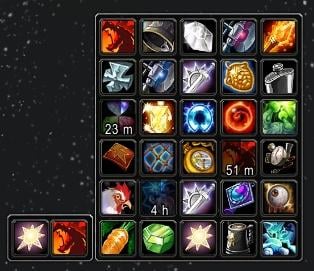
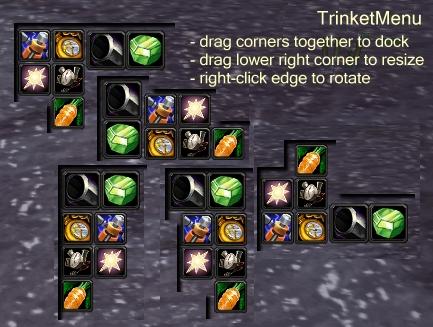
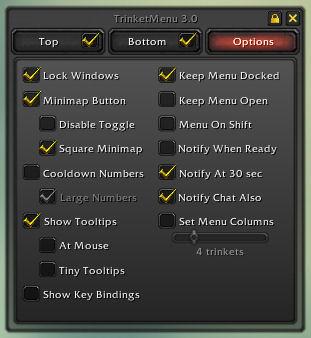
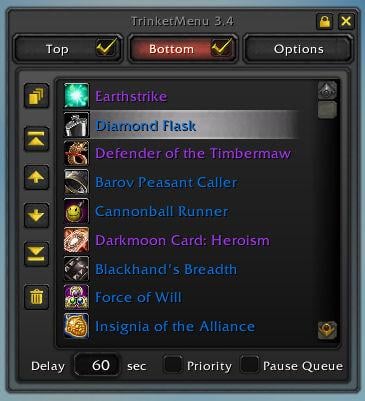
This is a mod to make swapping trinkets easier. It will display your two equipped trinkets in a bar. Mouseover on either trinket will display a menu of up to 30 trinkets in your bags to swap.
__ New in 3.72 __
- Key bindings now done in default UI key binding interface (hit ESC to Game Menu->Key Bindings and scroll to bottom)
__ New in 3.71 __
- Fix for upcoming 2.4.2 patch
__ New in 3.7 __
- Support for engineering bags. If you have an engineering bag in use, engineered trinkets will go there if space permits, and normal trinkets will only use normal bags.
- Trinkets that leave a buff no longer need a delay defined. It will detect what buff an item grants and keep the item equipped for as long as you have that buff. You can still use a delay if you want, for trinkets that don't give a buff (ie, Prismcharm) or have special needs.
- Removed obsolete help frame about the delay.
Swapping/Using trinkets
Left click a trinket in the menu to equip it to the top trinket slot.
Right click a trinket in the menu to equip it to the bottom trinket slot.
Left or Right click either trinket to use them. Or make a key binding for either trinket.
Auto Queue
3.0 introduces auto trinket queues to TrinketMenu. In options you can sort a trinket slot to the order you want trinkets equipped, turn on Auto Queue for that slot (Alt+Click the trinket on the bar or check the tab in options), and the mod will automatically swap trinkets as they're used and come off cooldown.
It was (hopefully) made to be intuitive enough to use without instructions, but if wondering about specifics:
The auto queue rules are:
A trinket at 30 seconds or less cooldown is considered off cooldown.
If the currently equipped trinket is on cooldown, swap to the first available trinket not on cooldown.
If the currently equipped trinket cannot go on cooldown (passive trinkets), equip a higher ranking trinket when it comes off cooldown.
If the currently equipped trinket is ready for use, then do nothing unless a higher-ranked trinket marked 'Priority' is waiting to swap in.
If a trinket has a 'Delay' defined, then hold that trinket for its delay before swapping it out. (ie, Earthstrike for 20 seconds)
Auto queue icon colors:
A gold gear on a trinket means that auto queue is active for that slot.
A grey gear on a trinket means the equipped trinket has a delay defined and is waiting to swap out.
A red gear on a trinket means the equipped trinket is flagged 'Pause Queue' and auto queue is suspended.
Other auto queue notes:
If you use some mod to automatically swap in passive trinkets (Carrot on a Stick or Argent Dawn Commission), flag those trinkets 'Pause Queue' to suspend the queue while they're equipped.
Swapping to a passive trinket manually in TrinketMenu will stop the auto queue for that slot. Alt+click the slot to turn auto queue back on.
A purely passive trinket will mark the natural end of a queue. If you would like the queue to stop sooner (ie, Burst of Knowledge as bottom-most trinket even on cooldown), move the "-- stop queue here--" mark to where you want the queue to stop.
The auto queues work independently of the "trinket ready!" notifications.
Trinkets attempting to swap during combat or while dead will queue for when you drop out of combat or return to life.
If you don't want to use auto queue and would like to remove it completely, you can delete TrinketMenuQueue.xml and TrinketMenuQueue.lua while out of game. The remaining mod will be about the size of TrinketMenu 2.7 and run better than 2.7.
Auto Queue Shared Timers
Keep in mind as you set up your queues that many trinkets trigger shared cooldown timers. As an example:
Trinket 0 contains a Cannonball Runner not on cooldown
Trinket 1 contains a Diamond Flask not on cooldown
When you click Diamond Flask, it will put the Cannonball Runner into a 60-second cooldown. TrinketMenu will then look for something more available for Trinket 0, and then 30 seconds later as the Cannonball Runner comes off cooldown it will swap it back in.
This is expected behavior. If it seems like this happens a lot, you may want to Auto Queue only one trinket slot, until you get trinkets that can be used without triggering the other's cooldown.
Customizing Display
The main and menu windows are independently scalable and rotatable. While the windows are unlocked:
Move either window by dragging its edge.
Rotate either window by right-clicking its edge.
Scale/resize either window by dragging the lower-right corner to the desired size.
If you're having problems grabbing the edge of the menu window to move/rotate/resize it, hold Shift down while it's open and the menu won't go away when the mouse leaves the menu's edge.
If you right-click the gear icon around the minimap (or /trinket options) a small options window will appear under the minimap. Here you can customize the display further by showing cooldowns as numbers and keeping the menu always open.
Once you're settled on a setup you like, you can lock the windows in options.
To set an exact scale (optional):
/trinket scale main n : Scale the main window to n
/trinket scale menu n : Scale the menu window to n
ie: /trinket scale menu 0.85
-- see readme.txt for much more info --
Optional Files - Trinket Menu
Sorry, there are currently no optional files available.
This mod has my focus right now btw. Sorry it's taken so long the scaling thing is just a nightmare.
High priority changes:
- The #&!)!@!~*&@ scaling bug
- Trinkets wanting to swap while casting will wait until casting is done.
Low priority changes:
- Moving options into default UI's options panel
- Adding option for spacing between trinkets
- ButtonFacade support
- Making it WotLK ready
Originally posted by Reis Any chance this will be fixed so that trinkets will not change if there is spellcast in progress ?
After last patch spellcasting is aborted if any gear is changed
Yeah this must done. Its gotten me into alot of trouble.Like catching a node in Arathi basin, while doing it and a trinket swaps it cancels the tagging which really messes things up.
Any chance this will be fixed so that trinkets will not change if there is spellcast in progress ?
After last patch spellcasting is aborted if any gear is changed
Originally posted by Crazytoo It works fine if you do not adjust it at all. The workaround does not set it back for me and yes any adjustment to the scale, the mod goes south. Scaling is way off.
its does work IF u do the following (at elast worked for me)
1. drag the scale icon or enter the scale command with some value like 1
2. then reload ui, ur trinket icons are staying together properly now, may nit the correct scale yet but tehy touch now
3. enter /trinket scale main 1
and it should be perfect
4. just move it to the right place by dragging the frame in case its not yet at right place
Originally posted by coldsun i changed the screen resolution lately and therefore had to do some adjustments to the ui scale. Now, trinketmenue cant be adjusted/resized properly, the icons for the 2 equipepd trinkets are 2x the size compared the size when shown in bag or in avail trinkets. When im moving the right corner to resize, the trinkets move away from each other in a waired way (+ getting smaller)(or even overlap when moved into opposite direction) instead of just growing/or shrinking in size but keeping in touch to each other
hope there is a solution since its one of my fav mods
thx in advance
edit : to workaround this a "/trinket scale main 1" (e.g) works to get it to nomal back, though resizing with rightlowercorner drag still gives weired results
It works fine if you do not adjust it at all. The workaround does not set it back for me and yes any adjustment to the scale, the mod goes south. Scaling is way off.
i changed the screen resolution lately and therefore had to do some adjustments to the ui scale. Now, trinketmenue cant be adjusted/resized properly, the icons for the 2 equipepd trinkets are 2x the size compared the size when shown in bag or in avail trinkets. When im moving the right corner to resize, the trinkets move away from each other in a waired way (+ getting smaller)(or even overlap when moved into opposite direction) instead of just growing/or shrinking in size but keeping in touch to each other
hope there is a solution since its one of my fav mods
thx in advance
edit : to workaround this a "/trinket scale main 1" (e.g) works to get it to nomal back, though resizing with rightlowercorner drag still gives weired results
How about adding key binding to use both trinkets while you're at it ?
Something like "Use any available trinket"
(yes, I know it can be done with a macro easily but still )
Bindings can be modified manually in the corresponding file in a few seconds. Just bind a key what you can, then open the text file and replace it with what you need.
Originally posted by Niobium Actually upon re-reading his post, he is saying hold down Control/Shift/Alt, then click the one you want to bind, then click the combo key. So, hold down shift, then click "bind", then click eg. F1.
I will have to try that later and report back, but IIRC that still causes the binding window to close.
Another solution is to roll back to the previous version of trinket menu, bind it using that, and then roll up to the new one. And another is to grab a legacy settings file out of your WTF folder from a previous version. You can't bind in the main WoW binding section anymore, since the only option there is to toggle seeing the menu (not that you'd want to but it was an option prior to this version).
Your first suggestion didn't work. About downgrading, that was what made me lose my keybindings. I had them working, I upgraded to the bugged versions and my keybindings stopped working. Tried to go back but I can't get the version that worked. I think it was another author who uploaded the patched version.
And I have tried the WTF file, but I never got it to work. Or I got it to work on 1 of the trinket slots but no matter what I did it wont work on the second one.
Edit: No wait, your first suggestion did work. I just released the key the first time I tried it.
Originally posted by thebum Doesn't work. Pressing shift, ctrl or alt closes down the key bindings window.
Actually upon re-reading his post, he is saying hold down Control/Shift/Alt, then click the one you want to bind, then click the combo key. So, hold down shift, then click "bind", then click eg. F1.
I will have to try that later and report back, but IIRC that still causes the binding window to close.
Another solution is to roll back to the previous version of trinket menu, bind it using that, and then roll up to the new one. And another is to grab a legacy settings file out of your WTF folder from a previous version. You can't bind in the main WoW binding section anymore, since the only option there is to toggle seeing the menu (not that you'd want to but it was an option prior to this version).
re: riding crop: I'm sure there are plenty of mods to handle swapping riding crops back out after combat. It's not a very complicated process. (Player in combat? Make a note to unequip riding crop. Player leaves combat? Check note, unequip riding crop) This mod is a subset of a larger mod called itemrack that has in the past and will again handle conditional events like that. So you could say it's already being added, but in a different mod.
The scope of trinketmenu is very specific to keep feature creep to a minimum. It won't ever become a mod to equip stuff when <X> beyond things like the auto queue which is intrinsic to the items in the slot and not outside conditions.
I'm glad you believe there are lots of mods that will properly unload the crop after combat stops. I look forward to seeing you and the user community fill this forum with all the mod names that sport such functionality.


