| Go to Page... |

| Compatibility: | Return to Karazhan (7.1.5) Legion (7.0.3) |
| Updated: | 10-26-16 09:10 AM |
| Created: | unknown |
| Downloads: | 1,327,537 |
| Favorites: | 2,655 |
| MD5: |
Scrolling Combat Text 

Please post all errors and suggestions on http://grayhoof.wowinterface.com/ using the provided forms.
Be sure to check out my simple but enhanced combat log EavesDrop
Also check out SCTD if you want SCT to show your damage.
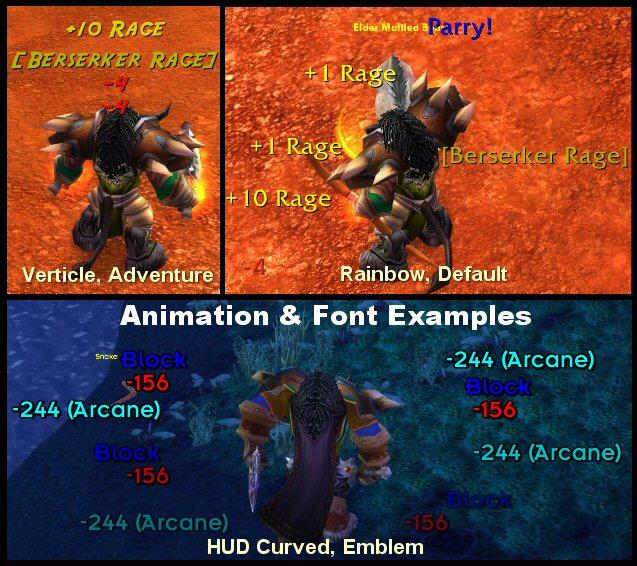
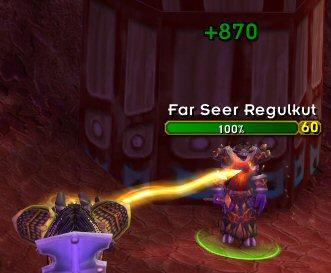
What is it? - A fairly simple but very configurable mod that adds damage, heals, and events (dodge, parry, windfury, etc...) as scrolling text above you character model, much like what already happens above your target. This makes it so you do not have to watch (or use) your regular combat chat window and gives it a "Final Fantasy" feel.
What can it do?
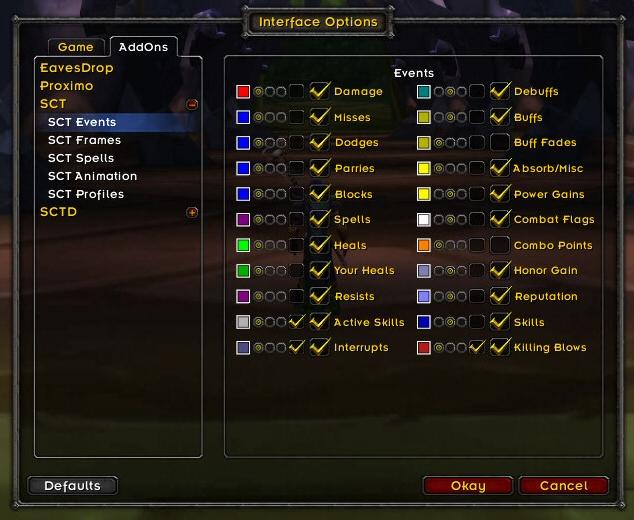
- Damage messagesHow do I use it? - First unzip it into your interface\addons directory. For more info on installing, please read install.txt. Now just run WoW and once logged in, type /sctmenu to get the options screen.
- Heals (incoming and outgoing) and Overhealing (with healer ID's), with filtering for small heals.
- Spell Damage/Resists and Damage Type
- All "Miss" events (dodge, block, immune, etc...)
- Custom Colors for all text events
- Config file to setup custom events (self and target), capture data, and display it.
- Debuff/Buff gain and loss Messages
- Low Health and Mana Warnings with values, and optional sounds
- Rage/Mana/Energy Gains
- Enter and Leave Combat Messages
- Rogue Combo Points, 5 CP Alert Message
- Class Skill alerts (Execute, Overpower, CounterAttack, etc...)
- Honor, Reputation, Skill Gain
- Eight Animation Types (Verticle, Rainbow, Horizontal, Angled Down, Angled Up, Sprinkler, Curved HUD, Angled HUD)
- Four Fonts
- Two seperate Animation frames, each with their own settings. Assign any Event to either.
- Ability to flag any event as critical or as a text messages
- Sliders for text size, opacity, animation speed, movement speed, and on screen placement (with custom editbox)
- Lightmode, for when you care most about performance (at the loss of a few features).
- Now Based in Ace3.
- Settings saved per character by default, but supports all Ace3 Profiles
- Load/Delete settings from another character. Load built in Profiles.
- Localized to work in almost all WoW clients.
SCT_EVENT_CONFIG.LUA is used to setup custom message events. Please open up the file (notepad, etc...) and read the opening section to understand how to use it all.
PLEASE NOTE - THIS IS THE MOST IMPORTANT FILE IN SCT. IF YOU DON'T READ IT AND USE IT, THEN YOU ARE MISSING OUT ON A TON OF WHAT SCT HAS TO OFFER IN CUSTOMIZATION
/sctdisplay is used to create your own custom messages.
Useage:
/sctdisplay 'message' (for white text)
/sctdisplay 'message' red(0-10) green(0-10) blue(0-10)
Example: /sctdisplay 'Heal Me' 10 0 0 - This will display 'Heal Me' in bright red
Some Colors: red = 10 0 0, green = 0 10 0, blue = 0 0 10, yellow = 10 10 0, magenta = 10 0 10, cyan = 0 10 10
FAQ
How do I get My Crits or My Hits to show? I would suggest you get SCTD: http://www.wowinterface.com/download...fo.php?id=4913
I don't understand what the 2 frames are for! - Each frame lets you set different features. So you can set frame one using Sprinker animation and Default font, while frame 2 can be using Veritcle animation and Adventure font. You can then assign each event to a specfic frame using the radio buttons next to the events.
There's too many options. Help someone new see how things work! - Try out some of the new built in profiles. While on the options screen, click the "Profiles" button. At the top of the window will be a listing of some default profiles to try out. Maybe you'll fine one you like or it will spark some ideas for you to try.
How do I change the fonts? - You can now select from many fonts on the options page. You can also change the font of message and apply the font to the in game damage font used for your damage (requires relog)
I don't like friendly nameplates on. How do I make my heals appear over who I heal? - Friendly nameplates have to be on in order to show your heals. SCT will turn them on if you turn on the option, but you must manually turn them off if you don't like it (see Target keybindings).
I don't like the new spell icons, how do I turn them off? - There is an option to turn them off under the spell tab.
Support
Please post all errors and suggestions on http://grayhoof.wowinterface.com/ using the provided forms.
7.0 - Changes for WoW 7.0
6.72 - TOC update for 6.2
6.71 - Turned Shorten Value option on by default.
6.7 - Added a Shorten Value option, updated sliders to work better and with newer values (finally).
6.67 - TOC update for 6.1
6.66 - TOC update for 6.02
6.65 - TOC update for 5.4
6.64 - TOC update for 5.3
6.63 - TOC update for 5.2
6.62 - Updates for 5.1 nameplate changes
6.61 - Updates for 5.1
6.6 - Updates for 5.0.4
6.56 - Fix for nil power strings, TOC for 4.3
6.55 - TOC Fix for options
6.54 - Fixes for 4.2
6.53 - TOC Fix for options
6.52 - Fixes for 4.1
6.51 - Fixes for power events and new power types
6.5 - Fixes for 4.0
6.41 - Fix for Nameplates
6.4 - Fixes for 3.2 and TOC
6.33 - Fixes for nameplates and misc errors
6.31 - Fixes for 3.0
6.3 - Updates and fixes for 3.0 patch
6.2 - Added icon support to the message frame. Added Dispel as a default event. Added Dispel and Cast events as custom event. Cleaned up string and cache code. Use 2.4.3 dispel events.
6.1 - Total rewrite of custom event code. sct_event_config.lua can be still be used for custom events (READ THE FILE), but in game option menu fully supports custom events now. Converted to a faster combat log system. Fix for nameplates in PvP. Fix some options not updating when copying or loading a profile. Convert to LibShareMedia-3.0.
6.01 - Added item buffs to buff events and fade events. Fixed interrupts causing errors with nameplates. Fixed timer call. Fix for custom damage and miss events. Fixed active skill names duplicating. Made fades use buff/debuff color. Fixed display usage message. Added CN translation. Allow fonts to scale down to size 8. Made Blizzard options frame movable. Made Blizzard dropdown clamp to the screen.
6.0 - Converted to WoW 2.4 Combat Log. Converted to Ace3. Custom events completely redone, make sure to read SCT_EVENT_CONFIG.LUA. Moved options menu to WoW 2.4 Addons Menu. Options menu reorganized to be much cleaner and simpler.
5.7 - Added optional EavesDrop style spell icons. Added damage filter. Added selfonly flag to debuff custom events. Made all font sizes change 1 step at a time.
5.61 - Fixed some minor bugs with SharedMedia and Messages.
5.6 - Added SharedMedia for fonts. Cleaned up Drain/Leech events. Added option to turn off WoW's 2.1 healing. Cleaned up Unit Nameplate code.
5.5 - Added Spell Name option. Added Truncating or Abbreviating of spell/buff names. Changed buff/debuff events to use SpecialEventsLib; allows for much better buff and debuff tracking. Added Test Button. Removed Light Mode. Added new Custom Event Buff types for much easier buff/debuff event tracking; see sct_event_config.lua for more info.
5.4 - Added Spell Reflection Tracking; only works when combat log reports events in correct order. Added ability to show outgoing heals over friendly nameplates; see FAQ for more info. Temporarily added manual execute/hammer tracking until blizzard fixes 60+ skill auto tracking. Added pet buffs to power gain tracking.
5.31 - Added Diablo Font. Fixed Chat Tab Tainting. Fixed Rampage event to use 20 rage. Fixed Overhealing bug. Fixed Gap Slider not working on all frames.
5.3b - Fixed color change saves.
5.3 - Made spell colors editable. Added interruption events. Added killing blow events. Added Rampage Notification (not 100% prefect, but works most of the time). Cleaned up crit overlapping more. Fixed custom event sorting/parsing issues. Made heal filter based on total amount actually healed (so overhealing spam can be removed). Removed compost lib. Added SpecialEvents-Aura lib (will do more in future with it).
5.2 - Converted to WoW 2.0 standards. Added Text Alignment to Frame: Left, Center, Right, or HUD (based on position around HUD) justified. Added new HUD Curved Animation: moves in a semi circle around your character, ideal for use with curve based HUD bars. Added new HUD Angled Animation: moves in a slight angle around your character, ideal for use with angle based HUD bars. Added Gap Distance to HUD Animations to change the distance they are from center. Made Crits overlap less often. Made spammed text behave better. Made Custom events save to the event that triggers them after being found, improves performance over time.
5.11 - Added glancing and crushing indicators. Added outgoing HOT flag. Added Emblem font. Fixed slider edit box bug.
5.1 - Total new look for options window. Added mana gain filter. More speed optimizations around passed args and function calls. Modified custom events so only events for current class are loaded (make sure to use this for you own events). Option window opens while dead =). Converted all table iterators to use pairs().
5.01 - Slight speed optimizations around passed args and function calls. Added more default events to event file. Added buff counts. Made heal filter defaults to zero.
5.0 - Complete rewrite using Ace2 and ParserLib with more performance in mind. Two seperate animation frames. Angled Up, Sprinkler, and Flash Crit animations. New Skill event. Seperate Buff and Debuff fading. Sounds to health/mana warnings. Color spell damage by spell type. Toggle for Custom events (improves performance when off). Light mode, users WoW's new built in events to gain performance, at the cost of a few features. Sample messages when changing options. Editboxes to position sliders. Sounds to custom events. Healer filter option.
...For full version history, please see here: http://grayhoof.wowinterface.com/portal.php?&id=41&pageid=11
File Name |
Version |
Size |
Author |
Date |
Type |
7.1 |
38kB |
10-26-16 09:11 AM |
Addon |
 |
Comment Options |
 09-30-19, 04:10 AM
|
|||
|
A Kobold Labourer
Forum posts: 0
File comments: 1
Uploads: 0
|
Yes please!!!!! |
||

|

|
| Evania |
| View Public Profile |
| Send a private message to Evania |
| Find More Posts by Evania |
| Add Evania to Your Buddy List |
|
09-13-19, 08:19 AM
|
|||
|
A Defias Bandit

Forum posts: 2
File comments: 3
Uploads: 0
|
 Yes Please...

__________________
Code:
There can be only one! |
||
|
|
|
| Hundrkillor |
| View Public Profile |
| Send a private message to Hundrkillor |
| Find More Posts by Hundrkillor |
| Add Hundrkillor to Your Buddy List |
|
09-07-19, 11:19 AM
|
||
|
A Kobold Labourer
Forum posts: 0
File comments: 3
Uploads: 0
|
|
|
|
|
|
| scottshahaman |
| View Public Profile |
| Send a private message to scottshahaman |
| Find More Posts by scottshahaman |
| Add scottshahaman to Your Buddy List |
|
07-19-18, 01:07 AM
|
|
|
A Murloc Raider
 Forum posts: 5
File comments: 10
Uploads: 11
|
|
|
|
|
| Mr.Dio |
| View Public Profile |
| Send a private message to Mr.Dio |
| Find More Posts by Mr.Dio |
| Add Mr.Dio to Your Buddy List |
|
07-18-18, 04:39 PM
|
|
|
A Murloc Raider
Forum posts: 7
File comments: 2
Uploads: 0
|
8.0.1 Broken
I would very much love to see this addon fixed for 8.0.1, I feel lost without it!
|
|
|
|
| calismic |
| View Public Profile |
| Send a private message to calismic |
| Find More Posts by calismic |
| Add calismic to Your Buddy List |
|
12-08-17, 06:03 PM
|
|||
|
A Kobold Labourer
Forum posts: 0
File comments: 1
Uploads: 0
|
 Re: Re: cant access the config menu for sct
I can access the SCT menu but I can't save any SCT settings. Can you help me please? |
||
|
|
|
| Patife17 |
| View Public Profile |
| Send a private message to Patife17 |
| Find More Posts by Patife17 |
| Add Patife17 to Your Buddy List |
|
11-21-17, 06:04 AM
|
|||
|
A Kobold Labourer
Forum posts: 0
File comments: 13
Uploads: 0
|
Re: Re: cant access the config menu for sct
 |
||
|
|
|
| dwfmagik |
| View Public Profile |
| Send a private message to dwfmagik |
| Find More Posts by dwfmagik |
| Add dwfmagik to Your Buddy List |
|
11-08-17, 09:23 AM
|
||
|
A Deviate Faerie Dragon
Forum posts: 14
File comments: 31
Uploads: 0
|
Re: cant access the config menu for sct
Replace existing lines with the following in sct\sct.LUA: LINE 210: PlaySound( 850 ) LINE 220: PlaySound( 3081 ) LINE 228: PlaySound( 851 ) Replace existing lines with the following in sct_options\options.LUA: LINE 548: PlaySound( 841 ) LINE 1010: PlaySound( 856 ) LINE 1079: PlaySound( 856 ) LINE 1099: PlaySound( 856 ) |
|
|
|
|
| Meloric |
| View Public Profile |
| Send a private message to Meloric |
| Find More Posts by Meloric |
| Add Meloric to Your Buddy List |
|
10-31-17, 07:30 AM
|
|
|
A Kobold Labourer
Forum posts: 0
File comments: 1
Uploads: 0
|
cant access the config menu for sct
Im playing with the newest patch 7.3 or so and i just installed sct for the first time in years, it runs fine but i cant access the menu ive tried /sct menu and /sctmenu but i dont get a menu, /sctdisplay does get a response but not anything i need, i see it in the interface tab but when you click its blank window.
i have deleted the interface cache and wft folders but still no menu has anyone else had this problem and how did you fix it?? tperez |
|
|
|
| tperez2 |
| View Public Profile |
| Send a private message to tperez2 |
| Find More Posts by tperez2 |
| Add tperez2 to Your Buddy List |
|
11-13-16, 05:05 PM
|
|
|
A Deviate Faerie Dragon
 Forum posts: 10
File comments: 23
Uploads: 1
|
Overhealing bug
There seems to be a bug with the display of overhealing when you heal someone else than yourself. For example if you heal yourself it goes +235k (35k) or you heal yuorself at 100% it goes +0 (270k).
However when healing someone else at near full hp it goes +0 (0), even though it heals him to full and there actually is some overheal. Same happens when healing someone who is full +0 (0), even though it should show overhealing inside the brackets, like when healing yourself. |
|
|
|
| Hopelez |
| View Public Profile |
| Send a private message to Hopelez |
| Find More Posts by Hopelez |
| Add Hopelez to Your Buddy List |
|
07-26-16, 02:34 PM
|
|
|
A Defias Bandit
Forum posts: 2
File comments: 33
Uploads: 0
|
Blacklist a spell?
I'm using SCT (and SCTD) because of a bug with blizz SCT in that they randomly decide to stop showing up, so I have to use an addon now.
I want to know if I can blacklist a certain spell from causing messages to pop up, namely "Inspiring Presense"; it causes everyone in 60 yards to heal for 3% of the damage they cause, and you are the source of the heal, so it spams up the screen if you are in town or in a group doing content. I know you can filter out smaller heals, but this feels like a bandaid. Also, is it possible to change the format of the "Blocked" damage text to be more blizzlike? It throws me off having it show 2 seperate lines (damage taken, then another line in different color showing how much was blocked). Blizzlike format is -XXX (YYY Blocked), Current SCT format is Block (YYY) in blue, and a new line -XXX in red. |
|
|
|
| Ssateneth |
| View Public Profile |
| Send a private message to Ssateneth |
| Find More Posts by Ssateneth |
| Add Ssateneth to Your Buddy List |
|
06-12-15, 09:57 AM
|
||
|
A Kobold Labourer
Forum posts: 0
File comments: 1
Uploads: 0
|
|
|
|
|
|
| dakhran |
| View Public Profile |
| Send a private message to dakhran |
| Find More Posts by dakhran |
| Add dakhran to Your Buddy List |
|
03-04-15, 10:11 PM
|
||
|
A Wyrmkin Dreamwalker
Forum posts: 54
File comments: 149
Uploads: 4
|
EDIT: Actually I remember now (sorry been a while). These events are dependent on the built in WoW skill combat events. If they are not going off at the right time, my guess is the WoW events themselves were not updated for these new values.
Last edited by Grayhoof : 03-04-15 at 10:18 PM.
|
|
|
|
|
| Grayhoof |
| View Public Profile |
| Send a private message to Grayhoof |
| Visit Grayhoof's homepage! |
| Find More Posts by Grayhoof |
| Add Grayhoof to Your Buddy List |
|
03-02-15, 02:42 AM
|
|
|
A Kobold Labourer
Forum posts: 1
File comments: 7
Uploads: 0
|
Are there going to be an update for 35% kill skills? Currently it don't go off until 20%. I'm no expert but I have tried looking at the LUA code , but I have not been able to locate were the event is to change it that way.
Marksman Hunters have http://www.wowhead.com/spell=157707 "Enhanced kill shot" Kill Shot can be used on targets with 35% health or less. Retribution Paladins have http://www.wowhead.com/spell=157496 "Empowered hammer of wrath" Hammer of Wrath can be used on targets with less than 35% health. |
|
|
|
| Rikardos |
| View Public Profile |
| Send a private message to Rikardos |
| Visit Rikardos's homepage! |
| Find More Posts by Rikardos |
| Add Rikardos to Your Buddy List |
|
03-01-15, 03:42 PM
|
|
|
A Wyrmkin Dreamwalker
Forum posts: 54
File comments: 149
Uploads: 4
|
Version 6.71
The new 6.71 version of SCT adds a couple of long requested updates:
1. Option to shorten all values (560323 becomes 560k, etc...). Please not this is on by default and can be turned off in the Animation options section. More robust options may come later. 2. Sliders were updated to work correctly. Slider values were also updated to be more appropriate for today's values in WoW. Note, you can always type any number you want next to a slider and hit enter to save it, instead of using only what the slider provides. Let me know if there are obvious issues or other long time fixes needed. While I have not played WoW in years, I do try to keep my mods working well.
Last edited by Grayhoof : 03-01-15 at 03:45 PM.
|
|
|
|
| Grayhoof |
| View Public Profile |
| Send a private message to Grayhoof |
| Visit Grayhoof's homepage! |
| Find More Posts by Grayhoof |
| Add Grayhoof to Your Buddy List |
|
Support AddOn Development!
You have just downloaded by the author . If you like this AddOn why not consider supporting the author? This author has set up a donation account. Donations ensure that authors can continue to develop useful tools for everyone.
*Clicking the donate button above will take you to PayPal.com

*Clicking the donate button above will take you to Pledgie.com
