Addon Info.
Optional Files (2)
Archived (1)
Comments (190)
  Category: Action Bar Mods
Addon Information
Download Latest Version.
To add favorites please register for a free account. If you already have one you need to login. How do I install this? (FAQ)
Gello's Portal Bug Reports Feature Requests
Author:
Version:
1.992
Date:
09-25-2007 04:18 PM
Size:
79.24 Kb
Downloads:
162,830
Views:
465,876
Favorites:
1,132
MD5:
Pictures
Click to enlarge
Usage
Click to enlarge
Queues
Click to enlarge
Sets
Click to enlarge
Options
ItemRack   Popular!
Rate: 5 out of 5 with 42 votes  
This is a mod to make swapping equipment easier. You add equipment slots to a bar and mouseover on the bar will create a menu of all items in your bags that can go in that slot.

__ New in 1.992 __
- Tooltip on character sheet fixed for 2.2 patch.
__ New in 1.991 __
- ADDON_ACTION_BLOCKED should fire a lot less for those running debugging tools. (this event will stop entirely in next major update)
__ New in 1.99 __
- Updated for 2.0 (secure buttons, lua 5.1, etc)
- Key bindings for individual slots moved to options (lower left button)
- Reset Bar and Reset Events button merged into one button named Reset

*** NOTE *** For Users of Previous Versions *** NOTE ***
Your previous sets and events should carry over to the new client. If you experience any abnormal behavior:
/itemrack reset : reset the bar
/itemrack reset events : reset events
/itemrack reset everything : wipe all settings/sets and start from default

__ Banking __

1.97 introduces bank support to ItemRack. When the bank is open:
- Items and sets containing items in the bank have a blue border in the menu.
- Select a banked item or set from the menu to pull it into your bags, space permitting.
- Select an unbanked item or set from the menu to push it to the bank, space permitting.

Note: If you have two items of the same name in bank, it will bank/unbank them fine from the individual slot menus but it won't correctly reflect both their banked status until both are out/in bank. And grabbing sets with same names and different enchants will not be reliable yet. The cure for this is coming. It partly requires abandoning old sets which didn't store item id's which I'm not going to work around in 1.x since it will be moot soon.

__ Setup __

Initially the ItemRack is empty. You choose which armor slots to add to the bar with Alt+Click:

1. Open your character window ('C' is the default key)
2. Alt+Click equipment slots to the bar. For instance: Alt+Click your helm to add the head slot to ItemRack. Alt+Click it again to remove it. You can add as many equipment slot as you want.
3. That's it really. Mouseover that item and if any other item can go in that slot it will display it in a menu.

__ Customizing Display __

You move the window by dragging the black border of the bar.
You resize/scale the window by dragging the "grip" in the lower right corner of the bar.
You rotate the window by clicking the "rotate" button on the edge of the bar.

Once you have the bar positioned where you like, you can hit the "lock" button on the edge of the bar. The buttons on the edge will disappear and the window cannot be moved. However you can still add/remove items when the bar is locked.

To unlock the bar, hold Alt while you mouseover the bar. The lock and option buttons will return.

__ Useage __

Mouseover an item in the bar and a menu will pop up of all items in your bags that can go in that slot. Click the item in the menu and it will swap.

If an equipped item can be used, clicking the item on the bar (or its key binding) will use the item.

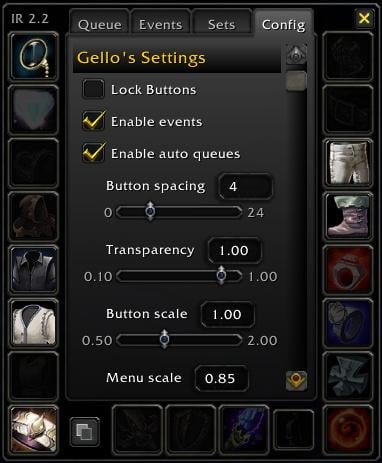
Default behavior is to only show Soulbound items in the menu. You can turn this off in options, accessed by a button on the edge of the bar. (Hold Alt down if the bar is locked to get to the options button)

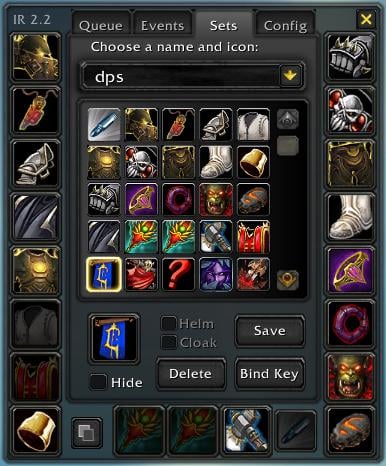
__ Sets __

To start making sets, left-click the ItemRack minimap button:
- Any slots on the rack are automatically marked active and will be highlighted.
- Darkened slots will not save with the set.
- You can toggle whether a slot will be active by clicking the slot.
- You can swap gear to active slots the same as you do from the rack. (mouseover menu)
- ALT+click works in the set builder same as character panel.
- You can save an unlimited number of sets, but only 30 max will show on the menu.
- Sets will not queue during death or combat (yet)
- Sets are saved per-character

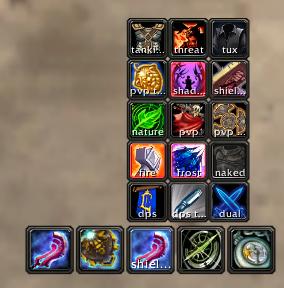
To equip a set, there are three ways:
1. Add the Set "slot" to the rack by alt+clicking yourself in the character window. (or alt+click the set icon in the set builder). Now you can swap sets the same as you swap individual items. Mouseover the "Set" slot and it will display your saved sets to swap to.
2. Bind a key from the set builder. Up to 10 sets (per character) can be directly bound to a key. After you've saved a set, click 'Bind Key' and then choose a key to bind to the set. You do not need to create any macros or action buttons. Just hit the key to equip that set.
3. Make a macro. In some cases you may want to situationally equip a set. To do so in a macro, use /script EquipSet("setname"). For instance: /script if UnitClass("target")=="Priest" then EquipSet("1h+shield") end.

__ Events __

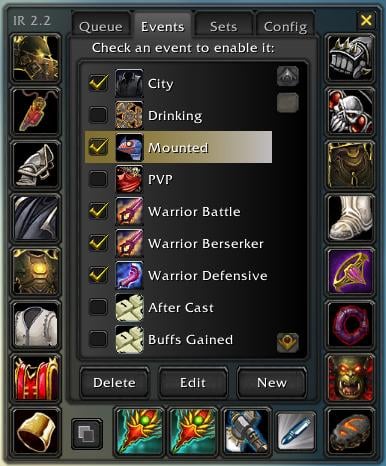
In the options window when you right-click the minimap button are three tabs. All event setup is done in the Events tab.

Events are disabled initially. To begin using events you need to enable it with the "Enable Events" checkbox at the top of the Events tab. This is the "master switch". You can set up a key binding to toggle all events on or off as well.

In that tab you'll see a list of events with a red question mark beside it. Click the question mark to choose what set to equip for the event. When you've chosen a set it will be enabled. You won't be able to enable an event until you've associated a set for it. (even if the event script doesn't rely on a defined script)

To disable/enable a set with an associated event, uncheck the event. Alternately, you can click Delete to remove the set association and have it drop down to the bottom of the list.

Deleting an event not associated with a set will completely remove it if no other characters use that event.

See events manual.txt for more information on creating/editing events.

There are two events this mod uses you won't find in the wiki:
ITEMRACK_NOTIFY : arg1 is the name of the item who's cooldown has finished
ITEMRACK_ITEMUSED : arg1 is the name of the item, arg2 is the slot that was used

__ Queued Items __

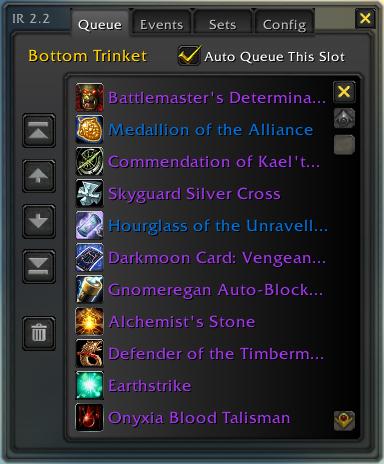
We can't swap non-weapon items when we're dead or in combat. If you attempt to swap in either of these conditions, ItemRack will "queue" the items for immediate swap once you leave combat or return to life.

- The queued item will appear as a small inset into the slot it's going to.
- If you want to unqueue an item, reselect it again.
- If you want to queue the item to another slot (ie, ring from one finger to the other), select it for the other slot.
- The 'queue' is only one-item deep. Meaning, once a queued item is equipped that queue is emptied.
- Selecting a series of items for a slot will only change the queued item. It won't set up an order to them.
- You can queue as many armor slots as you want. For instance if a druid is corpse camping you and you're paranoid enough to have a suit of Nature Resist gear in your bags, you can queue up the whole suit and it will swap in on revive.

In 1.7 you can now queue sets with these important notes:
- Empty slots in a set will not queue.
- If you are wearing an item that wants to go elsewhere in the queued set, that item will not be queued.
- Weapons never need to queue in combat, but will not queue in death either.
- To unqueue a set you've queued, select the set again.
- Queued sets will not show an inset in the set icon. That set icon gets a lot of business and its sole purpose is to say what the previous equipped set was. Don't attribute any other meaning to it.

-- much more in readme.txt and events manual.txt
  Optional Files - ItemRack
File Name
Version
Size
Author
Date
Type
2.11
56.88 Kb
05-07-2008 02:56 PM
Addon
1.0
3.58 Kb
03-19-2006 07:56 AM
Addon
  Archived Versions - ItemRack
File Name
Version
Size
Author
Date
1.991
79.21 Kb
Gello
12-23-2006 05:52 PM
  Comments - ItemRack
Post A Reply
Author Comments Comment Options
Old 05-06-2008, 12:51 PM  
Toran
An Aku'mai Servant

Forum posts: 33
File comments: 105
Uploads: 0
Anyone know how to get this recognized by ButtonFacade?

http://www.wowace.com/forums/index.php?topic=12549.0
__________________

Last edited by Toran : 05-06-2008 at 12:52 PM.
Toran is offline Report comment to moderator   Edit/Delete Message Reply With Quote
Old 04-24-2008, 11:22 AM  
Cervelat
A Kobold Labourer

Forum posts: 0
File comments: 1
Uploads: 0
Quote:
Originally posted by Gremlin
Any able to configure this to work with the NetherRay yet?
update the following function in ItemRack.lua

Code:
function ItemRack_PlayerMounted(v1)
	local buffName, buffIcon 
	for i=1,24 do
		buffName,_,buffIcon = UnitBuff("player",i)
		if buffIcon then
			if string.find(buffName,"Riding Nether Ray") then
				return 1
			elseif string.find(buffIcon,"Mount_") then
				return 1
			elseif problem_mounts[buffIcon] or v1 or string.find(buffIcon,"QirajiCrystal_") then				
				-- hunter could be in group, could be warlock epic mount etc, check if this is truly a mount
				-- or if v1 is set to true, always check every buff. sigh this is slow but really no way around it without more data from users
				Rack_TooltipScan:SetUnitBuff("player",i)
				if string.find(Rack_TooltipScanTextLeft2:GetText() or "",ItemRackText.MOUNTCHECK) then
					return 1
				end
			end
		else
			return nil
		end
	end
end
Cervelat is offline Report comment to moderator   Edit/Delete Message Reply With Quote
Old 03-29-2008, 02:17 AM  
Gremlin
An Aku'mai Servant

Forum posts: 36
File comments: 16
Uploads: 0
Any able to configure this to work with the NetherRay yet?
Gremlin is offline Report comment to moderator   Edit/Delete Message Reply With Quote
Old 03-28-2008, 02:06 PM  
Draca
A Kobold Labourer

Forum posts: 1
File comments: 1
Uploads: 0
Update ?

could anyone update this please ?
Draca is offline Report comment to moderator   Edit/Delete Message Reply With Quote
Old 02-17-2008, 11:16 PM  
Gremlin
An Aku'mai Servant

Forum posts: 36
File comments: 16
Uploads: 0
Anyone for help with the Netheray event thing?

Last edited by Gremlin : 02-17-2008 at 11:26 PM.
Gremlin is offline Report comment to moderator   Edit/Delete Message Reply With Quote
Old 02-09-2008, 03:45 AM  
Prismatech
A Murloc Raider
 
Prismatech's Avatar

Forum posts: 7
File comments: 13
Uploads: 0
stance switch

hello please help
search the trigger vor stance of worrieor
will per event switch fight = 2he weapon
Tank=shield and 1he weapon
sorry for my english
__________________
Prismatech is offline Report comment to moderator   Edit/Delete Message Reply With Quote
Old 01-29-2008, 03:15 AM  
Gremlin
An Aku'mai Servant

Forum posts: 36
File comments: 16
Uploads: 0
Hey guys,

Im trying to get my itemrack to switch to a mount set.. with my skybreaker whip trinket..

Works great with all my flying mounts except the netherray.. Any ideas?
Gremlin is offline Report comment to moderator   Edit/Delete Message Reply With Quote
Old 01-13-2008, 09:23 PM  
DaleMox
A Kobold Labourer

Forum posts: 0
File comments: 1
Uploads: 0
I found a solution to bind gear to shift (and can be used for alt and ctrl I guess).
You must edit the WTF/Account/MYNAME/bindings-cache.wtf file
then add what you like, experiment by binding gear to other button then change accordingly.

For instance for me to use Top and Bottom buttons of my Trinkets I wrote:
bind SHIFT-Q CLICK ItemRackButton14:LeftButton
bind SHIFT-E CLICK ItemRackButton13:LeftButton
DaleMox is offline Report comment to moderator   Edit/Delete Message Reply With Quote
Old 12-10-2007, 06:04 PM  
spootym
A Kobold Labourer

Forum posts: 0
File comments: 2
Uploads: 0
equipping order causing problem

Due to the some gems being unique, the order that items are being equipped is causing the maximum number of gems equipped error to show and preventing the item to be equipped. Would it be possible to edit the order that the mod equips items?
spootym is offline Report comment to moderator   Edit/Delete Message Reply With Quote
Old 12-06-2007, 09:23 PM  
Farmbuyer
A Kobold Labourer

Forum posts: 1
File comments: 9
Uploads: 0
Bank bag support bug + patch

Normally, missing items in sets are colored red. If you have the bank open, and the missing items are in bank bags, ItemRack will color them blue instead.

There is a bug in that the bank bag slot added in TBC is not searched. Items in that bag are still red instead of blue. The bug is due to line 99 or so in ItemRack.lua, which sets ItemRack.BankSlots to a list of hardcoded bank bag numbers instead of checking the NUM_BANKBAGSLOTS value from Blizzard.

The easy fix is to add "11" to the end of that list. This will still break the next time the bank gets a new slot in some future game version. :-) The proper fix is to insert all numbers between NUM_BAG_SLOTS+1 and NUM_BANKBAGSLOTS inclusive; you can see an example in the extracted CloseBankBagFrames() function.
Farmbuyer is offline Report comment to moderator   Edit/Delete Message Reply With Quote
Old 11-28-2007, 12:56 AM  
Striph
A Murloc Raider
Interface Author - Click to view interfaces

Forum posts: 4
File comments: 9
Uploads: 2
Same error, randomly getting Addon blocked by interface, taint log here:

Code:
11/27 18:42:16.078  Global variable classFileName tainted by ItemRack - Interface\FrameXML\FriendsFrame.lua:639 GuildStatus_Update()
11/27 18:42:16.078      Interface\FrameXML\FriendsFrame.lua:756 FriendsFrame_OnEvent()
11/27 18:42:16.078      FriendsFrame:OnEvent()
11/27 18:42:16.078  Execution tainted by ItemRack while reading classFileName - Interface\FrameXML\FriendsFrame.lua:653 GuildStatus_Update()
11/27 18:42:16.078      Interface\FrameXML\FriendsFrame.lua:136 FriendsFrame_Update()
11/27 18:42:16.078      Interface\FrameXML\FriendsFrame.lua:757 FriendsFrame_OnEvent()
11/27 18:42:16.078      FriendsFrame:OnEvent()
11/27 18:42:16.078  An action was blocked in combat because of taint from ItemRack - RaidFrame:Hide()
11/27 18:42:16.078      Interface\FrameXML\FriendsFrame.lua:33 FriendsFrame_ShowSubFrame()
11/27 18:42:16.078      Interface\FrameXML\FriendsFrame.lua:137 FriendsFrame_Update()
11/27 18:42:16.078      Interface\FrameXML\FriendsFrame.lua:757 FriendsFrame_OnEvent()
11/27 18:42:16.078      FriendsFrame:OnEvent()

Last edited by Striph : 11-28-2007 at 12:57 AM.
Striph is offline Report comment to moderator   Edit/Delete Message Reply With Quote
Old 11-22-2007, 02:54 PM  
speak
A Deviate Faerie Dragon
 
speak's Avatar

Forum posts: 15
File comments: 88
Uploads: 0
taint log

Code:
11/21 22:15:22.906  An action was blocked in combat because of taint from ItemRack - RaidFrame:Hide()
11/21 22:15:22.906      Interface\FrameXML\FriendsFrame.lua:33 FriendsFrame_ShowSubFrame()
11/21 22:15:22.906      Interface\FrameXML\FriendsFrame.lua:137 FriendsFrame_Update()
11/21 22:15:22.906      Interface\FrameXML\FriendsFrame.lua:757 FriendsFrame_OnEvent()
11/21 22:15:22.906      FriendsFrame:OnEvent()
speak is offline Report comment to moderator   Edit/Delete Message Reply With Quote
Old 11-13-2007, 06:26 PM  
Farmbuyer
A Kobold Labourer

Forum posts: 1
File comments: 9
Uploads: 0
ring suddenly shows up as trinket

In 2.3, the topmost ring is suddenly being added to the menu bar, which previously only had the two trinkets showing. No matter what I click, I can't turn it off.

Is this happening to anyone else?
Farmbuyer is offline Report comment to moderator   Edit/Delete Message Reply With Quote
Old 10-25-2007, 06:39 AM  
Azrharn
A Kobold Labourer

Forum posts: 0
File comments: 1
Uploads: 0
Darkmooncard: Crusade

Somehow itemrack doesn't see it as a trinket. the Vengeance card is there but the crusade is not in the list if I wanna change em

Oh it's about Itemrack 2.1

Last edited by Azrharn : 10-25-2007 at 02:42 PM.
Azrharn is offline Report comment to moderator   Edit/Delete Message Reply With Quote
Old 10-21-2007, 06:31 AM  
natherul
A Kobold Labourer

Forum posts: 0
File comments: 1
Uploads: 0
is there anyway to remove the spacing between items?
natherul is offline Report comment to moderator   Edit/Delete Message Reply With Quote
Post A Reply


Category Jump:


The Network:
EQInterface | EQ2Interface | LoTROInterface | MMOInterface | WoWInterface | VGInterface | Allakhazam | Thottbot | Wowhead | Zam


WoWInterface.com Copyright ©2004
World of Warcraft is a registered Trademark of Blizzard Entertainment.
vBulletin - Copyright ©2000 - 2008, Jelsoft Enterprises Ltd.



