___________________________________________________
NotesUNeed v6.63.33500 - Adrill of Eonar (US)
Originally created by Telic of Dragonblight (EU)
___________________________________________________
- fixed ChatFrameEditBox issue as reported by ameyaselene. Thanks for the great bug report.
Additionally, if anyone else would additionally be interested in working on maintaining this mod with me, I am looking in to setting NuN up on a repository to allow multiple contributors to work on it. PM me if you want to get involved.
AJ (Adrill of Eonar/US)
Feature-rich, searchable Notes database with many automated features, and additional NuN tooltips for viewing note details.
Make Contact Notes on other Players, or General Notes on anything else.
This AddOn is for making your own custom notes on players, and quests, and items, etc. and does not come with any pre-made notes.
It does provide an Export and Import Feature for sharing of sets of notes, or publishing of note databases.
There is no longer an "Alternative" version of NuN, and the default Modifier keys for creating notes from Container Items and Hyperlinks is now simply "<Alt>-Left Mouse Click". For anyone unhappy with this key-Combo, then they can now specify their own via the NotesUNeed Options frame.
Compatible with Titan via : TitanNotesUNeed
http://wow.curse.com/downloads/wow-addons/details/titannotesuneed.aspx
Compatible with LibDataBroker AddOns via : NuN-LDB
http://www.wowinterface.com/downloads/info13550-NuN-LDBLibDataBrokerAddonforNotesUNeed.html
Below is a summary of NotesUNeed functionality, but you should read the Readme.txt file for much more detailed discussion on these subjects.
Main Features of NuN
--------------------
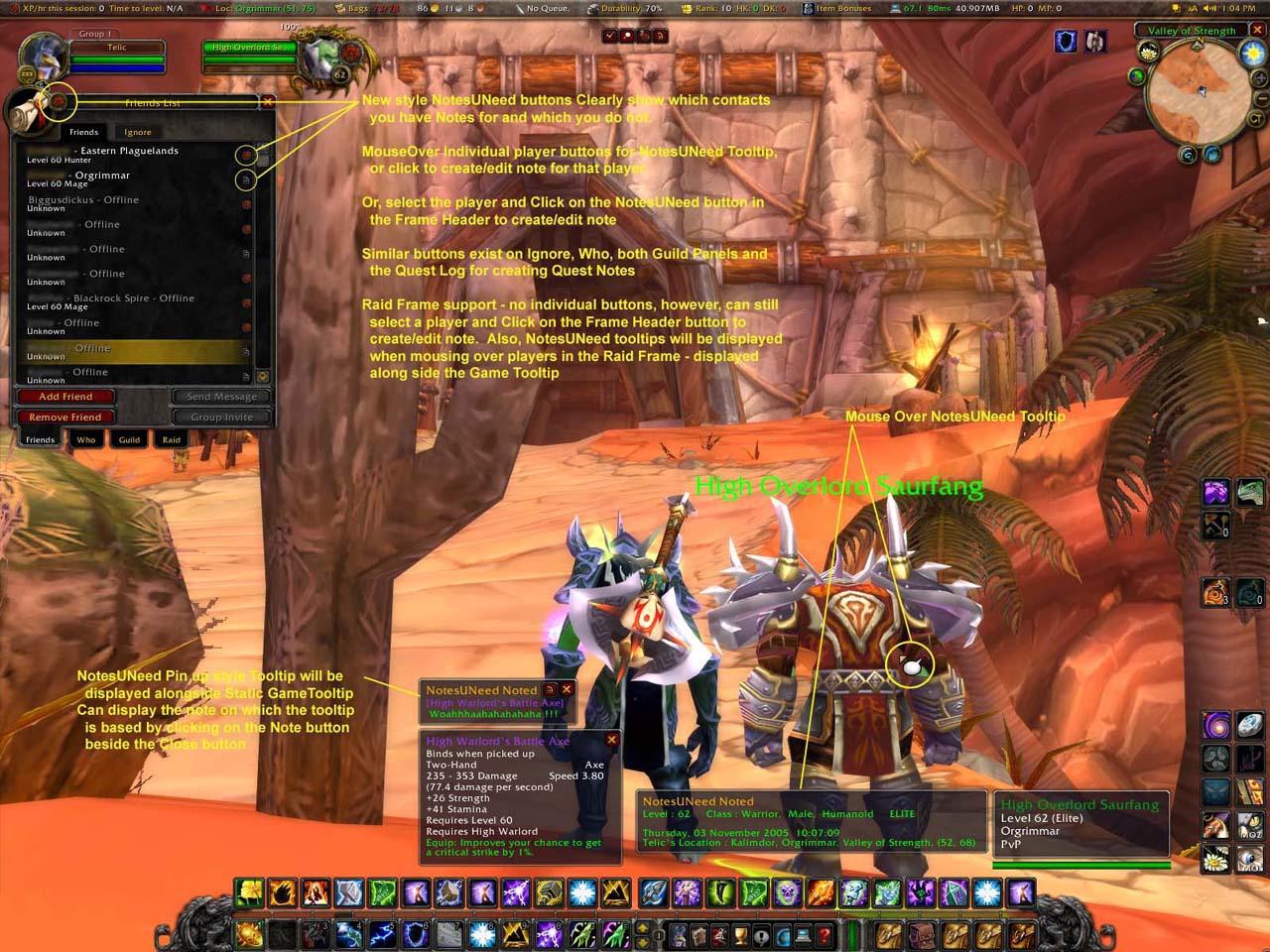
1.) Create Player Notes (aka Contact Notes) :
- Create Contact notes :
a) using new NuN buttons in the Friends Frame
b) using the NuN Micro Buttons described in point 3
c) using slash commands
d) via new NuN options in the player context menu
e) Or via any of the automated methods mentioned below
- NuN can auto-populate many details about race, class, guild, etc.
- Also add your own free Text notes
- auto maintain Friend / Ignore Lists across different Alts
- auto-note people you Party with
- auto-note Guild members
- auto maintain notes on your own Characters plus Levelling notes
- Rate Players via Right click menu and see that Rating in Tooltips
or tagged to Player Names in Chat
2.) Create General text notes on anything you like :
- Create General notes :
a) via the Micro Buttons in point 3 below;
b) via slash commands;
c) use the NuN Modifier when clicking on Container Items or Hyperlinks
(Default "<Alt>-Left Mouse Click" but can be changed in Options)
d) importing from a Plugin database
e) receiving notes in-game from other NuN users
f) Or via any of the automated methods below
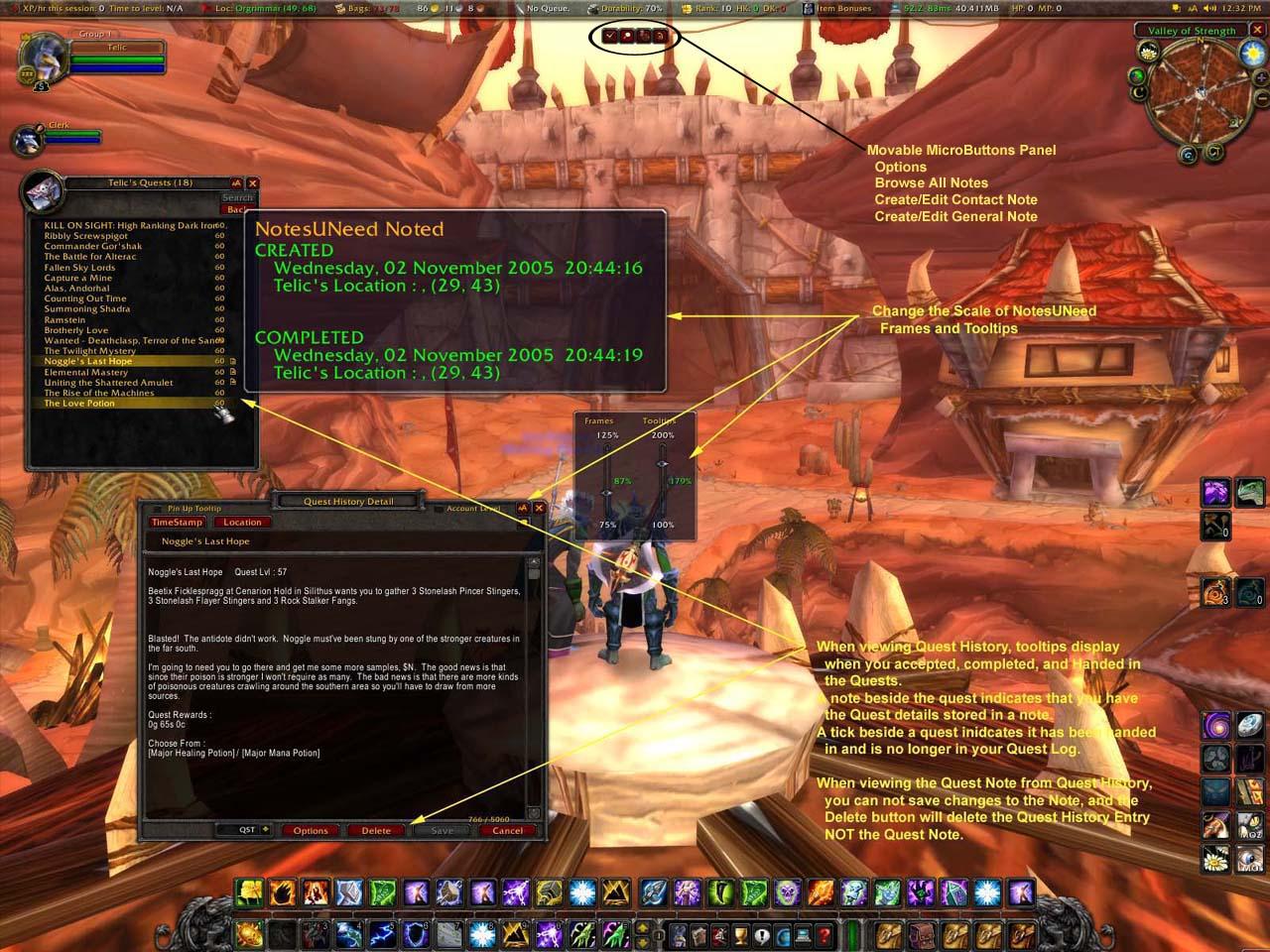
- Options to auto maintain Quest Notes which will save a few kinds of notes
a) Quest notes that record quest details plus Quest Giver name and location
b) Quest progress notes which record location when completing quest objectives
c) Quest History detailing when a given Toon Accepted, and Completed quests
- General notes can be saved at Account or Realm level
- Scripting - LUA scripts can be executed from General notes by :
a) Using the Run Script button in the frame
b) Slash command "/nun -x <NOTE_NAME>"
c) Execute one NuN Note from another NuN Note with the following command :
NuN_ExecuteNote("<Note Name>")
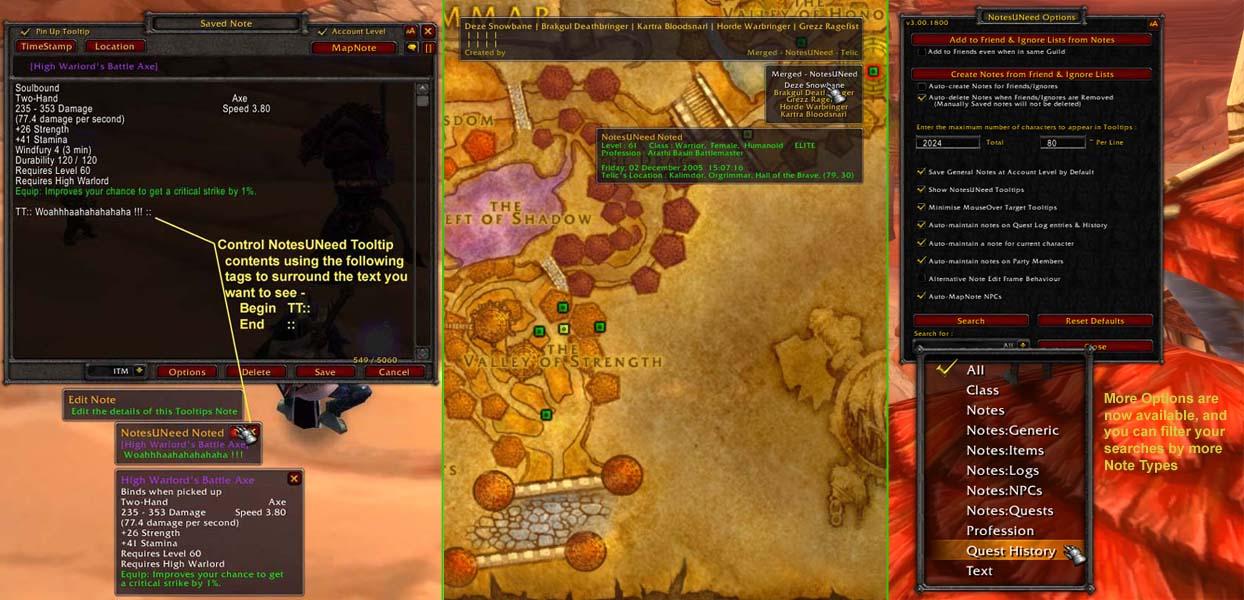
- General notes can be assigned the following Types for easy searching :
a) ITM - Item notes
b) QST - Quest notes, and quest objective notes
c) NPC - Notes made on NPCs and Mobs
d) LOG - NotesUNeed records Transmission logs when you send/receive notes
e) LUA - Keep your own in-game scripts library and execute notes like Macros
f) - or just leave blank ;p
3.) NuN has a MicroButtons panel with 4 buttons for quick access to features.
This frame can be moved by dragging the small border surrounding the buttons, and can be hidden if not needed (see slash commands). From left to right the buttons are :
- Options : toggle the NuN Options frame
- Note Browser : toggle the NuN Note Browser frame
<Alt> Left Click to browse General notes only
Right Click to browse Quest History
- Contact Note : create a note for the current target
will create a General note if current target is an NPC
<Alt> Click to re-open the last opened Contact Note
- General Note : create a General note
will create an NPC note if current target is an NPC
<Alt> Click to re-open the last opened General Note
4.) Note Browser Window.
This is where you can view the list of notes you have :
- default sorting is your Faction, then Opposing, then General Notes
- search for notes containing text you specify in the edit box
a) Left click : Case insensitive search
b) Right click : Case sensitive search
- filter visible notes from the Options Frame
e.g. to only show Quest Notes, or NPC Notes
- a tick indicates a General note is saved at Account level
- hover over a note to see its contents in a Tooltip
- Right-Click to open the sticky NuN PinUp Tooltip
- <Shift>Left-Click to paste the note name in to open chat box
- After filtering and searching to narrow down the visible set of Notes, you can :
a) Mass delete those listed in the browser frame
b) Export listed notes for other players to install and Import
5.) Options frame - open via the Microbuttons or slash command "/nun"
Configure NotesUNeed here, or filter the notes to appear in the Note
Browser frame. For example, to just look at NPC notes, or browse
Quest History for one of your Toons
6.) Backup and Restore functionality to save your database
This functionality is kept in separate LoadOnDemand AddOns to save memory.
Both the Backup and Restore processes will execute a ReloadUI()
7.) Import and Export of notes Databases
Share sets of notes with friends, or publish notes databases as a Plugin
for others to Import
8.) Broadcasting & Sending of NotesUNeed Notes
Broadcast Raid Instructions for Boss enchounters or PvP strategy, or
just your enchant selling menu; Or send formatted notes for other
NotesUNeed users to add to their database.
** -- SEE THE ENCLOSED README.TXT FILE FOR FURTHER DETAILS -- **
** -- ON THE ABOVE FUNCTIONALITY LIST -- **
______________
Slash Commands
______________
/nun : Toggles the NotesUNeed Options window
/nun -h : Displays this list of Slash commands
/nun <note title> : Will attempt the following :
1. Fetch a saved Contact note with that name
2. Fetch a saved General note with that title
3. Create a new Contact note if a player of that name is in your party/raid group or is within target range
4. Toggles the NotesUNeed Options window
/nun -t : Fetches the saved Contact note for the current target, or creates a new one, or shows your own characters note if no valid target. Since v2.00.1800, this command will create notes for NPCs and populate some basic information about them.
/nun -g : Creates a new General Note, untitled.
/nun -g <note title> : Fetches the existing General note with that title, or Creates a new General note with that title.
/nun -ch <name> : Create a Horde Player Character note for the given name without validating it
/nun -ca <name> : Create an Alliance Player Character note for the given name without validating it
/nun -tt : Toggle NotesUNeed Tooltips on/off
/nun -micro : Toggle the NotesUNeed Microbuttons panel hide/show
/nun -x <note title> : Tries to execute the specified note as a Lua Script. If no note exists, then will open the Note Search window
/nun -i <name> : to stop NotesUNeed trying to ignore a player
/nun -f <name> : to stop NotesUNeed trying to befriend a player
/nun -resetlists : to reset NotesUNeed's Friend/Ignore lists to those of the currently logged Alt
/nun -purgeexport : to clear Exported records and allow the creation of a newly named set of records
/nun -delay [number of seconds] : transmissions to channels have a default delay between each line being sent of 0.33 Use this slash command to change this value. Will report the current value if you do not pass any seconds value.
/nun -restrictwho : stops NuN from automatically trying to gather /who information
Slash Commands for Sending Messages
-----------------------------------
/nun -sendG "NOTE_NAME", "SEND_METHOD"[, "SEND_PARAMETER"]
- sends General type note text
/nun -sendGF "NOTE_NAME", "SEND_METHOD"[, "SEND_PARAMETER"]
- sends General type note as Formatted text
/nun -sendC "NOTE_NAME", "SEND_METHOD"[, "SEND_PARAMETER"]
- sends Contact type note text
/nun -sendCF "NOTE_NAME", "SEND_METHOD"[, "SEND_PARAMETER"]
- sends Contact type note as Formatted text
where -
"NOTE_NAME" = the name of the note or note title
"SEND_METHOD" = how to send the note e.g. "GUILD", "RAID", "WHISPER", "CHANNEL", etc.
"SEND_PARAMETER" = Optionally required (i.e. who to WHISPER to -OR- the Channel ID/Name)
NOTE: using any of these slash commands will close any currently open note.





 09-03-12, 07:53 PM






