| Go to Page... |


| Updated: | 10-11-10 03:56 PM |
| Created: | unknown |
| Downloads: | 929,624 |
| Favorites: | 2,770 |
| MD5: |
EquipCompare 

Patch 4.0.1: The latest version is patch 4.0.1 compatible. There are no functionality changes, EquipCompare still works, so I just updated the version number.
If you like this AddOn, please consider making a small, optional donation of any amount that is convenient for you to show your support. You can use PayPal for this:

Summary
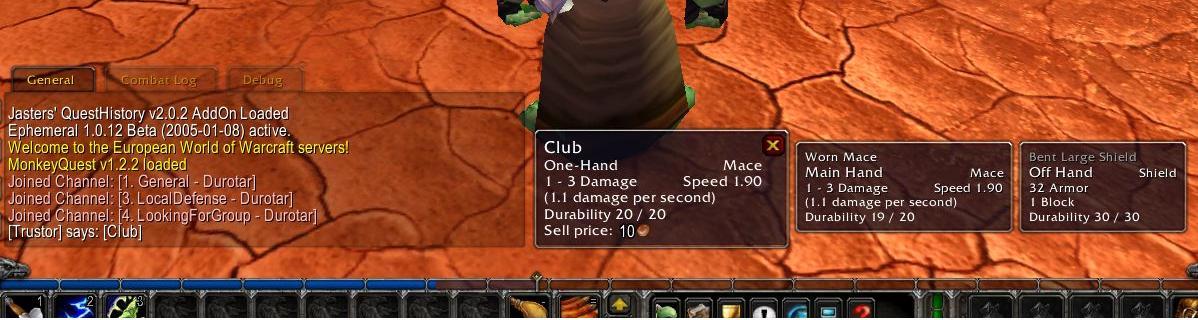
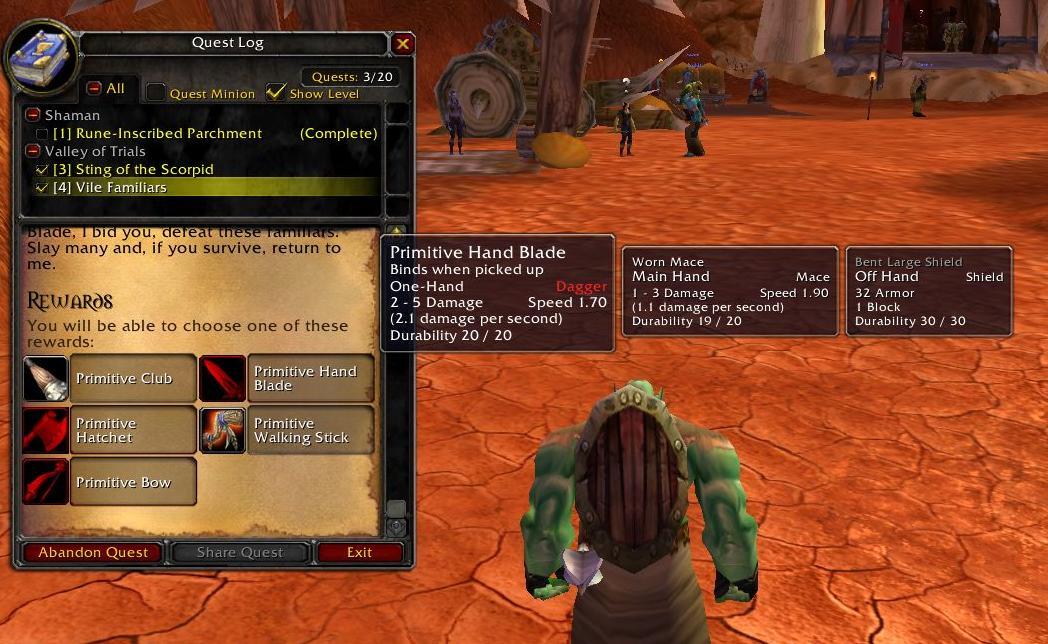
When you shop for items at a vendor or the Auction House and you hover over an item, you get a comparison tooltip showing the "currently equipped" item too. This AddOn adds such a feature everywhere in the game where you can hover over items, such as in your bags, in the loot window or on the reward page of a quest. You also receive comparison tooltips when clicking an item link in the chat box.
For detailed description of features, see the included Description.txt file. Simple install/uninstall/usage instructions are given below. Post a comment if you like, or discuss the AddOn in this thread: http://www.wowinterface.com/forums/s...ead.php?t=2597
The AddOn is compatible with and the texts are localized for US English, EU English, German, French, Korean, Simplified Chinese and Traditional Chinese clients.
Troubleshooting
Check the Known Issues list first! If EC only appears to be working at the AH and vendors, but nowhere else, then you don´t actually have EC correctly installed and working! The default Blizzard UI has EC-like features in those two places already, that´s what you are seeing. In this case, make sure that EC is enabled correctly on the character selection screen.
Advanced tip: For some really advanced uses, turn on the Alt-key mode and install CharactersViewer. Choose an alternate character in CV, go to the Auction House then hover over an item. First you get comparison with your equipped item, but then hold Alt to get comparison with your alternate character. Shop with ease both for yourself and your other characters with this great feature!
Install
Unzip the downloaded zip file into your "World of Warcraft\Interface\AddOns" folder. This is a standalone, pure AddOn.
Uninstall
Delete the "World of Warcraft\Interface\AddOns\EquipCompare" folder.
Usage
The AddOn is enabled by default. Type "/equipcompare help" for further usage information, or see the documentation in the included Description.txt file.
Developer API
See the included Description.txt for a short summary. See the comments in front of each of the functions in EquipCompare's code for full documentation.
Known Issues
- Main/Off Hand item both gets displayed in situations when a lot of players feel they shouldn't be (This works as intended at the moment).
- If you view an Off Hand item when you have a 2H item equipped, you don't get comparison with the equipped 2H item. (This works as intended at the moment).
- If both comparison tooltips are getting displayed and they are very wide (e.g. German client), it is possible that they don't both fit on the screen. In this case, part of one might get cut off.
Special thank you goes to
Flisher for the very fruitful collaboration on making CharactersViewer and EquipCompare work together.
Thanks goes to
- WoWInterface and Curse Gaming for hosting the AddOn.
- The entire Cosmos team for their help and support (including, but not limited to AlexYoshi, Thott, Sarf, AnduinLothar, StarDust, Sasmira).
- Norganna for making Auctioneer work together with EquipCompare
- Woofiest for the bug reports and great AddOn pack.
- All the original localizers (beWRage, Maischter, zerra, eerieN, Firebroo, arith)
Legalese (a.k.a. the Small Print)
The author holds all copyright to this AddOn. You are free to download, copy, distribute and re-host this AddOn in its original, unmodified form, for non-profit purposes. You are free to include this AddOn in any compilation, package, distribution etc. in its original form so long as credit is given to the author. If you distribute or re-host this AddOn, either in a compilation or by itself, you must include a link to the AddOn's official page as the author is responsible for maintaining only the official page of the AddOn. You are allowed, for your own personal use only, to make modifications to this AddOn and to privately distribute such modified form to people known to you (such as friends and guild members). However, you must not publically host or distribute a modified version of this AddOn, without express permission of the author. The author reserves the right to deny any of the above to any person or sites for any reasons.
Optional Dependencies: Khaos, Satellite, CharactersViewer, LootLink
Khaos: If Khaos is installed, EquipCompare options can be set via the Khaos configuration options. In this case, the settings are rememebered on a per-configuration basis.
Satellite: If Satellite is installed, slash commands are registered via Satellite.
Lootlink: If LootLink is installed, you will receive the comparison tooltips when hovering over items in the LootLink database.
CharactersViewer: If CharactersViewer (version 55 or higher) is installed, EquipCompare shows comparison tooltips with the items of the character you have selected in CV, instead of with the currently equipped items, provided this feature is enabled in EquipCompare. Use this great feature to easily compare your equipment or inventory with your alts. Alternatively, do things like receive relevant shopping tooltips at the Auction House, when you are shopping for your alt.
Cosmos (deprecated but supported): If Cosmos is installed, EquipCompare options can be toggled on and off via the Cosmos configuration menu. In this case, the settings are remembered on a per-character basis.
Sky (deprecated but supported): If Sky is installed, slash commands are registered via Sky.
* Patch 4.0 TOC update
Changes in 2.17:
* Patch 3.3 TOC update
Changes in 2.16:
* Patch 3.1
Changes in 2.15:
* Temporary workaround for the frequent "attempt to compare number with nil" bug that seem to appear for a lot of people.
Changes in 2.14:
* Weapon comparison behaviour changed. This fixes the missing main/offhand tooltip bug as well.
* Tooltip placement logic significantly improved. If there is one side to fit all the comparison tooltips, the code will find it now. In rare cases tooltips may still be partially off the screen, if the tooltips can't fit on any side.
Changes in 2.13:
* Patch 3.0
For older change notes see the included Change Notes.txt file.
 |
Comment Options |
 11-11-12, 04:06 PM
|
|
|
A Kobold Labourer
Forum posts: 0
File comments: 4
Uploads: 0
|
Long time user and fan of EquipCompare. Since there's been no update, I would highly suggest switching over to http://www.curse.com/addons/wow/moncaicompare as a great alternative. Not much to it, as it works directly with Blizzard's basic comparison tool.
|

|

|
| shinjuru |
| View Public Profile |
| Send a private message to shinjuru |
| Find More Posts by shinjuru |
| Add shinjuru to Your Buddy List |
|
09-05-12, 12:56 AM
|
||
|
A Kobold Labourer
Forum posts: 0
File comments: 48
Uploads: 0
|
I went through and made the changes as you posted, seems to be working fine atm but I checked !swatter (error catching add on that comes with Auctioneer) and this was there:
Date: 2012-09-05 01:33:58 ID: -1 Error occured in: Global Count: 90 Message: ..\AddOns\EquipCompare\EquipCompare.lua line 1037: Invalid inventory slot in GetInventorySlotInfo Debug: [C]: ? [C]: GetInventorySlotInfo() EquipCompare\EquipCompare.lua:1037: EquipCompare\EquipCompare.lua:1035 EquipCompare\EquipCompare.lua:1188: EquipCompare_ShowCompare() EquipCompare\EquipCompare.lua:1126: EquipCompare_CheckCompare() EquipCompare\EquipCompare.lua:768: EquipCompare_OnUpdate() [string "*:OnUpdate"]:1: [string "*:OnUpdate"]:1 Locals: (*temporary) = "RangedSlot" AddOns: Swatter, v5.14.5335 (KowariOnCrutches) ACP, v3.4 Align, v Atlas, v1.21.1 AtlasBattlegrounds, v1.21.1 AtlasDungeonLocs, v1.21.0 AtlasOutdoorRaids, v1.21.0 AtlasTransportation, v1.21.1 AtlasLootLoader, vv7.00.01 AtlasQuest, v4.8.0 BETA AucAdvanced, v5.14.5335 (KowariOnCrutches) AucFilterBasic, v5.14.5335 (KowariOnCrutches) AucFilterOutlier, v5.14.5335.5335(5.14/embedded) AucMatchUndercut, v5.14.5335.5225(5.14/embedded) AucScanData, v5.14.5335 (KowariOnCrutches) AucStatHistogram, v5.14.5335 (KowariOnCrutches) AucStatiLevel, v5.14.5335 (KowariOnCrutches) AucStatPurchased, v5.14.5335 (KowariOnCrutches) AucStatSales, v5.14.5335.5335(5.14/embedded) AucStatSimple, v5.14.5335 (KowariOnCrutches) AucStatStdDev, v5.14.5335 (KowariOnCrutches) AucStatWOWEcon, v5.14.5335.5335(5.14/embedded) AucUtilAHWindowControl, v5.14.5335.5133(5.14/embedded) AucUtilAppraiser, v5.14.5335.5335(5.14/embedded) AucUtilAskPrice, v5.14.5335.5160(5.14/embedded) AucUtilAutoMagic, v5.14.5335.5335(5.14/embedded) AucUtilCompactUI, v5.14.5335.5335(5.14/embedded) AucUtilEasyBuyout, v5.14.5335.5238(5.14/embedded) AucUtilFixAH, v5.14.5335 (KowariOnCrutches) AucUtilItemSuggest, v5.14.5335.5335(5.14/embedded) AucUtilPriceLevel, v5.14.5335.5237(5.14/embedded) AucUtilScanButton, v5.14.5335.5335(5.14/embedded) AucUtilScanFinish, v5.14.5335.5153(5.14/embedded) AucUtilScanProgress, v5.14.5335.4979(5.14/embedded) AucUtilScanStart, v5.14.5335.5153(5.14/embedded) AucUtilSearchUI, v5.14.5335.5335(5.14/embedded) AucUtilSimpleAuction, v5.14.5335.5208(5.14/embedded) AucUtilVendMarkup, v5.14.5335.4828(5.14/embedded) Babylonian, v5.1.DEV.312(/embedded) ButtonFacade, v5.0.387 Chatter, v1.0 Configator, v5.1.DEV.330(/embedded) CTCore, v5.0002 DBMCore, v DebugLib, v5.1.DEV.312(/embedded) EquipCompare, v2.18 GFWDisenchantPredictor, v5.0.1 Grid, vr1522 Informant, v5.14.5335 (KowariOnCrutches) LibExtraTip, v5.12.DEV.324(/embedded) Linkepedia, v1.1.2 Masque, v5.0.387 MasqueLiteStep, v5.0.63 Omen, v3.1.7 OmniCC, v4.3.0 Quartz, v3.1.0-1-g0d31d19 RatingBuster, v5.0.4.361 Recount, v SlideBar, v5.14.5335 (KowariOnCrutches) StellarBars, v5.0.001 Stubby, v5.14.5335 (KowariOnCrutches) TipHelper, v5.12.DEV.315(/embedded) Titan, v5.1.3.50001 TitanBag, v5.1.3.50001 TitanClock, v5.1.3.50001 TitanGold, v5.1.3.50001 TitanLocation, v5.1.3.50001 TitanLootType, v5.1.3.50001 TitanPerformance, v5.1.3.50001 TitanRecZone, v5.0.0.3 TitanRepair, v5.1.3.50001 TitanVolume, v5.1.3.50001 TitanXP, v5.1.3.50001 XPerl, v3.5.10 XPerlArcaneBar, v XPerlParty, v XPerlPartyPet, v XPerlPlayer, v XPerlPlayerBuffs, v XPerlPlayerPet, v XPerlRaidAdmin, v XPerlRaidFrames, v XPerlRaidHelper, v XPerlRaidMonitor, v XPerlRaidPets, v XPerlTarget, v XPerlTargetTarget, v BlizRuntimeLib_enUS v5.0.4.50001 <us> (ck=b68) Did I miss editing something in the file?
__________________
|
|
|
|
|
| Belial_69699 |
| View Public Profile |
| Send a private message to Belial_69699 |
| Find More Posts by Belial_69699 |
| Add Belial_69699 to Your Buddy List |
|
09-02-12, 01:05 PM
|
||
|
A Kobold Labourer

Forum posts: 0
File comments: 10
Uploads: 0
|
Re: 5.0.4 Fixes
These match the changes I made. Good Job. All works now.
|
|
|
|
|
| defunk |
| View Public Profile |
| Send a private message to defunk |
| Find More Posts by defunk |
| Add defunk to Your Buddy List |
|
09-01-12, 10:14 PM
|
|
|
A Fallenroot Satyr
 Forum posts: 24
File comments: 33
Uploads: 6
|
5.0.4 Fixes
To get rid of all errors introduced by Ranged/Relic slot removal and other 5.0.4 changes, open EquipCompare.lua and edit the following lines:
184-185: Lua Code:
198: Lua Code:
201-205: Lua Code:
That's it, you're done. EQ 2.18 now works fine with WoW 5.0.4
__________________
Sará the Insane |
|
|
|
| SaraFdS |
| View Public Profile |
| Send a private message to SaraFdS |
| Find More Posts by SaraFdS |
| Add SaraFdS to Your Buddy List |
|
08-30-12, 07:43 PM
|
||
|
A Frostmaul Preserver

Forum posts: 266
File comments: 194
Uploads: 0
|
|
|
|
|
|
| khurzog |
| View Public Profile |
| Send a private message to khurzog |
| Find More Posts by khurzog |
| Add khurzog to Your Buddy List |
|
08-30-12, 02:25 AM
|
|
|
An Aku'mai Servant
Forum posts: 31
File comments: 20
Uploads: 0
|
Lots of errors on this patch. Any update coming?
Or any other addons similar to this? |
|
|
|
| mondoz |
| View Public Profile |
| Send a private message to mondoz |
| Find More Posts by mondoz |
| Add mondoz to Your Buddy List |
|
05-12-12, 01:39 AM
|
|
|
Premium Member
 Forum posts: 55
File comments: 138
Uploads: 3
|
Any update comming?
|
|
|
|
| Tntdruid |
| View Public Profile |
| Send a private message to Tntdruid |
| Find More Posts by Tntdruid |
| Add Tntdruid to Your Buddy List |
|
02-28-12, 02:22 PM
|
|
|
A Kobold Labourer
Forum posts: 0
File comments: 1
Uploads: 0
|
 No more working...
No more working with last patch.
|
|
|
|
| Zmb |
| View Public Profile |
| Send a private message to Zmb |
| Find More Posts by Zmb |
| Add Zmb to Your Buddy List |
|
07-10-11, 02:50 PM
|
|
|
A Kobold Labourer
Forum posts: 0
File comments: 9
Uploads: 2
|
include WoW-like attribute change information
Since some latest patch WoW tooltips contain inforamtion about attribute changes when holding down shift while hovering over an item (i.e. +- x stamina, compared to the item currently equipped).
Equipcompare currently lacks this additional information. Hence I'd like to suggest to: a) either add these information to Equipcompare or b) let the default WoW tooltip being displayed for at least those situations where WoW itself supports equipment comparison Reasoning: These additional information are rather useful and help a lot when comparing items and losing these information when having equipcompare installed is a rather heavy argument against using EQCompare at all. |
|
|
|
| Luke1410 |
| View Public Profile |
| Send a private message to Luke1410 |
| Find More Posts by Luke1410 |
| Add Luke1410 to Your Buddy List |
|
05-11-11, 12:30 AM
|
|
|
A Flamescale Wyrmkin
Forum posts: 130
File comments: 231
Uploads: 0
|
Is it possible to skin this addon? It doesn't match my other skinned mouse-over tooltip. I used this picture in a my Auctioneer post, but it shows my equiped item tool-tip not skinned.
 |
|
|
|
| litesung |
| View Public Profile |
| Send a private message to litesung |
| Find More Posts by litesung |
| Add litesung to Your Buddy List |
|
04-30-11, 11:07 AM
|
|
|
A Murloc Raider
Forum posts: 4
File comments: 1
Uploads: 0
|
pb with new version
I cant use no more the old version.
The new pach seems not working with this old version. thanks for your help |
|
|
|
| williamb |
| View Public Profile |
| Send a private message to williamb |
| Find More Posts by williamb |
| Add williamb to Your Buddy List |
|
04-10-11, 01:07 AM
|
||
|
A Murloc Raider
Forum posts: 6
File comments: 14
Uploads: 1
|
Tooltip rendered (partially/completely) off screen fix #2 for EquipCompare v2.18
I looked for when I reinstalled WoW was EquipCompare. I am glad to see you are keeping it going. Thank you for all your hard work on this addon over the years.  I may have figured out a method to resolve some of the issues with wide comparative tooltip frames being displayed (partially or completely) off the screen. This attempts to reposition wide comparative tooltip frames (main hand to the left and off hand to the right of the main tooltip) when *both* of the comparative tooltip frames do not fit together on the left or right side of the main game tootlip. * Works with WoW v4.0.6 and EquipCompare v2.18. * See NOTES below. * Open the EquipCompare.lua file, found at: (WindowsXP default location) C:\Program Files\World of Warcraft\Interface\AddOns\EquipCompare\EquipCompare.lua Replace code lines starting at 1260 through 1293. Copy and paste the code between the following two comments: "-- Try to place the tooltips in sensible places" and "-- Record side of alignment" From: ------------------------------------------------------------------- Code:
		-- Try to place the tooltips in sensible places
		if ( ComparisonTooltip1:IsVisible() ) then
			if ( leftAlign ) then
				local left = ComparisonTooltip1:GetLeft();
				if ( left < 0 ) then
					leftAlign = false;
					ComparisonTooltip1:ClearAllPoints();
					ComparisonTooltip2:ClearAllPoints();
					ComparisonTooltip1:SetPoint("TOPLEFT", tooltip:GetName(), "TOPRIGHT", 0, -10);
					ComparisonTooltip2:SetPoint("TOPLEFT", "ComparisonTooltip1", "TOPRIGHT", 0, 0);
				end
			else
				local right;
				local twotips = ComparisonTooltip2:IsVisible();
				if ( twotips ) then
					right = ComparisonTooltip2:GetRight();
				else
					right = ComparisonTooltip1:GetRight();
				end
				if ( right and GetScreenWidth() and right > GetScreenWidth() ) then
					leftAlign = true;
					ComparisonTooltip1:ClearAllPoints();
					ComparisonTooltip2:ClearAllPoints();
					if ( twotips ) then
						ComparisonTooltip2:SetPoint("TOPRIGHT", tooltip:GetName(), "TOPLEFT", 0, -10);
						ComparisonTooltip1:SetPoint("TOPRIGHT", "ComparisonTooltip2", "TOPLEFT", 0, 0);
					else
						ComparisonTooltip1:SetPoint("TOPRIGHT", tooltip:GetName(), "TOPLEFT", 0, -10);
					end
				end
			end
		end

		-- Record side of alignment
To: ------------------------------------------------------------------- Code:
		-- Try to place the tooltips in sensible places
		if ( ComparisonTooltip1:IsVisible() ) then
			local left = 0;
			local right = 0;
			if ( leftAlign ) then
				left = ComparisonTooltip1:GetLeft();
				if ( left < 0 ) then
					leftAlign = false;
					ComparisonTooltip1:ClearAllPoints();
					ComparisonTooltip1:SetPoint("TOPLEFT", tooltip:GetName(), "TOPRIGHT", 0, -10);
					right = ComparisonTooltip1:GetRight();
					if ( ComparisonTooltip2:IsVisible() ) then
						ComparisonTooltip2:ClearAllPoints();
						ComparisonTooltip2:SetPoint("TOPLEFT", "ComparisonTooltip1", "TOPRIGHT", 0, 0);
						right = ComparisonTooltip2:GetRight();
					end
				end
				if ( right > GetScreenWidth() ) then
					ComparisonTooltip1:ClearAllPoints();
					ComparisonTooltip1:SetPoint("TOPRIGHT", tooltip:GetName(), "TOPLEFT", 0, -10);
					left = ComparisonTooltip1:GetLeft();
					if ( ComparisonTooltip2:IsVisible() ) then
						ComparisonTooltip2:ClearAllPoints();
						ComparisonTooltip2:SetPoint("TOPLEFT", tooltip:GetName(), "TOPRIGHT", 0, -10);
						right = ComparisonTooltip2:GetRight();
					end
				end
			else
				right = ComparisonTooltip1:GetRight();
				if ( ComparisonTooltip2:IsVisible() ) then
					right = ComparisonTooltip2:GetRight();
				end
				if ( ( right ) and ( GetScreenWidth() ) and ( right > GetScreenWidth() ) ) then
					leftAlign = true;
					if ( ComparisonTooltip2:IsVisible() ) then
						ComparisonTooltip2:ClearAllPoints();
						ComparisonTooltip2:SetPoint("TOPRIGHT", tooltip:GetName(), "TOPLEFT", 0, -10);
						ComparisonTooltip1:ClearAllPoints();
						ComparisonTooltip1:SetPoint("TOPRIGHT", "ComparisonTooltip2", "TOPLEFT", 0, 0);
						left = ComparisonTooltip1:GetLeft();
					else
						ComparisonTooltip1:ClearAllPoints();
						ComparisonTooltip1:SetPoint("TOPRIGHT", tooltip:GetName(), "TOPLEFT", 0, -10);
						left = ComparisonTooltip1:GetLeft();
					end
				end
				if ( left < 0 ) then
					ComparisonTooltip1:ClearAllPoints();
					ComparisonTooltip1:SetPoint("TOPRIGHT", tooltip:GetName(), "TOPLEFT", 0, -10);
					left = ComparisonTooltip1:GetLeft();
					if ( ComparisonTooltip2:IsVisible() ) then
						ComparisonTooltip2:ClearAllPoints();
						ComparisonTooltip2:SetPoint("TOPLEFT", tooltip:GetName(), "TOPRIGHT", 0, -10);
						right = ComparisonTooltip2:GetRight();
					end
				end
			end
			--Test new tooltip positions to check if new far left, new far right, ComparisonTooltip1 bottom,
			--and/or ComparisonTooltip2 bottom points are rendered off-screen.
			--Solution: Reposition the main tooltip and redraw the comparative tooltip(s) to fit on screen.
				--(Intentionally left blank, for now.)
		end

		-- Record side of alignment
Save the file. Run the game. Your mileage may vary, but probably won't.  NOTES: 1) There may be a few steps that can be optimized in the replacement code, but I wanted the code to be "easy" to follow. 2) This code modification does not rectify the positioning of long tootips which display beyond the bottom screen edge (possibly a future fix). 3) EquipCompare's tooltips appear to obscure the tootips displayed when the player presses the ALT button while hovering over an equippable item. I suppose if you are using EquipCompare, then you probably don't need the ALT button's functionality - essentially making this a non-issue. |
|
|
|
|
| Thrashfinger |
| View Public Profile |
| Send a private message to Thrashfinger |
| Find More Posts by Thrashfinger |
| Add Thrashfinger to Your Buddy List |
|
04-09-11, 08:35 PM
|
||
|
A Murloc Raider
Forum posts: 6
File comments: 14
Uploads: 1
|
Re: Atlas Loot tool tips
Options // Interface // AtlasLoot Top box, right column, second option "Comparison TT". Were you looking for additional functionality beyond this, or was this what you were looking for? |
|
|
|
|
| Thrashfinger |
| View Public Profile |
| Send a private message to Thrashfinger |
| Find More Posts by Thrashfinger |
| Add Thrashfinger to Your Buddy List |
|
03-19-11, 07:00 AM
|
||
|
Premium Member
Forum posts: 29
File comments: 31
Uploads: 1
|
|
|
|
|
|
| Malsis |
| View Public Profile |
| Send a private message to Malsis |
| Find More Posts by Malsis |
| Add Malsis to Your Buddy List |
|
02-23-11, 04:54 PM
|
|
|
A Kobold Labourer
Forum posts: 0
File comments: 1
Uploads: 0
|
can you make update for 4.0.6? my compare not more works
 please make update^^  |
|
|
|
| Katanja |
| View Public Profile |
| Send a private message to Katanja |
| Find More Posts by Katanja |
| Add Katanja to Your Buddy List |
|
Support AddOn Development!
You have just downloaded by the author . If you like this AddOn why not consider supporting the author? This author has set up a donation account. Donations ensure that authors can continue to develop useful tools for everyone.
*Clicking the donate button above will take you to PayPal.com

*Clicking the donate button above will take you to Pledgie.com
