Addon Information
Download Latest Version.
To add favorites please register for a free account. If you already have one you need to login. How do I install this? (FAQ)
Telic's Portal Bug Reports Feature Requests
Author:
Version:
v3.76.30100
Date:
07-18-2009 05:54 AM
Size:
8.80 MB
Downloads:
366,747
Favorites:
582
MD5:
Pictures
Click to enlarge
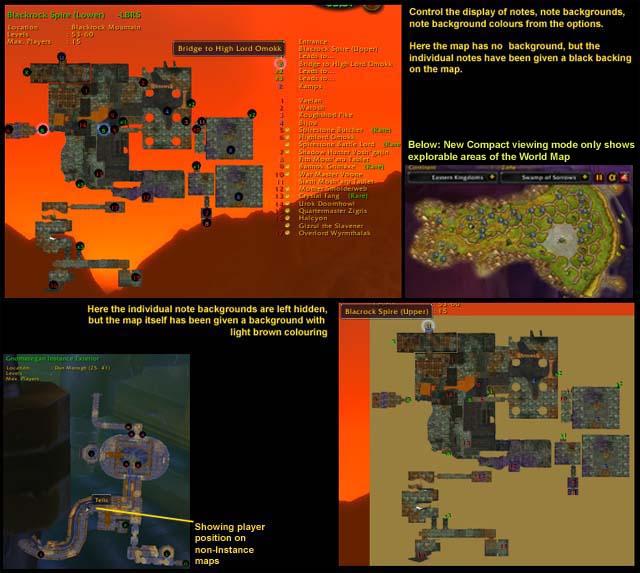
Map Selector, AlphaMap with Gatherer/Magellan Icons, Options Frame, other maps
Click to enlarge
Instance Maps, Player Icon on non-Instance Dungeon, & Compact World Map viewing mode
Click to enlarge
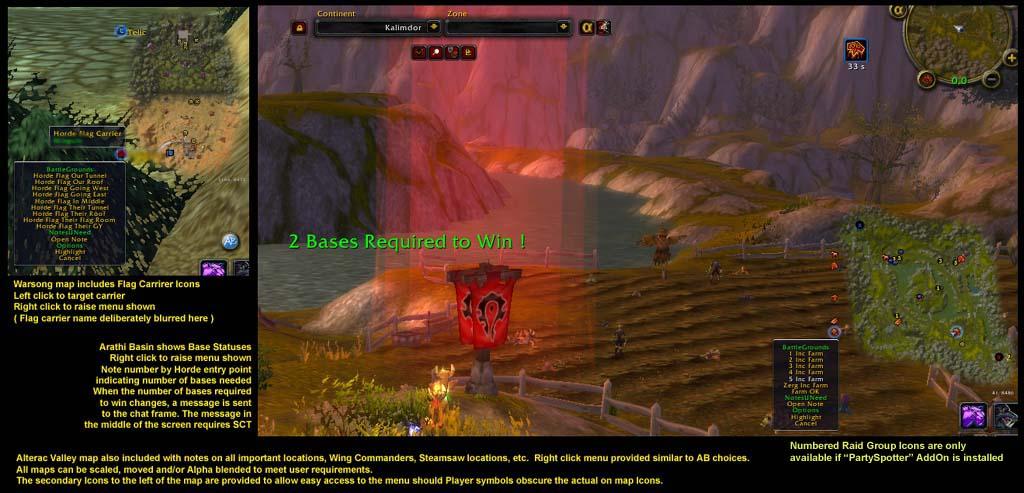
Battlegrounds Maps and Features
Click to enlarge
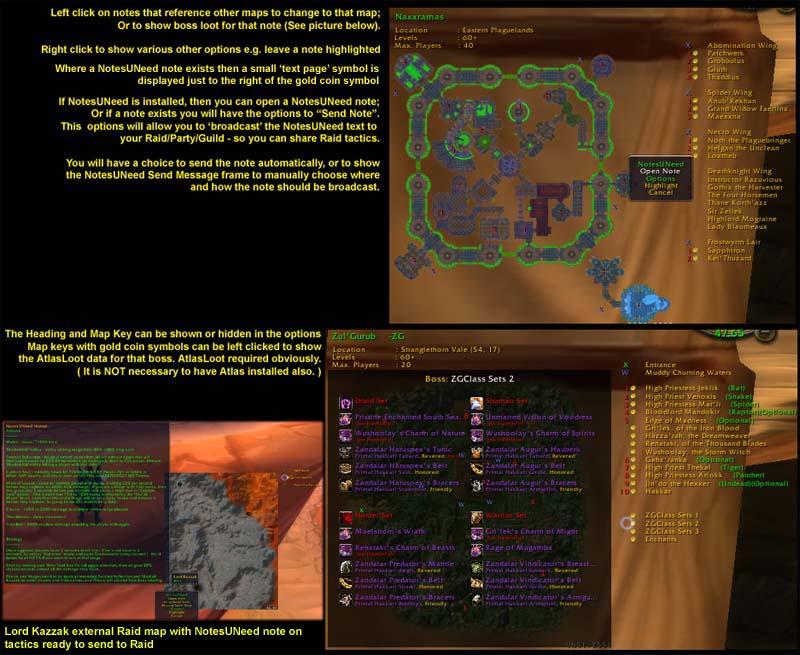
More Instance Maps, and AtlasLoot compatible
AlphaMap   Popular! (More than 5000 hits)
v3.76.30100

Click here to lend your support!

telic@hotmail.co.uk

Compatible with QuestHelper v0.46 and later

Includes Maps for Instances, Battlegrounds, & World Bosses, and the major non-Instance Cave systems

Basically, AlphaMap is a scalable, moveable, transparent WorldMap that the user can have on screen while they continue to play and interact with the world.

Move the AlphaMap by holding down Control & Alt keys, and moving via the yellow movement bars at the top and bottom of the map.

Supported by PartySpotter, and MozzFullWorldMap(Fan's Update).

Native support for MapNotes, Gatherer, MetaMapNotes, CTMapMod, FlightMap, AtlasLoot, and NotesUNeed


See Patch Notes / Change History for specific details of functional changes/bug fixes


FEATURES NOT TO MISS

- World Map replacement mode via the 'Mouse Interaction' checkbox in the Miscallaneous Tab of the Options. ALT-Clicking on the AlphaMap will allow you to zoom in/out via left/right clicks. Without the <Alt> key pressed, then AlphaMap will remain invisible to the mouse as per current functionality.

- World Map 'Compact' veiwing mode, which will trim the world map, and only show explorable areas; so that keeping the map up on screen uses even less space.
The 'Standard'/'Compact' veiwing modes can be switched via a key binding.
NOTE : A side affect of this will mean that characters won't see areas they haven't discovered yet. If you would like to use Compact viewing mode, but STILL be able to see ALL areas in the current Map, you will need to install 'MozzFullWorldMap (Fans Update)'

- Special Battlefield options for reporting positions and incoming. (Note that the Raid Group numbered icons in the pictures are only available with the 'PartySpotter' AddOn installed)


FEATURES IN MORE DETAIL


High Quality Instance Maps :
lots of options allowing you to change the scale, alpha, the display of notes, note backgrounds, map background, Instance Header and Footer information, instance legend, the ability to change the colour of the note and/or map backgrounds.
Compatible with the latest versions of AtlasLoot (v1.60 and later). Atlas not required if you need to save memory.
Instance settings are saved separately to the World Map settings, so you don't have to change the way AlphaMap is displayed every time you enter/exit an Instance.
Or, save all Instance map settings separately allowing you to have different Instance maps set to different sizes, etc. Uncheck the box on the 'Dungeons' tab of the Options frame.


High Quality BattleGround Maps :
Minimap textured maps of Battlegrounds displaying all player units, and Battleground flags/objectives.
In Warsong Gulch, extra flag icons record which players have picked up which flags. Left click on a flag to target the carrier. Right click the flag to bring up a menu allowing you to report the flag's position to Raid/Party/General chat.
In Arathi Basin, the number of bases required to win is displayed next to your Faction's entry point. When ever the number of bases you need to win changes, a message is sent to your chat box to inform you of this. If you have the Scrolling Combat Text AddOn installed, then this message will also be displayed in the center of the screen. Right click on bases to report the number of incoming enemy to Raid/Party/General chat.
In Alterac Valley, Right click on bases to report the number of incoming enemy to Raid/Party/General chat.
As per all AlphaMap maps, the scale, alpha, and position of the maps can be changed and will be saved separately from the World Map settings or the Instance map settings.
Or, save all Battleground map settings independantly from each other allowing you to show the large Alterac Valley map at a smaller scale than the small Warsong Gulch map - Uncheck the box on the 'Battlegrounds' tab of the Options frame.


World Boss Maps & Instance Exteriors Caves :
For example, maps for Gnomeregan dungeon (before you enter the Instance), Dire Maul exterior, and Maraudon Exterior; And zoomed minimap style maps for the World Bosses Lord Kazzak, Azuregos, and all 4 of the Four Dragons. All these maps are capable of displaying player units, and all save their settings spearately from each other, and from the World, Instance and Battleground maps.


All the above maps have AlphaMap notes detailing key locations, mobs, etc. These notes can be clicked to do one or more of the following :
Left Click
- If the note leads to another map, then that map will be displayed. e.g. links between LBRS/UBRS/BWL, DM maps, etc.
- If the note has Loot noted for it, a small gold coin will be displayed next to it, and left clicking will show the AtlasLoot frame
Righ Click will raise a menu with several possible options
- You can leave a particular map note highlighted
- In Battlegrounds, there are special options for reporting the number of enemy incoming on a base, or the location of a flag carrier
- If you have NotesUNeed installed, then you can open a NotesUNeed note, or Send the NotesUNeed note text to your Raid/Party/Guild. i.e. store the tactics for a particular boss in a NotesUNeed note, and then send those tactics to your Raid via the right click menu for that boss on the AlphaMap
  Change Log - AlphaMap
Changes in v3.64.30100 from v3.63.30100
-------------------------------------------------

- compatibility fix to prevent map changes caused by Carbonite
NOTE : AlphaMap Mouse Interaction mode and manual world map changing is restricted when Carbonite is installed


Changes in v3.63.30100 from v3.62.30100
-------------------------------------------------

- fix to maps with vehicles in 3.1
(NOTE: This version is backward compatible with 3.0.9 - but must Load Out of Date AddOns)


Changes in v3.62.30100 from v3.61.30100
-------------------------------------------------

- fix to manual map selection away from an instance style AlphaMap map to a World Map continent map

- fix to make sure right click POI menus close fully after a selection has been made

- added a Cancel option to POI right click menus

- some small data corrections to POI Plugins


Changes in v3.61.30100 from v3.60.30100
-------------------------------------------------

- update to CTMap_Mod support


Changes in v3.60.30100 from v3.55.30000
-------------------------------------------------

- toc & compatibility update for WoW 3.1 patch
(NOTE: This version is backward compatible with 3.0.9 - but must Load Out of Date AddOns)

- MAJOR FIXES TO SOLVE MAP UPDATING ISSUES FOR WOTLK

- GatherMate support (controlled by standard Gatherer check box in Options)
NOTE: AlphaMap expects EITHER Gatherer or GatherMate - if you have both installed, only Gatherer will be displayed.

- major fix to the latest MobMap Support including map icon positions, tooltip display, and opening of AlphaMap rather than the World Map
(SHIFT-Click on MobMap Quest question marks to open the original Blizzard map)

- fix to TravelAgents plugin - clicking on Flight Master points on Continent maps will now display available routes to other Flight Masters

- fix to _POI_ Plugins to prevent display of empty right click menus, and improved support for MapNotes Mininote tracking of POIs

- small data fixes to POI data and flight paths
  Optional Files - AlphaMap
File Name
Version
Size
Author
Date
Type
v3.54.30000.B.8
7MB
03-18-2009 10:19 AM
Addon
  Archived Versions - AlphaMap
File Name
Version
Size
Author
Date
v3.75.30100
9MB
Telic
07-16-2009 09:24 AM
v3.64.30100
7MB
Telic
05-23-2009 07:20 AM
v3.63.30100
7MB
Telic
04-15-2009 02:51 AM
v3.62.30100
7MB
Telic
04-13-2009 07:04 AM
v3.61.30100
7MB
Telic
04-12-2009 07:00 AM
v3.60.30100
7MB
Telic
04-11-2009 07:34 AM
v3.55.30000
7MB
Telic
03-24-2009 10:45 AM
v3.52.30000
7MB
Telic
12-12-2008 02:15 PM
v3.51.30000
7MB
Telic
12-07-2008 07:41 AM
v3.50.30000
7MB
Telic
11-21-2008 03:53 PM
  Comments - AlphaMap
Post A Reply Comment Options
Old 11-08-2009, 04:57 PM  
KleinerMink
A Deviate Faerie Dragon

Forum posts: 11
File comments: 70
Uploads: 0
Is there a real map zoom like on the minimap?

I dont want to zoom my whole ui like what alpha map does at the moment.
KleinerMink is offline Report comment to moderator   Edit/Delete Message Reply With Quote
Old 11-07-2009, 05:37 PM  
miros
A Kobold Labourer
 
miros's Avatar
Interface Author - Click to view interfaces

Forum posts: 0
File comments: 55
Uploads: 5
Great!!

P.S. Any way to hide the AL button?
P.P.S. Could you add support for routes?

Last edited by miros : 11-07-2009 at 06:37 PM.
miros is offline Report comment to moderator   Edit/Delete Message Reply With Quote
Old 10-03-2009, 08:59 PM  
frmrpreztaft
A Kobold Labourer

Forum posts: 0
File comments: 2
Uploads: 0
I'm interested in scaling down the Zone dropdown menu, so that i can put it above my Zone Map. is there a way to do this?

Great addon, keep up the good work.
frmrpreztaft is offline Report comment to moderator   Edit/Delete Message Reply With Quote
Old 08-28-2009, 06:21 AM  
iceeagle
A Kobold Labourer

Forum posts: 0
File comments: 1
Uploads: 0
Re: AlphaMap is NOT broken

Sorry for the inconvenience. I uploaded version 1.3 of Fubar_WintergrasperFu which should work fine with AlphaMap. I didn't do extensive testing so if there is still any problem please let me know.
iceeagle is offline Report comment to moderator   Edit/Delete Message Reply With Quote
Old 08-27-2009, 09:32 PM  
Thors Liebling
A Deviate Faerie Dragon

Forum posts: 15
File comments: 29
Uploads: 2
Exclamation AlphaMap is NOT broken

Sorry, Telic, for the wrong bug report

I just found the problem after checking my own notes about the addon changes I made: it is Fubar_WintergrasperFu which can be found here:
http://wow.curseforge.com/addons/fubar_wintergrasperfu/

I will send iceeagle a private message, because he does not have comments or tickets enabled.

Wintergrasper is a small broker addon showing the starting time of the next battle. Also it should actually show which faction currently controls Wintergrasp, which it does not (even when being right in that zone).

Having Fubar_WintergrasperFu disabled, AlphaMap works just fine
Thors Liebling is offline Report comment to moderator   Edit/Delete Message Reply With Quote
Old 08-27-2009, 08:44 PM  
Thors Liebling
A Deviate Faerie Dragon

Forum posts: 15
File comments: 29
Uploads: 2
Thanks, Telic, for your quick reply although you are busy with rl things.
Yes I meant the battlefield minimap. It is sort of flickering between showing the current zone and the Northrend/Outlands/Kalimdor/Eastern Kingdoms map.

Here two examples for the big map: I am flying in the zone Zul'Drak and want to see where the entrance is for the instance Gundrak (I always have this orientation problem). So I put my mouse over the AlphaMap icon to have a short look. But I could only see a map of Northrend :-(
So I opened my big map, and here also I could see for a period of maybe a second the map of Zul'Drak, abd then it changed to Northrend.

I will give you also two examples for the instance maps: when being in the zone Zul'Drak, I wanted to have a look at the instance Gundrak. Usually I change the drop down menu to Northrend - Instances and then I expected to see a map of Gundrak, because I was infront of it (that is what usually would happen). Still Northrend was shown, so I tried to mark Gundrak manually on the right drop down menu. But I could not, because the drop down menu closed rigth away, and I could only see the instance map of Ahn'kahet, which is the first instance map listed in the drop down menu.
After having entered Gundrak I expected to finally see the right instance map, but things were as before.

Actually I did not change anything to my addons, but after serverdown Tuesday night, I suddenly have these problems. Is it possible, that Blizzard made some changes only to the German servers?

No, I do not use Carbonite, since I believe that tomquest2 is a whole lot better. The German translation is perfect too
Everything was okay until the servers came back online on Wednesday.
I always load out of date addons, because there are a whole lot of addons around, that function very well, but do not have a toc update.

I will log in again now and have a look if the paused mode is turned on. I would not want it to pause, I can't think of a reason for using that mode myself.

Which website do you actually prefer to check regularly? Is it wowui, wowinterface or curseforge?

Greetings, Telic, I hope you are fine, and if not so, I wish you all the best, which will hopefully help

ThorsLiebling
Thors Liebling is offline Report comment to moderator   Edit/Delete Message Reply With Quote
Old 08-27-2009, 07:33 PM  
Telic
A Defias Bandit
 
Telic's Avatar
Interface Author - Click to view interfaces

Forum posts: 3
File comments: 421
Uploads: 17
Re: Last version broken

Quote:
Originally posted by Thors Liebling
AlphaMap seems to be broken now.

* Showing the small map always for the current zone is not possible.
* It is not possible to show instance maps, they also don't show by themselves anymore when entering an instance.

I know you don't have any spare time at the moment, just wanted to let you know in case
* Showing the small map always for the current zone is not possible.

Sorry, but I honestly don't know what this means exactly
I have no problem displaying the Zone Map (Battlefield Minimap) for the current zone alongside AlphaMap.
The Zone Map will interfere with AlphaMap's ability to display maps other than the one that you are currently in....
Also, if using 'PLAYER' mode to concentrate on the player, it is possible to very briefly see other maps, but it should change quickly back to your zone.


* It is not possible to show instance maps, they also don't show by themselves anymore when entering an instance.

It is, and they do... at least in my testing.
Do you have Carto 3 installed - sadly I can't gaurantee that AlphaMap works with it...
Or with that other quest map thingy that people were originally charged for, but I can't remember the name of at the moment...

It sounds like, maybe, you are using AlphaMap in 'PAUSED' mode, rather than one of the original modes...
Have you checked the 'STATUS' of AlphaMap - it now has three modes that are displayed differently than they were before as detailed in the change log for version v3.75.30100.
Display of the 'PAUSED' button now means AlphaMap is ACTUALLY PAUSED.
Previously, it used to mean that pressing 'PAUSE' would Pause the map.
This was changed to account for the third available mode of display - 'PLAYER' tracking mode.

Last edited by Telic : 08-27-2009 at 07:44 PM.
Telic is offline Report comment to moderator   Edit/Delete Message Reply With Quote
Old 08-27-2009, 11:11 AM  
Thors Liebling
A Deviate Faerie Dragon

Forum posts: 15
File comments: 29
Uploads: 2
Last version broken

AlphaMap seems to be broken now.

* Showing the small map always for the current zone is not possible.
* It is not possible to show instance maps, they also don't show by themselves anymore when entering an instance.

I know you don't have any spare time at the moment, just wanted to let you know in case
Thors Liebling is offline Report comment to moderator   Edit/Delete Message Reply With Quote
Old 08-18-2009, 11:43 AM  
Telic
A Defias Bandit
 
Telic's Avatar
Interface Author - Click to view interfaces

Forum posts: 3
File comments: 421
Uploads: 17
Re: Zone Levels

Quote:
Originally posted by DesertDwarf
How do I get zone levels, instance levels, fishing levels, etc., to show up on this map?

Go to the author of the AddOn that is displaying that information on the World Map, and ask them to put it on AlphaMap too

(or Is that info now standard on the World Map? I'm too busy to even test that atm.)
Telic is offline Report comment to moderator   Edit/Delete Message Reply With Quote
Old 08-12-2009, 11:09 PM  
DesertDwarf
A Kobold Labourer

Forum posts: 1
File comments: 6
Uploads: 0
Zone Levels

How do I get zone levels, instance levels, fishing levels, etc., to show up on this map?
__________________
DesertDwarf
"I could be taller, but why?"
DesertDwarf is offline Report comment to moderator   Edit/Delete Message Reply With Quote
Old 08-07-2009, 12:27 PM  
Telic
A Defias Bandit
 
Telic's Avatar
Interface Author - Click to view interfaces

Forum posts: 3
File comments: 421
Uploads: 17
AFAIK

Current version should be working OK if you load as an Out of Date AddOn yes?

The new maps will take me a little longer...
Telic is offline Report comment to moderator   Edit/Delete Message Reply With Quote
Old 08-07-2009, 04:35 AM  
Harshmage
Different
 
Harshmage's Avatar
Premium Member
Interface Author - Click to view interfaces

Forum posts: 7
File comments: 20
Uploads: 1
Any word on a 3.2 update? Willing to test prior to release!
__________________
-Bryan-
http://www.harshmage.com/
Harshmage is offline Report comment to moderator   Edit/Delete Message Reply With Quote
Old 07-18-2009, 05:59 AM  
Telic
A Defias Bandit
 
Telic's Avatar
Interface Author - Click to view interfaces

Forum posts: 3
File comments: 421
Uploads: 17
Note

Note : the Quick Options 'Toggle Players' button works differently to the Group Pins option in the main AlphaMap Options frame.
The Quick Option toggle just gives a quick way of turning party/raid dots on and off quickly.
The Group Pins option on the options frame gives a way of filtering raid dots to only show your local party members.

(Quick Options accessible by holding down &lt;Control&gt; &amp; &lt;Alt&gt; at the same time)
Telic is offline Report comment to moderator   Edit/Delete Message Reply With Quote
Old 07-18-2009, 05:40 AM  
Telic
A Defias Bandit
 
Telic's Avatar
Interface Author - Click to view interfaces

Forum posts: 3
File comments: 421
Uploads: 17
Changes in v3.76.30100 from v3.75.30100

- fix to display of Party members

- fix to tooltip information for Play/Pause/Player button

- fix to button checking of Quick Options from earlier versions

- fix to Options tab resetting when selecting certain Instance style options
Telic is offline Report comment to moderator   Edit/Delete Message Reply With Quote
Old 07-16-2009, 09:25 AM  
Telic
A Defias Bandit
 
Telic's Avatar
Interface Author - Click to view interfaces

Forum posts: 3
File comments: 421
Uploads: 17
Changes in v3.75.30100 from v3.64.30100

- added Instance maps for Ulduar

- added AtlasLoot data for Ulduar bosses

- added display of player dots in Northrend Instance maps

- added quick control button to toggle the display of Party/Raid members on maps
Simply hold down <Control> + <Alt> keys and Check / Uncheck the players button

- added a third update mode called "Player" mode to the existing Paused / Play modes.
Just keep clicking on the AlphaMap Pause toggle button to cycle through these three modes.
This new mode makes AlphaMap track the Player and will always try to display the current map where the player is.
You will NOT be able change the map to view other Zones or Instance maps where the player is not displayed.
If you want to browse different maps, then change the map update mode to either Paused or normal Play modes

- the Pause/Play button now behaves differently and displays the icon representing the CURRENT update mode.
So if the Pause button is displayed - then AlphaMap is PAUSED.
If the Play button is displayed - then AlphaMap is in its default Play mode.
If the Player arrow is displaed - then AlphaMap is in "Player" mode, and the map will always change to the map showing the player arror

- added BattleGround POIs to Strand of the Ancients

- Battleground POIs now slightly larger for clearer visibility

- slight cosmetic tweaks to several maps including Strand of the Ancients, Chamber of Aspects, the Oculus

- some small data corrections to maps & notes, AtlasLoot links, and POI locations
Telic is offline Report comment to moderator   Edit/Delete Message Reply With Quote
Post A Reply


Category Jump:

Support AddOn Development!

You have just downloaded by the author . If you like this AddOn why not consider supporting the author? This author has set up a donation account. Donations ensure that authors can continue to develop useful tools for everyone.


The Network:
EQInterface | EQ2Interface | LoTROInterface | MMOInterface | War.MMOUI | WoWInterface | VGInterface | Allakhazam | Thottbot | Wowhead | Zam


©2009 MMOUI / ZAM Network
vBulletin - Copyright ©2000 - 2009, Jelsoft Enterprises Ltd.



