| Go to Page... |


| Updated: | 08-15-09 08:16 PM |
| Created: | unknown |
| Downloads: | 8,041 |
| Favorites: | 83 |
| MD5: |
Cirk's Targetz 

Do you get confused about which target you are supposed to be assisting on, especially when you are supposed to be one of the tanks, or a puller to a tank, or a mage sheeping, or a warlock banishing? Or do you have the responsibility for making sure that everyone has their correct targets before calling the attack, and never quite know if they do?
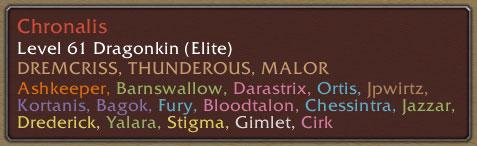
Targetz was written to try and help out with these problems. It adds a couple of lines of text to the bottom of your tooltip when you mouse over a potential target, showing who else in your party or raid is currently targetting that mob. Raid members who are setup as MTs (main tanks) or MAs (main assists) in CT_RaidAssist, oRA2 (if you have either of those installed) or in the default Blizzard raid interface are shown in blue text by default, while other raid and party members are shown in their class colors.
Targetz should work with many popular tooltip addons, such as Mousetip, TipBuddy (although not when the tooltip is in compact mode), TinyTip, AF_Tooltip, MobInfo-2, and others.
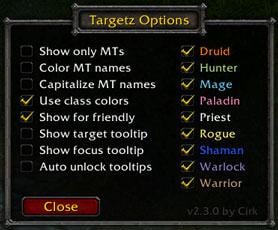
To avoid huge tooltips in larger raids where nearly everyone might be targeting a boss mob, Targetz provides the feature (on by default) to only show the MTs in the tooltip when you are in a raid. You can toggle whether Targetz only shows MTs, or shows both MTs and everyone else (or selected classes) using the Targetz options window via the /targetz show slash command.
Some examples of using Targetz
- You have the job of setting up all the MTs to each attack a different target. Usually you'd target each mob in turn and tell an MT to assist you, wait for them to tell you they had the right target, and then repeat. But you won't know for sure that they have the actual target you wanted them to have. Targetz can show you that easily, since you'll see their name appear on the mob's tooltip when they get that target! And if the mobs are moving around a lot (like Garr's minions do, for example), where it can make targetting each one in turn very difficult, Targetz allows you to easily select one that you haven't yet assigned!
- Need to check that every mob has a MT before you start the pull? Easy! Mouseover each one in the group to be pulled and check!
- Need to check that all your MTs have hunters assigned to their targets as well (to pull the mob to them)? Use the new Targetz options window or the /targetz class slash command to add hunters to your tooltip as well (even when they aren't in the MT list) and check just by mousing over each MT targeted mob.
- You are one of the MTs for a pull, but somehow lost your target (due to someone trading with you accidentally, or you misclicking your action bar, etc.). Targetz allows you to easily see what mobs are already are targeted, and pick one that isn't yet (which will hopefully be yours
 ).
).
Targetz slash commands
Targetz supports the following options (where you can also use /tz in place of /targetz):
/targetz help shows these options.
/targetz toggles the Targetz options window.
/targetz show shows the Targetz options window.
/targetz hide hides the Targetz options window.
/targetz on enables Targetz (default unless you change it).
/targetz off disables Targetz for this character, and it will remain off until you turn it back on again.
/targetz target unlock allows you to unlock the target tooltip so you can left-click and drag it to where you'd like it to be.
/targetz target lock locks the target tooltip again so it can't be clicked on accidentally.
/targetz target reset resets the target tooltip back to its default position and scaling.
/targetz target scale <scalevalue> allows you to change the size of the target tooltip. Default is 1.0 (unless it has been changed by another addon like Mousetip).
/targetz target width <maxwidth> allows you to change the maximum width of the target tooltip.
/targetz focus <command> works the same as [b]/targetz target <command>[b] as described above, but for the focus tooltip instead./targetz reset resets all the targetz options to their default.
/targetz status shows the status of Targetz.
Notes
When you are in a party only, and not in a raid, Targetz will show all party members who are targeting a mob in the tooltip, and the MT-only and class filtering settings will have no effect.
The target and focus tooltips that Targetz provides through the /targetz option window use the same settings as your normal mouseover tooltip, so if (for example) you have selected to only see MTs on non-friendly targets, then the target tooltip will also only show MT names when your current target is attackable.
Acknowledgements
The idea that grew into Targetz came originally from Thunderous (on Doomhammer) - thanks Thunder! Subsequent tweaks and improvements largely are due to the members of the BFE raid team, and The Applesauce Gang. Also, a huge thankyou to Kortanis, who did a great job of keeping Targetz (and others of my addons) working in 2.0 while I was away.
Hope you find it useful!
-- Cirk
- Changed help text to format it for use with Blizzard options interface.
- Replaced chat frame announcement with showing the description and slash commands in the Blizzard addons interface menu.
- Changed version string to v3.2.0.
3.0.1
- Fix issue that arises when logging in on a newly created character or after reinstalling WoW due to client messages arriving in unexpected order.
- Changed version string to v3.0.1.
- Added support for the Deathknight class
- Fixed a bug where oRA maintanks weren't being identified
- Fixed a bug where the default Blizzard maintanks and mainassists weren't being identified
- Provide options to set maximum width and scaling of the target and focus tooltips
- Removed all the slash command options that are now supported by the UI
- Added an option to the UI to put a space between the player lists and the rest of the tooltip
- Various changes for version 3.0 compatibility
- Changed version string to v3.0.0.
- Added an options UI for configuring Tooltip's options more easily!
- Added support for a "focus" tooltip in addition to the previously added "target" tooltip
- Miscellaneous code cleanups and rearranging (all functions contained in the Targetz global now).
- Added support for the new target tooltip
- Added a new reset command
- Added handling of the Blizzard MT and MA assignments for building the MT list
- Some minor code cleanups
- Code cleanups and changes to move as many of Targetz's global functions into one global table.
- Fixes for issues relating to interaction with other addons (to stop the tooltip "blinking", and to avoid left-over text in the tooltip).
- Lots of changes to get Targetz to play nice with both the 2.0 client and with other addons. (Functionally Targetz is the same however).
 |
Comment Options |
 11-11-08, 08:31 AM
|
||
|
A Cobalt Mageweaver

 Forum posts: 226
File comments: 97
Uploads: 11
|
I'll send Seerah a PM with the details 
__________________
Cirk's Addons |
|

|

|
| Cirk |
| View Public Profile |
| Send a private message to Cirk |
| Find More Posts by Cirk |
| Add Cirk to Your Buddy List |
|
11-08-08, 07:22 PM
|
||
|
A Flamescale Wyrmkin
Forum posts: 101
File comments: 176
Uploads: 0
|
Trying to use this with TipTop, getting this error:
|
|
|
|
|
| Vranx |
| View Public Profile |
| Send a private message to Vranx |
| Find More Posts by Vranx |
| Add Vranx to Your Buddy List |
|
10-14-08, 06:48 PM
|
|
|
A Murloc Raider
Forum posts: 4
File comments: 1
Uploads: 0
|
Thanks Cirk for getting this back up and running! Can't imagine running instances and raids without this anymore.
 |
|
|
|
| Nightravyn |
| View Public Profile |
| Send a private message to Nightravyn |
| Find More Posts by Nightravyn |
| Add Nightravyn to Your Buddy List |
|
10-13-08, 11:16 AM
|
|
|
A Cobalt Mageweaver
Forum posts: 226
File comments: 97
Uploads: 11
|
Targetz 3.0.0 available
Ready for the 3.0.2 patch - note that this will not work with 2.4.3 or earlier!
__________________
Cirk's Addons |
|
|
|
| Cirk |
| View Public Profile |
| Send a private message to Cirk |
| Find More Posts by Cirk |
| Add Cirk to Your Buddy List |
|
12-01-07, 07:30 AM
|
|
|
A Cliff Giant
Forum posts: 76
File comments: 1046
Uploads: 0
|
Some very strange stuff was happening with Targetz 2.30 last night during a Kara raid. So strange that this has become unreliable for usage.
Have been using 2.3 for a while without problems. But targeting an enemy last night, it stopped showing other player names in the second tooltip and the main tooltip. Instead if showed...the last item in my packs I was looking at and/or picked up in dark blue capitalized text. As in "SOUL ESSENCE" or a green BOP item or so on. Both main tanks (of which I was one) were using ORA2 (latest version off the SVN). No changes I made to the options helped. Originally had the tooltips showing all targeters and had all the class names unchecked. Switched it to main tanks only, no change (still showed the last item seen). Checked all the class names, no change. Turned on and off the second tooltip, no change. Uncheck friendly targets, no change. And so on. Hope you can fix the problem. |
|
|
|
| Zidomo |
| View Public Profile |
| Send a private message to Zidomo |
| Find More Posts by Zidomo |
| Add Zidomo to Your Buddy List |
|
11-16-07, 06:10 PM
|
||
|
A Cobalt Mageweaver
Forum posts: 226
File comments: 97
Uploads: 11
|
In the meantime, until I make such a change, you might want to try just reducing the width of all Targetz' tooltip lines by changing the value of TARGETZ_MAX_PLAYER_LINE_WIDTH on line 196 of Targetz.lua from 320 to (say) 140, or whatever is a good size for your setup. Cheers -- Cirk
__________________
Cirk's Addons |
|
|
|
|
| Cirk |
| View Public Profile |
| Send a private message to Cirk |
| Find More Posts by Cirk |
| Add Cirk to Your Buddy List |
|
11-16-07, 01:00 PM
|
|
|
A Cliff Giant
Forum posts: 76
File comments: 1046
Uploads: 0
|
Gave the XML changes a try. Yep, the text is now smaller. But...
I had forgotten exactly what the problem with the separate target tooltip was in my last post. Basically because as soon as I ran into the issue with v2.2, I disabled the target tooltip and used the TargetCheck mod instead for that tooltip. So the memories in that post were somewhat foggy .It wasn't just the font being large (which was a problem for both myself and other people I heard from in guild), it was--and is--the names in the tooltip extending horizontally in the tooltip box instead of stacking vertically (as TargetCheck does it). As I prefer to have this target tooltip to the right side of the target frame, the wide horizontal tooltip tends to overlap things. If the names could be stacked vertically in the tooltip, there would be no problem with overlap. Yes, I know it can be moved, but I have no place to move it to. Positioning it underneath the target frame (I use PitBull for unit frames) doesn't work because I have the Decursive mini-unitframe (MUF) boxes underneath the target frame (and immediately under the buff/debuff icons) extending to the left, taking up the space. Immediately below the Decursive MUFs are the party/raid frames. Above the target I have the target-of-target frame. And to the left is my own (player) frame. Positioning it at the bottom of the UI defeats the purpose of the target tooltip; instead I can just look at the Targetz names in the regular tooltip. So an option to stack the target tooltip names vertically instead of horizontally--as well as the selectable font sizing I brought up before--would make the target tooltip usable here. Thanks a bunch for your reply; look forward to seeing your mods progress (a big fan of your LootCounter mod ).
Last edited by Zidomo : 11-16-07 at 01:02 PM.
|
|
|
|
| Zidomo |
| View Public Profile |
| Send a private message to Zidomo |
| Find More Posts by Zidomo |
| Add Zidomo to Your Buddy List |
|
11-13-07, 02:46 PM
|
||
|
A Cobalt Mageweaver
Forum posts: 226
File comments: 97
Uploads: 11
|
I'll add some sort of scaling control in the next version, but in the meantime, if you'd like to change your own version to make it smaller, just edit the Targetz.xml file (with notepad ot equivalent) and change the 6 occurrences of "GameTooltipText" to "GameTooltipTextSmall" and see if that solves it for you. Also, don't forget you can also move the target tooltip to wherever you'd like so it doesn't overlap anything. -- Cirk
__________________
Cirk's Addons |
|
|
|
|
| Cirk |
| View Public Profile |
| Send a private message to Cirk |
| Find More Posts by Cirk |
| Add Cirk to Your Buddy List |
|
11-13-07, 01:28 PM
|
|
|
A Cliff Giant
Forum posts: 76
File comments: 1046
Uploads: 0
|
Been using this for a while, always very handy. Initially was pleased with v2.2.0 adding the new additional target tooltip. Would enable me to stop using the TargetCheck mod, which provides similar functionality.
One major problem with the target tooltip, though. The font is too large, at least for me and several other people In my guild I've recommended this mod to. As in the target tooltip box takes up more space than it needs to; overlaps the raid warning frame among other things (even when I limit the number of targeters in options). As a result, I disabled the new Targetz target tooltip and continued to use TargetCheck. Target Check's font size is pretty much perfect. With patch 2.3 now in place, I'd like to give Targetz's target tooltip another try (in case 2.3 presents issues with TargetCheck). So any chance of giving us changeable icon sizes for the Targetz target tooltip and/or the main tooltip? |
|
|
|
| Zidomo |
| View Public Profile |
| Send a private message to Zidomo |
| Find More Posts by Zidomo |
| Add Zidomo to Your Buddy List |
|
11-04-07, 06:03 AM
|
|
|
A Fallenroot Satyr
Forum posts: 27
File comments: 55
Uploads: 0
|
looks like it wont work with cowtip for me anyway and tiptac made my wow crash when i moved mouse over netherweave cloth
|
|
|
|
| shinzon |
| View Public Profile |
| Send a private message to shinzon |
| Find More Posts by shinzon |
| Add shinzon to Your Buddy List |
|
10-01-07, 01:41 AM
|
||
|
A Cobalt Mageweaver
Forum posts: 226
File comments: 97
Uploads: 11
|
 ). ).
__________________
Cirk's Addons |
|
|
|
|
| Cirk |
| View Public Profile |
| Send a private message to Cirk |
| Find More Posts by Cirk |
| Add Cirk to Your Buddy List |
|
09-30-07, 11:19 PM
|
|
|
A Deviate Faerie Dragon
Forum posts: 18
File comments: 285
Uploads: 0
|
This mod works fine with TipTac, the new reincarnation of TipBuddy. However, TipBuddy is still working so far with 2.2. TipTac isn't quite up to speed in comparison with the features TipBuddy still has to offer. Targetz isn't working with TipBuddy, though. Have any advice on why or how to get this to work?
|
|
|
|
| Spiderkeg |
| View Public Profile |
| Send a private message to Spiderkeg |
| Find More Posts by Spiderkeg |
| Add Spiderkeg to Your Buddy List |
|
09-30-07, 06:51 PM
|
||
|
A Cobalt Mageweaver
Forum posts: 226
File comments: 97
Uploads: 11
|
Re: Request
Unfortunately, the only way we have to "lock in" a mouseover target (or arbitrary mob) for the purpose of tracking information about them like Targetz does, is to either target it or focus it, since the WoW client APIs don't allow us to keep track of a mob through any other means. -- Cirk
__________________
Cirk's Addons |
|
|
|
|
| Cirk |
| View Public Profile |
| Send a private message to Cirk |
| Find More Posts by Cirk |
| Add Cirk to Your Buddy List |
|
09-30-07, 06:03 PM
|
|
|
An Aku'mai Servant
Forum posts: 34
File comments: 74
Uploads: 3
|
Request
Not sure if this is possible, but would you be able to extend the new always-visible tooltip to show who's currently targetting not just your target, but focus, mouseover, and perhaps just an arbitrary mob? It would be quite handy (at least for me!). I'm asking for this because normally I don't have anything targetted - the extra UI frames get in the way, and I'm just healing so already have everyone's health bars up on the screen; but I would quite like to see who's currently targetting the boss, say, or the main tank for some fights, etc., so a tooltip somewhere that I could glance at without having to worry about targetting something specifically would be neat.
Lovely addon as ever though. Cheers. |
|
|
|
| Fin |
| View Public Profile |
| Send a private message to Fin |
| Visit Fin's homepage! |
| Find More Posts by Fin |
| Add Fin to Your Buddy List |
|
09-30-07, 12:11 PM
|
|
|
A Deviate Faerie Dragon
Forum posts: 18
File comments: 285
Uploads: 0
|
Cirk, you are as awesome as ever!
|
|
|
|
| Spiderkeg |
| View Public Profile |
| Send a private message to Spiderkeg |
| Visit Spiderkeg's homepage! |
| Find More Posts by Spiderkeg |
| Add Spiderkeg to Your Buddy List |
|
