Category: Graphic UI Mods
Addon Information
Download Latest Version.
To add favorites please register for a free account. If you already have one you need to login. How do I install this? (FAQ)
Gello's Portal Bug Reports Feature Requests
Author:
Version:
1.82
Date:
10-14-2008 06:43 AM
Size:
9.79 Kb
Downloads:
56,367
Favorites:
222
MD5:
Pictures
Click to enlarge
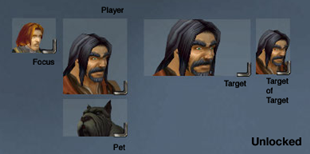
Almost-Default Animated PortraiTs
Click to enlarge
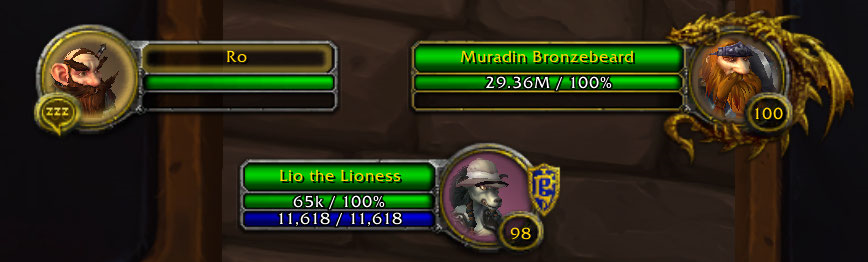
Options Panel
Adapt - Almost-Default Animated Portraits   Popular! (More than 5000 hits)
This small mod is an animated unit frames for (nearly) any UI.

Installation note for users of previous versions: You will need to exit the game and restart for new files to be recognized. If you install the mod while logged in, quit and log back in instead of reloading the UI.

__ New in 1.82 __
- Updated for 3.0 patch
- /adapt goes to options panel
__ New in 1.8 __
- Added an options panel (ESC to Game Menu->Interface->Addons->Adapt)
- Removed slash commands (options panel takes their place)
- Added option for full model portraits

When a mod requests a portrait to be drawn, this mod intercepts the request and instead draws a model to the dimensions of the intended texture, dynamically creating the model if one didn't exist for that texture yet.

In theory it should work with all mods that use SetPortraitTexture, including default, DUF, HitList, Elite Player Frame, etc.

This mod is meant to be configuration-free (especially if you use the default unit frames), but you can change some options by hitting ESC to the Game Menu, clicking Interface, then Addon tab at the top and Selecting Adapt.

Limitations:
  • There is no way to apply a real mask to a model. To make models fit into "circle" portaits, the square is shrunk to fit within the circle.
  • There is no way to know whether some portraits should be square while others circle. Choose which one you prefer overall.
  • There's not a lot of wiggle room for models to be under/over other frames/textures.
  • If a "circle" portrait is too small or too large, try "square". This mod doesn't watch for frames to resize and can't shift estimated circle boundries to moving anchors.
  • Some mods do wild things with frameStrata. This mod can't guarantee the background will show up or that the model will even be over the background instead of under. Try toggling the background on/off.
  • While this mod attempts to be universal, it can't guarantee it will work with every conceivable way that textures can be drawn/layered.
  Optional Files - Adapt - Almost-Default Animated Portraits
Sorry, there are currently no optional files available.
  Comments - Adapt - Almost-Default Animated Portraits
Post A Reply Comment Options
Old 10-12-2009, 12:59 PM  
Kunstbanause
A Defias Bandit
Interface Author - Click to view interfaces

Forum posts: 2
File comments: 32
Uploads: 3
Re: party

Quote:
Originally posted by blight9000
hey
my party aint 3d any known issues or something like that? im using spartanui if that helps.
Hey
I don't think you provide enough information, regarding your problem. I am using the Spartan UI too and had to play around with the background strata a bit to get it working.
Kunstbanause is offline Report comment to moderator   Edit/Delete Message Reply With Quote
Old 09-16-2009, 03:27 PM  
blight9000
A Kobold Labourer

Forum posts: 0
File comments: 8
Uploads: 0
party

hey
my party aint 3d any known issues or something like that? im using spartanui if that helps.

Last edited by blight9000 : 09-16-2009 at 03:37 PM.
blight9000 is offline Report comment to moderator   Edit/Delete Message Reply With Quote
Old 07-05-2009, 11:00 AM  
7Shandy
A Kobold Labourer

Forum posts: 0
File comments: 3
Uploads: 0
flip target portrait

Hi!

Is there any possibility to flip the target portrait so that they look at each other if I target myself?


Regards!
7Shandy is offline Report comment to moderator   Edit/Delete Message Reply With Quote
Old 07-01-2009, 08:04 AM  
Slakah
A Molten Giant
 
Slakah's Avatar
Interface Author - Click to view interfaces

Forum posts: 751
File comments: 132
Uploads: 25
For anyone who wants to fix the stuttery Target of Target model, just go into the Adapt.lua file with a text editor and replace.

Code:
m:SetUnit(unit)
with

Code:
dummymodel:SetUnit(unit)
local guid = UnitGUID(unit)
if dummymodel:GetModel() ~= m:GetModel() or self.oldguid ~= guid then
	m:SetUnit(unit)
        m.oldguid = guid
end
and add
Code:
local dummymodel = CreateFrame("PlayerModel")
somewhere at the top of the file.

Last edited by Slakah : 07-02-2009 at 11:55 AM.
Slakah is offline Report comment to moderator   Edit/Delete Message Reply With Quote
Old 02-23-2009, 09:27 AM  
Kunstbanause
A Defias Bandit
Interface Author - Click to view interfaces

Forum posts: 2
File comments: 32
Uploads: 3
Hei Gello,

this Addon is really cute.
Thumps up ^^
Kunstbanause is offline Report comment to moderator   Edit/Delete Message Reply With Quote
Old 01-25-2009, 09:46 AM  
Sitanel
A Deviate Faerie Dragon
 
Sitanel's Avatar

Forum posts: 19
File comments: 6
Uploads: 0
Male Undead

"I have an undead male mage as my main and I love this mod, except when he slouches halfway offscreen."

To my knowledge this isn't an issue with Adapt, rather an issue with Blizzards default viewpoint for all models (as far as I'm aware all unit frames that use 3D models have this problem) the same goes for (for example) all NPCs facing to the right and all players facing to the left.

On a side note I've noticed a problem with Adapt, when you target one of the Vrykul (like the "Ymirjar" in Icecrown) the FPS plummets down so low the game is virtually unplayable :S I've tried it with other 3D unit frame mods (Pitbull and GUF) and the problem doesn't occur. Is that just me? :S

Anyways, thanks for the great mod It's excellent for those using an "Almost-Default-UI :P
Sitanel is offline Report comment to moderator   Edit/Delete Message Reply With Quote
Old 01-23-2009, 04:34 AM  
Nendyen
A Defias Bandit

Forum posts: 1
File comments: 1
Uploads: 0
Same question as Sok down there. I have an undead male mage as my main and I love this mod, except when he slouches halfway offscreen.

Is there anyway to compensate for the slouching the undead men do? (Not sure if the undead women suffer from the same spinal issues as the men.)
Nendyen is offline Report comment to moderator   Edit/Delete Message Reply With Quote
Old 01-11-2009, 11:48 PM  
Hevanus
A Deviate Faerie Dragon
 
Hevanus's Avatar

Forum posts: 15
File comments: 209
Uploads: 0
Issues:

- I get errors when I open and try to use the Adapt options menu. Edit: Deleting my Adapt savedvariables fixed this for me.

- Portraits appear behind whatever frame they're anchored to. May be related to Skinner, but the problem went away when I commented out the SetFrameLevel(1) call in Adapt (not sure why it's doing that anyways).

Last edited by Hevanus : 01-12-2009 at 12:04 AM.
Hevanus is offline Report comment to moderator   Edit/Delete Message Reply With Quote
Old 11-14-2008, 09:32 AM  
Aesir
An Aku'mai Servant
 
Aesir's Avatar
Interface Author - Click to view interfaces

Forum posts: 30
File comments: 159
Uploads: 1
UPDATE: I traced this issue to SpartanUI.

It runs this code:
Code:
    if (Adapt) then
        Adapt_Settings.Shape = "SQUARE"
        Adapt.Reshape()
        Adapt_Settings.Back = Adapt_Settings.Back=="OFF"
        Adapt.Reback()
    end
Commenting out that block results in the value being saved correctly.

Original post follows:


Avatar background "transparent" setting does not save session-to-session

I found that Adapt doesn't save the setting for background transparency on the avatar portrait in the unit frame. Since reporting that bug, I checked my Adapt SV:

Saved Variables - Adapt.lua:
Code:
Adapt_Settings = {
    ["DontUse"] = {
    },
    ["Shape"] = "SQUARE",
    ["Back"] = false,
}
Back is set false, but the code appears to be looking for ON or OFF. Need to trace through and find out all the places where "Back" is defined and assigned values. Then determine if you want the function return or value to be ON/OFF or TRUE/FALSE.

Likely places to check to confirm you're getting or setting the desired value include:
Code:
Adapt.lua        45    Back = "ON",        -- "ON" or "OFF" whether background shows
Adapt.lua        130    frame.backLayer = frame:CreateTexture(modelName.."Back","BACKGROUND")
Adapt.lua        135    if Adapt_Settings.Back=="OFF" then
Adapt.lua        166    local back = Adapt.Textures[textureName].backLayer
Adapt.lua        173    if Adapt_Settings.Back=="OFF" then
Adapt.lua        194    if Adapt_Settings.Back=="ON" then
Adapt.lua        200    AdaptOptionsCheckButtonTransparent:SetChecked((Adapt_Settings.Back=="OFF") and 1 or nil)
Adapt.lua        296    Adapt_Settings.Back = AdaptOptionsCheckButtonTransparent:GetChecked() and "OFF" or "ON"
Adapt.lua        352    Adapt.OldSettings.Back = Adapt_Settings.Back
Adapt.lua        373    Adapt_Settings.Back = Adapt.OldSettings.Back
HTH (P.S.: My money is on line 200.)

As a temporary work-around, I'm going to modify the SV value by hand and then avoid entering the Adapt configuration panel (so it doesn't reset the incorrect value).
__________________
-- æsir

Last edited by Aesir : 11-20-2008 at 07:59 PM.
Aesir is offline Report comment to moderator   Edit/Delete Message Reply With Quote
Old 10-23-2008, 04:32 AM  
Curve
A Defias Bandit

Forum posts: 2
File comments: 3
Uploads: 0
If you use a non default UI Scale it seems to mess things up a bit, is there any way i can move the 3d models back a bit? They seem to be clipping with the frame a bit, ie http://i35.tinypic.com/10yl5rm.jpg

Seems to work ok with "Full model" ticked though. But id rather have the default 3d portrait
Curve is offline Report comment to moderator   Edit/Delete Message Reply With Quote
Old 10-17-2008, 05:10 AM  
sun
A Defias Bandit
Interface Author - Click to view interfaces

Forum posts: 2
File comments: 107
Uploads: 1
class icons

an option to put the class icons in the frame instead of the 3d,2d option would be nifty
sun is offline Report comment to moderator   Edit/Delete Message Reply With Quote
Old 05-27-2008, 08:45 PM  
Lombra
A Deviate Faerie Dragon
 
Lombra's Avatar
Interface Author - Click to view interfaces

Forum posts: 19
File comments: 171
Uploads: 17
Could you add an option to make the background black when not using the transparent option? (instead of class coloured)

Forgive me if this is in the latest version already, can't test it for a while.
__________________
Grab your sword and fight the Horde!

Shattered Hand-EU
Lombra is offline Report comment to moderator   Edit/Delete Message Reply With Quote
Old 04-13-2008, 07:11 AM  
chimorra
A Defias Bandit
 
chimorra's Avatar

Forum posts: 2
File comments: 9
Uploads: 0
Thanks alot

Thanks alot for this i think this is the best unit frame addon ever simple and easy keep it up
chimorra is offline Report comment to moderator   Edit/Delete Message Reply With Quote
Old 04-13-2008, 04:25 AM  
IRID1UM
A Murloc Raider

Forum posts: 8
File comments: 66
Uploads: 0
thanks for updating!
IRID1UM is offline Report comment to moderator   Edit/Delete Message Reply With Quote
Old 09-04-2007, 04:39 AM  
Kahoona
A Fallenroot Satyr

Forum posts: 25
File comments: 7
Uploads: 0
For some reason the model animations skip around when using the Target of Target in CT Unitframes.
Kahoona is offline Report comment to moderator   Edit/Delete Message Reply With Quote
Post A Reply


Category Jump:


The Network:
EQInterface | EQ2Interface | LoTROInterface | MMOInterface | War.MMOUI | WoWInterface | VGInterface | Allakhazam | Thottbot | Wowhead | Zam


©2009 MMOUI / ZAM Network
vBulletin - Copyright ©2000 - 2009, Jelsoft Enterprises Ltd.